To unlock an AT&T locked iPhone 16 Pro, make sure it is paid off, more than 60 days old and not reported lost or stolen, then let AT&T release it or submit an unlock request at att.com/deviceunlock.
This guide covers the AT&T requirements, how to check Carrier Lock in Settings, the routes for Wireless, Prepaid and non-customers, setting up a new carrier's eSIM, and what to do when the iPhone still says SIM locked.

How to unlock an AT&T iPhone 16 Pro
A carrier lock is only one of the ways an iPhone can be locked, and only AT&T can remove it. Apple states that it cannot unlock an iPhone for use with a different carrier.
On an AT&T Wireless plan, an eligible iPhone that meets every requirement should unlock by itself. The steps below confirm that and file a request when it has not happened.
- On the iPhone, open Settings, tap General, then tap About and look at Carrier Lock.
- If it shows No SIM restrictions, the iPhone is already unlocked and you can skip to adding the new carrier's eSIM.
- If it shows SIM locked, pay off any remaining installment balance and bring the AT&T bill up to date.
- Open att.com/deviceunlock in a browser and select Apple as the device brand.
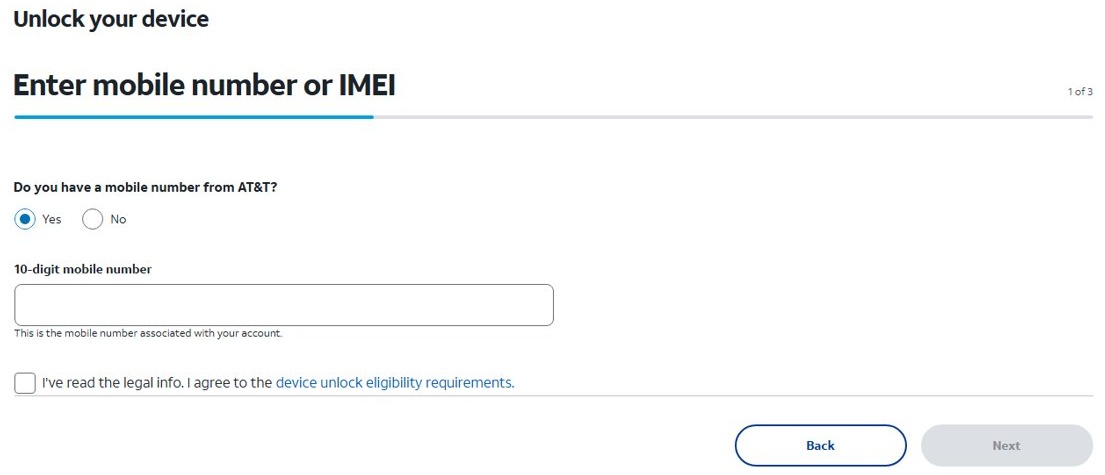
- Start the unlock request and answer Do you have a mobile number from AT&T? with Yes or No.
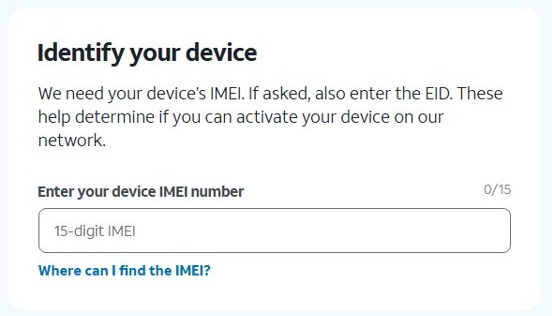
- Enter the 10-digit AT&T mobile number on the account, or the iPhone's IMEI if you do not have one.
- Tick the box that says you agree to the device unlock eligibility requirements, select Next, and finish the remaining screens.
- Wait for AT&T to confirm the unlock, then check Carrier Lock again for No SIM restrictions.
Apple notes that a carrier can take a few days to complete an unlock request. Contact AT&T for the status of a request that has not gone through.
AT&T iPhone unlock requirements
AT&T checks the same four conditions for every AT&T Wireless device, whether you are a customer or not. Prepaid and business phones have their own rules.
| Requirement | What AT&T checks |
|---|---|
| Bought more than 60 days ago | The iPhone was purchased over 60 days ago and is not active on another AT&T account |
| Paid in full | Paid at purchase, or the installment plan is paid off with a zero balance |
| Not lost, stolen or fraud | The iPhone has not been reported lost, stolen or involved in fraud |
| Account current | For current customers, the AT&T bill is not past due |
| AT&T Prepaid | Twelve months of paid AT&T Prepaid service, not active on another AT&T account, not reported lost or stolen |
| Business-owned devices | A business iPhone on a contract can be unlocked once the service commitment term has ended |
| Deploying for active duty | Military customers can unlock before paying off the device by saying so in the request and emailing deployment documents |
Apple Watch is always unlocked on AT&T, so only the iPhone needs a request.
How to check if your iPhone 16 Pro is carrier locked
The Carrier Lock line in Settings is the quickest proof on iOS 14 and later. AT&T customers can also see the status in their online account.
- Open the Settings app.
- Tap General, then tap About.
- Scroll to Carrier Lock.
- Read the value: No SIM restrictions means unlocked, and SIM locked means AT&T still has the lock on.
- As an AT&T Wireless customer, sign in to your AT&T account, select the iPhone and look for Device unlocked in the device info.
The About screen also lists the IMEI. Touch and hold the number to copy it, which is handy for the unlock form.
Can I unlock my AT&T iPhone before it is paid off?
Not as a regular customer. The installment balance must be zero, so the real choice is about which unlock route fits your situation.
| Your situation | What to do | Why |
|---|---|---|
| Paid off, over 60 days, bill current, AT&T Wireless | Check Carrier Lock first, then submit a request if it still says SIM locked | Eligible iPhones on AT&T Wireless should unlock by themselves |
| Installment balance still owed | Pay the balance to zero, then request the unlock | AT&T requires the device to be paid in full |
| Bought less than 60 days ago | Wait until day 61, then request the unlock | The 60-day rule applies even when the iPhone is paid off |
| Bill past due | Make the payment in your AT&T account first | A past-due account blocks the unlock |
| AT&T Prepaid iPhone | Submit an unlock request after 12 months of paid service | The AT&T Device Unlock app is for Android phones only |
| Bought used, not an AT&T customer | Submit a request with the IMEI and answer No to the AT&T number question | AT&T unlocks eligible devices for non-customers too |
| Deploying for active duty | Request the unlock now and say you are deploying | AT&T makes an exception to the paid-off rule for deployment |
How to unlock an AT&T iPhone if you are not an AT&T customer
A used iPhone 16 Pro bought from someone else can still be released, as long as it meets the four AT&T requirements. The seller's unpaid balance or a lost or stolen report blocks it.
- On the iPhone, open Settings > General > About and copy the IMEI.
- Open att.com/deviceunlock in a browser and use Check device IMEI if you want to confirm the iPhone came from AT&T.
- Select Apple as the brand and start the unlock request.
- Answer No to Do you have a mobile number from AT&T?.
- Enter the IMEI and the contact details the form asks for.
- Agree to the device unlock eligibility requirements and submit the request.
- When AT&T confirms the unlock, check Carrier Lock for No SIM restrictions.
A carrier unlock is separate from Activation Lock. If a used iPhone asks for someone else's Apple Account during setup, the seller has to remove Activation Lock from their account before you can use it.
How to unlock an AT&T Prepaid iPhone
AT&T Prepaid phones qualify after twelve months of paid service. Android phones use the AT&T Device Unlock app, but a Prepaid iPhone needs an unlock request.
- Confirm the iPhone has had twelve months of paid AT&T Prepaid service.
- Make sure it is not active on another AT&T account and has not been reported lost or stolen.
- Open the AT&T unlock page, select Apple, and start the request.
- Enter the Prepaid mobile number when asked, agree to the eligibility requirements, and submit.
- After AT&T confirms the unlock, open Settings > General > About and look for No SIM restrictions next to Carrier Lock.
How to activate an eSIM from a new carrier on an unlocked iPhone 16 Pro
An iPhone 16 Pro sold in the U.S. is eSIM-only and does not take a physical SIM card. Once AT&T releases it, finish the switch by adding the new carrier's eSIM.
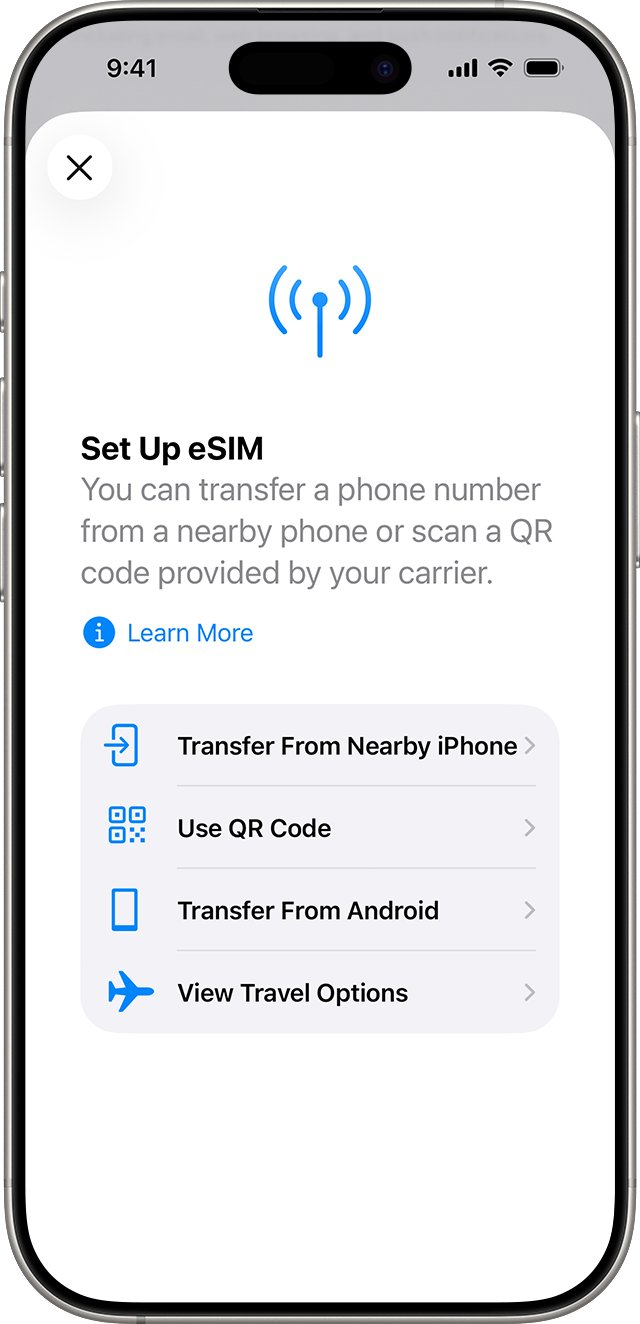
Your iPhone must be on Wi-Fi to activate the eSIM. The new carrier decides which method it supports: eSIM Carrier Activation, a QR code, or a carrier link or app.
- Ask the new carrier for an eSIM and tell them the iPhone is unlocked.
- If the carrier assigns the eSIM to your iPhone, tap the Carrier Cellular Plan Ready to Be Installed notification, or find it in Settings.
- Tap Continue at the bottom of the screen.
- If the carrier gave you a QR code instead, open the Camera app, scan it, and tap the Cellular Plan Detected notification.
- Tap Continue, then tap Add Cellular Plan, and enter a confirmation code if the carrier gave you one.
- Make a call to test the line. If it fails, contact the new carrier.
The iPhone 16 Pro holds two active eSIMs and can store eight or more, so you can keep the old line while testing the new one.
Apple's own fallback for an iPhone with no new SIM to insert is to back up the iPhone, erase it, and restore it from that backup. Only use it when the eSIM still will not activate after AT&T confirms the unlock.
Can Apple unlock an AT&T iPhone 16 Pro?
No. Apple cannot unlock an iPhone for use with a different carrier, so deal with AT&T directly. The carrier lock lives in AT&T's system. Apple's own support article says only your current carrier can unlock your iPhone, and that you should contact the carrier for the status of a request.
If the iPhone is locked because you forgot the passcode, that is a different problem with a different fix. You can unlock or reset a locked-out iPhone without contacting AT&T.
AT&T iPhone still SIM locked after unlock request
Carrier Lock still says SIM locked
AT&T has not finished the request yet, or the request was not approved.
- Wait a few days, since a carrier can take that long to complete an unlock.
- Open Settings > General > About and check Carrier Lock again.
- Contact AT&T to check the status of the request if it still says SIM locked.
"The SIM card inserted in this iPhone does not appear to be supported"
The iPhone still carries the AT&T lock, so it refuses another carrier's service.
- Open Settings, tap General, then tap About.
- Look under Carrier Lock for No SIM restrictions.
- If that message is not there, contact AT&T and ask them to apply the unlock in their system.
AT&T did not approve the unlock request
One of the four requirements is not met.
- Check that the installment balance is zero in your AT&T account.
- Check that the iPhone was bought more than 60 days ago and is not active on another AT&T account.
- Pay any past-due bill on the account.
- For a used iPhone, ask the seller whether it was reported lost or stolen or still has a balance.
- Submit a new request once every requirement is met.
New carrier's eSIM will not activate after the unlock
The iPhone is not on Wi-Fi, or the plan was not sent to this iPhone.
- Connect the iPhone to Wi-Fi.
- Confirm No SIM restrictions under Carrier Lock.
- Ask the new carrier to resend the eSIM or give you a QR code.
- If it still fails, back up the iPhone, erase it, and restore it from that backup.
The iPhone is locked by a passcode or an Apple Account, not by AT&T
A forgotten passcode or Activation Lock is not a carrier lock, and AT&T cannot remove it.
- For a forgotten passcode, use Apple's reset steps for a locked iPhone.
- For a screen asking for a previous owner's Apple Account, ask that owner to remove the iPhone from their account.
- Request the AT&T unlock separately if Carrier Lock also says SIM locked.
AT&T iPhone unlock FAQ
How do I unlock an AT&T phone?
Make sure the phone is paid off, more than 60 days old, not reported lost or stolen, and that your bill is current. Then submit an unlock request on AT&T's device unlock page. Eligible iPhones on AT&T Wireless should unlock by themselves.
How do I unlock an AT&T iPhone?
Check Settings > General > About > Carrier Lock first. If it says SIM locked, meet AT&T's requirements and submit an unlock request with your AT&T number or the IMEI. No SIM restrictions means the iPhone is unlocked.
How do I unlock an AT&T cell phone if I am not a customer?
Submit an unlock request on AT&T's device unlock page and answer No when asked for an AT&T mobile number. Enter the phone's IMEI instead. The device still has to meet the 60-day, paid-off and not-lost-or-stolen rules.
How long does it take to unlock an AT&T iPhone?
Apple says a carrier might take a few days to complete an unlock request. An eligible iPhone on AT&T Wireless can unlock by itself without a request. Contact AT&T if Carrier Lock still says SIM locked after a few days.
Can Apple unlock my AT&T iPhone 16 Pro?
No. Apple cannot unlock an iPhone for use with another carrier. Only the current carrier, AT&T in this case, can remove the carrier lock, so the request has to go to AT&T.
Can I unlock an AT&T iPhone that is not paid off?
Not as a regular customer. AT&T requires the installment balance to be zero before unlocking. The exception is active-duty military deployment, where you state in the request that you are deploying and email the deployment documents.
Does the U.S. iPhone 16 Pro have a SIM card slot?
No. iPhone 16 Pro models sold in the U.S. are activated with an eSIM and do not support a physical SIM card. After AT&T unlocks the iPhone, add the new carrier's eSIM in Settings.
Is Apple Watch locked to AT&T?
No. AT&T states that Apple Watch is always unlocked, so only the iPhone needs an unlock request when you change carriers.
Does unlocking an AT&T iPhone erase it?
No, a carrier unlock does not erase the iPhone. Apple only suggests backing up, erasing and restoring as a last step when there is no new SIM to insert and the iPhone still will not activate with the new carrier.