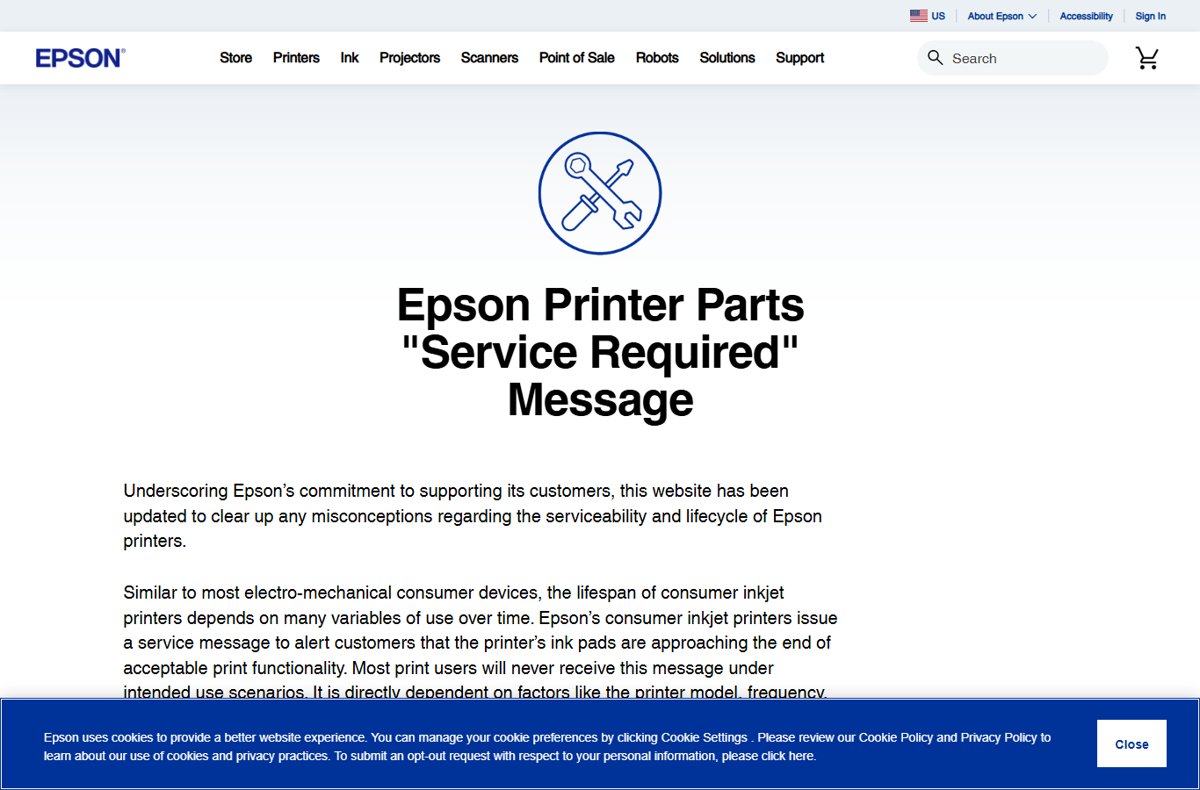
Epson does not give home users a tool to reset the ink pad counter; the supported fix is to replace the ink pads through Epson's service or a certified technician, or to swap the maintenance box on models that have one.
This guide explains what the counter and its error messages mean, compares every official option, covers the free resetter downloads people search for, and shows how to put off the alert on your next printer.
How to fix the Epson ink pad counter error
The counter tracks how much waste ink the pads have absorbed. Clearing the alert properly means replacing the pads or the box that holds the waste ink, so the counter starts again at zero.
- Note the exact message on the printer screen or in the Epson software, such as A part inside your printer is at the end of its service life. Service is required.
- Check whether your printer takes a replaceable ink maintenance box; Epson lists compatible printers on each maintenance box product page.
- If it does, buy the matching box and replace it when the printer prompts you.
- If it does not, check whether the printer is still under the one-year standard limited warranty or an Epson service contract.
- Call Epson Service & Support on 562-276-1300 (U.S.) or 905-709-9475 (Canada) and ask for the ink pad replacement service.
- Or book a local certified technician through the Epson Service Center Locator to replace the pads.
Epson's ink pad replacement service includes round-trip shipping and packaging, so the printer does not need to go to a shop.
What the Epson ink pad counter does
Every inkjet sends some ink to waste, mostly during print head cleaning. Epson printers count that waste and warn you before the pads can no longer hold it.
| Part or term | What it is |
|---|---|
| Ink pads (waste ink pads) | Absorbent pads inside the printer that collect ink flushed from the print head |
| Ink maintenance box | A replaceable waste ink container on some EcoTank and WorkForce models; it stores ink flushed during print head cleaning |
| Ink pad counter | The printer's running estimate of how full the pads are |
| Service alert | The message shown when the pads approach the end of acceptable print performance |
| What affects it | Printer model, how often you print, usage conditions and the type of printing over time |
Epson states that most users never see the message under intended use. Heavy printing and frequent head cleaning bring it sooner.
Epson ink pad error messages and what they mean
| Message | What it means | Can you still print? |
|---|---|---|
| An ink pad is nearing the end of its service life | An early warning; the pads are close to full | Yes, for now; plan a replacement |
| A part inside your printer is at the end of its service life. Service is required. | The ink pads are full | No; the printer must be serviced to keep printing |
| A general end-of-life service alert without the wording above | Other components may also be near the end of their usable life | No; contact Epson or a certified technician for an assessment |
| The printer software says the maintenance box needs to be replaced | The replaceable waste ink box is full | No, until you fit a new box |
Epson ink pad reset options compared
| Your situation | Best option | Why |
|---|---|---|
| Printer has a replaceable maintenance box | Replace the maintenance box | A user part; for example the C9398 box costs $18.99 on epson.com and fits the ET-1910, ET-2410, ET-2900 and ET-4903 |
| Printer is under warranty or an Epson service contract | Epson Service & Support | Maintenance messages are typically covered while the warranty or contract is active |
| Out of warranty, you want Epson to do it | Epson ink pad replacement service | Shipping and packaging both ways are included |
| Out of warranty, you prefer a local repair | Certified technician via Service Center Locator | Replaces the pads without shipping the printer |
| Repair costs more than the printer is worth | Epson recycling program | Retires the printer responsibly; Epson also sells newer models |
| You found a free resetter or reset key online | Avoid it | Epson does not publish these tools; they come from unknown third parties and reset the counter without replacing the full pads |
Replace the Epson ink maintenance box
Printers with a maintenance box manage waste ink in a cartridge you swap yourself. The printer and its Epson printer software tell you when the box needs replacing.
- Look up your printer model on epson.com and open its supplies or accessories list.
- Find the Maintenance Box listed for your model and confirm your printer appears under its compatible printers.
- Buy the matching box, such as the Maintenance Box C9398 (C12C939891) for the EcoTank ET-2400 and ET-2900 families.
- Follow the replacement instructions in your printer's user guide or on its control panel when the alert appears.
- Print a test page to confirm the alert has cleared.
Models without a maintenance box keep their waste ink in internal pads that need service.
Use the Epson ink pad replacement service
- Have your printer's model and serial number ready.
- Call Epson Service & Support on 562-276-1300 in the U.S. or 905-709-9475 in Canada, or open epson.com/contact-us.
- Ask for the ink pad replacement service and confirm whether your warranty or service contract covers it.
- Pack the printer with the packaging Epson provides and ship it.
- Print a test page when the printer comes back to confirm the alert is gone.
Find a certified Epson technician to replace the ink pads
- Open the Epson Service Center Locator at epson.com/ServiceCenterLocator.
- Search for a certified center near you.
- Call a listed center and ask for an ink pad replacement quote for your model.
- Compare the quote with the price of a new printer before you book the repair.
Are free Epson ink pad resetter downloads safe?
Do not download free Epson ink pad resetters, reset utilities or reset keys from file sites. Epson's own support pages offer service, technician and recycling options, not a reset program. The tools sold or shared as resetters are programs from unknown publishers, a common way to deliver malware, and they only zero the counter while the saturated pads stay inside the printer.
How to avoid the Epson ink pad error in the future
| Habit | Why it helps |
|---|---|
| Run print head cleaning only when a nozzle check shows gaps | Each cleaning flushes ink into the pads or maintenance box |
| Choose a printer with a replaceable maintenance box if you print a lot | You replace a cartridge yourself instead of booking a pad service |
| Add a one- or two-year Epson service contract | Epson says these cover continued operation even with heavy use for up to three years |
| Register the printer and keep the purchase record | Makes warranty service quick if the alert appears in the first year |
| Match the printer to your volume | Heavy daily printing on a home model fills the pads sooner |
Epson ink pad error fixes by model and symptom
How to reset the ink pad on an Epson L3210
The L3210 has no user reset tool, and printers bought outside the U.S. or Canada are serviced by Epson in that country.
- Check the L3210 user guide for a replaceable maintenance box.
- If there is no box, contact Epson support or an authorized service center in your country for an ink pad replacement.
- Ask whether the printer is still under regional warranty before you pay for the repair.
Epson ink pad reset utility for the L3250, L5290 or L120
Epson provides no user reset utility for these models; the counter is cleared when the pads are serviced.
- Check the model's user guide for a replaceable maintenance box.
- If there is none, contact Epson support in the country where you bought the printer.
- Skip reset keys and resetter downloads; they are not Epson software.
Epson printer shows an end-of-life alert but not the ink pad message
Other components may be near the end of their usable life as well.
- Write down the exact message.
- Ask Epson Service & Support or a certified technician to assess the printer.
- Compare the repair quote with the price of a new printer or Epson's recycling program.
Epson ink pad counter FAQ
How do I reset the ink pad on an Epson L3210?
Epson does not provide a user reset for the L3210 ink pad counter. Check the user guide for a replaceable maintenance box; if there is none, contact Epson support or an authorized service center in your country to replace the pads.
How do I reset the Epson ink pad error?
Replace the maintenance box on models that have one, or have the ink pads replaced through Epson Service & Support or a certified technician. The counter is cleared as part of that service.
Why is my Epson printer showing a service alert for parts?
The alert means the ink pads that collect waste ink are approaching the end of acceptable performance. Epson shows it so the printer is maintained before the pads stop working properly.
What part needs service when the Epson ink pad message appears?
The service alert refers to the ink pads, the absorbent pads that collect ink flushed from the print head. On models with a maintenance box, the box is the part to replace.
Is an Epson ink pad replacement covered by warranty?
Hardware failures and maintenance messages are typically covered while the printer is under the standard limited warranty or an extended Epson service contract. The standard warranty is one year.
Can Epson replace the ink pads after the warranty ends?
Yes. Contact Epson Service & Support on 562-276-1300 in the U.S. or 905-709-9475 in Canada for the paid ink pad replacement service, which includes round-trip shipping and packaging.
Is there an official Epson ink pad reset utility download?
Epson's support page for the service-required message lists pad replacement, certified technicians and recycling as the options, with no downloadable reset program. Files sold as Epson reset keys come from third parties.
How can I avoid the Epson ink pad error in the future?
Run head cleaning only when needed, pick a model with a replaceable maintenance box if you print heavily, and consider Epson's one- or two-year service contract, which can cover heavy use for up to three years.
Bottom line: should you reset or replace Epson ink pads?
Replace, do not just reset: swap the maintenance box if your model has one, and otherwise use Epson's pad replacement service or a certified technician. The counter exists because the pads fill up, so zeroing it with an unofficial tool leaves the real problem in place and puts your PC at risk. If the repair quote is close to the price of a new printer, Epson's recycling program is the cleaner exit.



![EA Javelin anti-cheat setup: fix kernel errors [2026]](https://techdows.com/wp-content/uploads/2026/10/EA-Javelin-anti-cheat-setup-fix-kernel-errors-2026-1-570x338.jpg)