To make an iPhone ring longer before voicemail, ask your carrier to increase the no-answer time on your line, because iOS has no setting for how long a call rings.
This guide covers what AT&T, Verizon and T-Mobile control, the iPhone settings that silence calls or send them straight to voicemail, Live Voicemail, and how to time the ring yourself.
How to make iPhone ring longer before voicemail
There is no ring-length slider on iPhone. Your carrier's network decides when an unanswered call moves to voicemail, so the fix is a request to the carrier plus a check of the iPhone settings that cut ringing short.
- Contact your carrier and ask them to increase the no-answer time before unanswered calls forward to voicemail on your line.
- Ask them to confirm that busy, unanswered and unreachable calls still forward to your voicemail box after the change.
- On the iPhone, open Settings, tap Apps, then tap Phone.
- Scroll to Screen Unknown Callers and select Never, so calls from unsaved numbers ring like any other call.
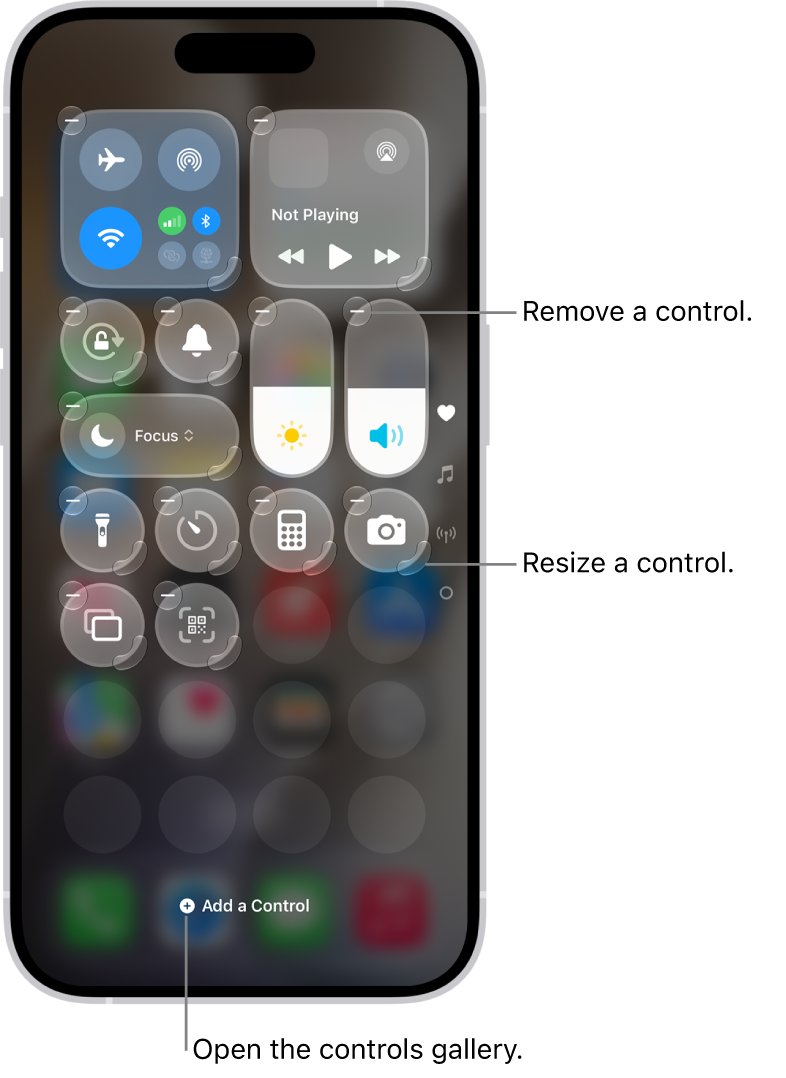
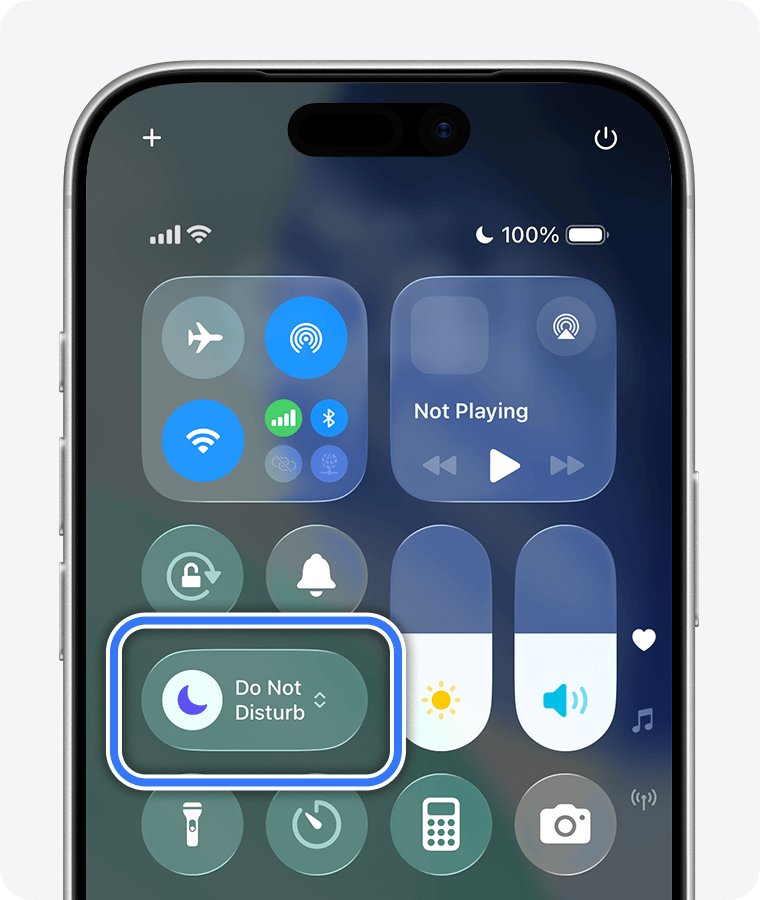
- Open Control Center and turn off any active Focus, such as Do Not Disturb, Sleep or Work.
- Call your iPhone from another phone, leave it untouched, and count the rings before your greeting plays.
Steps 1 and 2 change the actual ring time. Steps 3 to 5 stop the iPhone from silencing or skipping calls, which often feels like a short ring.
Is there a ring time setting on iPhone?
No. Settings > Sounds & Haptics controls the ringtone, ringer volume, haptic pattern and Change with Buttons, and nothing else about ringing. These are the settings that do affect how a call rings, and where each one lives.
| Setting or service | Where it lives | What it does to an incoming call |
|---|---|---|
| No-answer time before voicemail | Your carrier's network | Sets how long an unanswered call rings; Verizon moves unanswered calls on after 3 to 6 rings |
| Ringtone, ringer volume and Haptics | Settings > Sounds & Haptics | Changes what you hear and feel, not how long the call lasts |
| Silent mode | Control Center, or Settings > Sounds & Haptics | Turns the ringer off; the call still arrives and iPhone may still vibrate |
| Screen Unknown Callers | Settings > Apps > Phone | Silence sends unsaved numbers to voicemail; Ask Reason for Calling screens them before the phone rings |
| Focus (Do Not Disturb, Sleep, Work) | Control Center | Silences calls while the Focus is on |
| Live Voicemail | Settings > Apps > Phone | Shows a live transcript as a caller leaves a message and lets you pick up |
| Call Forwarding | Settings > Apps > Phone > Call Forwarding (GSM networks) | Redirects every call to another number you enter |
iPhone ring time before voicemail on Verizon, AT&T and T-Mobile
Each carrier runs its own voicemail forwarding, and each publishes different controls. None of the three lists a dial code that changes the ring time itself, so the request goes through customer support.
| Carrier | What it publishes about unanswered calls | What to do for a longer ring |
|---|---|---|
| Verizon | Unanswered calls move on after 3 to 6 rings. *71 plus a 10-digit number forwards only unanswered calls; *73 turns forwarding off | Ask Verizon whether the no-answer time on your line can be increased |
| AT&T | *61* plus a number and # forwards unanswered calls; ##61# removes that forwarding | Ask AT&T about the ring time before voicemail instead of re-entering forwarding codes |
| T-Mobile | Unanswered calls should forward to 1-805-637-7243, the voicemail system; ##004# resets call forwarding settings | Ask T-Mobile to lengthen the ring time, and reset forwarding if calls stop reaching voicemail |
| Other carriers and resellers | Forwarding codes vary, and some resold plans do not support conditional forwarding | Ask the carrier for its no-answer settings and conditional call forwarding commands |
Dial carrier codes from the keypad in the iPhone Phone app, not from a third-party calling app. A wrong number in a forwarding code can leave unanswered calls with nowhere to go, so turn call forwarding on or off only with the numbers your carrier gives you.
How to ask your carrier for a longer ring before voicemail
Support agents use different names for the same timer. Asking for it by more than one name saves a transfer between departments.
- Note the phone number you want to change, and which line it is if your iPhone uses Dual SIM.
- Contact your carrier's customer support by phone, chat or its account app.
- Ask for a longer no-answer time before voicemail, also called the ring time or the no-answer transfer time.
- Ask the agent to state the new time in rings or seconds, so you can test it.
- Ask them to confirm that busy and unreachable calls still forward to your voicemail box.
- Restart your iPhone after the change, then test it with a call from another phone.
If the carrier says the time is fixed on your plan, the iPhone settings below are the only part left to change.
Set Screen Unknown Callers to Never on iPhone
With Silence selected, calls from numbers that are not in Contacts are silenced and sent to voicemail. With Ask Reason for Calling, the caller is asked why they are calling before your phone rings.
- Open Settings and tap Apps.
- Tap Phone.
- Scroll to Screen Unknown Callers.
- Select Never so calls from unsaved numbers ring like any other call.
- Under Call Filtering, turn off Unknown Callers if you also want those calls listed in your recent calls.
- Add family, your doctor's office and other important numbers to Contacts so they always ring.
Calls are not screened while you are roaming, and call screening turns off for 24 hours after you call emergency services.
Turn off Do Not Disturb so calls ring on iPhone
A Focus silences calls, and Silent mode turns the ringer off. Either one makes a call seem to go to voicemail without ringing, even though the carrier's timer has not changed.
- Swipe down from the top-right corner of the screen to open Control Center.
- Look at the Focus control for Do Not Disturb, Sleep or Work.
- If a Focus is highlighted, tap it, then tap it again to turn it off.
- Tap the Silent mode button in Control Center if Silent mode is on.
- Or open Settings > Sounds & Haptics and turn Silent Mode off.
- Check that the Silent mode icon has gone from the status bar.
On an iPhone with an Action button, pressing and holding it switches Silent mode on or off by default; if it starts a voice recording instead, switch it back to Silent Mode in Settings > Action Button. On older models, flip the Ring/Silent switch toward the front to turn the ringer back on.
Use Live Voicemail to answer a call after it stops ringing
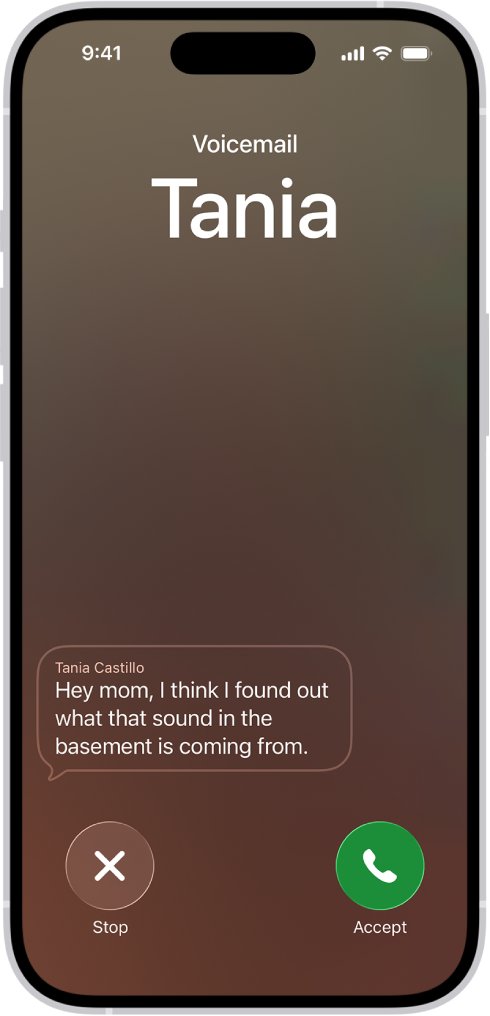
Live Voicemail gives you a second chance at a call you did not reach in time. When a caller is sent to voicemail, the iPhone shows a transcript as they speak, and you can still pick up.
- Open Settings and tap Apps.
- Tap Phone.
- Turn on Live Voicemail.
- When a missed call goes to voicemail, watch the transcript on the call screen.
- Pick up the call while the caller is still leaving the message if you want to talk.
- Tap Stop to end the incoming voicemail without answering or blocking the call.
The caller cannot hear you until you answer. If your iPhone is off or out of network range, the call goes to carrier voicemail instead, and Live Voicemail is only offered by select carriers in select countries.
With Screen Unknown Callers set to silence unknown numbers, those calls go straight to Live Voicemail without ringing first, so set it to Never if you want them to ring.
Change iPhone ringtone and ringer volume so you hear every call
A quiet or short-sounding ringtone does not change the ring time, but it is easy to miss. These settings make the ring you get easier to notice.
- Open Settings and tap Sounds & Haptics.
- Tap Ringtone, preview a few sounds, and select a louder one.
- Drag the ringer volume slider to the right.
- Turn on Change with Buttons if you want the volume buttons to set the ringer volume.
- Tap Haptics and choose a stronger vibration pattern, or tap Create New Vibration.
- To give one person a distinct ring, open Contacts, tap the name, tap Edit, then tap Ringtone.
Alarms and timers follow the ringtone volume by default. Turn off Match Ringtone Volume under Alarms and Timers if you want to set the alarm volume separately.
How to time how long your iPhone rings before voicemail
Time the ring before and after the carrier makes its change, so you can tell whether the request went through.
- Ask someone to call your iPhone, or call it from another phone.
- Start a stopwatch on the calling phone when the first ring sounds.
- Leave the iPhone untouched, because one press of the side button silences the call and two quick presses decline it.
- Stop the stopwatch when your voicemail greeting starts, and note the rings counted.
- Repeat the test after the carrier's change and compare the two times.
- If the caller hears rings but your iPhone stays silent, check Control Center for a Focus or Silent mode.
iPhone goes to voicemail too fast: how to fix it
Calls go straight to voicemail without ringing
A Focus, Silent mode, call screening or a blocked number is stopping the ring, or iOS is out of date.
- Update the iPhone to the latest version of iOS.
- Turn off Silent mode and any active Focus in Control Center.
- In Settings > Apps > Phone, set Screen Unknown Callers to Never.
- Under Call Filtering, turn off Unknown Callers.
- Tap Blocked Contacts, swipe left on any number blocked by mistake, and tap Unblock.
Calls from unknown numbers never ring
Screen Unknown Callers is set to Silence, which sends unsaved numbers to voicemail or Live Voicemail.
- Open Settings > Apps > Phone.
- Tap Screen Unknown Callers and select Never.
- Save numbers you expect calls from in Contacts.
A call goes to voicemail when you press the side button
One press silences the call, and two quick presses decline it and send it to voicemail.
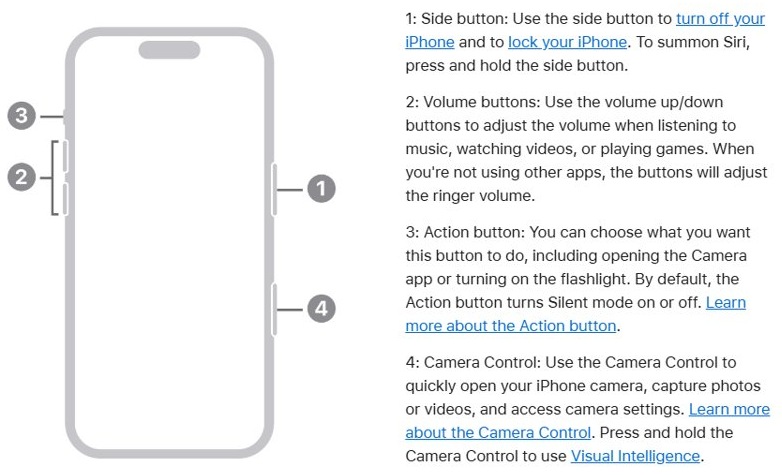
- Press the side button or a volume button only once to silence a ringing call.
- Answer the silenced call before it reaches voicemail if you still want it.
- Leave the buttons alone while timing the ring, because declined calls end the ring at once.
Unanswered calls keep ringing and never reach voicemail
Voicemail is not set up, the mailbox is full, or no-answer forwarding to voicemail was cleared.
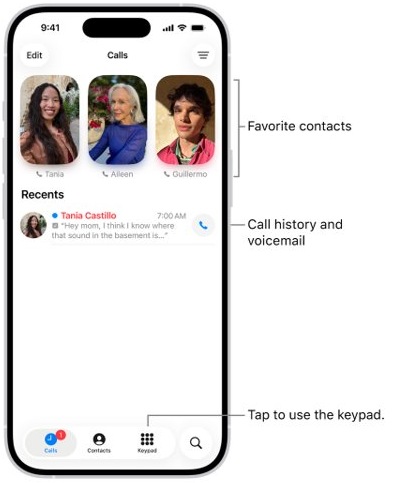
- Open the Phone app and tap Voicemail; create a password and greeting if asked.
- Delete old messages if your mailbox is full.
- On T-Mobile, dial ##004# from the keypad and tap call to reset call forwarding settings.
- On other carriers, ask support to restore forwarding to voicemail for unanswered, busy and unreachable calls.
- If voicemail stopped after a reset code, restore voicemail after dialing #004# with your carrier's help.
Calls go to another number instead of ringing
Call Forwarding is on, on the iPhone or at the carrier.
- Open Settings > Apps > Phone > Call Forwarding and turn it off.
- Check that the Call Forwarding icon has gone from the status bar.
- On Verizon, dial *73 to turn off forwarding.
- On AT&T, T-Mobile and other carriers, ask support to point no-answer forwarding back at your voicemail box.
iPhone ring time before voicemail FAQ
How many rings before voicemail on iPhone?
There is no fixed iPhone number, because the carrier sets the no-answer time. Verizon, for example, sends unanswered calls on after 3 to 6 rings. Time a test call to see what your line does.
Can you change how long an iPhone rings before voicemail?
Not from iPhone Settings. The ring time is part of your carrier's voicemail forwarding, so ask the carrier to increase the no-answer time on your line. Sounds & Haptics only changes the ringtone, volume and vibration.
Why does my iPhone go to voicemail after one ring?
A Focus, Silent mode, Screen Unknown Callers or a blocked number is the usual cause. Pressing the side button twice also declines a call. If none of those apply, the carrier's no-answer time is short, so ask the carrier to lengthen it.
Does Silent mode send calls to voicemail?
No. Silent mode turns the ringer off, so the call arrives without sound and iPhone may still vibrate. The call still rings for the carrier's full no-answer time before it reaches voicemail.
Can I answer a call while it is going to Live Voicemail?
Yes. With Live Voicemail on, iPhone shows a transcript as the caller speaks, and you can pick up the call while they are still leaving the message. The caller cannot hear you until you answer.
What does ##004# do on T-Mobile?
T-Mobile lists ##004# as the code that resets call forwarding settings. Dial it from the keypad and tap call when unanswered calls no longer reach voicemail, then test with a call from another phone.
How do I call my voicemail directly on iPhone?
Open the Phone app, tap Keypad, then press and hold 1 to call your voicemail box on AT&T and T-Mobile. You can also tap Voicemail in the Phone app to play messages without calling.