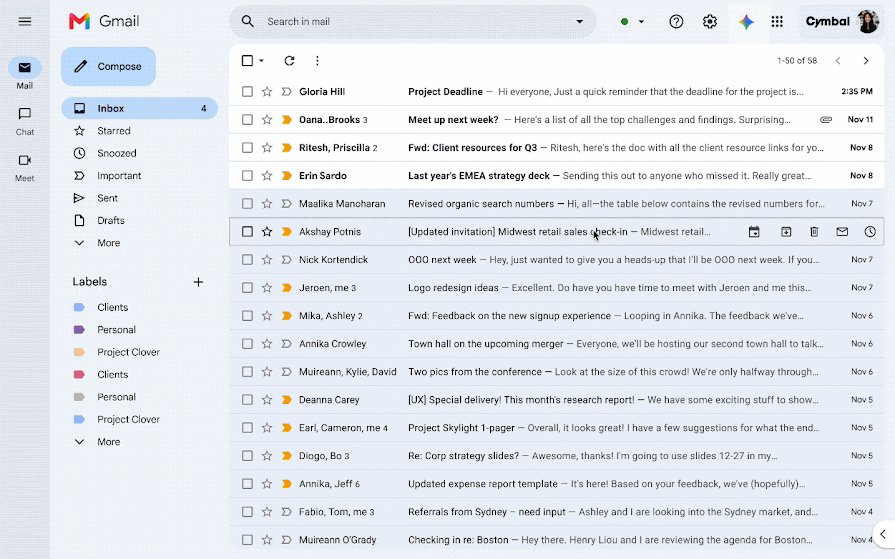
Type is:unread into the Gmail search box and press Enter to list every unread email, including the one hiding behind the 1 next to your inbox.
This guide covers where that last unread message usually hides, how to search archived mail, categories, Spam and Trash, how to sort unread mail to the top, and how to find it in the Gmail app on Android.
Find the unread message on a computer
The search operator is:unread finds emails by their unread status anywhere in your mailbox, not just the visible page of your inbox.
- Open Gmail in your browser and sign in to your account.
- Click the search box at the top of the page.
- Type
is:unreadand press Enter. - Above the results, click Most relevant and choose Most recent so the newest unread email sits first.
- Open the message, or tick its checkbox and click Mark as read at the top.
If the search returns nothing but the counter still shows 1, the email is in Spam or Trash, which a standard search skips. The next section covers that case.
Where Gmail's one unread message usually hides
| Where you have looked | Search to run | What it catches |
|---|---|---|
| Only the first page of the inbox | is:unread |
Unread mail anywhere except Spam and Trash |
| The inbox and its tabs | is:unread in:archive |
An unread email you archived before opening |
| The Primary tab only | is:unread category:promotions (repeat per tab) |
Unread mail sorted into Social, Promotions, Updates or Forums |
| Not the Snoozed folder | is:unread in:snoozed |
An unread email you snoozed for later |
| Everything, and still nothing | is:unread in:anywhere |
Unread mail in Spam and Trash too |
Run the searches top to bottom. Most readers find the stray email with the first or second row.
Search the entire Gmail account
Gmail's standard search leaves out Spam and Trash by default. Google documents in:anywhere as the operator that searches across Gmail including those two folders.
- Click the search box at the top of Gmail.
- Type
is:unread in:anywhereand press Enter. - Sort the results by Most recent to see the latest unread email first.
- Check the folder label shown on each result, such as Spam or Trash.
- Open the message or mark it as read to clear it from the count.
Advanced search does the same job without operators. Click Show search options in the search box, set the Search drop-down to Mail & Spam & Trash, then click Search.
Check archived unread mail
Archiving removes an email from the inbox but keeps it under All Mail. An email archived before it was opened stays unread there.
- Click the search box at the top of Gmail.
- Type
is:unread in:archiveand press Enter. - Open the archived email you find, or tick it and click Mark as read.
- To put it back in the inbox, tick its checkbox and click Move to Inbox.
- To browse instead of search, click More on the left, then All Mail.
If someone replies to an archived email, Gmail returns the conversation to your inbox. A thread you thought was gone can bring the unread count back this way.
Search each Gmail category
With the Default inbox type, Gmail sorts mail into Primary, Social, Promotions, Updates and Forums. An unread newsletter in Promotions is easy to miss if you only read Primary.
| Category | Search to type | Typical mail found |
|---|---|---|
| Primary | is:unread category:primary |
Emails from people you know |
| Social | is:unread category:social |
Social network and media-sharing notifications |
| Promotions | is:unread category:promotions |
Deals, offers and marketing mail |
| Updates | is:unread category:updates |
Confirmations, statements and reminders |
| Forums | is:unread category:forums |
Mailing lists and discussion groups |
Archived emails do not appear in any category, so a category search will not find mail you archived. Use the archive search above for that.
Put unread messages at the top of the inbox
The Unread first inbox type splits the inbox into two sections, with Unread at the top. The stray message then cannot hide on a later page.
- Click Settings at the top right of Gmail to open Quick settings.
- Under Inbox type, select Unread first.
- Look at the Unread section at the top of the inbox.
- Open or mark as read the email listed there.
- To go back to tabs later, return to Inbox type and select Default.
If you cannot spot the Gmail gear icon, look at the far top right of the page, next to the help and apps buttons. Category tabs only appear with the Default inbox type.
Check category settings
Your category tabs decide where new mail lands. Checking which tabs are turned on shows you which ones to open or search.
- Click Settings at the top right of Gmail.
- In Quick settings, under Inbox type, select Default.
- Click Customize.
- Note which categories are ticked, and tick any you want shown as tabs.
- Click Save, then open each tab and look for bold, unread emails.
New-mail notifications only cover the Primary category. An unread email in Promotions or Updates can arrive without any alert, which is why it goes unnoticed.
Find it in the Gmail app on Android
The Android app accepts the same search operators as Gmail on a computer.
- Open the Gmail app on your Android phone or tablet.
- Tap Search in mail at the top.
- Type
is:unreadand tap Search on the keyboard. - Above the results, tap Most relevant and choose Most recent.
- Open the message, or tap the sender's profile image and tap Read at the top right.
To keep unread mail on top in the app, tap Menu at the top left, then Settings, choose your account, and under Inbox tap Inbox type and pick Unread first. Archived mail is under Menu > All mail.
When the result looks like the wrong message
| What you see | Why it happens | What to do |
|---|---|---|
| A whole thread appears, but its visible email is already read | Conversation view groups replies, so one unread reply inside a thread marks the thread | Open the thread and expand each message, or turn conversation view off |
| A search excluding something still returns a whole thread | Gmail matches individual messages first, so negative searches can return a full conversation | Search positively with is:unread instead of excluding read mail |
| The top result on Android is not the newest unread email | Results are sorted by relevance by default | Switch the sort from Most relevant to Most recent |
| The result is an old email you never meant to keep | It sat unread in an archived or categorised spot | Mark it as read, archive it or delete it |
To turn conversation view off, click Settings > See all settings, scroll to Conversation View, select Conversation view off and click Save Changes. Each email then shows separately in the inbox.
How to confirm Gmail's unread count is cleared
- Search
is:unreadagain and confirm Gmail shows no matching results. - Search
is:unread in:anywhereto confirm Spam and Trash are clear too. - Look at the number beside Inbox on the left; it should be gone.
- Refresh the browser tab so the counter reloads.
- On Android, open the Gmail app and check the inbox for bold, unread emails.
If the count is still there after a refresh, work through the fixes below.
What to do when Gmail still shows one unread message
Gmail inbox shows 1 unread message, but no unread email is showing
The unread email is in another category tab, on a later page, or inside a conversation.
- Switch Inbox type to Unread first in Quick settings.
- Open the email listed in the Unread section.
- If it is a thread, expand every message in it.
- Switch Inbox type back to Default if you prefer tabs.
My Gmail says I have unread messages but the search finds nothing
Standard search skips Spam and Trash, and some mail is snoozed.
- Search
is:unread in:anywhereand press Enter. - Search
is:unread in:snoozedand press Enter. - Mark any result as read or delete it.
Gmail shows 2 or more unread messages you cannot clear one by one
Several old unread emails are scattered across tabs or archived mail.
- Search
is:unreadand press Enter. - Tick the select-all checkbox at the top left of the results.
- Click Mark as read at the top.
- Repeat on the next page of results if more remain.
Gmail app says I have unread messages on Android
The app sorts search results by relevance and may hold the email in another category.
- Tap Search in mail and search
is:unread. - Change Most relevant to Most recent.
- Tap the sender's profile image on the left of a message, then tap the box next to Select all.
- Tap Mark as read at the top right.
The bottom line on Gmail's single unread message
Search is:unread first, then is:unread in:anywhere if that comes back empty. Switch the inbox to Unread first if the count keeps coming back. Between them, those two searches cover the inbox, tabs, archived mail, Spam and Trash, which are the only places Gmail can keep an unread email.
Once the counter is clear, the Unread first layout stops a single forgotten email from hiding again.
Gmail unread message FAQ
Why does Gmail show 1 unread message?
Gmail shows 1 unread message because one email has never been opened or marked as read. It often sits in a category tab such as Promotions, inside a conversation, or on a later inbox page. Searching is:unread lists it.
How do I find the unread message in Gmail?
Type is:unread in the Gmail search box and press Enter, then sort by Most recent. If nothing appears, search is:unread in:anywhere, which also covers Spam and Trash.
How do I show only unread emails in Gmail?
Search is:unread to list only unread emails. For a lasting view, open Quick settings and set Inbox type to Unread first, which puts an Unread section at the top of the inbox.
How do I see unread messages in Gmail on Android?
Open the Gmail app, tap Search in mail, type is:unread and tap Search. Change Most relevant to Most recent to see the newest unread email first.
Does is:unread search only the inbox?
No. is:unread searches your whole mailbox, including archived mail and every category, but standard search leaves out Spam and Trash. Add in:anywhere to include those two folders.
How do I find an unread archived email?
Search is:unread in:archive in Gmail. You can also click More, then All Mail on a computer, or tap Menu, then All mail in the Android app, and look for bold unread emails.
Can I mark the unread message as read without opening it?
Yes. On a computer, tick the checkbox next to the email and click Mark as read. In the Android app, tap the sender's profile image on the left of the message, then tap Read at the top right.
Why is my Gmail showing unread messages when the inbox is empty?
The unread emails are outside the inbox view, usually in archived mail, Spam, Trash or Snoozed. Search is:unread in:anywhere and is:unread in:snoozed to find them.
Why is the Gmail Android result not the newest unread email?
The Gmail app sorts search results by relevance by default. Tap Most relevant above the results and choose Most recent to list unread email in date order.