To fix "Object reference not set to an instance of an object" in Visual Studio, run the app with the debugger, find the variable that is null on the highlighted line, and give it a value or check it before you use it.
This guide covers reading the Exception Helper, breaking on System.NullReferenceException, the code fixes for each cause, nullable reference types, and what to do when the Visual Studio IDE itself shows the message.
How to fix object reference not set to an instance of an object in Visual Studio
The message is the text of System.NullReferenceException. Your code called a member on a variable whose value is null, and the debugger can name that variable for you.
- Open the solution and press F5 (Debug > Start Debugging).
- Repeat the action that caused the error. The Exception Helper opens on the line that threw
System.NullReferenceException. - Hover over each object on that line. The data tip that shows
nullis the variable at fault. - Open the Call Stack window and double-click the line below the top one to see where that variable should have been set.
- Fix the cause: create the object with
new, assign it before use, or test it withif (value is not null)before calling its members. - Press Ctrl + Shift + F5 to restart the app and repeat the same action to confirm the exception is gone.
Which object reference not set fix matches your case?
The same message appears in two very different places. Match where you saw it before you change anything.
| Where the message appears | Do this first | Why |
|---|---|---|
| Exception Helper while debugging your app | Inspect the highlighted line with data tips and the Autos window | Your code dereferenced a null variable on that line |
Console output or a log with Unhandled Exception: System.NullReferenceException |
Read the stack trace, then reproduce it under the debugger | The top frame of the trace names the method that threw |
| An ASP.NET error page in the browser | Turn on Just My Code and break on the exception in Exception Settings | ASP.NET's top-level handler shows an error page instead of breaking |
Green squiggles or CS8602 warnings in the Error List |
Add the missing null check the warning points to | The compiler found a possible null dereference before it ever runs |
| A Visual Studio dialog box while opening a solution, creating a project or using a designer | Update Visual Studio, then try safe mode, a settings reset and a repair | The fault is inside the IDE or an extension, not in your code |
| Only after a reference shows a warning or goes missing | Fix the broken reference in Solution Explorer | A broken reference produces an exception error when the app uses it |
Understanding the object reference not set to an instance of an object error
An object reference is a variable that points at an object in memory. A reference that points at nothing holds null, and calling a method, reading a property or indexing into it throws.
Microsoft describes the exception as typically reflecting developer error. The table lists the facts that identify it.
| Item | Value | What it tells you |
|---|---|---|
| Exception type | System.NullReferenceException |
The search term to use in Exception Settings and in your logs |
| Message text | Object reference not set to an instance of an object. | A new NullReferenceException() with no message can show "The value 'null' was found where an instance of an object was required." instead |
| HRESULT | COR_E_NULLREFERENCE, value 0x80004003 |
The code you see when the exception crosses into COM or native code |
| What an object reference is | A variable of a reference type, such as a class, string, array or list | Value types such as int cannot be null unless declared as int? |
| When it is thrown | At run time, on the line that dereferences the null value |
The bug is often earlier, where the value should have been assigned |
| Languages affected | C#, Visual Basic, F# and C++/CLI on .NET | Visual Basic shows warning BC42104 when a variable is used before it is assigned |
Common causes of NullReferenceException in C# and Visual Basic
Every documented cause comes down to one variable that was never given an object. Find your pattern in the left column.
| Cause | Example | Code fix |
|---|---|---|
| The object was declared but never created | List<string> names; then names.Add("x") |
Create it at declaration: List<string> names = new(); |
| The array was never dimensioned | int[] values = null; then values[0] = 1 |
Give it a size: int[] values = new int[10]; |
A method returned null and its result was used |
Array.Find(...) finds no match, then found.FirstName |
Test the return value with if (found != null) first |
One link in a chained expression is null |
pages.CurrentPage.Title when CurrentPage is null |
Store the intermediate value and check it, or write pages.CurrentPage?.Title |
An array or list contains a null element |
values[i].Trim() on ["one", null, "two"] |
Check each element before you call members on it |
A method received a null argument |
PopulateNames(names) where names came back null |
Validate the argument at the start of the method |
| An event has no subscribers | PropertyChanged(this, e) with nobody listening |
Raise it with PropertyChanged?.Invoke(this, e) |
| A list was created without running its constructor | FormatterServices.GetUninitializedObject(type) |
Use Activator.CreateInstance so the list is initialized |
Identifying the error with the Visual Studio debugger and Exception Helper
These steps find the exact variable that was null. Start them with the solution open and the project set to a Debug build.
- Press F5 to start debugging and reproduce the error. Visual Studio stops on the throwing line and opens the Exception Helper.
- Read the Exception Helper text. It names
System.NullReferenceExceptionand, where it can, the value that was null. - Hover over each variable on the yellow-highlighted line. Data tips show the current value; expand objects to see their properties.
- Check the Autos window for every variable used on the current and preceding line, and the Locals window for everything in scope.
- Right-click the suspect object and choose Add Watch to follow its value across later runs.
- Open the Call Stack window and double-click lower frames to see which caller passed or produced the
nullvalue. - Read the Output window, where the debugger also writes the exception message.
- Set a breakpoint by clicking the left margin a few lines earlier, restart with Ctrl + Shift + F5, and step with F10 (Step Over) or F11 (Step Into) to see where the value stays
null.
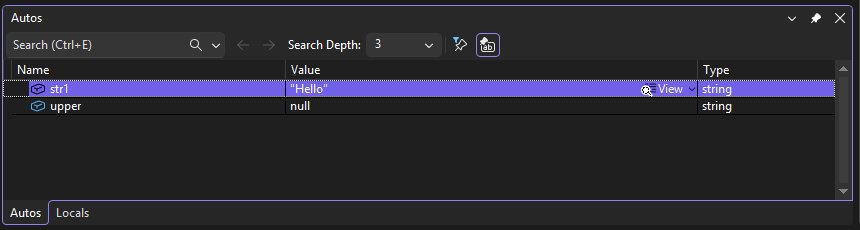
Break when NullReferenceException is thrown in Exception Settings
When a try/catch swallows the exception, or ASP.NET turns it into an error page, the debugger may never stop. Tell it to break at the throw.
- With the solution open, select Debug > Windows > Exception Settings.
- Type
NullReferencein the Search box on the Exception Settings toolbar. - Expand Common Language Runtime Exceptions and tick System.NullReferenceException.
- Press F5 and reproduce the error. Execution now breaks where the exception is thrown, even if a handler catches it later.
- Inspect the line with data tips and the Call Stack window as in the previous section.
- When you finish, select Restore the list to the default settings on the toolbar to stop breaking on every handled throw.
These exception settings are stored in the solution's .suo file, so they apply to that solution only.
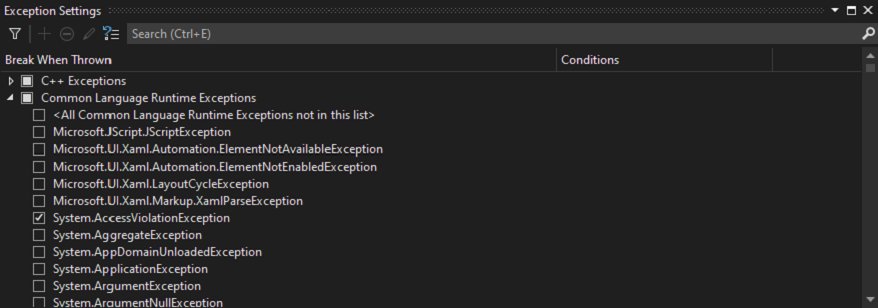
Fixing the object reference error in C# code
Pick the fix that matches what the value should be. A null that is a bug needs the object created; a null that is a valid state needs a check.
| Fix | Code | Use it when |
|---|---|---|
| Initialize objects | var customer = new Customer(); |
The object must always exist before it is used |
| Check for null | if (order is not null) { order.Ship(); } |
null is a legitimate state, such as "no match found" |
| Default values for collections | public List<string> Tags { get; } = new(); |
A property or field holds a list that callers add to |
| Null-conditional and null-coalescing operators | string name = user?.Name ?? "Unknown"; |
You want a fallback value instead of a branch |
| Nullable types | int? age = null; and string? middleName; |
A value can genuinely be missing, so the type says so |
| Ensure proper method returns | Return an empty list or string.Empty instead of null |
Callers should not have to test every return value |
| Event handling | PropertyChanged?.Invoke(this, args); |
An event may have no subscribers when it is raised |
| Data binding practices | Set the DataContext or data source before the view binds, and check bound items for null in handlers |
A WPF or Windows Forms control reads its data before it is loaded |
| Exception handling | try { ... } catch (NullReferenceException ex) { log(ex); } around one specific call |
You can recover, skip a bad record, restore state or report the error |
Microsoft recommends avoiding the exception rather than handling it after it occurs. Never use an empty catch block, because it hides the error and makes the next bug harder to find.
Enable nullable reference types to catch null errors at build time
Nullable reference types make the compiler warn about likely null dereferences before the app runs. They change no run-time behaviour.
- Open the project's
.csprojfile in the code editor. - Inside the
<PropertyGroup>, add<Nullable>enable</Nullable>if it is not already there. Recent .NET templates add it for you. - For an older project you want to migrate file by file, add
#nullable enableat the top of a single source file instead. - Build the project and open the Error List.
- Fix each
CS8602(*Dereference of a possibly null reference*) by adding a null check before the member access. - Fix each
CS8618(*Non-nullable variable must contain a non-null value when exiting constructor*) by initializing the member, for example with= string.Empty;or in the constructor. - Mark values that may legitimately be missing with
?, such asstring?, and use the null-forgiving!only where you know the value cannot benull.
Fix Visual Studio showing object reference not set in a dialog box
When the message appears in an IDE dialog, not in your running app, the fault sits in Visual Studio or an extension. Work down the list and test after each step.
- Close every Visual Studio window, reopen the solution and repeat the action once to rule out a one-off failure.
- Select Help > Check for Updates, then choose Update in the Update available dialog.
- Start Visual Studio in safe mode with
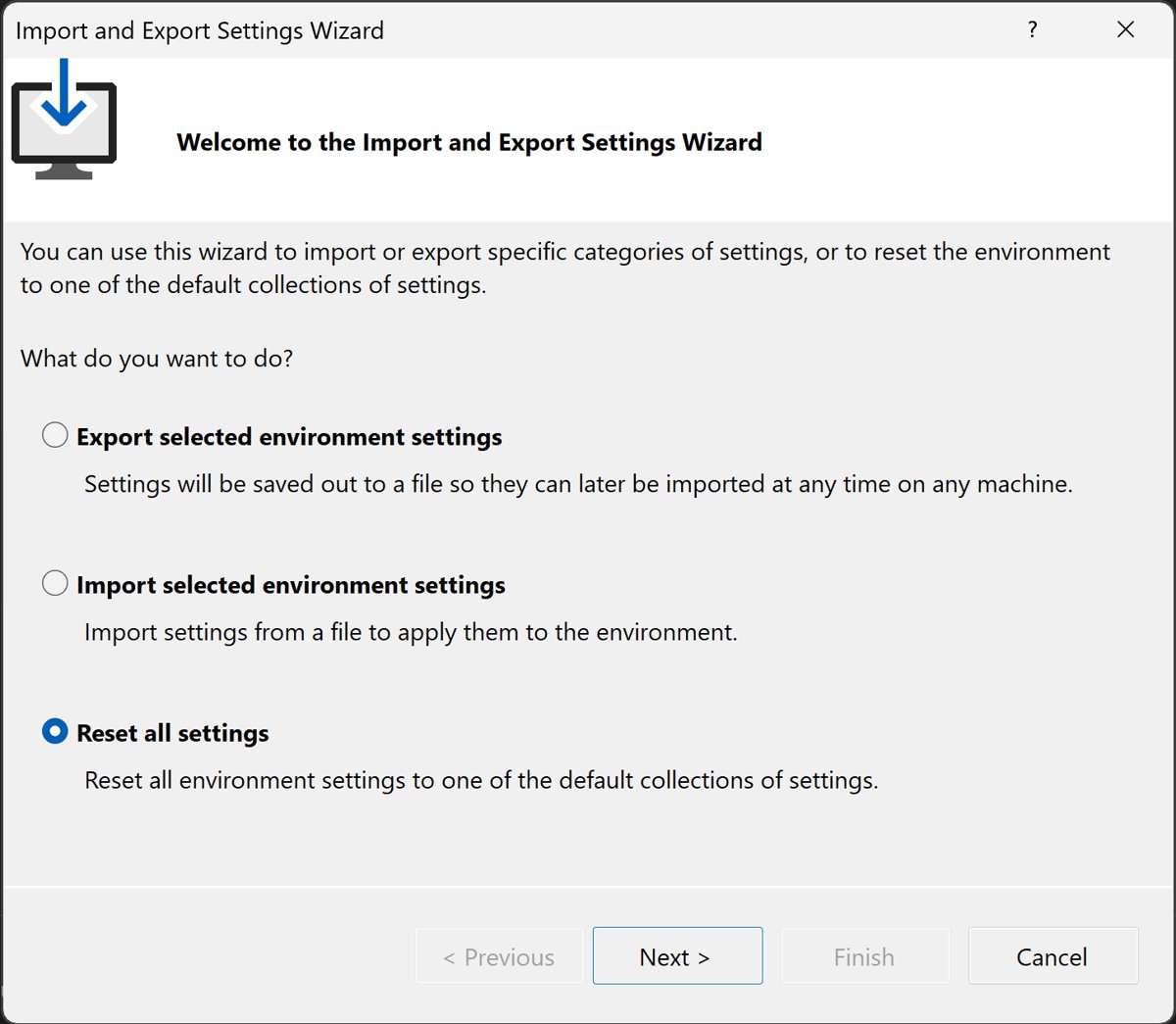
devenv /SafeModefrom Developer Command Prompt. If the error is gone, an extension caused it; disable extensions one at a time. - Reset the IDE settings: select Tools > Import and Export Settings, choose Reset all settings, then Next.
- On Save Current Settings, choose Yes, save my current settings, pick a collection on Choose a Default Collection of Settings, then select Finish and Close.
- Open Visual Studio Installer from the Start menu, find your installation and choose More > Repair.
- If the dialog still appears, select Help > Send Feedback > Report a Problem and record the steps that trigger it.
A repair resets user settings and removes per-user extensions installed without elevation, so export your settings first if you have customised the IDE.
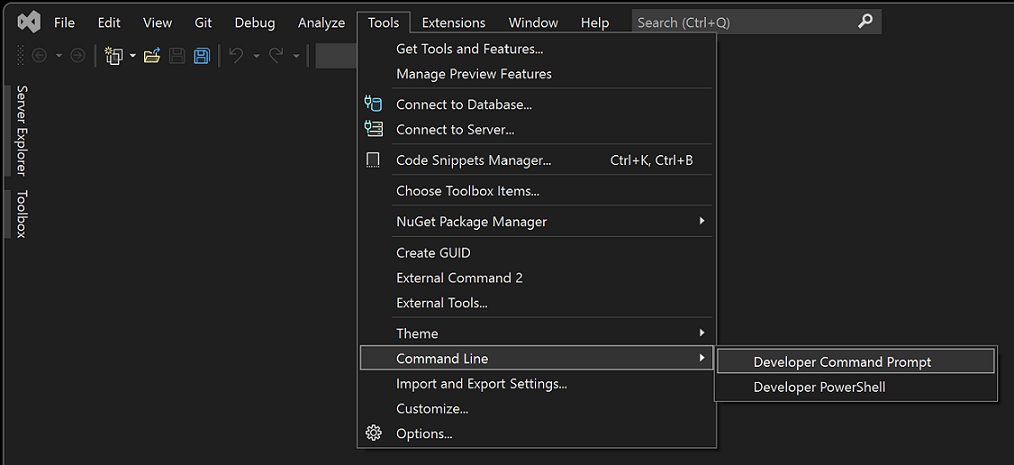
Start Visual Studio in safe mode from Developer Command Prompt
Open Developer Command Prompt from Tools > Command Line, or search developer command prompt in the Windows 11 Start menu. Close Visual Studio first.
devenv /SafeMode/SafeMode starts Visual Studio with only the default environment and services, and stops all third-party VSPackages from loading. Switches are not case-sensitive, and -SafeMode works too. To return the IDE to a default profile from the same prompt, run devenv /ResetSettings General, or replace General with CSharp, VB, VC or Web.
You should see: Visual Studio opens without your extensions. Repeat the action that raised the dialog: if it now works, an extension is the cause. If it still fails in safe mode, move on to the settings reset and the repair.
How to confirm the NullReferenceException is fixed
- Restart debugging with Ctrl + Shift + F5 and repeat the exact action that threw. The Exception Helper should not open.
- Keep System.NullReferenceException ticked in Exception Settings for one run, so a handled throw elsewhere still stops the debugger.
- Build the project and confirm the Error List shows no new
CS8602orCS8618warnings for the code you changed. - Test the edge case that produced
null, such as an empty search result or a missing record, and confirm the fallback path runs. - Run the Release build once, because
Debug.Assertchecks only run in Debug builds. - Untick the exception or select Restore the list to the default settings when you finish.
Visual Studio object reference not set still appearing: fixes by symptom
The debugger never stops, but the app logs the error
A handler catches the exception, or ASP.NET's top-level handler turns it into an error page.
- Open Debug > Windows > Exception Settings.
- Tick System.NullReferenceException under Common Language Runtime Exceptions.
- Turn on Just My Code for ASP.NET projects so the debugger breaks in your code.
- Reproduce the error and inspect the line where execution stops.
The Exception Helper stops inside framework or library code
Your code passed a null argument into a method that dereferenced it.
- Open the Call Stack window.
- Double-click the first frame that belongs to your project.
- Check each argument passed on that line with data tips.
- Validate the argument before the call, or fix the code that produced it.
Visual Studio references missing or reference not found
The reference path is wrong, or the referenced file was deleted, renamed, unreachable on the network, or is a COM component not installed on this PC.
- In Solution Explorer, expand References or Dependencies and find the entry with a warning icon.
- Remove the broken entry and add it again with Add Project Reference or Add COM Reference.
- For a C# file reference, open the project Properties, select Reference Paths, type the folder in Folder and select Add Folder.
- Use the NuGet Package Manager for packaged libraries, and project-to-project references for projects in the same solution.
Visual Studio project reference not working after a framework change
When one project targets .NET Framework 4.5 or later and the other targets .NET Framework 2, 3, 3.5 or 4.0, Visual Studio creates a file reference instead of a project reference.
- Open each project's properties and compare the target framework.
- Retarget the older project to a framework version the other project can reference.
- Remove the old reference and add it again from the Projects tab of Reference Manager.
- Rebuild the solution and check the Error List.
Visual Studio not showing references in Solution Explorer
SDK-style .NET projects list references under Dependencies, not References.
- Expand the Dependencies node of the project.
- Open Assemblies, Projects or Packages to see each kind of reference.
- Right-click Dependencies to add or remove project references or open the NuGet package browser.
The IDE dialog returns after a reset and repair
The fault is in Visual Studio itself or in the specific project type.
- Open the solution with
devenv /DoNotLoadProjectsand load projects one at a time to find the one that triggers it. - Run
devenv /Logto record an activity log of the failing session. - Select Help > Send Feedback > Report a Problem, search for an existing report, and vote on it or submit yours with a recording.
Best practices to prevent future NullReferenceException errors
Each habit below removes one of the causes listed earlier before it reaches a user.
| Practice | What to do | What it prevents |
|---|---|---|
| Keep nullable reference types on | Leave <Nullable>enable</Nullable> in every project and treat CS8602 as a bug |
Null dereferences reaching run time unnoticed |
| Initialize at declaration | Create collections and required objects where they are declared or in the constructor | Use-before-assign errors and CS8618 warnings |
| Return empty, not null | Return an empty collection or string.Empty when there is nothing to return |
Callers forgetting to test every result |
| Validate at method entry | Check arguments at the top of public methods, and add Debug.Assert for internal assumptions |
A null travelling deep into code before it fails |
Use ?. and ?? deliberately |
Apply them where null is a valid state, not to hide a missing object |
Silent wrong results that are harder to debug than the exception |
| Annotate helper methods | Add attributes such as [NotNullWhen(true)] to your own null-check helpers |
False warnings that tempt you to add ! everywhere |
| Handle exceptions narrowly | Wrap try/catch around the specific call that can fail, and log what you catch |
Empty catch blocks that hide the real location of the error |
| Read squiggles before running | Clear red squiggles and investigate green ones in the Error List before pressing F5 | Warnings that become run-time exceptions later |
Object reference not set to an instance of an object FAQ
How do I fix object reference not set to an instance of an object?
Run the app with F5, let the Exception Helper stop on the throwing line, and hover over each object to find the one that is null. Then create that object before use, assign it earlier, or check it for null before calling its members.
What does object reference not set to an instance of an object mean?
It is the message of System.NullReferenceException. Your code tried to call a method, read a property or index into a variable whose value is null, meaning it points at no object. The error is thrown at run time on the line that used the null value.
Why does Visual Studio say object reference not set when I open a project?
When the message appears in an IDE dialog rather than in your app, the fault is in Visual Studio or an extension. Update Visual Studio, start it with devenv /SafeMode, reset settings through Tools > Import and Export Settings, then repair it from Visual Studio Installer.
Should I catch NullReferenceException with try/catch?
Usually not. Microsoft recommends avoiding the exception rather than handling it, because it often signals a bug. Catch it only around one specific call where you can recover, skip a bad record, restore state or report the error, and never with an empty catch block.
How do I make Visual Studio break where the null reference is thrown?
Open Debug > Windows > Exception Settings, expand Common Language Runtime Exceptions and tick System.NullReferenceException. The debugger then breaks at the throw even if a handler catches it later. Use Restore the list to the default settings when you are done.
Do nullable reference types stop NullReferenceException?
They reduce it but do not change run-time behaviour. With <Nullable>enable</Nullable> set, the compiler warns about possible null dereferences, such as CS8602. Default structs and new arrays of reference types can still hold null without a warning.
What is the HRESULT for NullReferenceException?
NullReferenceException uses the HRESULT COR_E_NULLREFERENCE, which has the value 0x80004003. You see this code when the exception surfaces through COM interop or native code rather than as a managed exception message.
How do I fix missing references in Visual Studio?
Find the entry with a warning icon under References or Dependencies in Solution Explorer, remove it and add it again through Add Project Reference or Add COM Reference. For file references in C#, correct the folder on the project's Reference Paths page.
Why are references not showing in Visual Studio 2022?
SDK-style .NET projects list them under the Dependencies node, not References. Expand Dependencies, then Assemblies, Projects or Packages. The Assemblies tab of Reference Manager is also unavailable for .NET Core and .NET 5 or later projects; use Browse instead.
Can the ?. operator cause problems?
It returns null instead of throwing, so overusing it can hide a missing object and produce silent wrong results. Use it where null is a valid state, pair it with ?? for a sensible default, and keep real bugs visible by fixing the missing assignment.





![Java JRE latest version: Download & Install [32-bit, 64-bit]](https://techdows.com/wp-content/uploads/2026/10/Java-JRE-latest-version-Download-Install-32-bit-64-bit-1-600x338.jpg)