You can now able to see Suggestions from Pinterest in Collections and export the created Collections to your Pinterest boards in Microsoft Edge Canary.version 84.0.521.0 or later.
At the Build 2020 conference, Microsoft announced it is bringing Sidebar Search, Pinterest integration to Collections, and other new features for businesses to the new Microsoft Edge browser. The company said it will roll out features to Edge pre-release channels in the next month.
That said, Microsoft brought the Collections Integration with Pinterest, without Send to OneNote option in addition to the currently available Send to word and Excel options much earlier to the Edge Canary version.
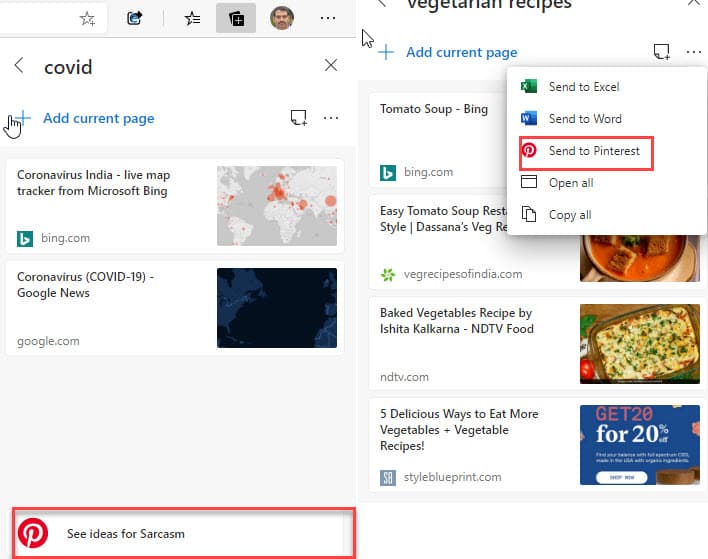
Enable Pinterest suggestions in Collections in new Microsoft Edge
1.Launch Microsoft Edge Canary
2. Click on the ellipsis icon and select Settings
3. Scroll down o Services and enable “Show suggestions from Pinterest in Collections”

Do note suggestions are generated based on Collections title and they will appear at the bottom of a collection. The suggestion when clicked takes you to Pinterest to show some boards, which you can add to your collection by selecting an option in the page right-click menu.
You can anytime turn off Edge from showing Pinterest Suggestions in Collections by going to Settings> Privacy> Services> Show suggestions from Pinterest in Collections.
To send or export a Collection to your Pinterest account
1. In the new Edge browser, click on Collections icon on toolbar
2. Click on Collection name to open a collection
3. Click on … icon and select “Send to Pinterest”
Note: You need to sign into a Pinterest account to see ideas and you also need to allow Collections in Edge to see all your boards to generate new pins and boards for you.
Related articles:
Microsoft Edge Origin Trials are now available for developers
Microsoft releases ‘Group Tabs & Share’ Extension for Edge
Microsoft removes malicious Extensions from Edge Add-ons Store
Microsoft Edge Canary gets support for PWA Icons on the taskbar to show Shortcuts
Microsoft Edge 84 adds Read aloud support for PDFs





