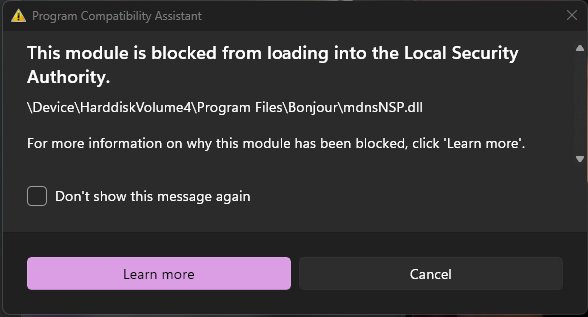
The mdnsNSP.dll warning means Local Security Authority (LSA) protection stopped a file that is not signed with a Microsoft signature from loading into LSA, and the fix is to update or uninstall the Bonjour software that installed it.
This guide covers why Bonjour's mdnsNSP.dll is blocked, how to remove it, how to check the file's publisher and the block events, and why LSA protection should stay on.
How to fix mdnsNSP.dll blocked from loading into the Local Security Authority
Microsoft's advice for this notification is to remove the software that loads the blocked file, or to turn off future warnings for that file. Removing Bonjour clears it for good.
- Select Start > Settings > Apps > Installed apps.
- Type Bonjour in the search box above the list.
- Select More (the three dots) next to Bonjour, then select Uninstall.
- Select Uninstall again to confirm and follow the prompts.
- Restart the PC.
- If you still need Bonjour, install the latest Bonjour version from the software that bundled it instead, and leave LSA protection turned on.
If you keep Bonjour and the notification returns, the block itself does no harm to Windows. LSA protection is doing its job by keeping the file out of the sign-in process.
Why is Bonjour mdnsNSP.dll blocked?
LSA is the Windows process that checks your credentials when you sign in and manages the tokens used for single sign-on. LSA protection only lets code into that process if it meets Microsoft's signing rules.
| Rule | What Microsoft states | What it means for mdnsNSP.dll |
|---|---|---|
| Signature | Any plug-in loaded into LSA must be digitally signed with a Microsoft signature | A file signed only by its own publisher fails to load |
| Security process | Plug-ins must also follow Microsoft's Security Development Lifecycle guidance | Even a signed file can fail if it does not comply |
| Default state | LSA protection is on by default; new installs turn it on immediately | A fresh Windows 11 install blocks the file from the first boot |
| Upgrades | Upgraded PCs turn it on after a five-day evaluation period and a restart | The warning can appear days after a Windows upgrade |
| Notification | When a file is blocked, a notification names the blocked file | The message names mdnsNSP.dll |
| Your options | Remove the software loading the file, or turn off future warnings for that file | Uninstall or update Bonjour, or silence the warning |
A blocked file is not proof of malware. It only means the file does not meet the signing rules for code that runs inside LSA.
mdnsNSP.dll: what is it?
The file name matches Bonjour, Apple's zero-configuration networking service. Bonjour uses multicast DNS (mDNS) to find printers and other devices on the local network without a DNS server.
| Detail | Value |
|---|---|
| Software it belongs to | Bonjour, Apple's local network discovery service |
| Protocol | Multicast DNS (mDNS) |
| Network port | UDP 5353 |
| Common source on Windows | Apple software that bundles Bonjour, such as Bonjour Print Services |
| Why LSA sees it | It tries to load into the LSA process, which requires a Microsoft signature |
| Similar file | nimdnsNSP.dll, whose ni prefix points to NI software rather than Apple |
Whether you need the Bonjour service depends on what you use it for.
How to remove mdnsNSP.dll from Control Panel
Some apps cannot be removed from the Settings app. Programs and Features in the classic Control Panel lists older desktop installers, including Bonjour.
- In search on the taskbar, enter Control Panel and select it from the results.
- Select Programs > Programs and Features.
- Right-click Bonjour and select Uninstall or Uninstall/Change.
- Follow the directions on the screen.
- Repeat for any other Bonjour entry, such as Bonjour Print Services, if you no longer use it.
- Restart the PC.
Removing Bonjour stops Bonjour-based printer and device discovery on that PC. Reinstall it later if a printer or app stops finding devices.
How to check which app installed mdnsNSP.dll
Check the file's publisher before you remove anything. This also tells you whether the notification is about Apple's Bonjour or another vendor's copy.
- Open File Explorer and select This PC.
- Type mdnsNSP.dll in the search box and press Enter.
- Right-click the file in the results and select Properties.
- Open the Details tab and read Product name and Copyright.
- Open the Digital Signatures tab, if it is present, to see who signed the file.
- Uninstall or update the app named there.
A file signed by its publisher but not by Microsoft still fails the LSA check. The signature tab confirms who made it, not whether LSA will accept it.
How to find mdnsNSP.dll block events in Event Viewer
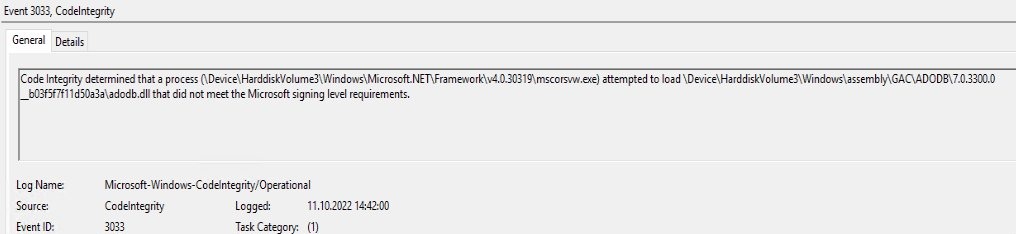
Windows logs each file that LSA refuses in the Windows Event Viewer. These events show the exact path of the blocked mdnsNSP.dll.
- Right-click Start and select Event Viewer.
- Expand Applications and Services Logs > Microsoft > Windows > CodeIntegrity.
- Select Operational.
- Look for event ID 3033, logged when a process, usually LSASS.exe, tries to load a file that does not meet Microsoft signing level requirements.
- Look for event ID 3063, logged when the file does not meet the security requirements for shared sections.
- Open the event to read the full path of the blocked file.
Events 3065 and 3066 in the same log are audit-only versions. They mean the file would be blocked, but current policy still let it load.
Should you turn off LSA protection for mdnsNSP.dll?
No. Keep Local Security Authority protection on and deal with the Bonjour file instead. Microsoft describes LSA protection as a vital security feature that blocks untrusted code injection and memory dumping of the process that holds your sign-in credentials. Turning it off to let one networking file load trades credential protection for a warning that does no harm when left alone.
Microsoft's own option for a file you choose to keep is to turn off future warnings for that file, not to turn the protection off.
How to tell if Local Security Authority protection is on
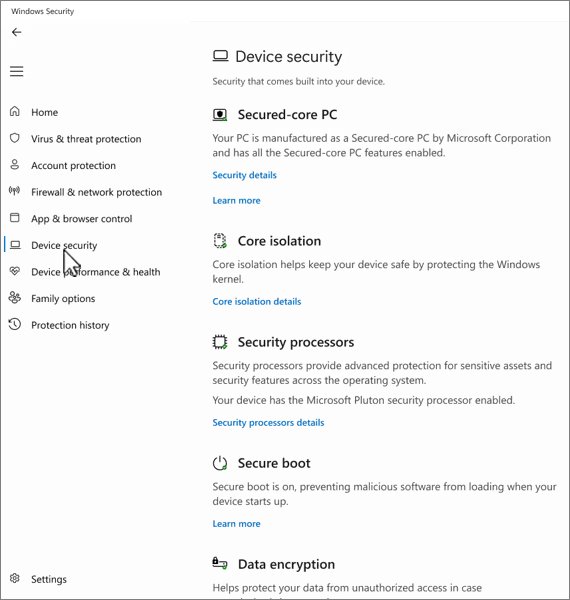
- Open the Windows Security app.
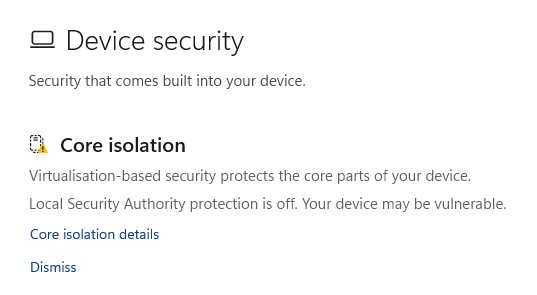
- Select Device security, then select Core isolation details.
- Check that the Local Security Authority protection toggle is On.
- For proof from the log, open Event Viewer and expand Windows Logs > System.
- Look for the WinInit event 12: LSASS.exe was started as a protected process with level: 4.
After you remove Bonjour and restart, the protection stays on and the mdnsNSP.dll notification no longer appears.
mdnsNSP.dll blocked Windows 11 warning still appears
The warning returns after you uninstalled Bonjour
Another app still has its own copy of Bonjour, or the PC has not restarted since the removal.
- Restart the PC.
- Search This PC for mdnsNSP.dll in File Explorer.
- Open the remaining file's Properties > Details tab to see which product installed it.
- Update or uninstall that product.
This module is blocked: nimdnsNSP.dll
NI software installed its own multicast DNS file, which also lacks a Microsoft signature for LSA.
- Open the file's Properties to confirm the publisher.
- Check the publisher's support site for an updated version.
- Uninstall the NI component that installed it if you no longer need it.
Faulting module name: mdnsNSP.dll_unloaded
An app crash report names the Bonjour module, so the Bonjour component is the part to update or remove.
- Update the software that bundles Bonjour to its latest version.
- If the crashes continue, uninstall Bonjour from Settings > Apps > Installed apps.
- Restart the PC and run the app again.
mdnsNSP.dll blocked FAQ
Why is mdnsNSP.dll blocked?
Local Security Authority protection only loads plug-ins signed with a Microsoft signature. mdnsNSP.dll is not, so Windows blocks it from loading into LSA and shows a notification naming the file.
Why is Bonjour mdnsNSP.dll blocked on Windows 11?
LSA protection is on by default in Windows 11. New installs turn it on immediately, and upgraded PCs turn it on after a five-day evaluation period, so the Bonjour file is blocked after that restart.
How do I remove mdnsNSP.dll?
Uninstall Bonjour. Select Start > Settings > Apps > Installed apps, find Bonjour, select More > Uninstall, then restart. Programs and Features in Control Panel works too if Settings cannot remove it.
What is mdnsNSP.dll?
It is a file that comes with Bonjour, Apple's local network discovery service, which uses multicast DNS on UDP port 5353. Check the file's Properties > Details tab to confirm which product installed it on your PC.
Is it safe to ignore the mdnsNSP.dll blocked notification?
Yes. The block keeps the file out of the sign-in process and does not harm Windows. Microsoft lets you turn off future warnings for a blocked file if you choose to keep the software.
Does a blocked mdnsNSP.dll mean my PC has malware?
No. LSA protection blocks any plug-in that lacks a Microsoft signature, including legitimate software. The warning means the file fails the signing rules, not that it is malicious.
Should I turn off LSA protection to load mdnsNSP.dll?
No. Microsoft calls LSA protection a vital security feature that protects sign-in credentials. Remove or update Bonjour, or silence the warning for that file, and keep the protection on.
What is nimdnsNSP.dll?
It is a similarly named multicast DNS file with an NI prefix, installed by NI software rather than Apple. LSA blocks it for the same signing reason; update or remove the NI component that installed it.