To check if an Apple Watch is real, pair it with your iPhone in the Apple Watch app, then match the serial number in Settings > General > About to the one engraved in the band slot and enter it at checkcoverage.apple.com.
This guide covers the serial number and IMEI, model and size checks, physical tells, Activation Lock on a used watch, battery health, where to buy safely and how to report a fake.
How to check Apple Watch is original
A genuine Apple Watch is set up when you pair the Apple Watch with an iPhone in the Apple Watch app, and its serial number is listed by Apple. Run these checks together; a watch that passes all of them is real.
- Press and hold the watch's side button until the Apple logo appears.
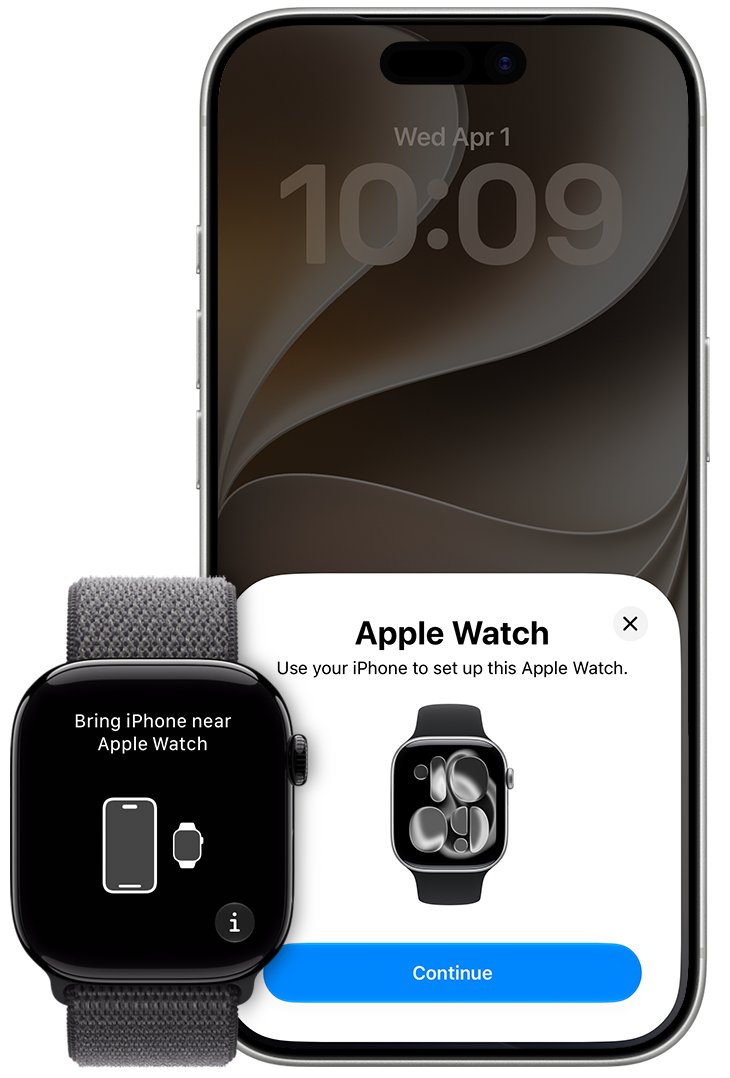
- Hold the watch near your unlocked iPhone and wait for Use your iPhone to set up this Apple Watch, then tap Continue. If nothing appears, open the Apple Watch app, tap All Watches, then tap Add Watch.
- Finish pairing, then on the watch open Settings and tap General > About. Note the Serial Number.
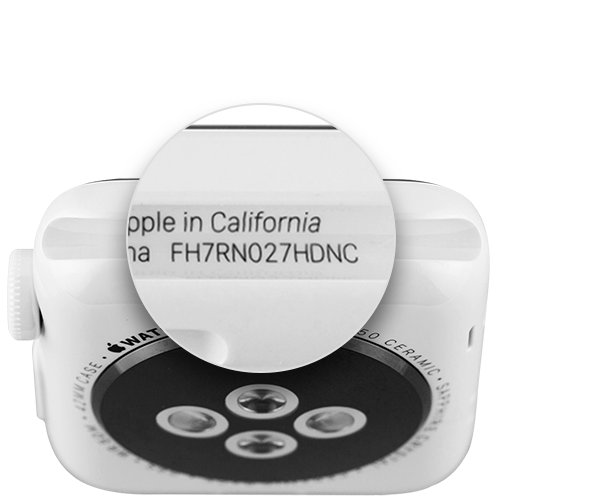
- Remove the band and read the serial number engraved inside the band slot. It must match the one in About.
- Go to checkcoverage.apple.com, enter the serial number and the CAPTCHA, then select Submit.
- Check that the model and coverage Apple shows match the watch in your hand.
If the watch will not pair through the Apple Watch app, or Apple's coverage page does not recognise the serial number, do not buy it.
How to check Apple Watch serial number and IMEI
Apple shows the serial number in three places. On a genuine watch all three agree, and cellular models also list an IMEI.
- On the watch, open Settings, tap General, tap About, then scroll down to Serial Number or IMEI.
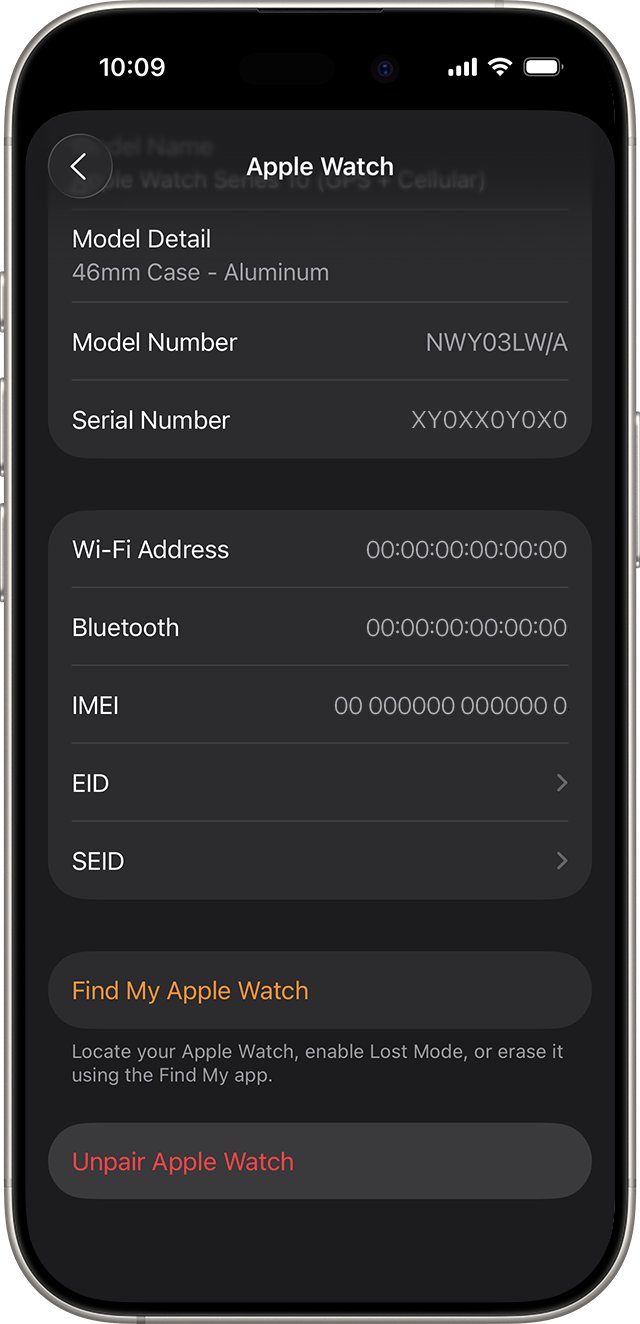
- On the iPhone, open the Apple Watch app, tap the My Watch tab, then tap General > About.
- Compare the Serial Number on the iPhone with the one on the watch.
- On Apple Watch Series 1 or later, including SE and Ultra models, remove the band and read the serial number inside the band slot.
- On Apple Watch (1st generation), read the serial number engraved on the back of the case.
- On a GPS + Cellular model, check that IMEI appears in About. GPS-only models do not have an IMEI.
A serial number that differs between the case and the software is a reason to walk away, even if the watch pairs.
Apple Watch warranty check with the serial number
Apple's coverage page is the quickest outside check. It reads the serial number and returns the device and its warranty or AppleCare status.
- Copy the serial number from Settings > General > About on the watch.
- Open checkcoverage.apple.com in a browser.
- Type the serial number into Enter a serial number.
- Type the characters from the CAPTCHA image, then select Submit.
- Read the product name shown and compare it with the model you were told you are buying.
- Note the coverage status so you know whether limited warranty or AppleCare still applies.
You can also select Sign In on the same page to see every device linked to your own Apple Account.
How to identify Apple Watch series and size
A fake is often sold as a newer model than it is. The model number in the Apple Watch app, plus the case size engraved on the back, tells you exactly which Apple Watch generation you have.
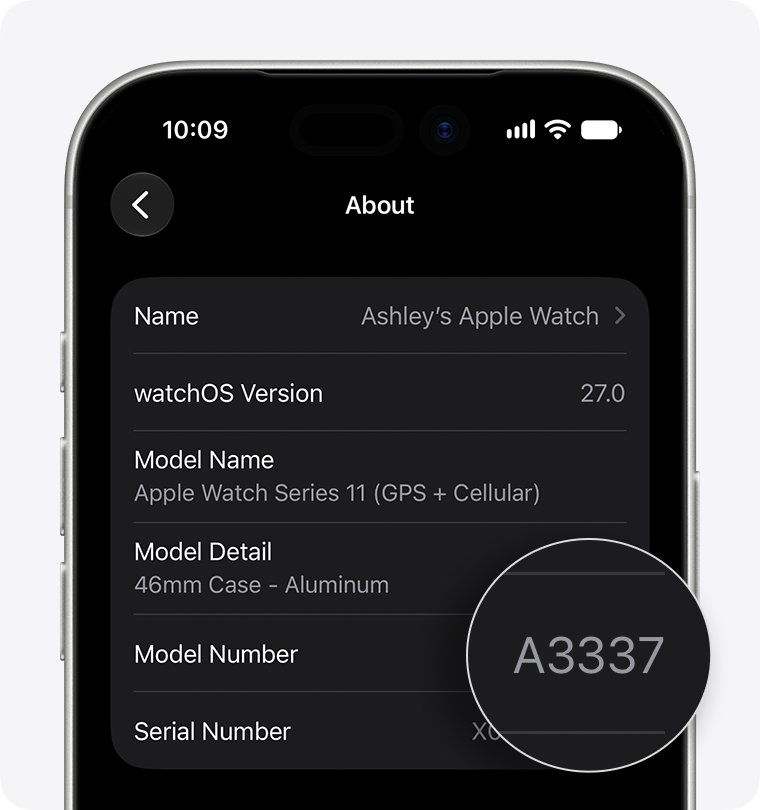
In the Apple Watch app, tap My Watch > General > About, then tap Model Number. The field changes from a part number starting with M to a five-digit model number starting with A.
| Model | Case sizes | Model numbers (North America, Europe, Asia Pacific) | Front and back |
|---|---|---|---|
| Apple Watch Series 12 (GPS) | 42mm, 46mm | A3581, A3584 | Ceramic Shield 2, aluminum back |
| Apple Watch Series 12 (GPS + Cellular) | 42mm, 46mm | A3582, A3587 | Aluminum, titanium or ceramic cases |
| Apple Watch Ultra 4 | 49mm | A3579 | Sapphire crystal, ceramic back |
| Apple Watch Series 11 (GPS) | 42mm, 46mm | A3331, A3333 | Ion-X glass, aluminum back |
| Apple Watch Series 11 (GPS + Cellular) | 42mm, 46mm | A3335, A3337 | Ion-X glass (aluminum) or sapphire crystal (titanium) |
| Apple Watch SE 3 (GPS) | 40mm, 44mm | A3324, A3325 | Ion-X glass, aluminum back |
| Apple Watch SE 3 (GPS + Cellular) | 40mm, 44mm | A3326, A3328 | Ion-X glass, aluminum back |
| Apple Watch Ultra 3 | 49mm | A3281 | Sapphire crystal, ceramic back |
China mainland models use different A-numbers. For older watches, look the model number up on Apple's Identify your Apple Watch page; a number that is not on Apple's list does not belong to a real Apple Watch.
Does a real Apple Watch have a SIM slot or reset button?
No. Apple states that Apple Watch has no SIM slot and no reset button. Cellular models get their plan during setup, and the small holes in the case are for sound, plus water-depth measurement on Apple Watch Ultra.
| What you see | Genuine Apple Watch | What it means |
|---|---|---|
| A SIM card tray or slot | Never present | Not an Apple Watch |
| A pinhole reset button | Never present; holes are speaker and sensor openings | Not an Apple Watch |
| Serial number inside the band slot | Present on Series 1 and later | Missing or mismatched means walk away |
| Case size engraved on the back | Present | Must match the size the seller listed |
| Setup through the Apple Watch app on iPhone | Required | A watch that cannot be added there is not genuine |
| IMEI in Settings > General > About | Only on GPS + Cellular models | An IMEI on a GPS-only listing is a mismatch |
Check Activation Lock before buying a used Apple Watch
A real watch can still be useless to you if it is linked to someone else's Apple Account. Activation Lock blocks pairing with a new iPhone until the previous owner's password is entered.
- Turn the watch on. If you see a passcode screen or the watch face, it has not been erased yet.
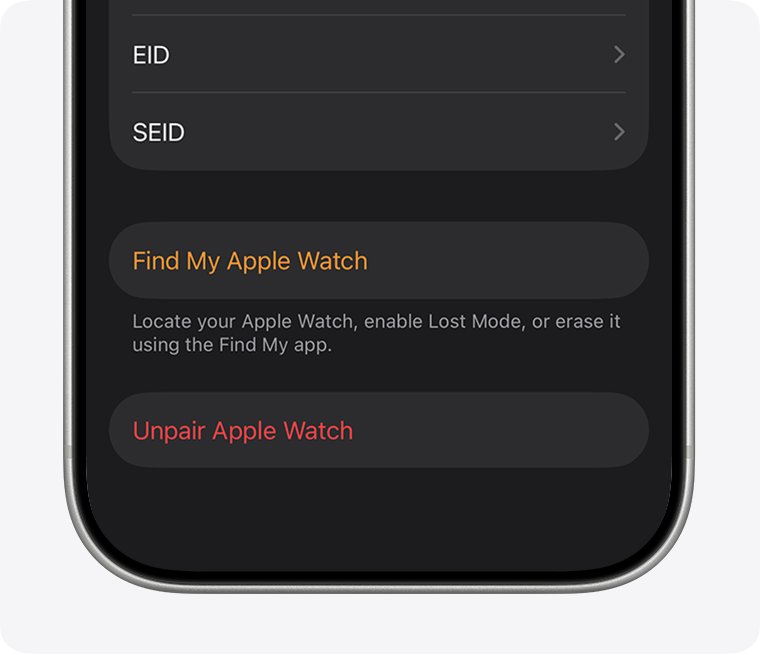
- Ask the seller to unpair it in their Apple Watch app: My Watch > All Watches, tap the info button, then tap Unpair Apple Watch and enter their Apple Account password.
- If the seller no longer has the iPhone, ask them to erase it from icloud.com/find, then select Remove under the watch.
- Pair the watch with your iPhone. If setup asks for the previous owner's Apple Account password, Activation Lock is still on.
- On a cellular model, ask the seller to remove and cancel any active cellular plan.
- After pairing, open My Watch > All Watches, tap More Info and check that Find My Apple Watch now shows under your own account.
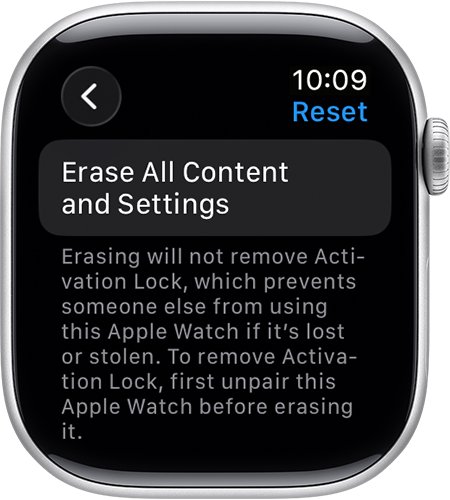
Erasing the watch on its own (Settings > General > Reset > Erase All Content and Settings) does not remove Activation Lock. Only the previous owner's password does, so a full Apple Watch factory reset by the seller is not enough.
Check battery health on Apple Watch
Battery capacity tells you how worn a real used watch is. The screen is part of watchOS, so it only exists on a genuine watch.
- On the watch, open the Settings app.
- Tap Battery to see the charge percentage, a recent charge graph and when it was last charged.
- Tap Battery Health.
- Scroll down to read Maximum Capacity, which compares the battery with when it was new.
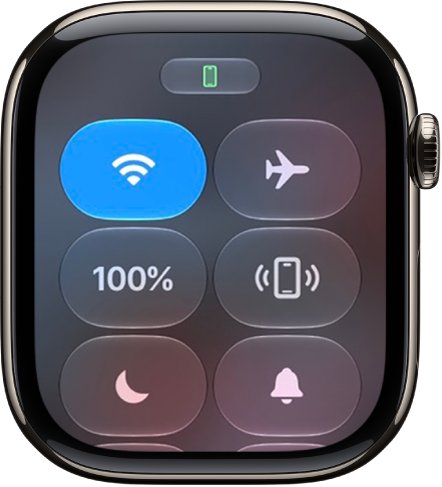
- Press the side button to open Control Center and confirm the battery percentage there matches.
Apple Watch alerts you when capacity is significantly reduced, so a low reading is a reason to ask for a lower price or a battery service quote.
How to check Apple Watch software version and storage
A genuine watch runs watchOS and updates through Apple. watchOS 27 runs on Apple Watch SE 3, Series 9 and later, and Ultra 2 and later.
- On the iPhone, open the Apple Watch app and tap the My Watch tab.
- Tap General, then tap Software Update to see whether watchOS is up to date or an update is offered.
- Go back to General and tap Storage to see what is using space on the watch.
- On the watch itself, open Settings, tap General, then tap Software Update to run the same check without the iPhone.
- If an update is offered, install it with the watch on its charger and at least 50 percent charged.
A watch that claims to be a recent model but cannot see Apple's software updates fails this check. On a genuine watch you can update to watchOS 27 from the same screen.
Does Apple Watch have Find My?
Yes. Find My and Activation Lock turn on automatically when you set up Find My on the paired iPhone, and a genuine watch then appears in Apple's device list.
- Open the Find My app on your iPhone, iPad or Mac, or sign in at icloud.com/find.
- Open the device list and look for the watch by name.
- Select it to see its location, play a sound or turn on Lost Mode.
- In the Apple Watch app, tap My Watch > All Watches, then tap More Info next to the watch.
- If Find My Apple Watch is listed, Activation Lock is on under your Apple Account.
Apple Watch not pairing during setup
These are the setup failures Apple lists. On a used watch, each one tells you something about what the seller did or did not do.
The watch asks for a passcode
It is still paired with another iPhone.
- Ask the seller to unpair it from their iPhone.
- If nobody knows the passcode, the watch must be erased and then set up again.
An Activation Lock screen appears
The watch is still linked to an Apple Account.
- Ask the previous owner to enter their Apple Account email and password, or remove the watch from icloud.com/find.
- Do not complete the purchase until the lock is gone.
Your iPhone says it needs an update
Newer watches need a recent iOS. Series 12 and Ultra 4 need iPhone 11 or later with iOS 27; SE 3 needs iOS 26 or later.
- Tap Update Now when the iPhone offers a software update.
- Wait for the update to finish, then start pairing again.
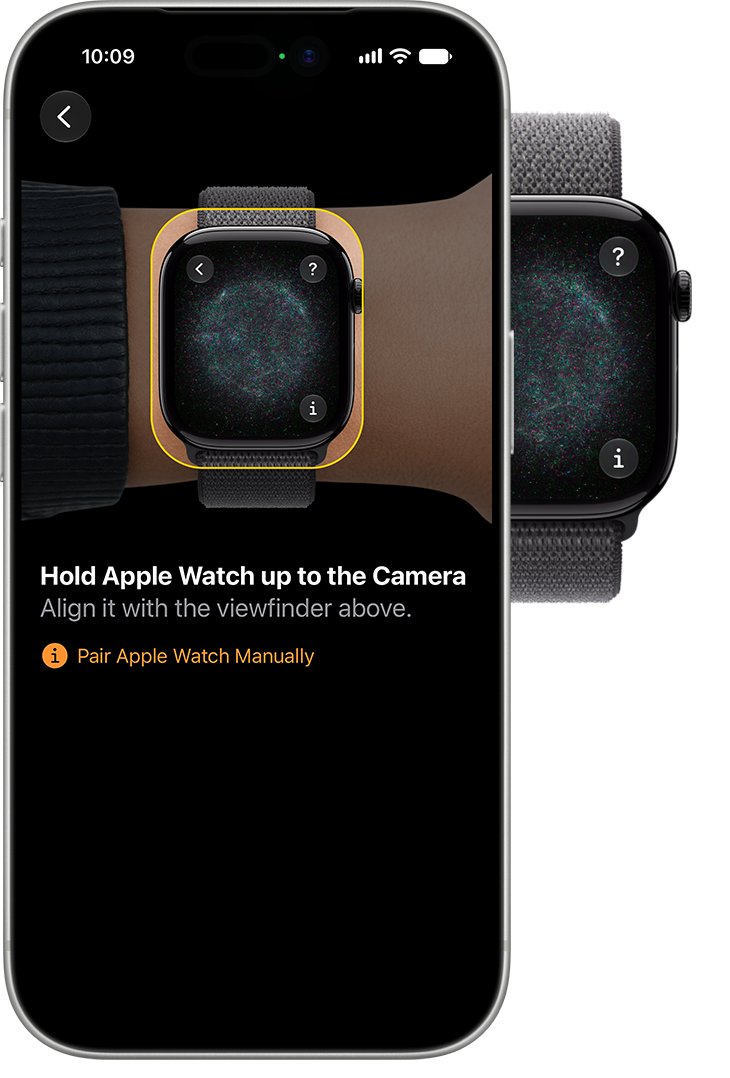
The pairing animation does not appear or the camera cannot read it
The automatic pairing step did not start.
- Tap Pair Apple Watch Manually and follow the prompts.
- Keep the watch and iPhone close together with Bluetooth on.
The watch will not turn on
The battery is flat.
- Put the watch on its charger for a while.
- Press and hold the side button until the Apple logo appears.
You get an error message during setup
A temporary fault on the iPhone or watch.
- Update the iPhone to the latest iOS.
- Turn the iPhone off and on, then turn the watch off and on.
- Try pairing again. A watch that never appears in the Apple Watch app at all is not a genuine Apple Watch.
How to report a fake Apple Watch to Apple
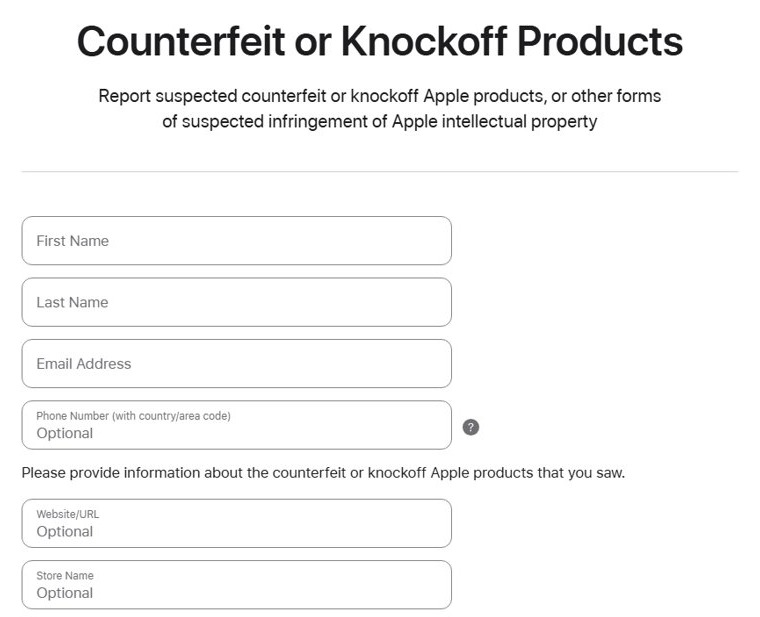
Apple takes reports of counterfeit and knockoff products through a form on its legal site.
- Open apple.com/legal/contact/counterfeit-prevention.html.
- Enter your name, email address and phone number.
- Add the website or store name, its location and the product model the seller used.
- Under the most similar Apple product, choose Apple Watch or Apple Watch Ultra.
- Describe what you saw, tick the box if you have photos or documents to add, and send the form.
Fake messages that use Apple's name are a separate scam; learn to spot real Apple communication.
Where to buy a genuine Apple Watch
Buy from Apple or an Apple Authorized Reseller listed at locate.apple.com, and treat any other seller as a used purchase that must pass the pairing, serial and Activation Lock checks before you pay. Apple's own advice for watches bought from anyone other than Apple or an authorized reseller is to identify the model, confirm Activation Lock is removed and the watch is erased, and pair it with your iPhone first.
Fake Apple Watch FAQ
How do I check if my Apple Watch is original?
Pair it with your iPhone in the Apple Watch app, then compare the serial number in Settings > General > About with the one inside the band slot. Enter that serial number at checkcoverage.apple.com. A watch that pairs, matches and is recognised by Apple is genuine.
How do I check my Apple Watch serial number?
On the watch, open Settings and tap General > About. On the iPhone, open the Apple Watch app and tap My Watch > General > About. On Series 1 and later, the serial number is also engraved inside the band slot.
How do I check the Apple Watch IMEI number?
Open Settings on the watch and tap General > About, or open the Apple Watch app and tap My Watch > General > About. The IMEI appears only on GPS + Cellular models, so a GPS-only watch has none.
How do I identify which Apple Watch I have?
In the Apple Watch app, tap My Watch > General > About and tap Model Number until it shows a five-digit number starting with A. Match that number against Apple's Identify your Apple Watch list.
How do I check my Apple Watch size?
Read the case size engraved on the back of the watch. You can also find the model number in the Apple Watch app and match it to Apple's list, which gives the case size for each model number.
Can I check my Apple Watch battery health?
Yes. On the watch, open Settings, tap Battery, then tap Battery Health and scroll to Maximum Capacity. It compares the current capacity with when the battery was new, and the watch alerts you when it is significantly reduced.
How do I check the Apple Watch software version?
Open the Apple Watch app on iPhone and tap My Watch > General > Software Update, or open Settings > General > Software Update on the watch. It shows whether watchOS is current or offers the newest version the watch supports.
Does Apple Watch have Find My?
Yes. Find My and Activation Lock turn on automatically when Find My is set up on the paired iPhone. The watch then shows in the Find My app and at icloud.com/find, where you can locate it, play a sound or erase it.
How can I find my Apple Watch?
Open the Find My app on your iPhone, iPad or Mac, or sign in at icloud.com/find, then pick the watch from the device list. You can see it on a map, play a sound, use Lost Mode or erase it remotely.
Can a fake Apple Watch pair with an iPhone?
Not through the Apple Watch app. Apple's setup process adds a watch only through that app, using the pairing animation or manual pairing, and a genuine watch then lists its serial number there. A watch that cannot be added this way is not an Apple Watch.