The Verification Required loop in the App Store means your Apple Account has an unpaid balance, so pay that balance and the password and payment prompts stop repeating.
This guide covers paying it on iPhone, iPad, Mac and Windows, using a gift card or added funds instead, and the fixes for cards that keep getting declined.
How to fix Verification Required on the App Store
Apple shows "verification required" or "billing problem with a previous purchase" when it could not charge your payment method for an earlier purchase. Retrying that charge is the fastest way out of the loop.
- Open the Settings app on your iPhone or iPad and tap your name.
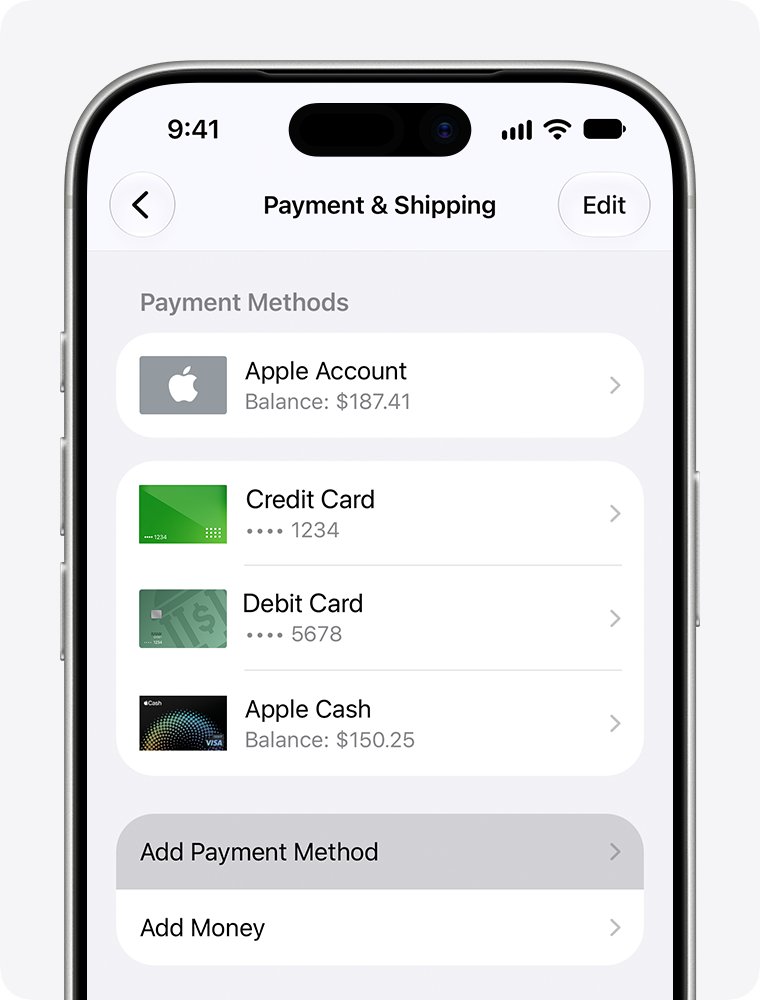
- Tap Payment & Shipping. Sign in with your Apple Account if asked.
- Tap Fix Payment Information.
- Tap Try Again to retry the unpaid purchase.
- Open the App Store and download the app again.
If the retry fails, the card on file cannot be charged. Add a different payment method or pay the balance with Apple Account credit, as shown in the next sections.
Why is App Store asking for verification?
Every prompt in the loop traces back to one unpaid order. Until it is paid, the App Store blocks more than just paid apps.
| What you see | What it means |
|---|---|
| "Verification required" when you tap Get | An earlier charge failed and the account has an unpaid balance |
| "Billing problem with a previous purchase" | The same unpaid balance, worded differently |
| Free apps will not download | An unpaid balance can block free downloads as well as purchases |
| Subscriptions stop working | Subscriptions can be paused until the balance is paid |
| Password, then payment details, then the prompt again | The new details were not accepted, so the unpaid order is still open |
| A text or banking-app request after you enter a card | Your bank requires its own verification before Apple can charge the card |
A pending in-app purchase or a renewal that failed is often the hidden order. It appears in red in your App Store purchase history.
Pay the App Store amount you owe with Apple Account balance
If your card keeps failing, pay the unpaid order with Apple Account credit. Redeem an Apple Gift Card or App Store Card first, then apply the balance to the order.
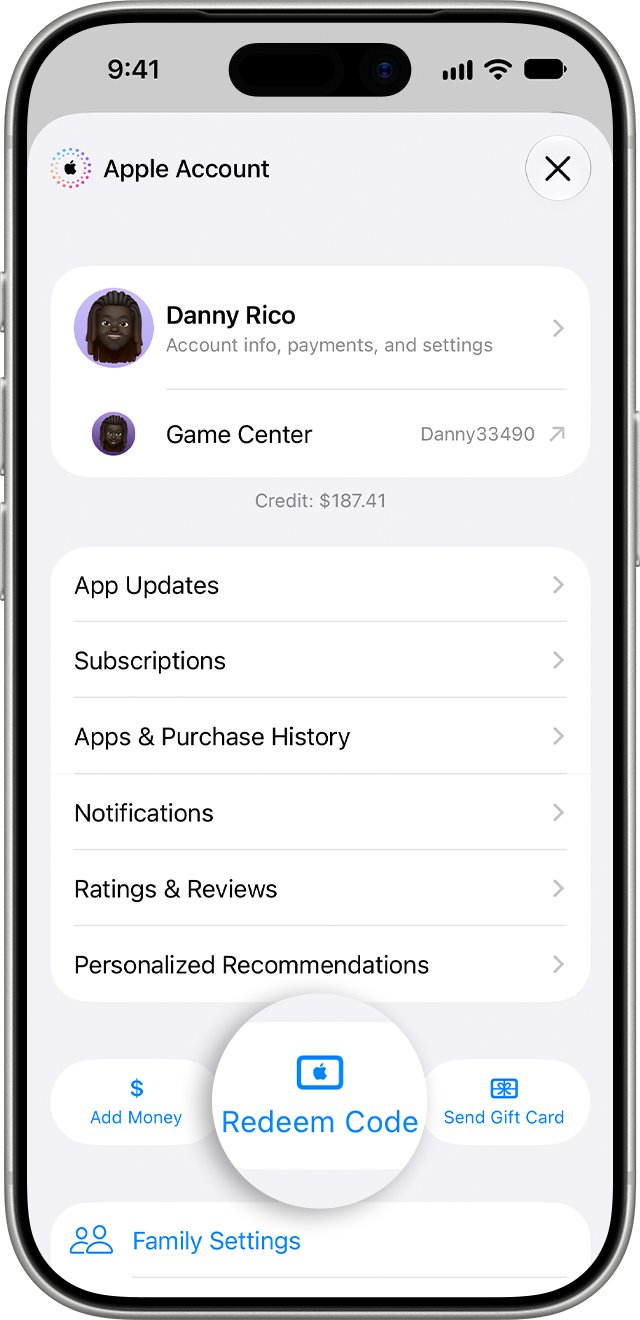
- In the App Store, tap your photo, initials or the My Account button.
- Tap Redeem Code, then tap Use Camera or Enter Code Manually and tap Redeem.
- Open Settings, tap your name, then tap Media & Purchases.
- Tap View Account and sign in if asked.
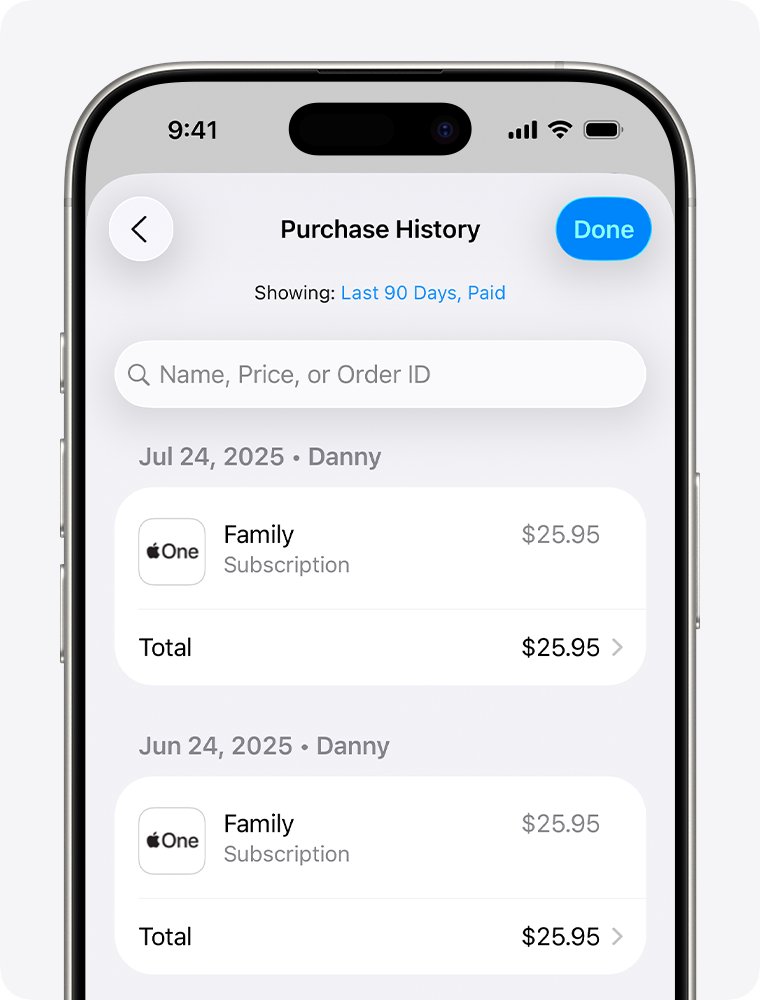
- Tap Purchase History.
- Tap the order with red text that says Amount You Owe.
- Tap Pay with Apple Account Credit.
Any credit left after the unpaid order is paid stays on your account for future purchases. Gift cards are not sold in every country or region.
Add money to Apple Account to stop Verification Required
Adding funds to your Apple Account balance is another way to cover the amount you owe. Your account still needs a valid payment method to add money, and Apple Account balance is not available everywhere.
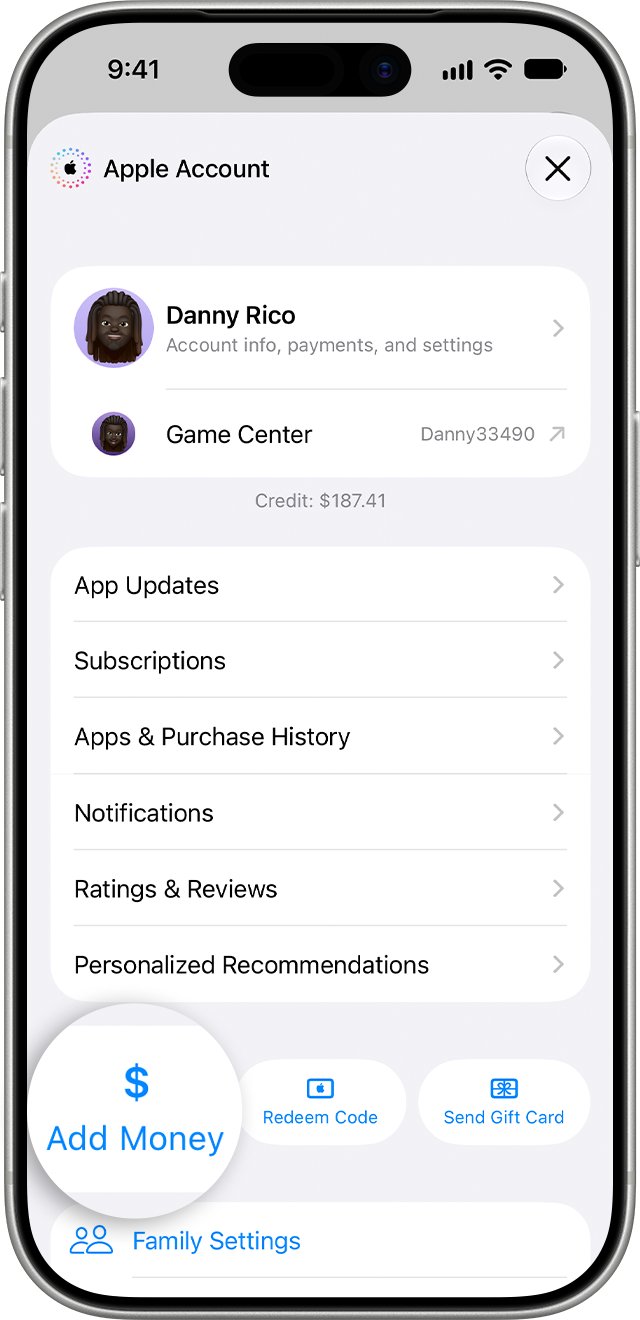
- In the App Store, tap your photo, initials or the My Account button.
- Tap Add Money.
- Tap the amount you want to add.
- Follow the onscreen instructions. Your bank may ask you to approve the charge by text message or in its app.
- Go to Settings > your name > Media & Purchases > View Account > Purchase History.
- Tap the red Amount You Owe order and pay it with your Apple Account credit.
On a Mac, open the App Store, click your name at the bottom of the sidebar, then click Add Money. Skip Set Up Auto Reload unless you want money added automatically.
Change payment method on iPhone for the App Store
When the existing card is expired or blocked, replace it. Apple charges the unpaid balance to the new payment method automatically.
- Open Settings and tap your name.
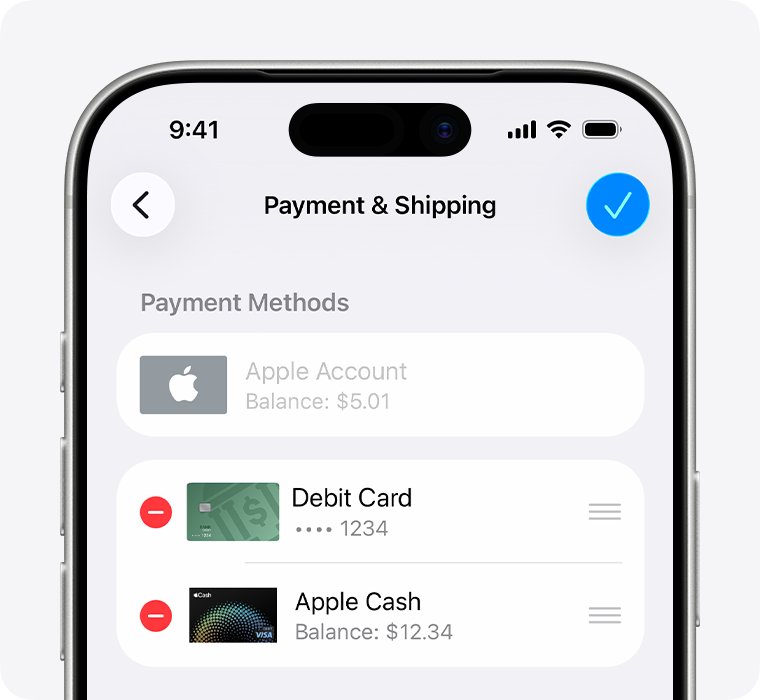
- Tap Payment & Shipping and sign in if asked.
- Tap Add Payment Method.
- Enter the new card or PayPal details. Check that your name and billing address match what your bank has on file.
- Tap Done.
- Tap Edit, tap the red delete button next to the old payment method, then tap Remove.
- Try the download again.
Accepted payment methods differ by country or region. In the United States they include Apple Account balance, Apple Card, Apple Cash, Apple Pay, most credit and debit cards, and PayPal.
Fix App Store Verification Required on Mac
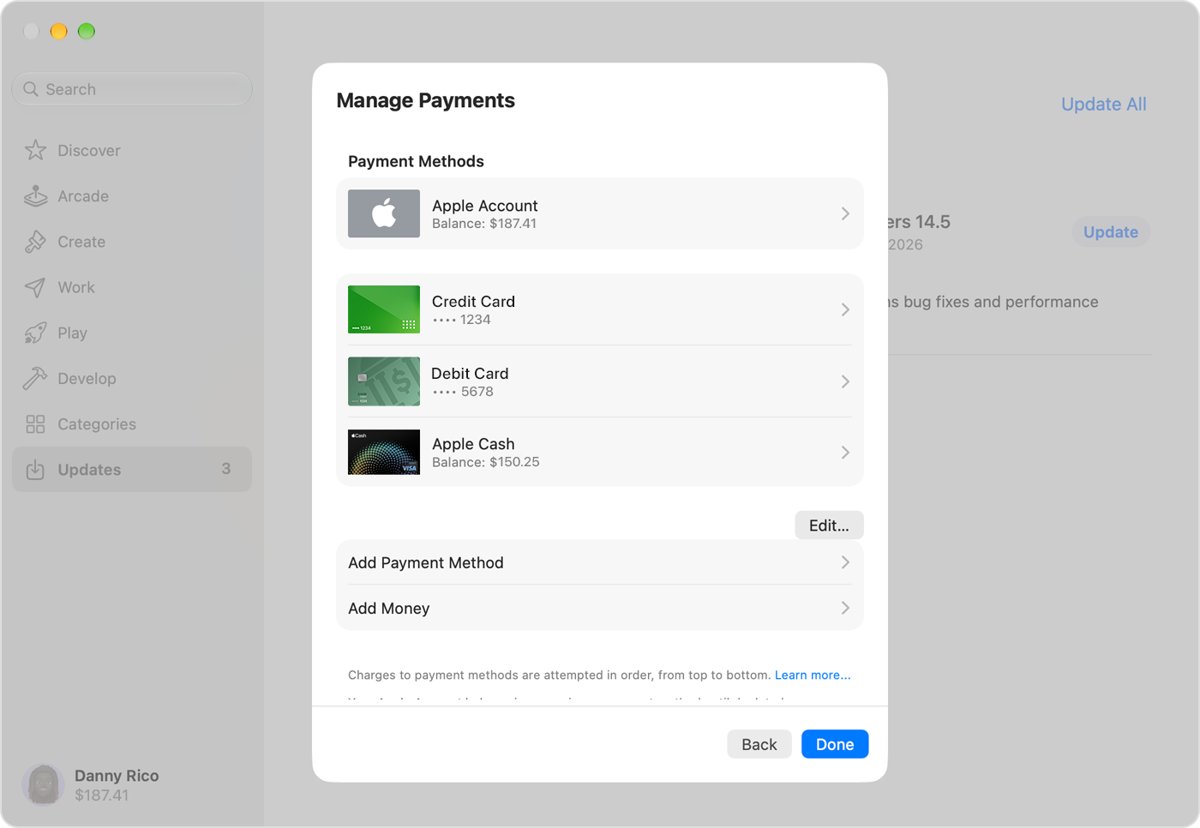
The Mac App Store keeps payment methods in your account page. Replacing the card there clears the same unpaid balance.
- Open the App Store and click your name at the bottom of the sidebar. If you see Sign In, sign in with your Apple Account.
- On the page that appears, click your name again and sign in if asked.
- Click Payment Methods.
- Click Add Payment Method, enter the new payment method, then click Done.
- Click Edit, then click Remove Payment Method next to the old one.
- Download the app again.
Fix Verification Required in Apple Music or iTunes on Windows
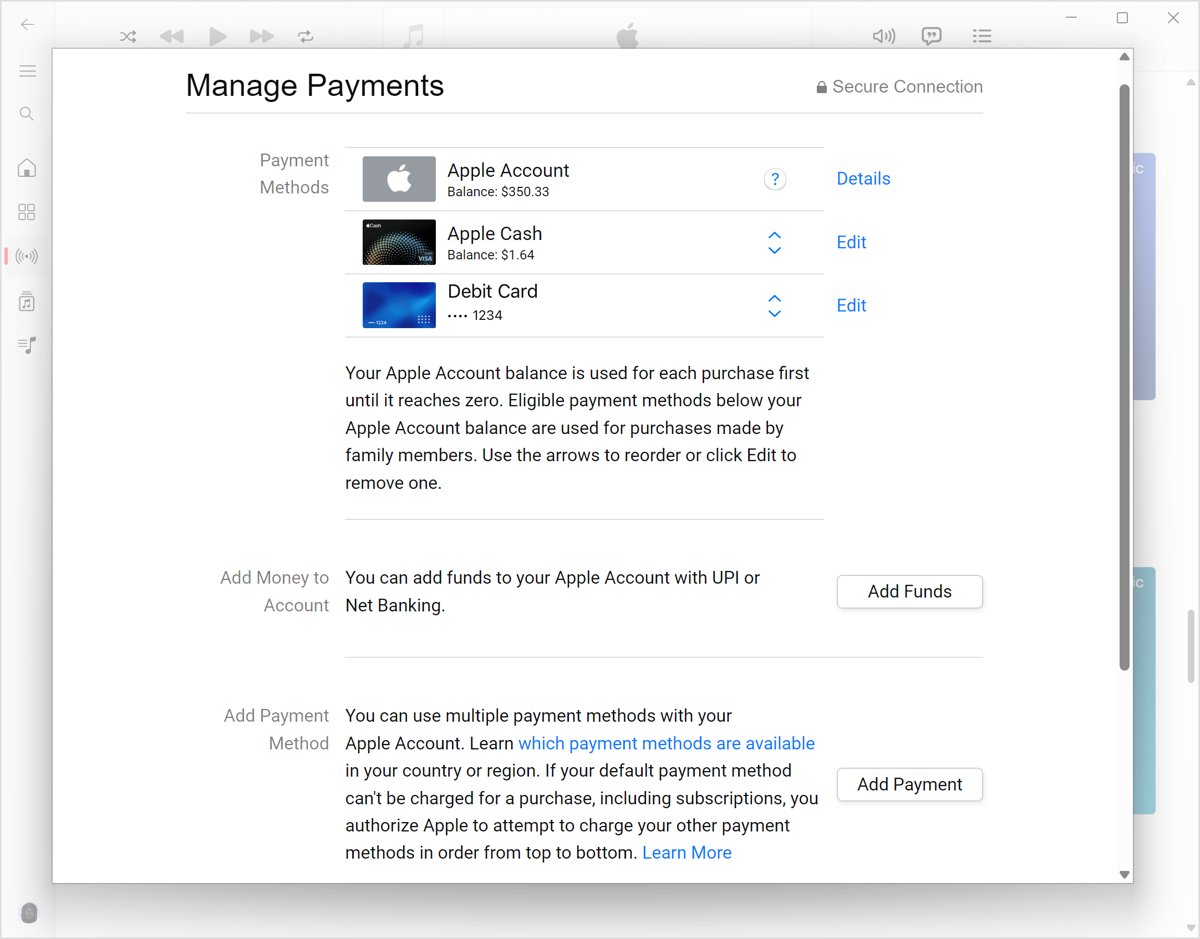
On a Windows PC, the Apple Music app for Windows and the Apple TV app hold your Apple Account payment details. Older PCs use iTunes for Windows instead.
- Open the Apple Music or Apple TV app.
- Click your name at the bottom of the sidebar, then click View My Account. In iTunes for Windows, choose Account > View My Account from the menu bar.
- Next to Payment Information, click Manage Payments.
- Click Add Payment, enter the new payment method, then click Done.
- Click Edit next to the old payment method, then click Remove Payment Method.
- Retry the purchase or download.
How to tell if the App Store unpaid balance is paid
A paid balance shows in two places. Check both before you assume the loop is over.
- Go to Settings > your name > Media & Purchases > View Account > Purchase History.
- Look for any order still marked in red with Amount You Owe. A paid order no longer shows that text.
- Open the App Store and tap Get on a free app.
- Check that the app downloads without a Verification Required prompt.
- On a computer, sign in at reportaproblem.apple.com and search for the charge amount to see the purchase.
If you do not recognize the order that was unpaid, you can request a refund from Apple for an eligible purchase once it is paid.
App Store keeps asking for password on free apps
After the balance is paid, a password prompt on free apps comes from your purchase settings, not from billing. You can turn off the password for free downloads in Media & Purchases.
- Open Settings and tap your name.
- Tap Media & Purchases.
- Tap Password Settings.
- Choose Always Require or Require After 15 Minutes for purchases.
- Turn off the password requirement for free downloads if you no longer want the prompt.
If Password Settings is missing, Face ID or Touch ID is turned on for purchases, and every download, even a free one, asks for it. Paid items always need a password, Face ID or Touch ID.
App Store keeps saying verification required
The new card is declined straight away
Billing details do not match your bank's records, or the bank blocked the charge.
- Check the spelling of your name and billing address in Payment & Shipping.
- Ask your bank to allow international purchases on the card if it blocks them.
- Complete any verification the bank sends by text message or in its app.
- Ask the bank why the card was declined. Apple does not have that information.
"Purchase Not Completed" appears instead
Apple detected suspicious purchase activity and wants to review the purchase.
- Go back to the item you tried to buy and try to buy it again.
- When Purchase Not Completed appears, select Continue.
- Follow the onscreen instructions to submit a purchase review.
Payment method not accepted in your country
Your Apple Account is set to a different country or region than your card.
- Open Settings > your name > Media & Purchases > Country/Region.
- Select your country or region and tap Continue.
- Tap Agree, then enter a payment method and billing address for that country.
- Spend any remaining balance and cancel blocking subscriptions first if the change is refused.
Verification Required on a Family Sharing account
With purchase sharing on, the family organizer's payment method is charged unless the member has a valid one.
- If you are the organizer, change your payment method in Payment & Shipping.
- If you are a member, add your own valid payment method, or redeem a gift card and pay the unpaid order.
- Ask the organizer to update their card if you want them to keep paying, since the organizer pays for shared purchases.
A subscription renewal keeps failing
Each failed renewal can create a new unpaid order.
- Pay the current unpaid order first.
- Open Settings > your name > Subscriptions and tap the subscription.
- Tap Cancel Subscription if you no longer want it.
- Cancel a free trial at least 24 hours before it ends to avoid the renewal charge.
You can't remove the old payment method
Accounts with an unpaid balance, subscriptions such as iCloud+ or purchase sharing must keep one payment method.
- Add the new payment method first.
- Then remove the old one, or change the payment method instead of deleting it.
- Contact Apple Support if the balance still will not clear.
Verification required App Store FAQ
How to fix verification required on the App Store?
Pay the unpaid balance on your Apple Account. On iPhone, go to Settings > your name > Payment & Shipping > Fix Payment Information and tap Try Again. If that fails, add a new payment method, or redeem a gift card and pay the order with Apple Account credit.
Why is App Store asking for verification?
The App Store asks for verification because Apple could not charge your payment method for a previous purchase. Your account now has an unpaid balance. Until it is paid, you might be unable to make purchases, download free apps or use subscriptions.
Why does the App Store keep saying verification required?
The message repeats because the unpaid order is still open. Entering the same declined card again does not pay it. Use a different card, check that your billing details match your bank, or pay the order with Apple Account credit.
Does Verification Required stop free app downloads on iPhone?
Yes. Apple says an unpaid balance can stop you downloading free apps as well as buying paid ones. Free app downloads work again once the outstanding balance is paid with a valid payment method or Apple Account credit.
Why does the App Store ask for telephone verification?
Some banks require you to approve a charge by text message, phone or their own app before Apple can bill the card. If you cannot complete that check, contact your bank or card issuer, because Apple cannot complete it for you.
How do I get out of the Apple account verification loop?
Find the red Amount You Owe order in Settings > your name > Media & Purchases > View Account > Purchase History. Pay it with a working card or Apple Account credit. After the order is paid, the password and payment prompts stop.
Can I fix Apple Store verification required with a gift card?
Yes. Redeem an Apple Gift Card or App Store Card in the App Store with Redeem Code, then open Purchase History, tap the Amount You Owe order and choose Pay with Apple Account Credit. Gift cards are not available in every country or region.