An iPhone that shuts off with a high battery reading and comes back at 10% after a forced restart almost always has a battery that can no longer deliver the peak power the phone asks for, so check Battery Health first and plan a battery service if it shows a warning.
This guide covers why iOS shuts the phone down early, the Battery Health messages that confirm it, the settings that cut the load on a weak battery, and what to do when the iPhone will not turn back on.
How to fix iPhone randomly shutting off
Work through these steps in order. The first two tell you whether the battery is the cause, and the rest stop the shutdowns while you arrange a repair.
- Open Settings, tap Battery, then tap Battery Health (iPhone 15 and later) or Battery Health & Charging (iPhone 14 and earlier).
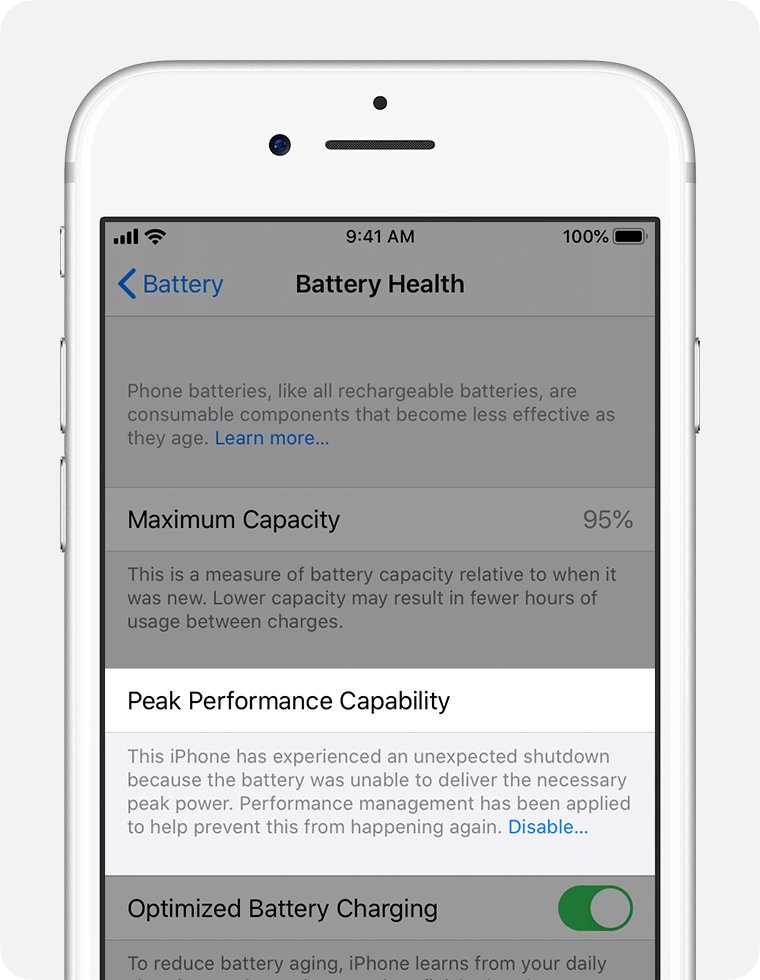
- Read Maximum Capacity and the Peak Performance Capability message, and look for Service next to Battery Health.
- Open Settings > General > Software Update and install any update shown.
- Keep the iPhone between 32º and 95º F (0º and 35º C) and out of the cold for a few hours.
- Keep the battery topped up, because shutdowns are more likely at a low state of charge.
- If Battery Health shows an unexpected shutdown message, a degraded battery warning or Service, book a battery replacement with Apple or an Apple Authorized Service Provider.
Apple states that unexpected shutdowns are more likely when a battery has a low state of charge, a higher chemical age, or is used in colder temperatures. A worn battery is the one cause on that list that does not go away by itself.
Why does my iPhone shut off randomly with battery left?
As a lithium-ion battery chemically ages, its impedance rises. When the phone pulls a burst of power, the voltage of a high-impedance battery drops further than a new one would.
Internal storage, power circuits and the battery itself need a minimum voltage. When the power management system can no longer hold that voltage, iOS shuts the iPhone down to protect those parts. The shutdown is deliberate from the phone's point of view, which is why it feels random to you.
| Condition | What it does to the battery | Lasting or temporary |
|---|---|---|
| High chemical age (many charge cycles, heat history) | Lower maximum capacity and lower peak power | Lasting until the battery is replaced |
| Low state of charge | Impedance rises temporarily, so voltage dips harder under load | Temporary |
| Cold temperature | Impedance rises and battery life drops; the iPhone can turn off | Temporary, returns to normal when the phone warms up |
| Heavy load: camera, games, navigation, 5G in weak signal | Sudden spikes in power demand | Only while the task runs |
| Exposure above 95º F (35º C) | Permanently reduces battery capacity | Lasting |
Batteries in iPhone 14 models and earlier are designed to keep 80 percent of their original capacity at 500 complete charge cycles under ideal conditions. Batteries in iPhone 15 models and later are rated for 1000 cycles.
How to check iPhone battery health
Battery Health is the quickest way to tell a battery fault from a software problem. The screen name differs by model.
- Open the Settings app.
- Tap Battery.
- Tap Battery Health on iPhone 15 and later, or Battery Health & Charging on iPhone 14 and earlier.
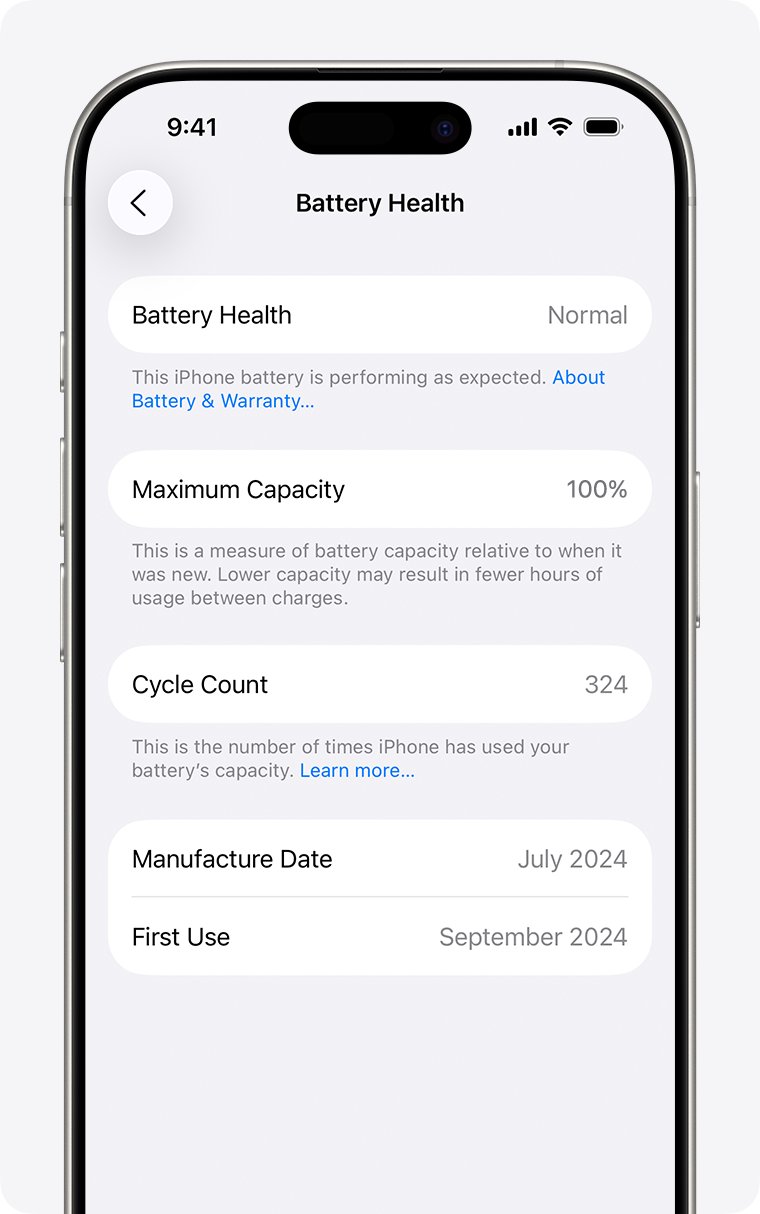
- Note the Maximum Capacity percentage, which compares the battery with its capacity when new.
- On iPhone 15 and later with iOS 17.4 or later, also note the Cycle Count, the manufacture date and the first-use date.
- Read the message under Peak Performance Capability.
- If Service appears next to Battery Health, follow the onscreen instructions to arrange a replacement.
A brand-new iPhone can show slightly less than 100 percent, depending on how long it sat between manufacture and activation.
iPhone peak performance capability messages explained
The Peak Performance Capability line is where iOS records that the phone has already shut down because of the battery. Match your message to a row.
| Message on the Battery Health screen | What it means | What to do |
|---|---|---|
| Your battery is currently supporting normal peak performance. | No battery-related shutdown has been recorded | Look at temperature, low charge and software first |
| This iPhone has experienced an unexpected shutdown because the battery was unable to deliver the necessary peak power. Performance management has been applied… | The battery caused the shutdown and iOS now limits peak performance to prevent another one | Leave performance management on and plan a battery replacement |
| …You have manually disabled performance management protections. | Someone tapped Disable; shutdowns can return | Expect protection to switch back on after the next unexpected shutdown |
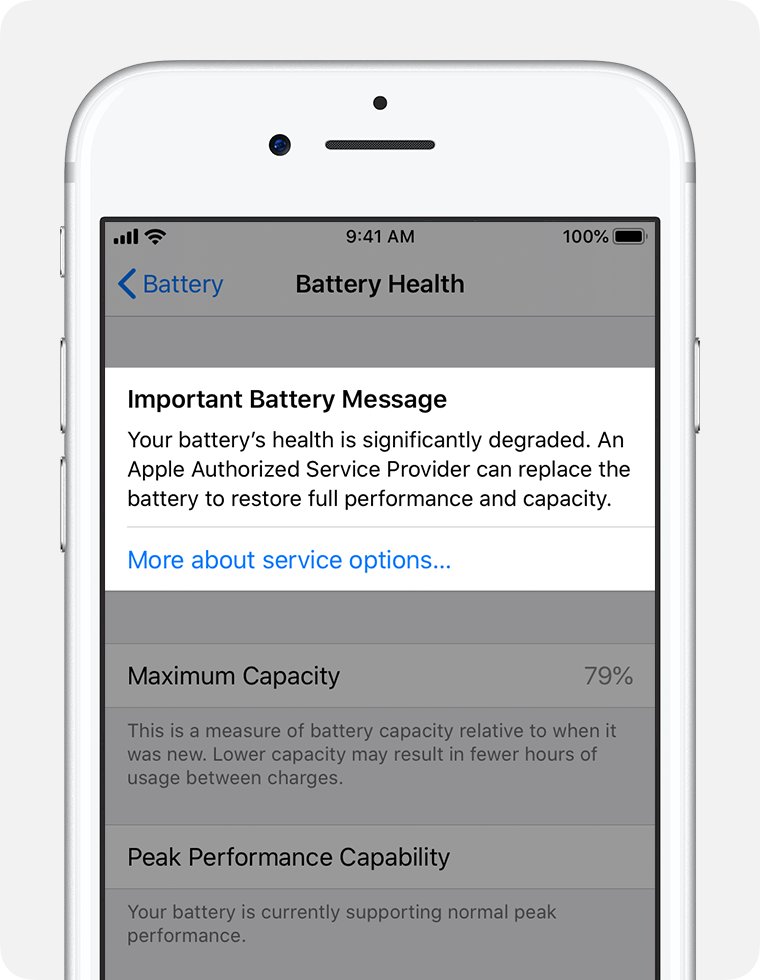
| Your battery's health is significantly degraded. | Capacity and peak power have dropped a long way; it is not a safety issue | Replace the battery to restore full performance and capacity |
| Unable to verify this iPhone has a genuine Apple battery. | Battery Health readings on this screen can be inaccurate | Have the battery checked by Apple |
Once you disable performance management you cannot turn it back on yourself. iOS reapplies it automatically if another unexpected shutdown happens.
How to force restart iPhone after it shuts off
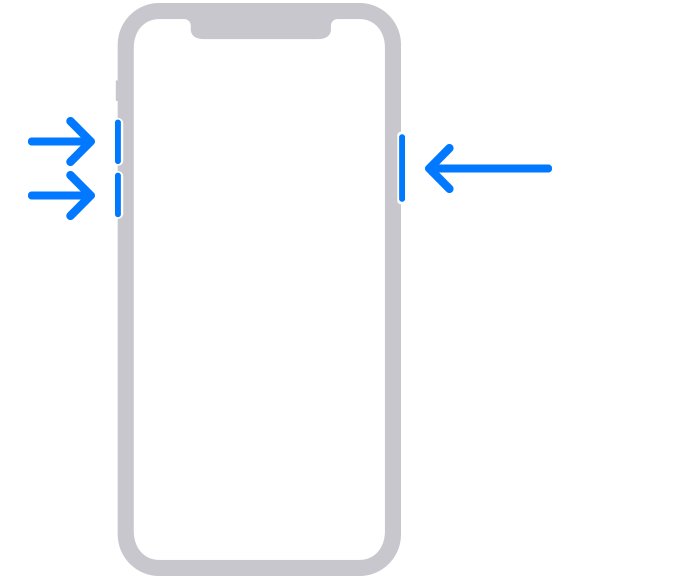
If the iPhone turned off and will not wake with a press of the side button, a forced restart brings it back without erasing anything. These steps are for iPhone 8 and later, including iPhone SE (2nd generation and later).
- Press and quickly release the volume up button.
- Press and quickly release the volume down button.
- Press and hold the side button.
- Release the side button when the Apple logo appears, which can take longer than 10 seconds.
- If nothing appears, charge the iPhone for one hour and try again.
iPhone 7 and earlier models use a different force restart button combination. If the percentage drops from full to about 10% across the shutdown and restart, check Battery Health next, since the gauge reading did not match what the battery could deliver.
How to update iOS to stop iPhone shutting off
Updating keeps your data and settings unchanged. iOS 11.3 and later reassess performance management over time and lower it when the battery can support the phone's peak power needs.
- Back up the iPhone to iCloud or to a computer.
- Connect to Wi-Fi and plug in the charger.
- Open Settings and tap General.
- Tap Software Update to see the installed version and whether an update is available.
- Tap Download and Install and follow the onscreen instructions.
- To stay current, tap Automatic Updates and turn on Automatically Install.
Battery life can dip for a few days after an update while background tasks finish. On iOS 18 and later, Settings > Battery shows an Ongoing iOS Update Insight while that work runs.
iPhone shuts off in cold weather
Cold raises battery impedance, so a phone that runs fine indoors can turn off outdoors with plenty of charge showing. This is temporary and battery life returns once the phone warms up.
- Use the iPhone where the ambient temperature is between 32º and 95º F (0º and 35º C).
- Keep it in an inside pocket in cold weather instead of a bag or car mount.
- Bring a phone that turned off in the cold indoors and let it warm to room temperature before you charge it.
- Store it between -4º and 113º F (-20º and 45º C), and never leave it in a parked car.
- Avoid charging or leaving the iPhone in direct sun, because heat above 95º F (35º C) permanently shortens battery life.
A cold iPhone can also refuse to charge or stop charging partway, so a slow climb in the percentage after a cold-weather shutdown is expected.
How to fix iPhone battery draining fast before it shuts off
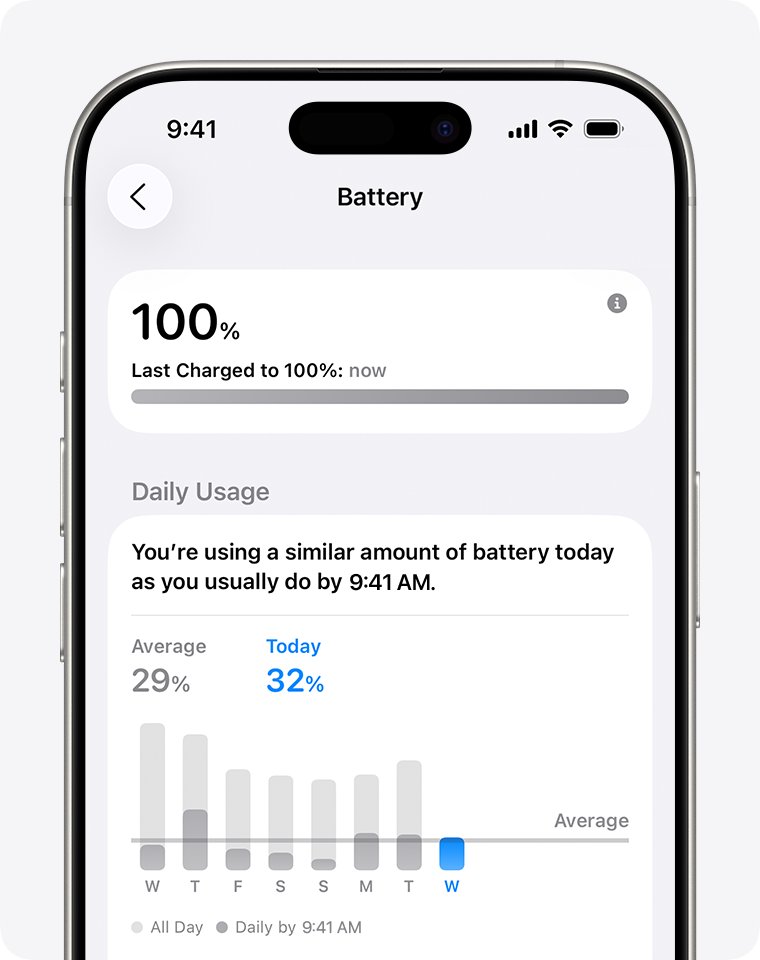
Every shutdown is more likely at a low state of charge, so anything that slows fast iPhone battery drain buys a weak battery time. Use the Battery screen to see what is draining it.
- Open Settings > Battery and act on any suggestion or Insight shown above Daily Usage, such as Enable auto-brightness or Enable auto-lock.
- Check the Daily Usage chart and tap View All Battery Usage to find the apps using the most power.
- Tap an app with high Background Activity and cut back on it, or limit its notifications.
- Connect to Wi-Fi in Settings > Wi-Fi, since Wi-Fi uses less power than cellular data.
- On iPhone 12 and later, open Settings > Cellular > Cellular Data Options > Voice & Data and tap 5G Auto.
- Open Settings > Battery > Power Mode and turn on Low Power Mode.
- On iPhone 15 Pro and later with iOS 26, turn on Adaptive Power to let the phone switch to Low Power Mode at 20 percent.
Low Power Mode reduces Mail fetch, Hey Siri, Background App Refresh and some visual effects, and turns itself off once the battery charges above 80 percent.
Should I replace my iPhone battery if it keeps shutting off?
Settings changes only reduce the load. They cannot restore the peak power a chemically aged battery has lost, so the Battery Health result decides the answer.
| What Battery Health shows | What to do | Why |
|---|---|---|
| Unexpected shutdown message or performance management applied | Replace the battery | iOS has confirmed the battery could not deliver peak power |
| Significantly degraded, or Service next to Battery Health | Replace the battery | Apple recommends service to restore full performance and capacity |
| Maximum Capacity near 80% or below on an older iPhone | Plan a replacement | The battery is near the end of its designed lifespan |
| Normal peak performance and shutdowns only in the cold | Keep the phone warm; no repair needed | Cold effects are temporary |
| Normal peak performance and shutdowns at room temperature | Update iOS, then contact Apple Support | The cause is not the battery's peak power |
| Unable to verify a genuine Apple battery | Have the battery checked | The readings on the screen cannot be trusted |
The one-year warranty covers a defective battery, and Apple offers out-of-warranty battery service for a fee that depends on the model.
iPhone keeps shutting on and off or won't turn back on
iPhone keeps shutting on and off repeatedly
The phone is stuck in a boot loop, often on the Apple logo, and cannot finish loading iOS.
- Connect the iPhone to a Mac with the Finder or a PC with the Apple Devices app.
- On iPhone 8 and later, press and quickly release volume up, press and quickly release volume down, then hold the side button until the Connect to computer screen appears.
- Choose Update on the computer first; only Restore erases your data.
- If the update fails, repeat the steps and choose Restore.
iPhone shut off and won't turn back on
The battery has run flat or the phone is frozen with a black screen.
- Force restart the iPhone with volume up, volume down and a long press of the side button.
- If it stays dark, charge it for one hour and try again.
- If it shows a low-charge battery icon, check the cable and adapter, then charge for 30 minutes or until it starts.
- If it still will not turn on, contact Apple for service.
iPhone keeps turning off with full battery only outdoors
Cold raises battery impedance and the phone protects itself by turning off.
- Bring the iPhone indoors and let it warm up.
- Turn it back on with the side button once it reaches room temperature.
- Check Battery Health for an unexpected shutdown message, which means the battery is also worn.
iPhone plugged in but battery going down
Charging pauses at extreme temperatures, and a computer that is asleep or off cannot charge the phone.
- Move the iPhone to a room between 62º and 72º F (16º and 22º C), the ideal range.
- Look for a lock screen notification or a note in Settings > Battery that charging is paused.
- Plug into a wall adapter, or keep the computer awake and powered on while it charges the phone.
An iPhone 17 that turns off randomly follows the same pattern, with a few model-specific checks.
iPhone randomly shutting off FAQ
Why did my iPhone randomly shut off?
Most random shutdowns happen because the battery cannot supply the burst of power the phone needs, so iOS turns it off to protect internal parts. Apple lists an aged battery, a low state of charge and cold temperatures as the conditions that make this likely.
Why does my iPhone keep shutting off with a full battery?
A high percentage shows stored charge, not the battery's ability to deliver peak power. A chemically aged battery with high impedance can drop below the minimum voltage under load even when the gauge reads full, and the phone shuts down.
How do I fix my iPhone randomly shutting off?
Open Settings > Battery > Battery Health and read the Peak Performance Capability message. Update iOS, keep the phone warm and charged above 20 percent, and replace the battery if the screen reports an unexpected shutdown or degraded health.
Why did my iPhone completely shut off and not turn back on?
The battery either ran flat or the phone froze with a black screen. Force restart it, then charge it for one hour if nothing happens. If it shows a low-charge icon, charge it for 30 minutes, and contact Apple if it still stays dark.
Why does my iPhone suddenly lose battery?
Background activity, poor signal, high screen brightness and the days after an iOS update all drain charge faster. Open Settings > Battery and check Daily Usage and View All Battery Usage to see which apps and system activity used the power.
Why is my iPhone losing battery quickly?
An older battery holds less charge, so each percentage point lasts a shorter time. Check Maximum Capacity in Battery Health; batteries in iPhone 14 and earlier are designed to keep 80 percent capacity after 500 complete cycles under ideal conditions.
Should I let my iPhone battery run down?
No. You can charge your iPhone every night even if it is not empty, and it stops charging when full. Running a worn battery down to a low state of charge also makes unexpected shutdowns more likely, so keep it topped up.
Does shutting down my iPhone save battery?
Turning the iPhone off stops the drain for that time, but it does not repair a worn battery or restore its peak power. For long-term storage, Apple recommends keeping the iPhone half charged.
Is it safe to keep using an iPhone with a degraded battery?
Yes. Apple states the significantly degraded message does not indicate a safety issue and the battery can still be used. Expect shorter battery life and more noticeable performance effects until the battery is replaced.
Will updating iOS stop my iPhone from shutting off?
Updating helps when the cause is software, and iOS 11.3 and later adjust performance management over time. An update cannot restore lost battery capacity, so a phone with a Battery Health shutdown warning still needs a new battery.