Excel saves workbooks as .xlsx by default, uses .xlsm when a workbook holds macros, .xlsb for binary workbooks, .xltx and .xltm for templates, and .xlam for add-ins, while .xls is the format of Excel 97-2003 and earlier.
This guide lists every extension Excel can open or save, what each one stores, which Excel version introduced it, and how to save or convert between them.
Which Excel file extension should you save as?
Match what the workbook has to do with the row below. The Save as type name is the label Excel shows in the Save As dialog.
| Your situation | Save as type | Extension |
|---|---|---|
| Everyday workbook with no macros | Excel Workbook | .xlsx |
| Workbook that runs VBA macros or Excel 4.0 macro sheets | Excel Macro-Enabled Workbook | .xlsm |
| Large workbook you want stored in binary form | Excel Binary Workbook | .xlsb |
| Reusable starting file without macros | Excel Template | .xltx |
| Reusable starting file with macros | Excel Macro-Enabled Template | .xltm |
| Extra code that loads into Excel | Excel Add-In | .xlam |
| Someone still uses Excel 97-2003 | Excel 97-2003 Workbook | .xls |
| Data for another app or database import | CSV (Comma delimited) or CSV UTF-8 | .csv |
| Sharing with LibreOffice or other OpenDocument apps | OpenDocument Spreadsheet | .ods |
| A copy nobody should edit | PDF or XPS Document | .pdf or .xps |
If none of those apply, keep .xlsx. It is the default in current Excel for Windows and Mac, and it is the format Microsoft 365 features such as AutoSave and the Accessibility Checker need.
Why Excel file extensions matter
The extension is the part of the file name after the last period, so in expenses.xlsx the extension is xlsx. Windows uses it to pick the app that opens the file and the icon it shows.
In Excel, the extension also tells you what the file can hold, which version can open it and whether it is safe to double-click.
| What the extension tells you | Example | Why it matters |
|---|---|---|
| Whether macros can be inside | .xlsx cannot hold macros; .xlsm can | A file ending in m can run code, so open an .xlsm file only from a source you trust |
| Which Excel versions can open it | .xls works in Excel 97-2003; .xlsx needs Excel 2007 or later | Saving in the wrong format loses data or blocks older users |
| How big the sheet can be | .xls stops at 65,536 rows; .xlsx goes to 1,048,576 | Rows beyond the limit are dropped when you save down |
| Whether formatting survives | .csv and .txt keep values only | Text formats lose formulas, charts and every cell format |
| Whether it is a template or add-in | .xltx opens as a new copy; .xlam loads as extra code | Double-clicking a template does not edit the template itself |
Renaming a file to change its extension does not convert it. The data inside stays in the original format, so Excel either refuses the file or warns that the format and extension do not match.
Excel file extensions by version
Excel kept the .xls extension for its first five binary formats, then switched to the XML-based .xlsx family with Excel 2007. The years below are the ones Microsoft lists for each format.
| Excel version | Workbook extension | Underlying format | Other extensions of that era |
|---|---|---|---|
| Excel 2.0 (1987), 3.0 (1990) | .xls | Early binary | .xlc charts, which current Excel can no longer open |
| Excel 4.0 (1992) | .xls, .xlw | Excel 4.0 binary | .xlw workbook bundles worksheets, chart sheets and macro sheets |
| Excel 5.0 (1994) and Excel 95 (version 7.0) | .xls | BIFF5 | Excel 5.0/95 Workbook is still a Save As choice |
| Excel 97 to Excel 2003 | .xls | BIFF8 | .xlt templates, .xla add-ins, .xlm macro sheets |
| Excel 2007 and later, including Microsoft 365 | .xlsx | Office Open XML | .xlsm, .xlsb (BIFF12), .xltx, .xltm, .xlam |
| Current Excel for Windows | .xlsx (Strict Open XML Spreadsheet) | ISO strict Open XML | Same extension as a normal workbook |
| Excel 98 to Excel 2004 for Mac | .xls | Same as Excel 97-2003 for Windows | Shown on a Mac as Excel 97-2004 Workbook |
Excel for Mac 2011 and later uses the same .xlsx format as Excel for Windows, so an .xlsx file moves between them without conversion.
The differences between XLS vs XLSX
XLS is a single binary file. XLSX is a zip package of XML parts that Excel compresses on save and unpacks on open, with no extra tool needed.
| Feature | XLS (Excel 97-2003) | XLSX (Excel 2007 and later) |
|---|---|---|
| File structure | Binary (BIFF8) | Zip-compressed Office Open XML |
| Rows and columns per sheet | 65,536 rows by 256 columns | 1,048,576 rows by 16,384 columns |
| Unique cell formats | Up to 4,000 | Up to 64,000 |
| Macros | Can store VBA macros | Cannot store macros; use .xlsm instead |
| File size | Larger for the same data | Up to 75 percent smaller in some cases |
| Damaged-file recovery | Single binary file | Parts are stored separately, so a damaged chart or table does not stop the rest opening |
| AutoSave and Accessibility Checker | Not available | Available |
| How current Excel opens it | Compatibility Mode | Normal mode with every feature |
Keep .xls only when the person receiving the file runs Excel 2003 or older. For everyone else, .xlsx keeps more data in a smaller file.
Other Excel file extensions
Beyond workbooks, Excel saves templates, add-ins and a few older or special-purpose formats. The letter at the end follows one rule: x means XML without macros, m means XML with macros.
| Extension | Save as type in Excel | What it is |
|---|---|---|
| .xlsm | Excel Macro-Enabled Workbook | XML workbook that stores VBA code and Excel 4.0 macro sheets |
| .xlsb | Excel Binary Workbook | Binary (BIFF12) workbook; also keeps macros |
| .xltx | Excel Template | XML template; cannot store macros |
| .xltm | Excel Macro-Enabled Template | XML template that keeps macros |
| .xlt | Excel 97-2003 Template | Binary template for Excel 97-2003 |
| .xlam | Excel Add-In | XML add-in that runs VBA projects and Excel 4.0 macro sheets |
| .xla | Excel 97-2003 Add-In | Binary add-in for Excel 97-2003 |
| .xll | None (built by developers) | DLL-based Excel add-in |
| .xlm | None in current Excel | Excel macro sheet from before Excel 2007 |
| .xlw | Open only | Excel 4.0 workbook; current Excel opens it but cannot save to it |
| .xlr | Open only | Microsoft Works 6.0-9.0 spreadsheet |
| .xml | XML Spreadsheet 2003 or XML Data | XML spreadsheet or data export |
| .ods | OpenDocument Spreadsheet | Open standard format used by LibreOffice and similar apps; some formatting may not carry over |
| .dbf | Open only | dBase III and IV tables |
| .htm, .html, .mht, .mhtml | Web Page, Single File Web Page | Workbook saved for a browser |
| .pdf, .xps | PDF, XPS Document | Fixed-layout copy for sharing or printing |
Excel CSV and text file formats explained
Every text format saves only the active sheet, and all formatting is lost. Formulas are written out as their results, or as plain text if the cell shows the formula.
| Save as type | Extension | Separator and use |
|---|---|---|
| CSV UTF-8 (Comma delimited) | .csv | Commas, UTF-8 encoding; UTF-8 Unicode encoding keeps accented and non-English characters |
| CSV (Comma delimited) | .csv | Commas, for another Windows app or database import |
| CSV (Macintosh), CSV (MS-DOS) | .csv | Commas, with line endings and characters set for those systems |
| Text (Tab delimited) | .txt | Tabs between columns |
| Unicode Text | .txt | Tabs, saved as Unicode text |
| Text (Macintosh), Text (MS-DOS) | .txt | Tabs, set for those systems |
| Formatted Text (Space delimited) | .prn | Lotus space-delimited; rows over 240 characters wrap to a new line |
| DIF | .dif | Data Interchange Format for other spreadsheet apps |
| SYLK | .slk | Symbolic Link format, read by Multiplan and other spreadsheet apps |
In a CSV file, a cell that contains a comma is wrapped in double quotation marks so the column count stays correct. The euro symbol turns into a question mark in .csv, tab-delimited .txt and .prn files.
File formats that are not supported in Excel
Current Excel, back to Excel 2007, can neither open nor save these. Save the file from the original program into a format Excel reads, such as .csv or .xls, and then open that copy.
| Format | Extension | Original program |
|---|---|---|
| Excel Chart | .xlc | Excel 2.0, 3.0 and 2.x |
| WK1, FMT, WK2, WK3, FM3, WK4 | .wk1, .wk2, .wk3, .wk4, .wks | Lotus 1-2-3, all versions |
| Microsoft Works | .wks | Microsoft Works, all versions |
| DBF 2 | .dbf | dBASE II |
| WQ1 | .wq1 | Quattro Pro for MS-DOS |
| WB1, WB3 | .wb1, .wb3 | Quattro Pro 5.0 and 7.0 for Windows |
Excel VBA FileFormat values for each extension
When a macro saves a workbook with Workbook.SaveAs, the FileFormat argument sets the format. Use the value that matches the extension you put in the file name.
| Extension | XlFileFormat constant | Value |
|---|---|---|
| .xlsx | xlOpenXMLWorkbook (also xlWorkbookDefault) | 51 |
| .xlsm | xlOpenXMLWorkbookMacroEnabled | 52 |
| .xltm | xlOpenXMLTemplateMacroEnabled | 53 |
| .xltx | xlOpenXMLTemplate | 54 |
| .xlam | xlOpenXMLAddIn | 55 |
| .xlsb | xlExcel12 | 50 |
| .xls | xlExcel8 | 56 |
| .xlsx (strict) | xlOpenXMLStrictWorkbook | 61 |
| .csv | xlCSV / xlCSVUTF8 | 6 / 62 |
| .ods | xlOpenDocumentSpreadsheet | 60 |
How to change the default file format in Excel
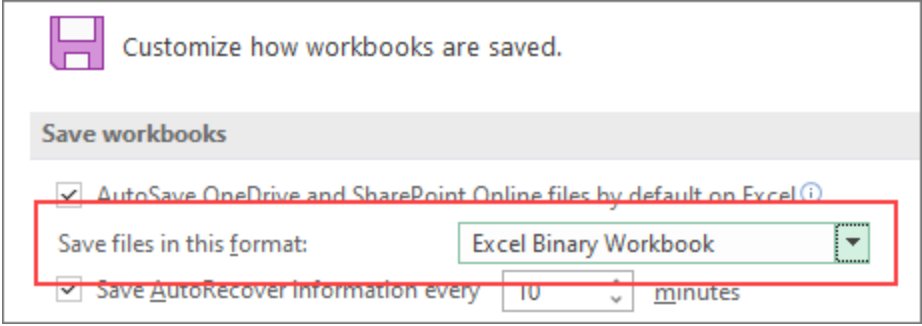
New workbooks save as .xlsx unless you change this. Pick .xlsm here if most of your workbooks carry macros.
- Open Excel and select File > Options.
- Select the Save category.
- Under Save workbooks, open the Save files in this format list.
- Select the format you want, for example Excel Macro-Enabled Workbook (*.xlsm).
- Select OK. New workbooks now use that format unless you choose another one in Save As.
How to save an Excel file as a different file type
The list of formats changes with the active sheet: a chart sheet offers fewer choices than a worksheet.
- Open the workbook in Excel.
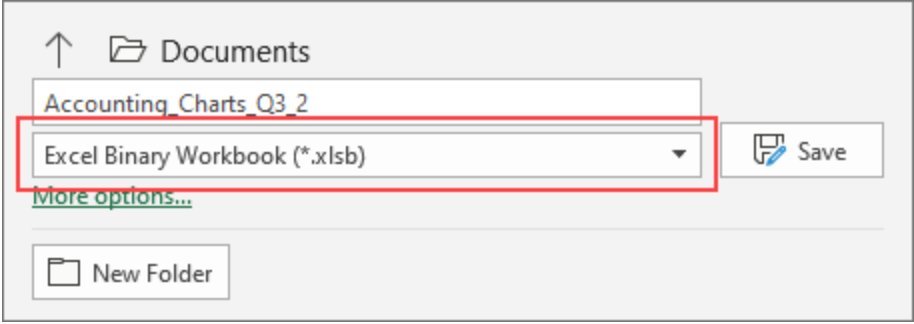
- Select File > Save As.
- Under Places, choose where to save, such as OneDrive or This PC.
- In the Save As dialog box, go to the folder you want.
- Open the Save as type list and select the format, for example CSV UTF-8 (Comma delimited) (*.csv).
- Type a name in the File name box and select Save.
For a text format, Excel saves only the active sheet. Switch to each other sheet and save it separately if you need them all.
How to convert XLS to XLSX in Excel
An .xls file opens in Compatibility Mode, which hides features that Excel 97-2003 lacks. Converting it removes that limit.
- Open the .xls workbook in Excel.
- Select File > Info.
- Select Convert to switch the workbook to the current file format.
- To keep the original .xls as well, select File > Save As instead (or Save a copy for a file on OneDrive or SharePoint).
- Set Save as type to Excel Workbook (*.xlsx), or Excel Macro-Enabled Workbook (*.xlsm) if the file has macros, and select Save.
How to save an Excel workbook as XLS for older versions
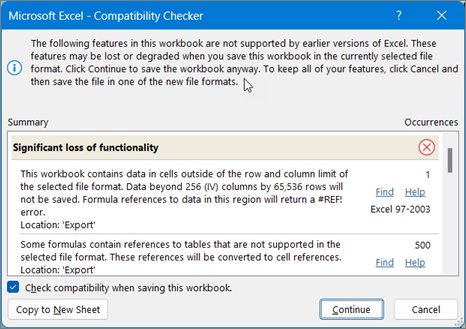
Run the Compatibility Checker first so you see what Excel 97-2003 will drop.
- Select File > Info > Check for Issues > Check Compatibility.
- Review each issue, select Find to jump to it, and fix what you can.
- Select File > Export > Change File Type.
- Under Workbook File Types, select Excel 97-2003 Workbook (*.xls).
- In the Save As window, choose a folder, enter a name in File name, and select Save.
Select Check compatibility when saving this workbook in the checker to run it automatically on every later save.
How to show file extensions in Windows 11 File Explorer
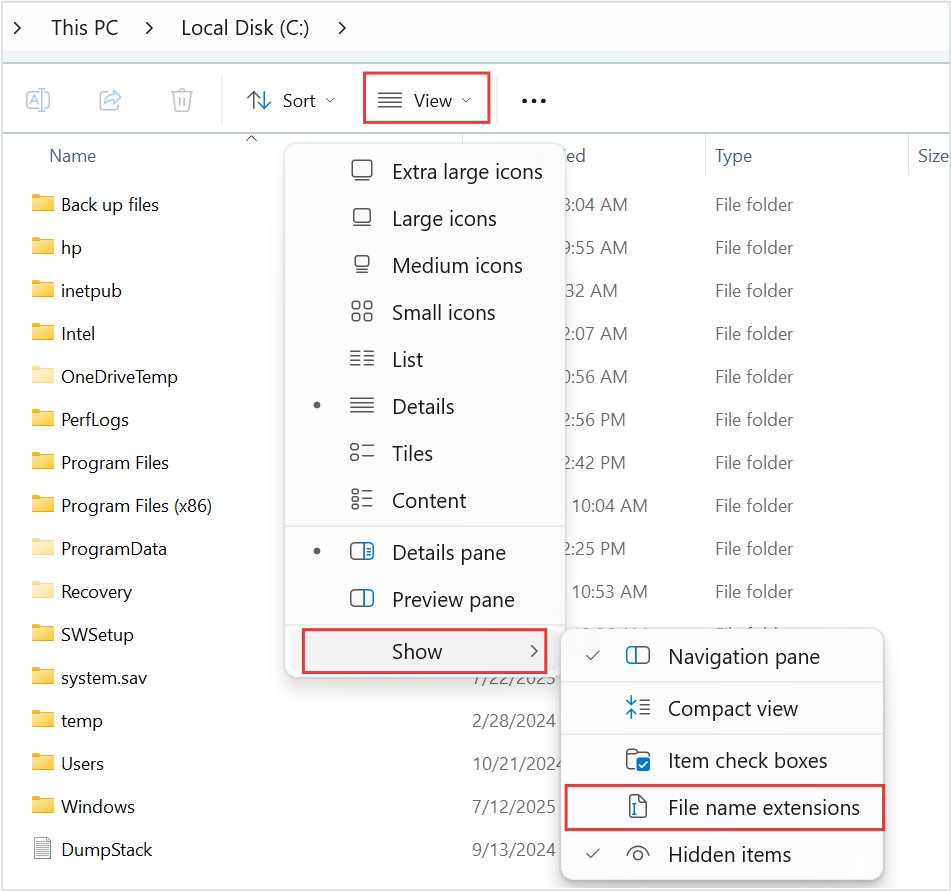
File Explorer in Windows 11 hides extensions by default, so report.xlsx and report.xlsm both show as report. Turn the extensions on to see which Excel format each file uses.
- Type file explorer in the taskbar search box and select File Explorer.
- Select View on the command bar.
- Select Show > File name extensions.
- Open the folder that holds your Excel files and read the ending after the last period, such as .xlsx or .xlsm.
Inside Excel, an .xls or other Excel 97-2003 file opens in Compatibility Mode, and File > Info offers a Convert button.
Excel file not opening or losing data after changing the format
Macros in a downloaded .xlsm file are blocked
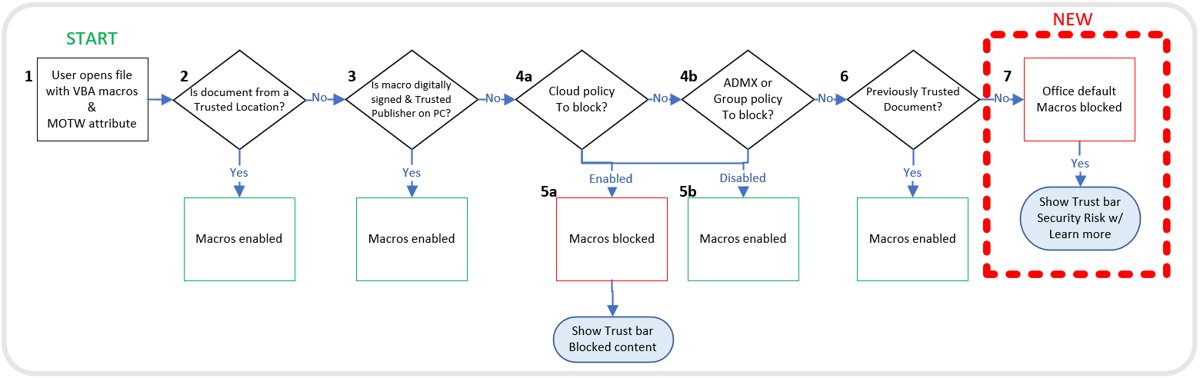
Windows marks files from the internet or email with Mark of the Web, and Office blocks macros in those files by default.
- Close the workbook, and continue only if you trust the person or site that sent it.
- Right-click the file in File Explorer and select Properties.
- On the General tab, select the Unblock checkbox and select OK.
- Open the file again in Excel.
Rows, columns or formatting are missing after saving as .xls
Excel 97-2003 stops at 65,536 rows by 256 columns and 4,000 unique cell formats, so anything beyond that is dropped.
- Open your original .xlsx copy, not the saved .xls file.
- Select File > Info > Check for Issues > Check Compatibility to list what will be lost.
- Move or split the data that sits past row 65,536 or column 256, or keep the workbook as .xlsx.
Formulas and formatting disappeared after saving as CSV
CSV keeps only the text and values shown in the active sheet.
- Reopen the original workbook file rather than the .csv copy.
- Save your working copy as Excel Workbook (*.xlsx).
- Use File > Save As with a CSV type only for the export copy you send to another app.
Excel will not open a file after you renamed its extension
Changing the extension renames the file but does not convert the data inside it.
- Rename the file back to its original extension in File Explorer.
- Open it in Excel.
- Select File > Save As, pick the format in Save as type, and select Save.
Excel file extensions FAQ
What is the default file extension for Excel?
The default is .xlsx, the Excel Workbook format used since Excel 2007. You can change it under File > Options > Save, in the Save files in this format list, for example to .xlsm if you write macros.
What is the difference between XLSX and XLSM?
Both are XML-based Excel workbooks. An .xlsx file cannot store VBA macros or Excel 4.0 macro sheets, while an .xlsm file can. The m at the end of an Office extension always means the file may contain macros.
Is XLSB better than XLSX?
XLSB stores the same workbook in binary form (BIFF12) instead of XML, and it can keep macros. Microsoft notes that it takes less time to save. XLSX stays the default and is the safer file to send when you do not know which app the other person uses.
Does renaming .xls to .xlsx convert the file?
No. Changing an extension only renames the file; the data stays in the old format. Open the .xls file in Excel and use File > Info > Convert, or File > Save As with Excel Workbook as the type.
Why can't I see .xlsx at the end of my file names?
File Explorer hides extensions by default. In Windows 11, open File Explorer and select View > Show > File name extensions to display .xlsx, .xlsm and every other extension.
How many rows can an XLS file hold?
An .xls file holds 65,536 rows by 256 columns per sheet. The .xlsx format holds 1,048,576 rows by 16,384 columns, so data past the old limit is lost when you save down to .xls.
Can a CSV file keep formulas and formatting?
No. A CSV file saves only the text and values shown in the active sheet. Formatting, charts, other sheets and live formulas are lost, so keep an .xlsx copy as your working file.
What is an .xlam file in Excel?
An .xlam file is an Excel add-in in the XML, macro-enabled format. It holds VBA code that loads into Excel to add functions or commands. The older binary add-in format from Excel 97-2003 uses .xla.
Can Excel open ODS files?
Yes. Excel opens and saves OpenDocument Spreadsheet (.ods) files, the format used by LibreOffice Calc and other apps. Some formatting does not carry over when you save or open an .ods file.
Which Excel formats can store macros?
Macros survive in .xlsm workbooks, .xlsb binary workbooks, .xltm templates, .xlam add-ins and the older .xls, .xlt and .xla formats. Saving a workbook with macros as .xlsx removes them.