To cancel an Apple subscription on iPhone, open Settings, tap your name, tap Subscriptions, tap the subscription, then tap Cancel Subscription.
This guide covers the same job on the web, iPad, Mac, Windows PC and Android, plus iCloud+, free trials, missing subscriptions and refunds.
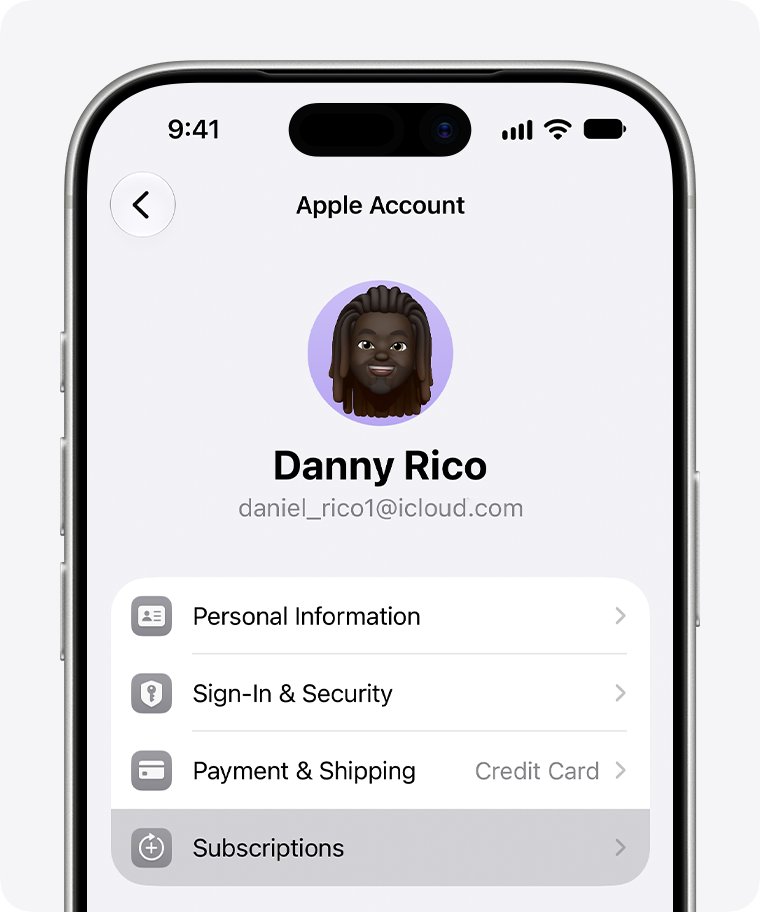
How to cancel Apple subscriptions on iPhone
The Subscriptions list holds subscriptions from Apple, such as Apple Music or Apple TV, and subscriptions you bought inside an app from the App Store.
- Open Settings and tap your name at the top.
- Tap Subscriptions.
- Tap the subscription you want to stop.
- Scroll down and tap Cancel Subscription.
If there is no Cancel Subscription button, or you see an expiration message in red text, the subscription is already canceled.
Where to cancel Apple subscriptions on each device
Every route ends at the same Subscriptions list for your Apple Account. Pick the row that matches the device in front of you.
| Your device | Where to cancel | Notes |
|---|---|---|
| iPhone, iPad or Apple Vision Pro | Settings > your name > Subscriptions | Fastest route for most people |
| Any browser, no Apple device | account.apple.com subscriptions page | Works on a borrowed computer or an Android phone |
| Mac | App Store > your name > Subscriptions | Sign in to the App Store first if asked |
| Windows PC | Apple Music or Apple TV app > View My Account | Older PCs use the same menu in iTunes for Windows |
| Android, billed through Google Play | Google Play app | Applies to Apple Music or Apple TV bought in Google Play |
| Bought through a wireless carrier or other provider | That carrier or provider | Apple cannot cancel it for you from the Subscriptions list |
How to cancel Apple subscriptions online
Use this route to cancel Apple subscriptions without an iPhone. It works from any browser, including one on a Windows PC, a Chromebook or an Android phone.
- Open a browser and go to
account.apple.com/account/manage/section/subscriptions. - Sign in with the email address or phone number and password for your Apple Account.
- Follow the onscreen instructions to choose the subscription and cancel it.
If the password is rejected, reset your Apple Account password first, then come back to the subscriptions page.
How to cancel app subscriptions on iPad
iPad and Apple Vision Pro use the same Settings path as iPhone. App Store subscriptions, such as a streaming or fitness app you subscribed to in the app, appear in the same list.
- Open Settings and tap your name.
- Tap Subscriptions.
- Tap the app or service you want to stop paying for.
- Scroll down if needed, then tap Cancel Subscription.
How to cancel Apple subscriptions on Mac
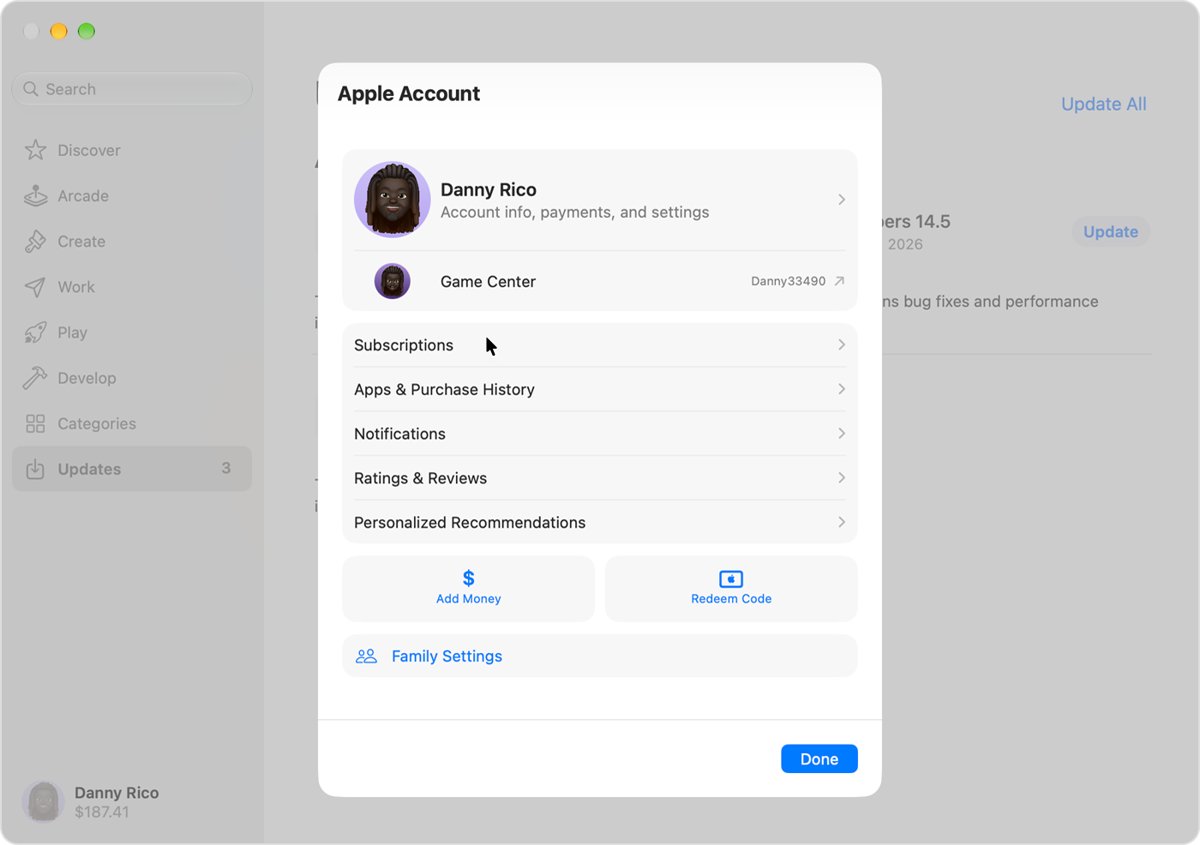
On a Mac, the Subscriptions list sits in your account page inside the App Store app.
- Open the App Store app.
- Click your name at the bottom of the sidebar, or click Sign In and sign in with your Apple Account.
- Click your name on the page that appears, and sign in again if asked.
- Click Subscriptions.
- Click the subscription you want to cancel.
- Click Cancel Subscription.
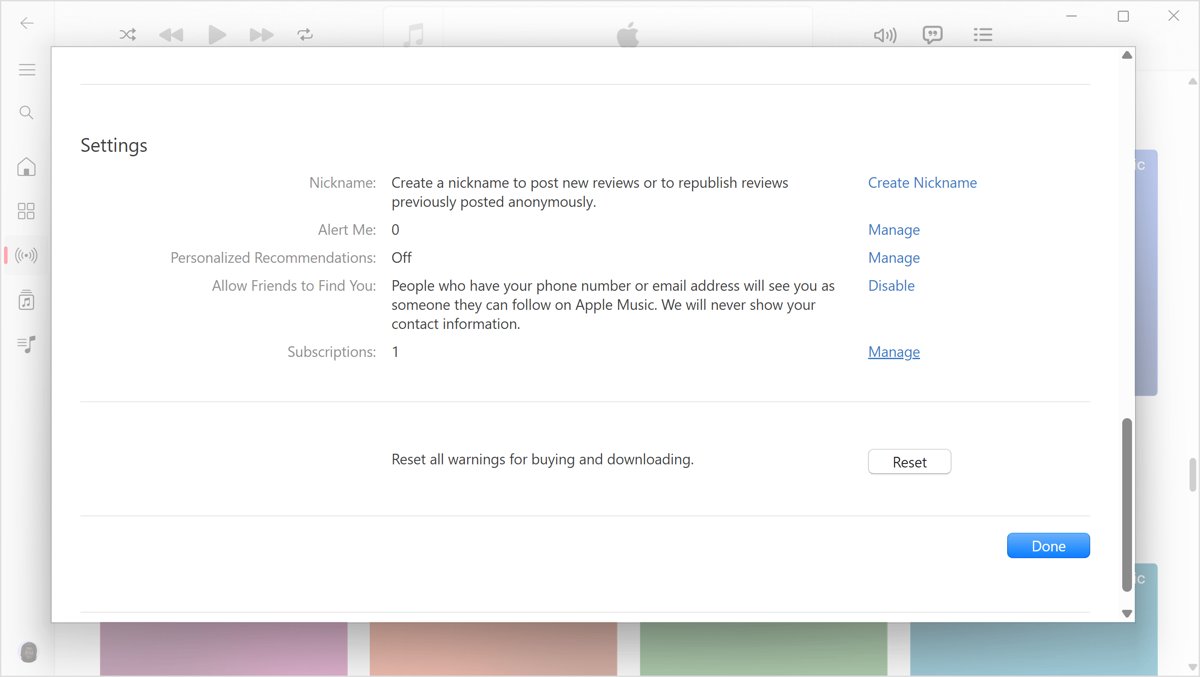
How to cancel Apple subscriptions on PC
On a Windows PC, the Apple Music and Apple TV apps can cancel subscriptions billed by Apple. The web route above also works on a PC and shows every subscription on the account.
- Open the Apple Music or Apple TV app.
- Click your name at the bottom of the sidebar, then choose View My Account, signing in if asked.
- In the Settings section, click Manage next to Subscriptions.
- Find the subscription and click Edit.
- Click Cancel Subscription.
With the older iTunes for Windows, choose Account > View My Account from the menu bar, click Manage next to Subscriptions, click Edit, then click Cancel Subscription.
Cancel Apple subscriptions on Android
Who bills you decides where you cancel. Apple Music or Apple TV bought in the Google Play Store is billed by Google, so Apple's Subscriptions list will not show a cancel option for it.
- Check your email receipt to see whether Google Play or Apple charged you.
- If Google Play bills you, open the Google Play app and cancel the Google Play subscription there.
- If Apple bills you, open a browser and go to
account.apple.com/account/manage/section/subscriptions. - Sign in with your Apple Account and follow the onscreen instructions to cancel.
How to cancel iCloud+ subscription
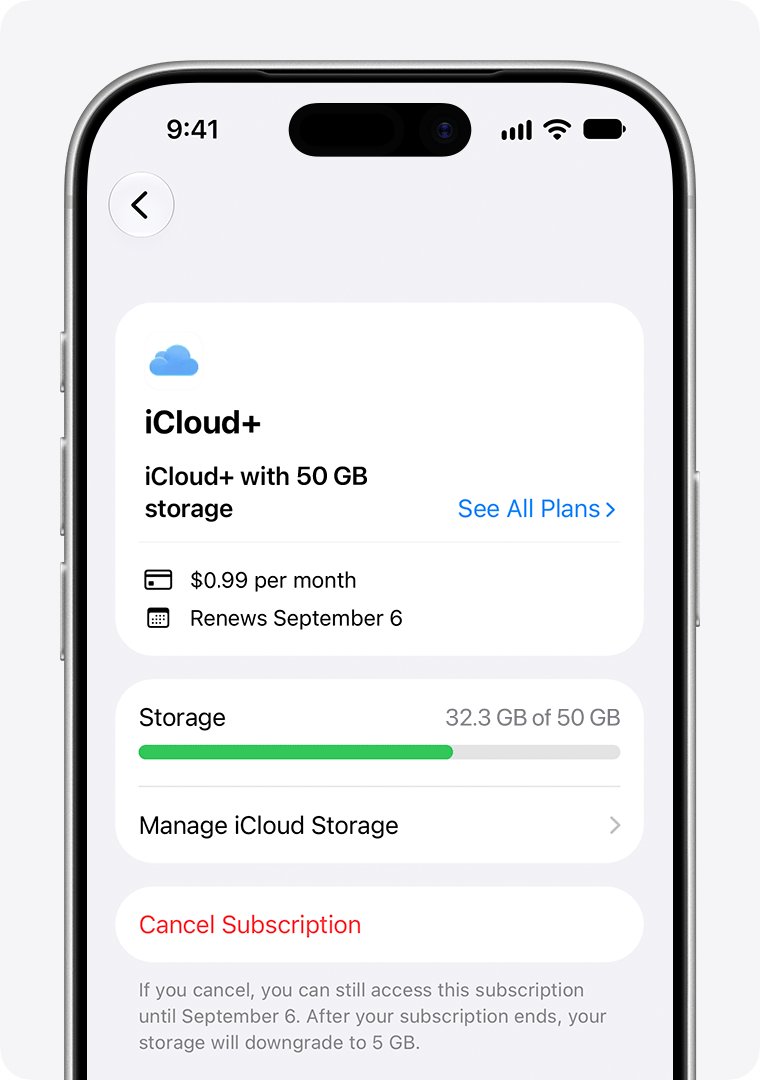
iCloud+ is a storage plan, so cancelling it moves you back to the free 5GB plan. The change takes effect after your current iCloud+ billing period ends.
| Device and version | Steps |
|---|---|
| iPhone or iPad, iOS or iPadOS 18.4 and later | Settings > your name > Subscriptions > iCloud+ under Active > Cancel Subscription |
| iPhone or iPad, iOS or iPadOS 18 to 18.3 | Settings > your name > iCloud > Manage Plan > Downgrade Options, then pick the free plan and tap Done |
| iPhone or iPad, iOS or iPadOS 17 and earlier | Settings > your name > iCloud > Manage Account Storage > Downgrade Options, then pick the free plan |
| Mac, macOS Tahoe 26 or later | Apple menu > System Settings > Apple Account > iCloud > Manage Plan > Cancel Subscription |
| Mac, macOS Sonoma to macOS Sequoia | System Settings > Apple Account > iCloud > Manage Plan > Downgrade Options, then choose the free 5GB plan |
| Windows PC with iCloud for Windows | Manage > Change Storage Plan > Downgrade Options, enter your password, choose the free 5GB plan, click Done |
Download or delete anything above 5GB first. If your data exceeds the new plan, iCloud stops syncing and iCloud backups stop.
On the free plan you also lose iCloud+ features such as Hide My Email and Private Relay.
How to cancel iCloud+ without an Apple device
Apple's route for this case runs through its report-a-problem site, which ends the plan and asks for a refund in one request.
- Go to
reportaproblem.apple.comand sign in with your Apple Account. - Select I'd like to, then select Request a refund.
- Choose the reason for your request, then select Next.
- Select the most recent iCloud+ charge, or the iCloud subscription at the top of the list.
- Select Submit and wait one to two days for a decision.
How to cancel Apple free trial before it renews
A free trial turns into a paid subscription on its own. Apple asks you to cancel at least 24 hours before the trial ends if you do not want it to renew.
- Open Settings, tap your name, then tap Subscriptions.
- Tap the trial, and note the date it is due to renew.
- Tap Cancel Subscription at least 24 hours before that date.
- Check that the subscription now shows an expiration message.
How do I cancel Apple Pay subscriptions?
Apple Pay is a way to pay, not a subscription service. A recurring charge you set up with Apple Pay on a company's website or app is billed by that company, so it never appears in Apple's Subscriptions list.
| How you signed up | Who bills you | Where to cancel |
|---|---|---|
| Apple Music, Apple TV, Apple Arcade, Apple One | Apple | Settings > your name > Subscriptions, or account.apple.com |
| Inside an app downloaded from the App Store | Apple | Settings > your name > Subscriptions |
| On a company's website, paying with Apple Pay | That company | Your account on that company's website or app |
| Through a wireless carrier bundle | The carrier | Contact the carrier |
To find out which company bills you, check your bank or credit card statement for the merchant name on the charge.
How to tell if an Apple subscription is canceled
A canceled subscription stays in the list until it expires, so its presence alone does not mean you will be charged again.
- Open Settings, tap your name, then tap Subscriptions.
- Tap the subscription you canceled.
- Look for an expiration message in red text.
- Check that the Cancel Subscription button is gone.
Both signs mean the subscription will not renew. For iCloud+, a blue check next to the free plan shows the downgrade is set.
Apple subscription not showing in Subscriptions
Can't find the subscription you want to cancel
The subscription is usually on a different Apple Account than the one signed in.
- Search your email for the words "receipt from Apple" or "invoice from Apple".
- Open the receipt for the subscription.
- Check which Apple Account was used for the purchase.
- Sign in to that Apple Account and cancel from its Subscriptions list.
A family member's Apple Account is on the receipt
You can't cancel a family member's subscription from your own account.
- Ask the family member named on the receipt to open their Subscriptions list.
- Ask them to tap the subscription and tap Cancel Subscription.
No receipt from Apple for the charge
The subscription was probably bought from another company.
- Check your bank or credit card statement for the company name on the charge.
- Contact that company to cancel the subscription.
AppleCare plan subscription not listed
The plan setup is not finished, so the plan is not linked to your Apple Account yet.
- Finish your AppleCare plan setup.
- Link the plan to your Apple Account.
- Open Subscriptions again and cancel it there.
Subscription came with your wireless carrier or another provider
The carrier or provider manages that subscription, not Apple.
- Contact your wireless carrier or provider for support.
- To move the subscription to a different Apple Account, contact Apple Support first, then set it up again with the provider.
No Cancel Subscription button
The subscription is already canceled and is waiting to expire.
- Look for an expiration message in red text under the subscription.
- Leave it, because it will not renew.
Cancelling works slightly differently in some countries and regions, and Apple lists special rules for Germany, Israel, South Africa and Türkiye.
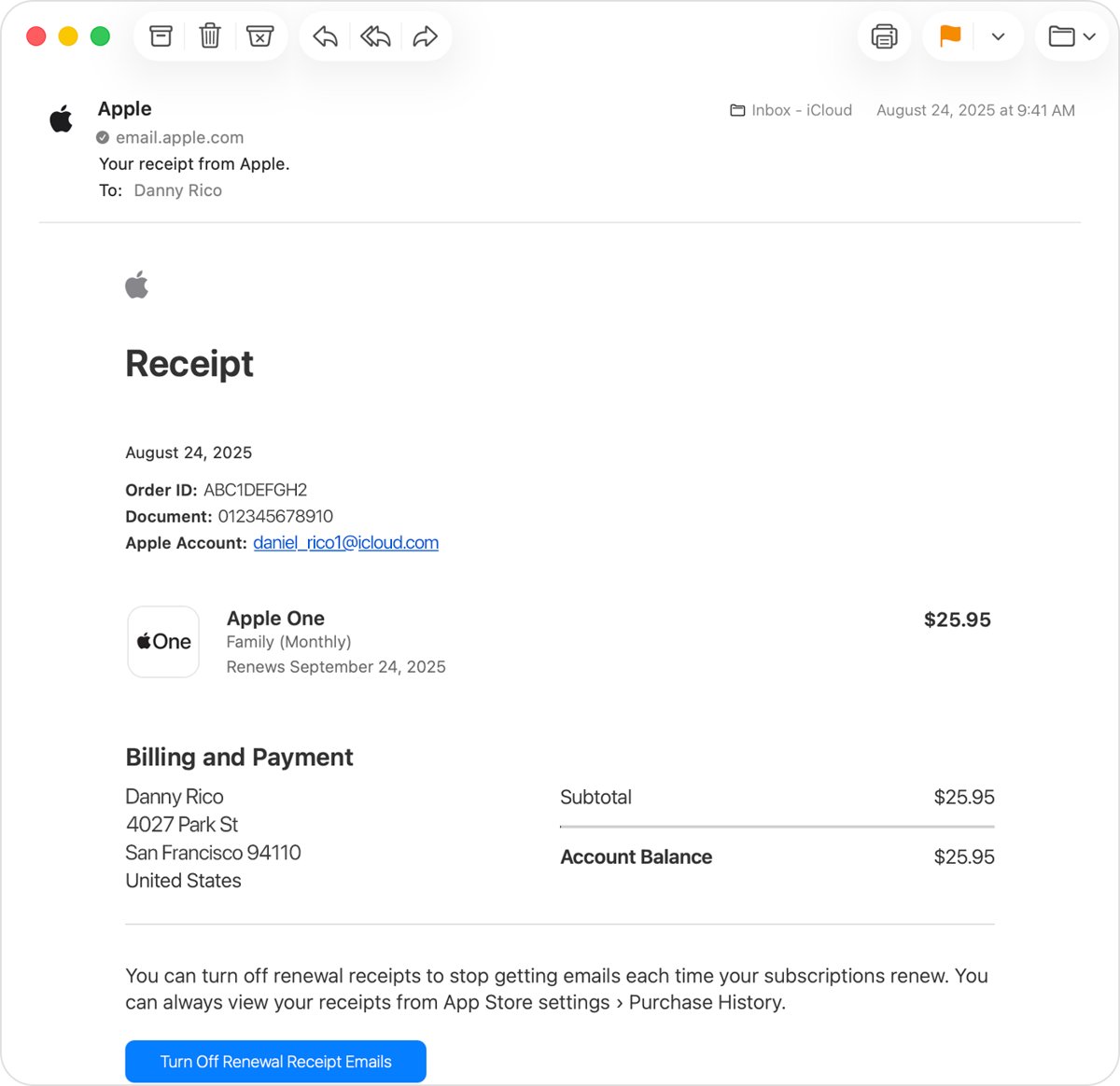
How to get a refund for an Apple subscription
Cancelling stops future charges but does not return a charge already made. Some subscription charges are eligible for an Apple refund, and you request it separately.
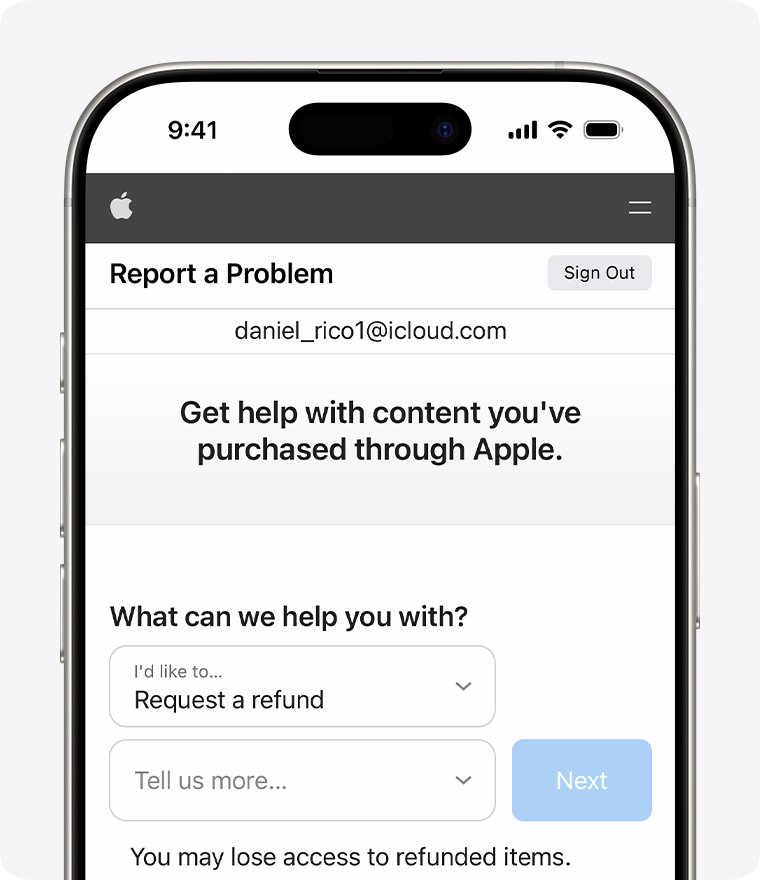
- Sign in to
reportaproblem.apple.comwith your Apple Account. - Tap or click I'd like to, then choose Request a refund.
- Choose the reason for the refund, then choose Next.
- Choose the subscription, then choose Submit.
- Wait 24 to 48 hours for an update on the request.
A pending charge cannot be refunded yet. Wait for the email receipt, then try again.
Cancel Apple subscriptions FAQ
How do I cancel Apple subscriptions?
On an iPhone or iPad, open Settings, tap your name, tap Subscriptions, tap the subscription and tap Cancel Subscription. Without an Apple device, sign in at account.apple.com and cancel from the subscriptions page.
How do I cancel Apple subscriptions on PC?
Open the Apple Music or Apple TV app, click your name, choose View My Account, click Manage next to Subscriptions, click Edit and then Cancel Subscription. A browser at account.apple.com works on any PC too.
How do I cancel an Apple subscription on iPhone?
Open Settings, tap your name, then tap Subscriptions. Tap the subscription and tap Cancel Subscription, scrolling down if the button is not visible. A red expiration message means it is already canceled.
How do I cancel app subscriptions on iPhone?
Subscriptions bought inside App Store apps appear in Settings > your name > Subscriptions. Tap the app's subscription and tap Cancel Subscription.
How do I cancel Apple Pay subscriptions?
A recurring payment set up with Apple Pay on a company's website is billed by that company. Cancel it from your account with that company. Only subscriptions billed by Apple appear in Settings > your name > Subscriptions.
Can I cancel Apple subscriptions without an iPhone?
Yes. Go to account.apple.com/account/manage/section/subscriptions in any browser, sign in with your Apple Account and follow the onscreen instructions. This works on Windows, Android and Chromebook devices.
Can I cancel Apple subscriptions on a computer?
Yes. On a Mac, open the App Store, click your name, then Subscriptions. On a Windows PC, use the Apple Music or Apple TV app, or sign in at account.apple.com in a browser.
When should I cancel an Apple free trial?
Cancel it at least 24 hours before the trial ends. Otherwise the trial can renew as a paid subscription. Open Settings > your name > Subscriptions to see the renewal date and cancel.