To enable AHCI on an installed copy of Windows 11, set Windows to boot into Safe Mode with bcdedit, switch the SATA mode to AHCI in the BIOS, then remove the Safe Mode flag once Windows starts.
This guide covers that switch, BitLocker preparation, how to tell if AHCI is enabled, what AHCI and IDE mean, and how to recover from a boot loop.
Enable AHCI in Windows 11/10 after installation
Windows does not install the boot-start storage driver for a controller mode it was not set up on. Changing the BIOS setting alone therefore ends in a reboot loop or an INACCESSIBLE_BOOT_DEVICE stop code.
Safe Mode loads a core set of storage drivers, so one Safe Mode boot lets Windows pick up the AHCI controller. Microsoft documents this exact sequence.
- Sign in with an administrator account and make sure you know its password, because you sign in again in Safe Mode.
- If the drive uses BitLocker, suspend it first (see the BitLocker section below).
- Select Start, type cmd, right-click Command Prompt and select Run as administrator.
- Run
bcdedit /set {current} safeboot minimaland wait for The operation completed successfully. - Restart the PC and open the UEFI (BIOS) setup.
- Change the SATA controller mode from IDE, ATA or RAID to AHCI, accept the warning, then save and exit.
- Let Windows start. It opens in Safe Mode and installs the AHCI controller driver.
- Open an elevated Command Prompt again and run
bcdedit /deletevalue {current} safeboot. - Restart. Windows now boots normally with AHCI enabled.
Will enabling AHCI trigger BitLocker recovery?
It can. Microsoft lists firmware and BIOS changes among the events that make BitLocker ask for its recovery key at startup.
Suspending protection avoids that, but a plain suspend resumes on the next reboot. This switch needs at least two reboots, so set a reboot count. First find your BitLocker recovery key and keep it on another device.
- Right-click Start and select Terminal (Admin).
- Run
manage-bde -status C:and check Protection Status. If it says Protection Off, skip the rest of this section. - Run
Suspend-BitLocker -MountPoint "C:" -RebootCount 3to keep protection suspended for three restarts. - Complete the AHCI switch.
- Run
Resume-BitLocker -MountPoint "C:"once Windows boots normally, then checkmanage-bde -status C:shows Protection On.
If the recovery screen still appears, enter the key and fix the BitLocker recovery screen at boot afterwards.

bcdedit safeboot minimal command for AHCI
These two commands are the whole Windows side of the switch. Run both from an elevated Command Prompt.
bcdedit /set {current} safeboot minimalAdds the safeboot value to the current boot entry, so every restart goes to Safe Mode until it is removed. After the AHCI boot, run bcdedit /deletevalue {current} safeboot to delete the value and return to normal startup.
You should see: Both commands print The operation completed successfully. If you see Access is denied, the prompt is not running as administrator.
How to enable AHCI in BIOS Windows 11
Windows 11 can restart straight into the firmware screen, so you do not need to catch a key at boot. If UEFI Firmware Settings is not offered, fix UEFI firmware settings missing or press the setup key while the PC powers on. Esc, Del and F2 are the most common.
- Open Settings > System > Recovery.
- Next to Advanced startup, select Restart now.
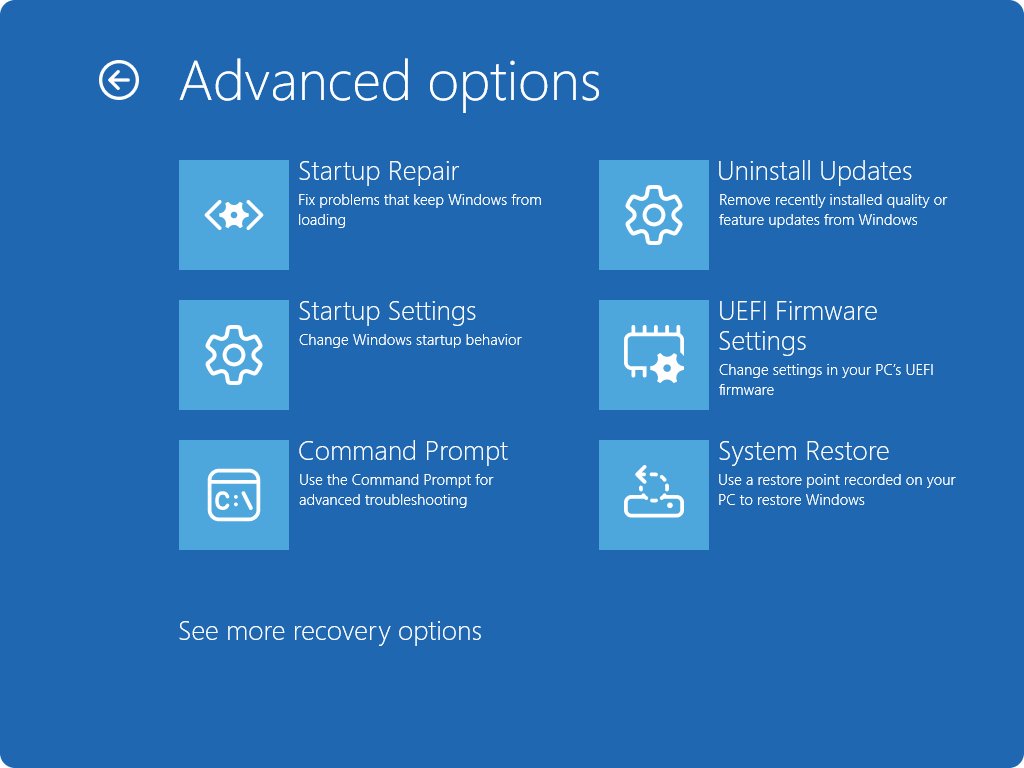
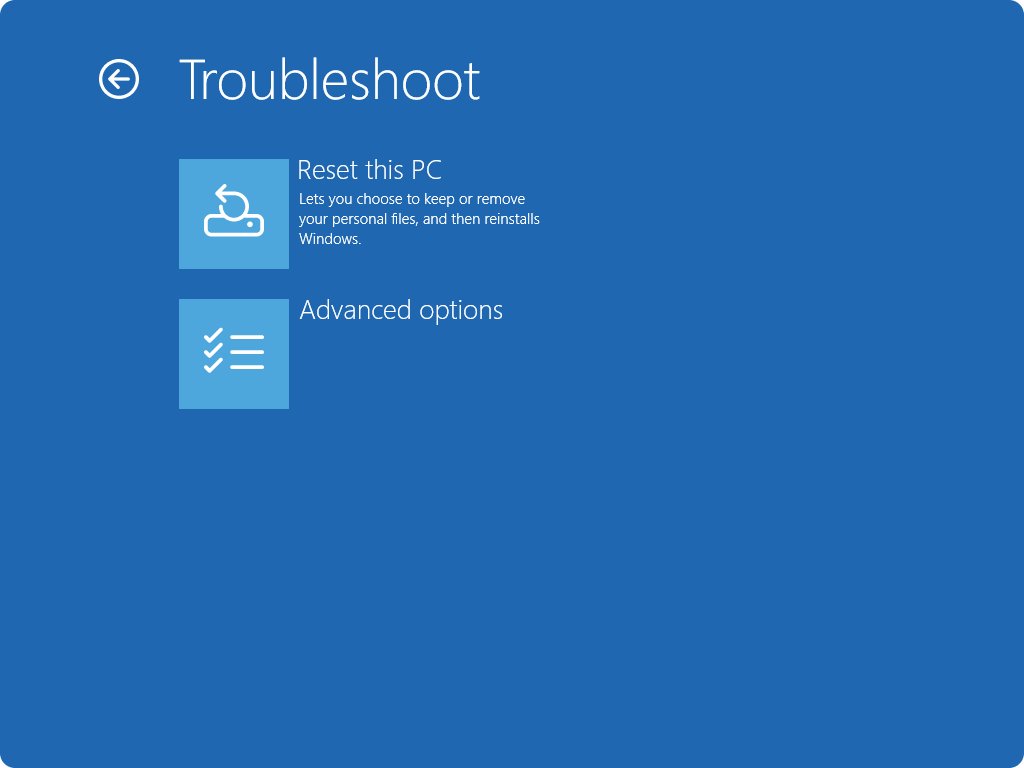
- Select Troubleshoot > Advanced options > UEFI Firmware Settings > Restart.
- Find the storage controller setting. Its name varies by maker, for example SATA Mode, SATA Operation or SATA Configuration. Check the PC manual if you cannot find it.
- Set it to AHCI and accept the warning about changing the controller mode.
- Save the change and exit. Most firmware uses F10 for save and exit, but follow the key shown on screen.
How do I know if my SSD is in AHCI mode Windows 11?
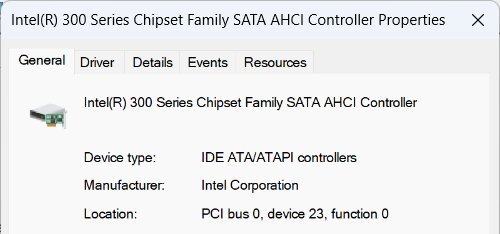
Device Manager shows which controller the drive sits on, and the controller name says whether it runs in AHCI mode. You can open Device Manager in Windows 11 from the Start right-click menu.
- Right-click Start and select Device Manager.
- Expand IDE ATA/ATAPI controllers.
- Look for a controller with AHCI in its name. That means the SATA controller runs in AHCI mode.
- For a second check, open an elevated Command Prompt and run
sc query storahci. A STATE line that reads RUNNING means the Windows inbox AHCI driver is loaded. - If the controller is listed under Storage controllers as an NVMe or RAID device instead, the AHCI setting does not apply to that drive.
A PC that uses Intel or AMD's own AHCI driver shows that vendor's controller name, and storahci may show STOPPED. Device Manager is the more reliable check.
What is AHCI?
AHCI stands for Advanced Host Controller Interface. It is the standard way an operating system talks to a SATA controller, and Windows ships its own driver for it, StorAHCI.
| AHCI feature | What it does for you |
|---|---|
| Native command queuing (NCQ) | Reorders reads and writes so the drive handles them in a faster order |
| TRIM support for SSDs | Keeps a SATA SSD performing well as it fills and frees space |
| Hot swapping | Connect or disconnect a SATA drive without restarting |
| Inbox driver (StorAHCI) | Windows 11 needs no extra download for standard AHCI controllers |
| SATA only | Does nothing for NVMe or USB drives, which use their own protocols |
What is IDE?
IDE (Integrated Drive Electronics) is the older parallel drive interface that used wide ribbon cables. In a BIOS, an IDE or ATA SATA mode makes the controller imitate that older interface for compatibility with old operating systems.
| IDE trait | Effect |
|---|---|
| Parallel data transfer | Slower than serial SATA |
| Two drives per channel | Each drive needs a select setting |
| No hot swapping | The PC must be off to connect or remove a drive |
| Compatibility mode on SATA PCs | Lets very old systems boot, at the cost of AHCI features |
Difference between AHCI and IDE
For Windows 11 on a SATA drive, AHCI is the right mode. IDE mode exists for legacy compatibility, and RAID mode is for arrays or the PC maker's storage driver.
| BIOS SATA mode | Use it when | Switching to AHCI |
|---|---|---|
| AHCI | You run Windows 11 on a SATA HDD or SSD | Already set; nothing to do |
| IDE / ATA / Compatibility | Only for very old operating systems | Follow the Safe Mode steps above |
| RAID / RST | Two or more disks form a RAID array | Do not switch; the array is not readable in AHCI mode |
| RAID / RST with a single drive | The PC maker shipped it this way | Possible with the Safe Mode steps; check the PC maker's support page first |
| NVMe drive | The system drive is an M.2 NVMe SSD | The SATA mode setting does not affect it |
AHCI mode Windows 11 boot loop and INACCESSIBLE_BOOT_DEVICE fixes
Reboot loop or INACCESSIBLE_BOOT_DEVICE right after switching to AHCI
The BIOS was changed before Windows was set to boot into Safe Mode, so the AHCI boot driver never loaded.
- Restart into the BIOS and set the SATA mode back to its previous value.
- Save and exit. Windows boots normally again.
- Run
bcdedit /set {current} safeboot minimalfrom an elevated Command Prompt. - Restart, set the SATA mode to AHCI, and repeat the switch from the first section.
Windows keeps starting in Safe Mode
The safeboot value is still in the boot entry.
- Open Command Prompt as administrator in Safe Mode.
- Run
bcdedit /deletevalue {current} safeboot. - Restart the PC.
BitLocker asks for the recovery key after the switch
BitLocker was not suspended, or the reboot count ran out.
- Enter the 48-digit recovery key on the blue recovery screen.
- Once Windows starts, run
Resume-BitLocker -MountPoint "C:"if protection shows as suspended.
Windows will not start at all, even with the old SATA mode
Something else changed, or the boot files were damaged.
- Set the SATA mode back to the value it had before.
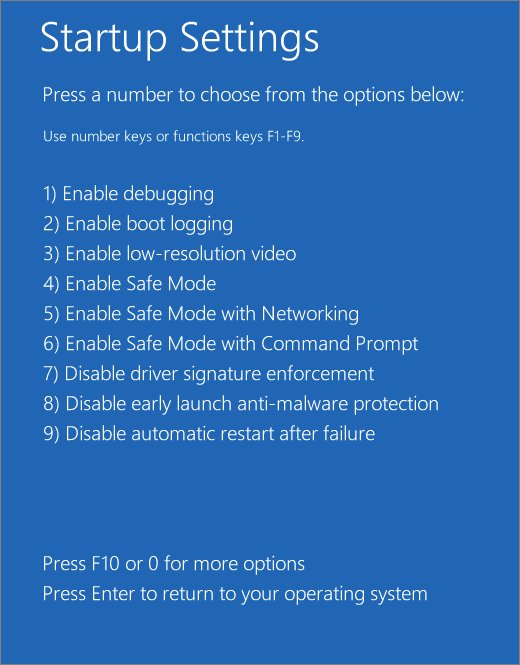
- Enter Safe Mode when the PC is not booting from Windows RE.
- From Troubleshoot > Advanced options, run Startup Repair or System Restore.
How to switch from AHCI back to IDE or RAID
Going back uses the same Safe Mode trick, because Windows needs to load the driver for the old mode.
- Suspend BitLocker with a reboot count if the drive is encrypted.
- Run
bcdedit /set {current} safeboot minimalfrom an elevated Command Prompt. - Restart into the BIOS and set the SATA mode back to IDE or RAID.
- Let Windows start in Safe Mode, then run
bcdedit /deletevalue {current} safeboot. - Restart and resume BitLocker.
AHCI mode Windows 11 FAQ
How do I enable AHCI mode in Windows 11 without reinstalling?
Run bcdedit /set {current} safeboot minimal as administrator, restart into the BIOS and set the SATA mode to AHCI, let Windows start in Safe Mode, then run bcdedit /deletevalue {current} safeboot and restart.
How do I check if AHCI is enabled?
Open Device Manager and expand IDE ATA/ATAPI controllers. A controller with AHCI in its name means AHCI is enabled. The BIOS SATA mode setting shows the same thing from the firmware side.
How do I enable AHCI in BIOS?
Open the UEFI setup from Settings > System > Recovery > Advanced startup > Restart now > Troubleshoot > Advanced options > UEFI Firmware Settings. Set the SATA mode option to AHCI. Prepare Windows with Safe Mode first, or it will not boot.
What happens if I change to AHCI without Safe Mode?
Windows usually fails to start with a reboot loop or an INACCESSIBLE_BOOT_DEVICE stop code. Set the BIOS back to the old mode, and Windows boots again with no damage done.
Do I need to install an AHCI driver for Windows 11?
Usually no. Windows includes StorAHCI, its own driver for standard SATA AHCI controllers. Intel and AMD storage drivers are optional and come from the chipset maker or your PC maker.
Does AHCI matter for an NVMe SSD?
No. AHCI applies only to SATA controllers. An M.2 NVMe SSD uses the NVMe protocol, so the BIOS SATA mode does not change how it performs.
Is AHCI faster than IDE?
Yes, for SATA drives. AHCI adds native command queuing, TRIM support for SSDs and hot swapping, none of which the IDE compatibility mode offers.
Should I switch from RAID to AHCI?
Only if there is no RAID array. If two or more disks form an array, switching to AHCI makes it unreadable. With one drive in RAID or RST mode, the Safe Mode method works, but check your PC maker's guidance first.