The Surface Pro 9 has a 13-inch 2880 x 1920 PixelSense Flow touchscreen running at up to 120Hz, with either a 12th Gen Intel Core i5 or i7 processor or a Microsoft SQ 3 chip with 5G.
The tables below split every spec by model, from memory and ports to 5G bands, charger wattage and driver support dates.
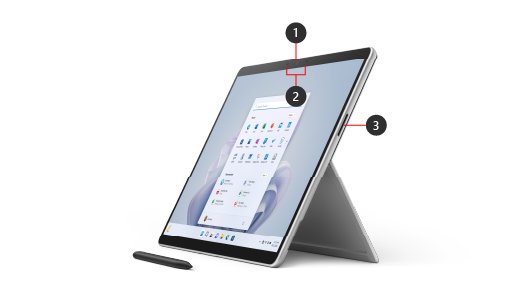
Surface Pro 9 tech specs
| Spec | Surface Pro 9 (Intel/Wi-Fi) | Surface Pro 9 with 5G (SQ 3) |
|---|---|---|
| Processor | 12th Gen Intel Core i5-1235U or i7-1255U | Microsoft SQ 3 with Neural Processing Unit |
| Graphics | Intel Iris Xe | Microsoft SQ 3 Adreno 8CX Gen 3 |
| Memory | 8GB, 16GB or 32GB LPDDR5 | 8GB or 16GB LPDDR4x |
| Removable SSD | 128GB, 256GB, 512GB or 1TB | 128GB, 256GB or 512GB |
| Display | 13-inch PixelSense Flow, 2880 x 1920, up to 120Hz | 13-inch PixelSense Flow, 2880 x 1920, up to 120Hz |
| Battery life | Up to 15.5 hours of typical use | Up to 19 hours of typical use |
| Ports | 2 x USB-C with USB 4.0/Thunderbolt 4, Surface Connect, Surface Type Cover port | 2 x USB-C 3.2, Surface Connect, Surface Keyboard port, nano SIM |
| Wireless | Wi-Fi 6E, Bluetooth 5.1 | Wi-Fi 6E, Bluetooth 5.1, 5G, LTE |
| Weight | 1.94 lb (879 g) | 1.95 lb (883 g) with mmWave |
| Size | 11.3 x 8.2 x 0.37 in (287 x 209 x 9.3 mm) | 11.3 x 8.2 x 0.37 in (287 x 209 x 9.3 mm) |
| Colors | Sapphire, Forest, Platinum, Graphite | Platinum |
| Casing and buttons | Aluminum; volume and power buttons | Aluminum; volume and power buttons |
| Operating system | Windows 11 Home (Pro for commercial customers) | Windows 11 Home for ARM-based PCs (Pro for commercial customers) |
Surface Pro 9 Intel vs 5G differences
Both models share a screen size and battery capacity, so the choice comes down to the processor. Use this table to match your needs to a model.
| If you need | Choose | Why |
|---|---|---|
| Thunderbolt 4 docks and displays | Surface Pro 9 (Intel) | Only the Intel model has USB 4.0/Thunderbolt 4 |
| 32GB of memory or a 1TB SSD | Surface Pro 9 (Intel) | The 5G model stops at 16GB and 512GB |
| Games, CAD software or specific drivers | Surface Pro 9 (Intel) | Microsoft says Windows on Arm will not install some of these |
| Mobile data with no hotspot | Surface Pro 9 with 5G | It takes a nano SIM or eSIM |
| The longest rated battery life | Surface Pro 9 with 5G | Rated 19 hours against 15.5 hours |
| Eye Contact and Automatic Framing on calls | Surface Pro 9 with 5G | Windows Studio Effects are listed for the SQ 3 model |
| A color other than Platinum | Surface Pro 9 (Intel) | The 5G model comes in Platinum only |
Surface Pro 9 processor and graphics
| Item | Surface Pro 9 (Intel/Wi-Fi) | Surface Pro 9 with 5G (SQ 3) |
|---|---|---|
| Processor options | Core i5-1235U, Core i7-1255U | Microsoft SQ 3 |
| Platform note | Options with 256GB of storage and above are built on the Intel Evo platform | Includes a Neural Processing Unit (NPU) |
| AI camera and audio effects | Not listed | Windows Studio Effects: Eye Contact, Portrait Background Blur, Automatic Framing, Voice Focus |
| Graphics | Intel Iris Xe | Adreno 8CX Gen 3 |
Surface Pro 9 RAM and storage options
Microsoft counts 1GB as 1 billion bytes, and system software and updates use a significant share of the listed storage.
| Item | Surface Pro 9 (Intel/Wi-Fi) | Surface Pro 9 with 5G (SQ 3) |
|---|---|---|
| RAM type | LPDDR5 | LPDDR4x |
| RAM sizes | 8GB, 16GB, 32GB | 8GB, 16GB |
| SSD sizes | 128GB, 256GB, 512GB, 1TB | 128GB, 256GB, 512GB |
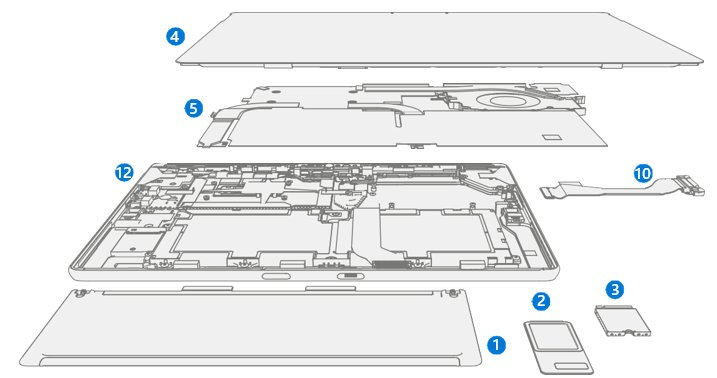
| SSD replacement | Customer Replaceable Unit, for a skilled technician | Customer Replaceable Unit, for a skilled technician |
Microsoft sells replacement SSDs through Surface Commercial Authorized Device Resellers and warns that device damage from a repair is not covered by its warranty.
Surface Pro 9 screen size and display specs
| Display spec | Value |
|---|---|
| Screen | 13-inch PixelSense Flow |
| Resolution | 2880 x 1920 (267 PPI) |
| Aspect ratio | 3:2 |
| Refresh rate | Up to 120Hz, with dynamic refresh rate |
| Contrast ratio | 1200:1 |
| Color profiles | sRGB and Vivid, with Adaptive Color |
| Touch | 10-point multi-touch |
| Glass | Gorilla Glass 5 |
| Intel model only | Dolby Vision IQ support and Auto Color Management |
Surface Pro 9 battery life and battery capacity
Both models share the same battery size, and the rated hours differ. Microsoft ran these tests in August 2022 on preproduction devices, with screen brightness at 150 nits and Wi-Fi connected.
| Battery spec | Surface Pro 9 (Intel/Wi-Fi) | Surface Pro 9 with 5G (SQ 3) |
|---|---|---|
| Rated typical use | Up to 15.5 hours | Up to 19 hours |
| Nominal capacity | 47.7 Wh | 47.7 Wh |
| Minimum capacity | 46.5 Wh | 46.5 Wh |
| Test device | Core i5, 256GB, 8GB RAM | SQ 3, 128/256/512GB, 8/16GB RAM |
The test mixed web browsing, Word, Excel and other Office apps, idle time and modern standby, and real battery life varies with settings and usage.
Surface Pro 9 charger wattage
You can charge either model through USB-C or Surface Connect. The supplied power supply differs between the two models.
| Charger spec | Surface Pro 9 (Intel/Wi-Fi) | Surface Pro 9 with 5G (SQ 3) |
|---|---|---|
| Included power supply | Model 1706, 60W (15V at 4A) | Model 1963, 39W (15V at 2.6A) |
| Minimum wattage | 60W | 39W |
| Recommended for fast charging | 60W | 60W |
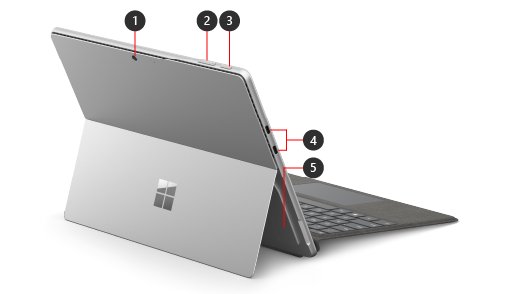
Surface Pro 9 ports
Microsoft's port list has no headphone jack and no SD card slot. It sells a Surface USB-C to 3.5mm Audio Adapter separately. Intel owners can enable Thunderbolt on Windows 11 for docks and displays.
| Port | Surface Pro 9 (Intel/Wi-Fi) | Surface Pro 9 with 5G (SQ 3) |
|---|---|---|
| USB-C | 2 x USB-C with USB 4.0/Thunderbolt 4 | 2 x USB-C 3.2 |
| Charging and dock port | 1 x Surface Connect | 1 x Surface Connect |
| Keyboard port | 1 x Surface Type Cover port | Surface Keyboard port |
| SIM | Not listed | 1 x nano SIM |
Surface Pro 9 external monitor support
These limits apply when the display connects directly. An adapter, dock or travel hub can lower the resolution or refresh rate, and Microsoft lists no three-display option for either model.
| Setup | Surface Pro 9 (Intel/Wi-Fi) | Surface Pro 9 with 5G (SQ 3) |
|---|---|---|
| One external display | 5120 x 2880 at 60Hz | 4096 x 2304 at 60Hz |
| Two external displays | 3840 x 2160 at 60Hz | 3840 x 2160 at 60Hz |
Surface Pro 9 Wi-Fi, Bluetooth and 5G specs
Both models have Wi-Fi 6E (802.11ax compatible) and Bluetooth 5.1. This table applies only to the SQ 3 model, and mmWave 5G is available in the US only.
| Cellular spec | Surface Pro 9 with 5G (SQ 3) |
|---|---|
| SIM | Nano SIM and eSIM |
| 5G | Sub-6 GHz, plus 5G-NR NSA mmWave |
| mmWave bands | n257, n260, n261 |
| 5G downlink | Release 15, 64 QAM, up to 4.2 Gbps, 4x DL CA (400MHz), 2×2 MIMO |
| 5G uplink | Release 15, 64 QAM, 2x UL CA (200MHz), 2×2 MIMO |
| LTE | Gigabit LTE-A Pro Release 15, 4×4 MIMO, LAA; DL Cat 20 up to 2Gbps; UL Cat 13 |
| LTE bands | 1, 2, 3, 4, 5, 7, 8, 12, 13, 14, 19, 20, 25, 26, 28, 29, 30, 38, 39, 40, 41, 42, 46, 48, 66, 71 |
| WCDMA bands | 1, 2, 5, 8 |
| Location | GPS, Glonass, Galileo and Beidou |
Surface Pro 9 cameras, speakers, microphones and sensors
| Component | Spec (both models) |
|---|---|
| Front camera | 1080p full HD video, plus a Windows Hello face authentication camera |
| Rear camera | 10.0MP autofocus, 1080p HD and 4K video |
| Speakers | 2W stereo with Dolby Atmos, which needs Dolby Atmos encoded content |
| Microphones | Dual far-field studio microphones |
| Sensors | Accelerometer, gyroscope, magnetometer, ambient color sensor |
Surface Pro 9 security features
Both models support face sign-in, so you can set up Windows Hello on either one. The security chip is where they differ: the Intel model uses firmware TPM 2.0, and the 5G model uses Microsoft Pluton.
| Feature | Surface Pro 9 (Intel/Wi-Fi) | Surface Pro 9 with 5G (SQ 3) |
|---|---|---|
| Security processor | Firmware TPM 2.0 | Microsoft Pluton |
| Sign-in | Windows Hello face sign-in | Windows Hello face sign-in |
Surface Pro 9 keyboard and pen compatibility
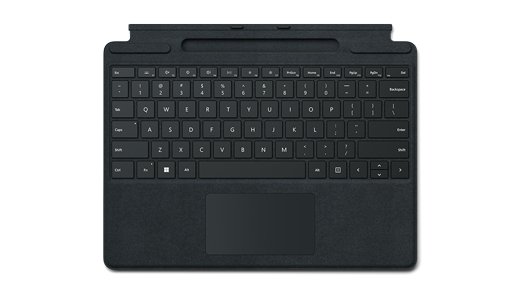
The keyboard and pen are sold separately, on both models. Tactile signals with Surface Slim Pen 2 work only in some apps on Windows 11.
| Accessory | Support |
|---|---|
| Pen | Designed for Surface Slim Pen 2, and supports Microsoft Pen Protocol (MPP) |
| Pen storage and charging | Integrated wireless charging in Surface Pro Signature Keyboard |
| Keyboards | Surface Pro Keyboard, Surface Pro Signature Keyboard, Surface Pro X Keyboard, Surface Pro X Signature Keyboard |
| Accessibility | Surface Adaptive Kit and Microsoft Adaptive Accessories |
Surface Pro 9 Windows version and supported software
The 5G model runs Windows for Arm-based PCs. Microsoft says it will not install some games, CAD software, third-party drivers or antivirus software.
| Item | Surface Pro 9 (Intel/Wi-Fi) | Surface Pro 9 with 5G (SQ 3) |
|---|---|---|
| Consumer Windows | Windows 11 Home | Windows 11 Home for ARM-based PCs |
| Commercial Windows | Windows 11 Pro | Windows 11 Pro for ARM-based PCs |
| Minimum Windows 11 | Version 22H2, build 22621 | Version 22H2, build 22621 |
| Minimum Windows 10 | Version 21H2, build 19044 | Not listed |
| Preloaded software | Microsoft 365 Apps and the Xbox app | Microsoft 365 Apps |
| Trials | Microsoft 365 Family and Xbox Game Pass Ultimate, 30 days each | Microsoft 365 Family and Xbox Game Pass Ultimate through Xbox Cloud Gaming, 30 days each |
Surface Pro 9 driver support end date and warranty
| Lifecycle item | Date or detail |
|---|---|
| Release date | October 25, 2022 |
| End of driver and firmware servicing | October 25, 2028 |
| After that date | Windows feature and security updates continue under the Windows lifecycle policy |
| Limited hardware warranty | 1 year |
| Sustainability | Meets ENERGY STAR requirements, registered EPEAT Gold in the US and Canada |
What comes in the Surface Pro 9 box
| Item | Surface Pro 9 (Intel/Wi-Fi) | Surface Pro 9 with 5G (SQ 3) |
|---|---|---|
| Device | Included | Included |
| Power supply | Included | Included |
| Quick Start Guide, safety and warranty documents | Included | Included |
| SIM card access tool | Not listed | Included |
| Keyboard and pen | Sold separately | Sold separately |
Surface Pro 9 system SKU list
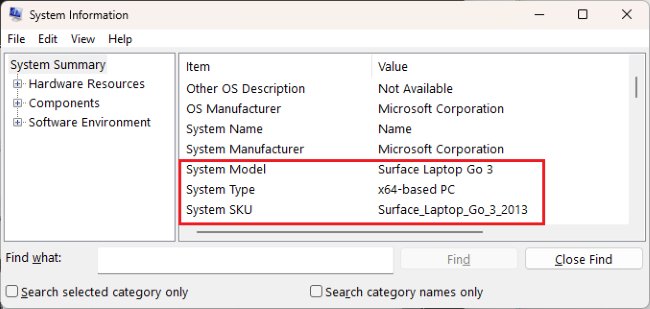
All versions report Surface Pro 9 as the system model, so the SKU tells them apart.
| Device | System SKU |
|---|---|
| Surface Pro 9, consumer | Surface_Pro_9_2038 |
| Surface Pro 9, commercial | Surface_Pro_9_for_Business_2038 |
| Surface Pro 9 with 5G (US) | Surface_Pro_9_With_5G_1997 |
| Surface Pro 9 with 5G (outside the US) | Surface_Pro_9_With_5G_1996 |
How to find your Surface Pro 9 model and specs
These steps show which version you own, and the SKU then points to the right column in the tables above.
- Select Start, type system, and open System Information.
- Read System Model and System SKU in the right-hand pane.
- Match the SKU to the list above.
- Open the Surface app and expand Device information for a second check.
Surface Pro 9 specs FAQ
Does the Surface Pro 9 have a headphone jack?
No. Microsoft's connection list for the Surface Pro 9 has USB-C, Surface Connect and the keyboard port, with no 3.5mm jack. Microsoft sells a Surface USB-C to 3.5mm Audio Adapter separately as an optional accessory for wired headphones.
Does the Surface Pro 9 come with a keyboard?
No. Microsoft's box contents list only the Surface, a power supply, a Quick Start Guide and safety and warranty documents, plus a SIM tool on the 5G model. The Surface Pro Signature Keyboard and Surface Slim Pen 2 are sold separately.
Does the Surface Pro 9 have Thunderbolt 4?
The Intel model does. It has two USB-C ports with USB 4.0 and Thunderbolt 4. The Surface Pro 9 with 5G has two USB-C 3.2 ports instead, so it does not offer Thunderbolt 4.
Do all Surface Pro 9 models have 5G?
No. Only the Surface Pro 9 with 5G, which uses the Microsoft SQ 3 processor, has cellular data. The Intel model is Wi-Fi only. Availability of 5G depends on your area and carrier, and mmWave works in the US only.
How long does the Surface Pro 9 battery last?
Microsoft rates the Intel model at up to 15.5 hours of typical use and the 5G model at up to 19 hours. Both have a 47.7 Wh nominal battery, and real battery life varies with settings, usage and signal strength.
Can the Surface Pro 9 run Windows 10?
Only the Intel model is listed for it, from version 21H2 build 19044. The 5G model is listed for Windows 11 only. Windows 10 support ended on October 14, 2025, and the Surface Pro 9 ships with Windows 11.
Is the Surface Pro 9 storage upgradeable?
The SSD is removable on both models, up to 1TB on Intel and 512GB on 5G. Microsoft treats it as a Customer Replaceable Unit for skilled technicians, and damage caused during a repair is not covered by its hardware warranty.
How many monitors can a Surface Pro 9 support?
Microsoft lists up to two external displays connected directly, each at 3840 x 2160 and 60Hz. With a single display, the Intel model reaches 5120 x 2880 at 60Hz and the 5G model reaches 4096 x 2304 at 60Hz.
What charger does the Surface Pro 9 use?
The Intel model includes a 60W power supply, and the 5G model includes a 39W one. Both charge through USB-C or Surface Connect. Microsoft recommends 60W for fast charging on either model, and the Intel model needs at least 60W.
How much does a Surface Pro 9 weigh?
The Intel model weighs 1.94 lb (879 g), and the 5G model weighs 1.95 lb (883 g) with mmWave. Those figures do not include the Surface Pro Signature Keyboard or Surface Slim Pen 2, which are sold separately.