KProxy is a proxy service with a free Firefox extension that changes the IP address and country websites see, though it hides you from those sites and not from KProxy itself.
This guide covers what the service offers, how to install and remove the extension, what its privacy policy says it collects, and when a VPN is the better choice.

KProxy free anonymous web proxy
A proxy sits between your browser and the website. The site receives the request from the proxy, so it does not get your own address.
The word to read carefully is anonymous. The requests are not anonymous to the proxy operator, so you are moving your trust from the website to KProxy.
Use KProxy for low-stakes browsing where you only want a different IP address or country, and use a VPN for anything sensitive. The extension is free and needs no account, but it holds broad browser permissions, was last updated in September 2022, and sits under a privacy policy that lists the sites you visit among the data it collects.
What is KProxy and who makes it?
KProxy's most documented product is its Firefox extension. The Firefox Add-ons listing below is the official store page, and these details are from November 2026.
| Detail | KProxy Extension for Firefox |
|---|---|
| Developer | Sumalab and Sergio Marquina. The privacy policy names Sumalab Digital SL of Madrid, Spain |
| Latest version | 3.1, released September 2, 2022 |
| Requirement | Firefox 91 or later |
| Size | 1.45 MB |
| License | MIT License |
| Store rating | 4 out of 5 from 63 reviews, with 1,687 users |
| Price | No registration or credit card needed. The privacy policy says some services carry a fee |
| Support | [email protected] |
A web proxy, in the classic sense, is a form on a web page where you enter a target address and the proxy fetches it for you. KProxy's listing positions the extension as the alternative to that approach, because it works from inside the browser.
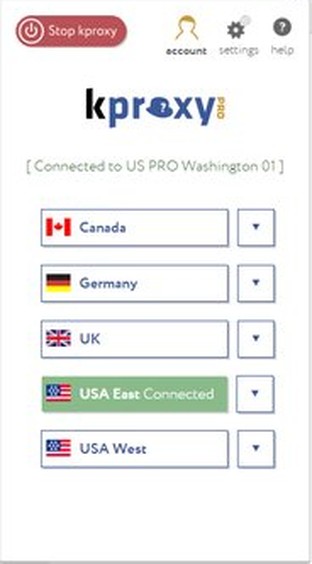
KProxy features and what they mean
The claims in the first column come from KProxy's own store listing. The second column adds what you should keep in mind when you weigh each one.
| KProxy says | What to keep in mind |
|---|---|
| Browse the web anonymously | Websites see the proxy's address, but KProxy still handles your requests |
| Change your IP address and country | The listing does not publish a list of available countries |
| Visit blocked and censored websites | Your school's or employer's acceptable use policy still applies to you |
| Works through proxies at work, university or library, and looks like a regular HTTPS connection | Check your organization's rules first, since filtering proxies commonly log usage |
| Encrypts the connection and makes it impossible to steal your data | KProxy's privacy policy says internet transmission is never completely secure and that it cannot guarantee the security of your data |
| No ads | The privacy policy separately lists Google Analytics tracking for every visitor to the add-on |
How to install the KProxy extension for Firefox
Get the free download from Mozilla's store rather than a download portal. The store is where the listing's version history, permissions and privacy policy are published.
- Update Firefox if you are on a version older than 91.
- Open the KProxy Extension for Firefox listing in Firefox.
- Confirm the author reads Sumalab, Sergio Marquina.
- Start the install from the listing page.
- Read the four permissions Firefox shows, and approve them only if you accept them.
- Open the extension and use its own controls to connect.
Extensions do not run in private windows by default. To allow it, open about:addons, click the extension, and select Allow under Run in Private Windows.
Is KProxy safe? Extension permissions explained
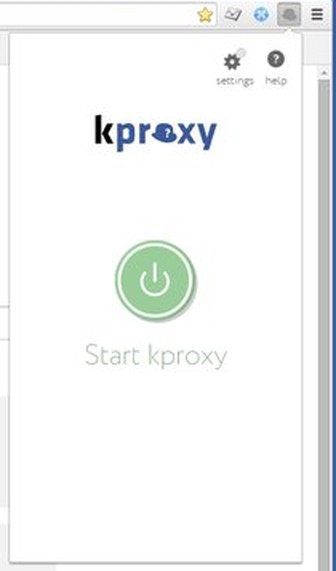
A proxy extension needs wide access to do its job, and that access is also the risk. Firefox's proxy API lets an extension intercept web requests and decide how to route them, and it needs host permission for the URLs it intercepts.
| Permission requested | What it covers |
|---|---|
| Control browser proxy settings | Routing your Firefox traffic through the proxy |
| Access your data for all websites | Every site you open, not a short list of domains |
| Read and modify privacy settings | Firefox's privacy preferences |
| Access browser tabs | Your open tabs |
Treat anything you do through a proxy as visible to its operator. Avoid signing in to banking, work or email accounts through a free proxy, and remember that the last update on this listing is from 2022.
Does KProxy keep logs? KProxy privacy policy explained
KProxy's published add-on privacy policy answers this directly. It lists website identity and usage activity among the data collected automatically, so it cannot be described as a no-logs service.
| Topic | What the privacy policy says |
|---|---|
| Collected automatically | IP address, browser type and version, time zone, connection type and WiFi network name |
| Activity data | Clicks, time on a page, the identity of third-party websites accessed through the add-on, and viewing history |
| Provided by you | Email address |
| Analytics | Google Analytics, for every visitor to the add-on |
| Sharing | No selling or renting, but sharing with affiliates and service providers for business purposes, including marketing |
| Legal requests | May share data in response to subpoenas, court orders and other legal process |
| Retention | While you remain a user, and for compliance the longer of the legal period or two years |
You can request access to your data, correction or deletion by emailing [email protected], the contact the policy names. The policy says it charges administrative costs when you ask for a copy of your data.
KProxy vs VPN: differences and when to use each
Microsoft's own guidance is that a VPN provides a more secure connection than a proxy server. A browser extension also covers one browser, while a system-level connection covers more of your traffic.
| Your situation | Use this | Why |
|---|---|---|
| You want a different IP address in Firefox for casual browsing | KProxy extension | Free and needs no account |
| You are on public Wi-Fi or handling private data | A VPN, such as the free Bitdefender VPN plan | Microsoft rates a VPN as the more secure connection |
| Your company runs its own VPN gateway | The built-in Windows VPN client | Windows connects without an extra app |
| Your organization requires a proxy server | Windows proxy settings | Your IT department supplies the address and port |
| You need strong anonymity from network surveillance | Tor | It is built for anonymity and routes traffic through a volunteer network |
How to set up a proxy server in Windows 11
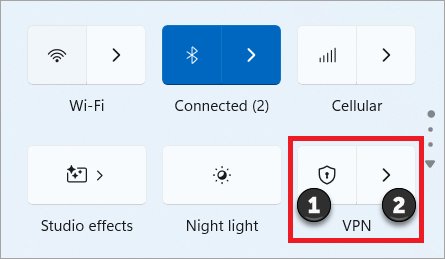
The KProxy extension changes Firefox's proxy settings, not the ones in Windows. Use this path only when you have the details of a proxy server, usually from your IT department.
- Open Settings and select Network & internet > Proxy.
- Under Manual proxy setup, next to Use a proxy server, select Set up.
- Turn on Use a proxy server.
- Enter the address in Proxy IP address and the number in Port.
- Add any sites that should skip the proxy to the exception list, separated by semicolons.
- Select Save.
For automatic setup, turn on Automatically detect settings under Automatic proxy setup on the same page.
How to check if KProxy changed your IP address
- Disconnect the extension and search Bing for your IP address in Firefox.
- Write down the address and the location shown.
- Connect KProxy and reload the page.
- Compare the two results. A different address means the proxy is carrying the request.
- If the address has not changed, reconnect the extension and reload the page.
Sites can still suspect a proxy from a cookie set on an earlier visit. Clearing cookies and the cache removes that link.
How to remove KProxy from Firefox
Remove the extension when you stop using the service, since it keeps its permissions for as long as it stays installed.
- Type
about:addonsin the Firefox address bar and press Enter. - Find KProxy Extension for Firefox in your extensions list.
- Use the options on that entry to remove it.
- Reload a site and check your IP address again to confirm you are back on your own connection.
To ask KProxy to delete data it holds about you, email [email protected] after you remove the extension.
KProxy free web proxy FAQ
Is KProxy really free?
The Firefox extension is free to install, and its listing says no registration or credit card is required. The privacy policy also says some KProxy services carry a fee, so not every part of the service is free.
Is KProxy safe to use?
KProxy suits low-stakes browsing better than sensitive work. The extension can access your data on all websites, and the privacy policy lists visited sites among collected data. Its last update dates from September 2022, so avoid signing in to important accounts through it.
Does KProxy hide my IP address?
KProxy hides your IP address from the websites you visit, since they receive requests from the proxy. It does not hide your address from KProxy, whose privacy policy says it collects your IP address automatically.
Is KProxy a VPN?
No. KProxy's extension is a proxy that controls Firefox's proxy settings, so it applies to that browser. Microsoft states that a VPN generally provides a more secure connection than a proxy server, and Windows configures the two separately.
Is there a KProxy extension for Chrome?
A search of the Chrome Web Store for KProxy returned no results in November 2026. The official extension that could be confirmed is the Firefox version on Mozilla's add-ons site, which requires Firefox 91 or later.
Can my employer or school see that I use KProxy?
KProxy says its connection looks like regular HTTPS traffic, but that is no promise of invisibility. Organizations can run filtering proxies that log usage and can monitor devices they manage. Using a proxy may also break their acceptable use policy, so check before you install it.
Who owns KProxy?
The privacy policy for the extension names Sumalab Digital SL, with a registered address in San Sebastian de los Reyes, Madrid, Spain. The Firefox listing credits Sumalab and Sergio Marquina as the developers.