Personal Gmail, Yahoo Mail and Outlook.com, which now includes Hotmail, each allow 25 MB per email, Facebook's Messenger Platform allows 25 MB per file, and WhatsApp allows files up to 2 GB.
The tables below separate personal and business limits, show why encoding can push a file over the limit, and give the steps for sending anything larger.
Attachment size limits for common service providers
Find your service, then check the limit and the route to send a large file through email. Email limits usually cover the whole message, so leave some room for the text.
| Service | Size limit | For larger files |
|---|---|---|
| Gmail (personal) | 25 MB | Google Drive |
| Outlook.com | 25 MB per email | OneDrive, up to 2 GB |
| Hotmail | 25 MB, because Hotmail is now Outlook.com | OneDrive, up to 2 GB |
| Outlook app on Windows with an internet account | 20 MB | OneDrive or Dropbox link |
| Outlook for iOS and Android | 33 MB, or 20 MB for iCloud accounts | Link to a file in cloud storage |
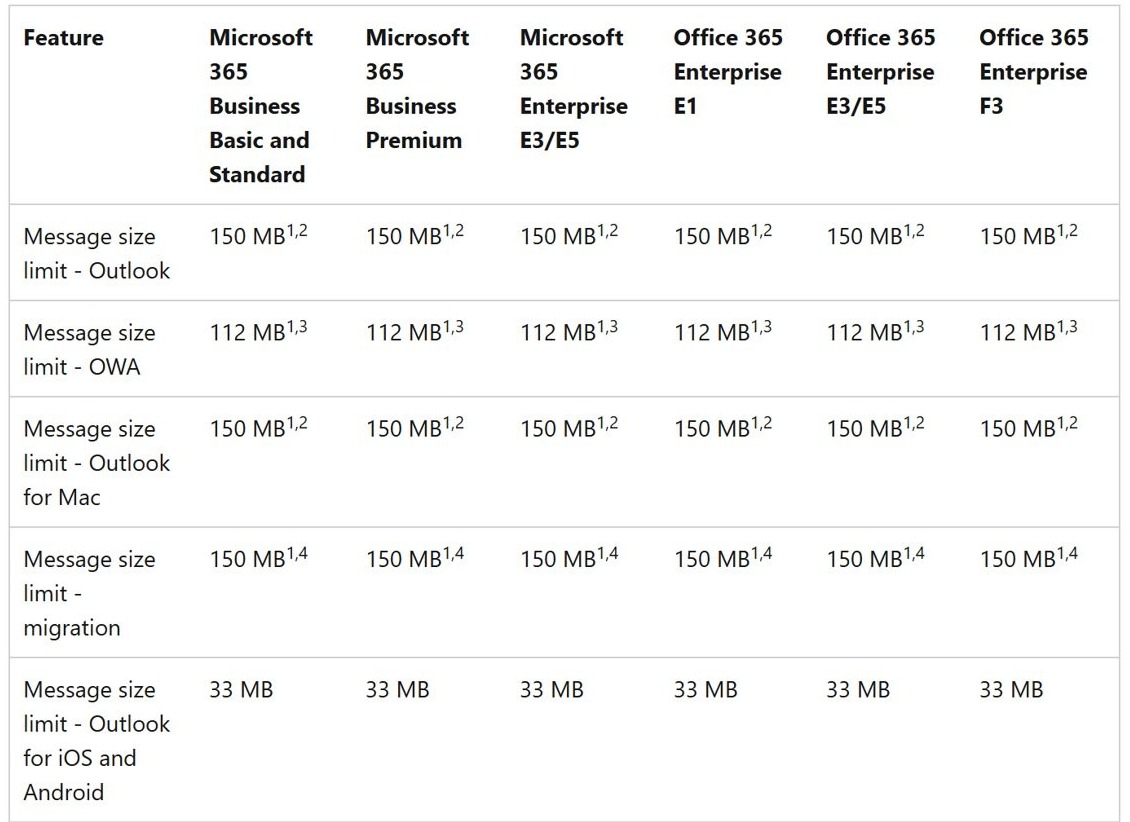
| Microsoft 365 business email | Up to 150 MB in Outlook and 112 MB in Outlook on the web, set by your admin | OneDrive or SharePoint link |
| Yahoo Mail | 25 MB per email | Upload to a cloud service and send a link |
| Facebook Messenger Platform | 25 MB per file, 8 MB for images sent by URL | Share a link to the file |
| 2 GB per file | Share a link to a cloud storage copy |
Gmail attachment maximum size
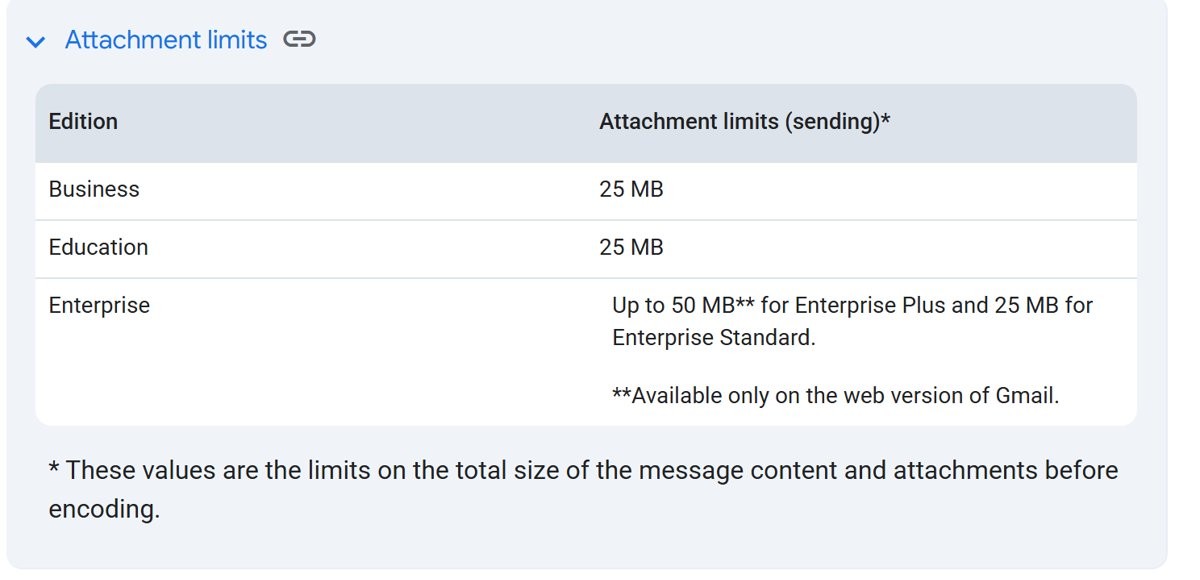
The size limit for Gmail attachments on a personal account is 25 MB. Work and school limits depend on the Google Workspace edition and on what the administrator allows.
| Gmail account | Sending limit | Receiving limit |
|---|---|---|
| Personal Gmail | 25 MB | Google's help page gives no separate figure |
| Workspace Business and Education | 25 MB | Google's limits page names no figure for these editions |
| Workspace Enterprise Standard | 25 MB | 50 MB after encoding |
| Workspace Enterprise Plus | Up to 50 MB in Gmail on the web | 70 MB after encoding |
When attachments pass the limit, Gmail removes them and adds a Google Drive link to the email instead. You also cannot send or receive attachments once your Google storage is full.
Outlook attachment size limit by app and account
Outlook has no single limit, because the app and the account type both matter. In every case, the limit counts the attachment and the email together.
| Outlook app or account | Limit | Notes |
|---|---|---|
| Outlook.com on the web | 25 MB per email | OneDrive files can be shared up to 2 GB |
| Outlook app with an internet account such as Outlook.com or Gmail | 20 MB | Includes the attachment and the email |
| Exchange Server business email | 10 MB by default | An administrator can change this value |
| Exchange Online in Outlook | 150 MB | Admins can configure a custom size limit from 1 MB to 150 MB |
| Exchange Online in Outlook on the web | 112 MB | Allows for the 33% encoding increase |
| Outlook for iOS and Android | 33 MB | iCloud accounts are limited to 20 MB |
If classic Outlook blocks a file that your mailbox would accept, you can increase the attachment size limit in Outlook.
Hotmail attachment size limit
Hotmail has no limit of its own, because Microsoft moved it to Outlook.com. You sign in to your Hotmail email with the same Microsoft account password.
Treat a Hotmail address as an Outlook.com account with a 25 MB email limit. Microsoft states that Hotmail is now Outlook.com, and it counts all text and attached files toward that 25 MB. Send anything larger as a OneDrive link, which can share files up to 2 GB.
Yahoo Mail attachment size limit
Yahoo Mail counts the total of every file in the message, so three 10 MB files will not fit in one email.
| Yahoo Mail rule | What it means |
|---|---|
| 25 MB total | All attached files in one message must not exceed 25 MB |
| Both directions | The limit applies to incoming and outgoing email |
| Blocked formats | Formats such as .exe, .bat, .msi and .vbs are not accepted |
| File names | Remove special characters from the file name if an attachment fails |
Facebook Messenger file size limit
Meta publishes these limits in its Messenger Platform documentation, which covers business messaging through Facebook Pages. Personal chats in the Messenger app may behave differently, so treat 25 MB as a guide there.
| Messenger Platform attachment | Limit | How it is measured |
|---|---|---|
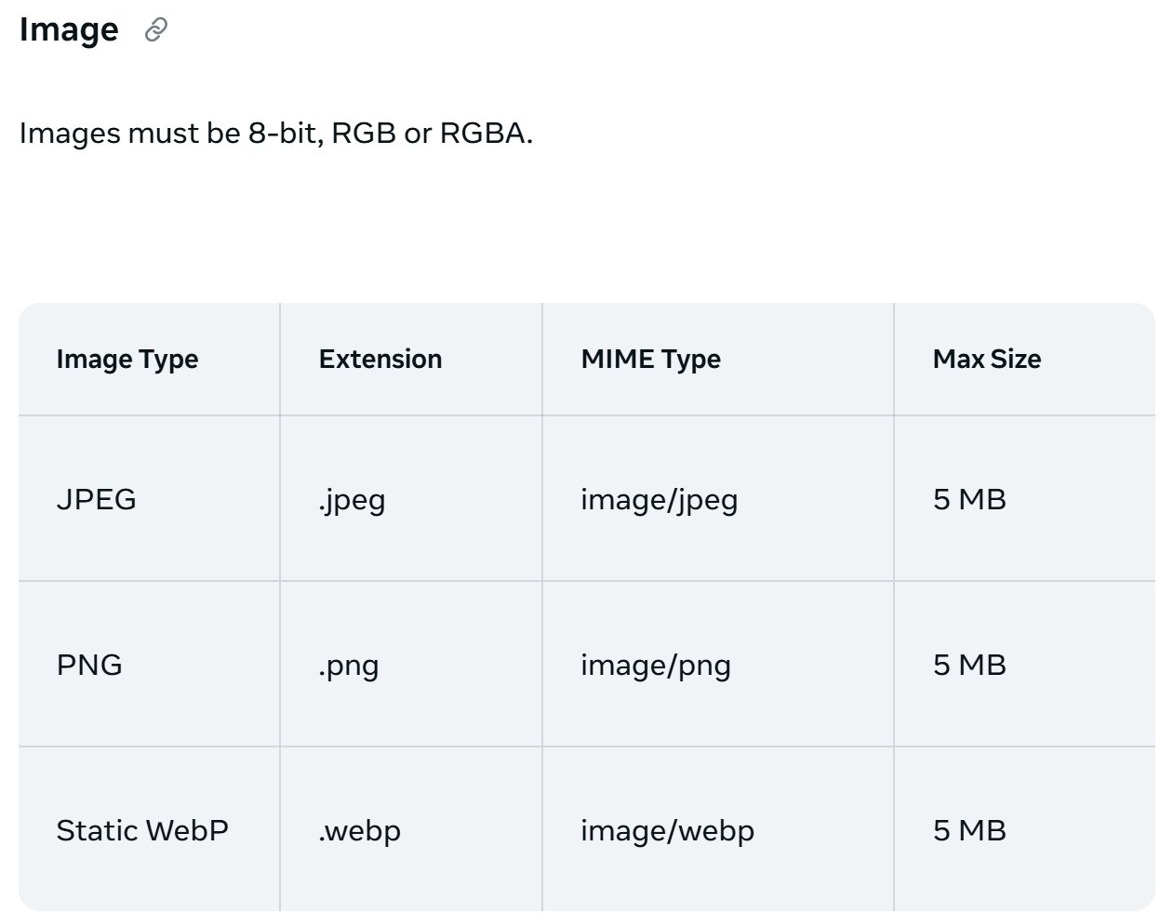
| Image sent by URL | 8 MB | Maximum image size for URL uploads |
| Audio, video or other file | 25 MB | Measured after encoding |
| Images in one message | 30 images | Images are the only media type allowed in a multi-attachment message |
WhatsApp file size limit
WhatsApp allows files of up to 2 GB at a time, protected by end-to-end encryption. That limit replaced the earlier 100 MB cap in 2022. The WhatsApp Business Cloud API has much lower limits, which matter only if your company sends messages through it.
| WhatsApp route | File type | Maximum size |
|---|---|---|
| WhatsApp app | Files | 2 GB |
| Business Cloud API | Documents | 100 MB |
| Business Cloud API | Video | 16 MB |
| Business Cloud API | Audio | 16 MB |
| Business Cloud API | Images | 5 MB |
| Business Cloud API | Animated stickers | 500 KB |
| Business Cloud API | Static stickers | 100 KB |
Why email encoding makes attachments larger than the file size
Email encoding adds to a file's size in transit, so a file can fail even when its size on disk looks safe. Each service measures this a little differently.
| Service | How encoding counts | Effect on you |
|---|---|---|
| Microsoft 365 | Messages leaving Microsoft datacenters get a 33% encoding increase | The 150 MB limit becomes 112 MB outside Microsoft |
| Outlook on the web | Limits the message to 25% below the configured setting | A 100 MB setting allows messages up to 75 MB |
| Gmail on Workspace | Sending limits apply before encoding, and receiving limits apply after it | Encoding adds about 37% to incoming mail |
| Messenger Platform | The 25 MB file limit applies after encoding | A file near 25 MB on disk can fail |
How to send large files through Gmail with Google Drive
Google recommends Drive for videos and other files above the limit. A Drive link keeps the file out of the message, so the 25 MB limit does not block it.
- Open Gmail on your computer and select Compose.
- Select the Insert files using Drive icon at the bottom of the message.
- Select the files you want to send.
- Choose Drive link at the bottom of the page, then select Insert.
- Select Send, and change the sharing settings if Gmail says your recipients cannot open the file.
How to send large attachments in Outlook with OneDrive
A OneDrive link keeps the email small, and Outlook.com can share OneDrive files up to 2 GB. These steps are for new Outlook on Windows.
- Start a new message, reply or forward.
- Select Attach File on the Message tab, then select Browse This PC and pick the file.
- Select the down arrow on the attachment.
- Select Upload to OneDrive and choose a destination.
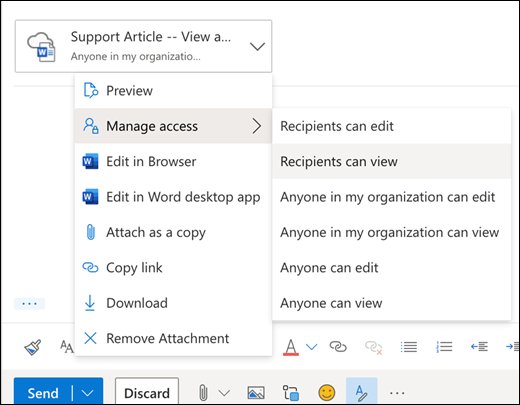
- Select the link to open its sharing options, then choose a permission such as Recipients can View.
- Send the message.
In Outlook.com, select Attach > Attach file > OneDrive, select your file, and then select Next. Upload the file to OneDrive first if it is still on your computer.
How to reduce attachment size in Outlook
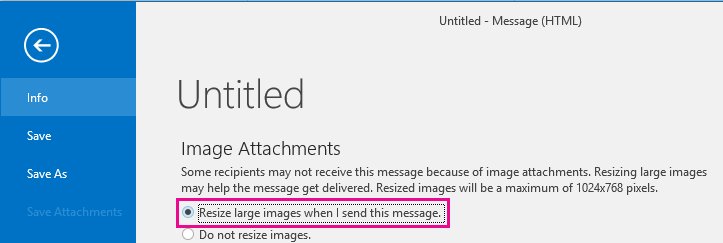
Classic Outlook can resize large images when it sends them. For other files, zip them before you attach them, because compression can bring a file under the limit.
- Attach the images to your message in classic Outlook.
- Select File > Info.
- Under Image Attachments, select Resize large images when I send this message.
- Return to your message and select Send.
Resizing a picture inside the message body only changes how it displays. It does not reduce the message size.
How to attach a file in Yahoo Mail
Yahoo Mail lists attachments below the message body, so you can see what you added before you send.
- Select Compose to open a new message.
- Select the attachment icon and choose the option to attach files from your computer.
- Select the files, then select Open.
- Confirm the files appear below the message body.
- Send the message, keeping the total at or under 25 MB.
Gmail blocked file types and Yahoo Mail blocked formats
A file can be well under the limit and still fail because of its type. Gmail also blocks these types inside archives and compressed files, so zipping an .exe does not get it through.
| Service | Examples of blocked types | Compressed files |
|---|---|---|
| Gmail | .exe, .bat, .cmd, .msi, .js, .jar, .dll, .iso, .ps1, .vbs | Blocked inside .zip and .tgz, and in .gz or .bz2 form |
| Yahoo Mail | .exe, .bat, .msi, .vbs | Yahoo's help page does not say |
If the sender is sure the file is safe, Google suggests uploading it to Drive and sending it as a Drive attachment.
Email attachment too large to send in Outlook, Gmail or Yahoo Mail
Outlook.com says the message is too large to send
Outlook.com holds a message rejected for attachment size in Drafts, not in the Outbox.
- Open the message in Drafts.
- Remove some attachments and send it again.
- If the error keeps appearing, delete the message from Drafts and then from Deleted Items.
- Send the file as a OneDrive link in a new message.
Non-delivery report after sending a large attachment in Microsoft 365
A message above your organization's size limit is not delivered, and the sender receives a report.
- Check the attachment size against the limit your admin set.
- Remember that mail leaving Microsoft can gain 33% from encoding.
- Send the file as a OneDrive or SharePoint link instead.
Outlook.com cannot send or receive email at all
Sending and receiving stop when your Microsoft cloud storage is full, and attachments count toward that storage.
- Check your storage use in your Microsoft account.
- Delete large attachments or OneDrive files you no longer need.
- Empty Deleted Items, because items there still count toward your quota.
Gmail recipient cannot open the Drive link
Gmail checks recipient access, and a private file stays hidden from people without access.
- Change the sharing settings when Gmail prompts you before sending.
- Choose Anyone with the link if recipients have no Google Account.
- Ask your admin if your work or school account restricts sharing.
Yahoo Mail attachment fails under 25 MB
A blocked format, a special character in the file name, or an unsupported browser can stop the upload.
- Confirm the file is not a blocked format such as .exe or .vbs.
- Remove special characters from the file name.
- Try again in a supported web browser.
Email attachment size limit FAQ
What is the Gmail attachment maximum size?
The Gmail attachment maximum size for a personal account is 25 MB. If your attachments total more than that, Gmail removes them and adds a Google Drive link to the email. Workspace limits depend on the edition and on your administrator's settings.
What is the size limit for Gmail attachments on a work account?
Workspace Business, Education and Enterprise Standard accounts can send 25 MB. Enterprise Plus can send up to 50 MB in Gmail on the web. Enterprise Standard can receive 50 MB and Enterprise Plus 70 MB, measured after encoding.
What is the max email attachment size in Outlook?
Outlook.com allows 25 MB per email, and the Outlook app lists 20 MB for internet accounts. Exchange Server defaults to 10 MB. Exchange Online allows up to 150 MB in Outlook and 112 MB on the web, depending on what your administrator sets.
Is the Hotmail attachment limit different from Outlook.com?
No. Microsoft states that Hotmail is now Outlook.com, so a Hotmail address follows the same 25 MB email limit. That total includes the message text and all attached files. Use a OneDrive link to share files of up to 2 GB.
What is the maximum attachment size in Yahoo Mail?
Yahoo Mail allows up to 25 MB in total for all the attached files in one message. The limit applies to both incoming and outgoing email. Yahoo also rejects formats such as .exe, .bat, .msi and .vbs whatever their size.
How big a file can you send on WhatsApp?
WhatsApp lets you send files of up to 2 GB at a time, with end-to-end encryption. That limit replaced the earlier 100 MB cap. The WhatsApp Business Cloud API is lower, with 100 MB for documents and 16 MB for video.
What is the largest file you can send through Facebook Messenger?
Meta's Messenger Platform documentation allows 25 MB for audio, video and other files, measured after encoding, and 8 MB for images sent by URL. Those figures cover business messaging through Pages, so use them as a guide for personal chats.
Why does Gmail turn my attachment into a Drive link?
Gmail does this when the total attachment size exceeds the limit, which is 25 MB on a personal account. It removes the attachment and adds a Google Drive link instead. Your recipients need access to the file, so check the sharing settings when Gmail asks.