Add GitLab's package repository with its script.deb.sh script, run sudo apt install gitlab-runner, then connect the runner to GitLab with sudo gitlab-runner register and an authentication token.
This guide covers each step on Ubuntu 24.04 and 22.04, choosing an executor, testing the runner with a pipeline, upgrading, removing it and fixing common errors.
Installing and registering GitLab Runner on Ubuntu
These commands are the same on Ubuntu 24.04 (Noble) and Ubuntu 22.04 (Jammy). Create the runner in GitLab first so that you have its token ready for the register command.
sudo apt update
curl -L "https://packages.gitlab.com/install/repositories/runner/gitlab-runner/script.deb.sh" -o script.deb.sh
sudo bash script.deb.sh
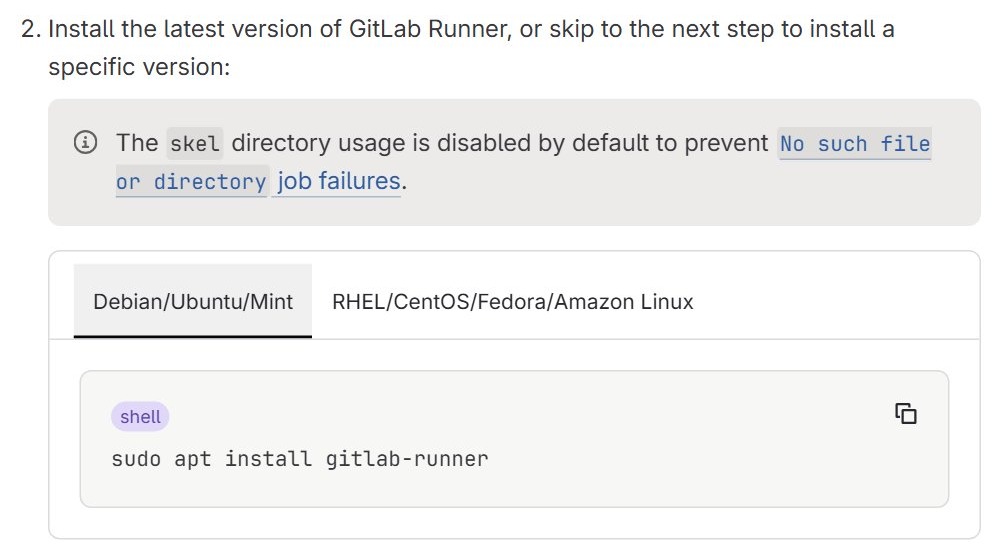
sudo apt install gitlab-runner
sudo gitlab-runner register
sudo gitlab-runner status
The first four commands refresh the package index, add GitLab's repository and install the package. register connects the runner to your GitLab instance, and status checks the service.
You should see: exit code zero from sudo gitlab-runner status while the service is running, and your runner in the output of sudo gitlab-runner list.
GitLab Runner supported Ubuntu versions
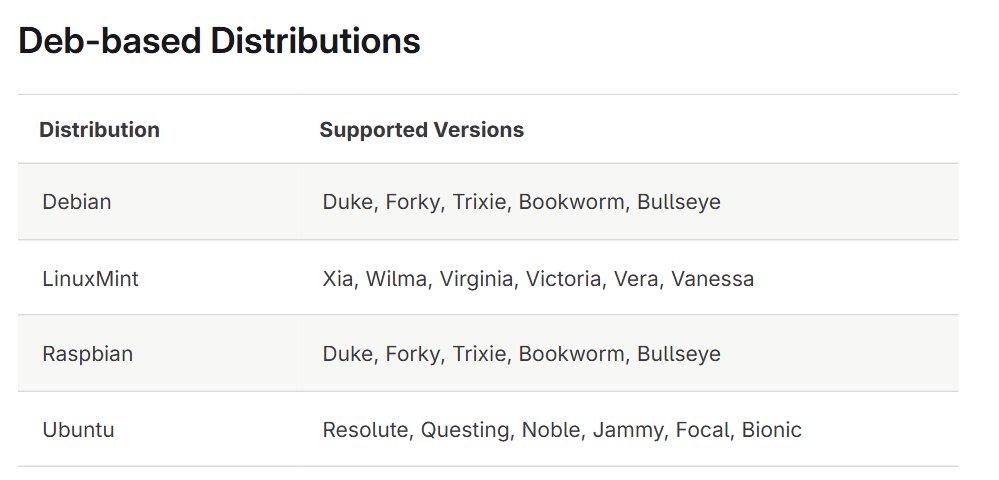
GitLab's package repository covers these Ubuntu releases. Debian, Raspbian and Linux Mint have their own lists in the same repository.
| Ubuntu release | Code name | In the GitLab Runner repository |
|---|---|---|
| Ubuntu 26.04 | Resolute | Yes |
| Ubuntu 25.10 | Questing | Yes |
| Ubuntu 24.04 | Noble | Yes |
| Ubuntu 22.04 | Jammy | Yes |
| Ubuntu 20.04 | Focal | Yes |
| Ubuntu 18.04 | Bionic | Yes |
You also need root access through sudo on the machine and the right role in GitLab to create a runner. GitLab recommends a machine separate from the one that hosts your GitLab instance, so you may want to download Ubuntu Server and build a dedicated VM.
The runner's major and minor version should stay in sync with your GitLab version. Mismatched versions can still work, but some features may be missing or behave incorrectly.
Step 1: Package update
Refresh the package index so that apt sees the latest versions in Ubuntu's repositories. Upgrading installed packages first is optional, but it picks up security updates.
sudo apt update
sudo apt upgrade
apt update refreshes the local package index. apt upgrade installs newer versions of the packages already on the machine.
Step 2: Adding GitLab Runner repository
Ubuntu's default repositories are not the source GitLab documents for this package, so add GitLab's repository with its install script. Read the script before you run it as root.
- Download the script:
curl -L "https://packages.gitlab.com/install/repositories/runner/gitlab-runner/script.deb.sh" -o script.deb.sh - Inspect the script:
less script.deb.sh - Press q to close
less, then run the script:sudo bash script.deb.sh
The repository's GPG keys are installed automatically on the first install. Keys that GitLab later rotates must be installed by hand on machines that already use the repository.
Step 3: Installing GitLab Runner on Ubuntu 24.04 or 22.04
Install the latest version from the repository you just added. Official packages run jobs under a gitlab-runner user.
sudo apt install gitlab-runnerThis installs the latest GitLab Runner release for your Ubuntu version. The skel directory is disabled by default to prevent "No such file or directory" job failures.
To pin a version, list what is available with apt-cache madison gitlab-runner. Then install the runner with the matching helper images package: sudo apt install gitlab-runner=17.7.1-1 gitlab-runner-helper-images=17.7.1-1. Since v17.7.1, leaving out the helper package can end in an unmet dependency error.
How to add a GitLab Runner to a project, group or instance
Create the runner in GitLab to get its authentication token. Pick the scope that matches who should use it.
| Runner scope | Role you need | Where to create it |
|---|---|---|
| Project runner | Maintainer of the project | Settings > CI/CD, expand Runners, then select Create project runner |
| Group runner | Owner of the group | Build > Runners, then select Create group runner |
| Instance runner | Administrator | Admin > CI/CD > Runners, then select Create instance runner |
On the form, enter job tags in the Tags field or select Run untagged, then select Create runner. GitLab shows an authentication token that starts with glrt-, which you use in the next step.
Registration tokens are the older method. They are scheduled for removal in GitLab 20.0 and must be enabled in the Admin Area before they work.
Step 4: Register GitLab Runner on Ubuntu
Registration links the installed runner to the runner you created in GitLab. The command asks for each value in turn.
- Run
sudo gitlab-runner register. - Enter your GitLab URL, for example
https://gitlab.comfor GitLab.com. - Paste the
glrt-authentication token. - Enter a description, and any job tags or maintenance note if prompted.
- Enter the executor, for example
dockerorshell. - If you chose
docker, enter a default image such asalpine:latest.
Registration saves the settings to /etc/gitlab-runner/config.toml when you run it as root. Behind a proxy, export HTTP_PROXY and HTTPS_PROXY, then run sudo -E gitlab-runner register.
How to register GitLab Runner non-interactively
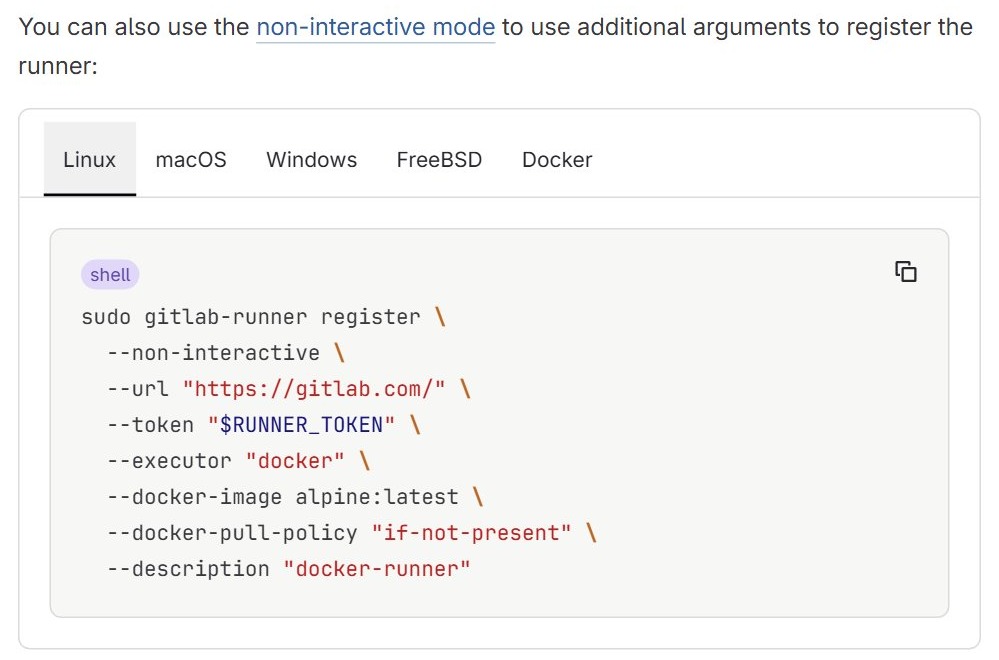
Pass every value as a flag when you set up runners from a script. Set RUNNER_TOKEN to your glrt- token first.
sudo gitlab-runner register \
  --non-interactive \
  --url "https://gitlab.com/" \
  --token "$RUNNER_TOKEN" \
  --executor "docker" \
  --docker-image alpine:latest \
  --docker-pull-policy "if-not-present" \
  --description "docker-runner"
--non-interactive skips the prompts. Replace the URL with your own instance if you do not use GitLab.com, and change --description to a name you will recognize in the runner list.
GitLab Runner Docker executor vs shell executor
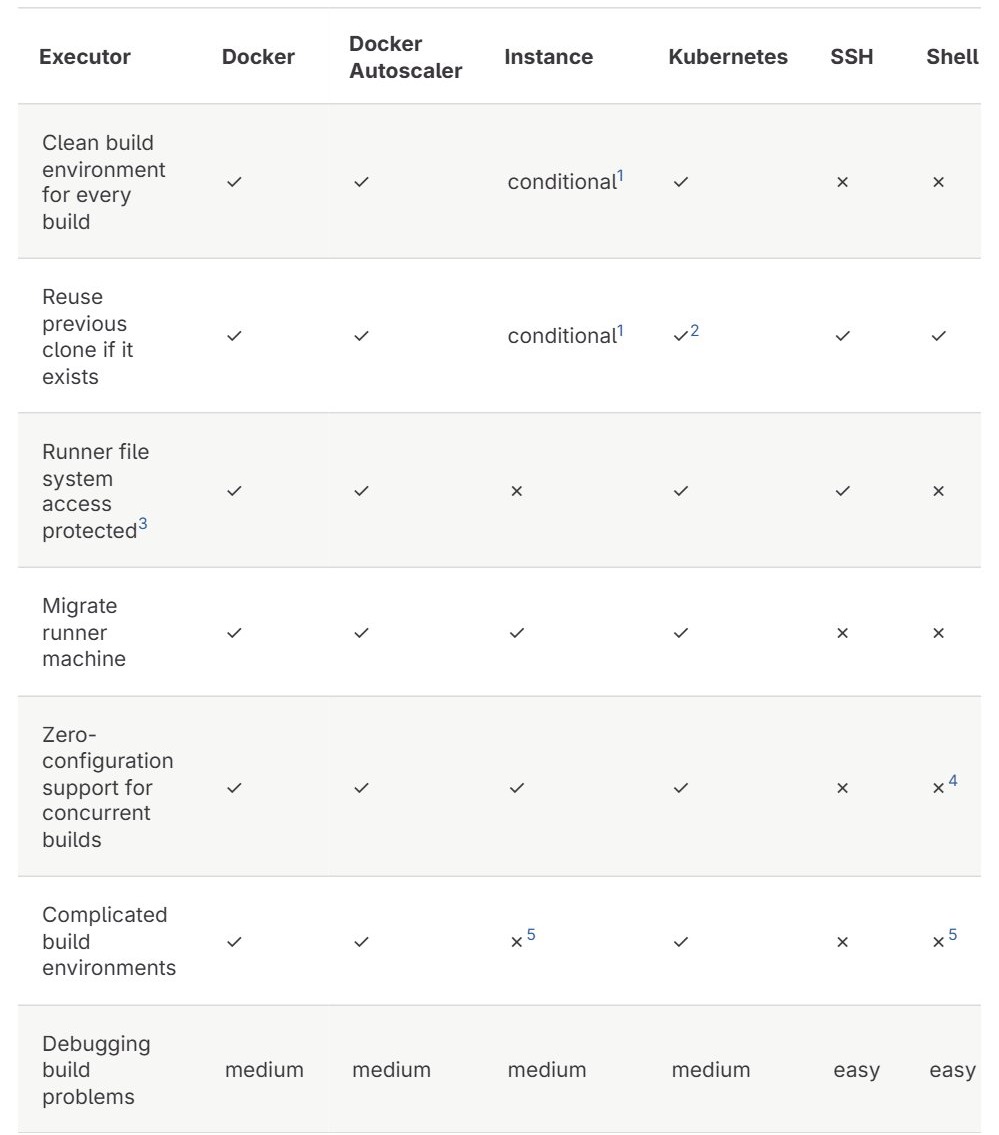
The executor decides where your jobs run. Docker suits most single-machine setups, because each job gets a clean container.
| Your situation | Executor | What to know |
|---|---|---|
| One machine, jobs need isolation | docker |
Install Docker on the runner host first. Minimum supported Docker version on Linux is 1.13.0 |
| One trusted machine, jobs run directly on it | shell |
No container isolation, and the executor is in maintenance mode. Use it only for builds from users you trust, on a server you own |
| You need to scale on cloud VMs | Docker Autoscaler or Instance | These create capacity on demand through fleeting plugins |
| You already run a Kubernetes cluster | kubernetes |
Each job gets its own pod in the cluster |
A shell runner that needs to run Docker commands requires the gitlab-runner user in the docker group: sudo usermod -aG docker gitlab-runner.
Step 5: Start and enable GitLab Runner
Start the service if it is not running, then enable it so that it starts when the machine boots.
sudo gitlab-runner start
sudo systemctl enable gitlab-runner.service
gitlab-runner start starts the service, and systemctl enable sets it to start at boot. enable alone does not start a service, which is why both commands are here.
You should see: enabled when you run sudo systemctl is-enabled gitlab-runner.service.
Other service commands follow the same pattern: sudo gitlab-runner stop and sudo gitlab-runner restart. All of them need administrator rights.
Step 6: Verify the GitLab Runner installation
Check the machine first, then check that GitLab can see the runner.
- Run
sudo gitlab-runner statusto check the service. - Run
sudo gitlab-runner listto see the runners in the configuration file. - Run
sudo gitlab-runner verifyto check that each registered runner can reach GitLab. - In GitLab, open your project and go to Settings > CI/CD, then expand Runners.
- Look for a green circle next to your runner, which means it is active.
GitLab shows one of four statuses. online means contact within the last 2 hours, offline means more than 2 hours without contact, stale means more than 7 days without contact, and never_contacted means the runner has not connected yet.
How to run a test job on GitLab Runner with .gitlab-ci.yml
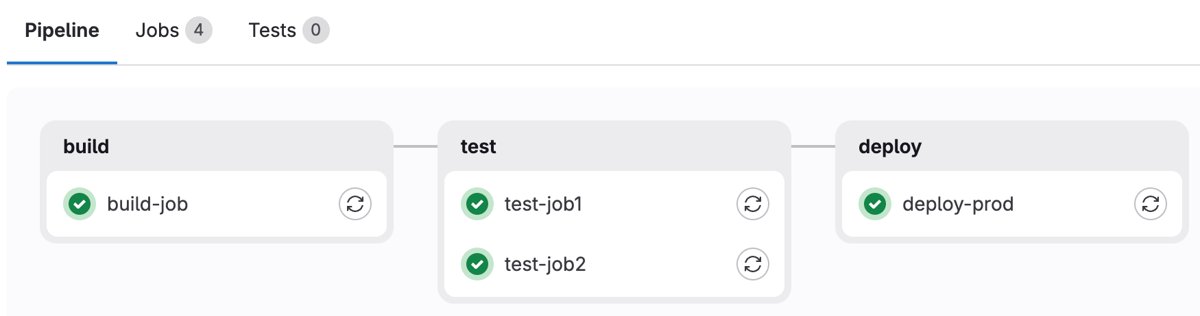
A short pipeline proves that the runner picks up work. Save this as .gitlab-ci.yml at the root of your repository and change the tag to one your runner has.
hello-job:
  stage: build
  tags:
    - ubuntu
  script:
    - echo "Hello from GitLab CI"
tags selects the runner, and a runner must have every tag listed on the job. Remove the tags block if your runner has Run untagged selected.
You should see: a new pipeline under Build > Pipelines. Select the pipeline ID and then the job name, and the job log shows the echo output.
How to configure the GitLab Runner
Runner settings live in /etc/gitlab-runner/config.toml when you run as root, and in ~/.gitlab-runner/config.toml when you do not. These are the settings people change most.
| Setting | Where | What it does |
|---|---|---|
concurrent |
Global | Limits how many jobs can run at once across all registered runners. 0 is not allowed |
check_interval |
Global | Seconds between checks for new jobs. The default is 3 |
log_level |
Global | Sets the log level: debug, info, warn, error, fatal or panic |
executor |
[[runners]] |
Sets the environment that runs the job |
limit |
[[runners]] |
Limits concurrent jobs for this one runner. The default 0 means no limit |
name |
[[runners]] |
The runner's description. It has no functional effect |
url |
[[runners]] |
Your GitLab instance URL |
token |
[[runners]] |
The runner's authentication token |
GitLab Runner checks the file for changes every 3 seconds and reloads it, so most edits need no restart. The listen_address setting is the exception. To reload by hand, run sudo systemctl reload gitlab-runner.service.
How to update GitLab Runner on Ubuntu
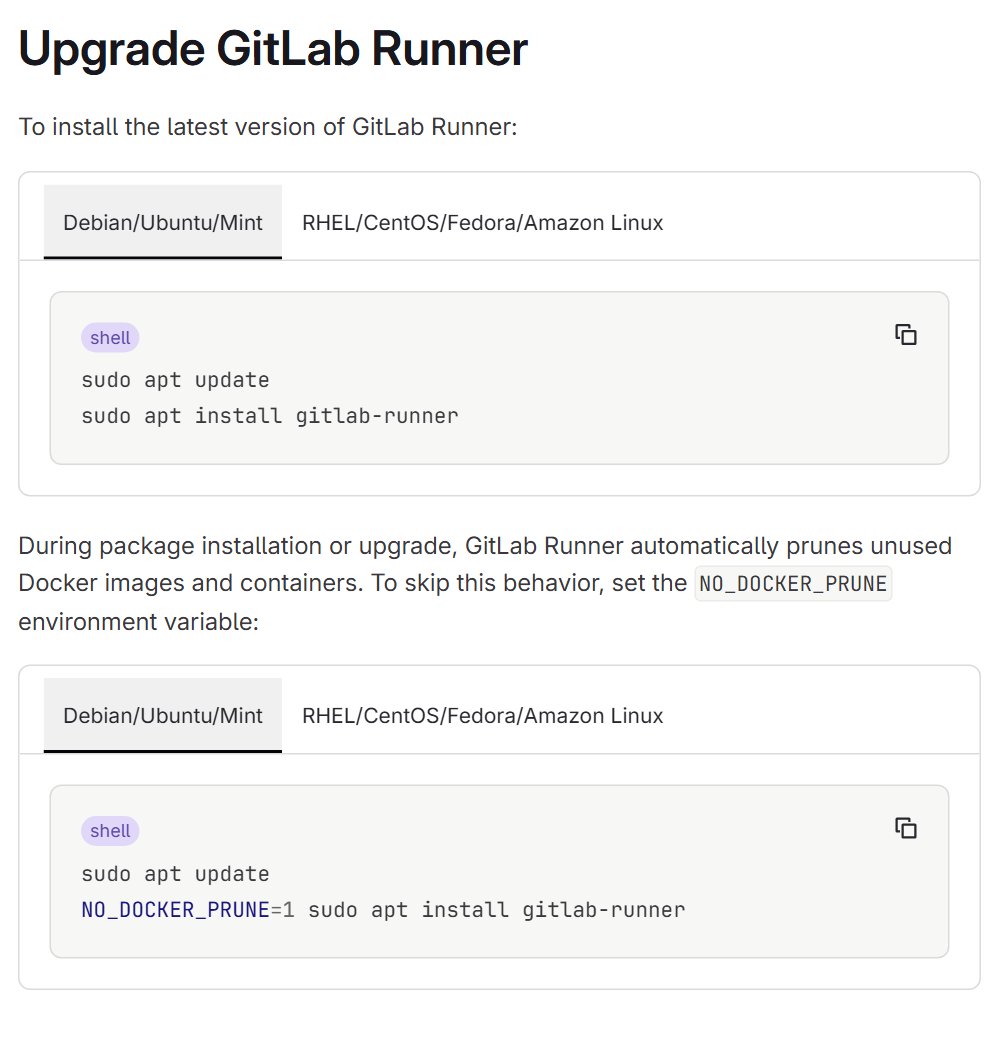
The update uses the same package, so apt fetches the newest version from GitLab's repository.
sudo apt update
sudo apt install gitlab-runner
Upgrades prune unused Docker images and containers by default. To keep them, run NO_DOCKER_PRUNE=1 sudo apt install gitlab-runner instead of the second command.
How to install GitLab Runner on Windows
Windows has no package step. You download a single binary from GitLab's Windows install page and run it as a service.
- Create a folder such as
C:\GitLab-Runner. - Download the binary for your architecture into that folder and rename it
gitlab-runner.exe. - Restrict Write permissions on the folder and the file so that regular users cannot replace them.
- Open an elevated command prompt and run
cd C:\GitLab-Runner. - Register the runner with
.\gitlab-runner.exe register. - Run
.\gitlab-runner.exe install, then.\gitlab-runner.exe start.
How to uninstall GitLab Runner on Ubuntu
Unregister the runner first so that it is removed from GitLab as well as from this machine, then remove the package.
- Run
sudo gitlab-runner unregister --all-runners. - Run
sudo gitlab-runner stop. - Run
sudo apt remove gitlab-runnerto remove the package and keep its configuration files. - Run
sudo apt remove --purge gitlab-runnerinstead if you also want the package configuration files removed.
To remove just one runner, use sudo gitlab-runner unregister --name test-runner. Runners already deleted in GitLab can be cleared with sudo gitlab-runner verify --delete, so back up config.toml before you run it.
GitLab Runner not working on Ubuntu
Start with the logs when the cause is not obvious: journalctl --unit=gitlab-runner.service -n 100 --no-pager. Then match the message you see to one of the errors below.
Check registration token
The GitLab instance does not recognize the token. It may have changed, or it may have been entered incorrectly.
- Copy the token again from GitLab and rerun
sudo gitlab-runner register. - If it still fails, ask an administrator to verify the token and confirm that registration is permitted.
410 Gone – runner registration disallowed
Token-based registration is disabled on the instance.
- Create the runner in GitLab and use its
glrt-authentication token. - If you must use a registration token, ask an administrator to check the instance, group or project settings.
Runner shows offline or never contacted in GitLab
The runner is not running on the host, or it cannot reach GitLab.
- Run
sudo gitlab-runner statusand, if it is stopped,sudo gitlab-runner start. - Run
sudo gitlab-runner verifyto test the connection. - Follow the live log with
journalctl --unit=gitlab-runner.service -f.
Job is stuck and never starts
No runner has every tag on the job, or the job has no tags and the runner does not run untagged jobs.
- Compare the job's
tagsin.gitlab-ci.ymlwith the runner's tags in Settings > CI/CD > Runners. - Add the missing tag to the runner, change the job's tags or turn on Run untagged jobs.
No such file or directory when a job runs
Dotfiles copied by skel on a runner installed before it was disabled by default can break jobs.
- Run
sudo rm /home/gitlab-runner/.profile. - Run
sudo rm /home/gitlab-runner/.bashrc. - Run
sudo rm /home/gitlab-runner/.bash_logout.
Job failed (system failure): preparing environment
This often comes from a shell profile script that fails when it loads.
- Look in the home directory of the runner user for
.bash_logout,.condarcand.rvmrc, the known culprits. - Fix or remove the file that fails, then run the job again.
x509: certificate signed by unknown authority
The runner does not trust the certificate of a self-hosted GitLab instance.
- Get your instance's certificate in PEM format, or the CA certificate if an internal CA signed it.
- As root, save it as
/etc/gitlab-runner/certs/gitlab.example.com.crt, using your own hostname in the file name. - Run
sudo gitlab-runner restart. GitLab's self-signed certificates guide has the alternativetls-ca-fileoption.
For more detail, add log_level = "debug" at the very top of config.toml. Debug output can expose variables and secrets, so turn it off when you finish.
GitLab Runner on Ubuntu FAQ
How do you install GitLab Runner on Ubuntu 20.04?
Use the same commands as on Ubuntu 24.04 and 22.04, because Ubuntu 20.04 (Focal) is in GitLab's package repository. Run the script.deb.sh repository script, then sudo apt install gitlab-runner, then sudo gitlab-runner register.
How do you install GitLab Runner on a VM?
Treat the VM like any Ubuntu machine and run the repository script, the apt install and the register command inside it. GitLab recommends a machine separate from your GitLab instance, so a dedicated VM is a sensible home for a runner.
How do you install GitLab Runner on an EC2 instance?
Connect to an Ubuntu EC2 instance over SSH and run the same repository script, apt install and register commands. The instance must be able to reach your GitLab URL, and it needs Docker installed if you choose the Docker executor.
How do you install GitLab Runner on a Linux machine other than Ubuntu?
On Debian, Raspbian and Linux Mint, use the same repository script and apt commands. If your distribution is not in the repository, GitLab documents a manual Linux install that uses its own packages or the binary.
How do you add a GitLab Runner to a project?
Open the project and go to Settings > CI/CD, expand Runners and select Create project runner. Enter tags or select Run untagged, select Create runner, and use the token GitLab shows with sudo gitlab-runner register. You need the Maintainer role.
How do you set up GitLab Runners for a whole group?
Open the group and go to Build > Runners, then select Create group runner. You need the Owner role for the group. Register the runner on your machine with its token, and every project in the group can then use it.
Do you need to build GitLab Runner from source?
No. GitLab publishes ready-made packages for Debian and Ubuntu, so sudo apt install gitlab-runner is all you need on Ubuntu. Other install routes include a manual binary install, a Docker container and bleeding edge development builds.
What is the difference between GitLab and GitLab Runner?
GitLab hosts your code and manages your CI/CD pipelines. GitLab Runner is a separate application that runs the jobs in those pipelines. GitLab sends each job to an available runner and receives the result back from it.