The best gaming room ideas start with the screen and desk position, then add a supportive chair, layered lighting, tidy cables and a color scheme that suits the space.
This guide covers layouts for small rooms, bedrooms and basements, LED lighting, furniture, PC and console tech, decor, budget choices and advanced setups.
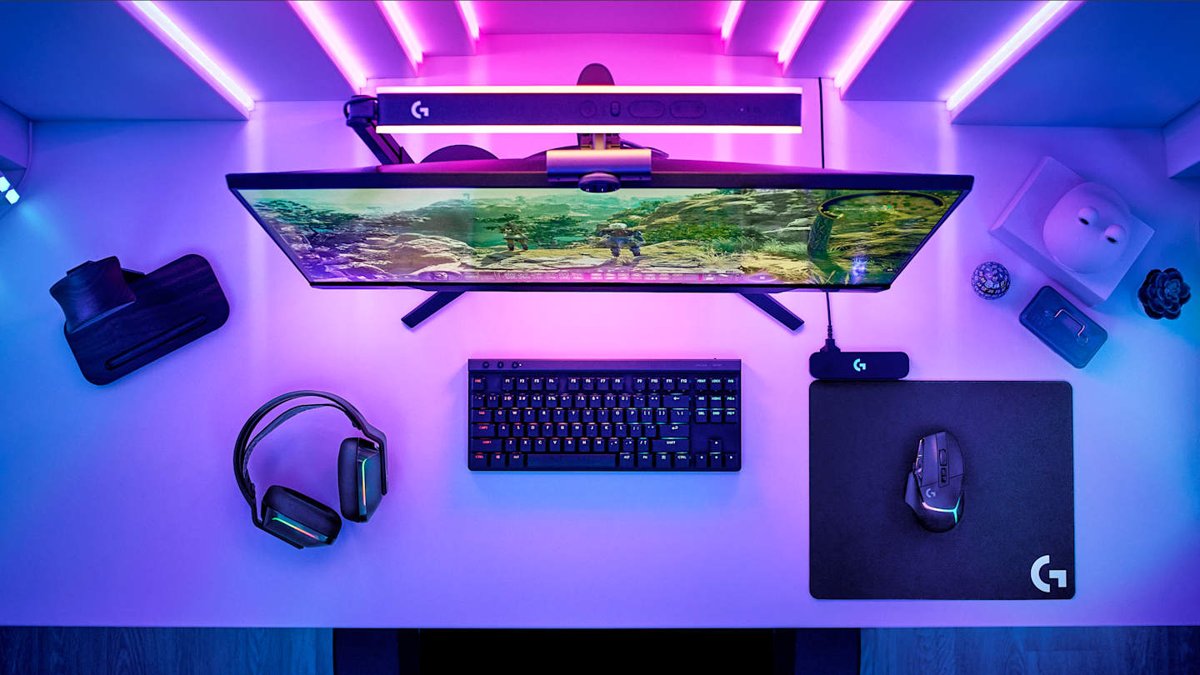
Gaming room ideas: Finding your perfect setup
Make these decisions in order, because each one limits the next. The screen position matters most, since glare and sitting distance are hard to fix after everything is in place.
- Measure the room and mark the window, door, outlets and router position on a rough sketch.
- Decide what you play on most: a PC, a console, or both.
- Place the desk or TV so that windows and bright lamps do not reflect on the screen.
- Choose a chair and desk that let you sit with your thighs parallel to the ground and your feet supported.
- Add lighting behind or around the screen, plus one general room light.
- Route the cables, then add color and decor last.
Gaming room layout ideas for different spaces
Match your room to the row below. The right layout depends more on the room's shape and light than on its size.
| Your space | Layout to try | Watch out for |
|---|---|---|
| Small room | Put the desk against the longest wall and mount the monitors on an arm to free the surface | A deep desk can block the door or the chair's path |
| Bedroom | Keep the desk on a separate wall from the bed, so the setup is out of your sightline at night | Bright RGB lighting near the bed, so choose lights you can switch off |
| Basement | Place the screen on a wall away from any small windows, and raise equipment off the floor | Damp, and limited outlets or Wi-Fi coverage |
| Dedicated room | Float the desk away from the wall or run desks along two walls for a second player | Long cable runs, which need floor covers or a route around the room |
| Shared living room | Use a TV stand with closed storage for the console, and keep the controllers in a drawer | Blocked console vents inside a closed cabinet |
How to build a gaming room
Build the room from the wall outward. Doing the power and network work first saves moving heavy furniture twice.
- Count the outlets you need for the PC or console, monitors, speakers, chargers and lights, then add a surge-protected power strip where needed.
- Plan the network. Run a LAN cable if the router can reach the room, because PCs and current consoles both accept a wired connection.
- Assemble and position the desk, leaving enough space behind it to reach the cables.
- Mount or place the screen so the area you look at lines up with your brow or slightly below it.
- Set the screen 20 to 30 inches (50 to 75 cm) from your eyes, and center your main display in front of you.
- Adjust the chair until your hips and knees are level and your forearms sit parallel to the desk.
- Connect the equipment, tie the cables down, and test everything before you add decor.
A larger TV can sit farther away than a desk monitor, so treat that distance as a starting point for desk setups.
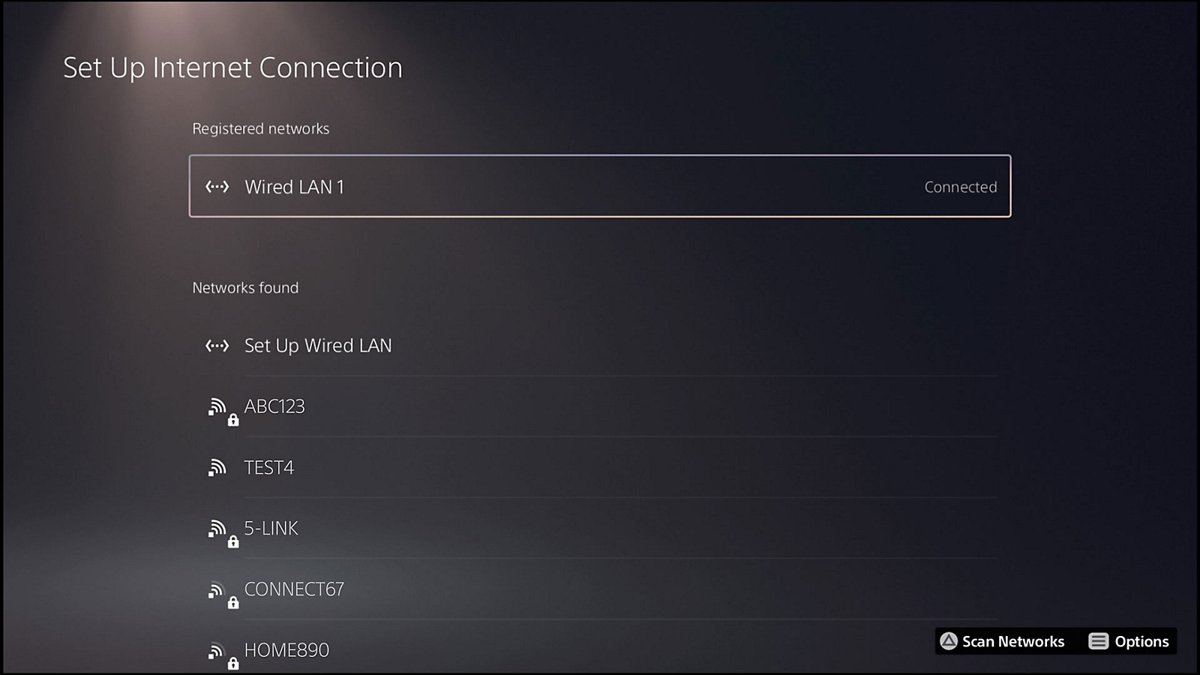
Essential gaming room ideas for 2026
| Idea | How to do it | What it improves |
|---|---|---|
| Separate zones | Keep one area for playing and another for storage or a second seat | The room stays usable when several people are in it |
| Screen-first placement | Angle the screen away from windows, and use blinds or shades if glare remains | Picture contrast and eye comfort |
| Layered lighting | Combine a ceiling light, a desk lamp and LED strips on separate switches | You can match the room to the time of day |
| Wall storage | Use shelves and a pegboard for controllers and headsets | Clear desk space |
| Hidden cables | Use a cable tray, tie-downs and desk-mounted power strips | Easier cleaning and a tidier view |
| Personal display | Choose a few pieces from games you love, not a wall full of everything | A room that feels like yours |
Gaming room color ideas
Darker walls cut reflections around a screen, and lighter walls make a small room feel more open. Pick one main color, one accent and one neutral, then test a sample on the wall in the evening light.
| Color scheme | Mood | Works best in |
|---|---|---|
| Charcoal and neon accent | Focused, high-contrast | Dedicated rooms and basements |
| Deep blue and warm wood | Calm and adult | Bedrooms and shared rooms |
| White and one bold color | Clean and bright | Small rooms that need to feel larger |
| Black and red | Classic gaming look | Rooms with matching RGB gear |
| Sage green and natural textures | Relaxed and minimalist | Rooms that double as a home office |
Gaming room furniture ideas: Where comfort meets performance
Spend your furniture money on the pieces that touch your body or hold your screens. Size matters as much as style, so check the numbers against your room and your height.
| Piece | What to look for | Example or benchmark |
|---|---|---|
| Gaming chair | A seat height that keeps your feet supported, with an angle of 90 to 110 degrees between back and thighs | Corsair's seat heights range from about 42.6 cm on the TC60 FABRIC to 60 cm on the T2 Road Warrior |
| Chair safety | Published standards for strength, durability and ergonomics | Corsair says its chairs meet ANSI/BIFMA X5.1 and EN1335, so check the listing for any chair you consider |
| Chair capacity | A weight rating above your own weight | 120 kg to 136 kg (264.5 to 300 lb) across Corsair's listed models |
| Gaming desk | Enough depth for your screen distance, and width for your PC and speakers | Corsair's Platform:6 base model has a 72 x 30 inch (180 x 76 cm) surface and a dual monitor arm |
| Monitor arm | VESA compatibility with your screen | A dual arm removes bulky monitor legs and makes both screens easier to adjust |
| Storage | Pegboards, hooks or a side shelf | A side shelf can hold a PC off the floor without using the main desk surface |
Gaming room ideas with LED lights
LED strips and RGB gear look best when they light the wall behind the screen, not your eyes. Match your screen brightness to the room, and reduce it in the evening.
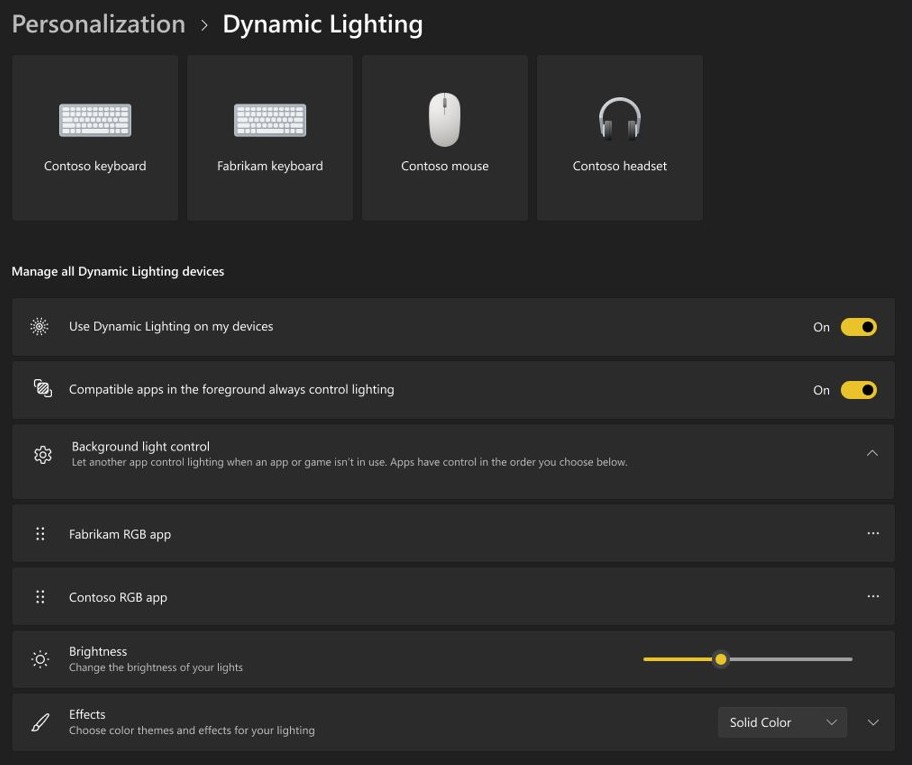
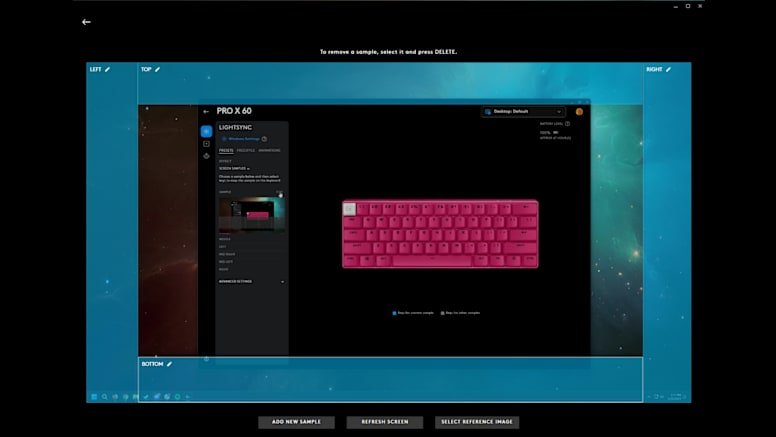
On Windows 11, Dynamic Lighting lets compatible devices from different brands share one set of effects. Logitech's LIGHTSYNC, for example, supports it alongside G HUB.
- Stick LED strips along the back edge of the desk or behind the monitor.
- Keep a separate ceiling or lamp light for general use, and move it if it reflects on the screen.
- Open Settings > Personalization > Dynamic Lighting on Windows 11.
- Turn on Use Dynamic Lighting on my devices.
- Set Brightness and Effects for all devices, or select one device card to adjust it alone.
- If the sliders have no effect, open Background light control and drag Dynamic Lighting Background Controller to the top.
PC gaming room ideas
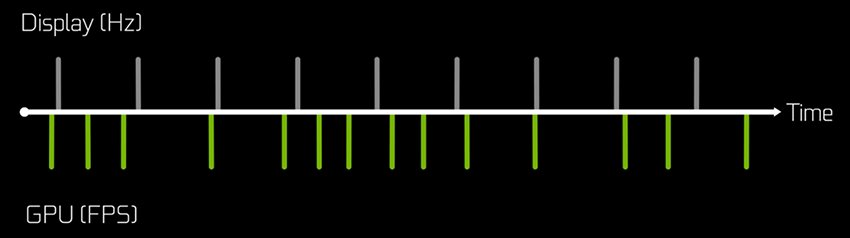
A PC room works best when the graphics card and monitor are chosen together. NVIDIA's shorthand is simple: the GPU produces the FPS and the display sets the Hz, and a high-Hz monitor only helps if the GPU can produce that many frames.
| Idea | How to do it | Why it helps |
|---|---|---|
| High refresh monitor | Set the rate under Settings > System > Display > Advanced display > Choose a refresh rate | A new monitor may not run at its top rate until you select it |
| Variable refresh rate | Choose a display with G-SYNC or a similar feature | Reduces tearing without the input delay V-Sync can add |
| Dual monitors | Press Windows + P, choose Extend, and put your largest screen as the main display | Keeps chat, guides or a stream beside the game |
| Vertical second screen | Rotate a VESA-mounted side monitor for chat and browser windows | Fits more text in less desk width |
| Lifted PC | Put the tower on a side shelf or stand instead of the floor | Keeps it clear of floor dust, and easier to reach |
Once the hardware is in place, you can boost your PC's gaming performance with changes in Windows and your graphics settings.
Gaming room setup ideas for PS5 and Xbox
Console rooms depend on two things: the right HDMI port and enough air around the console. Xbox support says to keep a console on a stable surface in a well-ventilated, relatively cool place, away from direct heat.
- Place the console on a stable surface, with nothing on, under or right next to it.
- Keep it off speakers and subwoofers, and away from heat sources.
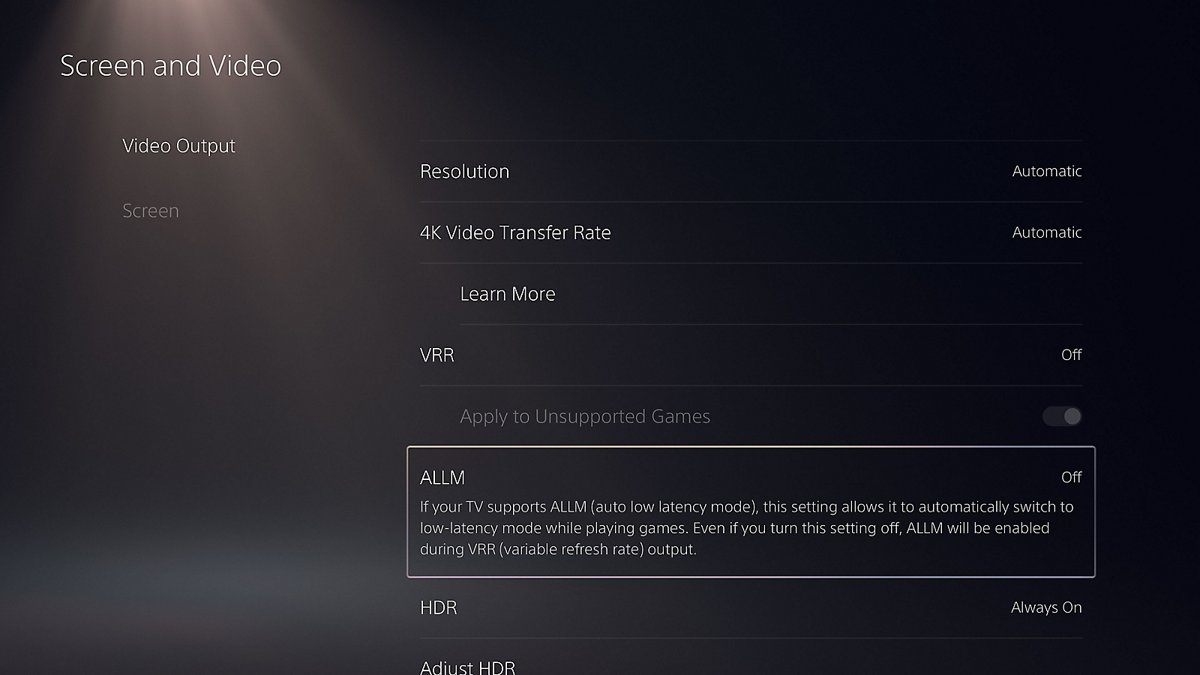
- For 4K at 120 Hz on PS5, connect directly to an HDMI 2.1 port on the TV, not through a receiver.
- Use the HDMI cable in the box, or an Ultra High-Speed HDMI cable rated for 4K 120 Hz.
- On PS5, go to Settings > Screen and Video > Video Output and turn on 120 Hz Output and VRR if your TV supports them.
- Attach the feet or base before you use a PS5, as Sony requires. Vertical placement on Slim and Pro models needs the separately sold stand.
If you also play on a PC, the Xbox app and Game Bar on Windows tie your account and controllers together.
Gaming room decor ideas
Good decor gives the room a theme without crowding the desk. Keep the area directly around the screen simple so nothing competes with the picture.
| Decor idea | How to use it | Best for |
|---|---|---|
| Framed game art | Hang two or three matching frames at eye level | Adult and modern rooms |
| Collectible shelves | Use floating shelves with lights on the back wall | Rooms that appear on camera |
| Controller and headset wall | Mount hooks on a pegboard beside the desk | Small rooms |
| Area rug | Place a rug under the seating area, and check that your chair casters roll on it | Rooms with hard floors |
| Plants | Add one or two low-light plants away from the vents | Minimalist rooms |
| Neon-style sign | Mount a gamer tag or logo sign above the screen line | Boys' rooms and streaming backdrops |
Small gaming room ideas
In a tight space, every piece needs to fold, stack or mount. Think vertically before you buy anything that sits on the floor.
| Idea | How it saves space |
|---|---|
| Wall-mounted TV or monitor arm | Frees the desk or stand surface below the screen |
| Shallow desk with a monitor arm | Lets the screen sit back from the desk edge without a deep desktop |
| Corner desk | Uses a corner that furniture usually wastes |
| Pegboard and hooks | Moves headsets and controllers off the desk |
| Light walls and one accent color | Makes the room feel larger than a fully dark scheme |
| Laptop or handheld dock | Lets you put away the whole setup when you need the room back |
Modern and minimalist gaming room ideas
A minimalist gaming room hides most of the technology and leaves only the screen, the desk and one lighting effect in view.
| Choice | Modern or minimalist version |
|---|---|
| Colors | Two or three neutral colors with a single accent |
| Lighting | One color of LED strip behind the desk, in place of a full rainbow effect |
| Desk | Clean surface with a cable tray below it and grommets for keyboard and mouse leads |
| Storage | Closed cabinets, or a lidded in-desk compartment for small items |
| PC | A plain case with its lighting turned down, or a console in a ventilated open shelf |
Gaming room ideas for boys and adults
| Area | Boys' gaming room ideas | Gaming room ideas for adults |
|---|---|---|
| Theme | Favorite game characters, posters and bright colors that are easy to repaint | Framed art, darker colors and natural materials |
| Seating | A chair with enough height range to adjust as they grow, plus a footrest | A supportive chair sized to your height, with a rated weight limit |
| Tech | A console or shared PC placed where a parent can see the screen | A high-refresh monitor or large TV, and quiet storage for gear |
| Health habits | A reminder to stand and move about every hour | A reminder to look 20 feet away for 20 seconds every 20 minutes |
Budget gaming room ideas that don’t sacrifice style
Spend on comfort and the screen first, because those affect every session. Almost everything else in a gaming room can be cheap, secondhand or homemade without hurting how it plays.
| Area | Spend here or save here | Low-cost idea |
|---|---|---|
| Chair | Spend | Look for a used office chair with adjustable height and arms, if a new gaming chair is too much |
| Monitor or TV | Spend | Buy for the refresh rate your PC or console can reach, and skip extra features it cannot use |
| Desk | Save | Use a plain tabletop on trestle legs, sized to fit the wall |
| Lighting | Save | Start with one LED strip and a desk lamp you already own |
| Cable management | Save | Use cable ties and adhesive clips along the back of the desk |
| Decor | Save | Print game art, frame it yourself, and paint one accent wall |
Advanced gaming room ideas for dedicated gamers
Once the basics are comfortable, these upgrades target picture quality, responsiveness and streaming. Check each one against the hardware you already have before you buy.
| Upgrade | What it adds | Check first |
|---|---|---|
| 4K 120 Hz TV | Higher frame rates on PS5 and similar consoles | An HDMI 2.1 port and support for 120 Hz in your games |
| 240 Hz monitor | A refresh cycle one quarter as long as on a 60 Hz display | A GPU that can reach those frame rates in your games |
| Screen-matched RGB | LIGHTSYNC screen sampling matches the room lighting to on-screen pixels | Compatible Logitech G devices and G HUB |
| Desk rail system | Accessories such as a shelf or pegboard that attach to the desk | A desk designed for it, such as Corsair's Platform series |
| Streaming corner | A dedicated backdrop, with a second screen for chat | Enough light on your face, and a wall that looks good on camera |
| Sound treatment | Soft panels, curtains and rugs that reduce echo for voice chat and streams | Wall space beside and behind the seat |
Gaming room maintenance ideas for a lasting setup
A gaming room stays comfortable if you look after the airflow, the cables and the seat. A short check every so often beats a full rebuild later.
| Task | What to do | Why it matters |
|---|---|---|
| Console airflow | Clear anything that has drifted on, under or next to the console | Blocked vents can make a console overheat |
| Dust | Wipe down desks and shelves, and clear dust from around the PC and console vents | Dust builds up around warm equipment |
| Cables | Re-tie loose runs and check for damaged leads | Keeps cables away from chair casters |
| Chair | Check that the height, armrests and casters still move properly | A worn chair changes your posture |
| Posture check | Re-measure screen height and distance after any desk change | Small moves add up to neck strain |
| Lighting | Re-check glare when the seasons change the daylight | A new reflection may need a blind or a moved lamp |
Gaming room inspiration gallery
Use these themes as starting points, and swap the details to suit your room. Each one works in a small room or a large one.
| Theme | The look | Key pieces |
|---|---|---|
| Cyberpunk den | Dark walls with magenta and cyan light | LED strips, neon-style sign, black desk |
| Retro arcade | Warm colors and old-school game art | Framed posters, a shelf of classic consoles, patterned rug |
| Scandinavian studio | Pale wood and soft white walls | Wood desk, hidden cables, one warm LED strip |
| Racing cockpit | Bold stripes and a sporty seat | Wheel stand, bucket-style chair, wide screen |
| Fantasy library | Deep colors with shelves of books and figures | Dark wood, warm lamps, framed maps |
| Console lounge | A sofa-first living space | Wall-mounted TV, ventilated open shelf, controller drawer |
Creating your ideal gaming room: Next steps
When the furniture is in place, spend an evening tuning the room before you call it finished.
- Sit in your normal position and check that the screen is centered and level with your brow or slightly below.
- Play at night and during the day, then move lamps or close blinds to remove any glare.
- Confirm your monitor or TV is running at its intended refresh rate.
- Set your screen brightness to match the room's lighting.
- Set a reminder to stand for at least two minutes every hour.
- Take a photo of the room, and note what still bothers you before you buy anything else.
Gaming room ideas FAQ
What is a gaming room?
A gaming room is a space set up mainly for playing video games, with the screen, seating, lighting and storage arranged around that use. It can be a whole room, a corner of a bedroom, or a converted basement. Any size works if the layout suits it.
How to build a gaming room?
Measure the room, then plan outlets and network access first. Position the desk or TV to avoid glare, set the screen 20 to 30 inches from your eyes at a desk, and adjust your chair. Connect and test everything, and add decor last.
What are good gaming room ideas?
Good ideas improve how the room plays and feels. Start with glare-free screen placement, a supportive chair, separate light sources and hidden cables. Then add wall storage, an accent color and a few pieces of game art that reflect what you play.
What are cool gaming room ideas?
Popular choices include LED strips that match on-screen colors, a neon-style sign with your gamer tag, a wall of lit collectible shelves and a dual monitor arm. A theme such as cyberpunk or retro arcade ties them together, so the room looks planned.
What are the best gaming room color ideas?
Charcoal with a neon accent suits dedicated rooms, deep blue with warm wood suits bedrooms, and white with one bold color helps a small room feel larger. Test a sample in evening light, because lamps and RGB lighting change how a color looks.
How do you set up a gaming room in a bedroom?
Put the desk on a different wall from the bed, keep it away from the window glare, and use lights you can turn off at night. A monitor arm and wall hooks free up floor space, and closed storage hides the setup when you want to sleep.
What are good basement gaming room ideas?
Basements suit dark color schemes because they have little natural light, which also reduces glare. Raise equipment off the floor in case of damp, check that you have enough outlets, and run a LAN cable if the Wi-Fi signal is weak down there.