To convert a PS1 file to an EXE on Windows 11, run iexpress.exe, package the script with a small batch launcher, and set cmd.exe /c "run.cmd" as the install program.
This guide covers writing the script and launcher, every IExpress Wizard page, testing the EXE, rebuilding it after edits, the package switches, and fixes when the script does not run.
Convert PowerShell script (PS1) file to EXE with IExpress
IExpress ships with Windows and builds a self-extracting EXE that unpacks its files and runs one command. Put MyScript.ps1 and a launcher called run.cmd in the same folder first; the next two sections show how to write both.
- Press Win + R, type
iexpress.exeand press Enter. Approve the User Account Control prompt if one appears. - Select Create new Self Extraction Directive file, then Next.
- Select Extract files and run an installation command, then Next.
- Type a package title, such as the script's name, and select Next.
- Select No Prompt on Confirmation prompt, then Do not display a license on License agreement.
- On Packaged files, add both
MyScript.ps1andrun.cmd, then select Next. - On Install Program to Launch, type
cmd.exe /c "run.cmd"in the Install Program box. - Select Default on Show window, No message on Finished message, then browse to where the EXE should be saved and tick Store files using Long File Name inside Package.
- Select No restart, then Save Self Extraction Directive (SED) file, then Next and Finish on Create package.
Double-click the new EXE to run your script. Keep the .sed file next to it, because it lets you rebuild the package after you edit the script.
How to make a PowerShell script
A PowerShell script is a plain text file with a .ps1 extension that holds the commands you would otherwise type. Notepad or Visual Studio Code both work.
- Open Notepad.
- Type the commands, one per line. For a test, use
Get-Service -Name W32Time. - Select File > Save as, set Save as type to All files, and name the file
MyScript.ps1. - Save it in a new empty folder that will hold only the package files.
- Open PowerShell in that folder and run
.\MyScript.ps1to check the script works before you package it.
If PowerShell answers that running scripts is disabled on this system, the execution policy is still Restricted, the Windows 11 default. The launcher in the next section sets a policy for its own session, so the packaged EXE is not affected by that default.
How to run a PowerShell script from a batch file
IExpress runs an install command, not a script, so a one-line batch file starts PowerShell with the right options. %~dp0 is the folder the batch file runs from, which is where IExpress extracts both files.
- Open Notepad and start a new file.
- Type
@echo offon the first line. - On the second line, type
powershell.exe -NoProfile -ExecutionPolicy RemoteSigned -File "%~dp0MyScript.ps1". - Save it as
run.cmdwith Save as type set to All files, in the same folder asMyScript.ps1. - Double-click
run.cmdto confirm it runs the script before you open IExpress.
-ExecutionPolicy only applies to that one PowerShell session and does not change the policy stored in the registry. Keep -File and the script path last on the line, because PowerShell reads everything after -File as the script and its arguments.
For PowerShell 7, replace powershell.exe with pwsh. Add -WindowStyle Hidden before -File if the script needs no console window.
IExpress Wizard settings for a PS1 to EXE package
Each wizard page maps to one choice. These are the values that suit a script launcher rather than a software installer.
| IExpress Wizard page | Choose | Why |
|---|---|---|
| First page | Create new Self Extraction Directive file | Starts a new package and its .sed file |
| Second page | Extract files and run an installation command | Unpacks the script and runs your launcher |
| Third page (title box) | The script's name | Shown in IExpress dialogs for the package |
| Confirmation prompt | No Prompt | The EXE runs without asking first |
| License agreement | Do not display a license | No license text is needed for a script |
| Packaged files | MyScript.ps1 and run.cmd |
Both files are extracted to the same folder |
| Install Program to Launch | cmd.exe /c "run.cmd" |
Runs the launcher, which starts PowerShell |
| Show window | Default | Window style for the launch command |
| Finished message | No message | No dialog when the script ends |
| Package Name and Options | Output path and Store files using Long File Name inside Package | Keeps MyScript.ps1 and other long names intact |
| Configure restart | No restart | A script launcher has no reason to restart Windows |
| Save Self Extraction Directive | Save Self Extraction Directive (SED) file | Lets you rebuild the EXE later |
How to test the IExpress EXE on Windows 11
- Copy the EXE to another folder, or another PC, that does not contain
MyScript.ps1orrun.cmd. - Double-click the EXE and approve the User Account Control prompt if Windows shows one.
- Check that the script's output or changes appear, for example the service status from
Get-Service. - For a script that should leave a window open, temporarily add
-NoExitbefore-Fileinrun.cmd, rebuild, and read any error text. - Remove
-NoExitagain and rebuild once the script works.
Does IExpress hide or compile the PowerShell script?
No. IExpress makes a self-extracting package, not a compiled program. The EXE carries your .ps1 file as it is and extracts it before running the launcher.
| Question | Answer |
|---|---|
| Is the script code protected? | No. The package switch for extracting files without running them unpacks the .ps1 as plain text |
| Does the target PC need PowerShell? | Yes. The EXE starts powershell.exe, which ships with Windows 10 and Windows 11 |
| Does it remove execution policy rules? | Only for the launched session, through the -ExecutionPolicy option in run.cmd |
| Can it run PowerShell 7 scripts? | Yes, if PowerShell 7 is installed on the target PC and run.cmd calls pwsh |
| Can it pass parameters to the script? | Yes. Add them after the script path on the -File line in run.cmd |
Never put passwords or keys in a script you package this way. Anyone with the EXE can extract and read them.
How to update the EXE after editing the PS1 script
- Edit and save
MyScript.ps1in the original folder. - Run
iexpress.exeagain. - Choose the option to open an existing Self Extraction Directive file and browse to the
.sedfile you saved. - Select Next through the pages, which keep your earlier choices.
- On Create package, select Next and Finish to overwrite the EXE.
The .sed file stores paths to the files, so keep the script and launcher in the same folder they were in when you first built the package.
IExpress package command-line switches
An IExpress EXE accepts these switches from Command Prompt. Microsoft documents them on its archived IExpress page.
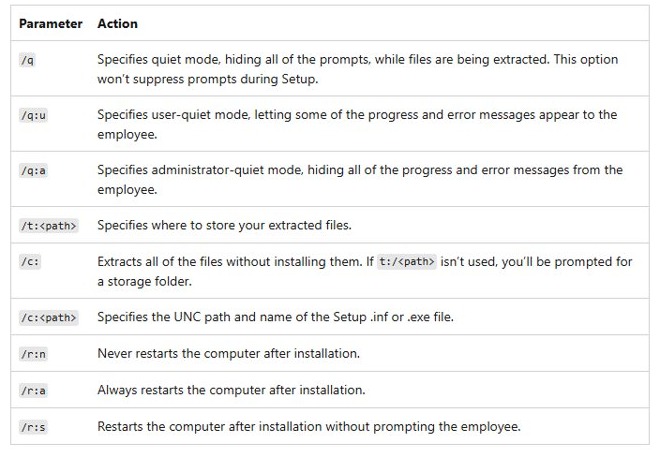
| Switch | What it does |
|---|---|
/q |
Quiet mode: hides prompts while files are extracted |
/q:u |
User-quiet mode: some progress and error messages still appear |
/q:a |
Administrator-quiet mode: hides all progress and error messages |
/t:<path> |
Sets the folder the files are extracted to |
/c: |
Extracts all files without running the install command; prompts for a folder if /t: is not given |
/c:<path> |
Sets the install command to run instead of the one stored in the package |
/r:n |
Never restarts the computer afterwards |
/r:a |
Always restarts the computer afterwards |
/r:s |
Restarts the computer afterwards without asking |
IExpress EXE not running the PowerShell script
"Running scripts is disabled on this system"
PowerShell started without an execution policy option, so the Windows 11 default of Restricted applied.
- Open
run.cmdand check the line contains-ExecutionPolicy RemoteSignedbefore-File. - Rebuild the EXE from the
.sedfile. - Run the EXE again.
A window flashes and closes with nothing done
The script hit an error and PowerShell exited before you could read it.
- Add
-NoExitbefore-Fileinrun.cmd. - Rebuild and run the EXE, then read the error in the window that stays open.
- Fix the script, remove
-NoExitand rebuild.
PowerShell cannot find MyScript.ps1
The launcher used .\MyScript.ps1 or a fixed path instead of the extraction folder.
- Change the path in
run.cmdto"%~dp0MyScript.ps1". - Check that both files were added on the Packaged files page.
- Confirm Store files using Long File Name inside Package was ticked, then rebuild.
The script needs admin rights and fails
The EXE started PowerShell without elevation.
- Right-click the EXE and select Run as administrator.
- Approve the User Account Control prompt.
PowerShell script to EXE FAQ
How do I make a PowerShell script?
Open Notepad, type the PowerShell commands one per line, and save the file with a .ps1 extension and Save as type set to All files. Run it from PowerShell with .\ followed by the file name, after allowing scripts with an execution policy such as RemoteSigned.
How do I do a PowerShell script that runs on double-click?
Put the script next to a batch file that calls powershell.exe -File with the script path, or package both into an EXE with IExpress so one double-click runs it.
Can I convert a PowerShell script to an executable without extra software?
Yes. IExpress is built into Windows and creates a self-extracting EXE. Run iexpress.exe, add the .ps1 and a batch launcher, and set cmd.exe /c with the launcher name as the install program.
Where is IExpress in Windows 11?
IExpress is iexpress.exe in the Windows System32 folder. Press Win + R, type iexpress.exe and press Enter, or type the same name in Command Prompt to start the IExpress Wizard.
Is a PS1 file converted with IExpress secure?
No. The EXE only stores the script and extracts it before running it. Anyone can unpack the files with the package's extract switch, so never include passwords or keys in the script.
Why does my IExpress EXE say running scripts is disabled?
PowerShell started with the default Restricted execution policy. Add -ExecutionPolicy RemoteSigned before -File in the batch launcher, rebuild the package, and the script runs in that session without changing the system policy.
Can the EXE run the PowerShell script without a window?
Yes. Add -WindowStyle Hidden to the powershell.exe line in the batch launcher, before -File. Test the script with a visible window first, because a hidden window also hides any error messages.