You cannot downgrade iOS 26 to iOS 18 on an iPhone 11 or later, because an iPhone installs only iOS versions Apple is still signing, and Apple has released no iOS 18 build for those models since iOS 18.7.8 on 22 April 2026.
Below is how that signing check works, what a computer restore actually installs, how to stay on iOS 26 instead of iOS 27, and the settings that make iOS 26 look closer to iOS 18.
Can you downgrade iOS 26 to 18?
Find your iPhone in the first column. The answer depends on the model, not on the computer or app you use.
| Your iPhone | Can it go back to iOS 18? | What to do instead |
|---|---|---|
| iPhone 11 through iPhone 16e (including iPhone SE 2nd and 3rd generation) on iOS 26 | No. The last iOS 18 release for these models was iOS 18.7.8 on 22 April 2026 | Stay on iOS 26 with its security updates, and change the iOS 26 display settings |
| iPhone models released after iPhone 16e, such as iPhone 17 | No. These models were never on any iOS 18 device list | Use iOS 26 or iOS 27; there is no iOS 18 build for them |
| iPhone XS, iPhone XS Max or iPhone XR | They are already on iOS 18, because iOS 26 needs an iPhone 11 or later | Install iOS 18.7.11 from Settings > General > Software Update |
| Already updated from iOS 26 to iOS 27 | Not to iOS 26 or iOS 18 either; the same signing rule applies | Keep iOS 27 and adjust its settings |
Any route that promises iOS 18 on an iPhone 11 or later in November 2026 is asking Apple's servers for a signature they no longer give for that version.
Why Apple blocks a downgrade from iOS 26 to iOS 18
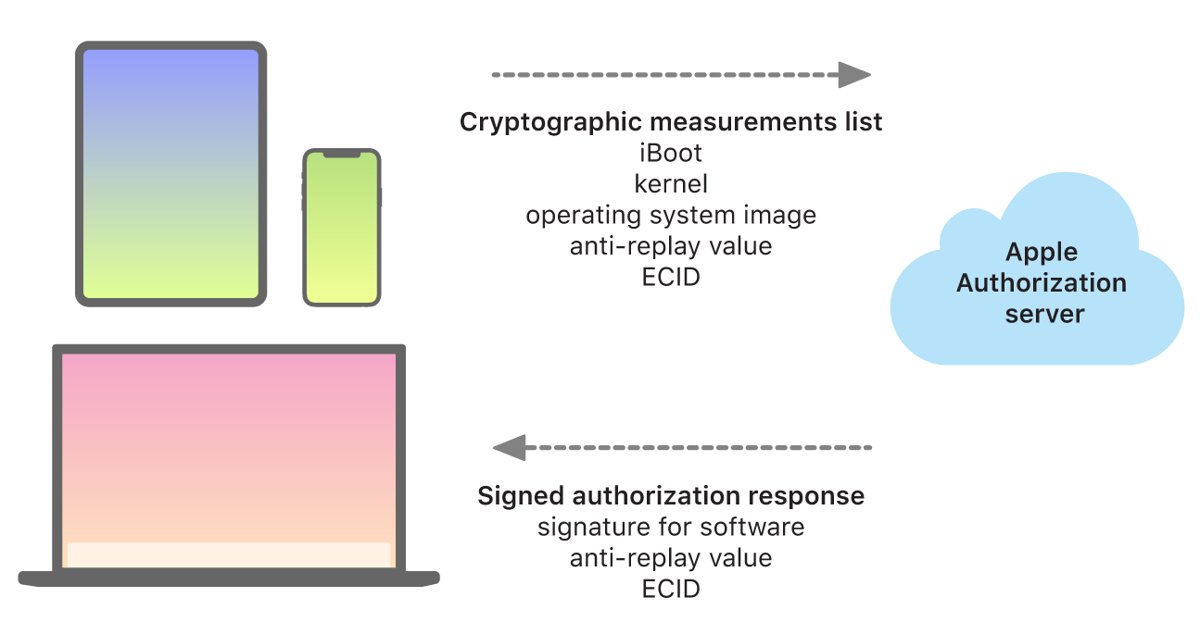
Every iOS install, wireless or through a computer, has to be authorised by Apple's installation server for your specific iPhone. Apple's platform security documentation says this lets Apple stop signing older versions with known vulnerabilities and helps prevent downgrade attacks.
| Check | What it does | Effect on an iOS 18 downgrade |
|---|---|---|
| System software authorization | Allows only iOS versions that Apple is actively signing to install on iPhone | An iOS 18 build Apple no longer signs is refused |
| ECID personalisation | Apple adds your iPhone's unique chip ID to the signed approval | An approval saved for another iPhone, or from an earlier date, cannot be reused |
| Anti-replay value | A random value in each request stops an old server reply from being replayed | A saved signature from 2025 or early 2026 does not unlock the install today |
| Secure Enclave check | The Secure Enclave verifies its own software and is designed to prevent downgrades | Firmware inside the iPhone cannot be rolled back separately |
| Network requirement | A connection to Apple is required to complete every update or restore | Offline tools cannot skip the signing step |
iOS 18 and iOS 26 updates Apple still releases by iPhone model
Apple's security releases list shows which iPhones receive each version. As of November 2026, iOS 27 is current and iOS 26 still gets security updates on iPhone 11 and later.
| Version | Latest release | Date | iPhones covered |
|---|---|---|---|
| iOS 27 | iOS 27.2 | 26 Oct 2026 | iPhone 11 and later |
| iOS 26 | iOS 26.7.2 | 26 Oct 2026 | iPhone 11 and later |
| iOS 18 (current branch) | iOS 18.7.11 | 26 Oct 2026 | iPhone XS, iPhone XS Max, iPhone XR |
| iOS 18 (last release for newer iPhones) | iOS 18.7.8 | 22 Apr 2026 | iPhone XR and XS models, iPhone 11 to iPhone 16, iPhone SE (2nd and 3rd generation), iPhone 16e |
| iOS 26 first release | iOS 26 | 15 Sep 2025 | iPhone 11 and later |
Every iOS 18 build after 18.7.8 lists only iPhone XS, XS Max and XR. That is why Software Update on an iPhone 11 or later no longer offers an iOS 18 path.
Back up iPhone before restoring iOS 26 with a computer
A restore erases the iPhone. A backup made on iOS 26 can only go back onto iOS 26 or later; if you try it on an older version, the iPhone asks to update first.
- Back up the iPhone to iCloud or to your computer; on Windows, you can back up the iPhone with the Apple Devices app.
- Open Settings and tap [your name].
- Tap Find My, then Find My iPhone, and turn Find My iPhone off.
- Enter your Apple Account password and tap Done on the keyboard.
- On a Mac, update macOS; on a Windows PC, update the Apple Devices app (or iTunes, if you still use it).
Downgrade iOS 26 to 18 using iTunes or the Apple Devices app: what a restore installs
A computer restore erases the iPhone and installs the latest iOS Apple offers for that model. On an iPhone 11 or later in November 2026 that is iOS 27, not iOS 18 and not iOS 26, so restore only if you want a clean install of the newest version.
- Connect the iPhone to your computer with a USB cable and select Allow if the accessory alert appears.
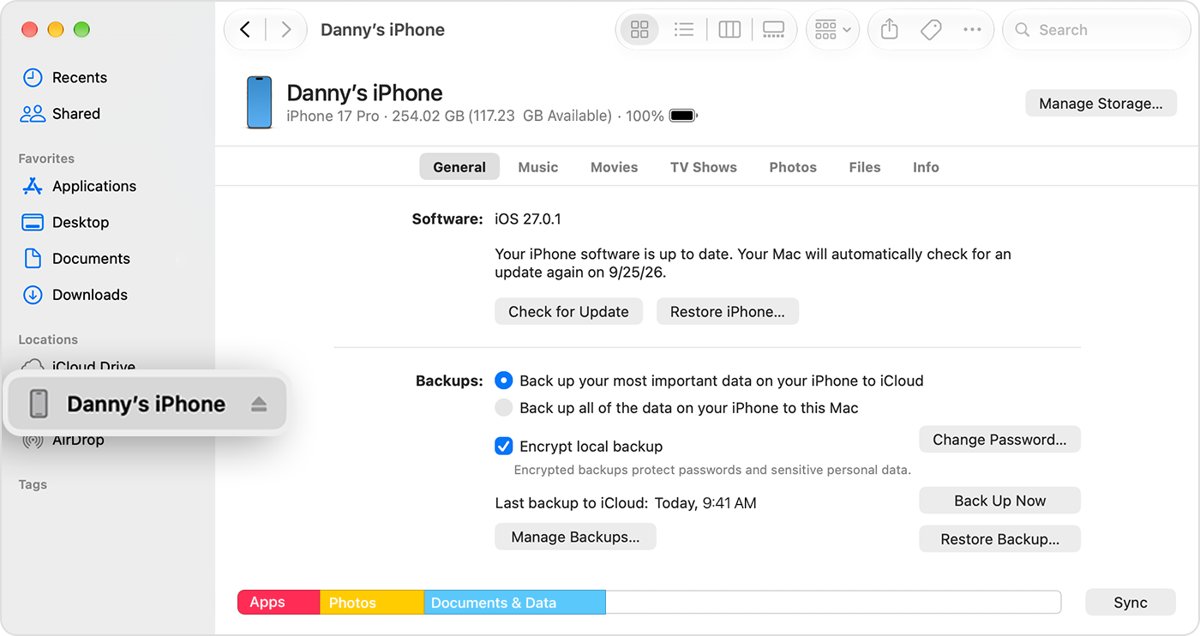
- Open the Finder on a Mac, or the Apple Devices app on a Windows 10 or later PC.
- Select the iPhone in the sidebar, click Trust, then tap Trust on the iPhone and enter its passcode.
- Click Restore iPhone and follow the onscreen instructions.
- Review the terms and click Agree; the computer downloads the current iOS and installs it.
- When the Hello screen appears, set the iPhone up and restore your backup.
Restoring an iPhone does not delete its eSIM. On a Windows PC or a Mac with macOS Mojave or earlier that still uses iTunes, update iTunes first and use its Restore iPhone button.
How to stay on iOS 26 and stop the iOS 27 update
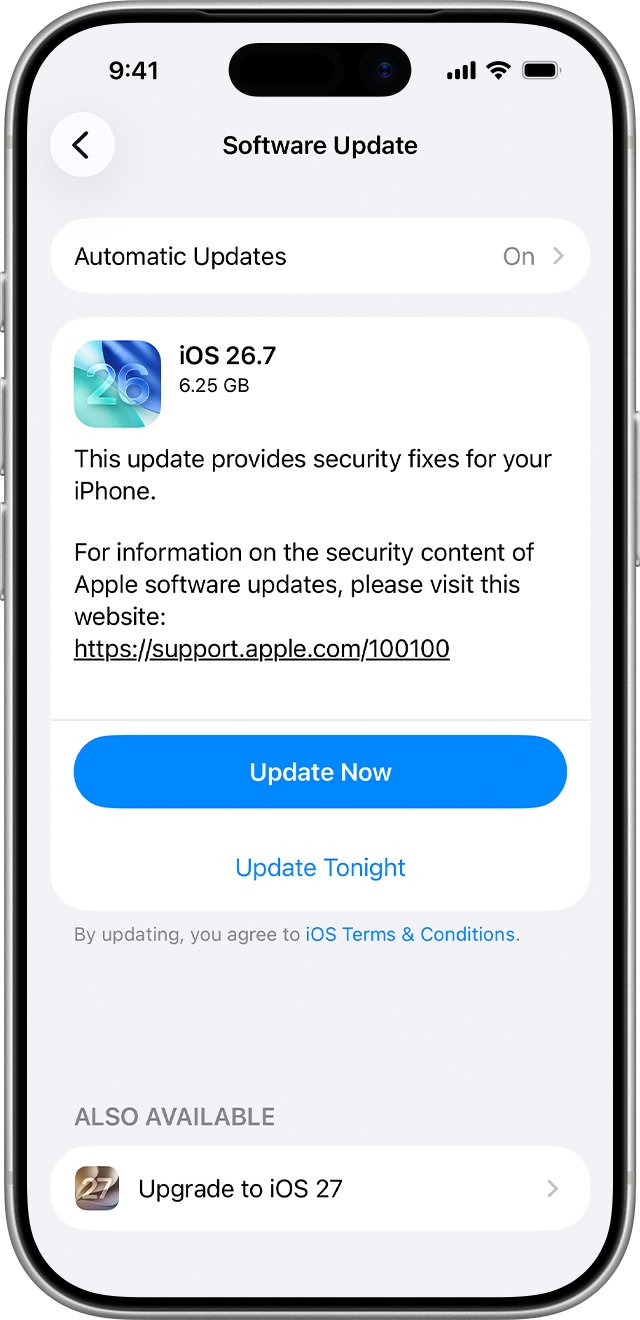
Since iOS 18 is off the table, the realistic goal is to keep iOS 26 rather than drift onto iOS 27. Apple still ships iOS 26 security updates for iPhone 11 and later, with iOS 26.7.2 released on 26 October 2026.
- Open Settings and tap General.
- Tap Software Update to see the installed iOS version and any update that is available.
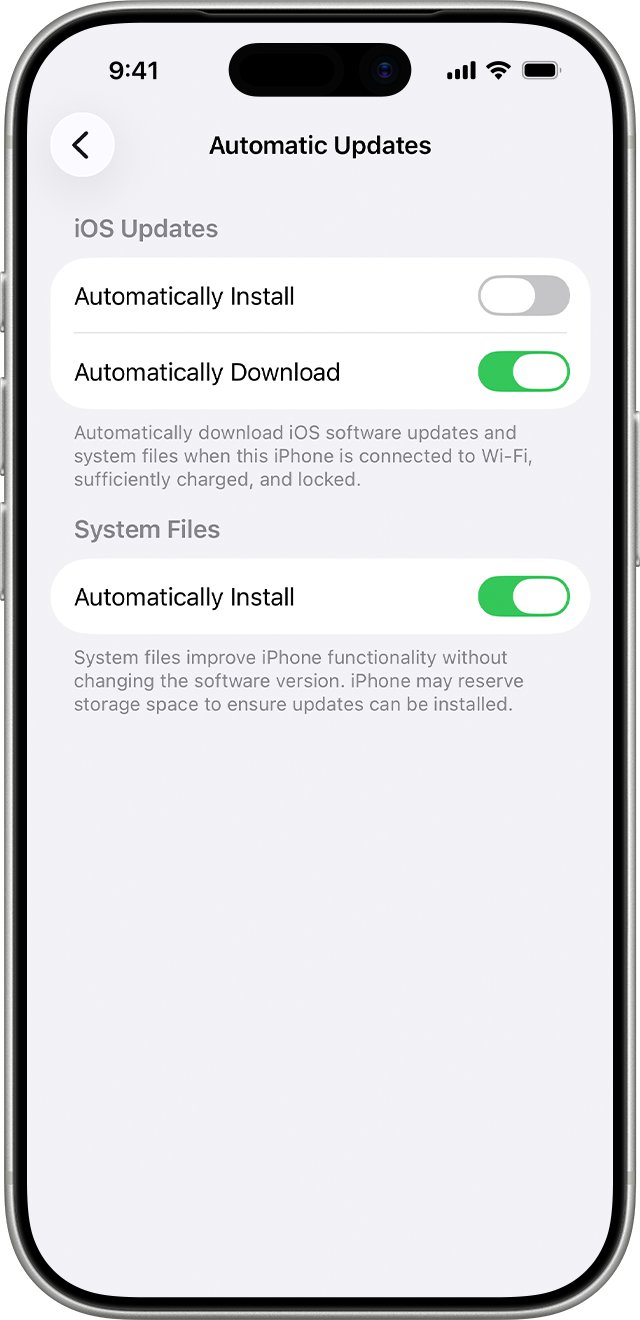
- Tap Automatic Updates.
- Turn off Automatically Install, so the iPhone no longer installs updates overnight while charging.
- Turn off Automatically Download too if you do not want update files stored in the background.
- Return to Software Update and read the version name before you tap Download and Install.
Keep installing iOS 26 security releases as they appear. An iPhone left on an old build misses the fixes listed for each release.
How to make iOS 26 look like iOS 18
Most people who want iOS 18 back want the old look, not the old code. These iOS 26 settings tone down Liquid Glass without a restore.
- Update to iOS 26.1 or later, which adds a Liquid Glass setting with the default clear look or a tinted look that makes the glass more opaque.
- Choose the tinted look to make the glass in apps and Lock Screen notifications more opaque.
- Go to Settings > Accessibility > Display & Text Size and turn on Reduce Transparency to give blurred backgrounds a solid colour.
- Go to Settings > Accessibility > Motion and turn on Reduce Motion to cut the morphing Liquid Glass animations.
- Lock the iPhone and check the Lock Screen and Control Center to see the change.
You can also turn off most of the Liquid Glass design with a few more display options. If iOS 26 feels slow rather than just different, fix iOS 26 lag and slowdowns before you think about any restore.
Can you downgrade iOS 26 to 18 with 3uTools or an unsigned IPSW?
No. A third-party tool or an unsigned IPSW file still has to pass Apple's per-device signing check, and that check refuses iOS 18 on iPhone 11 and later. The installer sends the build's measurements and your iPhone's ECID to Apple's authorization server, which signs only versions whose installation is permitted. Without that signature the iPhone will not boot the older build, so the attempt ends in an error and the iPhone may need recovery mode to start again.
How to downgrade iOS 26.2 to 26.1
Not on an iPhone that is up to date in November 2026: Apple now ships iOS 26.7.2, and neither Software Update nor a computer restore offers iOS 26.1. Point releases follow the same signing rule as major versions. Software Update only offers newer builds, and a restore installs the latest version Apple provides for the model, so going from one iOS 26 release to an earlier one is not a supported route.
iOS 26 downgrade and restore errors on iPhone
Unsigned IPSW or 3uTools downgrade fails and the iPhone will not start
Apple refused to sign the older build, so the iPhone cannot finish installing it.
- Connect the iPhone to a Mac or a PC with the latest Apple Devices app.
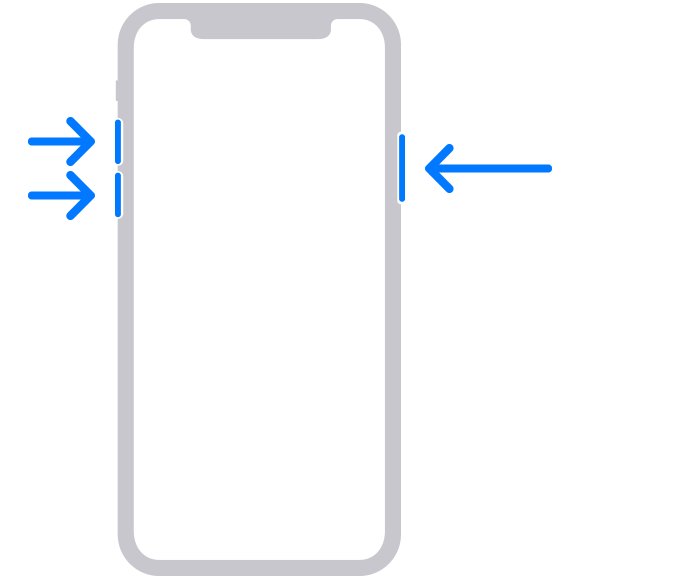
- Press and quickly release Volume Up, then Volume Down.
- Press and hold the side button until the Connect to computer screen appears.
- Choose Restore when the Update or Restore options appear on the computer.
- Set the iPhone up and restore your most recent backup.
"Needs a newer version of iOS" when restoring a backup
The backup was made on a newer iOS than the one now on the iPhone.
- Follow the onscreen steps to update the iPhone.
- Start the restore again from Transfer Your Apps & Data > From iCloud Backup, or with Restore Backup on the computer.
- Choose the most recent backup and keep the iPhone on Wi-Fi and power until it finishes.
iPhone leaves the Connect to computer screen during the restore download
The iOS download took longer than 15 minutes, so the iPhone exited recovery mode.
- Let the download finish on the computer.
- Put the iPhone back into recovery mode with the same button sequence.
- Choose Restore again when the Update or Restore options appear.
iPhone does not appear in Finder or the Apple Devices app
The computer software is out of date, the Trust prompt was skipped, or the iPhone is stuck in a failed install.
- Update macOS, or update the Apple Devices app on Windows.
- Unlock the iPhone and tap Trust when asked, then enter the passcode.
- If the iPhone still does not appear, put it into recovery mode and look for it on the computer again.
iOS 26 to iOS 18 downgrade FAQ
Can I downgrade iOS 26 to 18?
No, not on an iPhone 11 or later. An iPhone installs only versions Apple is still signing, and the last iOS 18 release for those models was iOS 18.7.8 on 22 April 2026. Only iPhone XS, XS Max and XR still get iOS 18 builds.
Does Apple let you downgrade iOS 26 to 18?
No. Apple's platform security design lets it stop signing older versions to prevent downgrade attacks, and it offers no iOS 18 build for iPhone 11 or later now. Software Update only offers newer versions, and a computer restore installs the latest one.
How do I downgrade iOS 26 to 18 on Windows?
You cannot. The Apple Devices app and iTunes on Windows restore the latest iOS Apple provides for the model, which is iOS 27 for iPhone 11 and later in November 2026. Windows tools cannot bypass Apple's signing check.
Can I downgrade iOS 26 to 18 using iTunes?
No. iTunes uses the same Apple signing server as the Finder and the Apple Devices app, so a restore installs the newest signed iOS. On an iPhone 11 or later that is iOS 27, which moves you further from iOS 18.
How do I downgrade iOS 26 to 18.5?
There is no route to iOS 18.5 either. It is an older iOS 18 build than 18.7.8, the last iOS 18 release for iPhone 11 and later, and Apple installs only versions it still signs for your model.
How do I downgrade iOS 26 to 17 or 16?
You cannot. iOS 17 and iOS 16 are even older than iOS 18, and Apple does not sign them for current iPhones. iPhone models released after iPhone 16e never supported them at all.
Is there a free way to downgrade iOS 26 to 18?
No free or paid method works, because the block is Apple's signing server, not a missing tool. Free settings changes are the practical option: the tinted Liquid Glass look, Reduce Transparency and Reduce Motion make iOS 26 look calmer.
Can I download iOS 26?
Yes, on iPhone 11 and later. Apple still releases iOS 26 updates, most recently iOS 26.7.2 on 26 October 2026, alongside iOS 27. Open Settings > General > Software Update to see what your iPhone is offered.