A CMOS battery is dead when the PC's date and time reset every time it loses mains power, BIOS settings fall back to defaults, or startup stops on a message such as CMOS Battery Low or Time-of-day clock stopped.
This guide covers what the battery does, how to test it with a multimeter, how to replace it and reset CMOS, and what a flat cell can and cannot cause.
How to detect a CMOS battery failure
Check the clock first. A cell that can no longer run the real-time clock shows it the first time the PC starts after being unplugged or switched off at the wall.
| What you see | What it means | Do this |
|---|---|---|
| Date and time are wrong after the PC was unplugged, often set to a date years in the past | The coin cell no longer keeps the real-time clock running without mains power | Test the battery or replace it |
| CMOS Battery Low at startup | The board has measured a weak battery (the wording ASUS NUC systems use) | Replace the CR2032 cell |
| Time-of-day clock stopped at startup | Dell's message for a clock that lost power | Set the time in BIOS setup, then replace the battery if the message returns |
| A prompt that BIOS settings were reset, or a CMOS checksum error | The settings stored in CMOS memory were lost | Load defaults, re-apply your changes and replace the battery |
| Boot order, XMP or fan settings revert after a shutdown | BIOS changes are not retained once power is removed | Replace the battery |
| Server event log shows VBAT Lower Critical or +3.3V Vbat … Lower Non-critical – going low | Battery voltage has dropped below the board's threshold (Intel server boards) | Clear CMOS, then replace the battery if the event repeats |
| Problems appear only after full power removal, never while the PC stays plugged in | The pattern points at the battery rather than the firmware | Run the overnight unplug test below |
One sign on its own is not proof. A loose holder or a firmware reset can wipe the clock too, so pair the symptom with a voltage reading or the unplug test.
What is a CMOS battery
CMOS stands for complementary metal-oxide-semiconductor, the memory type that first held BIOS settings. Many modern boards keep settings in non-volatile memory, but the battery-backed clock remains and the name stuck.
| Question | Answer |
|---|---|
| What type is it? | A 3 V lithium coin cell, a CR2032 on most desktop boards (Dell, Intel and ASUS all specify it) |
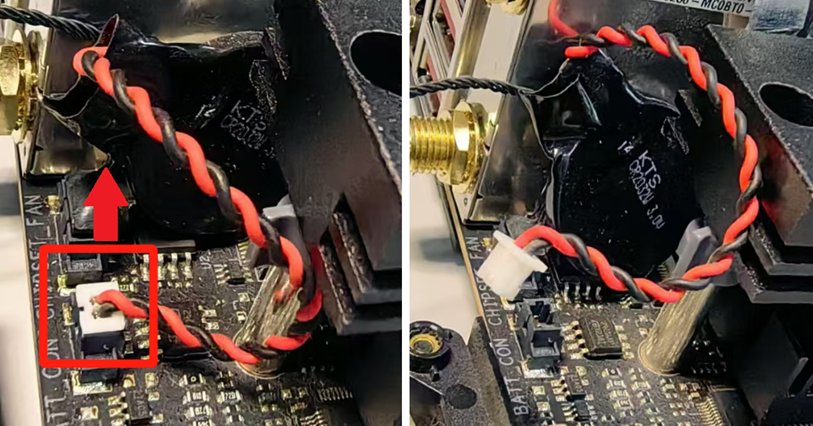
| Where does it sit? | In a holder on the motherboard; some compact PCs and laptops use a wired pack on a 2-pin header instead |
| What does it power? | The real-time clock and the CMOS memory that holds the date, time, BIOS password and setup values |
| When is it used? | Only when mains power is off. With AC connected, Intel boards supply the 3.3 V clock rail themselves |
| What does it not do? | It never runs the PC and has no effect on CPU, graphics or storage speed |
What causes a dead CMOS battery
| Cause | Why it drains or defeats the cell |
|---|---|
| Age | A lithium coin cell runs down slowly over years, even in a PC that works normally |
| Long periods unplugged | The battery only carries the clock when AC power is off. Intel says an unplugged server board can fall below its voltage threshold after about 1.5 years, against up to 4 years plugged in |
| Storage, shipping or a power strip switched off nightly | Every hour without standby power comes out of the cell, which is why stored or shipped PCs often show symptoms at first boot (Lenovo) |
| Poor contact | A loose holder or a badly seated wired connector mimics a flat battery even when the cell still has charge |
| A used replacement | A cell taken from another device may already be near empty; Dell says to fit a brand-new battery |
| No coin cell at all | Some Dell Latitude laptops have no CMOS battery by design, so the clock resets whenever the main battery drains completely with the charger disconnected |
How long does a CMOS battery last?
Vendors quote anything from 2 to 10 years, and the spread comes from how often the PC sits without standby power.
| Vendor | Stated battery life | Conditions |
|---|---|---|
| Dell (desktops) | About 2 to 3 years | Depends on usage and environment |
| ASUS (NUC mini PCs) | About 3 years | When the NUC is not plugged in; standby current extends it when plugged in |
| Intel (server boards) | Up to 4 years plugged in, about 1.5 years unplugged | After that, voltage can drop below the threshold for keeping the clock and BIOS settings |
| HP | 2 to 10 years from manufacture | Longer the more the computer stays plugged in |
A desktop that stays connected to a live outlet can keep its first battery far longer than one switched off at the wall every night.
Does a laptop have a CMOS battery?
Most laptops do, but the part and the access route differ from a desktop, and a few models have none.
| PC type | What keeps the clock | What you see when it fails |
|---|---|---|
| Desktop motherboard | CR2032 coin cell in a holder | Clock and BIOS settings reset after the PC is unplugged |
| Mini PC such as an ASUS NUC | Wired CR2032 on a 2-pin Molex connector, often on the underside of the board | Inaccurate BIOS date and time, and CMOS Battery Low at startup |
| Most laptops | A coin cell or a small wired pack inside the chassis | Clock resets; replacing it means removing the bottom cover and sometimes more |
| Some Dell Latitude models (5320, 7320, 7420, 7520, 9420, 9520) | No CMOS battery; the main battery keeps the clock | When the main battery drains fully without AC, the clock resets and the laptop asks which BIOS settings to restore |
How to test a CMOS battery with a multimeter
A new CR2032 is rated at 3 V, and Intel gives 3.0 V as the battery voltage with AC power off. A reading clearly below that rating, together with clock resets, means the cell is finished.
- Shut down the PC, switch off the power supply and unplug the power cord.
- Touch a bare metal part of the case, or wear an anti-static wrist strap clipped to the chassis.
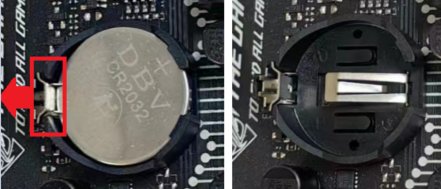
- Press the metal clip beside the holder and lift the cell out with a plastic tool, not a metal screwdriver.
- Set the multimeter to DC volts on a range above 3 V.
- Hold the red probe on the flat positive (+) face and the black probe on the other face.
- Read the display: a healthy cell reads close to 3 V, and a weak one reads well under it.
- Refit the cell the same way round, or fit a new one if the reading was low.
No meter to hand? The overnight unplug test further down answers the same question without opening the case twice.
How to replace a CMOS battery
Look up your model's service manual first. Dell manuals have a Coin cell battery section with model-specific removal steps, and you can find your motherboard model in Windows if you do not know which manual to open.
You will also need to enter BIOS setup once afterwards to set the clock.
- Buy a new 3 V CR2032, or the exact wired pack your board uses; do not reuse an old cell.
- Shut down and disconnect every power source; on a laptop, also disconnect the main battery.
- Ground yourself with an anti-static wrist strap attached to a metal part of the chassis.
- Open the case or bottom cover and find the round coin cell in its holder.
- Note which side faces up, press the metal clip to release the cell and lift it out with a plastic scribe. For a wired pack, unplug the 2-pin cable from the board.
- Insert the new battery the same way round as the old one until the clip holds it.
- Close the case, reconnect power and switch the PC on.
- At the prompt that BIOS settings were reset, open setup (F1 on ASUS boards), set the date and time, press F5 for Load Optimized Defaults, re-apply your own settings and press F10 to save.
Intel warns that a battery replaced with the wrong type can explode, so fit only the same or an equivalent type. Recycle the old cell as your local rules require.
How to reset CMOS on a motherboard
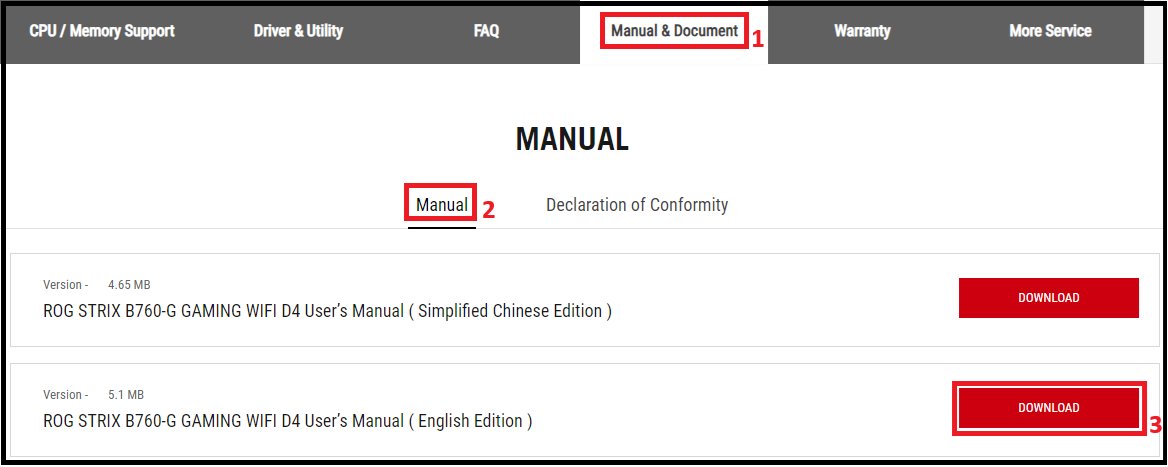
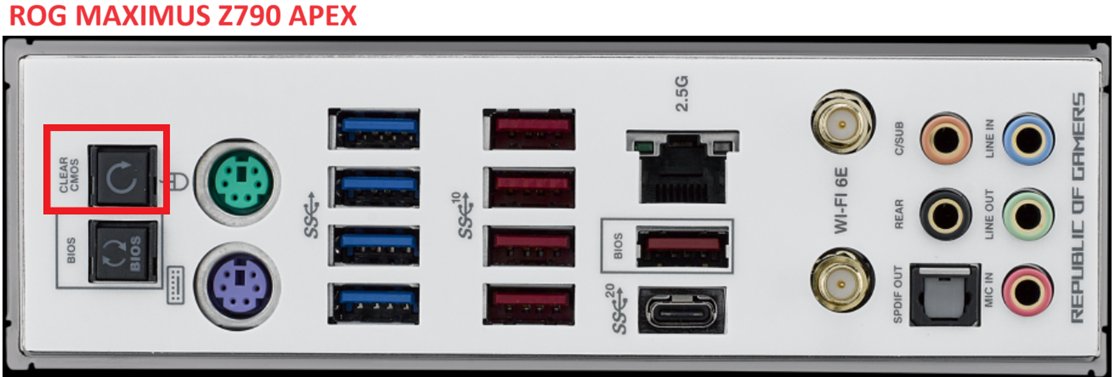
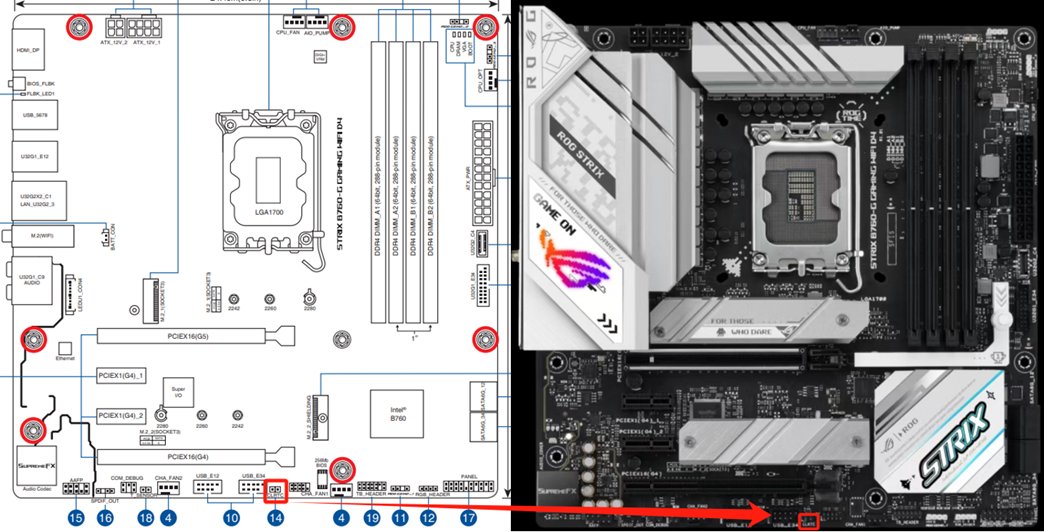
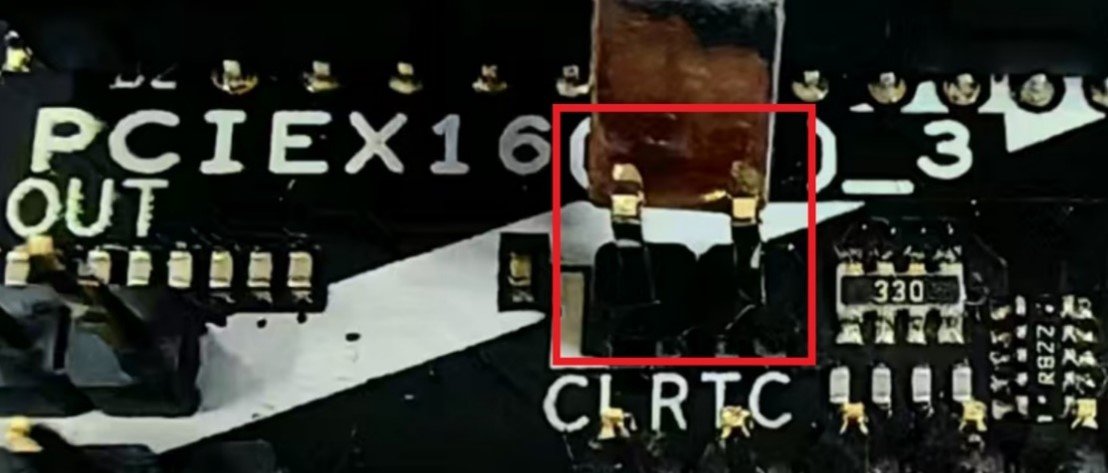
Reset CMOS when the PC misbehaves after a battery change or an unstable overclock. ASUS boards offer three routes: a Clear CMOS button, the CLRTC jumper pins, or removing the battery.
- Power off the PC and remove the power cord.
- Press and hold the Clear CMOS (CLR_CMOS) button for about 5 to 10 seconds.
- On a board without the button, short the two CLRTC pins with a jumper cap or a metal object for about 5 to 10 seconds.
- To clear by battery removal, take the coin cell out (or unplug the wired battery), clear with the button or pins, then refit the battery.
- Plug the power cord back in and switch the PC on.
- At the prompt that BIOS settings have been reset, press F1 to enter setup.
- Set the date and time, press F5 for Load Optimized Defaults, then press F10 to save and exit.
Your motherboard manual shows where the button or CLRTC header sits; ASUS lists each board's manual under Manual & Document on its support page. Setup keys differ on other brands.
How to tell if a new CMOS battery is holding the time
A clock that stays right while the PC is plugged in but resets after the power is fully removed points at the battery, so test exactly that.
- Set the correct date and time in BIOS setup and save.
- Start Windows and check the clock under Settings > Time & language > Date & time.
- Shut down and unplug the power cord, or switch the outlet off, overnight.
- Reconnect the power and enter BIOS setup before Windows loads.
- Read the date and time: if they are still correct, the battery is holding; if they reset, recheck the cell's seating and orientation.
If Windows shows the wrong time zone rather than the wrong clock, change the time and date in Windows 11 instead; that setting is not stored by the battery.
Troubleshooting a dead CMOS battery
Clock and date reset every time the PC is unplugged
The coin cell no longer carries the real-time clock without mains power.
- Test the cell with a multimeter, or go straight to a new CR2032.
- Replace the battery and set the date and time in BIOS setup.
- Run the overnight unplug test to prove the new cell holds.
"CMOS Battery Low" or "Time-of-day clock stopped" at startup
The board detected a weak battery or a clock that lost power.
- Press the key the message offers to enter setup.
- Set the date and time, save and restart.
- Replace the battery if the message returns after the next full power-off.
Time still resets after a new CMOS battery
Wrong orientation, poor contact in the holder or the wrong part.
- Check that the cell sits flat under the clip with the positive face the same way as the original.
- For a wired pack, reseat the 2-pin connector and check its polarity matches the header.
- Confirm the part: a 3 V CR2032, or the exact wired pack your model lists.
- Reset CMOS once and load optimized defaults.
- If a good, seated battery still loses the time, contact the PC or motherboard maker, because the fault is on the board or in the firmware.
PC will not boot after a CMOS reset or battery change
Defaults changed the boot order or storage mode that the installed system needs.
- Enter BIOS setup and set the Windows drive as the first boot device.
- Set the storage mode (AHCI or RAID) back to the value it had before the reset.
- On Dell laptops that ask which settings to restore, pick Last Known Good or Custom User Settings rather than BIOS Defaults if the storage mode was changed.
- Save the changes and restart.
Can a motherboard run without a battery?
Yes, a motherboard runs without a CMOS battery while it has mains power, but it loses the clock and BIOS settings every time the power is cut. Intel boards feed the 3.3 V clock rail from the power supply when AC is connected, and Lenovo notes that many PCs still boot with a depleted cell. Expect a wrong date, a reset prompt or a CMOS Battery Low message after each full power-off. Some Dell Latitude laptops ship with no coin cell at all and rely on the main battery instead.
Will removing the motherboard battery reset BIOS?
Usually yes on desktop boards, but not on every PC. Dell says removing the coin cell erases BIOS settings, and ASUS uses battery removal as one way to clear CMOS, which holds the date, time, BIOS password and setup values; ASUS pairs it with the Clear CMOS button or CLRTC pins. Lenovo notes that some systems keep most settings in non-volatile memory and retain them without the battery, so on those only the clock resets.
Removing the battery never deletes files on your drives. It only affects the clock and firmware settings.
Can a CMOS battery cause a black screen?
Not directly, but the settings a dead battery loses can stop the PC from reaching Windows. Dell says lost BIOS settings can keep a computer from loading the operating system, and Lenovo lists boot order and storage controller settings among what can revert. HP lists failure to boot and constant beeping among dead-battery symptoms. If the screen stays black with no maker logo after a battery change, reseat the cell and reset CMOS before you suspect the graphics card.
CMOS battery FAQ
What battery does a CMOS use?
Most desktop motherboards use a 3 V lithium CR2032 coin cell, the part Dell, Intel and ASUS all list. Some mini PCs and laptops use a CR2032 with a wire and a 2-pin connector instead, so check the model's manual before you buy a replacement.
Will replacing the CMOS battery delete my files?
No. Replacing the CMOS battery affects only the clock and BIOS settings, and documents, photos and programs on your drives stay untouched. If defaults change the boot order or storage mode, Windows may not start until you set those back, but the files are still there.
Does a dead CMOS battery slow down a computer?
No. The CMOS battery has no effect on CPU, graphics or storage performance while the PC is running. It only keeps the clock and some firmware settings alive when power is removed, so slowdowns during use come from other hardware or from software.
Does leaving a PC plugged in save the CMOS battery?
Yes. While the PC is connected to AC power, the board supplies the clock itself, so the coin cell is barely used. Intel rates its server board battery at up to 4 years plugged in against about 1.5 years unplugged, and ASUS says standby current extends NUC battery life.
Can I use a CR2032 from another device?
Dell recommends a brand-new battery rather than a used one, because a cell taken from a watch, key fob or old board may already be close to empty. A used cell can help you check whether the holder makes contact, but fit a new one for long-term use.
Where is the CMOS battery on a motherboard?
On a desktop board it is a coin-sized round cell in a plastic holder with a metal clip. On mini PCs such as the ASUS NUC it is often a wired cell on the underside of the board, and the model's service manual shows the exact location.
What happens if the CMOS battery is in the wrong way?
A cell fitted the wrong way round cannot power the clock, so the date and BIOS settings keep resetting as if the battery were dead. Lenovo lists orientation and holder contact as the first checks when the time still resets after a replacement.
Is it safe to replace a CMOS battery yourself?
Yes on most desktops, provided you unplug the power cord, ground yourself against static and fit the same battery type. Laptops and mini PCs can need more disassembly, and some have the cell under the board, so follow the model's service manual step by step.