The free way to watch your local ABC, CBS, FOX, NBC and PBS stations live on Roku is an HDTV antenna plugged into a Roku TV, then Home > Live TV and a channel scan.
This guide covers that and six free app-based methods, from The Roku Channel and NewsON to station, PBS and YouTube apps, plus what to do with a Roku stick and how to fix missing channels.
Method 1: Use an Antenna With a Roku TV
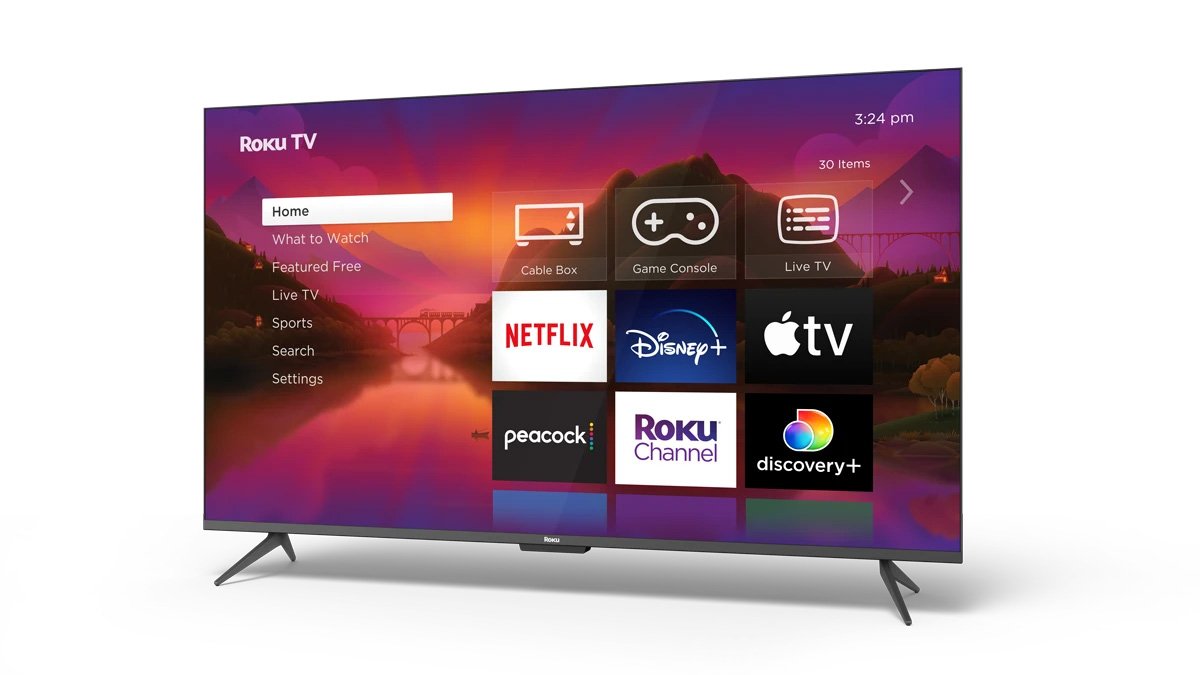
Roku TVs have a built-in tuner, so an antenna brings in your local broadcast stations with no subscription. You need an HDTV antenna, its power source and a coaxial cable.
- Connect the antenna's coaxial cable to the Ant/Cable In port on the back of the Roku TV.
- Plug the antenna into a power outlet or USB power source.
- Press Home on the Roku remote.
- Select Live TV.
- Follow the on-screen steps to scan for channels; the scan can take a few minutes.
- If Live TV is missing, go to Settings > TV inputs > Live TV > Set up input.
The TV must be online to finish setup, but afterwards antenna channels play without Wi-Fi. Add a USB 2.0 flash drive to pause live antenna TV for up to 90 minutes.
What You Can Watch for Free on Roku
| Free source | Live local stations? | Needs |
|---|---|---|
| Antenna on a Roku TV | Yes, full live broadcasts | HDTV antenna and coax cable |
| The Roku Channel Live TV guide | National news channels, not your local stations | Nothing extra |
| NewsON | Local newscasts from 285+ stations | Free app |
| Local TV station apps | That station's newscasts | Free app, where the station offers one |
| Local Now and Pluto TV | Local news and weather (Local Now), free channels | Free apps with ads |
| PBS and CBS News apps | Live local PBS station; free 24/7 CBS News | Free apps |
| YouTube app | Live news streams that publishers post | Free app |
Method 2: Find Free News Channels in The Roku Channel
The Roku Channel's Live TV Channel Guide carries hundreds of free live channels. Its news channels include ABC News Live, NBC News Now, Fox Live Now, WeatherNation and Fox Weather.
- Press Home and open The Roku Channel.
- Select the Live TV tile on its menu to open the Live TV Channel Guide.
- Scroll to the news section of the guide.
- Select a channel to start watching.
- While watching, press left on the remote to bring the guide back.
On a Roku TV with an antenna, your over-the-air local stations also appear in the same channel guide, side by side with the streaming channels.
Method 3: Install NewsON for Free Local Newscasts
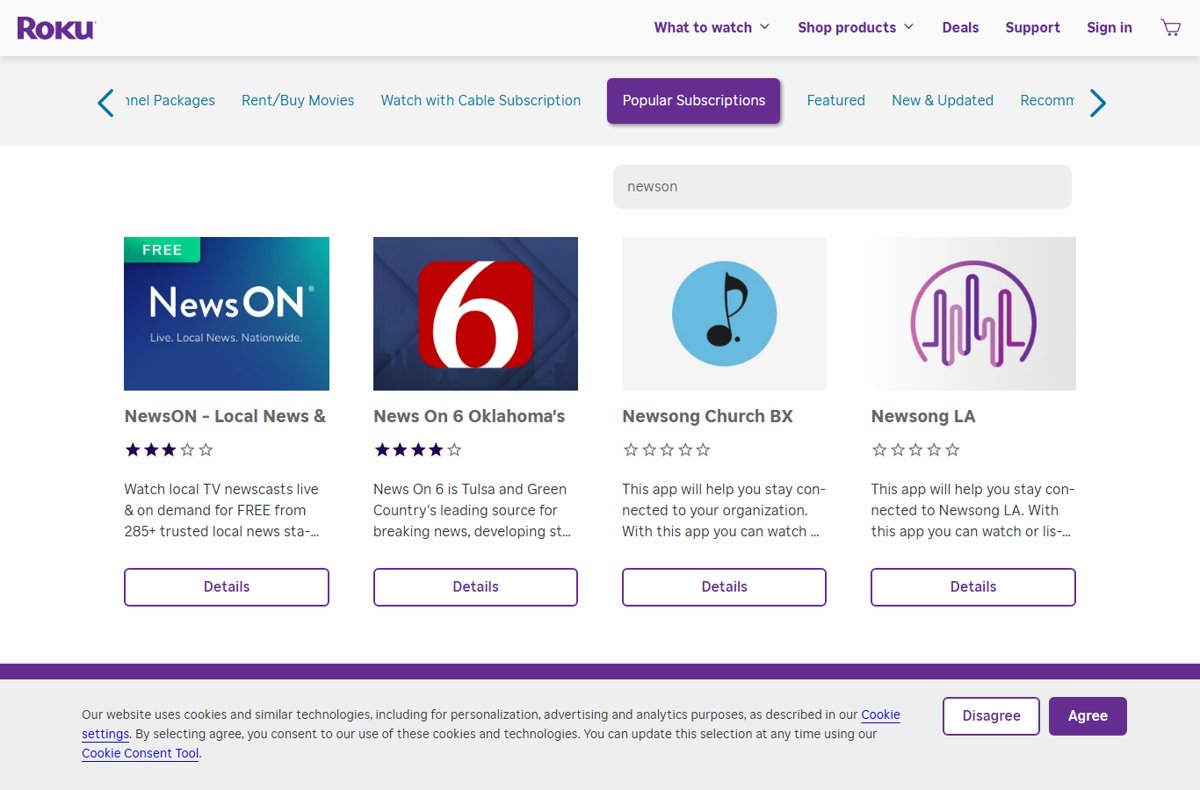
NewsON streams local TV newscasts live and on demand from more than 285 local news stations across the U.S., free.
- Press Home and select Store.
- Search for NewsON.
- Open NewsON – Local News & Weather and select Add app.
- Open the app from the bottom of your Home screen.
- Choose your location or a nearby station in the app to watch its latest newscast.
Method 4: Use Free Apps From Local TV Stations
Many individual stations publish their own Roku app, such as WPRI 12+ in Providence or CBS19+ in Tyler, Texas. These usually carry live newscasts, weather and local sports.
- Note your local stations' call letters or channel numbers, such as WPRI or 12.
- Press Home > Store and search for the call letters or the station name.
- Check the app description names your city.
- Select Add app.
- Open the app and select its live stream or latest newscast.
You can also add apps from channelstore.roku.com or the Roku mobile app; they sync to every Roku device on your account.
Method 5: Watch Local and Regional Channels on Free FAST Services
Free ad-supported streaming TV (FAST) apps run live channels like a cable guide. Local Now focuses on free local news and weather and lists over 400 channels.
- Press Home > Store and search for Local Now.
- Select Add app, then open it.
- Follow the app's prompts to show your area's news and weather.
- Add Pluto TV the same way for more free live channels.
- Browse each app's live guide for news channels near you.
Method 6: Use PBS, Network, and Broadcaster Apps for Free Local Content
The PBS app streams live TV from your local PBS station, and the CBS News app streams free 24/7 news with no login.
- Press Home > Store and search for PBS.
- Add the PBS app, or your member station's own app if one is listed.
- Open it and choose your local station to watch live.
- Search the Store for CBS News and add it for free live news.
- Check other network apps; some need a TV provider sign-in for live streams.
Method 7: Watch Free Local Streams on YouTube Using the Roku YouTube App
The official YouTube app on Roku includes live news. Some stations post live newscasts and clips on their YouTube channels.
- Press Home > Store, search for YouTube and add the official YouTube app.
- Open YouTube and search for your station's call letters plus "live".
- Open the station's channel and look for a live stream or recent newscast.
- Subscribe to the channel so its live streams appear on your home feed.
Several look-alike apps in the Roku Store say they are not affiliated with YouTube. Pick the app named simply YouTube.
Best Free Method for Each Situation
| Your situation | Best free method | Why |
|---|---|---|
| Roku TV and good reception | Method 1: antenna | Full live local stations, sports and prime time |
| Roku stick or box, no antenna | Method 3: NewsON | Local newscasts from 285+ stations |
| You want one station's news | Method 4: station app | Live newscasts direct from the station |
| You want national news free | Method 2: The Roku Channel or CBS News | No app or login needed |
| You want PBS live | Method 6: PBS app | Live local PBS station |
| Weak antenna signal | Methods 3 to 5 | Streaming does not depend on reception |
How to Find Out Which Local Channels You Should Be Able to Get
Roku notes that the number of antenna channels depends on your location and the antenna's position. A scan shows exactly what your setup receives.
- Connect the antenna and run Settings > TV inputs > Live TV > Scan for channels.
- Open the Live TV guide and note which stations appear.
- Move the antenna higher or nearer a window, then scan again and compare.
- For stations you cannot receive, search the Roku Store for their apps or use NewsON.
Can You Watch Local Channels on a Roku Stick With an Antenna?
Not through the stick itself. Antenna channels run through a Roku TV's built-in tuner; a Roku Streaming Stick or player plugs into HDMI and has no antenna input.
| Setup | How to watch antenna channels |
|---|---|
| Roku stick on a TV with its own tuner | Plug the antenna into the TV and switch inputs with the TV's own remote |
| Roku stick on a monitor or TV without a tuner | Use a network tuner (see below) or the free apps in Methods 2 to 7 |
| Roku TV | Use Method 1 directly |
Optional: Use a Network TV Tuner If You Already Own One
An HDHomeRun network tuner connects to your antenna and home network, then streams free over-the-air TV to Roku TVs and Roku players through its Roku app.
- Connect the antenna to the HDHomeRun tuner and the tuner to your router.
- On the Roku, press Home > Store and search for HDHomeRun.
- Select Add app and open it.
- Open it and follow the on-screen setup prompts.
- Pick a channel from the app's guide.
How to check your local channels are working
- Press Home, open Live TV and confirm your local stations appear in the guide with program titles.
- Tune to each one and check the picture holds steady for a few minutes.
- For app methods, open the app and confirm the live stream or newscast is for your city.
Common Problems and Fixes
Your antenna channels disappeared or none appear
A loose coax cable, poor antenna position or an outdated scan.
- Check the coax cable is firm in Ant/Cable In and not bent or damaged.
- Go to Settings > TV inputs > Live TV > Scan for channels.
- Move the antenna higher, near a window and away from routers and metal, then scan again.
- If the antenna is amplified, make sure it is powered; near towers, try without the amplifier.
Your local news app shows the wrong city
The app picked a default market or location.
- Open the app's settings and choose your city or market.
- For a station app, check its description names your area before adding it.
A channel asks for a cable login
Some network apps keep live streams behind a TV provider sign-in.
- Use the antenna, NewsON or the station's own free app instead.
- Check whether the app offers free clips or full episodes without signing in.
The stream is not truly live
Some apps offer newscasts on demand after they air.
- Look for a "Live" label in the app.
- Use an antenna for real-time broadcasts such as sports.
A new app does not appear on the Home screen
The device has not synced the app from your account.
- Go to Settings > System > System update > Check now.
- Scroll to the bottom of the Home screen, where new apps are added.
Paid Services Are Not Required, but Know the Difference
Live TV streaming services bundle local stations with cable networks for a monthly fee. They are optional; an antenna gets the same local broadcasts free where reception allows.
| Option | Local channels | Cost |
|---|---|---|
| Antenna on a Roku TV | Local broadcast stations in range | Free after buying the antenna |
| Free apps (Methods 2 to 7) | Newscasts, PBS, national news | Free, with ads |
| YouTube TV | Local ABC, CBS, FOX and NBC plus cable networks | $82.99 a month for the main plan at the time of writing |
Frequently asked questions
How do I watch local TV channels on a Roku TV?
Connect an HDTV antenna to the Ant/Cable In port, press Home, select Live TV and scan for channels. If Live TV is missing, open Settings > TV inputs > Live TV > Set up input.
How do I watch local TV channels live on Roku without cable?
Use an antenna on a Roku TV for live broadcasts. Without an antenna, add free apps such as NewsON, your station's own app, Local Now or the PBS app from the Roku Store.
How can I watch local channels for free?
An HDTV antenna receives local broadcast stations free. On Roku, free apps add local newscasts: NewsON covers 285+ stations, and many stations offer their own free app with live news.
Can I watch local TV channels on my laptop?
Yes, for news. Search for your station's website or YouTube channel for newscasts, and use the free PBS and CBS News services online. Full live broadcasts still need an antenna and a TV tuner.
Does The Roku Channel have local channels?
The Roku Channel's Live TV guide carries national news channels such as ABC News Live and NBC News Now. On a Roku TV with an antenna, your local over-the-air stations also appear in the same guide.
Can a Roku Streaming Stick get antenna channels?
Not directly, because the stick has no antenna input. Plug the antenna into a TV with its own tuner and switch inputs, or use a network tuner such as HDHomeRun with its Roku app.
Why did my local channels disappear on Roku TV?
Usually the coax cable is loose or the antenna has moved. Check the cable in the Ant/Cable In port, reposition the antenna, then run Settings > TV inputs > Live TV > Scan for channels again.
Conclusion
Put an HDTV antenna on a Roku TV for free live local stations, and add NewsON or your station's app for local news on any Roku player. The antenna is the only free route to full live broadcasts, while the free apps cover newscasts wherever reception is poor or the device has no tuner.