Press Ctrl + Page Down to move to the next sheet tab in Excel and Ctrl + Page Up to move to the previous one.
This guide covers the matching shortcuts for Excel on Windows, Mac and the web, how to jump straight to one sheet, how to switch workbooks, and what to do when the keys do nothing.
Using Keyboard Shortcuts to Cycle Through Tabs
Both shortcuts work in Excel for Microsoft 365, Excel 2024, 2021, 2019 and 2016 on Windows. Hold Ctrl down and tap the Page key once per sheet.
- Click any cell in the workbook so the grid has focus.
- Press Ctrl + Page Down to move one sheet tab to the right.
- Press Ctrl + Page Up to move one sheet tab to the left.
- Keep holding Ctrl and tap the Page key again to keep cycling.
Which shortcut to use on Windows, Mac and Excel for the web
The keys change with the platform, and Excel for the web changes again depending on the browser. Match your setup to a row.
| Your setup | Next sheet | Previous sheet | Why |
|---|---|---|---|
| Excel desktop app on Windows | Ctrl + Page Down | Ctrl + Page Up | The standard sheet shortcut Microsoft lists for Windows |
| Excel for Mac | Option + Right arrow (or Ctrl + Page Down) | Option + Left arrow | Option + arrow works on Mac keyboards that have no Page keys |
| Excel for the web in Chrome | Alt + Ctrl + Page Down | Alt + Ctrl + Page Up | Ctrl + Page Down alone is taken by the browser for its own tabs |
| Excel for the web in Edge, another browser or Microsoft Teams | Ctrl + Page Down (or Alt + Ctrl + Page Down) | Ctrl + Page Up (or Alt + Ctrl + Page Up) | Microsoft lists both forms for these hosts |
| You know the sheet name and want to jump, not cycle | F6, then the arrow keys | F6, then the arrow keys | Moves focus onto the tab row so you can pick one sheet |
Understanding Excel Tabs and Navigation Basics
"Tab" means four different things in Excel, and each has its own keys. Most failed shortcuts come from pressing the right keys for the wrong kind of tab.
| What people call a tab | What it is | Keys that move through it |
|---|---|---|
| Sheet tab | One worksheet inside a workbook, shown at the bottom of the window | Ctrl + Page Down / Ctrl + Page Up |
| Ribbon tab | Home, Insert, Page Layout, Formulas, Data, Review, View | Alt or F10, then the left and right arrow keys |
| Workbook window | A separate open .xlsx file | Ctrl + Tab or Ctrl + F6 |
| Browser tab | A tab in Edge or Chrome, including one running Excel for the web | Ctrl + Tab or Ctrl + Page Down in the browser |
| The Tab key in a cell | Moves the selection, it does not indent text | Tab moves one cell right, Shift + Tab moves one cell left |
Plain Page Down and Page Up without Ctrl scroll the current sheet by one screen. Alt + Page Down and Alt + Page Up scroll one screen right or left.
Step-by-Step Guide: Cycling Forward Through Tabs
Forward means left to right, in the order the sheet tabs appear along the bottom of the window.
- Open your Excel workbook and click a cell on the first sheet you want to start from.
- Check the tab row at the bottom of the window to see where you are starting from.
- Use the keyboard shortcut Ctrl + Page Down once to open the next sheet.
- Keep Ctrl held and press Page Down again for each further sheet.
- Release both keys when the sheet you want is active.
Step-by-Step Guide: Cycling Backward Through Tabs
Backward means right to left, toward the first sheet in the workbook.
- Open your Excel workbook on any sheet other than the first one.
- Hold down Ctrl.
- Repeatedly press Page Up to step back one sheet at a time.
- Release Ctrl when you reach the sheet you need.
- On a Mac, hold Option and press the Left arrow key instead.
Jump to one sheet with F6 and the arrow keys
Cycling one sheet at a time is slow in a workbook with 20 tabs. Microsoft documents a way to put keyboard focus on the tab row itself.
- Press F6 until the sheet tabs are active. F6 moves focus between the worksheet, ribbon, task pane and Zoom controls.
- Use the Left arrow or Right arrow key to highlight the sheet you want.
- Press Ctrl + Space to select that sheet.
- Press F6 again until focus returns to the grid, then start typing.
If the workbook uses named ranges, F5 opens Go To. Select a name in the Go to list and press OK to jump to it.
Select several sheets at once from the keyboard
Adding Shift to the cycling shortcut groups sheets instead of switching between them. Use it to format or fill the same cells on several sheets in one pass.
- Go to the first sheet of the group with Ctrl + Page Down or Ctrl + Page Up.
- Press Ctrl + Shift + Page Down to add the next sheet to the selection.
- Press it again for each further sheet, or use Ctrl + Shift + Page Up to add sheets to the left.
- Check that Group now appears in the title bar.
- Click any unselected tab, or right-click a selected tab and choose Ungroup Sheets, when you finish.
While sheets are grouped, anything you type or edit on the active sheet lands on every selected sheet. Excel for the web cannot select multiple sheets at once.
Switch between open Excel workbooks from the keyboard
Sheet shortcuts only move inside one file. Separate workbooks are separate windows and need different keys.
| You want to | Press | What happens |
|---|---|---|
| Flip between two open workbooks | Ctrl + Tab or Ctrl + F6 | Excel switches to the other workbook window |
| Step through three or more workbooks | Ctrl + Shift + Tab or Ctrl + Shift + F6 | Excel moves through all its open windows |
| Reach a workbook from another app | Alt + Tab | Windows switches between all open windows; keep holding Alt and tap Tab to cycle |
| See every open app first | Ctrl + Alt + Tab | Windows shows thumbnails; pick one with the arrow keys |
Inside a dialog box, Ctrl + Tab moves to the next tab of that dialog instead of switching workbooks.
Additional Tips for Efficient Tab Navigation
These additional tips cover the jobs that come right after reaching a sheet: adding one, renaming it and getting back to the top.
| Task | Windows shortcut | Note |
|---|---|---|
| Insert a new worksheet | Shift + F11 or Alt + Shift + F1 | Shift + F11 also works in Excel for Mac and for the web |
| Rename the active sheet | Alt, H, O, R, then type the name and press Enter | Names are limited to 31 characters and cannot use / \ ? * : [ ] |
| Open the sheet tab menu | Shift + F10 with the tab selected | Gives Rename, Hide and Unhide, the same as right-clicking the tab |
| Return to cell A1 after switching | Ctrl + Home | Moves to the beginning of the worksheet |
| Open the Go To dialog | F5 (Ctrl + G on Mac and the web) | Jumps to a named range or a typed cell reference |
| Scroll sideways without leaving the sheet | Alt + Page Down / Alt + Page Up | One screen right or left |
Short, distinct sheet names make the F6 method faster because you can read the target at a glance. A sheet cannot be named History, which Excel reserves.
The same Ctrl-plus-Page logic runs through browsers too. Firefox can even cycle Ctrl + Tab in recently used order.
How to check you landed on the right sheet
- Look at the sheet tab row and read the name on the active tab.
- Check the title bar. If it shows Group, several sheets are selected and edits will hit all of them.
- Press Ctrl + Home and confirm the data in cell A1 matches the sheet you expected.
Troubleshooting Common Issues When Cycling Through Excel Tabs on Keyboard
Ctrl + Page Down switches browser tabs in Excel for the web
Chrome uses Ctrl + PgDn and Ctrl + PgUp to jump between its own open tabs.
- Click a cell in the Excel grid so the page has focus.
- Press Alt + Ctrl + Page Down for the next sheet.
- Press Alt + Ctrl + Page Up for the previous sheet.
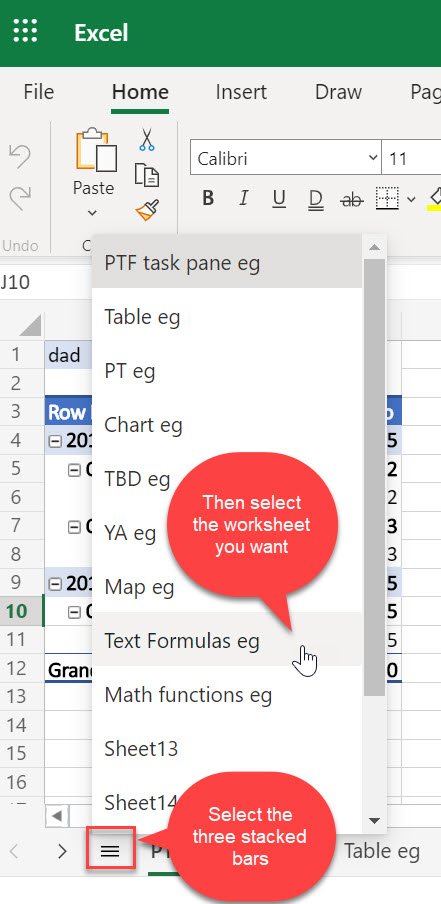
- Use the All Sheets menu at the bottom-left corner if you prefer to pick a sheet from a list.
Nothing happens on a laptop or compact keyboard
Page Up and Page Down often share keys with the arrows and need the Fn key.
- Find the keys printed with PgUp and PgDn on your keyboard.
- Hold Ctrl and Fn together.
- Press the PgDn key to go forward or PgUp to go back.
- On a Mac without Page keys, use Option + Right arrow and Option + Left arrow instead.
Typing on one sheet changed several sheets
Ctrl + Shift + Page Down was pressed, so the sheets are grouped.
- Look for Group in the title bar to confirm.
- Press Ctrl + Z to undo the unwanted edits.
- Click any unselected tab, or right-click a selected tab and choose Ungroup Sheets.
The sheet you want never comes up while cycling
The sheet is hidden, so it has no tab in the row.
- Right-click any visible sheet tab, or press Shift + F10 with a tab selected.
- Select Unhide.
- Pick the sheet in the Unhide dialog and select OK.
- If it is not listed, VBA hid it as very hidden, and the Unhide command cannot show those sheets.
Ctrl + Page Down moves through workbooks, not sheets
The keys being pressed are Ctrl + Tab or Ctrl + F6, which switch workbook windows.
- Confirm you are pressing Page Down, not Tab or F6, with Ctrl.
- Close any open dialog box first, since Ctrl + Tab moves between dialog tabs.
- Press Ctrl + Page Down again with a cell selected.
Frequently Asked Questions
How do you cycle through tabs in Excel?
Press Ctrl + Page Down to go to the next sheet tab and Ctrl + Page Up to go to the previous one. Hold Ctrl and tap the Page key repeatedly to keep moving through the workbook one sheet at a time.
How do you quickly go through Excel tabs?
Hold Ctrl and tap Page Down or Page Up without releasing Ctrl. To jump to a distant sheet, press F6 until the sheet tabs are active, use the arrow keys to reach the sheet, and press Ctrl + Space to select it.
How do you cycle through sheets in Excel on a Mac?
Press Option + Right arrow for the next sheet and Option + Left arrow for the previous sheet. Microsoft also lists Ctrl + Page Down for the next sheet on Mac, which helps on full-size keyboards that have Page keys.
How do you tab through Excel worksheets in a browser?
In Excel for the web, press Alt + Ctrl + Page Down for the next sheet and Alt + Ctrl + Page Up for the previous one. In Microsoft Teams or a browser other than Chrome, plain Ctrl + Page Down and Ctrl + Page Up also work.
How do you tab in an Excel cell?
The Tab key does not indent text inside a cell; it moves the selection one cell to the right, and Shift + Tab moves it one cell left. To start a new line inside the same cell, press Alt + Enter while editing it.
How do you cycle through tabs in Windows?
Press Alt + Tab to switch between open windows, and keep holding Alt while tapping Tab to cycle further. Alt + Esc cycles through windows in the order they were opened, and Windows key + Tab opens Task View.
How do you cycle through tabs on Edge?
Press Ctrl + Tab for the next tab and Ctrl + Shift + Tab for the previous one. Ctrl + Page Down and Ctrl + Page Up do the same. Ctrl + 1 to Ctrl + 8 jump to a specific tab, and Ctrl + 9 opens the last tab. Edge also has a keyboard shortcut for vertical tabs.
How do you cycle through tabs using the keyboard in any program?
Ctrl + Tab and Ctrl + Shift + Tab move between tabs in most tabbed windows, including browsers and dialog boxes. Excel sheet tabs are the exception: they use Ctrl + Page Down and Ctrl + Page Up, because Ctrl + Tab switches Excel workbook windows.
Why does Ctrl + Page Down not work in Excel?
The usual causes are a laptop that needs the Fn key for Page Down, or Excel for the web in Chrome, where the browser keeps Ctrl + Page Down for its own tabs. Add Fn on a laptop, or use Alt + Ctrl + Page Down in the browser.
Conclusion
Use Ctrl + Page Down and Ctrl + Page Up for day-to-day sheet switching, and switch to F6 plus the arrow keys once a workbook has more tabs than you want to step through. The Page shortcuts need no setup and work in every current desktop version of Excel for Windows, while F6 lets you reach a far sheet without passing through every sheet in between. On a Mac use Option + arrow, and in a browser add Alt.