Navisworks Freedom is the free Autodesk viewer for NWD and DWF files, and the download installs on 64-bit Windows 11 and Windows 10. Nothing expires, and no subscription is attached to it.
This guide covers the official download page, the install, what the viewer opens, the system requirements, silent deployment, and fixes for the errors that stop it.
On a Mac, the free Autodesk Viewer opens the same published models in a browser.
Which Navisworks Freedom download do you need?
Autodesk ships one build of the viewer: 64-bit Windows. Match your case to the row below before you start.
| Your situation | What to get | Official page |
|---|---|---|
| Windows 11 or Windows 10, 64-bit | Navisworks Freedom 2027 | How to download Navisworks Freedom |
| A model that is not NWD, DWF or ReCap | Navisworks Manage or Simulate, then save it as NWD | Supported file formats |
| macOS, Linux or a Chromebook | Autodesk Viewer in the browser | viewer.autodesk.com |
| Many machines to set up | The same installer, started with the –silent switch | Deployment and silent install |
| 32-bit Windows | No build exists; open the model in Autodesk Viewer | System requirements |
Press Windows + R, type winver and select OK to confirm your Windows version first.
Download Navisworks Freedom from the official Autodesk source
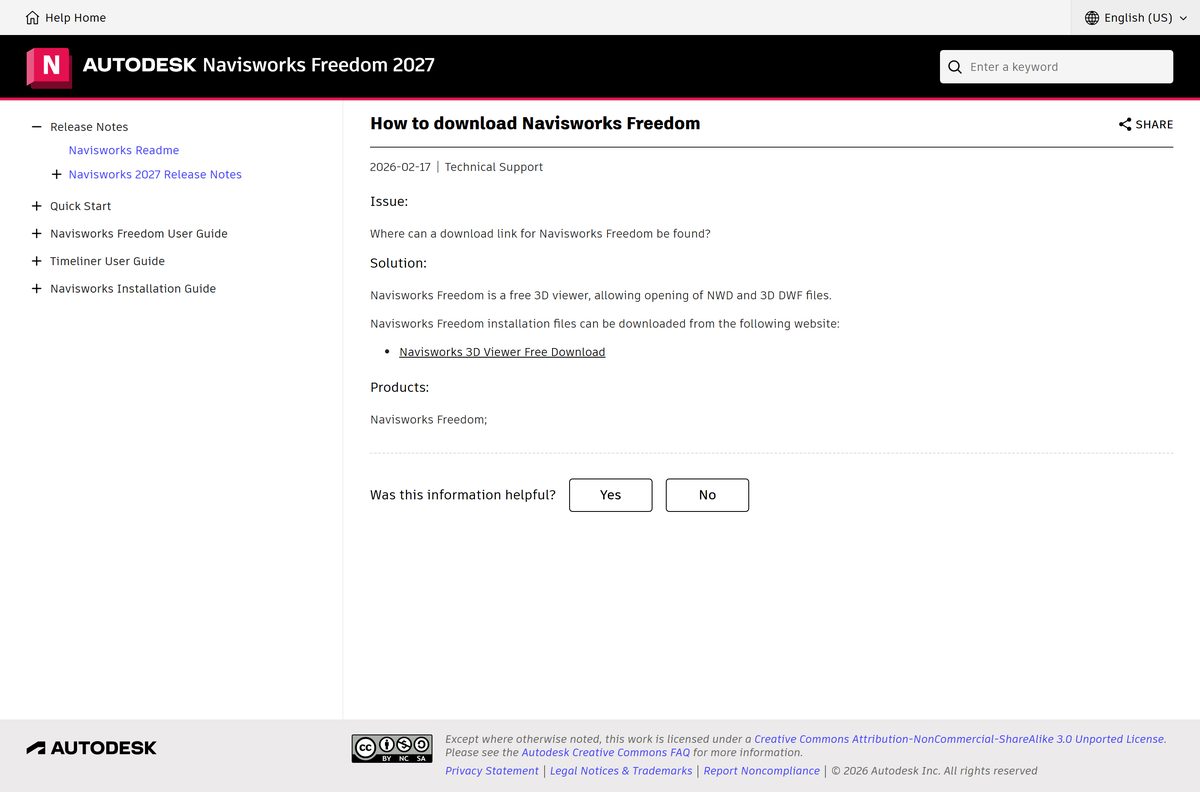
Autodesk keeps the viewer on its own Navisworks 3D Viewer Free Download page. The help article below is the route Autodesk documents to reach it.
- How to download Navisworks Freedom — Autodesk support article that links the Navisworks 3D Viewer Free Download page
- Navisworks Freedom 2027 help — release notes, user guide and installation guide for the current release
- System requirements — the hardware and Windows versions Autodesk supports
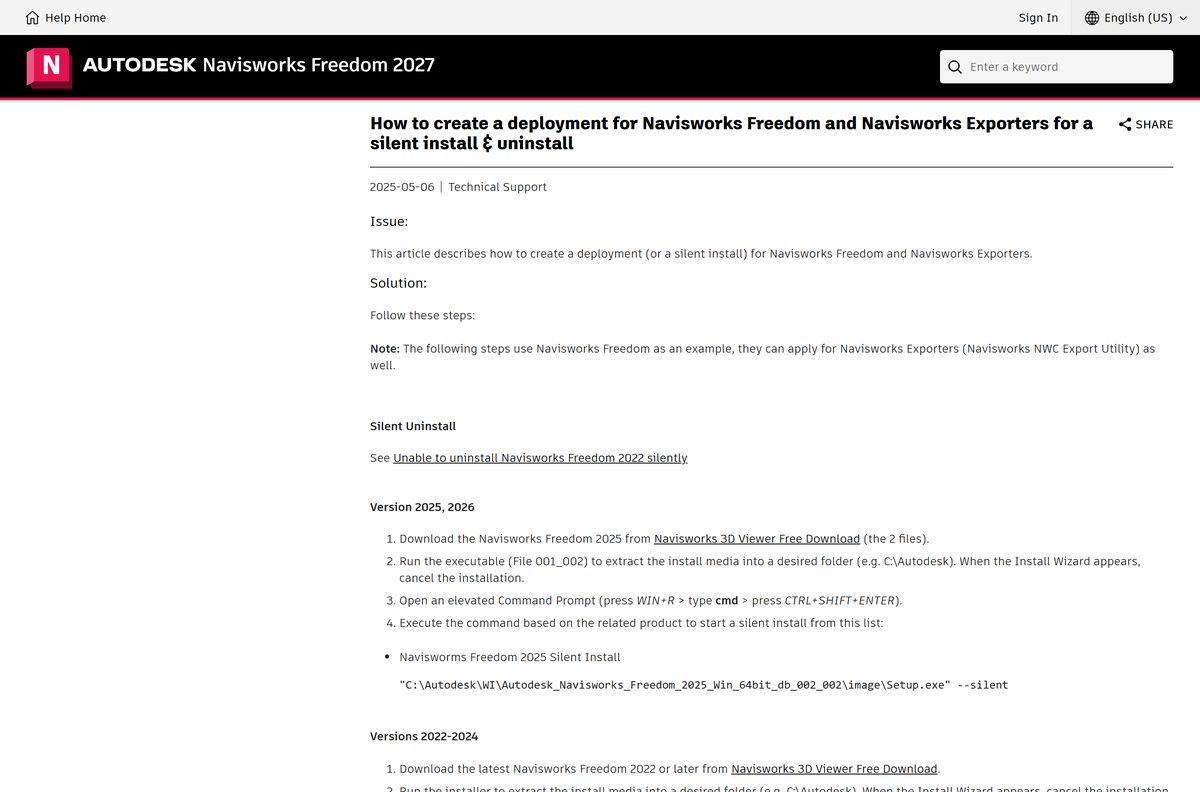
- Deployment and silent install — the two-part download, the extraction step and the setup command
The release arrives as two self-extracting files. Save both in the same folder, then run the one whose name ends in 002.
Autodesk states no installer size for the viewer, so treat any site quoting an exact megabyte figure as a repackager. A copy offered anywhere other than autodesk.com is not the Autodesk build.
How to install Navisworks Freedom on Windows 11 and 10
Install with an account that has administrator rights. The setup needs about 15 GB of free disk space.
- Open the Autodesk article How to download Navisworks Freedom and follow its link to the Navisworks 3D Viewer Free Download page.
- Pick the release you want and download both files into one folder.
- Run the file whose name ends in 002 to extract the install media, for example to C:\Autodesk .
- Wait for the Install Wizard to open.
- Accept the licence agreement and confirm the install location.
- Select Install and wait for setup to finish.
- Double-click the Navisworks Freedom shortcut on the desktop, or open it from the Start menu.
- Select the application button on the ribbon, then Open, and pick an NWD file.
Language packs install with the product, so switching interface language needs no second download. Add the -lang switch and a language code to the desktop shortcut to start in another language.
How to install Navisworks Freedom silently across a fleet
Autodesk documents a silent install rather than a separate MSI. The extracted media carries a Setup.exe that takes a –silent switch.
| Stage | What you run |
|---|---|
| Get the media | Autodesk deployment article |
| Extract it | Run the downloaded file ending in 002, then cancel the Install Wizard when it appears |
| Open a prompt | Press Windows + R, type cmd, then press Ctrl + Shift + Enter |
| Start the install | “C:\Autodesk\WI\Autodesk_Navisworks_Freedom_2025_Win_64bit_db_002_002\image\Setup.exe” –silent |
| Add the exporters | Run the same –silent switch against the Navisworks Exporters setup |
The folder name carries the release and build, so read the real path out of your extraction folder before you script it.
Test the command on one machine and confirm the shortcut launches before you push it wider.
How to open an NWD file on a Mac
Autodesk lists only Windows 10 and Windows 11 for the viewer. Two routes cover a Mac, and one of them needs no install at all.
| What you need to do | Route | Official page |
|---|---|---|
| Review a published model or share it | Upload it to Autodesk Viewer and open it in the browser | viewer.autodesk.com |
| Use the viewer itself on Apple hardware | Run Windows 11 in a virtual machine, then install the viewer inside it | System requirements |
| Open a file on an iPad or a phone | Autodesk Viewer in the browser | viewer.autodesk.com |
A virtual machine still needs the 64-bit Windows guest, 2 GB of memory and 15 GB of free disk space the requirements table lists.
Is Navisworks Freedom free?
Yes. Autodesk publishes it as the free viewer for NWD and DWF files, with no trial clock and no subscription. The money sits in the authoring products. Navisworks Simulate and Navisworks Manage combine models from several disciplines and publish the NWD file; the free viewer opens that result with its review data, viewpoints, animations, markups and comments, and cannot create or edit it. Anyone asking for a licence key, a payment or a sign-up for the viewer is not Autodesk.
Which Navisworks edition should you install?
Install the free viewer if you only open and review models, and buy Simulate or Manage if you have to publish or clash-test them. The viewer opens NWD, DWF and ReCap files and nothing else. Simulate adds scheduling and animation on top of a full set of CAD importers, and Manage adds clash detection. A file in PDMS, STP or STEP format has to pass through Manage or Simulate and be saved as NWD before the free viewer will open it.
Releases within one year are cumulative: a 2027.2 release also contains the 2027 and 2027.1 updates.
Check the Navisworks Freedom system requirements first
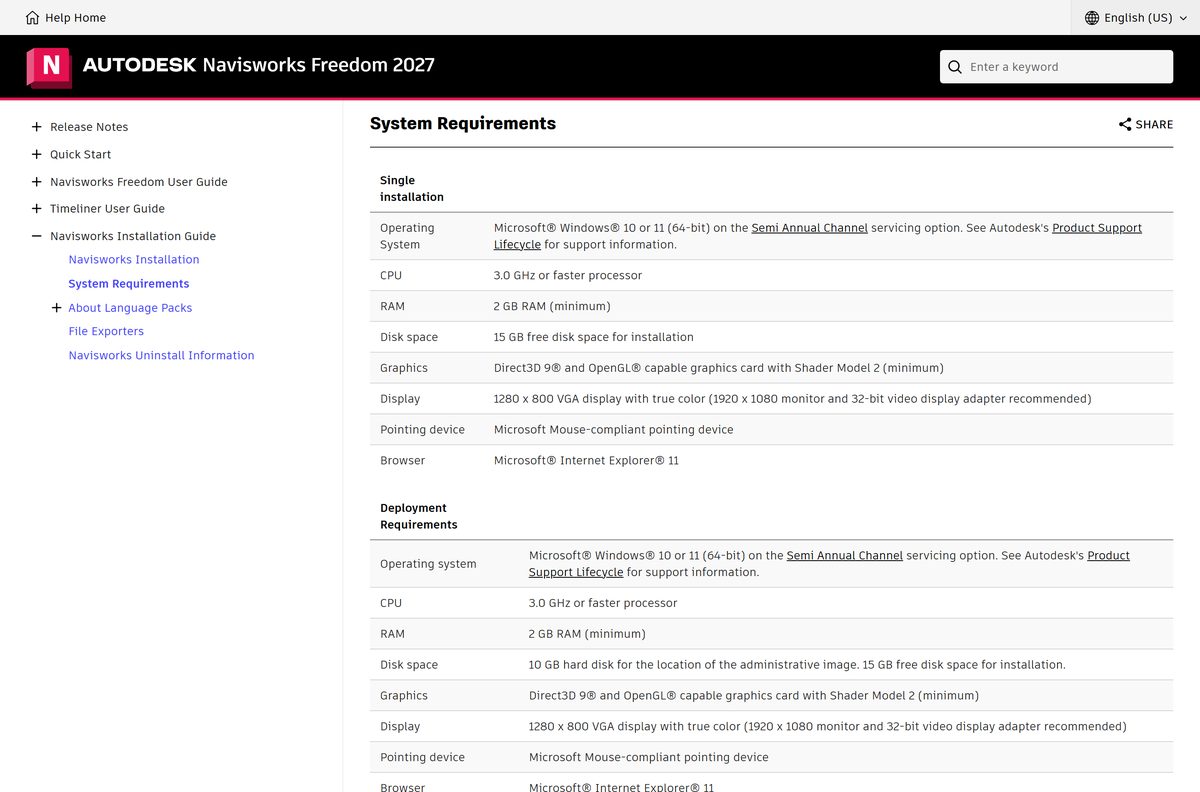
Autodesk sets a low bar for the viewer. A ten-year-old workstation clears it; the graphics card is the part worth checking.
| Field | Value |
|---|---|
| Software | Autodesk Navisworks Freedom |
| Developer | Autodesk, Inc. |
| Latest version | Navisworks Freedom 2027 |
| Licence | Free viewer, no subscription and no trial period |
| Windows | Windows 10 or Windows 11, 64-bit, Semi-Annual Channel servicing option |
| macOS | No build; Autodesk Viewer in a browser instead |
| Processor | 3.0 GHz or faster |
| Memory | 2 GB RAM minimum |
| Disk space | 15 GB free for the installation |
| Graphics | Direct3D 9 and OpenGL capable card with Shader Model 2 |
| Display | 1280 x 800 true colour minimum; 1920 x 1080 recommended |
| Browser | Microsoft Internet Explorer 11 |
| Pointing device | Microsoft Mouse-compliant |
| Architecture | 64-bit only; no 32-bit and no ARM64 build |
| Official source | autodesk.com |
| Last verified | 2026-09-22 |
Autodesk recommends a 32-bit video display adapter alongside the 1920 x 1080 monitor.
What Navisworks Freedom can open
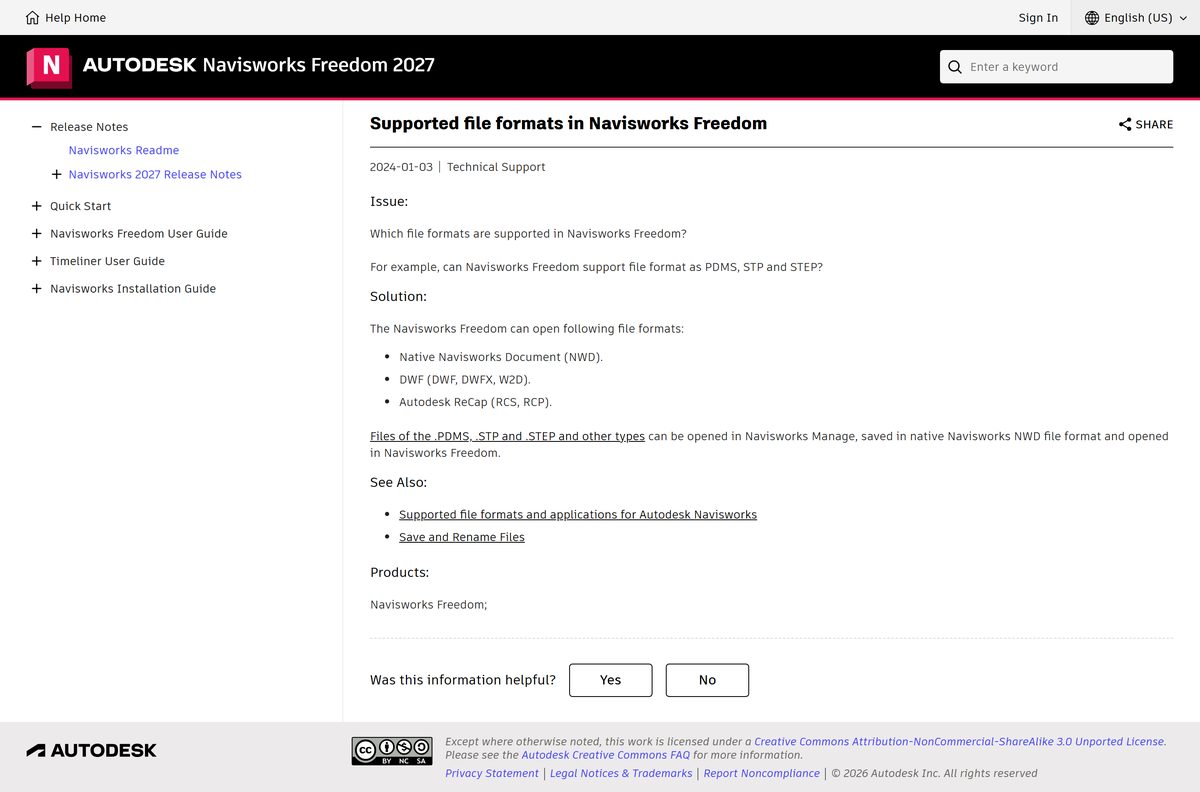
Three format families open in the viewer. Everything else has to be republished as NWD by an authoring product first.
| Format | Extensions | What you get |
|---|---|---|
| Native Navisworks Document | NWD | Full model geometry with review markups, viewpoints, animations and comments |
| Design Web Format | DWF, DWFX, W2D | Published 2D and 3D design files |
| Autodesk ReCap | RCS, RCP | Scans and scan projects, linked to the model and loaded as you navigate |
| Cache files | NWC | Not supported; open it in Manage or Simulate and save it as NWD |
| Plant and exchange formats | PDMS, STP, STEP | Not supported; convert to NWD in Manage first |
An NWD file is a snapshot of the model at publish time, and it compresses the CAD data by up to 80 percent of the original size.
Selecting several files at once with SHIFT and CTRL in the Open dialog is not available in the free viewer.
How to make Navisworks Freedom the default app for NWD files
Windows keeps its own file association, so a fresh install does not always claim the NWD extension.
- Right-click any .nwd file in File Explorer.
- Select Open with, then Choose another app.
- Pick Navisworks Freedom in the list.
- Turn on Always use this app to open .nwd files, then select OK.
- Repeat the same steps once for a .dwf file.
- Open Settings > Apps > Default apps to confirm both extensions now point at the viewer.
Fix Navisworks Freedom not installing or not opening a file
An NWC, RVT or DWG file refuses to open
The free viewer reads NWD, DWF and ReCap files only.
- Ask the model author for the file as an NWD.
- Open the file in Navisworks Manage or Simulate if you have either, then save it as NWD.
- Upload the file to Autodesk Viewer for a one-off look in the browser.
- Check the format against the Autodesk list before you ask for a new export.
The viewer closes as soon as it starts
The PATH environment variable holds two consecutive semicolons, or ends with one.
- Press Windows + R, type sysdm.cpl and select OK.
- Open the Advanced tab and select Environment Variables.
- Select Path and then Edit.
- Remove every empty entry, and any trailing semicolon.
- Select OK three times, then start the viewer again.
Setup stops midway, or the product will not start after installing
A previous Autodesk install left files, licence data and registry keys behind.
- Press the Windows logo, type appwiz.cpl and press ENTER.
- Uninstall every Autodesk entry except Autodesk Genuine Service.
- Open C:\Program Files\Autodesk\AdODIS\V1 , right-click RemoveODIS.exe and select Run as administrator.
- Open C:\Program Files (x86)\Common Files\Autodesk Shared\AdskLicensing , right-click Uninstall and select Run as administrator.
- Delete the contents of the %temp% folder, skipping any file that is in use.
- Follow the remaining steps in the Autodesk clean uninstall article, then install again.
You cannot select several models at once in the Open dialog
Multi-file selection is one of the features the free viewer leaves out.
- Open the first model on its own.
- Start the viewer from a command prompt with -AppendFile and the second file to add it to the loaded scene.
- Ask the author to publish the combined model as a single NWD when you need this often.
How to uninstall Navisworks Freedom
Removing one product takes the standard Windows route. Files you created or edited, and the licence files, stay on the computer.
- Press the Windows logo, type appwiz.cpl and press ENTER.
- Select the Autodesk Navisworks Freedom entry in the list.
- Select Uninstall and confirm the prompt.
- Wait for the Autodesk installer to finish, then select Finish.
- Restart the PC if setup asks for it.
- Delete the leftover shortcut from the desktop if Windows kept it.
Autodesk warns against registry cleaners and hand-edited registry entries for this: a product removed that way cannot be reinstalled.
Removing every Autodesk product and its licence data needs the full clean uninstall procedure.
Which free NWD viewer should you use instead?
Two Autodesk products sit either side of the free viewer, and one of them runs in a browser on any machine.
| Tool | Opens | Cost | Best for |
|---|---|---|---|
| Autodesk Viewer | Many CAD formats, in a browser | Free | Mac, Linux, tablets, and formats the desktop viewer rejects |
| Navisworks Simulate | Every supported CAD format, and publishes NWD | Paid subscription | Scheduling, animation and publishing |
| Navisworks Manage | Every supported CAD format, plus clash detection | Paid subscription | Coordination and clash testing |
| Navisworks Freedom | NWD, DWF and ReCap | Free | Reviewing a published model on a Windows PC |
Stay with the free viewer unless a file it rejects keeps landing in your inbox.
Frequently asked questions
Is the Navisworks Freedom download free?
Yes. Autodesk publishes it as the free viewer for NWD and DWF file formats. There is no trial period, no subscription and no licence to buy. The paid Navisworks Simulate and Navisworks Manage products are the tools that publish the NWD files it opens.
Where is the official Navisworks Freedom download page?
Autodesk hosts it on the Navisworks 3D Viewer Free Download page on autodesk.com. The Autodesk support article How to download Navisworks Freedom, under the Navisworks Freedom 2027 help, is the documented route to that page.
Does Navisworks Freedom work on Windows 11?
Yes. Autodesk lists Windows 10 and Windows 11, 64-bit, on the Semi-Annual Channel servicing option. The viewer also asks for a 3.0 GHz processor, 2 GB of RAM and 15 GB of free disk space.
How big is the Navisworks Freedom download?
Autodesk publishes no installer size. The release ships as two self-extracting files that you save in one folder, and the installation itself needs 15 GB of free disk space.
Is there a Navisworks Freedom offline installer?
Yes, in effect. The download is a self-extracting package that unpacks the full install media to a folder such as C:\Autodesk, and setup then runs from that folder rather than streaming anything.
Is there a Navisworks Freedom download for Mac?
No. Autodesk lists only 64-bit Windows 10 and Windows 11. On macOS, open the model with the free Autodesk Viewer in a browser, or run Windows 11 in a virtual machine and install the viewer there.
Is Navisworks Freedom available in 32-bit or for ARM PCs?
No. Autodesk ships a 64-bit Windows build only, named Autodesk_Navisworks_Freedom_
Which file formats does Navisworks Freedom open?
Three families: native Navisworks Document (NWD), DWF files (DWF, DWFX, W2D) and Autodesk ReCap files (RCS, RCP). Anything else has to be opened in Navisworks Manage or Simulate and saved as NWD first.
Why can’t Navisworks Freedom open my NWC file?
NWC is a cache format the free viewer does not read. Ask the author for an NWD copy, open the NWC in Navisworks Manage or Simulate and save it as NWD, or view the file in Autodesk Viewer.
Is Navisworks Freedom safe to download?
Yes, when it comes from autodesk.com. Download portals repackage Autodesk installers with their own wrappers, and a site offering a licence key or a paid copy of a free viewer is not distributing the Autodesk build.
What is the latest version of Navisworks Freedom?
Navisworks Freedom 2027 is the current release, with its own readme, release notes and known-issues list from Autodesk. Releases within a single year are cumulative, so a 2027.2 release also contains the 2027 and 2027.1 updates.
Can you install Navisworks Freedom silently on many PCs?
Yes. Extract the install media, open an elevated Command Prompt, then run the Setup.exe inside the extracted image folder with the –silent switch. The same switch works for the Navisworks Exporters package.