The Apache Maven download for Windows 11, Windows 10 and Mac is one archive from maven.apache.org, and it costs nothing. The current release is 3.9.16, published by the Apache Software Foundation under the Apache License 2.0.
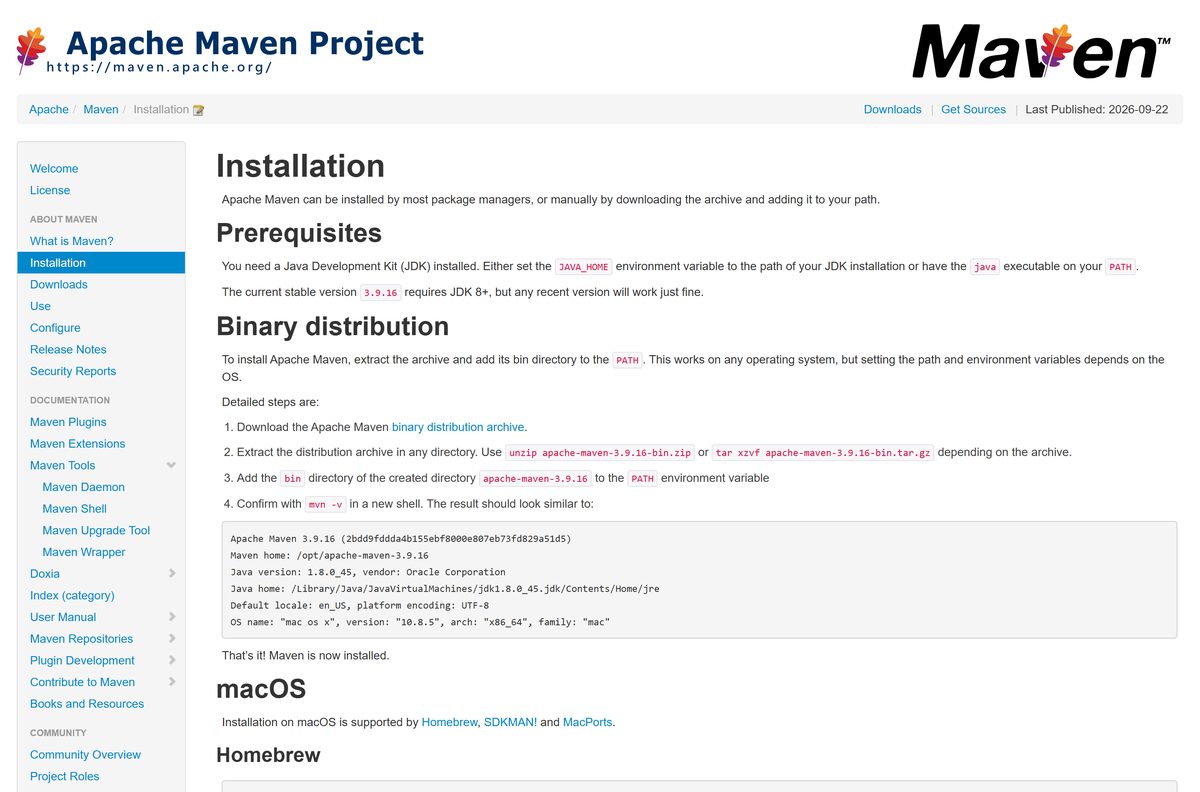
There is no setup wizard. You extract the archive, add its bin folder to your PATH , and run mvn -v to confirm the build tool answers.
This guide covers the right file for your machine, install steps for Windows and macOS, checksum verification, the Maven 3 or Maven 4 decision, and fixes for failed builds.
What Apache Maven needs to run: system requirements
Maven is a Java program, so the Java Development Kit matters more than your version of Windows or macOS. Set JAVA_HOME to your JDK folder, or keep java on your PATH .
| Item | Detail |
|---|---|
| Software | Apache Maven |
| Developer | The Apache Software Foundation |
| Latest version | 3.9.16, released 13 May 2026 |
| License / price | Free and open source, Apache License 2.0 |
| Download size | 8.96 MB binary zip, 8.85 MB tar.gz |
| Supported OS | Windows 11, Windows 10, macOS and Linux with a JDK installed |
| Java requirement | JDK 8 or later; JDK 17 or later for the 4.0.0 preview |
| Architecture | Platform-independent Java archive, runs on x64 and ARM64 |
| Offline installer | Yes, the binary archive is the complete distribution |
| Official download source | maven.apache.org |
| Last verified | 2026-09-22 |
Which Apache Maven download do you need?
Every operating system gets the same Java bytecode, so the only real choice is the archive format. Windows opens zip files natively; macOS and Linux handle tar.gz with one command.
| Your setup | File to download | Size |
|---|---|---|
| Windows 11 or Windows 10, any CPU | apache-maven-3.9.16-bin.zip | 8.96 MB |
| macOS or Linux, Apple silicon or Intel | apache-maven-3.9.16-bin.tar.gz | 8.85 MB |
| You want a resident daemon for faster repeat builds | maven-mvnd-1.0.6-windows-amd64.zip | 22.9 MB |
Building the tool from source is a separate job. Pick a binary archive unless you intend to patch it.
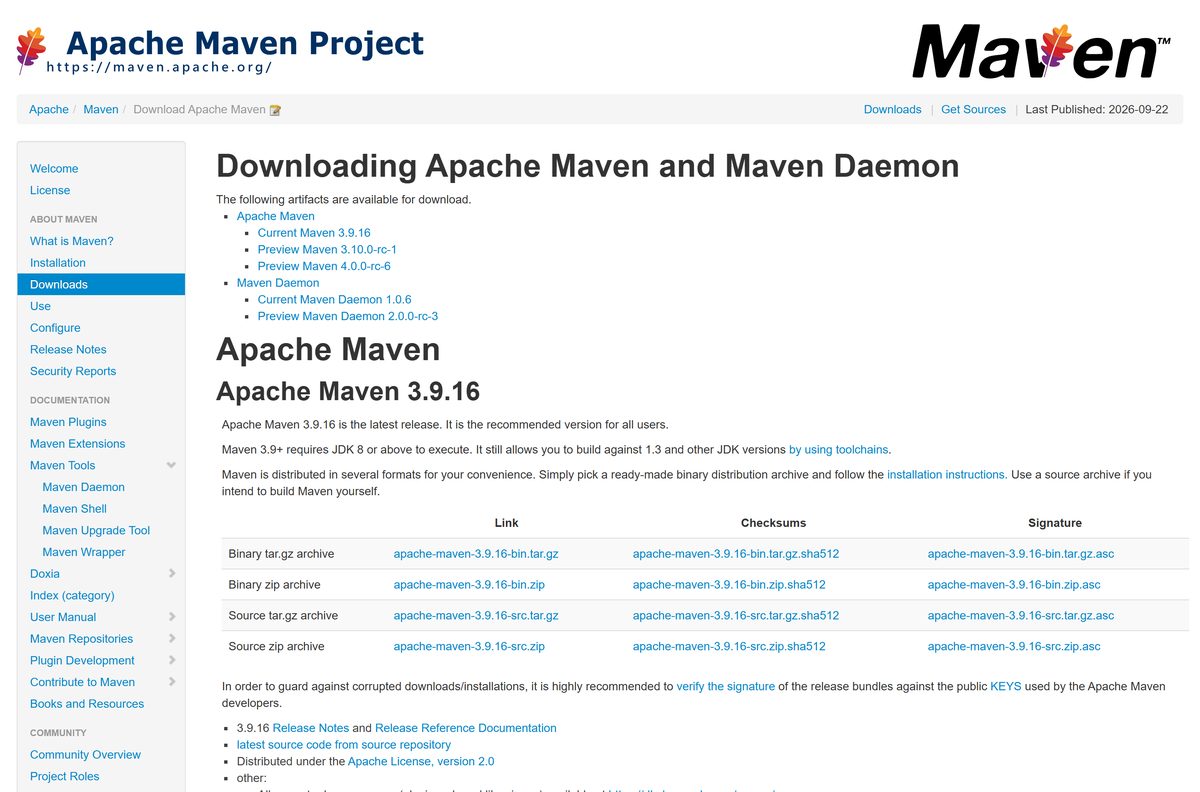
Download Apache Maven from the official Apache page
A SHA-512 checksum and a PGP signature sit beside every archive on the download page. Take both when the machine builds production artifacts.
- apache-maven-3.9.16-bin.zip — 8.96 MB · Windows binary archive
- apache-maven-3.9.16-bin.tar.gz — 8.85 MB · macOS and Linux binary archive
- apache-maven-3.9.16-bin.zip.sha512 — SHA-512 checksum for the zip
- Download page on maven.apache.org — Where every link above comes from
Nothing else is official. A mirror offering an .exe installer for this build tool is repackaging somebody’s work.
How to install Apache Maven on Windows 11 and 10
Installation is an extract plus two environment variables. Use a path without spaces, such as C:\tools , so older plugins parse it correctly.
- Install a JDK first, then note its folder, for example C:\Program Files\Java\jdk-21 .
- Download the binary zip from the official download page.
- Right-click the archive, choose Extract All, and extract it to C:\tools .
- Press Windows + R, type sysdm.cpl , and press Enter.
- Open the Advanced tab and select Environment Variables.
- Under System variables, select New, name it JAVA_HOME , and point it at your JDK folder.
- Select Path, choose Edit, then New, and add C:\tools\apache-maven-3.9.16\bin .
- Select OK three times, open a new Command Prompt, and run mvn -v .
- Read the output: it prints the version, the Maven home folder and the Java version in use.
Package managers do the same work: choco install maven for Chocolatey, scoop install main/maven for Scoop.
How to verify the Apache Maven archive before you extract it
The Apache Software Foundation publishes a SHA-512 checksum and a PGP signature for every file. Windows checks the hash with a built-in tool.
- Save the archive and its .sha512 file into the same folder.
- Open Command Prompt in that folder and run certUtil -hashfile apache-maven-3.9.16-bin.zip SHA512 .
- Open the .sha512 file in Notepad and compare the two strings; they must match exactly.
- On a Mac, run shasum -a 512 apache-maven-3.9.16-bin.tar.gz instead.
- For a signature check, import the KEYS file with gpg –import KEYS .
- Run gpg –verify apache-maven-3.9.16-bin.zip.asc apache-maven-3.9.16-bin.zip and look for Good signature.
A hash mismatch means a truncated or altered file. Delete it and download again rather than extracting it.
Run Apache Maven from a USB stick without installing it
Nothing writes to the registry, so the extracted folder is already portable. Only the local repository and the variables tie it to a machine.
- Extract the binary zip onto the USB drive.
- Open Command Prompt on the host PC and run set JAVA_HOME=C:\Program Files\Java\jdk-21 .
- Run set PATH=E:\apache-maven-3.9.16\bin;%PATH% , replacing E: with your drive letter.
- Run set MAVEN_OPTS=-Dmaven.repo.local=E:\m2repo to keep downloaded dependencies on the stick.
- Run mvn -v in the same window to confirm the paths resolved.
- Close the window when you are done; the host machine keeps no settings.
Which Apache Maven download do you need for your Mac?
Apple silicon and Intel Macs run the same archive, because the JDK supplies the native layer. Pick the route you already use for developer tools.
| Your Mac | Route | What to run |
|---|---|---|
| Apple M1 to M4 or Intel, manual install | apache-maven-3.9.16-bin.tar.gz | tar xzvf the archive, then add its bin folder to PATH |
| You already use Homebrew | Homebrew formula | brew install maven |
| You manage JDKs with SDKMAN! | SDKMAN! candidate | sdk install maven |
| You use MacPorts | MacPorts port | sudo port install maven3 |
All four routes land the same tool. Choose the manual archive when a project pins an exact release.
Is Apache Maven free?
The project is maintained by a non-profit foundation and carries no paid tier, no seat licence and no trial period.
Yes. Apache Maven is free and open source under the Apache License 2.0, including commercial use inside a company. The licence permits use, modification and redistribution, and the download page states it for every archive. Any site selling a copy or a licence key is unconnected to the project.
Should you install Maven 3 or the Maven 4 preview?
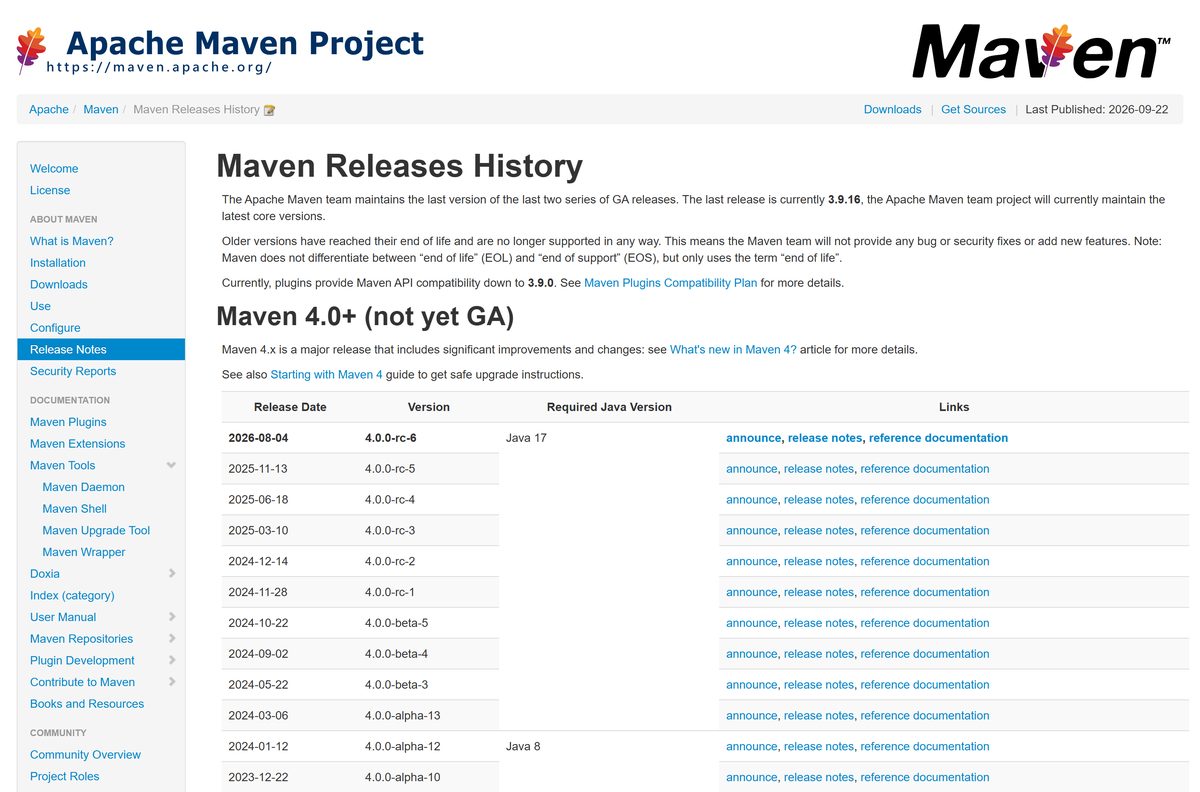
Two preview lines sit beside the stable release on the download page: 3.10.0-rc-1 and 4.0.0-rc-6. The Apache team labels both as unsafe for production.
Install the 3.9.x release. Use 4.0.0-rc-6 only on a scratch project you can afford to break. The 3.9 line is the recommended version for all users and runs on JDK 8 or later, while the 4.0.0 preview requires JDK 17 and is still a release candidate. The 3.8.9 line and everything before it reached end of life and gets no security fixes.
How to check your Maven version and update it
Upgrading means swapping a folder. Nothing in the old installation survives once the PATH entry points elsewhere.
- Open Command Prompt or Terminal and run mvn -v .
- Read line one: it shows the release, its commit hash and the install folder.
- Compare that release against the Maven releases history.
- Extract the newer archive beside the old folder rather than over it.
- Edit Path in Environment Variables and point the entry at the new bin folder.
- Open a new shell and run mvn -v again to confirm the change took effect.
- Delete the old folder once a build succeeds.
Homebrew users run brew upgrade maven instead, and the wrapper handles it per project.
Fix Apache Maven not installing or running on Windows 11 and 10
Almost every first-run failure is an environment variable, not a broken download.
‘mvn’ is not recognized as an internal or external command
The bin folder is missing from PATH, or the shell started before the variable was added.
- Close every Command Prompt window and open a new one.
- Run echo %PATH% and look for the apache-maven entry.
- If it is absent, add the full bin folder path in Environment Variables.
- Check the folder really exists, because extracting a zip can nest it one level deeper.
JAVA_HOME environment variable is not defined correctly
JAVA_HOME points at the bin folder, at a JRE, or at a path that no longer exists.
- Run echo %JAVA_HOME% and confirm it names the JDK root, not its bin subfolder.
- Run java -version to confirm a JDK is installed at all.
- Reset the variable to the JDK root folder, then reopen the shell.
- Avoid quotation marks and a trailing backslash in the value.
Could not resolve dependencies or connection timed out on the first build
The build cannot reach Maven Central, usually through a corporate proxy.
- Open %USERPROFILE%\.m2\settings.xml , creating the file if it is missing.
- Add a
block with your host, port and credentials. - Run mvn -U clean install to force a fresh resolve.
- Delete the failing folder under .m2\repository if a partial artifact keeps breaking the build.
Invalid target release or unsupported class file major version
The JDK on PATH is older or newer than the release the project compiles against.
- Run mvn -v and note the Java version line.
- Point JAVA_HOME at a JDK the project supports.
- Set maven.compiler.release in the project POM to that Java release.
- Run mvn clean package again in a new shell.
How to uninstall Apache Maven from Windows and macOS
There is no entry in Installed apps, because nothing ran an installer. Removal is a folder delete plus a variable cleanup.
- Run mvn -v and note the Maven home path it prints.
- Delete that folder in File Explorer.
- Open Environment Variables, edit Path, and remove the bin entry.
- Delete JAVA_HOME too if nothing else on the machine uses it.
- Delete %USERPROFILE%\.m2 to reclaim the cached dependencies, often several GB.
- On a Mac, run brew uninstall maven , or delete the extracted folder and its PATH line from your shell profile.
- Open a new shell and run mvn -v ; a ‘not recognized’ message confirms the removal.
Choose between Maven, Gradle, Ant and the daemon
Switching build tools rewrites your project layout, so change only for a concrete reason. The daemon is not a rival; it is the same tool kept warm in memory.
| Tool | Best for | Trade-off |
|---|---|---|
| Apache Maven 3.9.x | Java projects wanting a standard layout and stable plugins | XML configuration and a fixed lifecycle |
| Maven Daemon (mvnd) 1.0.6 | Repeat builds on the same machine | Keeps a JVM resident between builds |
| Gradle | Android work and heavily customised builds | A build script is code, harder to audit |
| Apache Ant | Legacy builds that already ship a build.xml | No dependency management without Ivy |
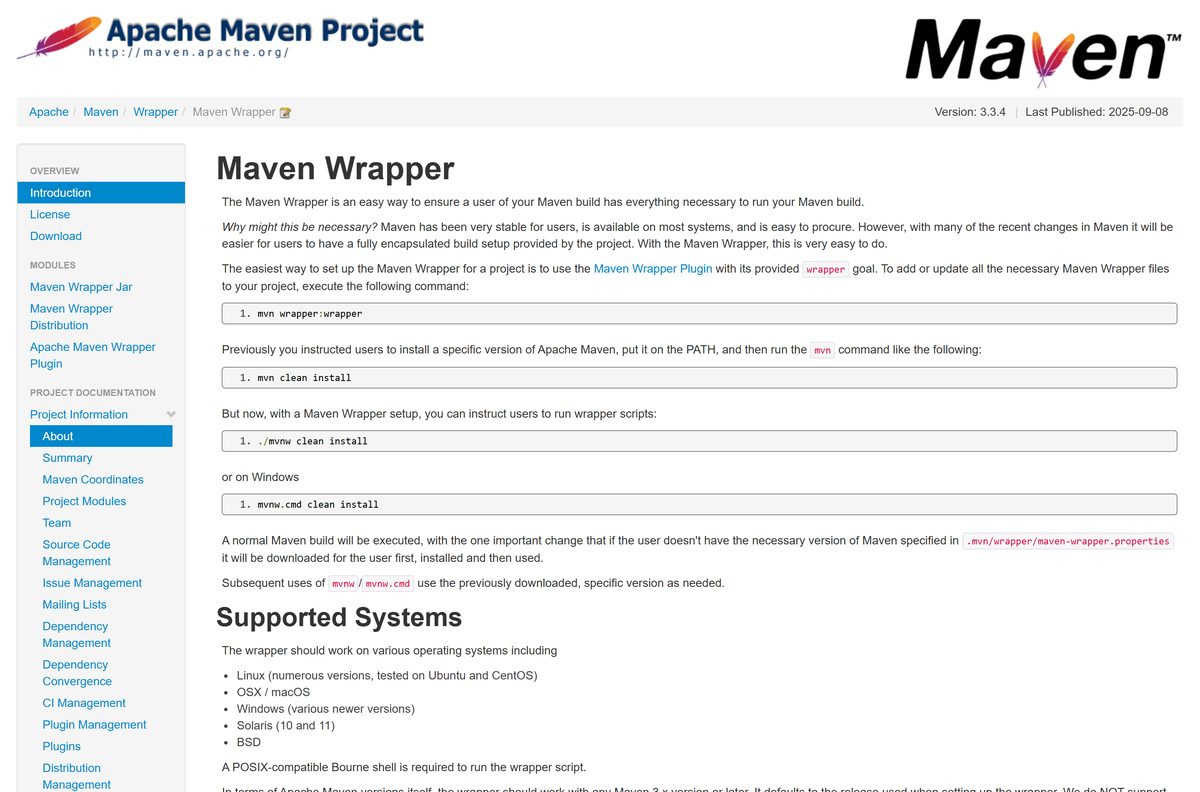
| The Maven Wrapper | Teams that must pin one release per project | Fetches the pinned release on first use |
Add the wrapper with mvn wrapper:wrapper , then let contributors run mvnw.cmd clean install on Windows.
Frequently asked questions
Is Apache Maven free?
Yes. It is free and open source under the Apache License 2.0, with no paid edition and no seat licence. The Apache Software Foundation distributes every archive at no cost.
Is Apache Maven free for commercial use?
Yes. The Apache License 2.0 allows use, modification and redistribution inside a commercial product, and grants a patent licence. Keep the licence file and attribution notices when you redistribute the code.
What is the official Apache Maven download page?
It is maven.apache.org/download.cgi, which links the binary archives, the source archives, the SHA-512 checksums and the PGP signatures. Any other site redistributes the release without the project.
Does Apache Maven work on Windows 11?
Yes. The same binary archive runs on Windows 11 and Windows 10 once a JDK is installed and the bin folder sits on your PATH. There is no separate Windows 11 build.
How big is the Apache Maven download?
The binary zip is 8.96 MB and the tar.gz is 8.85 MB. Plugins and dependencies arrive during your first build, so the local repository folder grows well past that.
Is there an offline installer for Apache Maven?
The binary archive is already the complete distribution, so extraction needs no network. Builds still reach Maven Central unless you prime the local repository or run with the offline flag.
How do I install Apache Maven on a Mac?
Extract the tar.gz archive and add its bin folder to your PATH, or run brew install maven, sdk install maven, or sudo port install maven3.
Does Apache Maven run on ARM64?
Yes. The distribution is platform-independent Java bytecode, so an ARM64 Windows PC or an Apple silicon Mac runs the same file as an x64 machine.
Is Apache Maven safe to download?
Yes, when the file comes from the Apache site. Check the published SHA-512 hash with certUtil on Windows or shasum on a Mac, and verify the PGP signature on build servers.
What is the latest Apache Maven version?
Release 3.9.16, dated 13 May 2026, is the current recommended version. Preview builds 3.10.0-rc-1 and 4.0.0-rc-6 also sit on the download page and are not safe for production.
Which Java version does Apache Maven need?
The 3.9 and 3.10 lines need JDK 8 or later, and the 4.0.0 preview needs JDK 17 or later. Toolchains let you build against older Java releases.
Why won’t Apache Maven start after extraction?
The usual cause is an environment variable. Reopen the shell so it picks up the new PATH, confirm JAVA_HOME names the JDK root rather than its bin subfolder, and check the extracted path exists.