Get the Intel Rapid Storage Technology (Intel RST) driver from your PC maker's support page first, or from the Intel download page that matches your processor generation, and install it with SetupRST.exe.
This guide covers which PCs need Intel RST, the difference between RST, AHCI, RAID and Intel VMD, how to load the VMD driver when Windows 11 setup shows no drives, the Optane app, and how to roll the driver back.
The fastest way to get the right Intel RST driver
Intel itself recommends drivers from your system manufacturer or Windows Update, because PC makers customize Intel drivers for their own designs. Use Intel's generic package only when your PC maker has nothing newer.
- Open Settings > Windows Update and install any pending driver updates.
- Open your PC maker's support page (Dell, HP, Lenovo, Acer, ASUS and others), enter your model or serial number and look under Storage or Chipset for the Intel Rapid Storage Technology driver.
- If your maker offers nothing, open Intel's Intel RST support page and pick the package that names your processor generation.
- Download SetupRST.exe from that page and run it.
- Accept the prompts, then restart when the installer asks.
- Let the installer open the Microsoft Store and install the management app it offers.
If you are installing Windows and setup cannot see your SSD, skip to the section on loading Intel RST during Windows setup below.
What Is Intel Rapid Storage Technology?
Intel RST is a Windows storage driver plus a management app for Intel platforms. It is not needed for a plain SSD to work; it adds features on top of the storage controller.
| Part | What it does | Where it comes from |
|---|---|---|
| Intel RST driver | Lets Windows use drives behind an Intel VMD controller, RAID 0/1/5/10 arrays and Intel Optane memory | SetupRST.exe from Intel or your PC maker |
| Intel VMD driver (iaStorVD.sys) | The file Windows setup needs to see drives on a PC with Intel VMD turned on | Extracted from SetupRST.exe |
| Intel Optane Memory and Storage Management | Management app for RAID, Optane and drive status on 8th to 15th Gen platforms | Microsoft Store, started by the installer |
| Intel Rapid Storage Management Application | Management app for Intel Core Ultra Series 3 platforms | Microsoft Store, started by the installer |
| Supported systems | Windows 10 64-bit and Windows 11 64-bit only; Intel RST does not support Linux | Intel support article 000057787 |
Do You Need the Intel RST Driver?
Match your situation to a row. Most single-SSD laptops already have what they need from the factory image or Windows Update.
| Your situation | Do you need Intel RST? | What to do |
|---|---|---|
| Windows 11 setup shows no drives on an Intel laptop or desktop | Yes, the VMD driver | Load iaStorVD.sys during setup, then install SetupRST.exe after Windows starts |
| You run two or more drives as a RAID 0, 1, 5 or 10 array | Yes | Install the package for your platform and manage the array in the app |
| Your PC has Intel Optane memory accelerating a drive | Yes | Install the Optane-capable package for your generation |
| Your PC shipped with Intel RST and it works | Keep it | Update only from your PC maker or Windows Update |
| A single SSD on a desktop with VMD and RAID turned off | No | Windows uses the drive without Intel RST |
| AMD processor | No | Intel RST is for Intel platforms only |
Intel RST, AHCI, RAID, and VMD Explained
These are firmware storage modes, and the driver Windows needs follows from the mode set in BIOS.
| Mode | What it means | Needs Intel RST? |
|---|---|---|
| AHCI | Standard SATA mode; each drive appears to Windows on its own | No |
| RAID | Intel's controller combines drives into RAID 0, 1, 5 or 10 volumes | Yes |
| Intel VMD | Intel Volume Management Device; NVMe and, on some platforms, SATA drives sit behind the VMD controller | Yes, the iaStorVD.sys driver |
| Intel Optane memory | Optane module accelerates a slower drive; needs RST and, on newer platforms, VMD | Yes |
Intel lists VMD support on 11th Gen and newer platforms, and only with a VMD-capable BIOS. Menu names for VMD differ by PC maker, so check your system manual.
Where to Download the Intel RST Driver
Your PC maker's support page comes first. When you use Intel's own download, the package must match your processor generation; Intel publishes a separate package per platform group.
| Your processor | Intel download page | Latest version listed | Windows |
|---|---|---|---|
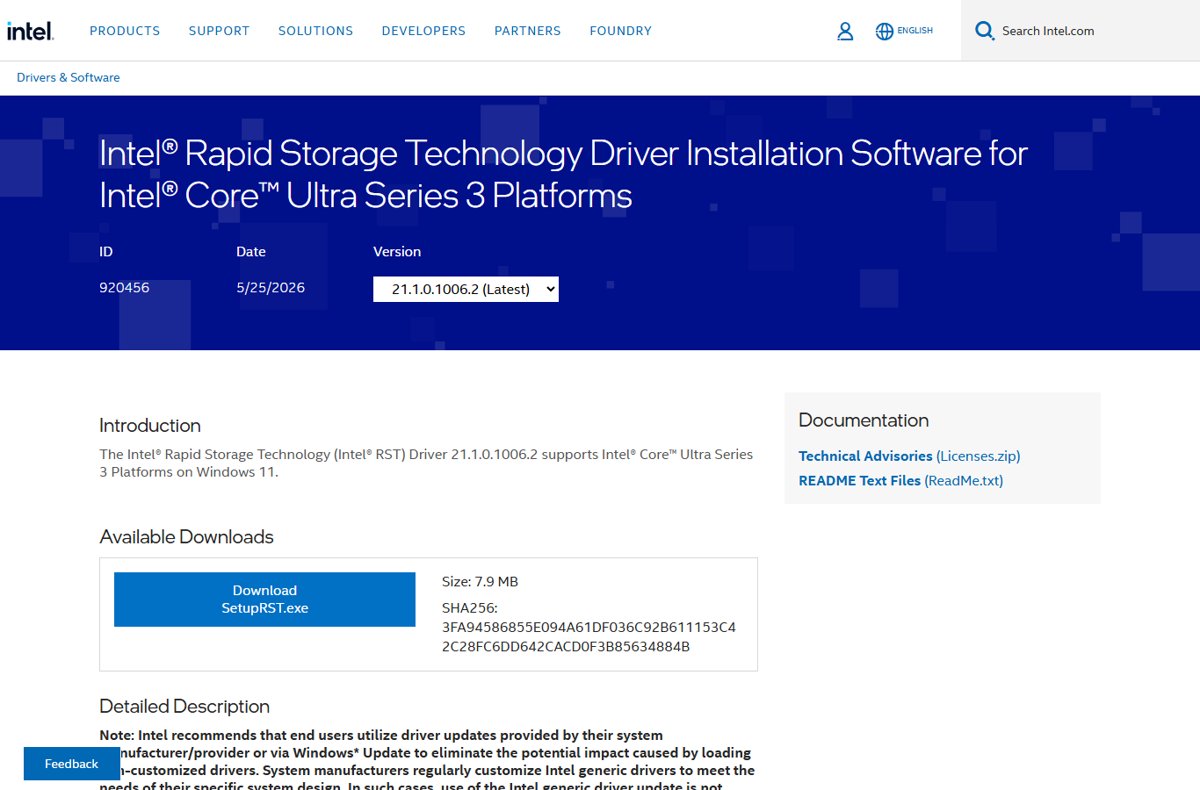
| Intel Core Ultra Series 3 | Intel RST for Intel Core Ultra Series 3 Platforms | 21.1.0.1006.2 (May 25, 2026) | Windows 11 x64 (23H2, 24H2, 25H2) |
| 12th to 15th Gen Intel Core | Intel RST with Intel Optane Memory (12th to 15th Gen) | 20.2.6.1025.3 (Jan 7, 2026) | Windows 10 x64 and Windows 11 x64, including 25H2 |
| 12th to 13th Gen Intel Core | Intel RST with Intel Optane Memory (12th to 13th Gen) | 19.5.8.1059.2 (Mar 19, 2025) | Windows 10 and Windows 11 |
| 10th and 11th Gen Intel Core | Intel RST with Intel Optane Memory (10th and 11th Gen) | 18.7.6.1010.3 (Apr 14, 2023) | Windows 10 and Windows 11 |
| 8th and 9th Gen Intel Core, Celeron G, Pentium Gold | Intel RST with Intel Optane Memory (8th and 9th Gen) | 17.11.3.1010.2 (Apr 14, 2023) | Windows 10 and Windows 11 |
Windows Update is the third route. It delivers driver updates your PC maker has published there, and Intel lists it alongside the manufacturer as the recommended source.
How to Check Which Storage Driver You Are Using
Check before you install anything. If an Intel RST or VMD controller is already listed, your PC already runs the driver.
- Right-click Start and select Device Manager.
- Expand Storage controllers.
- Look for an entry that names Intel RST or Intel VMD. A generic controller name means Windows' own driver is in use.
- Right-click the Intel entry and select Properties.
- Select the Driver tab and read Driver Version and Driver Date.
- Compare the version with the matching row in the download table above.
How to Install Intel RST in Windows 10 or Windows 11
Before you begin, back up your data and confirm the package matches your processor generation. Do not change the SATA, RAID or VMD setting in BIOS on a working installation; Intel warns this can leave Windows unable to boot.
- Download SetupRST.exe from your PC maker or the Intel page for your generation.
- Close open apps and save your work.
- Double-click SetupRST.exe and approve the User Account Control prompt.
- Accept the license and follow the installer's prompts.
- Let the installer start the Microsoft Store install of Intel Optane Memory and Storage Management (or Intel Rapid Storage Management on Core Ultra Series 3).
- Restart the PC when the installer asks.
To install through Device Manager instead, extract the drivers first (see the next section), then right-click the controller under Storage controllers, select Update driver > Browse my computer for drivers, point to the extracted folder and select Next.
How to Load Intel RST During Windows Setup
When Windows 11 or Windows 10 setup shows no drives on a PC with Intel VMD turned on, it needs the VMD driver file iaStorVD.sys. You need a second PC, a USB stick and the SetupRST.exe for your platform. These steps follow Intel article 000057787.
- On a working PC, download SetupRST.exe for your processor generation.
- Right-click in the folder that holds SetupRST.exe and select Open in Terminal.
- Run
./SetupRST.exe -extractdrivers SetupRST_extractedto unpack the drivers without installing them. - Copy everything in the SetupRST_extracted folder to a USB stick.
- Boot the target PC from your Windows installation media with the USB stick plugged in.
- At the screen that lists no drives, select Load driver, then Browse.
- Open Drivers > VMD on the USB stick and select iaStorVD.sys.
- Select the drive that now appears and finish Windows setup.
- After Windows starts, run SetupRST.exe to install the full driver and app.
Intel's article also says to set the boot option to UEFI, not Legacy, when you enable VMD in BIOS for a fresh install. Some PC makers ship a ready-made VMD or F6 driver folder on their support page; use it if your maker offers one.
Should You Disable VMD or RAID Instead?
Leave VMD and RAID as the PC shipped and load the VMD driver during setup; change the setting only before a clean install and only if you use no RAID array or Optane memory. Intel warns against changing BIOS storage settings after Windows is installed because it can cause an inaccessible boot device. RAID arrays and Optane acceleration also depend on Intel RST, so turning VMD or RAID off removes them. Menu names differ by PC maker, so follow your system manual if you do change it before installing.
Intel Optane Memory and Intel RST
Optane memory runs through the Intel RST driver, so the package you install must match your platform and Optane type.
| Your setup | Driver package Intel names | Management app |
|---|---|---|
| Intel Optane Memory H Series, or RAID on a VMD platform | Latest Intel RST with Intel Optane Memory for your generation | Intel Optane Memory and Storage Management |
| Intel Optane Memory M Series | Intel RST 18.x (10th and 11th Gen package) | Intel Optane Memory and Storage Management |
| 8th and 9th Gen with Optane | Intel RST 17.x (8th and 9th Gen package) | Intel Optane Memory and Storage Management |
| Intel Core Ultra Series 3 | Intel RST 21.x; the page lists RAID and VMD, not Optane | Intel Rapid Storage Management Application |
Both apps come from the Microsoft Store. The installer starts that download for you; if it is interrupted, search the Store for the app name above.
How to check the install worked
- Right-click Start, select Device Manager and expand Storage controllers.
- Confirm the Intel RST or Intel VMD controller shows no yellow warning icon.
- Open its Properties > Driver tab and confirm the Driver Version matches the package you installed.
- Open Start and find Intel Optane Memory and Storage Management or Intel Rapid Storage Management.
- Open the app and check that your drives, RAID volume or Optane module are listed with a normal status.
Common Intel RST Problems and Fixes
Windows setup cannot find the SSD
Intel VMD is on in BIOS and Windows setup has no VMD driver.
- Extract the drivers with
./SetupRST.exe -extractdrivers SetupRST_extractedon another PC. - Copy the folder to a USB stick.
- In setup, select Load driver and pick iaStorVD.sys from Drivers > VMD.
- Continue once the drive appears.
"No signed device drivers were found" during setup
Setup was pointed at the packed SetupRST.exe or at the wrong folder.
- Extract the drivers from SetupRST.exe first; setup cannot read inside the installer.
- Browse to the VMD folder under Drivers, not the top of the USB stick.
- Use the package for your processor generation; a package for another platform may not list your controller.
Intel RST installer says the platform is not supported
The package does not match your processor generation, or your PC maker's customized driver is required.
- Check your processor generation in Settings > System > About.
- Download the package from the matching row of the download table.
- If it still refuses, use the Intel RST driver from your PC maker's support page.
PC blue screens after changing SATA mode
The storage mode in BIOS was changed after Windows was installed.
- Enter BIOS again.
- Set the SATA, RAID or VMD option back to what it was before.
- Save and restart. Change the mode only before a clean install.
The Intel RST app is missing or will not open
The Microsoft Store step of the installer did not finish.
- Open Microsoft Store.
- Search for Intel Optane Memory and Storage Management (or Intel Rapid Storage Management on Core Ultra Series 3).
- Install it and open it from Start.
How to Uninstall or Roll Back Intel RST
Intel states the Intel RST VMD driver should not be removed after installation on a VMD system, because it can cause system errors. Roll back to the previous version instead of uninstalling it.
- Right-click Start and select Device Manager.
- Expand Storage controllers.
- Right-click the Intel RST or VMD controller and select Properties.
- Select the Driver tab, then Roll Back Driver.
- Choose a reason, select Yes, and restart if prompted.
- To remove only the management app, open Settings > Apps > Installed apps, select More next to the Intel app and choose Uninstall.
If Roll Back Driver is greyed out, no earlier driver is stored. Install the older package from your PC maker instead.
Performance: Will Intel RST Make Your SSD Faster?
Not on its own. Install Intel RST for RAID, Optane acceleration or VMD support, not as a speed upgrade for a single SSD. Intel's download pages describe the driver as enabling RAID 0/1/5/10, Optane memory acceleration and VMD support. None of them promises faster transfers for a single drive, and Intel recommends the PC maker's customized driver over the generic one.
Windows 10 vs. Windows 11 Compatibility
Every current package is 64-bit only. The newest platform package has dropped Windows 10.
| Package | Windows 10 64-bit | Windows 11 64-bit |
|---|---|---|
| Core Ultra Series 3 (21.x) | Not listed | Yes: 23H2, 24H2, 25H2 |
| 12th to 15th Gen (20.x) | Yes | Yes, including 24H2 and 25H2 |
| 12th to 13th Gen (19.x) | Yes | Yes |
| 10th and 11th Gen (18.x) | Yes | Yes |
| 8th and 9th Gen (17.x) | Yes | Yes |
Best Practices for Intel RST Driver Updates
| Practice | Why |
|---|---|
| Check your PC maker and Windows Update first | Intel says makers customize its drivers for their designs |
| Match the package to your processor generation | Intel publishes a separate package per platform group |
| Back up before updating a RAID or Optane system | The array and acceleration depend on the driver |
| Never change BIOS storage mode on a working install | Intel warns it can cause boot failures |
| Keep the VMD driver installed | Intel says removing it can cause system errors |
| Download only from intel.com or your PC maker | Skip third-party driver updaters and download portals |
Frequently Asked Questions
What is Intel Rapid Storage Technology?
Intel Rapid Storage Technology is Intel's Windows storage driver and management app. It adds RAID 0/1/5/10, Intel Optane memory acceleration and Intel VMD support on Intel platforms. A single SSD in AHCI mode works without it.
Do I need the Intel Rapid Storage Technology driver on Windows 11?
Only if your PC uses Intel VMD, a RAID array or Optane memory. The most common sign is Windows 11 setup showing no drives on an Intel PC; loading the VMD driver fixes that.
How do I install Intel Rapid Storage Technology?
Download SetupRST.exe from your PC maker or the Intel download page for your processor generation, run it, accept the prompts and restart. The installer also starts the Microsoft Store download of the management app.
Where do I download Intel Rapid Storage Technology for Windows 10?
Use your PC maker's support page first. On intel.com, the 8th and 9th, 10th and 11th, 12th to 13th, and 12th to 15th Gen packages all list Windows 10 64-bit. The Core Ultra Series 3 package is Windows 11 only.
Is there an Intel Rapid Storage Technology download in ZIP format?
Intel ships the driver as SetupRST.exe. To get loose driver files, run SetupRST.exe with -extractdrivers followed by a folder name; the VMD driver iaStorVD.sys lands in the Drivers\VMD folder.
How do I open Intel Rapid Storage Technology?
Open Start and select Intel Optane Memory and Storage Management, or Intel Rapid Storage Management on Core Ultra Series 3 PCs. If neither is there, install the app from the Microsoft Store.
How do I update Intel Rapid Storage Technology?
Check Windows Update and your PC maker's support page first, as Intel recommends. Otherwise download the newest SetupRST.exe for your generation from intel.com and run it over the existing install.
Should I download Intel RST from HP, Dell or Acer instead of Intel?
Yes, when your PC maker offers it. Intel says manufacturers customize its drivers for their system designs, so the version on the HP, Dell, Acer or Lenovo support page for your model is the safer choice.
Can I uninstall Intel Rapid Storage Technology?
You can remove the management app, but Intel says not to remove the VMD driver after installation on a VMD system. Use Roll Back Driver in Device Manager if a new version causes problems.

![What is Outlook PWA and How to Install it [2-min Read]](https://techdows.com/wp-content/uploads/2026/09/Microsoft-Edge-menu-showing-Install-this-site-as-an-app-520x338.jpg)