Flip on long edge binds a two-sided sheet along its longer side, so a portrait document turns sideways like a book, while flip on short edge binds along the shorter side, so a portrait page turns upward like a notepad.
The right choice depends on page orientation. This guide covers both options for portrait and landscape pages, where to set them in Word, Windows, macOS and PowerShell, and how to fix backs that print upside down.
Long Edge vs Short Edge: Key Difference
The setting tells the printer which edge of the sheet acts as the spine. The back side is then rotated so it reads upright when you turn the sheet over that edge.
Match your orientation to a row, then read across to the result you want.
| Page orientation | Flip on long edge gives you | Flip on short edge gives you | Pick for normal reading |
|---|---|---|---|
| Portrait (tall) | Binding on the left; you turn pages sideways like a book | Binding at the top; you flip pages up like a notepad or clipboard | Long edge |
| Landscape (wide) | Binding at the top; you flip pages up like a wall calendar | Binding on the left; you turn pages sideways like a book | Short edge |
Pick the wrong edge and the back of every sheet prints upside down relative to the front. Nothing is lost except paper; switch the edge and print again.
What Duplex Printing Means
Duplex printing is Microsoft's term for printing on both sides of a sheet. The flip setting only appears once two-sided printing is switched on.
| Term | What it means |
|---|---|
| Duplex printing | Printing on both sides of a sheet of paper |
| Automatic duplex | The printer turns the sheet itself and prints the second side without your help |
| Manual duplex | The printer prints one side of every sheet, then you turn the stack over and feed it back in |
| Binding edge | The edge the sheet turns over; the long or short edge choice sets it |
| Windows duplex values | Windows names the three states OneSided, TwoSidedLongEdge and TwoSidedShortEdge |
| macOS duplex values | The Double-sided menu offers On for standard binding and On (Short Edge) for binding at the top |
Microsoft notes that a copier-printer combination that copies two-sided usually supports automatic duplex printing as well.
Flip on Long Edge Explained
On US Letter and A4 paper the long edges are the two 11-inch or 297 mm sides. Flipping on the long edge keeps the back upright when you turn the sheet over one of those sides.
| Question | Flip on long edge |
|---|---|
| Portrait result | Pages turn left to right like a book or a report; the back reads upright |
| Landscape result | Pages flip over the top like a wall calendar; the back reads upright only when you lift the sheet upward |
| Common uses | Reports, letters, manuals, contracts, school handouts and most multi-page portrait documents |
| Windows name | TwoSidedLongEdge |
| macOS name | On in the Double-sided menu |
| Word and Publisher | The long-edge version of Print on Both Sides, such as Flip sheets on long edge in Publisher |
Flip on Short Edge Explained
The short edges are the 8.5-inch or 210 mm sides. Flipping on the short edge rotates the back so it reads upright when you turn the sheet over the top or bottom of a portrait page.
| Question | Flip on short edge |
|---|---|
| Portrait result | Pages flip upward like a notepad, clipboard or steno pad; the back reads upright only when you lift the sheet up |
| Landscape result | Pages turn left to right like a book; the back reads upright |
| Common uses | Landscape slides and spreadsheets, folded booklets, top-bound pads and some postcards |
| Windows name | TwoSidedShortEdge |
| macOS name | On (Short Edge) in the Double-sided menu, which Apple describes as binding at the top of the page |
| Word booklets | Word's book-fold booklets use landscape sheets, and Microsoft says to flip them on the short edge to avoid upside-down pages |
Which Option to Choose for Portrait Documents
Most portrait documents are read like a book, so long edge is the safe default. Short edge only makes sense when the pages will be flipped upward.
| Portrait document | Choose | Why |
|---|---|---|
| Report, essay, letter or manual | Long edge | Readers turn pages sideways, so the back must stay upright on a left-hand spine |
| Document going in a ring binder or stapled on the left | Long edge | The spine sits on the long left side |
| Notepad, clipboard form or top-stapled handout | Short edge | Readers lift each sheet up over the top edge |
| Two-sided flyer or form on a single sheet | Long edge | People usually turn a single sheet over sideways |
| Postcard with front and address side | Start with long edge, then check | Publisher's steps begin with long edge and switch to short edge if the preview shows one side upside down |
Which Option to Choose for Landscape Documents
Landscape reverses the logic. The long edges now sit at the top and bottom, so long edge produces a top-bound, flip-up result.
| Landscape document | Choose | Why |
|---|---|---|
| Slide handouts or spreadsheets read side to side | Short edge | The short edge is now the left side, so pages turn like a book |
| Word booklet made with Book fold | Short edge | Microsoft's booklet steps say to flip on the short edge to avoid upside-down pages |
| Wall or desk calendar | Long edge | The spine is at the top and pages flip upward |
| Presentation bound at the top for a flip-over stand | Long edge | Readers lift each sheet over the top edge |
| File that mixes portrait and landscape pages | Split the job | One binding setting applies to the whole job, so one orientation will print upside down |
Set long edge or short edge when printing from Word
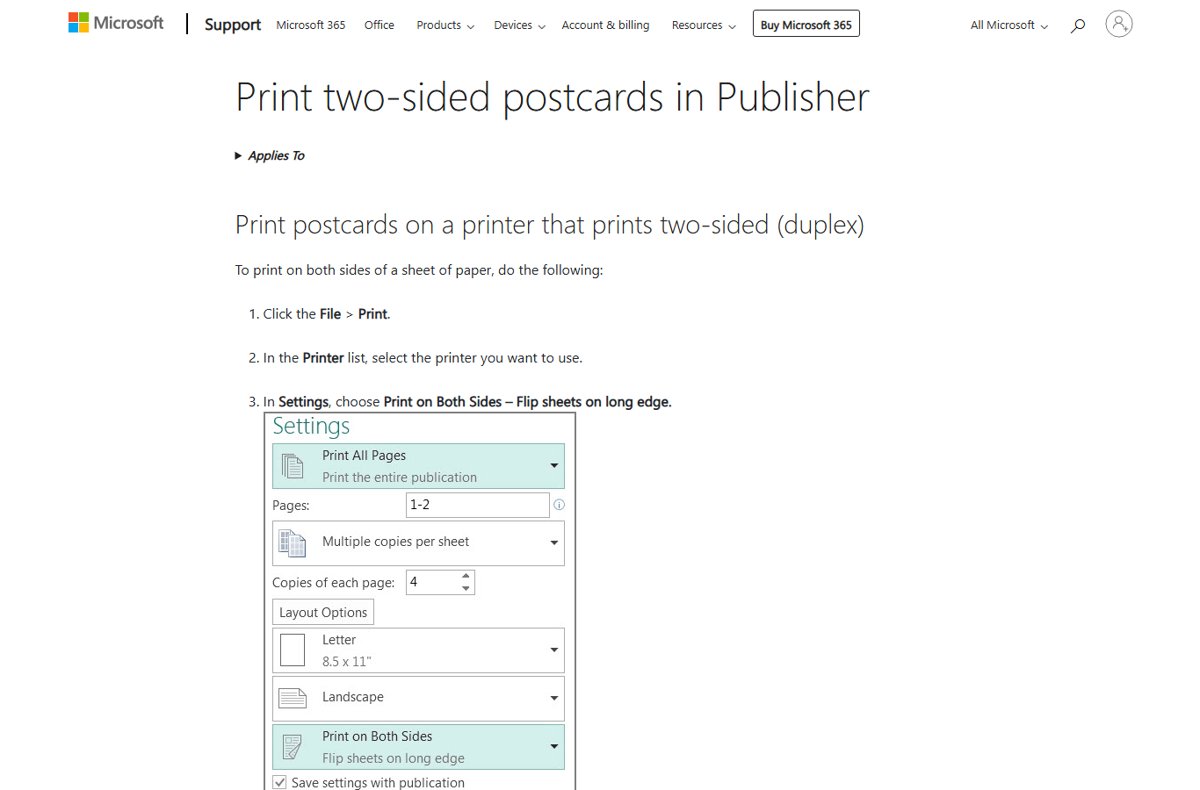
Word shows its two-sided options in the Settings list of the print screen. The same list tells you whether the selected printer supports automatic duplex printing.
- Select the File tab, then select Print.
- Choose your printer in the Printer list.
- Under Settings, open Print One Sided.
- Select the Print on Both Sides option for the edge you need: long edge for portrait, short edge for landscape.
- If only Manually Print on Both Sides is offered, select it and turn the stack over when Word prompts you.
- Select Print.
Publisher uses the same File > Print screen. Under Settings, it lists Print on Both Sides – Flip sheets on long edge and Print on Both Sides – Flip sheets on short edge.
Set the flip edge in Windows printing preferences
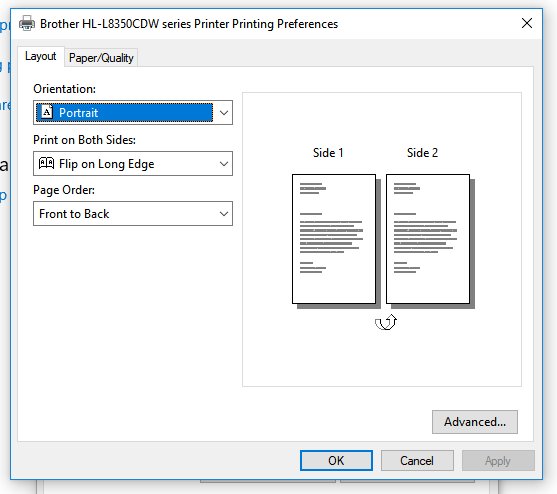
Setting the edge in the driver makes it the default for every app that uses that printer. The option name and tab depend on the printer maker's driver.
- On Windows 11, select Start > Settings > Bluetooth & devices > Printers & scanners.
- Select your printer, then select Printing preferences.
- Find the two-sided or duplex option on the driver's tabs.
- Choose the long-edge or short-edge setting that matches your usual page orientation.
- Select OK to save it as the default.
Choose long edge or short edge on a Mac
macOS does not use the words long edge in its print dialog. On gives standard side binding and On (Short Edge) gives top binding.
- Open the document and choose File > Print.
- Choose your printer.
- Open the Double-sided pop-up menu.
- Choose On for book-style portrait pages, or On (Short Edge) for top-bound pages.
- Click Print.
Set the default duplex edge with PowerShell
Set-PrintConfiguration changes a printer's default duplexing mode for everyone who uses it. Run it in PowerShell opened as administrator.
Set-PrintConfiguration -PrinterName "Printer name" -DuplexingMode TwoSidedLongEdge-DuplexingMode accepts OneSided, TwoSidedLongEdge or TwoSidedShortEdge. Replace Printer name with the exact name shown in Printers & scanners; wildcards are not accepted.
You should see: Get-PrintConfiguration -PrinterName "Printer name" shows the new value in its duplexing mode column.
How to check the flip edge before printing the whole job
A single test sheet settles the question faster than reading the driver's icons.
- Print only pages 1 and 2 of the document with your chosen setting.
- Hold the sheet the way the finished document will be read: sideways for a book, upward for a pad or calendar.
- Turn it over the binding edge and check that page 2 reads upright.
- If page 2 is upside down, switch to the other edge and print the full job.
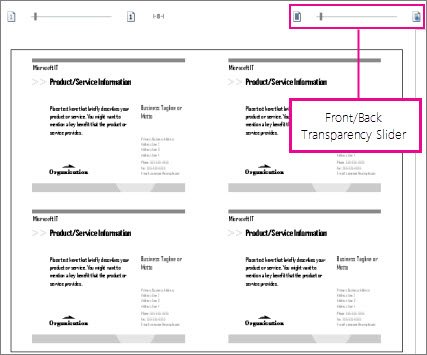
- In Publisher, drag the Front/Back Transparency slider in the preview pane to confirm both sides are right side up before printing.
Common Printing Mistakes and How to Fix Them
Back page prints upside down
The flip edge does not match how the sheet is turned for reading.
- Check the page orientation in the app's print screen.
- For portrait, select the long-edge option; for landscape, select the short-edge option.
- Print a one-sheet test and turn it over the binding edge before printing the rest.
Landscape pages rotate the wrong way
Long edge was chosen for a landscape job, which binds the sheet at the top.
- Open the print screen again.
- Change the two-sided option to the short-edge version.
- Print pages 1 and 2 and confirm they turn sideways like a book.
Mixed portrait and landscape pages behave inconsistently
Word applies one binding setting to every page in the job, so it does not change when the orientation changes.
- Print the portrait pages as one two-sided job with long edge selected.
- Print the landscape pages as a separate two-sided job with short edge selected.
- Collate the two stacks by hand.
Print on Both Sides is missing
The selected printer, or its driver setup, does not offer automatic duplex printing.
- Check another installed printer; one printer can support duplex while another does not.
- In Word, select Manually Print on Both Sides and turn the stack over when prompted.
- Or print with Only Print Odd Pages, turn the stack over, then print with Only Print Even Pages.
Manual duplex puts the second side upside down or on the wrong face
The stack was reloaded in the wrong direction for that printer.
- Run a one-sheet test, as Microsoft recommends, to learn how your printer wants pages reloaded.
- Mark the top edge of the test sheet with a pencil before reloading it.
- Reload the full stack the same way the test sheet printed correctly.
Frequently Asked Questions
What is flip on long edge?
Flip on long edge is a two-sided printing setting that binds the sheet along its longer side. On a portrait page the back prints so it reads upright when you turn the sheet sideways, like a book. It is the usual choice for reports, letters and manuals.
What does flip on long edge mean in simple terms?
It means the sheet turns over its long side. For a normal portrait document, you read page 1, turn the sheet like a book page, and page 2 is the right way up. Windows calls this mode TwoSidedLongEdge.
What does flip on short edge mean in simple terms?
It means the sheet turns over its short side. On a portrait page you flip the sheet upward, like a notepad or clipboard, and the back reads upright. On a landscape page it produces book-style side turning instead.
Should I use flip on long edge or short edge for a normal portrait document?
Use flip on long edge. It puts the binding on the left so pages turn like a book. Short edge on a portrait document leaves every back side upside down unless the pages will be bound at the top.
Which duplex setting should I use for landscape pages?
Use flip on short edge for landscape pages that are read side to side, such as slide handouts and Word book-fold booklets. Use long edge only when the landscape pages will be bound at the top, like a wall calendar.
Why are the back pages printing upside down?
The flip edge does not match the page orientation. Switch portrait jobs to long edge and landscape jobs to short edge. If the file mixes both orientations, print them as separate jobs, because one binding setting covers the whole print job.
Is flip on short edge vs long edge the same on a Mac?
Yes, only the labels differ. In the macOS print dialog, the Double-sided menu's On option gives standard side binding, and On (Short Edge) binds at the top of the page.
Bottom Line
Choose flip on long edge for portrait documents and flip on short edge for landscape documents, unless the pages will be bound at the top. Both settings produce book-style side turning in their matching orientation, and a single two-page test sheet confirms the choice before you spend a full stack of paper.