To play the Bing homepage quiz and win Microsoft Rewards points, sign in to rewards.bing.com with your Microsoft account, open the day's quiz card, and answer every question until the card shows a green checkmark.
This guide covers the desktop and mobile routes, how Rewards points and levels work, what "winning" actually means, and what to do when the quiz is missing or the points never arrive.
The fastest way to play today's Bing homepage quiz
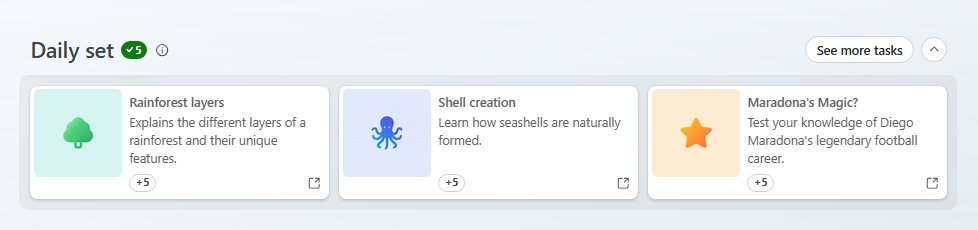
The Rewards dashboard is the one place that always lists the day's quizzes next to their point value. Microsoft describes these as quizzes and trivia games that are updated daily.
- Open rewards.bing.com in any browser.
- Select Sign in and use the Microsoft account you want the points on.
- Find the quiz card in the Daily set or in the earn activities below it.
- Select the card and answer every question until the quiz ends.
- Return to the dashboard and confirm the card now shows a green checkmark.
The point value printed on the card is the value for that day. Microsoft does not publish a fixed amount per quiz, so read it there rather than trusting a number from another site.
What Is the Bing Homepage Quiz?
The Bing homepage quiz is a short trivia activity tied to Bing and Microsoft Rewards. It is one of the daily activities Rewards members complete for points, alongside searches and other cards.
| Question | Answer |
|---|---|
| What is it? | A daily trivia quiz offered on Bing and surfaced as an activity card in Microsoft Rewards |
| Who runs it? | Microsoft, as part of the free Microsoft Rewards loyalty program |
| What does it cost? | Nothing. Rewards is free and needs only a Microsoft account |
| How often does it change? | Daily. Microsoft says quizzes and trivia games on the earn page are updated daily |
| What do you get? | Rewards points, shown on the card, plus progress toward a daily set streak |
| Where are points spent? | On the Rewards Redeem page: gift cards, sweepstakes entries and charity donations |
What You Need Before You Start
| Requirement | Detail | Why it matters |
|---|---|---|
| 1. A Microsoft account | A free personal account; former Bing Rewards members were moved to Microsoft Rewards automatically | Rewards is attached to the account; quizzes played while signed out earn nothing |
| 2. Microsoft Rewards availability in your region | Rewards runs in the countries on Microsoft's regions list, including the US, UK, Canada, India and Australia | Offers and redemption catalogs differ by region, and some regions do not earn search points |
| 3. Bing as your search engine | Search on bing.com or set Bing as the default in your browser | Searches earn their own points, and Bing as default for 14 days counts toward Gold |
| 4. A supported browser or app | Any current desktop or mobile browser; the Bing app and Microsoft Edge also earn on mobile | The quiz runs in the browser, and the dashboard works on both desktop and phone |
| Age 13+ or parental consent | Under-13s (or the child age in your country) need a parent or guardian to consent when the account is created | Required for the Microsoft account itself |
| A mobile or landline number (for redeeming) | VoIP numbers are refused; one number can serve at most six accounts | Microsoft verifies your phone before it releases a reward |
The Microsoft Services Agreement allows one Rewards account per person, even if you own several email addresses, and six per household.
How to Play the Bing Homepage Quiz on Desktop
On a PC or Mac, the quiz opens in a normal browser tab. Stay signed in to the same Microsoft account on both bing.com and rewards.bing.com.
- Go to bing.com and select Sign in at the top-right.
- Sign in with the Microsoft account linked to your Rewards membership.
- Open the Microsoft Rewards flyout at the top of the Bing page, or go straight to rewards.bing.com.
- Select the homepage quiz card to start it.
- Read each question and choose your answer.
- Keep going until the final question is answered.
- Close the quiz and reload rewards.bing.com to see the card marked complete.
Finish the whole quiz in one sitting. Microsoft lists an unfinished daily set as the first reason a streak resets.
How to Play the Bing Homepage Quiz on Mobile
The same dashboard opens in a phone browser. Microsoft also lists the Bing app and the Microsoft Edge app as ways to earn Rewards points on mobile.
- Option 1: open rewards.bing.com in your phone's browser and sign in.
- Scroll down to the Daily set section.
- Tap the quiz card and answer each question to the end.
- Option 2: install the Bing app from the App Store or Google Play and sign in with the same Microsoft account.
- Search in the Bing app while signed in to earn search points, then return to rewards.bing.com for the quiz card.
- Check in to the Bing app daily; seven days in a row counts as a Gold level-up activity.
Daily search points are capped per day whether you search on PC or mobile, so switching devices does not raise the search limit.
How to Find the Quiz Through Microsoft Rewards
The dashboard groups activities into the Daily set and further earn activities. Completing the daily set every day is what builds a streak.
- Sign in at rewards.bing.com.
- Check your level at the top-left of the page.
- Look at the Daily set row for today's quiz card and its point value.
- Scroll further for extra quizzes and trivia games listed as more activities.
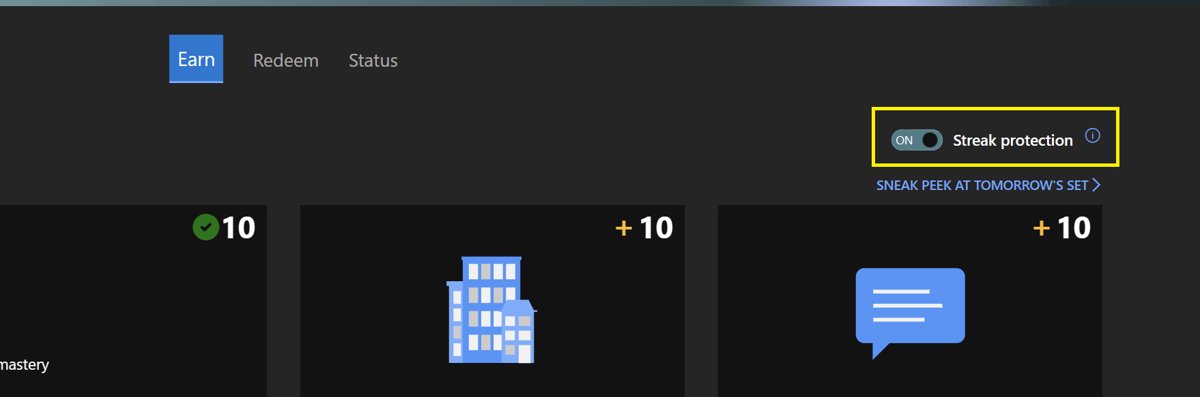
- Turn on the Streak protection toggle if you expect to miss a day; on mobile it sits next to Daily set.
- Select the Streak protection title in the information bar to see how many of your 14 yearly protection days remain.
Streak protection days cannot be earned. Every member gets 14 per calendar year, and they reset at the start of the new year.
How Microsoft Rewards Points Work
Quiz points go into the same balance as search, Xbox and Microsoft Store points. Your monthly total decides your level, and the level raises your daily search cap and monthly bonuses.
| Feature | Member | Silver | Gold |
|---|---|---|---|
| How to reach it | Join for free | Earn more than 500 points in a calendar month | Earn more than 750 points and complete 2 level-up activities |
| Bing searches that earn points per day | 5 (15 points) | 10 (30 points) | 20 (60 points) |
| Points per qualifying search | 3 | 3 | 3 |
| Default Search Bonus (monthly) | 30 | 90 | 210 |
| Bing Star bonus (monthly, up to) | 300 | 900 | 2,100 |
| Level bonus (monthly) | 60 | 180 | 420 |
| Redemption coupon (monthly) | None | 100 points | 200 points |
These are the figures on rewards.bing.com for the US. Some Microsoft support pages still describe an older Level 1 and Level 2 system, and earning rules vary by market, so trust the level shown on your own dashboard.
Microsoft says about 5,000 points usually redeems something worth $5. Points expire if your account has no earning activity for 12 months, and no more than 550,000 points can be redeemed per calendar year.
How to “Win” the Bing Homepage Quiz
There is no leaderboard or cash prize for the quiz itself. You "win" by getting it credited, keeping your daily set streak alive, and turning the points into a reward.
| What counts as a win | How to get it | Official detail |
|---|---|---|
| Quiz points credited | Finish every question while signed in | The value is shown on the quiz card |
| Daily set completed | Finish every card in the Daily set, including the quiz | The completed set shows a green checkmark |
| A Gold level-up activity | Complete the daily set 7 days in a row | Counts as one of the 2 activities Gold needs |
| A redeemed reward | Spend points on the Redeem page | Gift cards, sweepstakes entries and donations |
| A sweepstakes prize | Enter a Rewards sweepstakes with points | Winners are listed at rewards.bing.com/redeem/winners |
For accuracy, read each question slowly and watch for wording such as "not" or "which of these". If you are unsure, search the question on Bing in another tab; a signed-in search also counts toward your daily search points.
Can You Get Bing Homepage Quiz Answers in Advance?
No. Microsoft does not publish the questions or answers ahead of time, and third-party "answer" sites are unofficial guesses you cannot check against the live quiz. Quizzes change daily and vary by market. The Microsoft Services Agreement also bans bots, macros and other automated or fraudulent means of earning, and a violation can cancel the account and forfeit every point. Answer the questions yourself and look up anything you are unsure of on Bing.
Troubleshooting: Why the Quiz Is Not Showing
No quiz card on the dashboard
Earning activities vary by market, and not every activity runs in every region.
- Check that your country is on Microsoft's Microsoft Rewards regions list.
- Reload rewards.bing.com and scroll past the Daily set to the other activities.
- Come back the next day; quizzes and trivia games are refreshed daily.
The quiz appears on one device but not another
The two devices are signed in to different Microsoft accounts, or browser data is not syncing.
- Select your profile at the top-right of bing.com and note the account email.
- Sign out and back in with the account that holds your Rewards points.
- Reload the dashboard on both devices.
The quiz or daily set looks wrong while using a VPN
Rewards is tied to your market and your device's time zone; a VPN or a different time zone confuses both.
- Disconnect the VPN or proxy.
- Set the device clock to your real time zone.
- Reload rewards.bing.com.
What to Do If Points Do Not Credit
Quiz finished but the balance did not change
Give Mode is on, which Microsoft lists as the first reason a balance stops updating.
- Open rewards.bing.com and check whether Give Mode is switched on (see Microsoft's Give with Bing FAQ).
- Turn Give Mode off if you want to keep future points.
- Play the next activity with Give Mode off to credit your own balance.
Points went to the wrong account
The quiz was played while signed in to a different Microsoft account.
- Check the account shown at the top-right of bing.com.
- Sign in with your Rewards account before starting tomorrow's quiz.
Streak reset back to zero
The daily set was not finished on time, or a VPN or other time zone hid the completion.
- Finish every card in the Daily set, not only the quiz.
- Keep the device on your local time zone and switch off any VPN.
- Turn on Streak protection before days you know you will miss.
Search points stopped counting partway through the day
The daily search counter is maxed for your level, or searches look automated.
- Check your level's search cap in the points table above.
- Search by hand only; bot or macro queries are not credited.
- Contact Microsoft Rewards Support through the form on support.microsoft.com if points are still missing.
Tips to Maximize Microsoft Rewards Points
| Tip | What it earns | Condition |
|---|---|---|
| Finish the full daily set, not just the quiz | Card points plus a streak | Seven days in a row is a Gold level-up activity |
| Run your daily Bing searches | 3 points per qualifying search | Capped at 5, 10 or 20 searches a day by level |
| Set Bing as your default search engine | Default Search Bonus of 30 to 210 points a month | Search with it on at least 14 days in the month |
| Check in to the Bing app | A level-up activity | Seven days in a row |
| Claim monthly bonuses | Default Search, Bing Star and Level bonuses | Claim from Ready to claim on rewards.bing.com within 30 days |
| Earn 500+ points each month | Silver status and a 100-point coupon | Resets every calendar month |
| Earn 750+ points plus 2 level-up activities | Gold status and a 200-point coupon | Resets every calendar month |
Microsoft Edge is also listed as a way to earn on desktop and mobile; Techdows has covered how Microsoft promotes Edge on Bing.
Example: A Simple Daily Playthrough
This routine takes a few minutes and covers the quiz, the streak and the search points in one pass.
- Open rewards.bing.com and confirm you are signed in to the right account.
- Play the homepage quiz card in the Daily set to the last question.
- Complete the remaining Daily set cards until the green checkmark appears.
- Search anything you were unsure of in the quiz on Bing to count toward the day's search points.
- Open Ready to claim if it shows points, and claim them.
- Check your level at the top-left to see how far you are from Silver or Gold.
How to check the quiz points were credited
- Reload rewards.bing.com after finishing the quiz.
- Confirm the quiz card and the Daily set show a green checkmark.
- Compare your points balance with the figure before you played.
- Open the points breakdown page to see today's earned points by activity.
- Check the streak counter has gone up by one day.
If the card is ticked but the balance is unchanged, see the Give Mode fix above.
Best Strategy: Think Small, Earn Steadily
Play the quiz as part of the full daily set every day, add your capped Bing searches, and aim for Silver or Gold each month. One quiz is worth a small, unpublished number of points, but daily set streaks, level bonuses and monthly coupons compound. With about 5,000 points needed for a $5 reward, consistency matters far more than any single quiz score.
Fans of the images behind Bing's homepage can also grab past wallpapers, such as the Best of Bing 2018 theme for Windows 10.
Common Questions About the Bing Homepage Quiz
What is the Bing homepage quiz?
The Bing homepage quiz is a short daily trivia quiz from Microsoft that Rewards members can play for points. It appears as an activity card on the Microsoft Rewards dashboard at rewards.bing.com and changes every day.
How do I play the Bing homepage quiz?
Sign in at rewards.bing.com with your Microsoft account, select the quiz card in the Daily set, and answer every question until the quiz ends. The card then shows a green checkmark and the points are added to your balance.
How does Bing's homepage quiz work?
Each quiz is a short set of trivia questions refreshed daily. When you finish it while signed in to Microsoft Rewards, the points shown on the card are added to your balance and the activity counts toward your daily set streak.
Can I play the Bing homepage quiz every day?
Yes. Microsoft says quizzes and trivia games on the Rewards earn page are updated daily. Completing the daily set seven days in a row also counts as one of the two level-up activities needed for Gold status.
How do I play the Bing homepage quiz and win?
Finish every question while signed in, complete the rest of the Daily set, and redeem the points on the Rewards Redeem page. There is no separate prize for the quiz; the win is the credited points and the rewards they buy.
How can I play the Bing homepage quiz easily?
Bookmark rewards.bing.com and stay signed in, so the quiz card is one click away each day. Keep a Bing tab open to look up questions you are unsure of, since those searches also earn search points.
Are there Bing homepage quiz answers?
Microsoft does not publish answers in advance. Third-party answer sites are unofficial, and using bots or automated tools breaks the Microsoft Services Agreement, which can cancel the account and forfeit its points.
Is the Bing homepage quiz free to play?
Yes. Microsoft Rewards is free and needs only a Microsoft account. The quiz runs in your browser, so nothing needs to be bought or installed to play it.
Why should you play the Bing homepage quiz daily?
Daily play keeps your streak alive, adds points toward Silver (500+ a month) or Gold (750+ plus two level-up activities), and those levels raise your search cap and monthly bonuses.
How many points is the Bing homepage quiz worth?
Microsoft does not publish a fixed value for the quiz. The number of points on offer is printed on the quiz card on your Rewards dashboard, and it can differ by day and by market.

![5 Methods to Open Old Sound Settings in Windows 11 [2024]](https://techdows.com/wp-content/uploads/2026/09/Sound-dialog-with-the-Playback-tab-open-and-Properties-button-highlighted-500x338.jpg)