After the recent Edge 97 Android release, Microsoft is testing a bunch of new features. For instance, Microsoft Edge for Android may get News Notifications, an option to show desktop site by default, Read aloud in the background, a New tab page optimized for news, and more.
News Notifications:
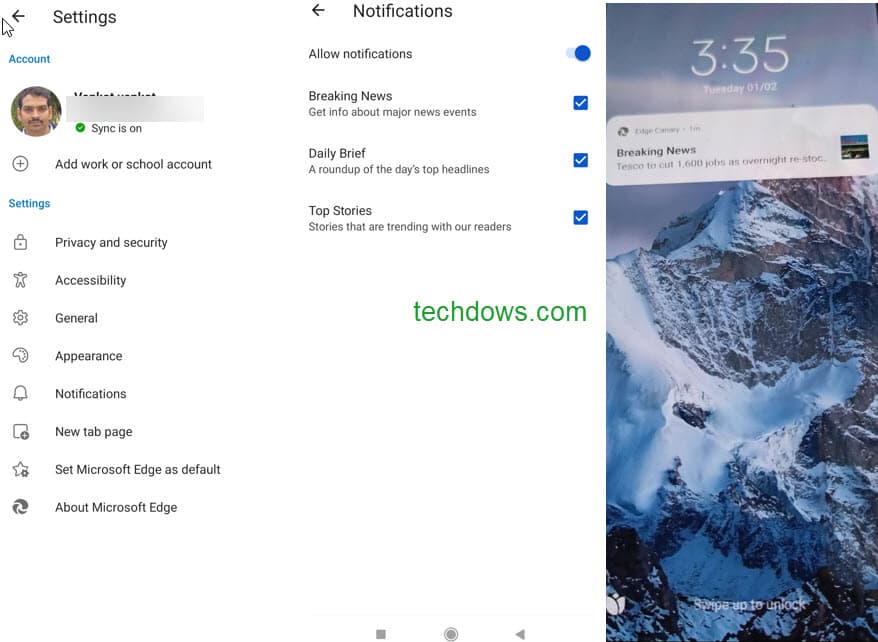
Microsoft Edge can now push notifications on news powered by Bing to your mobile.
You’ll get notifications on breaking news, top headlines, and trending stories.
Here is how you can enable the feature

How to enable news Notifications in Microsoft Edge on Android
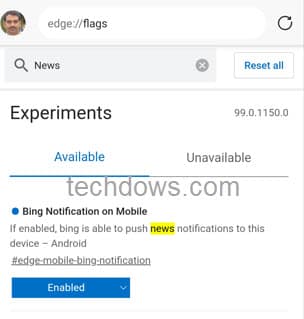
- Visit edge://flags
- Search for Notifications,
- for Bing Notification on Mobile, in the dropdown, select “Enabled” and restart the browser.
- Tap on the three-dot icon, select Settings, and turn on Notifications
You can configure the type of news you receive from Edge via notifications here.
After Chrome, Edge on Android lets you set the app to display the dekstop site by default. The setting is available out of the box in the Canary version.
Edge gets the ability to Show desktop sites by default
After Chrome, Edge on Android lets you set the app to display the dekstop site by default. The setting is available out of the box in the Canary version.
- Tap on the menu icon, select Settings > General
- In Site Display Settings, select “show the desktop site as default”.
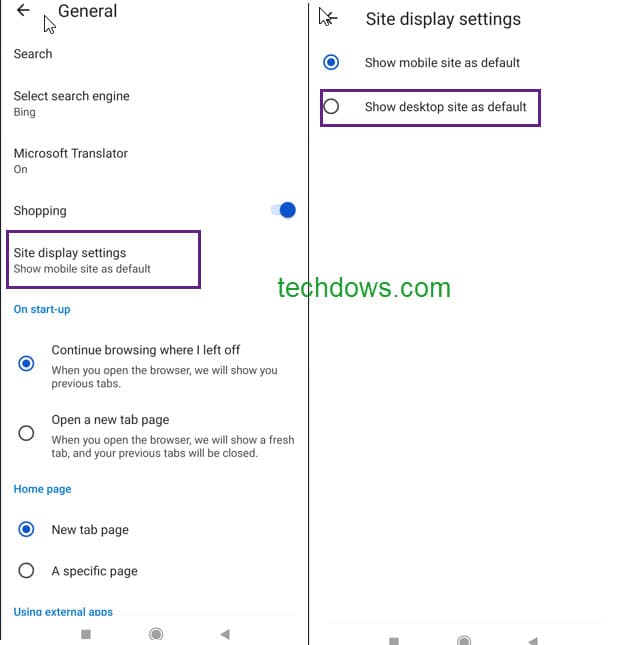
From now on, Edge renders and shows mobile verison of websites by default, you can restore default mobile view or use the mobile site option in the menu for that one time.
Play Read aloud in the background:
Read aloud to support background play in Edge on Android. Right now, you can enable this feature in Canary.
- Visit edge://flags
- Search for “read”, in the dropdown for “Read aloud background play“
- Select Enabled and restart the browser.
Open a website, click on the read-aloud icon in the address bar, and play it.

From then, Edge continues to read the article in the background even when you minimize or switch to another App.
Microsoft is working on a lot of new ways to optimize the new tab page to show news content. You can see a few experiments about the same on the flags page.
Other than these, as we reported, the company has plans to waste your time more by integrating the Surf game on Edge’s new tab page. You can find more details about this here.
More about Edge for Android:
Microsoft Edge on Android can now Scan for Leaked Passwords
Microsoft Edge 93 is now available for Android
Microsoft Edge beta for Android hits Play Store w/ Coupons & Ad blocker features
Microsoft Edge on Android gets Screenshot feature, Here’s how to use it


