Microsoft Edge is all set to get the Extensions toolbar menu from Chromium that already exists in Chrome for some time now. In fact, Microsoft itself confirmed in Edge roadmap that Edge 89 is getting the feature to manage extensions from the toolbar.
What you need to know about the extensions button in Edge browser:
- The puzzle piece icon on the toolbar lists all installed extensions
- Lets you check permissions each extension have on sites
- You can pin individual extensions to the toolbar
- Extensions button menu contains options to visit edge://extensions page and install new extensions by visiting Edge Add-ons Store
- The space occupied by extension icons on the toolbar can be saved with the toolbar button
- Both the toolbar and Edge menu no longer display extensions, the extensions button does going forward from version 89.

At the time of writing, the feature showed up for some in Edge Canary, dev, and beta channels via controlled rollouts.

Regardless of the CFR, you can enable the extensions toolbar button in Edge insider channels, here is how.

Enable or disable Extensions Toolbar button in Edge browser
1. Ensure Edge is not open, close it if running, right-click on Edge shortcut on the desktop
2. In the Target field add the following command line flag
--enable-features=msExtensionsHub
Edge shortcut field in Target should be like below after the addition
Edge Canary:
C:UsersusernameAppDataLocalMicrosoftEdge SxSApplicationmsedge.exe" --enable-features=msExtensionsHub
Edge Dev:
"C:Program Files (x86)MicrosoftEdge DevApplicationmsedge.exe" --enable-features=msExtensionsHub
Edge beta:
"C:Program Files (x86)MicrosoftEdge BetaApplicationmsedge.exe" --enable-features=msExtensionsHub
3. Open Edge browser
4. Visit Settings > Appearance and enable the “extensions button“, turn it off to disable.
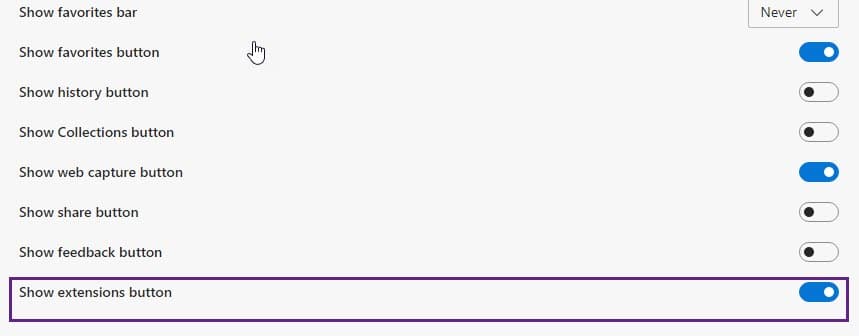
5. Click on the puzzle piece icon to view the extensions.
Till now Top of Edge menu and toolbar served as home for extensions, this will change with the next Edge update that’s coming in March 2021.
Whats’ your take on the Edge Extensions button? Have you liked it? Let us know in the comments below.
Related articles:
Microsoft Edge adds mini Context menu for PDFs
Enable or disable Edge’s new Downloads Menu
Voice typing comes to Microsoft Edge
Microsoft tests News Widget in Microsoft Edge browser






Turn Off the Lights extension dev releases Dark theme for Microsoft Edge - Techdows
[…] Microsoft Edge 89 lets you control extensions from Toolbar […]
Turn Off the Lights extension dev releases Dark theme for Microsoft Edge - Techdows
[…] Microsoft Edge 89 lets you control extensions from Toolbar […]