Microsoft is finally offering the most requested options –Open, Save As, Save and Cancel” -for a file download in Edge Canary and Dev version behind a setting, you need to enable that setting right now to see them.
After launching the new Microsoft Edge, Microsoft received feedback from users they want Edge Legacy’s feature that shows options at the bottom to open, save as, Save or Cancel a download.
The company tested the feature via controlled rollout on a few users and now made it available to all running Edge build higher than 87.0.629.0.
Compared to Chromium’s generic download dialog, the new options give greater control over the file that is being downloaded:
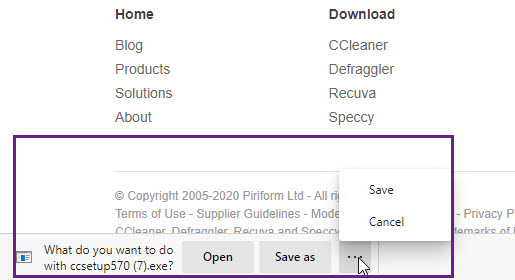
Open: Opens the file after downloading it to a temporary folder. This folder will be cleared automatically when you launch a new browser session for Edge.
Save as: Lets you rename and choose where the file is saved.
Save: Saves the file to the default downloads folder, i.e C:Users[username]Downloads.
Cancel: Cancel the download.
Enable new Download UI in Chromium Edge
- Launch new Microsoft Edge browser
- Click on ellipsis icon > Settings > Downloads
- Enable “Ask me what to do with each download”.
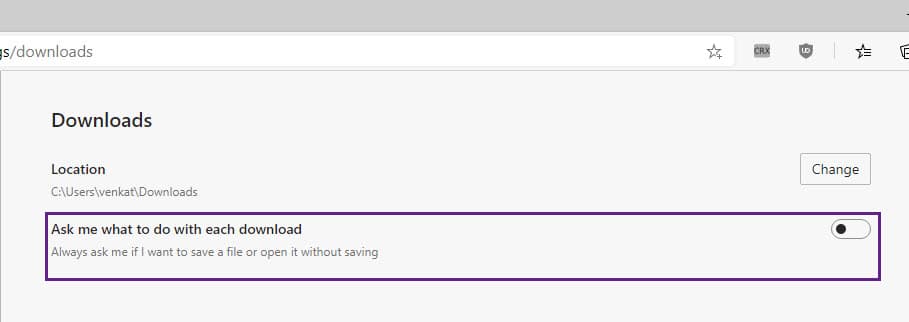
Ask me what to do with each download setting
From now on, whenever you download a file, Edge asks whether you want to open the file without saving or save the file.
In addition to this, Edge now allows you to delete downloads directly from the browser downloads page itself so that you can keep your downloads folder clean.
For this, visit edge://downloads/all and right-click on a download item (or click on … icon for the file in the download shelf), and select “Delete file”.
What’s your take on new options made available for download in the new Edge browser? Let us know in the comments below.
Related articles:
Microsoft Edge 86 Dev update brings a new alert for compromised passwords
Microsoft Edge to offer an option to disable PWAs Colorful Title bars
Microsoft Edge now allows using Digital Pen to highlight text in PDFs
Microsoft Edge’s ‘Link format’ to make it easier Paste URLs





