When iCloud.com shows a Connection Error in every browser on Windows 11 but only on certain Xfinity Wi-Fi networks, test another connection first, then have Xfinity or the network's owner check what that network is blocking.
This guide covers how to prove the network is the cause, how to check Xfinity CyberSecure, which Windows 11 settings to reset, and what to tell whoever runs the network.
How to fix iCloud.com Connection Error on Xfinity Wi-Fi
Apple's advice for iCloud.com access problems is direct: if the site works from a different location or internet connection, contact your ISP or network administrator, because some networks block certain services.
- Check the Apple System Status page for an iCloud problem. If a service is down, try again later.
- Connect the PC to a phone hotspot or another non-Xfinity network, then open
icloud.comand sign in. - If it works there, reconnect to Xfinity Wi-Fi and enter
icloud.comin the Xfinity CyberSecure Website Checker. - Open Settings > Network & internet > Proxy and turn off any manual proxy you don't need.
- Turn off any VPN you have connected, then try
icloud.comagain. - Run
ipconfig /flushdnsin an administrator Command Prompt, then reload the page. - Contact Xfinity or the building's network manager with your test results if the error stays.
Apple's iCloud troubleshooting doesn't name this exact error with Xfinity, so treat the steps as a process of elimination. Leave your Apple Account password alone at this stage, since a working login on another network already proves it.
iCloud.com works on one Xfinity network but not another: what it means
| Your test result | What it points to | What to do |
|---|---|---|
| Fails on every network, including a phone hotspot | The PC, the browser or an Apple outage | Check Apple System Status, then reset the Windows 11 network settings |
| Works on a phone hotspot, fails on all Xfinity networks in one building | Something shared by that building's network or service | Ask the property or network manager, then Xfinity |
| Works at another Xfinity location, fails at this one | This location's gateway or settings, not Xfinity as a whole | Have the gateway's account holder check CyberSecure and firewall settings |
| Fails only on your home Xfinity gateway | CyberSecure, the gateway firewall or DNS | Check the Website Checker and the gateway firewall level |
Fails only on xfinitywifi |
The hotspot sign-in page hasn't been completed | Open a browser and finish the Xfinity WiFi sign-in |
| Works in a phone browser on the same Wi-Fi, fails on the PC | A Windows 11 setting, VPN or proxy on the PC | Check proxy and VPN, flush DNS, then run a network reset |
How to test iCloud.com on another connection in Windows 11
This one test decides everything that follows, so do it before you change any settings.
- Turn on the mobile hotspot on your phone.
- On the PC, open Settings > Network & internet > Wi-Fi, then connect the computer to that Wi-Fi network.
- Open
icloud.comin the same browser that showed the error. - Sign in with your Apple Account.
- Write down the result, and reconnect to Xfinity Wi-Fi to repeat the test.
- Repeat on a phone browser using the same Xfinity network, with cellular data off.
Is Xfinity blocking iCloud.com? How to check Xfinity CyberSecure
Xfinity CyberSecure, the new name for Advanced Security, blocks risky websites and phishing attempts at the gateway. It runs on eligible leased Xfinity Gateways, not on a customer's own modem or a gateway in Bridge Mode. Only someone with access to that account can open its dashboard.
- Go to the Website Checker and enter
icloud.com. - In the Xfinity app, open the Home or Overview tab, then select CyberSecure to see risks from the past seven days.
- If CyberSecure blocked the site, select Allow Access to reach it for up to one hour.
- To report a mistaken block, go to
spa.xfinity.comand select Report an issue at the bottom of the page. - Choose I can't reach a website that I want to go to, then click Continue.
- Enter the full URL and your email address, click Review, then click Submit.
Xfinity typically replies within three business days. Leave CyberSecure on while you wait, since Xfinity's own guidance is against turning it off.
Xfinity gateway firewall settings that block iCloud.com
The gateway's firewall level changes what the network allows. Maximum Security blocks most applications except web browsing, email, iTunes and VPN, and Minimum Security is the default. You need the gateway's admin access for this, so in a shared building the network owner has to do it.
- Log in to the Xfinity gateway Admin Tool at
http://10.0.0.1. - Click Gateway on the homepage.
- Click Firewall, then select IPv4.
- Note the current level. Custom Security can block individual traffic types.
- Compare it with the default, Minimum Security (Low), and ask the network owner whether a higher or custom level was set on purpose.
- Have the owner allow the iCloud domains listed below, click Save Settings, then test
icloud.com.
xfinitywifi sign-in page not loading on Windows 11
Xfinity lists three hotspot names: xfinitywifi, XFINITY and Xfinity Mobile. The open xfinitywifi network needs a browser sign-in, and pages such as iCloud.com won't behave until that step is finished.
- Select the
xfinitywifinetwork in the Windows 11 Wi-Fi list. - Open a web browser and wait to be directed to the Xfinity WiFi sign-in page.
- Sign in with your Xfinity ID, or buy a pass if you aren't a customer.
- Open
icloud.comonce the sign-in page confirms the connection. - If you have a private home network available, select it instead, since the hotspot is a completely separate network.
Browsers supported by iCloud.com on Windows 11
An error in every browser rarely comes down to one browser, but an outdated one can still fail. Apple lists these minimum versions for a PC, and Safari isn't an option on Windows.
| Browser on a PC | Minimum version | What to do |
|---|---|---|
| Microsoft Edge | 130 | Update Edge, then retry icloud.com |
| Google Chrome | 130, desktop mode only | Update Chrome, then click More > Delete browsing data and clear Cookies and other site data |
| Firefox | 128 | Update Firefox, then retry icloud.com |
Windows 11 proxy and VPN settings that break iCloud.com
Apple says its services fail on any connection that uses HTTPS interception, which some proxies perform. It also tells you to turn off a configured VPN when you test iCloud Mail access.
- Open Settings > Network & internet > Proxy.
- Next to Use a proxy server, select Set up, and turn it off if your organization doesn't require it.
- Select Save.
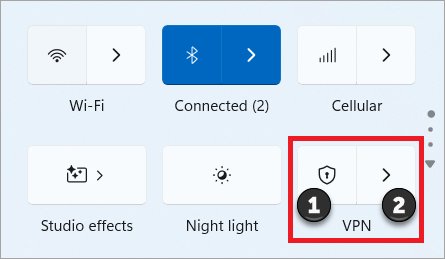
- Select the Network, Volume, Battery icon on the taskbar.
- Toggle the left side of the VPN quick setting to turn it off, or disconnect in your VPN app.
- Reload
icloud.com.
Flush DNS for iCloud.com in Windows 11 Command Prompt
Search for Command Prompt, then select Run as administrator and Yes. Run the commands one at a time, in this order.
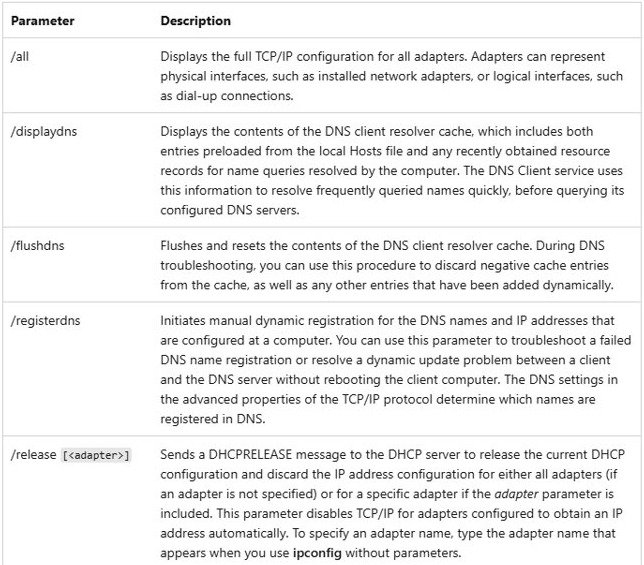
ipconfig /release
ipconfig /renew
ipconfig /flushdns
/release and /renew request a fresh IP address, and /flushdns flushes and resets the DNS client resolver cache. Your connection drops briefly between the first two commands.
You should see: A confirmation that the DNS cache was flushed, with no error after /renew. Then reload icloud.com in your browser.
How to change DNS on Windows 11 to test iCloud.com
If iCloud.com fails on Xfinity's default DNS and loads with another one, you have a precise finding to hand to Xfinity. You can change DNS settings on Windows for this test and put them back afterward. A managed building network can override or block this.
- Open Control Panel and go to Network and Internet > Network and Sharing Center > Change adapter settings.
- Right-click your Wi-Fi connection and choose Properties.
- Select Internet Protocol Version 4 (TCP/IPv4), then click Properties.
- Write down any DNS addresses already listed.
- Select Use the following DNS server addresses.
- Enter
8.8.8.8and8.8.4.4, the Google Public DNS addresses, then click OK. - Test
icloud.com. - Select the option to obtain DNS server addresses automatically to go back to Xfinity's servers.
Network reset in Windows 11 for iCloud.com connection errors
Use this only when iCloud.com fails on every network, because a reset removes and reinstalls your network adapters. You may need to reinstall VPN client software afterward.
- Select Start, type settings, and open Settings.
- Go to Network & internet > Advanced network settings > Network reset.
- Select Reset now, then Yes.
- Let the PC restart.
- Reconnect to Wi-Fi and enter the password again.
- Open
icloud.com.
How to restart an Xfinity gateway
This applies only to a gateway you or your household controls. A home network is unavailable during the restart, which can take up to 12 minutes through the app.
- Open the Xfinity app and sign in with your Xfinity ID and password.
- Tap the WiFi icon, then choose Troubleshoot.
- Select the restart option for your gateway.
- If the app restart doesn't work, disconnect the gateway's power cord.
- Wait one minute, then reconnect the power cord.
- Check the Xfinity outage map if the connection doesn't return.
iCloud domains and ports a network must allow
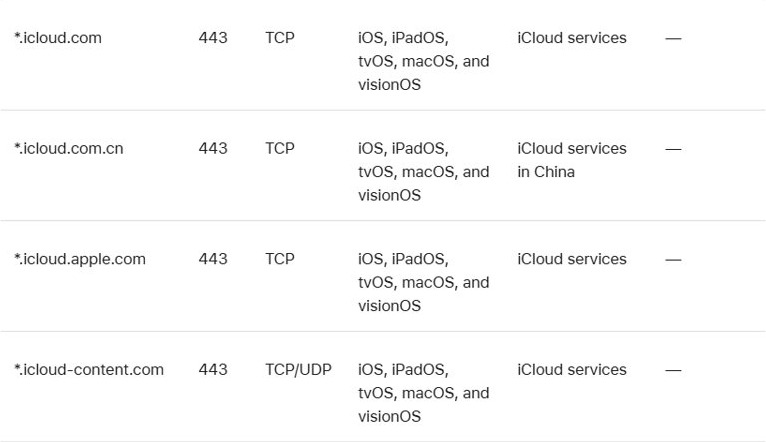
Give this table to the building's network manager or an Xfinity agent. It comes from Apple's guidance for enterprise networks, which also applies to any network that filters traffic.
| Item | What Apple requires |
|---|---|
| Main port | TCP 443 (HTTPS) for most Apple services |
| Apple domains | Outbound access to *.apple.com |
| iCloud domains | *.icloud.com, *.icloud.apple.com, *.apple-cloudkit.com, *.cdn-apple.com, *.icloud-content.com and *.apple-dns.net |
| IP-only firewalls | Allow 17.0.0.0/8 for IPv4, plus the IPv6 ranges 2403:300::/32, 2620:149::/32 and 2a01:b740::/32 |
| HTTPS interception | Turn it off for these hosts, because Apple services fail any connection that uses it |
| DNS | Don't block DNS lookups for Apple's CNAME chains, since those records can change |
How to tell if iCloud.com is loading on Xfinity again
- Close every browser window and open a new one.
- Connect the PC to the Xfinity network that showed the error.
- Go to
icloud.comand select Sign In. - Enter your Apple Account and complete the verification code prompt.
- Open Mail or Photos from the iCloud.com home page to confirm data loads as well as the sign-in page.
- Repeat in a second browser.
iCloud.com login not working on Xfinity Wi-Fi: other errors
Same Connection Error on all Xfinity networks in one building
A shared network or service sits upstream of each one, which you can't change from the PC.
- Record which networks fail and which other locations work.
- Give the property or network manager the iCloud domains and ports table.
- Open Xfinity Assistant, sign in, select Troubleshooting help, then choose Internet.
- Use a phone hotspot for iCloud.com until the network is fixed.
iCloud.com loads but keeps returning to the sign-in page
The network connection is working, and the problem has moved to the sign-in itself.
- Fix the endless iCloud login loop with the Windows 11 steps.
- Clear cookies for the browser you use.
- Try a different supported browser.
Verification fails after the password is accepted
This points to the two-factor step and not to Xfinity.
- Connect your trusted Apple device to the internet.
- Enter the six-digit code when it appears.
- Clear the iCloud verification failure if the code is refused.
Xfinity's troubleshooter finds nothing wrong
A general connection test doesn't prove one site is reachable.
- Open the Xfinity app, select WiFi, then tap Troubleshoot, and save the result.
- Tell the agent that other sites load and only
icloud.comfails. - Ask specifically whether
*.icloud.comis being blocked or intercepted on that network.
iCloud.com Connection Error FAQ
Why does iCloud.com show a Connection Error on Xfinity Wi-Fi?
Apple's troubleshooting page doesn't name this exact error, but it does say some networks block certain services, including iCloud Mail. If iCloud.com works on another connection and fails on this one, the network is the place to look, not your Apple Account.
Does Xfinity block iCloud.com?
It can happen on a given network, since CyberSecure blocks sites it rates as risky and a gateway firewall can restrict traffic. Enter the address in the Xfinity CyberSecure Website Checker, then report a mistaken block through spa.xfinity.com if it shows one.
Why does iCloud.com work at one Xfinity location but not another?
Each location has its own gateway, firewall level and CyberSecure settings, and a managed building can add its own controls. A working result elsewhere shows your account and PC are fine, so the failing location's settings need checking by whoever controls that network.
Which browsers work with iCloud.com on Windows 11?
Apple lists Microsoft Edge 130, Google Chrome 130 in desktop mode, and Firefox 128 as the minimums on a PC. Safari isn't listed for PCs. If all three show the same Connection Error, the browser isn't the cause, so test the network next.
Should I turn off Xfinity CyberSecure to reach iCloud.com?
No. Xfinity warns that turning it off ends real-time monitoring and doesn't recommend it. Select Allow Access to reach a blocked site for up to one hour instead, and report the mistaken block so that Xfinity can review it.
Can I use iCloud on Windows 11 without iCloud.com?
Yes. The iCloud for Windows app from the Microsoft Store gives you iCloud Drive, Photos and passwords on a PC. It needs the same Apple servers, so a network that blocks iCloud domains can stop the app from connecting as well.