SO-DIMM RAM is the small outline version of a desktop memory module, built for laptops, mini PCs and all-in-one computers where a full-size DIMM will not fit.
This guide covers how SO-DIMM differs from DIMM, the DDR generations and their pin counts, where SO-DIMM is used, its benefits and limitations, and how to pick, check and install the right module.
What is SO-DIMM RAM?
SO-DIMM stands for small outline dual in-line memory module. It holds the same kind of system RAM as a desktop stick: a small circuit board with DRAM chips that plugs into a slot on the motherboard.
SO-DIMM is the compact memory stick used in laptops, small-form-factor PCs, mini desktops and many all-in-ones. It supports the same DDR4 and DDR5 technology as desktop memory, but the board is roughly half the width of a DIMM. A DDR4 SO-DIMM has 260 pins and a DDR5 SO-DIMM has 262, against 288 on desktop DIMMs, so it only fits a SO-DIMM slot.
If your laptop has a free SO-DIMM slot, you can add or replace memory yourself. If its memory is soldered to the board, the amount you bought is the amount you keep.
SO-DIMM vs DIMM: key differences
Both module types use the same DDR generations. What separates them is size, pin count and the devices they fit.
| Feature | DIMM (desktop memory) | SO-DIMM (laptop memory) |
|---|---|---|
| Size | Longer module made for roomy desktop cases | Roughly half the width of a DIMM |
| Typical devices | Desktop computers, workstations and servers | Laptops, small-form-factor PCs, mini desktops and some all-in-ones |
| DDR4 pin count | 288 pins | 260 pins |
| DDR5 pin count | 288 pins | 262 pins |
| How it installs | Pushed straight down into the slot | Inserted at about 30 degrees, then pressed flat until the side clips lock |
| Capacity ceiling | Set by the motherboard, often 128 GB or more | Set by the laptop; many consumer laptops top out at 64 GB |
| Interchangeable? | No. A desktop UDIMM does not fit a SO-DIMM slot | No. Size, pin layout and electrical specs all differ |
Types of SO-DIMM RAM (DDR generations)
Every DDR generation has its own SO-DIMM with a different pin count and slot design. Generations never mix: a DDR4 laptop cannot take a DDR3 or DDR5 module, even when the sticks look alike.
| Generation | SO-DIMM pins | Voltage | Label prefix | Where you find it |
|---|---|---|---|---|
| DDR (first generation) | Not interchangeable with DDR2 or later slots | See the module label | See the module label | Only very old notebooks |
| DDR2 | 200 | See the module label | PC2 (for example PC2-6400) | Laptops and all-in-ones of that era, such as the Mid 2007 and Early 2008 iMac |
| DDR3 and DDR3L | 204 | DDR3L modules run at 1.35 V and also list 1.5 V | PC3 (for example PC3-8500) | Older laptops and iMac models from Early 2009 to Late 2015 |
| DDR4 | 260 | 1.2 V | PC4 (for example PC4-21333) | Notebooks such as 6th and 7th Gen Intel Core models, and the 27-inch iMac from 2017 to 2020 |
| DDR5 | 262 | 1.1 V | PC5 (for example PC5-38400) | Current laptops, mini PCs and Intel NUC kits; DDR5 SO-DIMM kits shipped for gaming laptops in 2022 |
Speeds rise with each generation. Samsung lists its DDR4 SO-DIMMs at up to 3,200 Mbps and its DDR5 SO-DIMMs at up to 5,600 Mbps, and Corsair sells DDR5 SO-DIMMs from 4,800 to 5,600 MT/s.
Uses of SO-DIMM RAM
| Device | Uses SO-DIMM? | What to know |
|---|---|---|
| Laptops and notebooks | Yes, when the model has a memory slot | Many slim laptops solder memory to the board instead; some have one soldered bank and one free slot |
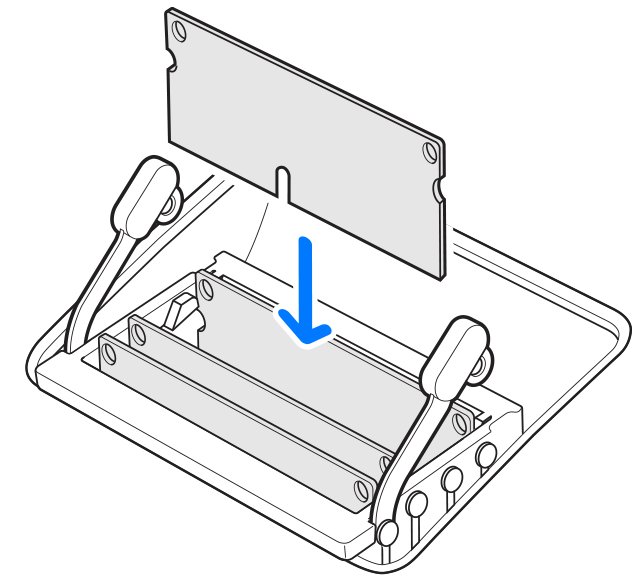
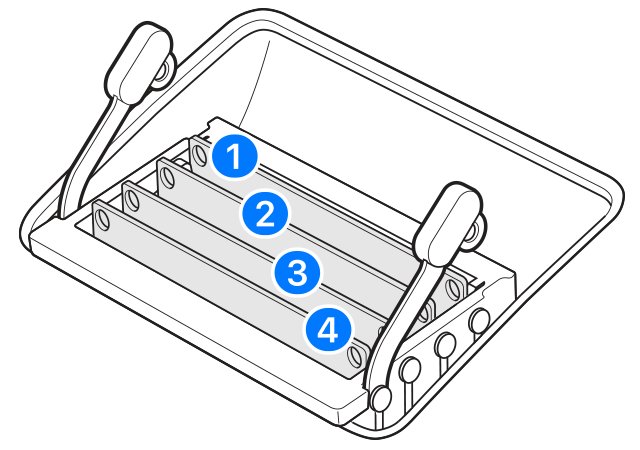
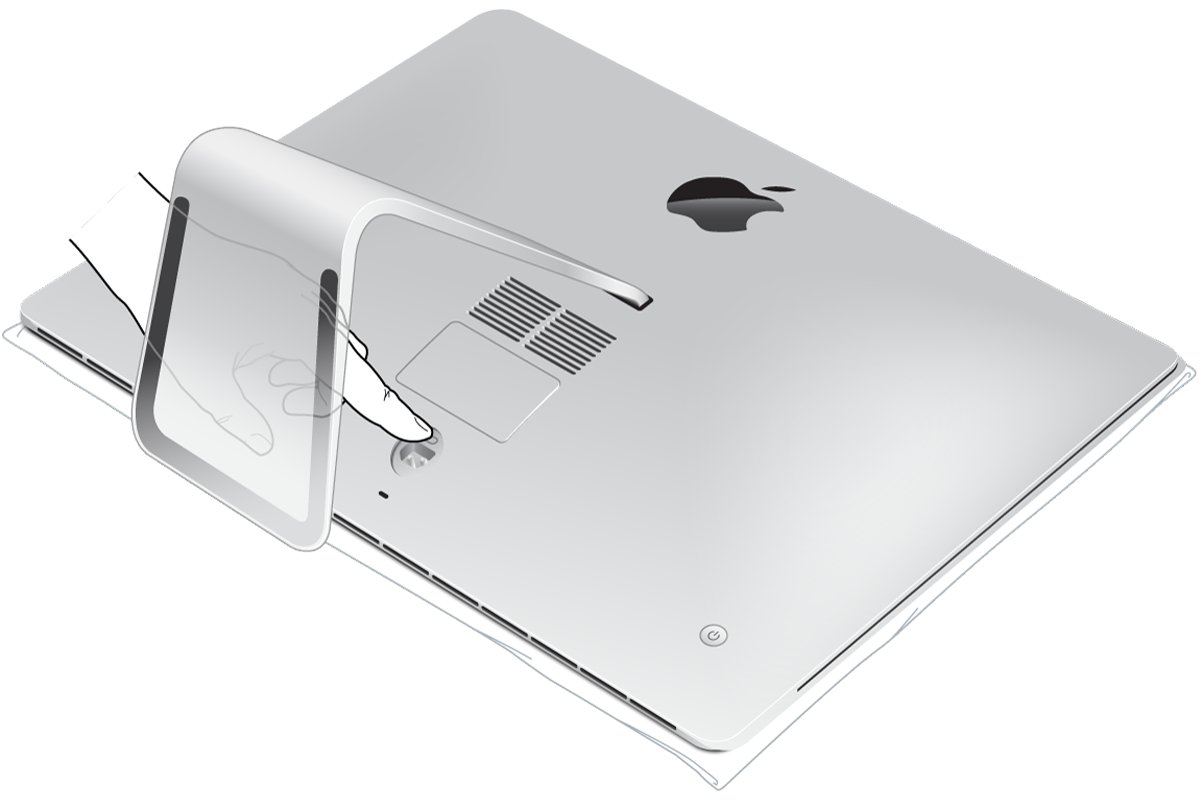
| All-in-one computers | Many do | The iMac (Retina 5K, 27-inch, 2020) takes four 260-pin DDR4 SO-DIMMs up to 128 GB; 24-inch M-series iMacs have memory in the chip package and cannot be upgraded |
| Mini PCs and small-form-factor desktops | Yes | Mini desktops and Intel NUC kits use the same SO-DIMMs as laptops |
| Mobile workstations, industrial systems and compact servers | Yes, often ECC SO-DIMM | These need ECC SO-DIMMs only when the system explicitly supports ECC |
| Gaming consoles | No | The Xbox Series X uses 16 GB of built-in GDDR6 on a 320-bit bus, not a SO-DIMM slot |
Benefits of SO-DIMM RAM
| Benefit | What it means for you |
|---|---|
| Compact size | Fits thin laptops, mini PCs and all-in-ones where a desktop DIMM has no room |
| Same memory technology as desktops | SO-DIMMs support the same DDR4 and DDR5 features as desktop modules, just on a smaller board |
| Upgradeable and replaceable | A module in a slot can be swapped for a larger one or replaced if it fails, which soldered memory never allows |
| Dual-channel with matched pairs | Two identical SO-DIMMs in a two-slot laptop enable dual-channel mode and more memory bandwidth |
| Lower voltage in newer generations | DDR5 SO-DIMMs run at 1.1 V against 1.2 V for DDR4, which suits battery-powered devices |
| Wide compatibility within a generation | A DDR5 SO-DIMM fits a wide range of Intel and AMD laptops, small-form-factor PCs and Intel NUC kits |
Battery life is not a reason on its own to add memory. Dell notes that extra modules can slightly increase power draw, although having enough RAM reduces how often the system pages to storage.
Limitations of SO-DIMM RAM
| Limitation | Why it matters |
|---|---|
| Not for standard desktop slots | A SO-DIMM does not fit a full-size DIMM slot, so laptop memory cannot move into a normal desktop motherboard |
| Lower capacity ceiling | Laptops usually have one or two slots, and many consumer models support 64 GB at most; the largest DDR5 SO-DIMMs Corsair sells are 48 GB each |
| Locked to one DDR generation | DDR4 and DDR5 use different slot designs and electrical specs, so an old laptop cannot move to newer memory |
| Not available on soldered laptops | Slim laptops with memory soldered to the board, and Macs with memory in the chip package, have no slot at all |
| ECC is a separate part | Standard SO-DIMMs have no error correction; ECC SO-DIMMs work only in systems built for them |
| Speed is set by the platform | Mixed modules run at the slowest one's speed, and some high-speed kits need BIOS changes on certain systems |
ECC SO-DIMM vs regular SO-DIMM
| Regular SO-DIMM | ECC SO-DIMM | |
|---|---|---|
| Error correction | None on the module | Extra memory bits and circuitry detect and correct single-bit errors |
| Typical devices | Consumer laptops, mini PCs and compact devices | Mobile workstations, industrial systems and compact servers |
| Compatibility | Works in any SO-DIMM slot of the same DDR generation | Needs a system that explicitly supports ECC; not interchangeable with non-ECC unless the system accepts both |
| Samsung DDR5 specs | Up to 32 GB, up to 5,600 Mbps, 1.1 V | Up to 32 GB, up to 5,600 Mbps, 1.1 V |
Samsung's DDR5 chips include on-die ECC, but that is built into each memory chip. An ECC SO-DIMM adds error correction on the module itself, and only that type needs ECC support from the laptop.
SO-DIMM vs soldered and CAMM2 laptop memory
Not every laptop uses a SO-DIMM slot. Check which of these your model has before you buy anything.
| Memory format | Can you upgrade it? | How it attaches |
|---|---|---|
| SO-DIMM | Yes, add or swap modules | Slots into an edge connector at an angle and clips flat |
| Soldered memory | No | Chips are fixed to the system board; some laptops pair it with one free SO-DIMM slot |
| Memory in the chip package (Apple M-series) | No, choose the amount when you buy | Integrated into the processor package |
| CAMM2 | Yes, it is a removable module | Lies flat and connects through a pin grid array; Dell created CAMM and worked with JEDEC to standardise CAMM2 |
How to choose the right SO-DIMM RAM
Compatibility comes down to a few checks, and each one is in your laptop's manual or specification page.
- Find your exact laptop model in its manual or the maker's support page and confirm it has an accessible SO-DIMM slot, not only soldered memory.
- Note the DDR generation it supports. DDR4 and DDR5 SO-DIMMs are not interchangeable.
- Match the pin count on the module's product page: 260 for DDR4, 262 for DDR5, 204 for DDR3.
- Check the maximum memory per slot and in total, and stay within it. Capacity above the stated maximum adds nothing and can cause compatibility problems.
- Pick a speed the laptop lists. A faster module still runs, but mixed modules drop to the slowest one's speed.
- Buy a matched pair, same capacity, speed and maker, if the laptop has two slots, so it runs in dual-channel mode.
- Choose a regular non-ECC SO-DIMM unless the system's specifications explicitly list ECC support.
- Use the PC maker's memory selector, such as Dell's, or the memory maker's compatibility list to confirm the exact part number.
How to check if your laptop uses SO-DIMM RAM in Windows 11
Windows reads the memory form factor from the firmware. Open Terminal or Windows PowerShell and run this command; it works on Windows 10 too.
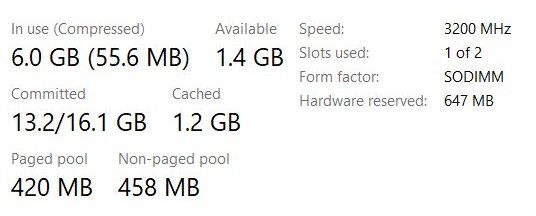
Get-CimInstance -ClassName Win32_PhysicalMemory | Format-Table DeviceLocator, Manufacturer, PartNumber, Capacity, ConfiguredClockSpeed, FormFactorEach row is one installed memory device. FormFactor 12 means SODIMM and FormFactor 8 means DIMM. DeviceLocator is the slot or bank, Capacity is in bytes, and ConfiguredClockSpeed is the configured clock speed in MHz. Search the PartNumber on the memory maker's site to see the module's generation and pin count.
You should see: One row per module with 12 in the FormFactor column means the laptop uses SO-DIMM memory. Two rows tell you two slots or banks are in use.
You can also check your RAM in Windows 11 through Task Manager's Performance tab, which shows total memory and its speed.
How to tell if SO-DIMM RAM is DDR4 or DDR5
A DDR5 SO-DIMM will not go into a DDR4 slot, so check the module before you open the laptop.
- Read the module label. PC4 in the speed code means DDR4, PC5 means DDR5, and PC3 means DDR3.
- Check the voltage on the label or product page: 1.2 V for DDR4, 1.1 V for DDR5.
- Look up the pin count on the maker's product page: 260 pins is DDR4, 262 pins is DDR5.
- Hold the module next to the slot and compare the notch with the ridge in the connector. Each generation uses a different slot design.
- Stop if the notch does not line up. Never force a module into a slot.
- After installing, run the
Get-CimInstancecommand above and confirm every module shows FormFactor 12 and the capacity you expect.
How to install SO-DIMM RAM in a laptop
Most laptops with an accessible slot need only a small Phillips screwdriver and about 15 minutes. Hold modules by the edges and never press on the chips.
- Shut down the laptop and unplug the power adapter. Remove a removable battery; disconnect an internal battery only if the service manual says to.
- Press and hold the power button for several seconds to drain residual power.
- Remove the bottom panel screws with a Phillips screwdriver and lift off the panel.
- Touch an unpainted metal surface or wear an anti-static wrist strap.
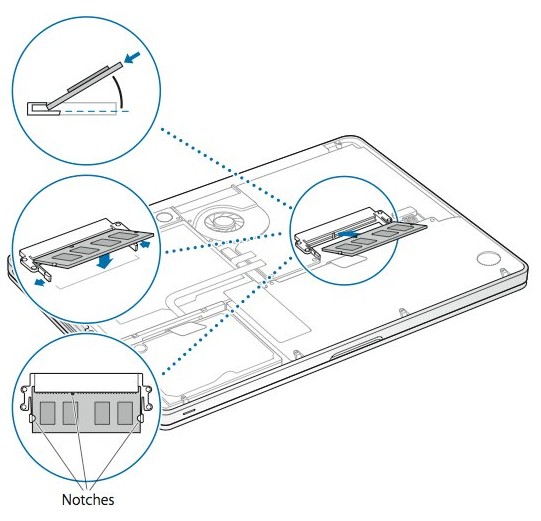
- To remove an old module, pull the retaining clips outward until it pops up at about 30 degrees, then slide it out at that angle.
- Line up the notch on the new SO-DIMM with the ridge in the empty slot.
- Insert the module firmly at about 30 degrees, then press it down flat until the side clips click.
- Refit the panel, battery and power adapter, then turn on the laptop and check that Windows reports the new memory.
Some Dell systems and other models have their own service procedure, so check the service manual before opening the chassis.
SO-DIMM RAM not detected after a laptop upgrade
Laptop won't boot after installing SO-DIMM RAM
A module is not fully seated, is the wrong type for the board, or is faulty.
- Power off and unplug the laptop.
- Remove and reseat each module until both side clips lock.
- Test one module at a time to find a faulty stick.
- Confirm the DDR generation and pin count match what the laptop supports.
New SO-DIMM not recognized or total RAM looks too low
The module is loose, the slot has a problem, or the total is above what the laptop or Windows supports.
- Reseat the module and check that the clips are locked.
- Try the module in the other slot.
- Compare the total with the laptop's stated maximum memory.
- Check that Windows is 64-bit; a 32-bit system tops out at 4 GB.
SO-DIMM RAM runs slower than its rated speed
Mixed modules run at the slowest module's speed, and the laptop's own memory specification sets the ceiling.
- Run the
Get-CimInstancecommand and read ConfiguredClockSpeed for each module. - Replace mismatched sticks with a matched pair of the same speed and capacity.
- Check the laptop's specifications for its highest supported memory speed; some high-speed kits also need BIOS adjustments on certain systems.
iMac screen stays dark after a SO-DIMM upgrade
Newer iMac models run a memory initialization that takes 30 seconds or more after a memory change.
- Wait for the memory initialization to finish without turning the iMac off.
- On i5 and i7 quad-core iMac models, make sure the top slots are populated; they will not start with a single module in a bottom slot.
- If it still fails, reinstall the original modules and contact the memory vendor if the iMac works with them.
If the laptop boots but crashes or freezes after the upgrade, run Windows Memory Diagnostic to test the new modules.
SO-DIMM RAM FAQ
Can I mix different brands of SO-DIMM RAM if their specifications match?
Usually, yes. Different brands with the same generation, speed and capacity generally work together, but small differences in timing, voltage or internal design can cause instability. Samsung and Dell both recommend modules that match in speed, capacity and maker, ideally a matched kit.
What if I install a SO-DIMM that has a faster speed than my laptop can support?
It works as long as the DDR generation and pin count match. Mixed modules run at the speed of the slowest one, and the laptop's memory specification sets the ceiling, so the extra speed rating goes unused rather than causing harm.
Are there desktop systems that use SO-DIMM RAM?
Yes. Small-form-factor PCs, mini desktops, Intel NUC kits and many all-in-ones use SO-DIMMs. The iMac (Retina 5K, 27-inch, 2020), for example, takes four 260-pin DDR4 SO-DIMMs for up to 128 GB.
How do I know if I accidentally purchased DDR5 instead of DDR4 SO-DIMMs?
Check the label and product page. DDR5 SO-DIMMs carry a PC5 speed code, run at 1.1 V and have 262 pins; DDR4 SO-DIMMs carry PC4, run at 1.2 V and have 260 pins. The notch also sits differently, so a DDR5 module will not seat in a DDR4 slot.
Could my laptop's stated maximum RAM be underestimated?
Treat the stated maximum as the limit. Lenovo notes that going beyond the supported capacity gives no benefit and can cause compatibility issues. Check the latest manual or specification page for your exact model, because makers sometimes list a higher supported capacity there.
Can I use desktop DIMM RAM in a laptop SO-DIMM slot?
No. Desktop UDIMMs cannot replace SO-DIMMs because their physical size, pin layout and electrical specifications are different. A DDR5 desktop module has 288 pins against 262 on a DDR5 SO-DIMM, so it will not fit the slot.
Can I mix DDR4 and DDR5 SO-DIMM RAM?
No. DDR4 and DDR5 use different slot designs, signaling and electrical characteristics, so a laptop accepts only the generation its board was built for. Within one generation, modules with different speeds can be mixed, but all of them run at the slowest module's speed.
Is SO-DIMM the same as laptop RAM?
Removable laptop RAM is almost always SO-DIMM. Laptops use SO-DIMM modules rather than full-size DIMMs, but many slim models solder memory to the board instead, and those have no SO-DIMM slot to upgrade.
Does adding more SO-DIMM RAM reduce laptop battery life?
Only slightly, and it varies. Extra modules can add a little power draw, but having enough memory means the laptop relies less on storage for temporary data, which can offset some of that. The real effect depends on the system and workload.
SO-DIMM RAM upgrade verdict
Buy SO-DIMM RAM only after you confirm three things in your laptop's manual: a free or replaceable slot, the DDR generation, and the maximum capacity. Those three facts decide whether a module works at all. Brand and speed rating matter far less, because mixed speeds fall back to the slowest module, while a soldered laptop or an M-series Mac cannot take a SO-DIMM whatever you buy.