Apple Numbers only shows stock data from the previous market day's close, so quotes never change during the trading day; if they stay stuck after a new close, check your internet connection, update Numbers, and test one STOCK formula against STOCKH.
This guide covers when Numbers refreshes stock prices, how to add quotes on Mac, iPhone and iPad, the STOCK and STOCKH functions, and fixes for blank cells, wrong currencies, missing non-US stocks and prices stuck on an old close.
How to fix stock quotes not updating in Apple Numbers
Work through these in order. Most stuck quotes come from a lost connection, an old app version, or a delay in the stock data feed.
- Check that the date you expect is a completed trading day; Numbers shows the close of the previous market day, not today's live price.
- Check your internet connection; a STOCK formula entered offline returns no value until the connection is back.
- Click an empty cell, select the Insert button in the toolbar, and check that Stock Quote is not dimmed. A dimmed option means Numbers cannot reach the internet.
- Quit Numbers completely and open the spreadsheet again.
- Update Numbers from the App Store: on a Mac, open App Store > Updates and select Update next to Numbers.
- Test one cell with
=STOCK("AAPL", "price")in a new table to see whether fresh data arrives. - If every quote is still stuck after the next market close, report it to Apple through the Numbers feedback form.
The STOCK function is powered by Yahoo, so a delay at the data provider affects every Numbers user at once. In that case the quotes come back without any change on your side.
When does Apple Numbers update stock prices?
Numbers is not a live ticker. Every stock value it shows describes the previous market day.
| What you see | What it really is |
|---|---|
| Price | The share price at the market close of the previous market day |
| Change | The difference between the last trade on the previous market day and the close the day before that |
| Percent change | The same difference as a percentage |
| Change shows 0 | The stock has not traded in that interval |
| Open, high, low, volume | Values from the previous market day |
| 52-week high and low | The highest and lowest trade prices in the last 52 weeks |
| Bid and ask price or size | Not available; Apple lists this data as currently unavailable |
That is why quotes look frozen while the market is open, and why they do not change over a weekend or a market holiday.
Numbers stock quotes do not change
Prices are stuck on an older close
Numbers could not fetch new data, the app is out of date, or the data feed is behind.
- Check your Wi-Fi or Ethernet connection and open a web page to confirm it works.
- Quit and reopen Numbers, then open the spreadsheet again.
- Update Numbers and your Mac, iPhone or iPad software.
- Compare one stock against STOCKH for the last trading date, as shown below, to see whether only your file is affected.
- Wait for the next market close; if nothing changes, send a report through the Numbers feedback form.
Stock Quote is dimmed in the Insert menu
The internet may be unavailable to Numbers.
- Check your network connection.
- Turn Wi-Fi off and on again, or switch to another network.
- Click a table cell and select the Insert button again.
A STOCK cell is blank or shows an error
The formula ran while offline, or the symbol is not recognised.
- Reconnect to the internet; the formula fills in when the connection returns.
- Check the symbol is in quotation marks, such as
"AAPL", or points to a cell that holds the symbol. - Add the exchange suffix for stocks outside the US, such as
.Lfor London or.COfor Copenhagen. - Wrap the formula in IFERROR so a missing value shows a dash instead of an error.
Stock prices show in the wrong currency
The currency in STOCK results follows your Language & Region settings.
- On a Mac, open System Settings > General > Language & Region and check the region.
- On iPhone or iPad, open Settings > General > Language & Region.
- Reopen the spreadsheet after you change the region.
A price dropped sharply overnight
Stock splits and reverse splits change what STOCK returns.
- Check whether the company recently split its shares.
- Adjust your share counts or cost basis in the spreadsheet to match the split.
How to add a stock quote in Numbers on Mac
You need an internet connection to add stock information to a cell.
- Open the Numbers app and the spreadsheet you want.
- Click the cell where the stock information should go.
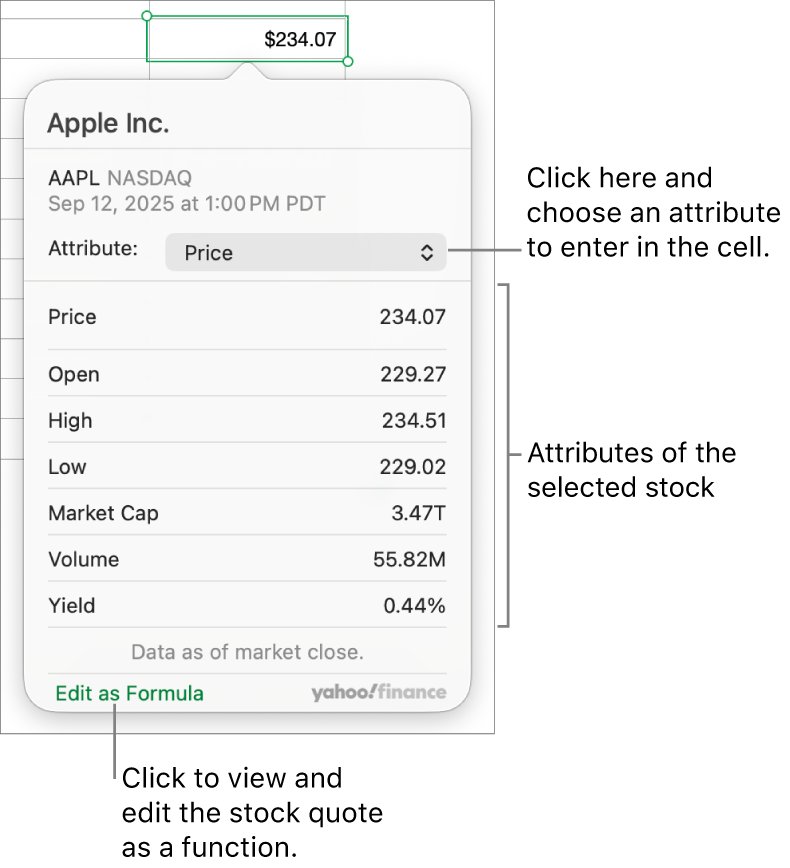
- Select the Insert button in the toolbar, then choose Stock Quote.
- Click a stock in the list, or type a company name or stock symbol in the search field.
- Open the Attribute pop-up menu and choose what to show, such as price or change.
- Click outside the dialog to place the value.
- To see the result as a formula, click Edit as Formula, change the arguments, and select OK.
How to add stock quotes in Numbers on iPhone and iPad
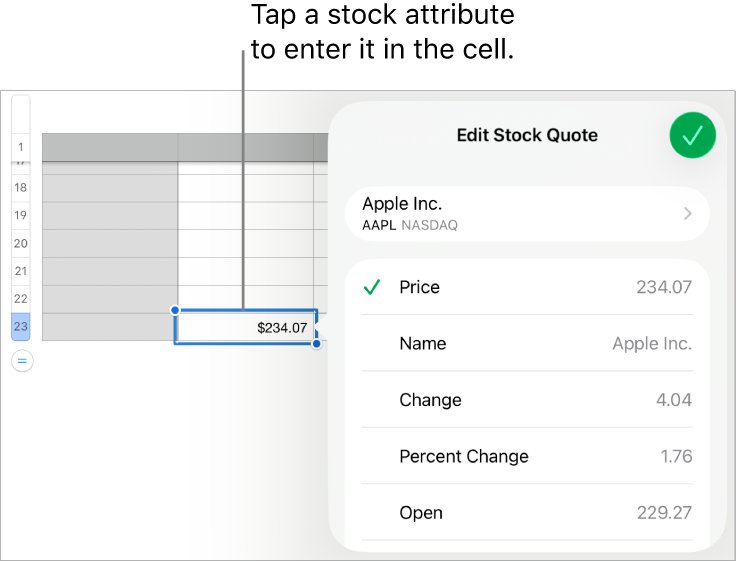
- Open Numbers and the spreadsheet, then tap a cell.
- Tap the Cell Action menu button at the bottom of the screen, or the Action menu button at the top right of the keyboard.
- Tap Stock Quote; you may need to swipe up to see it.
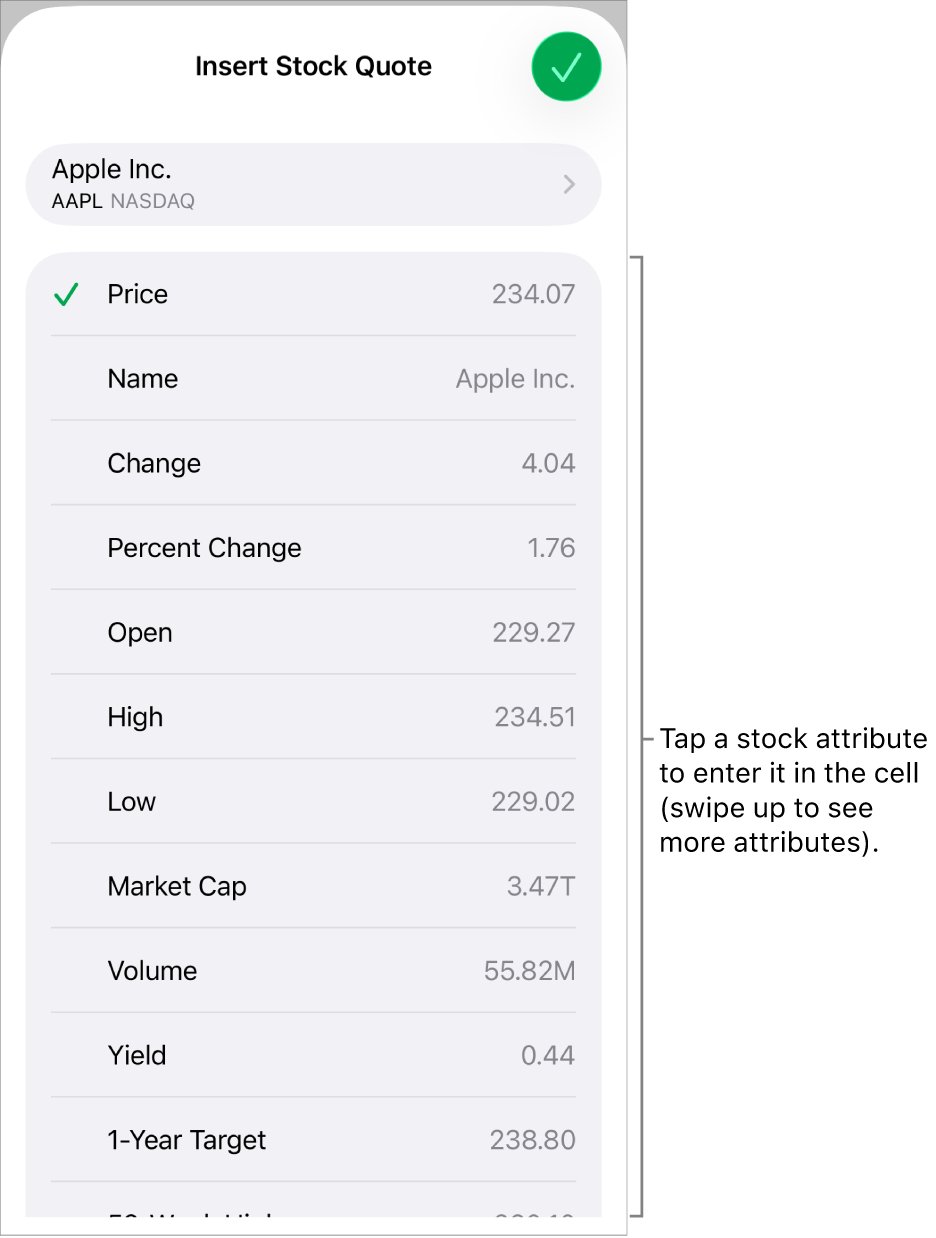
- Tap a stock in the list, or search by company name or stock symbol.
- Tap the attribute you want in the cell.
- Tap Done.
The iPhone and iPad versions use the same previous-market-close data as Numbers on Mac.
Numbers STOCK function attributes
The STOCK function uses the form STOCK(symbol, attribute). You can type the attribute name in quotation marks or use its number.
| Attribute | Number | Returns |
|---|---|---|
| price | 0 or omitted | Share price at the previous market day's close |
| name | 1 | Full company or stock name |
| change | 2 | Change between the last two closes |
| percent change | 3 | Change as a percentage |
| open / high / low | 4 / 5 / 6 | Previous market day's open, high and low |
| market cap | 7 | Market value of all outstanding shares |
| volume | 8 | Shares traded on the previous market day |
| 52-week high / low | 11 / 12 | Highest and lowest trade price in 52 weeks |
| currency | 19 | Currency the stock is priced in |
| exchange | 22 | Exchange, such as NYSE or NASDAQ |
| p/e ratio | 23 | Price divided by trailing 12-month earnings per share |
| previous close | 24 | Close of the trading day before the last trade reported |
For example, =STOCK("NKE", "high") returns Nike's highest price on the previous market day.
Find stock quote by date with STOCKH in Numbers
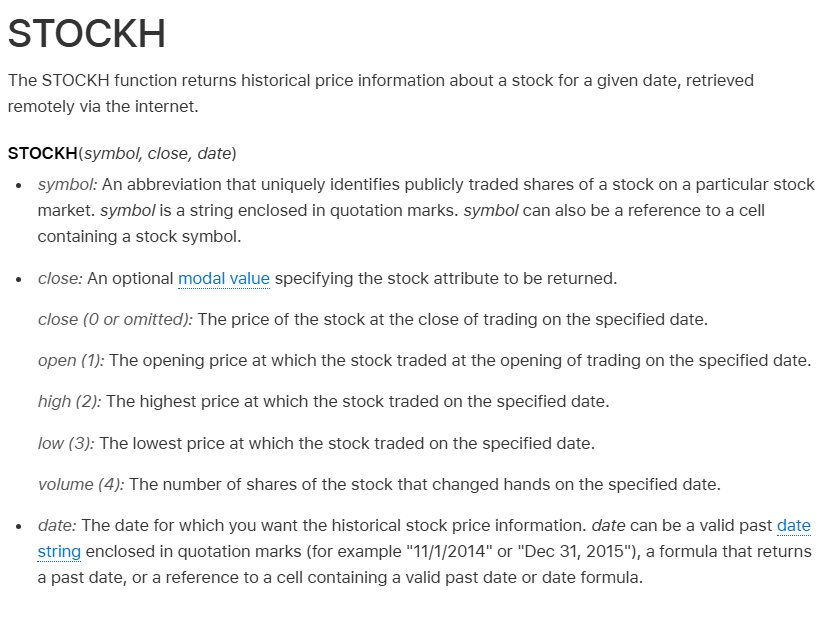
STOCKH returns the price of a stock on a past date. Use it to fill gaps or to check a past close.
=STOCKH("AAPL", "close", "11/3/2026")The first argument is the symbol, the second is the attribute (close, open, high, low or volume), and the third is a past date in quotation marks, a formula that returns a past date, or a cell holding a date.
You should see: Apple's closing price on November 3, 2026. A future date or a day with no trading returns no data.
Is my Numbers stock price up to date?
Compare the STOCK price with the historical close for the last trading day. If they match, Numbers has the latest data it can show.
- In an empty cell, type
=STOCK("AAPL", "price")and press Return. - In the next cell, type
=STOCKH("AAPL", "close", "11/3/2026"), using the date of the last completed trading day. - Compare the two values.
- If they match, your quotes are current and will change only after the next market close.
- If STOCK shows an older value than STOCKH, quit and reopen Numbers, then check again.
Hide stock formula errors in Numbers with IFERROR
A stock table with a single failed lookup can break totals that depend on it. IFERROR keeps the rest of the sheet working.
=IFERROR(STOCK(A9, "price"), "-")Returns the previous market day's closing price for the symbol in cell A9, or a dash if the symbol is invalid or the data cannot be retrieved.
You should see: A price in the cell, or a dash instead of an error.
How to use the stock template in Numbers
Numbers includes a ready-made stock tracker and a stock table style, so you do not have to build each formula.
- Open the My Stocks template from the template chooser.
- Click the table near the bottom of the sheet.
- Click the Add Row button in the bottom-left corner of the table.
- Type a stock symbol, such as AAPL, in column A; the rest of the row fills in.
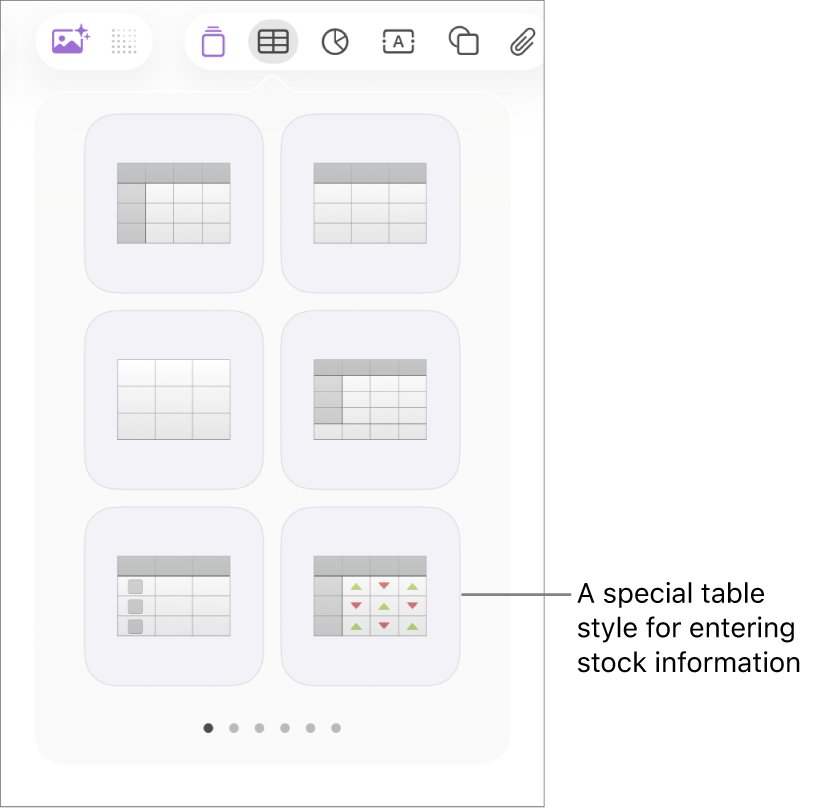
- To add a stock table to any sheet instead, select the Table button in the toolbar and choose the stock table style.
How to update the Numbers app on Mac, iPhone and iPad
An outdated copy of Numbers is worth ruling out before you report a data problem. You can also download Apple Numbers again if the app is missing.
- On a Mac, open the App Store and click Updates in the sidebar.
- Click Update next to Numbers, or Update All.
- On iPhone or iPad, open the App Store and tap your photo or the My Account button.
- Tap App Updates, then tap Update next to Numbers.
- Open the spreadsheet again once the update finishes.
How to report a Numbers stock data problem to Apple
- Note the symbols affected, the last date that updated correctly, and your Numbers and macOS or iOS versions.
- Open apple.com/feedback/numbers in a browser.
- Fill in your name, email address and a subject such as "Stock quotes not updating".
- Describe what you see and submit the form.
Apple reads the feedback but does not reply to each submission, so keep checking after each market close. If you need an answer about your account or device, contact Apple Support instead.
Numbers stock quotes FAQ
Does Numbers show real-time stock prices?
No. Numbers shows stock data from the previous market day's close. Prices do not move during the trading day, and the change value compares the last two closes rather than today's price with yesterday's.
Why are my stock prices in Numbers the same as yesterday?
If the market has not closed since the last update, there is no new close to show. Over a weekend or a market holiday, Numbers keeps showing the last trading day's values, and a stock that did not trade reports a change of 0.
Where does Numbers get its stock data?
Apple says the STOCK function is powered by Yahoo. The data is retrieved over the internet, so a delay at the data provider or a lost connection on your device can leave quotes unchanged.
Does Numbers update stock prices automatically?
Numbers fetches stock values over the internet. A STOCK formula entered offline returns no value and fills in once the connection is back. Values only change after a new market close.
Can Numbers get historical stock prices?
Yes. Use STOCKH with a symbol, an attribute and a past date, for example =STOCKH("AAPL", "close", "11/3/2026"). It returns the close, open, high, low or volume for that day.
How do I get London or other non-US stocks in Numbers?
Add the exchange suffix to the symbol. For example, add .L for stocks on the London exchange or .CO for the Copenhagen exchange. Without the suffix, Numbers may not retrieve any data for the stock.
Why does Numbers show stock prices in the wrong currency?
The currency in STOCK and STOCKH results depends on your Language & Region settings. Check System Settings on a Mac, or Settings on iPhone and iPad, then reopen the spreadsheet.
Why are the bid and ask prices blank in Numbers?
Apple lists bid price, bid size, ask price and ask size data as currently unavailable for the STOCK function. Use price, previous close or the day's high and low instead.
Can I get the gold price in Numbers?
Yes. Type =STOCK("GC=F") in a cell for gold, or SI=F for silver, HG=F for copper, PL=F for platinum and PA=F for palladium. On iPhone you can also add the gold price to the Stocks app.