A 404 error means your browser reached the website, but the server cannot find anything at the address you requested, so the way back is to correct or trace the URL rather than repair your computer.
This guide shows how to recover from a 404 as a visitor, how to confirm the status code in Chrome DevTools or curl, and how site owners should fix, redirect or deliberately keep 404 responses.
How to recover from a 404 as a visitor
Most 404s come from a mistyped address or a page that moved without a redirect. Work through these in order and stop as soon as the page loads.
- Check the address bar for typos, doubled slashes, a stray character at the end, or a letter swapped for a number (for example
f00instead offoo). - Delete the last part of the path, after the final
/, and press Enter to open the parent section of the site. - Keep trimming the path until a page loads, or go straight to the site's home page.
- Use the site's own search box or menu to look for the page title or topic.
- Search the web for the page title with the
site:operator, for examplesite:example.com 404 page title, to find the page's new address. - If you followed a link from another site or an old bookmark, update the bookmark once you find the new URL.
A 404 does not mean the whole website is down. The server answered; it just has nothing at that address.
What does “404 not found” actually mean?
404 is an HTTP status code: a three-digit number the web server sends back with every response. Codes from 400 to 499 are client errors, which means the request itself points at something the server cannot serve.
| Question | Answer |
|---|---|
| Who sends the 404? | The web server hosting the site, not your browser or your PC |
| What it says | The server cannot find the requested resource at that URL |
| Is it permanent? | Not necessarily. A 404 does not say whether the page is gone for good or only temporarily missing |
| What a permanent removal should return | 410 Gone, when the owner knows the page is gone for good |
| Common causes | Mistyped URLs, and pages moved or deleted without a redirect |
| Can it hide a private page? | Yes. A server may send 404 instead of 403 Forbidden to hide that a resource exists from a visitor who is not allowed to see it |
| What links that lead to it are called | Broken or dead links, a symptom of link rot |
404 versus other HTTP responses
The number tells you who has to act. A 404 points at the address; a 5xx server error points at the server; a 403 points at your permissions.
| Status code | What the server is saying | What you should do |
|---|---|---|
| 200 OK | The request succeeded and the page content is in the response | Nothing, unless the page shows a not-found message (see soft 404 below) |
| 301 Moved Permanently | The page has a new permanent URL, given in the response | Follow it; site owners should use this when a page moves |
| 302 Found | The page is at another URL temporarily | Keep using the original address in future |
| 403 Forbidden | The server knows who you are but refuses access | Sign in or ask for access; the URL itself may be correct |
| 404 Not Found | Nothing exists at this URL, permanent or not | Correct or trace the URL |
| 410 Gone | The page was deliberately removed and is likely gone for good | Stop requesting it; owners should remove links to it |
| 500 Internal Server Error | The server hit a problem it could not handle | Try again later; the site owner must fix it |
| 503 Service Unavailable | The server is down for maintenance or overloaded | Wait and retry; it is a temporary condition |
A refused page needs different steps, so fixing a 403 Forbidden error is a separate job from fixing a 404.
A 503 Service Unavailable error usually clears on its own once the server recovers.
Is the page missing, or is one of its files missing?
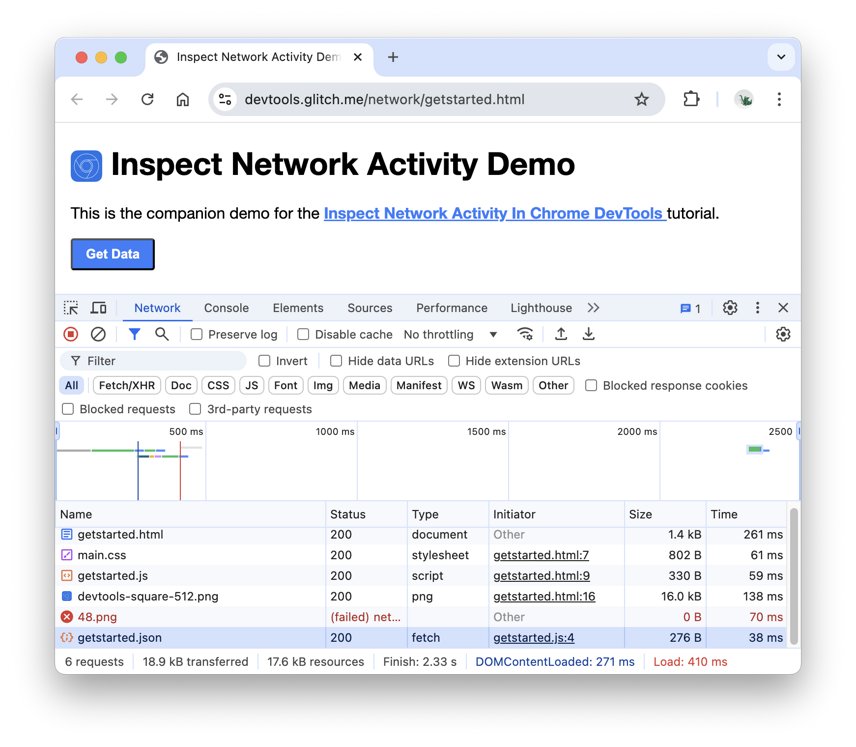
A page can load fine while an image, stylesheet or script on it returns 404. You then see a broken image or a page with no styling, not a full error page. Chrome DevTools shows which file failed.
- Open the page in Chrome and press Ctrl + Shift + J (Command + Option + J on a Mac) to open DevTools.
- Click the Network tab.
- Reload the page so the Network panel logs every request it makes.
- Read the Status column: the top row is usually the main HTML document, and the rows below are its files.
- Type
status-code:404in the Filter box to show only the requests that returned 404. - Click a failed row and open the Headers tab to see the full request URL and the status the server returned.
- Check Preserve log if the page redirects, so requests from the first page load are not cleared.
If the top document row shows 404, the page itself is missing. If only lower rows do, the page exists and the site owner needs to fix the paths to those files.
Check the response with curl
curl prints the status code the server sends, with no browser cache, extensions or custom error page design in the way. Run it in Command Prompt or Terminal where curl is available.
curl -s -o /dev/null -w "%{http_code} %{url_effective}\n" -L https://example.com/old-page-s hides the progress meter, -o /dev/null throws away the page body (use -o nul on Windows), -w prints the final response code and the URL curl ended on, and -L follows redirects. Run curl -I https://example.com/old-page instead to see only the response headers, including the status line.
You should see: 404 with the original URL confirms the page is missing. 200 with a new URL means a redirect already sends visitors to a working page. A 200 on an address that shows a not-found message is a soft 404.
Why a 200 response can still be a 404 problem
A soft 404 is a page that tells the visitor "not found" but sends a 200 OK status code. Search engines then treat an error page as real content.
Google Search Console reports these as Soft 404 in the Page indexing report, and Google recommends returning a real 404 code for pages that truly do not exist.
| What the site does | Status code sent | Why it is a problem |
|---|---|---|
| Shows a friendly "page not found" message with a 200 code | 200 | Google may report a Soft 404 and treat the error page as content |
| Redirects every missing URL to the home page | 301 or 302, then 200 | Google calls this a soft 404; visitors land somewhere they did not ask for |
| Serves an empty page or placeholder text | 200 | Google may treat an empty page as a soft 404 |
| Points Apache's ErrorDocument at a full http:// URL | 302 redirect | The visitor and crawlers never receive the original 404 code |
| Points an nginx error_page at an external URL | 302 by default | The 404 is replaced by a redirect status |
How website owners should fix 404 errors
Not every 404 needs fixing. Google says most 404s do not harm a site's indexing or ranking, and a deleted page with no replacement should return 404. Fix the ones you link to yourself or list in a sitemap.
| Your situation | What to do | Why |
|---|---|---|
| The page moved to a new URL | Add a 301 permanent redirect from the old URL to the new one | Visitors and search engines reach the new page; Google treats 301 as a strong signal |
| The page was deleted and has no replacement | Let it return 404, or 410 if you know it is gone for good | Google currently treats 410 the same as 404 and drops the URL over time |
| Your own pages link to the missing URL | Update or remove those internal links | Visitors should not hit dead links on your own site |
| The URL is in your sitemap | Remove or correct it in the sitemap | A submitted URL that returns 404 is reported as an error |
| Visitors often mistype a URL (cancelling vs canceling, f00 vs foo) | Redirect the common misspelling to the right page | One redirect recovers a recurring stream of lost visitors |
| The URL never existed on your site | Ignore it | Google drops these from the report after about a month |
On Apache, a simple permanent redirect is one line with mod_alias: Redirect permanent "/old" "https://example.com/new". On nginx, use return 301 inside a location block for the old path.
Set up a custom 404 page in Apache and Nginx
A custom 404 page should keep the 404 status code and give the visitor a way forward: a search box, the main sections and a link to the home page.
| Server | Directive | Where it goes | Keep the 404 status by |
|---|---|---|---|
| Apache | ErrorDocument 404 /notfound.html |
Server config, virtual host, directory, or .htaccess when AllowOverride includes FileInfo |
Using a local path that starts with /, never a full http:// URL |
| Nginx | error_page 404 /404.html; |
The http, server or location block |
Not adding =200 or an external URL to the directive |
| Nginx (static files) | try_files $uri $uri/index.html $uri.html =404; |
A location block |
Ending the list with =404 so unmatched paths return 404 |
On nginx, add internal; to the location = /404.html block so the error page itself cannot be requested directly.
How to check a 404 fix worked
- Run
curl -s -o /dev/null -w "%{http_code} %{num_redirects} %{url_effective}\n" -Lfollowed by the old URL. - Confirm a moved page shows
200, one redirect, and the new URL as the final address. - Confirm a deleted page shows
404or410and zero redirects. - Request a made-up address such as
https://example.com/does-not-existand confirm it returns404, not200, while your custom page still displays in a browser. - In Google Search Console, open the Page indexing report, click the affected reason, and use URL Inspection then Test live URL on a fixed example.
What about robots.txt?
Do not use robots.txt to block URLs that return 404. Google lists blocking 404s with robots.txt next to redirecting them to the home page as practices that make a site's structure harder to process. robots.txt only manages crawling; it is not a way to remove a page from search. A missing URL should simply return 404 and stay crawlable so Google can see that status and drop it.
Fix 404 errors that keep coming back
Search Console reports Soft 404 on a page that should not exist
The page shows a not-found message but sends 200, or redirects to the home page.
- Check the URL with
curl -Iand read the status line. - Change the server or CMS so the missing page returns
404or410. - Remove any catch-all rule that redirects every missing URL to the home page.
- Re-run Test live URL in Search Console's URL Inspection tool.
Your custom 404 page shows, but curl reports 302
Apache's ErrorDocument or nginx's error_page points at a full URL, which makes the server send a redirect.
- Open the server config or
.htaccessfile that sets the error page. - Replace the full URL with a local path, for example
/404.html. - Reload the server configuration.
- Run curl again and confirm the code is
404.
Old links to a moved page still return 404
The page moved without a redirect, or the redirect matches the wrong path.
- Run curl with
-Lon the exact old URL, including any trailing slash. - Add a 301 redirect from that exact path to the new URL.
- Test both the old URL with and without a trailing slash.
The page loads but images, styles or scripts are missing
The page exists, but some of its files return 404 because of wrong paths or deleted files.
- Open DevTools, click Network, and filter by
status-code:404. - Copy each failed URL from the Headers tab.
- Restore the file at that path or correct the reference in the page.
The page is fixed but your browser still shows the 404
A cached copy of the old error response is still being served.
- Open DevTools in Chrome so the reload options are available.
- Long-press the reload button and choose Empty Cache and Hard Reload.
- If it persists, run curl to confirm what the server is really sending now.
Edge users can do the same with a hard refresh in Microsoft Edge.
When should you contact the site owner?
| Your situation | Contact the owner? | Why |
|---|---|---|
| A link on the site's own pages or menu leads to a 404 | Yes | Only the owner can fix their internal links |
| A page you used recently now 404s and site search cannot find it | Yes | It may have moved without a redirect |
| Images or downloads on a working page return 404 | Yes | The page exists but its files are broken |
| You typed the address yourself or used an old bookmark | Not yet | Check the URL and search the site first |
| The link came from another website | Tell that site's owner | The broken link lives on their page |
| The whole site returns 5xx errors, not 404 | Wait, then report it if it continues | That is a server problem, not a missing page |
When you report it, include the exact URL, the page that linked to it, and the time you saw the error.
404 error FAQ
Does a 404 mean the website is down?
No. A 404 means the server is up and answered your request, but it has nothing at that exact address. A site that is down usually returns a 5xx code such as 503, or does not respond at all.
Is a 404 caused by my computer?
Almost never. The website's server sends the 404 because the URL does not match anything it holds. The usual causes are a mistyped address, an old bookmark, or a page the owner moved or deleted without a redirect.
What is the difference between a 404 and a 410?
A 404 says the page cannot be found and does not say whether that is permanent. A 410 Gone says the page was removed and is likely gone for good. Google currently treats 410 the same as 404.
Should every 404 page redirect to the home page?
No. Google calls redirecting missing pages to the home page a soft 404, which confuses visitors and search engines. Redirect only pages that moved to a real equivalent, and let truly missing pages return 404.
How do I find a lost website or page?
Trim the URL back to the home page, then use the site's search or menu. You can also search the page title with the site: operator, such as site:example.com plus the title, to find its new address.
Do 404 errors hurt SEO?
Generally no. Google says 404s do not harm a site's indexing or ranking when the URLs should not exist. Fix the ones you link to yourself, list in a sitemap, or that replace a moved page.
How long does a removed page keep showing as 404 in Google Search Console?
Google says 404 errors for deleted or never-existing pages should drop out of the report after about a month. Googlebot may still recheck the URL for a while, but it crawls it less and less often.
Can a site return 404 for a page that exists?
Yes. A server may send 404 instead of 403 Forbidden to hide that a page exists from visitors who are not allowed to see it. Signing in can make the same URL load normally.
The bottom line on 404 errors
As a visitor, fix the address or trace the page through the site; as a site owner, redirect moved pages with 301 and let deleted pages return a real 404 or 410. A 404 is the server telling the truth about a URL. The damage comes from hiding it: soft 404s, blanket home-page redirects and robots.txt blocks confuse both visitors and search engines, while an honest status code with a useful custom page gets everyone back on track.