Open Command Prompt as administrator and run net stop wuauserv followed by net start wuauserv to restart the Windows Update service on Windows 11.
The Services app and PowerShell do the same job. This page also covers the related BITS and Cryptographic services, a disabled service, error 0x80070422 and what to do when updates still fail after the restart.
Restart Windows Update service in Windows 11 via CMD
Select Start, type cmd, right-click Command Prompt and select Run as administrator. Then run these two commands, pressing Enter after each one.
net stop wuauserv
net start wuauserv
wuauserv is the service name of Windows Update. The first command stops it and the second starts it again, with no PC restart needed.
You should see: Command Prompt reports the service stopping, then starting, and returns to the prompt.
Windows can shut the service down by itself when it has been idle. If it is already stopped, go straight to net start wuauserv.
Restart Windows Update service using Services app
Use this route if you prefer not to type commands. The Services app shows the service under its display name, Windows Update, not wuauserv.
- Press Win + R, type
services.mscand press Enter. - Scroll down the list and locate Windows Update.
- Right-click Windows Update and select Restart.
- If the service is stopped, right-click it and select Start instead.
- Read the Status column and check that it shows Running.
Restart Windows Update service using PowerShell
Select Start, type PowerShell, right-click Windows PowerShell, select Run as administrator and run this command. It sends a stop message and then a start message to the Windows Service Controller, and it needs an account with permission to control services.
Restart-Service -Name wuauserv -PassThru-PassThru makes the command print the service's state, because Restart-Service shows nothing by default. If the service was already stopped, the command starts it without reporting an error.
You should see: A line with Running under Status and wuauserv under Name.
Fully restart all Windows Update dependent services in CMD
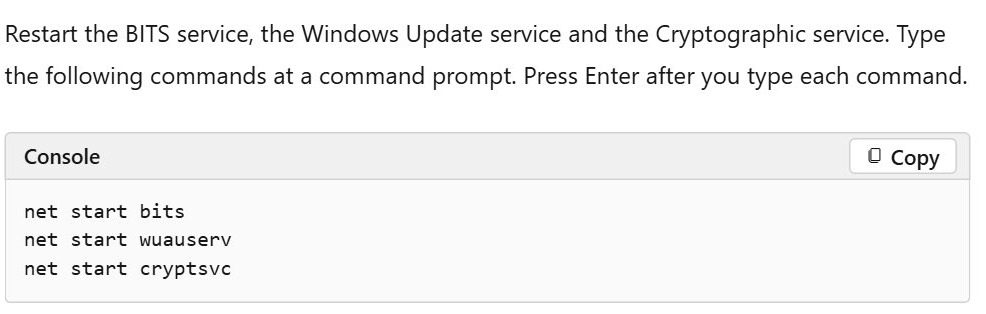
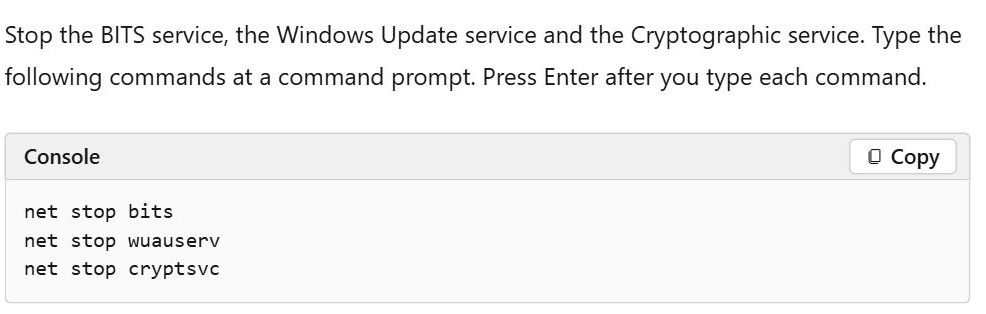
Windows Update works alongside the Background Intelligent Transfer Service (BITS) and the Cryptographic service, so Microsoft's manual reset stops and restarts all three. Run these from the same elevated Command Prompt, one line at a time.
net stop bits
net stop wuauserv
net stop cryptsvc
net start bits
net start wuauserv
net start cryptsvc
This restarts the services and changes no files. Use it when restarting wuauserv alone hasn't cleared a stuck download or a repeating error.
You should see: All three services report that they started.
How to check if Windows Update service is running
Run this in Command Prompt or PowerShell. Keep the .exe so that PowerShell doesn't read sc as a different command.
sc.exe query wuauservGet-Service -Name wuauserv in PowerShell gives the same answer in a shorter form, with Status, Name and DisplayName columns.
You should see: A STATE line that reads RUNNING. A stopped service isn't always a fault, because Windows stops it after a long period of inactivity.

What is the Windows Update service name in Windows 11?
Settings talks to the Update Orchestrator, which in turn talks to the Windows Update service. These are the names to look for when one of them has stopped.
| Display name in Services | Name for commands | What it does for updates |
|---|---|---|
| Windows Update | wuauserv |
The client service that scans for, downloads and installs updates |
| Background Intelligent Transfer Service | bits |
Transfers files in the background using idle network bandwidth |
| Cryptographic Services | cryptsvc |
Stopped and restarted as part of Microsoft's Windows Update reset |
| Update State Orchestrator | Listed under its display name in Services | Connects the Settings page to the Windows Update service |
Windows Update errors fixed by restarting the service
A restart is a real fix for only some update failures. Match your error here before you try anything larger.
| What you see | Do this | Why |
|---|---|---|
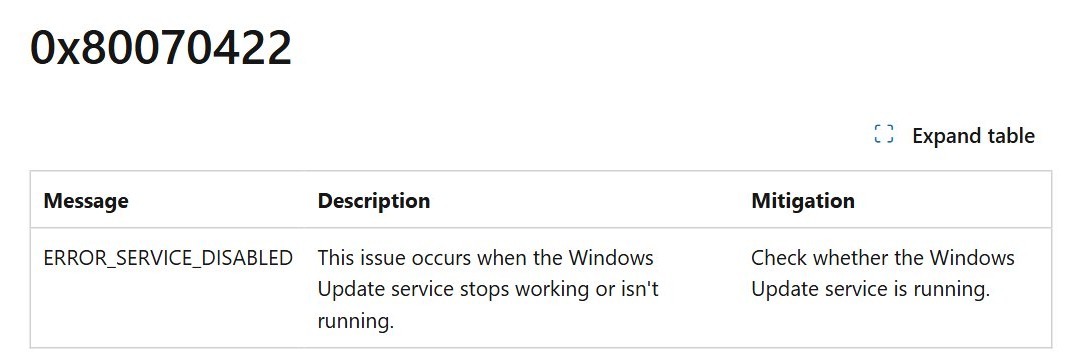
| Error 0x80070422 | Set the Startup type to Automatic, then start the service | The service has stopped working, isn't running or is disabled |
| Error 0x80248014 | Right-click Windows Update in Services and select Start | Microsoft's listed fix is to start the service |
| Error 0x80240034 | Check that the service is running, then check for updates again | Microsoft's listed check for this code |
| Error 0x800705b4 | Stop the service, clear C:\Windows\SoftwareDistribution, start it again |
A restart alone doesn't clear the update cache |
| Error 0x8024A10A | Keep the PC active and connected, then retry the install | The service shut down after a long period of inactivity |
| Check for updates appears frozen | Close Settings, reopen it, then check Update State Orchestrator and Windows Update in Services | Settings stops responding if these services stop unexpectedly |
Restarting the service doesn't install anything by itself. Go to Settings > Windows Update and select Check for updates afterwards, or force a Windows 11 update if nothing appears.
How to enable Windows Update service in Windows 11
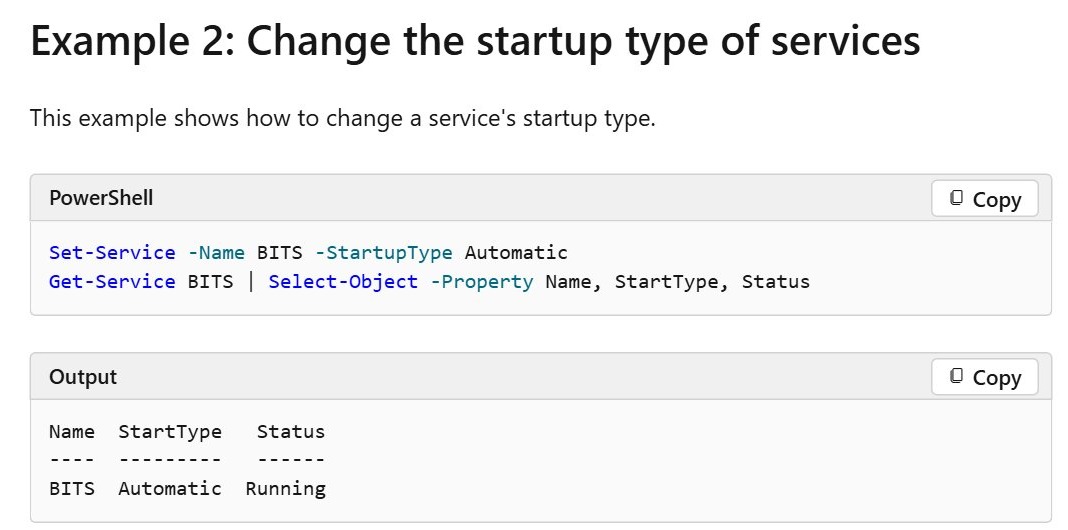
A service set to Disabled can't be started by a user or an application, so a restart fails until you change the startup type. Microsoft's fix for error 0x80070422 is below.
- Press Win + R, type
services.mscand press Enter. - Right-click Windows Update and select Properties.
- Set Startup type to Automatic.
- Select Start if the service is stopped.
- Select Apply, then OK.
To do the same in an elevated PowerShell window, run Set-Service -Name wuauserv -StartupType Automatic, then Start-Service -Name wuauserv. If the setting turns back to Disabled on a work or school PC, your organization's policy is controlling it, so ask your IT administrator.
How to clear the SoftwareDistribution folder in Windows 11
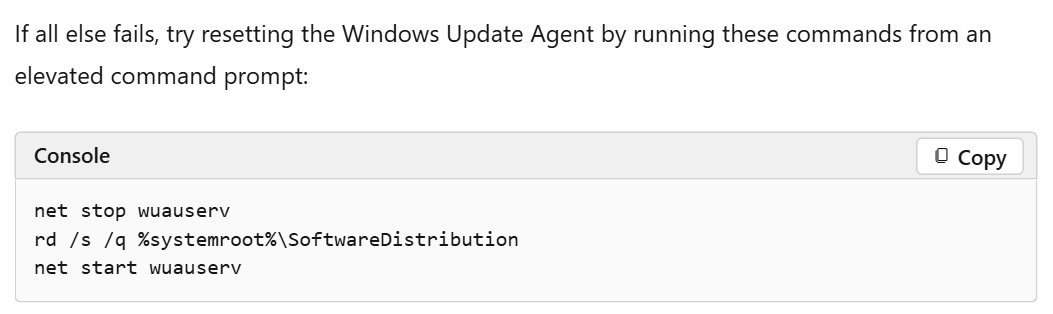
Microsoft lists this step for when a restart isn't enough, as an "if all else fails" reset of the Windows Update Agent. Run all three lines in an elevated Command Prompt.
net stop wuauserv
rd /s /q %systemroot%\SoftwareDistribution
net start wuauserv
The folder must be removed while the service is stopped. rd /s /q deletes it with no confirmation prompt, so type the path exactly. Windows Update then has to download any pending updates again.
You should see: The service starts, and Check for updates scans again from Settings.
Windows Update service not running in Windows 11
Access denied when you run net stop wuauserv
The commands need an elevated prompt, and a normal Command Prompt window can't control the service.
- Close the current window.
- Select Start, type cmd, right-click Command Prompt and select Run as administrator.
- Select Yes at the User Account Control prompt.
- Run the commands again.
Windows Update service won't start or error 0x80070422
The service is disabled, so Windows can't start it on demand.
- Open Windows Update in
services.mscand select Properties. - Set Startup type to Automatic and select Apply.
- Select Start, then OK.
- Restart the PC if the service still refuses to start.
Windows Update stuck after restarting the service
Settings relies on the Update Orchestrator as well as Windows Update, and either one can stop unexpectedly.
- Close the Settings app and reopen it.
- Open
services.mscand check that Update State Orchestrator and Windows Update are running. - Run the three-service restart above if downloads are still stuck.
Updates still fail after the service restarts
The service is healthy, so the fault lies in the update files or in Windows system files.
- Go to Settings > System > Troubleshoot > Other troubleshooters and select Run next to Windows Update.
- Repair the Windows Update components with DISM and SFC from an elevated prompt.
- Run
Get-WindowsUpdateLogin PowerShell to generate a readable log, then search it for your error code.
Windows Update service restart FAQ
What is the command to restart Windows Update service?
Run net stop wuauserv and then net start wuauserv in an elevated Command Prompt. In PowerShell, a single command does both: Restart-Service -Name wuauserv. There is no need to restart the whole PC for the service change to take effect.
What is the service name for Windows Update?
The service name is wuauserv, and its display name in the Services app is Windows Update. Commands such as net start, sc.exe query and Restart-Service take the service name, while the Services list is sorted by the display name.
Do I need administrator rights to restart Windows Update service?
Yes. Microsoft's commands run from an elevated Command Prompt, and PowerShell's service cmdlets work only when your account has permission to manage services. On a work PC without those rights, ask your IT administrator to restart the service for you.
Should Windows Update service be set to Automatic or Manual?
It must not be Disabled, because a disabled service can't be started by anything. Microsoft's fix for error 0x80070422 sets the Startup type to Automatic, so use that if the service was disabled. A Manual service can still be started by an application.
Why does Windows Update service keep stopping?
Windows stops the service after a long period of inactivity, so finding it stopped when nothing is updating isn't a fault. Microsoft's error 0x8024A10A describes this shutdown. If it stops during an install, keep the PC active and its connection up until the install completes.
Does restarting Windows Update service delete downloaded updates?
No. Stopping and starting the service leaves files in place, including anything already in the SoftwareDistribution folder. Only the separate rd /s /q step removes that folder, and after that step Windows Update has to download pending updates again.
Is it safe to stop Windows Update service?
Stopping it briefly is safe, and Microsoft's own reset steps do exactly that. Start it again straight afterwards, because a PC with the service stopped or disabled shows errors such as 0x80070422 and doesn't receive security updates until the service runs again.