To fix a Windows Script Host error on Windows 11, read the script path in the error box, then remove or repair the .vbs or .js file it names, which is usually a leftover startup entry or an unwanted script.
This guide covers what Windows Script Host does, how to read the error, basic and advanced repairs, restoring Windows 11, and fixes grouped by the message you see.
The fastest way to fix a Windows Script Host error
Windows Script Host is not broken in most cases. Something is asking it to run a script that is missing, damaged or unwanted, and the error box tells you which file.
- Read the error box and note the full script path it shows, for example a .vbs file inside a user or AppData folder.
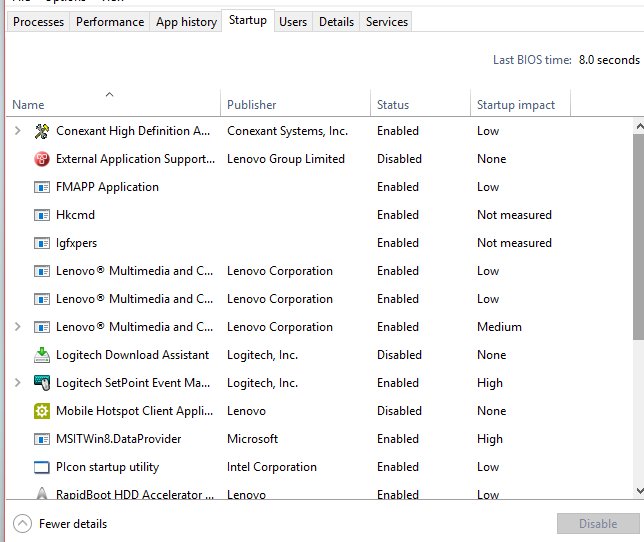
- Open Start > Settings > Apps > Startup and switch Off any entry you do not recognise or that points to that script.
- Right-click Start, select Task Manager, open the Startup apps tab and Disable the same entry if it appears there.
- Open the Windows Security app, select Virus & threat protection, then Scan options, choose Full scan and start it.
- Restart the PC and sign in. If the error box does not return, the fix worked.
If the script is one you wrote or a program you trust installed, the error is inside the script itself. Fix the line it reports, or reinstall that program.
Understanding Windows Script Host and Its Role
Windows Script Host provides an environment that runs scripts in several languages. It ships as two programs that run the same scripts in different ways.
| Part | What it is | What it means for the error |
|---|---|---|
| wscript.exe | The Windows-based host. Shows alerts, script errors and prompts as dialog boxes. It is the default host. | Error pop-ups on the desktop come from wscript.exe. |
| cscript.exe | The command-line host. Runs a script inside a console window. | Errors print as text in the console instead of a pop-up. |
| .vbs, .js, .wsf | The usual script file extensions. A .wsf file can use several scripting engines and run several jobs. | The file named in the error has one of these extensions. |
| VBScript | A scripting language that Windows Script Host runs. Microsoft deprecated it in October 2023. | It is a preinstalled feature on demand for now and will be removed from Windows later. |
| Windows Script Host Settings | A dialog that opens when you run wscript.exe with no script. It sets global properties for scripts on the PC. | Useful for checking that the host itself starts. |
Because VBScript is on the way out, a .vbs file that fails today may stop running entirely in a future Windows release. Ask the script's publisher for a replacement, usually written in PowerShell.
Diagnosing Windows Script Host Errors
Match what you see to a row. The script path and the moment the error appears tell you most of what you need.
| What you see | Likely cause | Go to |
|---|---|---|
| Error box right after you sign in, naming a script you do not recognise | A leftover startup entry or an unwanted script left by removed software or malware | Basic fixes, steps 2 to 5 |
| Error box when you double-click your own .vbs or .js file | A mistake inside the script, such as a bad line or a missing file it reads | Fix the reported line, or run it with cscript to read the full message |
| "There's no script engine for file extension" | The file uses an extension Windows Script Host has no engine registered for | Troubleshoot section below |
| "Windows Script Host access is disabled on this machine" | Script Host has been turned off on the PC by a setting or policy | Troubleshoot section below |
| Script files open in Notepad or another app instead of running | The .vbs or .js file association was changed | Basic fixes, step 6 |
| Errors keep coming back after every fix | Damaged system files or a deeper change to Windows | Advanced fixes, then restoring Windows 11 |
Basic Fixes for Windows Script Host Errors
Work through these in order and restart after each one. Most errors stop by step 4.
- Restart the PC once to rule out a one-off failure.
- Open Start > Settings > Windows Update and select Check for Windows updates. Select Download & install if updates are offered, then restart.
- Open Start > Settings > Apps > Startup and turn Off any entry tied to the script. If an entry shows We couldn't find this app, its target is missing; select the icon next to its toggle to see the registry location or file path holding the broken entry.
- Press Windows + R, type
shell:startupand press Enter. Delete any shortcut that points to the failing script. Repeat withshell:common startupfor entries that run for all users. - Open Windows Security > Virus & threat protection > Scan options, choose Full scan and run it. Remove anything it finds.
- If script files open in the wrong app, open Settings > Apps > Default apps, type
.vbs(or.js) in the search bar, select the result and choose the Windows-based script host.
Only delete a startup entry or script you can identify. If a program you use relies on the script, reinstall that program instead.
Advanced Fixes for Windows Script Host Errors
When the error names a system file, or scripts fail across the board, repair Windows' own files. Microsoft's order is DISM first, then System File Checker, because DISM supplies the files SFC uses for repairs.
- Select Search, type
cmd, right-click Command Prompt and select Run as administrator. Approve the prompt or enter the administrator password. - Type
DISM.exe /Online /Cleanup-image /Restorehealthand press Enter. It can take several minutes and uses Windows Update as its repair source. - When DISM finishes, type
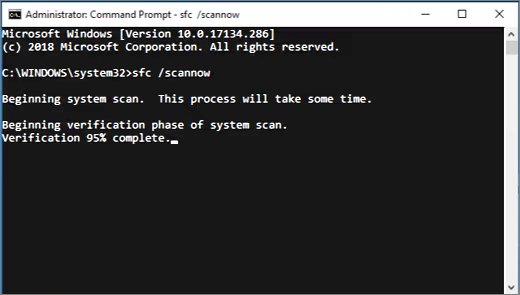
sfc /scannowand press Enter. Do not close the window until verification reaches 100%. - Read the result. "Windows Resource Protection did not find any integrity violations" means system files are fine. "Found corrupt files and successfully repaired them" means the repair worked.
- If you get "Windows Resource Protection could not perform the requested operation", start Windows in safe mode and run
sfc /scannowagain. - If malware is suspected and a full scan found nothing, open Windows Security > Virus & threat protection > Scan options, choose Microsoft Defender Antivirus (offline scan) and start it. Save your work first, because the PC restarts.
To check whether a background program triggers the script, perform a clean boot: run msconfig, select Hide all Microsoft services and Disable all on the Services tab, then disable startup apps in Task Manager and restart. If the error stops, turn items back on half at a time to find the culprit. The same DISM and SFC pair also repairs other missing-file errors, such as the vcruntime140.dll missing error.
Restoring Windows 11 to Fix Persistent Problems
If the error started after a recent install or change, System Restore rolls system files, registry settings and installed programs back without touching personal files. Reset this PC is the last step when nothing else works.
- Press Windows + R, type
rstrui.exeand press Enter. - In Restore system files and settings, select Next.
- Pick a restore point dated before the error first appeared. Select Show more restore points if the one you need is missing.
- Optionally select Scan for affected programs to see which apps the restore removes, then select Next and Finish. Windows restarts automatically.
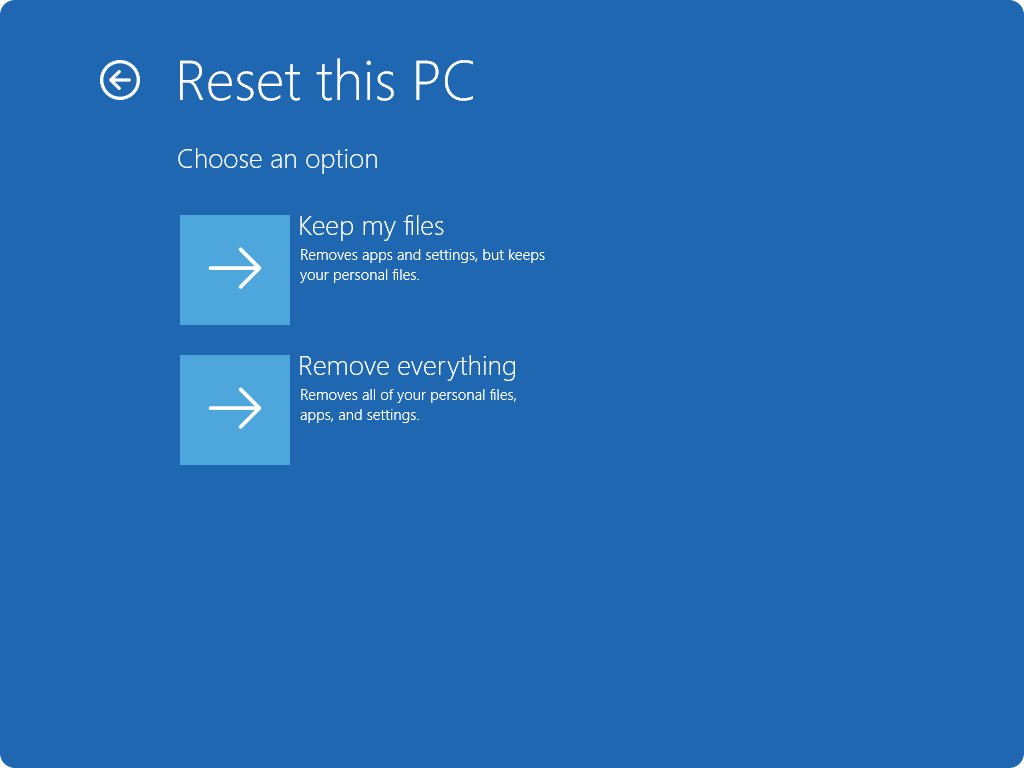
- If no restore point helps, back up your files, open Settings > System > Recovery and select Reset PC.
- Choose Keep my files to reinstall Windows while keeping documents, or Remove everything for a clean start. Pick Cloud download if local system files are damaged.
Keep my files still removes installed apps and settings. If the PC is encrypted, have your BitLocker recovery key ready before either option.
Preventative Measures and Best Practices
| Habit | Why it prevents the error |
|---|---|
| Do not open .vbs, .js or .wsf files from email or downloads you did not expect | Script files run as soon as you double-click them, which is how unwanted scripts land in startup folders |
| Keep Windows Security real-time protection on and let Windows Update install updates | Current protection and security intelligence stop most script-based malware before it runs |
| Uninstall programs through Settings instead of deleting their folders | A deleted folder leaves its startup entry behind, which then points at a missing script |
| Review Settings > Apps > Startup every few months | Unknown entries are easier to spot and remove before they cause errors |
| Keep System Protection on so restore points exist | A restore point is the quickest way back if a script change breaks something |
| Replace your own VBScript files with PowerShell over time | VBScript is deprecated and will be removed from Windows in a future release |
How to check the fix worked
- Restart the PC and sign in normally. No Windows Script Host box should appear.
- Open Start > Settings > Apps > Startup and confirm the entry you removed is gone or set to Off.
- Open Windows Security and select Protection history to confirm scans found nothing new or that threats were removed.
- Press Windows + R, type
wscriptand press Enter. The Windows Script Host Settings dialog should open, which shows the host itself starts.
Fix Windows Script Host when it is still not working
Windows Script Host error pops up at every startup
A startup entry points to a script that was deleted, moved or never belonged on the PC.
- Open Settings > Apps > Startup and look for an entry labelled We couldn't find this app.
- Select the icon next to its toggle to see the path or registry location that holds it.
- If it is a registry location, it is one of the Run keys:
HKCU\Software\Microsoft\Windows\CurrentVersion\Run,HKLM\Software\Microsoft\Windows\CurrentVersion\RunorHKLM\Software\Wow6432Node\Microsoft\Windows\CurrentVersion\Run. - Back up the registry, open Registry Editor, go to that key and delete only the value that points to the failing script.
- Restart and run a full scan in Windows Security.
"Windows Script Host access is disabled on this machine"
Script Host has been switched off on the PC, often by an administrator policy on work or school devices.
- On a work or school PC, contact your IT administrator. The block is deliberate and they control it.
- On a personal PC, think about when scripts last worked. If the change is recent, run System Restore to a point before it.
- If a program you need requires scripts, ask its publisher whether a version without VBScript exists.
"There's no script engine for file extension"
The file uses an extension that has no registered script engine, or the association for a standard extension was changed.
- Check the file's extension. Windows Script Host runs .vbs, .js and .wsf files by default.
- For a script with a custom extension, run it from Command Prompt with
cscriptand the/e:parameter, which names the engine for that one run. The association is not saved, so repeat/e:every time. - For a standard .vbs or .js file, reset its default app in Settings > Apps > Default apps.
- If the association will not stick, run DISM and
sfc /scannowas shown in the advanced fixes.
Windows Script Host not working at all
System files are damaged, or VBScript is missing from the PC.
- Run DISM and then
sfc /scannowfrom an administrator Command Prompt. - Install pending updates from Settings > Windows Update.
- If only .vbs files fail and .js files run, the problem is VBScript itself. It is deprecated, so move the task to PowerShell or ask the script's publisher for an update.
- If nothing runs, use System Restore or Reset PC with Keep my files.
When to Seek Professional Help
| Situation | Who to contact | Why |
|---|---|---|
| Work or school PC shows "access is disabled" | Your IT administrator | Script Host is blocked by policy and only the admin can change it |
| A business app's own script throws the error | The app's publisher | The script belongs to them, and they know whether a VBScript-free version exists |
| Scans keep finding threats or the error returns after a restore | Microsoft Support at support.microsoft.com/contactus | A persistent infection or deeper Windows damage needs guided repair |
| SFC reports files it cannot fix and a reset is not an option | Microsoft Support or a trusted local technician | Manual file replacement is error-prone and easy to get wrong |
Frequently Asked Questions
How do I fix a Windows Script Host error?
Read the script path in the error box, then turn off the startup entry that runs it in Settings > Apps > Startup and run a full Windows Security scan. If the error continues, run DISM and sfc /scannow, then System Restore.
How do I fix Windows Script Host itself?
Repair it with Windows' own tools. Run DISM.exe /Online /Cleanup-image /Restorehealth and then sfc /scannow from an administrator Command Prompt. Both restore damaged system files that the script hosts wscript.exe and cscript.exe depend on.
How do I solve a Windows Script Host error that appears at startup?
A startup error almost always means a startup entry points to a missing or unwanted script. Remove it in Settings > Apps > Startup, check the shell:startup folder, and scan with Windows Security. Restart to confirm the box is gone.
How do I remove a Windows Script Host error for good?
Delete the cause, not the message. Remove the startup entry or shortcut that launches the script, delete the unwanted script file, and scan for malware. Uninstall programs through Settings in future so they do not leave broken entries behind.
How do I disable Windows Script Host?
Microsoft's current consumer support pages do not document a switch for it. On managed PCs, administrators block script hosts with application control tools such as AppLocker. If you only want an error to stop, remove the script's startup entry instead of disabling the host.
How do I stop Windows Script Host from running a script?
Right-click Start, open Task Manager and end the wscript.exe or cscript.exe process. That stops the current run only. To stop it running again, remove the startup entry or shortcut that launches the script.
Is Windows Script Host a virus?
No. wscript.exe and cscript.exe are part of Windows. Malware can still use them to run harmful scripts, so an unknown script in a startup folder deserves a full scan with Windows Security.
Will VBScript errors stop when VBScript is removed?
The errors will turn into scripts that do not run at all. Microsoft deprecated VBScript in October 2023 and keeps it as a preinstalled feature on demand before removing it, so replace important .vbs scripts with PowerShell.
Is a Windows Script Host error the same as an app's script error?
No. A Windows Script Host error comes from wscript.exe running a .vbs or .js file. Script errors inside apps, such as the Foxit Reader script error, come from the app's own engine and need that app's fix.