To delete a Telegram account, sign in at my.telegram.org with your phone number, enter the code Telegram sends to your app, and confirm the deletion.
This guide covers the instant route on desktop and phone, the self-destruct timer, logging out instead, what happens to your data, and fixes when the code never arrives.
How to delete a Telegram account immediately
Telegram's own instructions send you to its deactivation page, and they recommend a computer browser rather than a phone browser. You also need Telegram open on at least one signed-in device, because the confirmation code arrives there.
- On a computer, open a browser and go to telegram.org/deactivate, which redirects to my.telegram.org.
- Type your phone number in international format, for example +(country code)(carrier code)(number), and select Next.
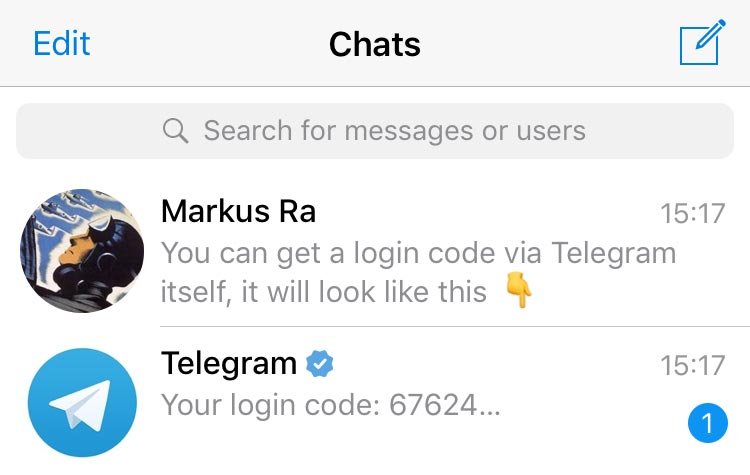
- Open Telegram on your phone or another signed-in device and read the code in the chat from the verified Telegram profile.
- Type that code on the web page to sign in.
- Choose the delete account option on the page that opens.
- Confirm the deletion when the page asks you to.
Confirming wipes your messages, contacts and cloud data. It cannot be undone, so finish the export and Premium steps in the tips section first.
The code can arrive in any signed-in session, including Telegram Web on a PC or Mac.
Telegram account deletion methods compared
Only two routes actually remove the account. The rest keep it alive while hiding it from one device or trimming the data stored with it.
| Your situation | Use this | What happens to the account |
|---|---|---|
| You want the account gone today | Deactivation page at my.telegram.org | Deleted on confirmation, with all cloud data |
| You no longer have access to any Telegram session | Self-destruct after inactivity | Deleted once you stay offline for the set period (18 months by default) |
| You want a break but may return | Log out on each device | Kept, with cloud chats intact; secret chats on that device are lost |
| You want less data stored, not a closed account | Delete synced contacts, drafts, chats and call history | Kept, with the chosen data removed |
| You only want the app off your phone | Uninstall the app | Kept; the inactivity timer still runs |
| You changed your phone number | Settings > your phone number > Change Number | Kept, moved to the new number with all chats |
Quick summary of Telegram account deletion
| Question | Answer |
|---|---|
| Where do you delete the account? | The deactivation page at my.telegram.org |
| How does the confirmation code arrive? | Inside Telegram, not by SMS |
| Can it be undone? | No. Signing up again creates a new, empty account |
| What is deleted? | Messages, media, contacts and every other item stored in the Telegram cloud |
| What survives? | Copies of your messages held by the people you sent them to, and groups you created |
| What if you just stop using it? | The account self-destructs after 18 months offline by default |
What is Telegram?
Telegram is a cloud-based messaging app. Your cloud chats are stored encrypted on Telegram's servers and sync to every device signed in with your phone number.
| Feature | Why it matters when you delete the account |
|---|---|
| Phone number as the account ID | Each number is a separate account, and you need it to reach the deactivation page |
| Cloud chats on Telegram's servers | Deleting the account removes them from the cloud, not from your contacts' copies |
| Secret chats | Device-specific and end-to-end encrypted; they are lost when you log out of that device |
| Many devices at once | Any signed-in device can receive the deletion code |
| Telegram Premium | An optional paid subscription that may need cancelling separately |
Why you might want to delete your Telegram account
The reasons to delete a Telegram account usually fall into a few groups. Some of them have a lighter fix that keeps your chat history.
| Reason | Lighter alternative | Delete the account? |
|---|---|---|
| You moved to another messenger for good | None needed | Yes |
| You want Telegram to hold less of your data | Delete synced contacts, drafts, chats and payment info | Only if trimming is not enough |
| You get messages from strangers | Tighten Settings > Privacy and Security, such as who sees your phone number | Usually not |
| You switched to a new phone number | Change the number in Settings | No |
| You want a break from notifications | Log out or mute chats | No |
| You lost the phone and fear someone reads your chats | Terminate the old session from another device and turn on Two-Step Verification | Only if you cannot regain control |
Telegram is often one of several accounts closed in one sitting, alongside steps like deleting a Snapchat account or closing a Yahoo Mail account.
Why is deleting Telegram difficult?
The process has three steps, yet each one trips people up for a specific reason.
| Obstacle | Why it happens | What to do |
|---|---|---|
| The instant delete lives on a website | Telegram routes immediate deletion through its deactivation page | Open my.telegram.org in a browser |
| No SMS arrives | The deletion code is sent via Telegram, not SMS | Check the chat from the verified Telegram profile in your app |
| Switching between a phone browser and the app | Telegram recommends a non-mobile browser for this process | Use a computer for the web page and your phone for the code |
| No signed-in device | The account is tied to the phone number and an active session | Recover the number through your carrier, or wait for self-destruction |
| Fear of losing chats | Deletion is permanent and irreversible | Export your data from the Telegram Desktop app first |
Helpful tips before you delete your Telegram account
Work through these before you open the deactivation page. None of them can be done after the account is gone.
- Export your chats: in Telegram Desktop, go to Settings > Export Telegram data, pick what to save, and choose JSON or HTML.
- Export a single chat instead by opening its … menu and choosing Export chat history.
- Cancel Telegram Premium if you bought it through the App Store or Google Play, because those stores can keep charging after the account is deleted.
- On iPhone, cancel it in iOS Settings > Apple ID Settings > Subscriptions; on Android, open Google Play and go to Payments & subscription > Subscriptions.
- Make sure every group and channel you created has admins you trust, because they lose their creator but admins keep their rights.
- Save phone numbers or usernames of contacts you want to keep reaching, since your Telegram contact list is deleted.
- If you only changed numbers, use Settings > your phone number > Change Number instead of deleting.
A Premium subscription bought through @PremiumBot stops on its own when the account is deleted. The unused part of the billing period is not refunded.
Step-by-step guide to delete your Telegram account on iPhone or Android
The same deactivation page works in Safari on iPhone or Chrome on Android. The tricky part is switching to the Telegram app for the code and back without losing the page.
- Open your phone's browser and go to my.telegram.org.
- Enter your number with the country code and tap Next.
- Switch to the Telegram app and open the chat from the verified Telegram profile.
- Copy the confirmation code from that chat.
- Switch back to the browser tab, paste the code and sign in.
- Choose the delete account option and confirm.
If the page keeps failing on your phone, run the same steps on a computer, which Telegram recommends for this process.
How to delete a Telegram account using self-destruction settings
Telegram deletes any account that stays offline for a set period. The default is 18 months, and you can shorten it from Settings in the app.
- Open Telegram and go to Settings.
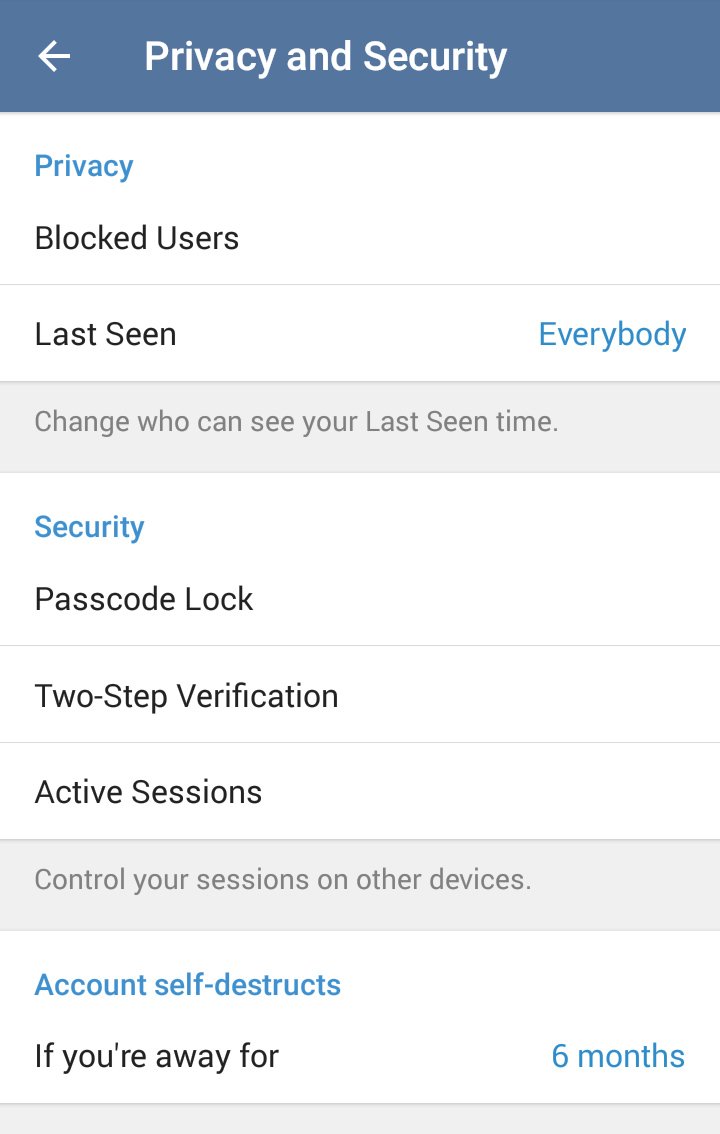
- Open Privacy and Security.
- Find the account self-destruction option, which shows the current inactivity period.
- Pick the shortest period you are comfortable with.
- Log out or uninstall Telegram on every device and stop opening it.
- Wait for the full period to pass; the account and its cloud data are then deleted.
Opening Telegram on any device before the period ends counts as coming online and restarts the clock. Use this route when you cannot receive a code for the instant route.
How to log out of Telegram without deleting your account
Logging out keeps your account and every cloud chat. It removes all secret chats on that device, so clear them first if you want them gone on the other side too.
- On iPhone, open Settings, tap Edit, then tap Log out.
- On Android or Telegram Desktop, open Settings, tap the … menu in the top-right corner, then choose Log out.
- To end a session on a device you no longer hold, go to Settings > Devices (or Privacy and Security > Active Sessions) on another device and terminate it.
- Sign back in later with the same phone number to get your cloud chats back.
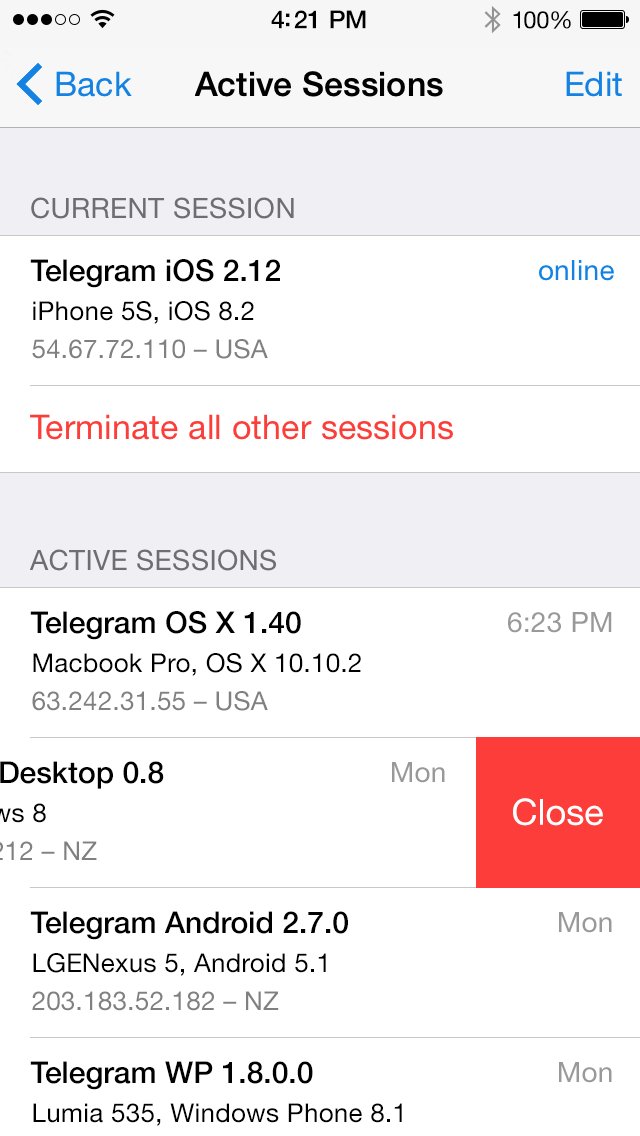
Alternative methods: remove Telegram data without deleting the account
Telegram lets you delete most of your data while keeping the account. On iPhone, the data options sit one level deeper, under Data Settings.
- To delete a chat for both sides, press and hold it, tap the delete icon, and tick the option to delete for both parties.
- Go to Settings > Privacy and Security (on iPhone, then Data Settings) and choose Delete Synced Contacts.
- In the same place, choose Delete All Cloud Drafts; on Android this option is in Settings > Data and Storage.
- Turn off Suggest Frequent Contacts to clear suggestion data about people and bots you message often.
- Choose Clear Payment & Shipping Info to remove stored payment tokens and shipping details.
- Delete your call log from Calls with Delete All Calls, and remove old profile photos from your profile picture menu.
Deleting the Telegram app vs. deleting your Telegram account
| Uninstall the app | Delete the account | |
|---|---|---|
| Messages and media in the cloud | Kept | Deleted |
| Contacts and groups list | Kept | Deleted |
| Other signed-in devices | Keep working | Lose access |
| Telegram Premium billing | Continues | Stops only for @PremiumBot purchases |
| Coming back later | Reinstall and sign in to get everything back | Starts a new, empty account |
| Inactivity timer | Keeps running if no device comes online | Not relevant |
What happens to your data after Telegram account deletion
Deletion flushes your data from Telegram's cloud, but copies other people hold are outside your control.
| Data | After deletion |
|---|---|
| Your messages, media and contacts in the cloud | Deleted |
| Messages you sent to other people | They keep their copies |
| Groups and channels you created | Keep running without a creator; admins keep their rights |
| Login email address, if you set one | Removed with the account |
| Your phone number | Can register again, but as a brand-new user |
| Contacts who have your number saved | Are notified if you sign up again, and see a new, empty chat |
Still not working? Fix Telegram account deletion problems
No SMS code arrives for the deactivation page
The deletion code is sent through Telegram itself, never by SMS.
- Open Telegram on any signed-in phone, tablet or computer.
- Open the chat from Telegram, the verified profile with the blue check.
- Type that code on the deactivation page.
You cannot delete the Telegram account without login access
Telegram identifies accounts only by phone number and active sessions, so it cannot verify you otherwise.
- If the SIM was lost or stolen, ask your carrier to block it and issue a new SIM with the same number.
- Sign in to Telegram with the restored number.
- Delete the account from the deactivation page.
- If you cannot recover the number, stay offline and let the account self-destruct after its inactivity period.
The page rejects your phone number
The number is not in international format.
- Start with + and your country code.
- Add the carrier or city code, then the rest of your number.
- Use the number the account is registered to, not a newer number you have not moved to Telegram.
Deletion keeps failing on iPhone or Android
Telegram recommends a non-mobile browser for this process.
- Open my.telegram.org on a computer instead, as Telegram recommends.
- Read the code on your phone and type it on the computer.
- Confirm the deletion on the computer.
Telegram Premium still charges after the account is deleted
App Store and Google Play subscriptions are billed by Apple or Google, not by Telegram.
- On iPhone, open iOS Settings > Apple ID Settings > Subscriptions and cancel Telegram Premium.
- On Android, open Google Play, tap your avatar and go to Payments & subscription > Subscriptions.
- Cancel the Telegram Premium subscription there.
Is deleting Telegram the right choice?
Delete the account only if you are leaving Telegram for good; for a break, a new number or privacy worries, log out, change the number or trim your data instead. Deletion is irreversible. Your history, contacts and group ownership cannot be restored, and a new sign-up with the same number starts from an empty account.
FAQs on how to delete a Telegram account
How do I delete my Telegram account permanently?
Go to my.telegram.org, enter your phone number, type the code Telegram sends to your app, and confirm the deletion. This permanently removes your messages, contacts and cloud data, and it cannot be undone.
Can I delete my Telegram account instantly?
Yes. The deactivation page at my.telegram.org deletes the account as soon as you confirm. The self-destruct setting is the slow route, deleting the account only after a set period offline.
How do I delete my Telegram account on iPhone?
Open my.telegram.org in Safari, enter your number, then copy the code from the Telegram chat in the app and paste it on the page. Confirm the deletion. A computer browser is easier, because you avoid switching apps.
How do I delete my Telegram account on Android?
Open my.telegram.org in Chrome or another browser, enter your number, and read the code in the Telegram app. Enter it on the page and confirm. The steps match iPhone, because deletion happens on the website.
How do I delete my Telegram account on desktop?
Open my.telegram.org in any desktop browser, enter your number in international format, and read the code in Telegram on your phone or Telegram Desktop. Enter the code, choose the delete option, and confirm.
Can I delete my Telegram account in the app?
The app offers the self-destruct setting under Settings > Privacy and Security, which deletes the account after a period offline. For immediate deletion, Telegram's instructions point to the deactivation page at my.telegram.org.
Can I delete my Telegram account without logging in?
No. The deletion code is delivered inside Telegram, so you need at least one signed-in device. Without one, recover your number through your carrier, or let the account self-destruct after its inactivity period.
Can I delete my Telegram account with an SMS code?
No. The deactivation page sends its confirmation code via Telegram, not SMS. Look for it in the chat from the verified Telegram profile on any device where you are signed in.
Why can't I delete my Telegram account?
The usual causes are waiting for an SMS that never comes, having no signed-in device, or a number typed without the country code. The code arrives in the Telegram app, and the number must start with + and the country code.
Can I recover a deleted Telegram account?
No. Telegram account termination is irreversible. If you sign up again with the same number, you appear as a new user without your old history, contacts or groups.
Where is the Telegram delete account link?
The link is telegram.org/deactivate, which opens the sign-in page at my.telegram.org. Telegram's FAQ and privacy policy both point to this deactivation page for account deletion.
Does deleting Telegram cancel Telegram Premium?
Only if you subscribed through @PremiumBot, and the unused period is not refunded. Subscriptions bought through the App Store or Google Play must be cancelled in your Apple or Google account, or billing can continue.
The bottom line on deleting Telegram
Export your chats, cancel any store-billed Premium plan, then delete the account from my.telegram.org on a computer with Telegram open on your phone for the code. That order saves everything you might need later, stops billing Telegram cannot cancel for you, and avoids the browser-switching that breaks the code on phones.