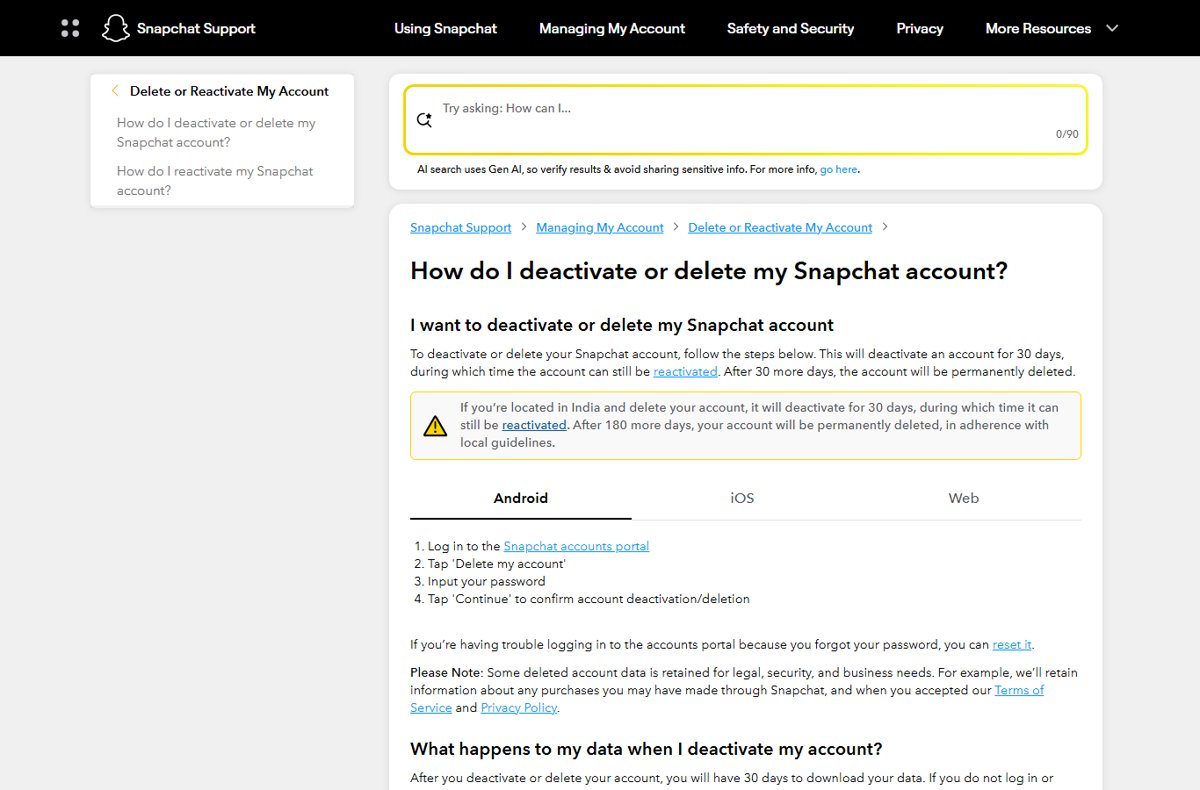
To delete your Snapchat account permanently, log in at accounts.snapchat.com, select Delete my account, enter your password and select Continue.
Snapchat first deactivates the account for 30 days and then deletes it for good, so this guide covers backing up your data, the phone and web routes, cancelling the deletion and fixing a portal that refuses you.
The fastest way to delete your Snapchat account
The accounts portal works the same in any browser, on a phone or a computer. You need your username and password.
- Open accounts.snapchat.com in a browser and log in to your Snapchat account.
- Select Delete my account.
- Type your password.
- Select Continue to confirm the deactivation and deletion.
- Stay logged out of the Snapchat app for the next 30 days.
Logging back in during those 30 days reactivates the account and cancels the deletion.
Which deletion route should you use?
| Your situation | Use this | Why |
|---|---|---|
| You are on a computer | accounts.snapchat.com in a browser | No app needed, same steps on any system |
| You use Snapchat on Android | Settings > Account Actions > Delete Account | The app hands you straight to the accounts portal |
| You use Snapchat on iPhone | accounts.snapchat.com in Safari or another browser | Snapchat lists the portal steps for iOS |
| You forgot your password | Reset it from accounts.snapchat.com first | The portal asks for the password before it deletes |
| You only want a break | Delete, then log back in within 30 days | Deletion starts as a 30-day deactivation |
Back Up Your Snapchat Data Before Deleting
Snapchat lets you download your data for 30 days after you delete, but requesting it first is safer. Exports can take up to 7 days to prepare, and large ones take longer.
- Log in at accounts.snapchat.com, or open the app's Settings and select My Data.
- Select My Data.
- Choose the data to include, and turn on Export your Memories if you want your saved Snaps.
- Pick a date range, or turn the range off to receive all data.
- Confirm the email address for the notification and select Submit.
- When the email arrives, select See exports, then Download, and save the zip file.
Open the zip on a computer, then open index.html and select Memories to download your saved Snaps one by one or all at once.
The export can include login history, profile data, Snap history, saved chats, Memories, purchases, friends, location, search history and Bitmoji.
How to Delete Your Snapchat Account on iPhone or Android
On Android, the Settings screen links straight to the deletion page. On iPhone, Snapchat's own instructions send you to the accounts portal in a browser.
- Open Snapchat and tap your profile icon, then tap the gear button to open Settings.
- Scroll down to Account Actions and tap Delete Account.
- Log in to the Snapchat accounts portal when it opens.
- Tap Delete my account.
- Enter your password and tap Continue.
- On iPhone, if the app does not open the portal, go to accounts.snapchat.com in Safari and repeat steps 3 to 5.
Deleting the account does not remove the app. Uninstall Snapchat afterwards so you do not log in by accident and reactivate it.
How to Delete Your Snapchat Account From a Web Browser
- Go to accounts.snapchat.com in Chrome, Edge, Safari or Firefox.
- Log in with your username or email and your password.
- Select Delete my account.
- Enter your password again.
- Select Continue to confirm.
Log out of Snapchat on every other phone or tablet too. Any later login within 30 days counts as reactivation.
What Happens When You Delete Your Snapchat Account
Deletion runs on a fixed timeline. Know these dates before you confirm, because a permanently deleted account cannot come back.
| Time after you delete | What happens | Outside India vs India |
|---|---|---|
| Days 1 to 30 | Account is deactivated; you can reactivate and download data | Same in both |
| After day 30 | Account moves to permanent deletion | Deleted after 30 more days; in India after 180 more days |
| Data not downloaded | Data is permanently deleted | After 60 days; in India after 210 days |
| Retained records | Purchase records and Terms of Service acceptance are kept | Same in both |
While the account is deactivated, you cannot change its password or log in with your email address or phone number. Only the username works.
How to Cancel Account Deletion During the 30-Day Window
Only you can reactivate the account. Snapchat Support cannot do it for you.
- Open the Snapchat app.
- Log in with the username of the deactivated account, not your email or phone number.
- Enter the password the account had when you deleted it.
- Wait for the account to reactivate, then check your friends list and Memories.
If you forgot the password, you cannot reset it while the account is deactivated. Past the 30 days, the account cannot be reactivated at all.
What to Check After Your Snapchat Account Is Permanently Deleted
Run these checks once the 30-day deactivation has passed. They confirm the deletion went through and nothing you need was lost.
- Confirm the data export zip opens and that
index.htmlshows your Memories and chats. - Try to log in once more only after the full deletion period, since an earlier login reactivates the account.
- Uninstall Snapchat from every phone and tablet you used.
- Check that no other device, such as an old phone or tablet, still has Snapchat installed and logged in.
- Keep the export somewhere other than the phone, because Snapchat cannot send it again once the account is gone.
Why can't you delete your Snapchat account?
Snapchat won't let me delete my account because the password is wrong
The portal asks for your current password before it confirms the deletion.
- Go to accounts.snapchat.com.
- Use the password reset option on the login page.
- Log in with the new password and select Delete my account again.
I can't log in to delete my account because it is locked
Snapchat locks accounts for Community Guidelines violations, suspicious activity or a compromise.
- Read the message shown when you log in, since it names the type of lock.
- Wait out a temporary lock before trying the accounts portal again.
- Follow Snapchat's account-locked help page for the lock type you see.
There is no Delete Account option in the app
Snapchat's iPhone instructions route deletion through the web portal instead of an in-app button.
- Open a browser on the phone or a computer.
- Go to accounts.snapchat.com and log in.
- Select Delete my account and confirm with your password.
I deleted the app but my account is still active
Uninstalling the app leaves the account untouched.
- Open accounts.snapchat.com in a browser.
- Log in and select Delete my account.
- Enter your password and select Continue.
My account came back after I deleted it
A login within 30 days, from any device, reactivates the account.
- Log out of Snapchat on every device, including old phones and tablets.
- Delete the account again from the accounts portal.
- Uninstall the app so it cannot log in automatically.
Frequently Asked Questions
How do I delete my Snapchat account?
Log in at accounts.snapchat.com, select Delete my account, type your password and select Continue. On Android you can start from Settings, Account Actions, Delete Account. The account is deactivated for 30 days and then deleted.
How do I completely delete a Snapchat account?
Delete it from the accounts portal and then stay logged out for 30 days. After that window, Snapchat deletes the account permanently, 30 days later outside India and 180 days later in India. A permanently deleted account cannot be reactivated.
Does deleting the Snapchat app delete my account?
No. Uninstalling the app only removes it from the phone, and the account keeps working. To delete the account, use Delete my account at accounts.snapchat.com or Delete Account under Account Actions in the app's Settings.
Why can't I delete my Snapchat account?
The usual causes are a forgotten password or a locked account, because the portal needs you logged in and asks for your password. Reset the password at accounts.snapchat.com, or resolve the lock, then try Delete my account again.
Why won't Snapchat let me delete my account on iPhone?
Snapchat's iPhone instructions use the accounts portal rather than an in-app button. Open accounts.snapchat.com in Safari, log in, select Delete my account, enter your password and select Continue.
How long does Snapchat take to delete an account?
The account is deactivated for 30 days, then deleted after 30 more days. In India, deletion comes 180 days after the deactivation period. Data you have not downloaded is deleted after 60 days, or 210 days in India.
Can I get my Snapchat account back after deleting it?
Yes, within 30 days. Log in to the app with the account's username and password to reactivate it. Snapchat Support cannot reactivate it for you, and a permanently deleted account cannot be restored.
Does Snapchat keep any data after deletion?
Yes, some. Snapchat keeps certain data for legal, security and business needs, such as records of purchases and when you accepted its Terms of Service and Privacy Policy.
Bottom Line
Request your data export first, then delete the account at accounts.snapchat.com and stay logged out everywhere for the full 30 days. Exports can take a week to arrive, and any login during the deactivation window quietly cancels the deletion.







Cameo Snap: a comprehensive guide for Snapchat Cameos - Techdows
[…] want Snapchat holding your face for AI features. If you are leaving the app altogether, you can delete your Snapchat account permanently […]