Trend Micro sells its home security software as Maximum Security, and the installer comes straight from the Trend Micro consumer download page. Windows 11 and Windows 10 take a 285 MB package, and a Mac takes a 103 MB disk image.
The current Windows release is version 17.9, built for x64 and for Windows on Arm. Trend Micro publishes a SHA-256 checksum next to each package, so you can confirm the file before running it.
This guide covers the official links, the install steps on both platforms, the checksum check, the system requirements, upgrades, removal and fixes for installs that stall.
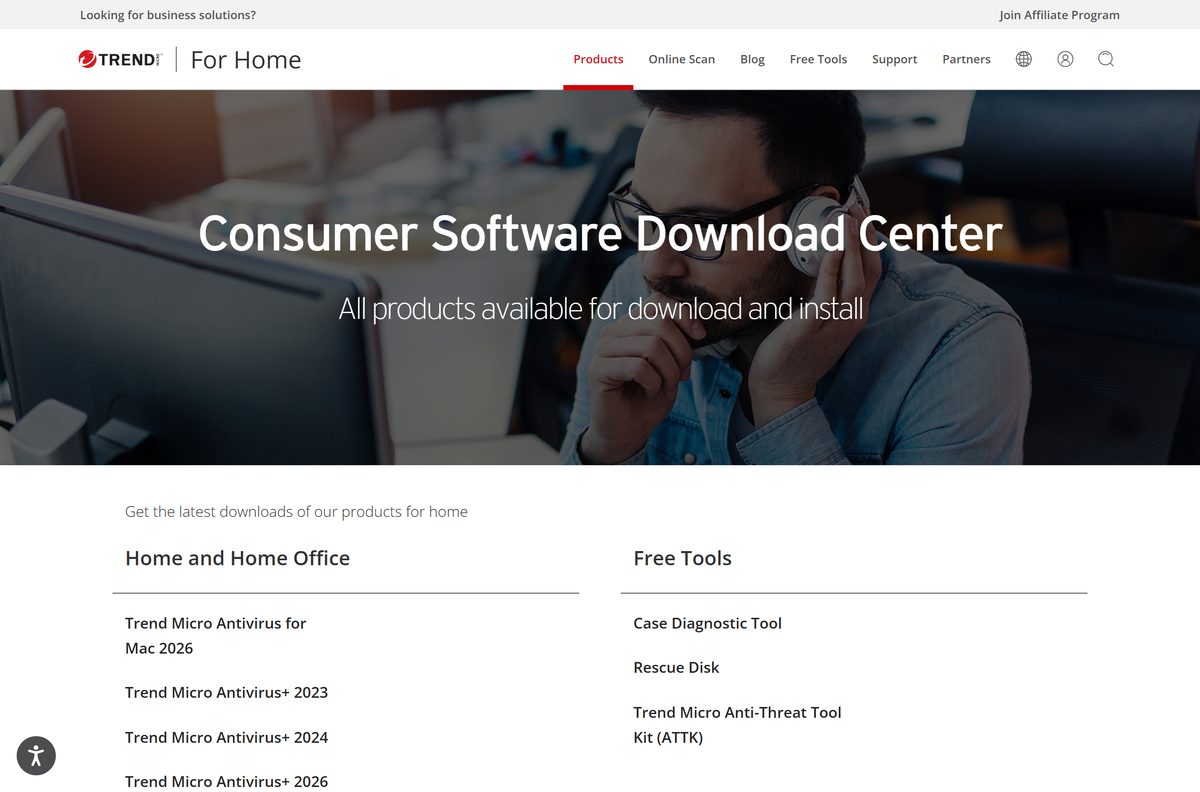
Which Trend Micro download do you need?
Match the row to the machine in front of you. The Windows packages are not interchangeable, and the Mac image is a separate product inside the same subscription.
| Your device | Download | Size |
|---|---|---|
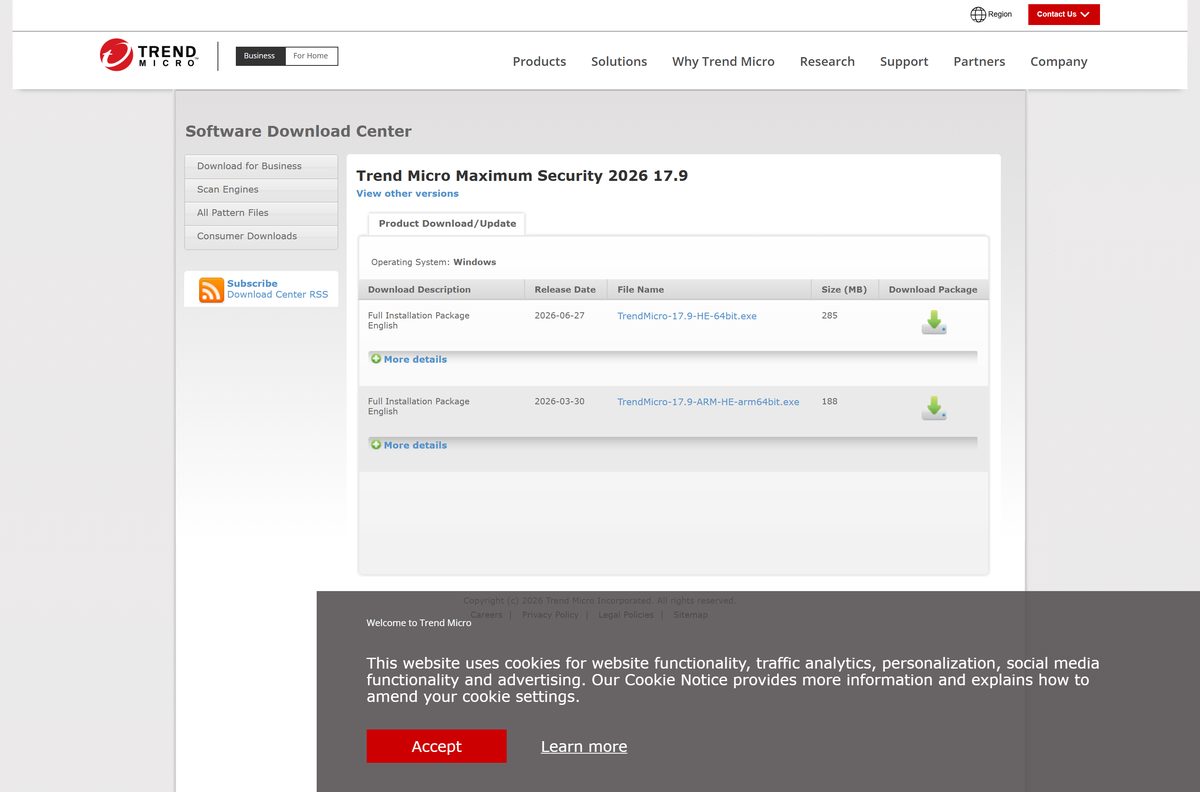
| Windows 11 or Windows 10 on an Intel or AMD PC | TrendMicro-17.9-HE-64bit.exe | 285 MB |
| Windows 11 on a Snapdragon or other Arm PC | TrendMicro-17.9-ARM-HE-arm64bit.exe | 188 MB |
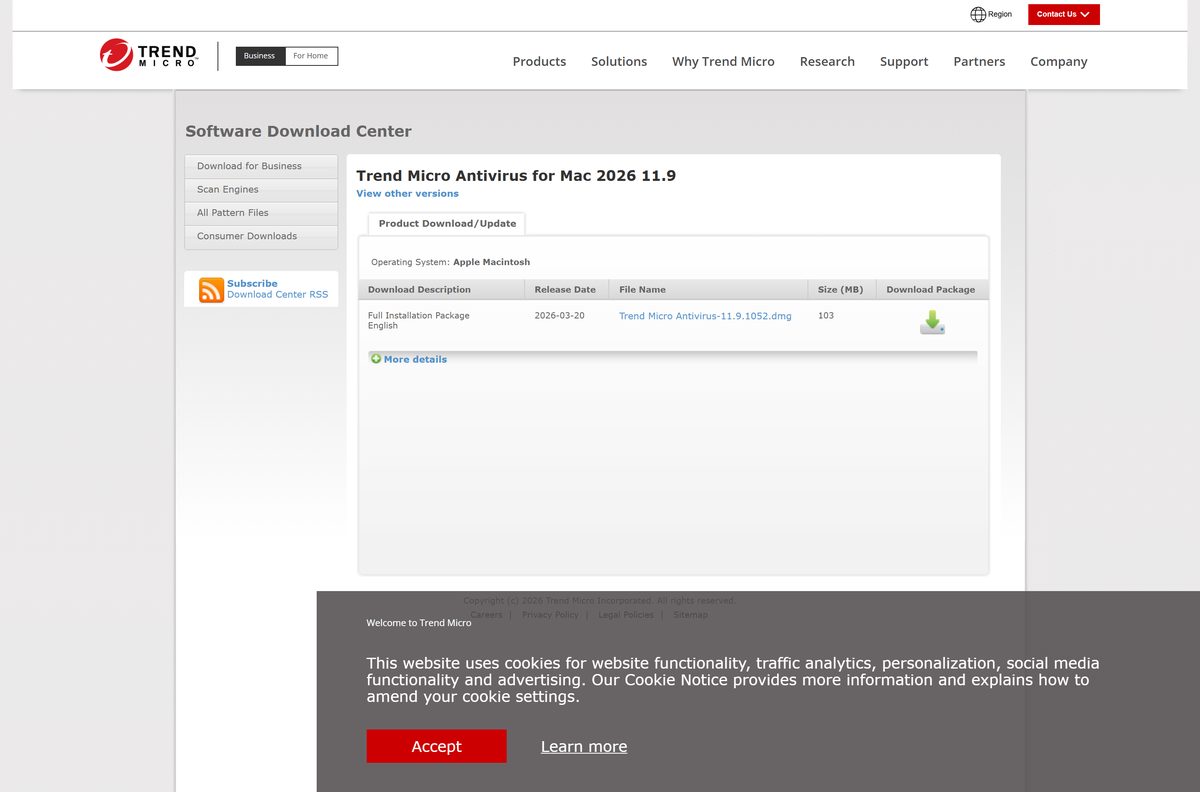
| Mac running macOS 11 or later | Trend Micro Antivirus-11.9.1052.dmg | 103 MB |
| Chromebook, Android phone or iPhone | Consumer downloads page | Varies by store |
There is no 32-bit Windows package. Trend Micro lists only the x64 and Arm64 builds for the 2026 release.
Download Trend Micro Maximum Security from the official download page
Both Windows files are labelled Full Installation Package on the download page, and both carry a release date you can read before you click.
- TrendMicro-17.9-HE-64bit.exe — 285 MB · x64, released 27 June 2026
- TrendMicro-17.9-ARM-HE-arm64bit.exe — 188 MB · Arm64, released 30 March 2026
- Maximum Security 2026 download entry — Release dates and SHA-256 values
- Trend Micro consumer downloads — Every home edition, including older builds
Keep the downloads page bookmarked rather than the file link. The file path changes with each release, and the page always points at the current one.
How to install Trend Micro Maximum Security on Windows 11 and 10
Close any other security suite first. Windows runs one real-time antivirus engine at a time, and setup stops when it finds a second one.
- Open the Trend Micro consumer downloads page and select Trend Micro Maximum Security 2026.
- Download TrendMicro-17.9-HE-64bit.exe on an Intel or AMD PC, or TrendMicro-17.9-ARM-HE-arm64bit.exe on a Windows on Arm PC.
- Double-click the saved file and select Yes at the User Account Control prompt.
- Type the serial number from your order confirmation, or start the trial if you have no serial number yet.
- Select Agree and Install to accept the licence agreement and begin the installation.
- Wait while setup copies the files and registers the program. A 285 MB package takes several minutes on a mechanical drive.
- Enter the email address for your Trend Micro account when setup asks for it.
- Select Finish, then open the console from the notification area and run the first scan.
Restart the PC if setup asks. The real-time engine loads its drivers during the next boot.
How to verify the Trend Micro installer before you run it
Trend Micro prints a SHA-256 value under More details beside each package. Two minutes at a prompt confirms the file arrived whole.
- Save the installer without running it, and note the folder it landed in.
- Open Windows Terminal in that folder, or open Command Prompt and change to it.
- Run certutil -hashfile TrendMicro-17.9-HE-64bit.exe SHA256 .
- Compare the result with dd0431ee153b4f3335a92f550227feba391b7269c362a1bdb9f7dc1378d22371 for the x64 package.
- Use c6bb1135ff51cfa829c69bb76e86fcfaff23101dbe932276ea85d1c85b0f5850 instead when you took the Arm64 package.
- On a Mac, run shasum -a 256 “Trend Micro Antivirus-11.9.1052.dmg” in Terminal and expect 1dd8cf68e68faff1874cc886daf319e6e1e692fd736331c48f38ca4e873c0fa7 .
- Delete the file and download it again if the two strings differ in any character.
Which Trend Micro download do you need for your Mac?
The Mac side of the subscription installs Antivirus for Mac 2026, version 11.9. One image covers both Apple silicon and Intel hardware.
| Your Mac | Download | Size |
|---|---|---|
| Apple M1, M2, M3 or M4 on macOS 11 or later | Trend Micro Antivirus-11.9.1052.dmg | 103 MB |
| Intel Mac on macOS 11 or later | Trend Micro Antivirus-11.9.1052.dmg | 103 MB |
| Mac on macOS 10.15 or earlier | Older Mac builds | Use View other versions |
Open the image, run the installer inside it, then grant Full Disk Access when macOS asks. Scanning is limited until that permission is granted.
Is Trend Micro Maximum Security free?
Trend Micro also publishes free tools, including HouseCall and the browser-based online scan, and those are separate from the paid suite.
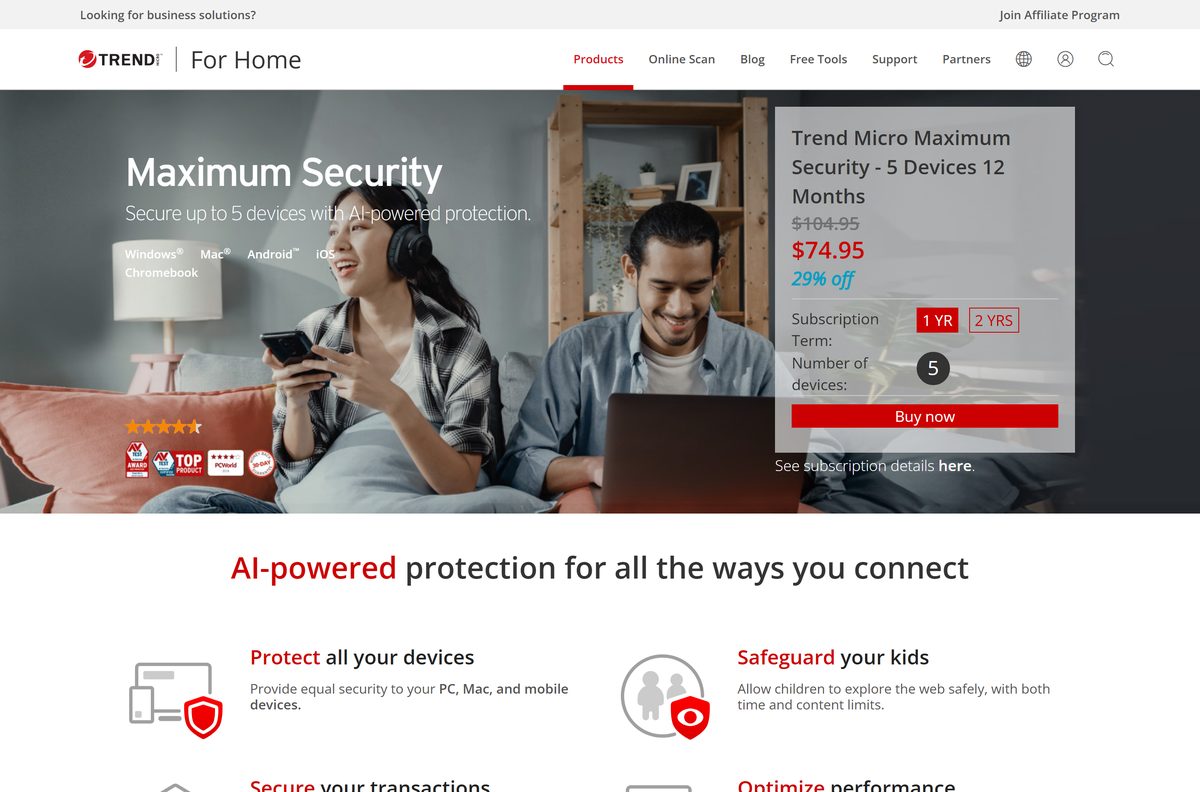
No. Maximum Security is a paid subscription, and Trend Micro links a free trial from its consumer product pages. A one-year plan for five devices is $74.95 against a list price of $104.95, and two years is $99.95. Antivirus+ Security covers one Windows PC for $29.95, and Internet Security covers three for $59.95. Anything advertised as a free full version of the suite is not from Trend Micro.
Should you install the 2026 build or an older Trend Micro version?
The downloads page still lists the 2023 and 2024 packages alongside the 2026 release, which is version 17.9.
Install the 2026 build unless a support case tells you otherwise. It is the release Trend Micro currently ships, it is the only one offered for Windows on Arm, and an existing subscription serial number activates it. The older entries exist so an in-place reinstall can match a machine that is already running them.
How to check your Trend Micro version and update it
The program updates itself in the background, so a version behind the download page usually means the update service has been blocked or switched off.
- Open Settings on Windows 11 and select Apps, then Installed apps.
- Find the Trend Micro entry and read the version number beside it.
- Compare that number with the version shown on the Maximum Security download entry.
- Download the current package when your number is lower.
- Run the downloaded file over the existing installation. Setup keeps the serial number and the settings.
- Restart the PC when setup asks, then confirm the version again in Installed apps.
Check the Trend Micro Maximum Security system requirements
Trend Micro states operating system requirements per platform. The suite covers five devices in any mix of these systems.
| Field | Value |
|---|---|
| Software | Trend Micro Maximum Security |
| Developer | Trend Micro Incorporated |
| Latest version | 17.9 (2026 release) |
| Windows | Windows 10 and Windows 11 |
| Mac | macOS 11 or later |
| Other platforms | Chrome OS 79 or later, Android 5.0 or later, iOS 13.0 or later |
| Architecture | x64 and Arm64 on Windows; one universal image on Mac |
| Download size | 285 MB (x64), 188 MB (Arm64), 103 MB (Mac) |
| Licence | Paid subscription, five devices, free trial offered |
| Offline installer | Yes, both Windows files are full installation packages |
| Official download source | trendmicro.com |
| Last verified | 22 September 2026 |
Fix Trend Micro not installing on Windows 11 or 10
Four symptoms account for most failed installs. Work through the one that matches.
Setup stops because another security program is present
Windows allows one real-time antivirus engine at a time.
- Open Settings and select Apps, then Installed apps.
- Uninstall the other security suite and restart the PC.
- Open Windows Security and confirm Microsoft Defender Antivirus took over.
- Run the Trend Micro installer again.
The download stops short or the file will not open
A truncated transfer leaves a file that looks complete in File Explorer.
- Check the size on disk against 285 MB for the x64 package.
- Run the SHA-256 check described above.
- Download again from the downloads page rather than reusing an old link.
- Switch to a wired connection if the second attempt also falls short.
Setup rejects the serial number
Serial numbers are tied to one edition and one term.
- Retype the number, watching for a zero read as the letter O.
- Confirm the number belongs to Maximum Security and not to another edition.
- Sign in at account.trendmicro.com and copy the number listed against the subscription.
- Start the trial instead if the subscription has not been activated yet.
The installer will not start on a Windows on Arm PC
The x64 package does not install on an Arm device.
- Open Settings, select System, then About.
- Read the System type line under Device specifications.
- Take the Arm64 package when it names an Arm-based processor.
- Delete the x64 file so the wrong one is not run again by mistake.
How to uninstall Trend Micro from Windows 11 and 10
Removal releases the seat on the subscription, so the same serial number can protect a different device afterwards.
- Open Settings and select Apps, then Installed apps.
- Find the Trend Micro entry, select the three-dot menu, then Uninstall.
- Select Yes at the User Account Control prompt.
- Follow the removal wizard and confirm when it asks whether to remove the program.
- Restart the PC when the wizard finishes.
- Open Windows Security and check that Virus & threat protection now reports Microsoft Defender Antivirus.
Sign in to the Trend Micro account afterwards and remove the retired device from the subscription so the seat is free.
Which Trend Micro edition covers your devices?
All three Windows editions install from the same 17.9 code base. The difference is the device count and the platforms included.
| Edition | Devices | Platforms | One year | Windows package |
|---|---|---|---|---|
| Antivirus+ Security | 1 | Windows | $29.95, listed at $42.95 | 280 MB |
| Internet Security | 3 | Windows | $59.95, listed at $83.95 | 283 MB |
| Maximum Security | 5 | Windows, Mac, Android, iOS, Chrome OS | $74.95, listed at $104.95 | 285 MB |
| Premium Security Suite | 10 | Windows, Mac, Android, iOS, Chromebook | $109.95, listed at $154.95 | Installs Maximum Security |
Pick Maximum Security when the household mixes a PC with a Mac or a phone. Antivirus+ Security is a single Windows PC only.
Frequently asked questions
Is the Trend Micro download free?
The download itself costs nothing, but Maximum Security is a paid subscription. A one-year plan for five devices is $74.95 against a $104.95 list price, and Trend Micro links a free trial from its consumer product pages.
Where is the official Trend Micro download page?
The consumer downloads page at trendmicro.com lists every home edition, and each entry links to the installer on files.trendmicro.com. Nothing else is an official source for these packages.
Does Trend Micro support Windows 11?
Yes. Trend Micro lists Windows 10 and Windows 11 as the supported Windows releases for Maximum Security, and ships the 2026 build for both x64 and Arm64 hardware.
How big is the Trend Micro download?
The x64 Windows package is 285 MB and the Arm64 package is 188 MB. The Mac disk image for Antivirus for Mac 2026 is 103 MB. Both Windows files are listed as full installation packages.
Is there an offline installer for Trend Micro?
Yes. Trend Micro labels both Windows files Full Installation Package, and at 285 MB and 188 MB they carry the program rather than fetching it. You still need a connection to activate the serial number.
Can you install Trend Micro on a Mac?
Yes. The Mac side of a Maximum Security subscription installs Antivirus for Mac 2026, version 11.9, from a 103 MB disk image. It requires macOS 11 or later and runs on Apple silicon and Intel Macs.
Does Trend Micro have a 64-bit or Arm64 build?
Both. The 2026 release ships as a 64-bit x64 package and a separate Arm64 package for Windows on Arm PCs. There is no 32-bit Windows package in this release.
Is the Trend Micro installer safe to run?
Take it from trendmicro.com or files.trendmicro.com, then check the SHA-256 value Trend Micro publishes beside each package. A file that matches is the one the vendor shipped.
What is the latest Trend Micro version?
Version 17.9 is the current Windows release, dated 27 June 2026 for the x64 package and 30 March 2026 for the Arm64 package. Antivirus for Mac 2026 is version 11.9.
Why will Trend Micro not install?
The usual causes are another antivirus program still installed, a truncated download, a serial number from a different edition, or the x64 package on an Arm PC. Each has a fix in the troubleshooting section above.






