Copilot on WhatsApp ended with Meta's January 15, 2026 terms update, which limits general-purpose AI assistants on the WhatsApp Business Platform to markets where Meta is legally required to allow them. Move to Copilot at copilot.com or in the Windows, Mac, iOS or Android app.
This guide covers how to export your WhatsApp chat, which Copilot app to use, what happens to your history, and what businesses using AI on WhatsApp should do.
How to use Copilot after WhatsApp
Save anything you need from WhatsApp first, because the export stays in WhatsApp's text format and can't be re-imported.
- Open your Copilot chat in WhatsApp and export it.
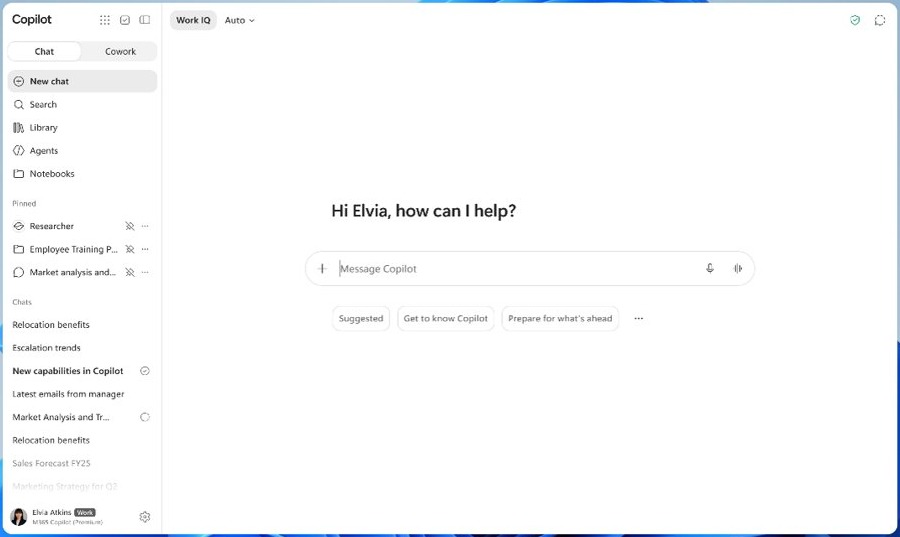
- Go to copilot.com, or install the Microsoft Copilot app on your device.
- Sign in with a personal Microsoft account, an Apple ID or a Google account.
- Start a new chat and paste in any details from your export that you still need.
Background: Copilot on WhatsApp
Microsoft's privacy statement covers Copilot in third-party products such as messaging platforms. WhatsApp access depended on Meta's business platform rules, and these dates show how those rules changed.
| Date | What changed | Who it affected |
|---|---|---|
| January 15, 2026 | WhatsApp's updated terms limit general-purpose AI assistants to markets where Meta is legally required to permit them | AI providers on the WhatsApp Business Platform |
| February 16, 2026 | Meta starts charging AI providers for service messages in Italy | AI providers serving users in Italy |
| March 11, 2026 | Brazil and 29 European markets join the charged list | AI providers serving those markets |
| May 13, 2026 | Meta stops charging in Italy and the European markets | AI providers serving those markets |
| October 15, 2026 | Türkiye joins the list of permitted markets at no charge | AI providers serving Türkiye |
What Microsoft announced and what it means for users
Microsoft's current help pages carry no WhatsApp notice. They point people to Copilot's own apps instead, and these statements apply to personal accounts.
| What Microsoft's help pages say | What it means for you |
|---|---|
| Copilot is available on Windows, Mac, the web, iOS and Android | Pick the app for the device you use most |
| Copilot chat is available at no extra cost, even without a Microsoft 365 subscription | You don't need to pay to keep asking Copilot questions |
| Signing in unlocks chat history, more image creation, longer conversations and extended voice sessions | Sign in rather than using Copilot anonymously |
| Sign in to the updated Copilot app by December 31, 2026 to preserve eligible chats and content | Sign in now if you also used Copilot outside WhatsApp |
Why WhatsApp changed course (technical and business rationale)
Meta's published documents state the rule and its legal limit, but give no technical or cost reason. Treat any explanation beyond this table as interpretation.
| Question | What Meta's documents say |
|---|---|
| Who is restricted? | Providers and developers of AI or machine learning technologies, when those technologies are the primary functionality |
| Who decides what is primary? | Meta, in its sole discretion |
| Where are assistants still allowed? | Only where Meta is legally required to permit them |
| What is the business change? | Meta charges AI providers for service messages in some permitted markets, and pricing for other businesses is unchanged |
| Is a technical reason given? | No, the AI provider pricing page gives no infrastructure or capacity reason |
The immediate user-facing impacts
The rule applies to AI providers on WhatsApp's business platform. It doesn't change your ordinary chats with people.
| Area | What happens | What to do |
|---|---|---|
| New questions | Copilot isn't a permitted general-purpose assistant on WhatsApp in the US | Use copilot.com or the Copilot app |
| Old replies | Microsoft's Copilot history lists copilot.com, Windows, macOS and mobile, not WhatsApp | Export the WhatsApp chat if you need a record |
| Importing history | WhatsApp exports can't be re-imported because they are text files | Keep the export as a reference |
| Disappearing content | View once messages aren't exported, and web and desktop exports also skip disappearing messages | Save anything important separately |
| Business chatbots | Customer service bots can continue when AI is incidental to the service | Keep using them, subject to Meta's terms |
How to export WhatsApp chat history (practical steps and caveats)
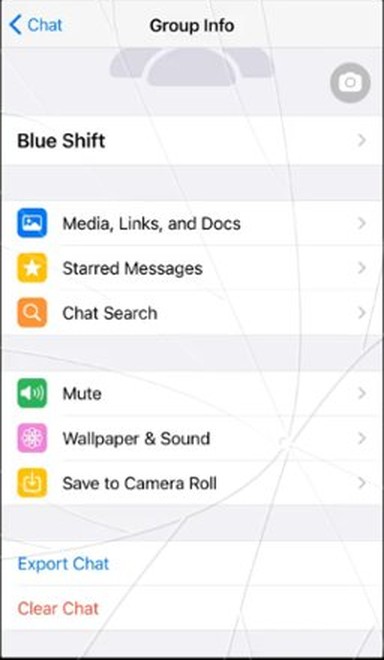
Open the Copilot chat, then follow the row for your device. If you want WhatsApp on a computer for this, you can download WhatsApp for PC first.
| Device | Export steps | Media and format |
|---|---|---|
| Android | Tap the menu icon, then More > Export chat, and choose a destination such as Gmail | Choose Without media or Include media |
| iPhone | Tap the contact's name, then Export chat, and choose a destination such as Save to Files | Choose With all media, With selected media… or Without media. The export is a ZIP file |
| WhatsApp Web, Windows or Mac | Click the menu icon, then Export chat, select All messages or Custom date range, then click Export | ZIP file with no media |
Three caveats apply. View once messages aren't exported, web and desktop exports also skip disappearing messages, and no export can be re-imported into WhatsApp.
Migration options and recommended transition steps
Use the option that matches your device, then sign in with the account you plan to keep. Your chat history stays separate by account type.
| Your device | Where to get Copilot | Next step |
|---|---|---|
| Any browser | copilot.com | Sign in to save your conversations |
| Windows PC | Microsoft Store, or the Copilot app already on many new Windows 11 PCs | Press Windows key + C to open it |
| Mac | Microsoft's Copilot app download page | Sign in after installing the app |
| iPhone or iPad | Apple App Store, with iOS 16.0 or later required | Open the app and sign in |
| Android phone | Google Play Store | Open the app and sign in |
The same account gives you the same history across these apps. On a PC, you can then set up Copilot on Windows 11 with the keys and settings you prefer.
What's different on Copilot's native surfaces
Copilot's own apps offer features tied to your account, your files and your subscription. Availability depends on your plan.
| Feature | What you get in the Copilot app |
|---|---|
| Chat history | Saved conversations you can reopen when signed in |
| Files | Upload files or create Word, Excel and PowerPoint files |
| Images | Image creation, with more available after sign-in |
| Voice | Voice conversations, with extended sessions after sign-in |
| Connected accounts | Connections to email, calendar and cloud storage |
| Multi-step tasks | Cowork, on eligible plans |
| Free tier | Chat, image creation and file uploads, subject to capacity and limits |
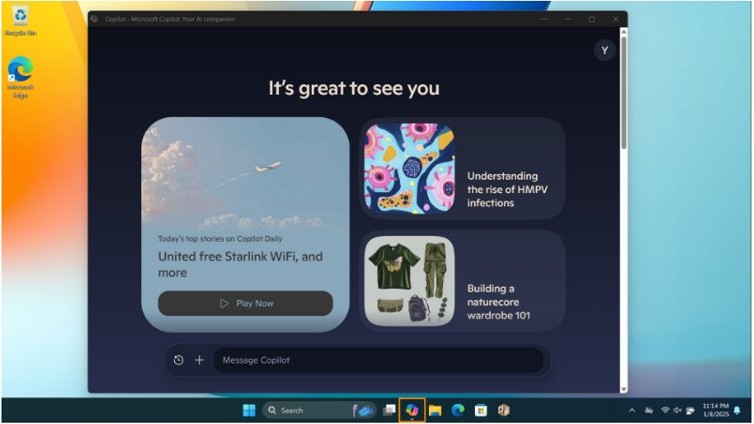
How to open Copilot on Windows 11
Windows gives you several routes into the Copilot app, and each one opens the same assistant.
| Route | What to do | Requirement |
|---|---|---|
| Copilot key | Press the Copilot key | A keyboard with the key |
| Keyboard shortcut | Press Windows key + C | Windows 11 with the Copilot app |
| Voice | Say Hey, Copilot | You must opt in first |
| Taskbar or Start | Select the Copilot app icon | The app is typically pinned to one of these |
Privacy, authentication, and the unauthenticated-session problem
Copilot history depends on signing in. A chat that was never tied to a Copilot account has no signed-in history to carry forward, so your WhatsApp export is your record of it.
| Question | Answer | Applies to |
|---|---|---|
| Does Copilot remember chats without sign-in? | No. Access to history requires signing in | copilot.com, Windows, macOS and mobile |
| Are prompts used to train foundation models? | No. Microsoft says prompts, responses and file contents aren't used for that | Personal accounts on the updated Copilot app |
| Whose privacy terms cover a messaging platform? | Microsoft's statement applies, and the third party's policies may also apply | Copilot in third-party products |
| Are personal and work chats combined? | No. Chats and protections stay separate by account type | Personal and work or school accounts |
How to delete or export Copilot chat history
These controls cover chats inside Copilot's own apps. Your WhatsApp copy is separate, so manage it in WhatsApp.
- Open the history list from the left sidebar on copilot.com, Windows or macOS, or from the menu on mobile.
- To delete one chat on the web or mobile, select the three dots beside it, then Delete.
- To delete one chat on Windows or macOS, right-click it, then select Delete.
- To delete everything on a Microsoft account, open account.microsoft.com/privacy/copilot and select Delete all activity history under Copilot app activity history.
- To delete everything on an Apple ID, open Account > Privacy in the Copilot app and select Clear my history.
- To export your history on a Microsoft account, use the same privacy dashboard.

Broader ecosystem implications
The terms reach every provider whose main product on WhatsApp is an AI assistant, not only Microsoft. Businesses that use AI behind customer service sit on the other side of the line.
| Group | What the terms mean | Limit |
|---|---|---|
| General-purpose AI assistants | Barred where AI is the primary functionality | Exceptions only where Meta is legally required to permit them |
| Businesses with AI customer service | May use an AI provider as a Solution Provider | Platform data can't be used to build or improve AI models |
| Businesses fine-tuning a model | Allowed for exclusive use | The data can't end up improving other models |
| Non-AI businesses | Pricing is unchanged by the AI provider policy | General WhatsApp pricing still applies |
Risks, unanswered questions, and what to watch
Two dates and a few open questions matter now. The first date is the one that can cost you data.
| Item | Status | What to watch |
|---|---|---|
| Copilot chat migration | Unmigrated personal content is permanently deleted after December 31, 2026 | Sign in to the updated Copilot app before that date |
| Copilot on TVs | Retires from Samsung and LG TVs on December 1, 2026 | Microsoft's list of retiring Copilot features |
| Permitted WhatsApp markets | Türkiye, Brazil, Italy and listed European markets, with the list last changed on October 15, 2026 | Meta's AI provider pricing page |
| WhatsApp business terms | Last modified September 23, 2026 | Meta's terms page and its archive |
| Copilot in permitted markets | Microsoft's help pages don't say whether Copilot will return to WhatsApp there | A Microsoft statement naming those markets |
What consumers and businesses should do now (practical checklist)
| If you are | Do this now | Why |
|---|---|---|
| A consumer with a Copilot chat on WhatsApp | Export the chat, then start using copilot.com or the app | An export is your only portable copy |
| A consumer who also used Copilot elsewhere | Sign in to the updated app by December 31, 2026 | Unmigrated content is deleted after that date |
| A mobile Copilot user on a personal account | Download the updated Copilot app | Microsoft requires it on mobile |
| A business using AI for WhatsApp customer service | Check that AI stays incidental and platform data stays out of model training | Meta's terms restrict both |
| A company offering an AI assistant on WhatsApp | Check whether your market is on Meta's list and budget for service messages | Meta charges in some permitted markets |
| An IT admin | Tell staff to use work accounts in Copilot, and allow *.cloud.microsoft | Work accounts receive enterprise data protection |
Copilot on WhatsApp not working: fixes for moving to the Copilot app
Copilot on WhatsApp not responding
Meta's terms no longer permit general-purpose AI assistants on WhatsApp outside its listed markets.
- Export the chat if you need a copy.
- Open copilot.com or the Copilot app.
- Sign in and ask your question there.
WhatsApp Copilot chats not showing in the Copilot app
Microsoft's history feature lists Copilot's own apps, not WhatsApp.
- Open your WhatsApp export.
- Copy the details you still need.
- Paste them into a new Copilot chat.
Copilot history missing on copilot.com
History appears only when you're signed in, and it stays separate by account type.
- Sign in with the account you used before.
- Check for the Personal or Work label beside your profile.
- Open the sidebar with the sidebar icon in the upper left.
Old Copilot mobile chats not showing on your phone
Personal mobile users must download the updated Copilot app.
- Install the updated Microsoft Copilot app from your app store.
- Sign in with the same account before December 31, 2026.
- Open the menu to see your history.
WhatsApp export has no photos or videos
WhatsApp web and desktop exports never include media.
- Open the chat in WhatsApp on your phone.
- Start Export chat again.
- Choose Include media on Android, or With all media on iPhone.
Copilot app looks different from these steps
Microsoft says its new Home starting point is still rolling out.
- Look for Chat in the navigation pane.
- Open your account menu to confirm which account you're using.
- Update the app, then reopen it.
Copilot on WhatsApp FAQ
Is Copilot still available on WhatsApp?
No, not in the US. Since January 15, 2026, WhatsApp's terms permit general-purpose AI assistants only where Meta is legally required to allow them. The United States isn't on Meta's list, so use copilot.com or the Copilot app.
Why did Copilot leave WhatsApp?
Meta's WhatsApp Business Platform terms bar AI providers when AI is the primary functionality of their service. Meta decides what counts as primary, and its published documents don't give a technical reason for the change.
Can I transfer my WhatsApp Copilot chats to the Copilot app?
No direct transfer is documented. WhatsApp says exported chat history can't be re-imported, and Microsoft's Copilot history lists only its own apps. Keep the export as a record and paste what you need into a new chat.
How do I export my Copilot chat from WhatsApp?
Open the chat. On Android, tap the menu icon, then More and Export chat. On iPhone, tap the contact's name, then Export chat. On web or desktop, click the menu icon, select Export chat, then click Export.
Is the Microsoft Copilot app free?
Yes for basic use. Microsoft says Copilot chat is available at no extra cost, even without a Microsoft 365 subscription. Free users can chat, create images and upload files, subject to capacity and limits.
Which account do I need for the Copilot app?
You can sign in with a personal Microsoft account, an Apple ID or a Google account. Signing in adds chat history, more image creation, longer conversations and extended voice sessions. Work and school accounts stay separate.
What happens to my Copilot chats after December 31, 2026?
Microsoft says content that hasn't moved to the updated Copilot app is permanently deleted after that date. Sign in to the updated app before then to preserve eligible chats. Mobile users on personal accounts must download the updated app.
Can businesses still use AI chatbots on WhatsApp?
Yes, when AI is incidental to the service. A business may use an AI provider as a Solution Provider for tasks such as customer service. WhatsApp Business Platform data still can't be used to build or improve AI models.
Which countries still allow AI assistants on WhatsApp?
Meta's AI provider page lists Türkiye, Brazil, Italy and a group of European markets. That list shows where AI providers may send service messages. It doesn't mean Copilot itself is available in those countries.
Final assessment: what this change means for the future of conversational AI distribution
Treat Copilot's own apps as your long-term home and keep any AI habit you rely on tied to an account you control. A third-party messaging platform can change its rules, as Meta did here, and its terms let Meta decide what counts as primary functionality. Assistants that live in their own signed-in apps keep your history, files and settings under one account, so they don't depend on another platform's rules.