To fix slow cellular data on iPhone 12 Pro after the iOS 18 update, set Voice & Data to 5G Auto, turn off Low Data Mode and Low Power Mode, then install any iOS and carrier settings updates.
Apple's iOS 18 release notes list no cellular speed bug or fix for this phone, so settings and your carrier are the first places to look. This guide covers each fix, a repeatable speed test, the 5G icons and the questions to put to your carrier.
How to fix slow cellular data on iPhone 12 Pro
These steps change the settings most likely to hold back speed. They delete nothing, and each takes under a minute.
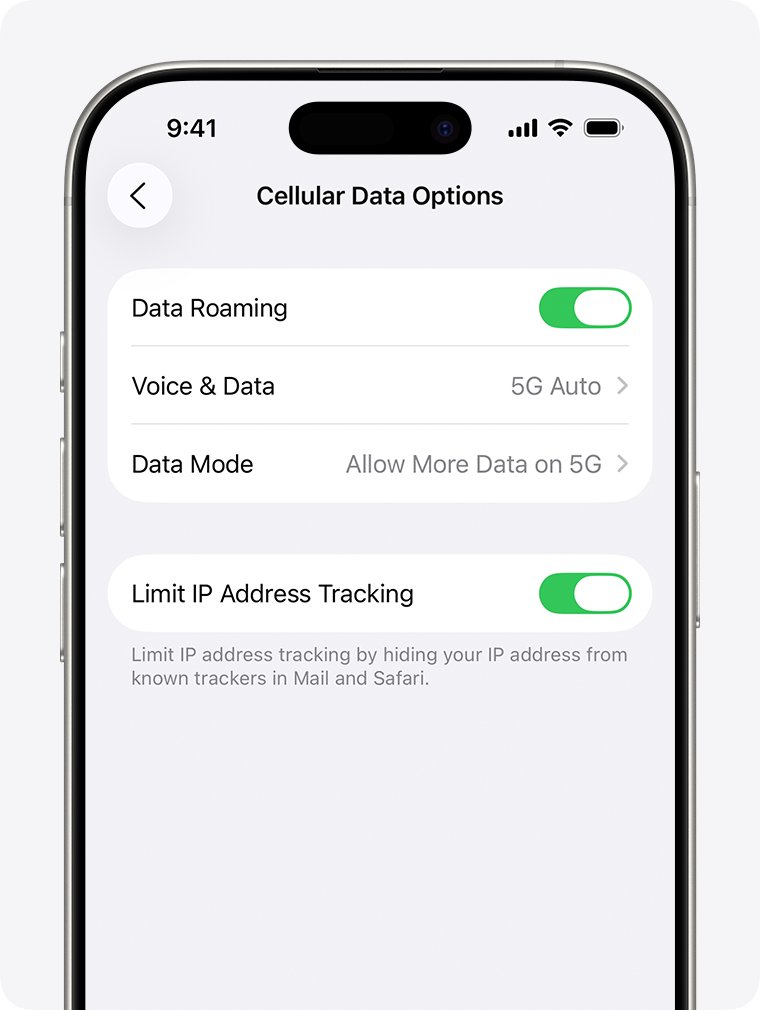
- Open Settings, tap Cellular, then tap Cellular Data Options.
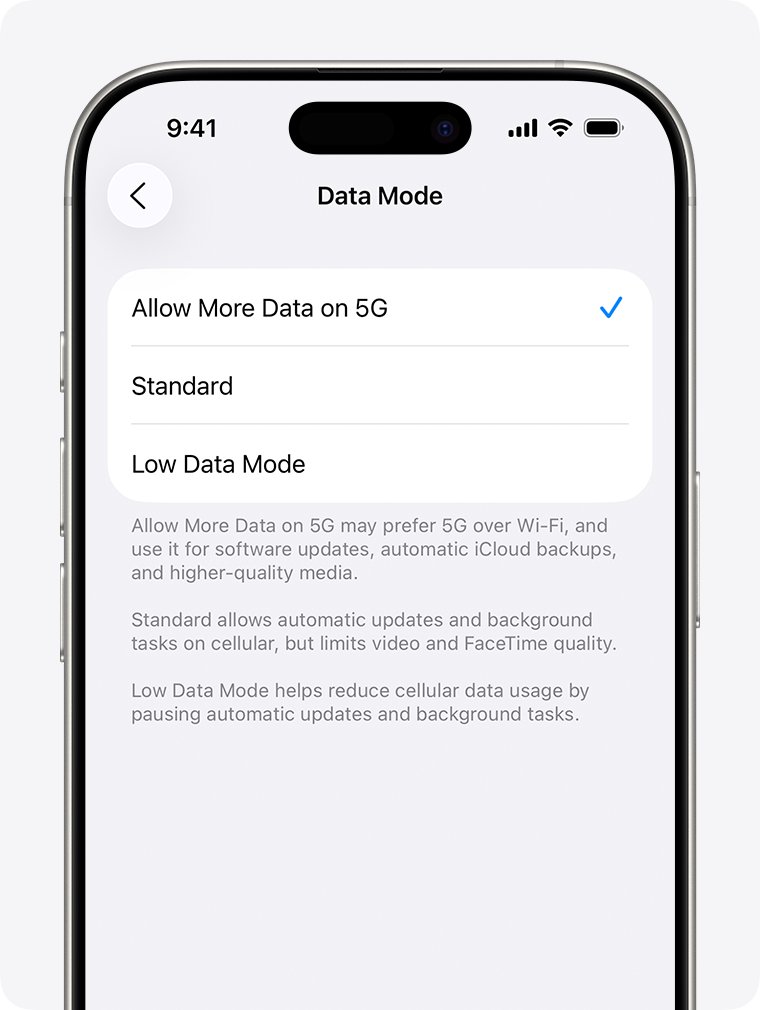
- Tap Data Mode and choose Standard instead of Low Data Mode. On an LTE plan, turn off the Low Data Mode switch.
- Go back, tap Voice & Data, and choose 5G Auto.
- Open Settings > Battery and turn off Low Power Mode.
- Open Settings, turn on Airplane Mode for at least 15 seconds, then turn it off.
- Open Settings > General > About and install a carrier settings update if one appears.
On Dual SIM, tap Cellular and choose the line you want to change before you open its options. Dual SIM keeps these settings per line.
Why is my cellular data so slow on iPhone 12 Pro?
Match what you see on your phone to a row, then jump to that fix.
| What you see | Likely cause | Fix |
|---|---|---|
| Video looks soft and App Store autoplay has stopped | Low Data Mode is on and reduces streaming quality | Set Data Mode to Standard |
| The battery icon is yellow | Low Power Mode limits 5G on this model, apart from cases such as streaming and large downloads | Turn off Low Power Mode, or charge to 80% |
| 5G shows but pages crawl | A weak or busy 5G cell | Compare 5G Auto with LTE at the same spot |
| LTE shows where 5G used to appear | Voice & Data is set to LTE, or your plan or area lacks 5G | Choose 5G Auto, then ask your carrier |
| Everything was fine until you moved or traveled | Roaming, coverage or an outage | Check Data Roaming and ask your carrier about outages |
| Only one app is slow | That app or its service, or its cellular access is off | Check the app list under Cellular |
| Slow on Wi-Fi as well | Not a cellular problem | Treat it as general iPhone lag after iOS 18 |
Turn off Low Data Mode on iPhone 12 Pro
Low Data Mode restricts background network use, turns off automatic downloads and backups, and lowers streaming quality. It does what it was built to do, but it can look like a slow connection. A 5G plan and an LTE plan show the option in different places.
- Open Settings and tap Cellular.
- Tap Cellular Data Options.
- On a 5G plan, tap Data Mode and choose Standard or Allow More Data on 5G.
- On an LTE/4G plan, turn off Low Data Mode.
Allow More Data on 5G permits higher-quality FaceTime, HD streaming, iOS updates over cellular and automatic iCloud backups. It uses more of your allowance, so Standard is the safer choice on a capped plan.
Switch iPhone 12 Pro between 5G and LTE for faster data
5G is not faster everywhere. Testing each option at the place where your data feels slow shows which one suits that spot.
- Open Settings > Cellular > Cellular Data Options.
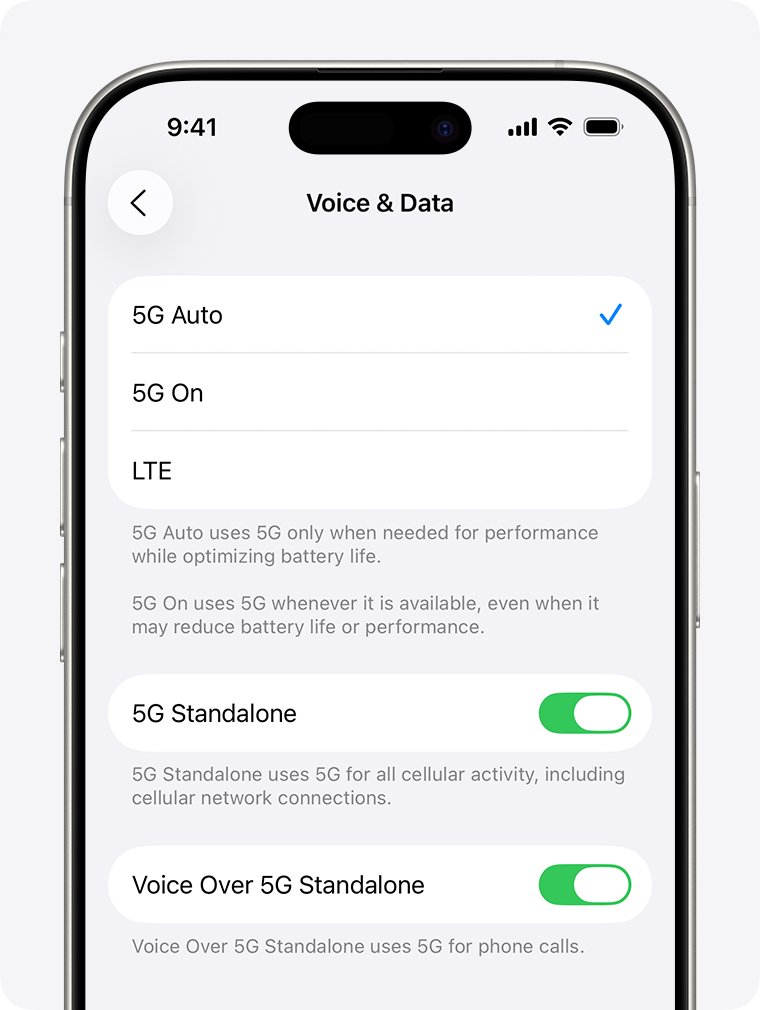
- Tap Voice & Data.
- Choose 5G Auto so the phone drops to LTE when 5G gives no noticeable gain.
- Choose 5G On if you want 5G whenever it is available, at some cost to battery life.
- Choose LTE if 5G is weak where you spend most of your time.
The 5G icon follows your carrier's network configuration. In rare cases it appears even when 5G coverage is not available, so a 5G icon alone does not prove you are on a strong 5G signal.
Turn off Low Power Mode when iPhone 12 Pro data is slow
Low Power Mode disables 5G on iPhone 12 models, except in some cases such as video streaming and large downloads. It also disables 5G Standalone on these models where that network exists. The mode turns off by itself once you charge to 80% or higher, so slow data that clears up after charging points here.
- Look at the battery icon in the status bar. Yellow means Low Power Mode is on.
- Open Settings and tap Battery.
- Turn off Low Power Mode.
- Test your data again, or use the battery icon in Control Center to toggle the mode next time.
Low Power Mode also turns off Background App Refresh and email fetch, so late iPhone notifications can come from the same setting.
Update carrier settings on iPhone 12 Pro
Carrier settings updates let your carrier improve network connectivity and performance on your phone, and installation takes less than a minute. A dismissed prompt leaves you on the old version until you install it from About.
- Connect to Wi-Fi or a cellular network.
- Open Settings and tap General.
- Tap About.
- Follow the onscreen prompt if a carrier update is available.
- Tap the version number next to Carrier to see more detail about what is installed.
No prompt usually means nothing is waiting, but only your carrier can confirm that you have its latest settings.
Update iPhone 12 Pro from iOS 18 to the latest version
Staying on an early iOS 18 build means missing later fixes. Apple's security releases page now lists iOS 27.2 and iOS 26.7.2 for iPhone 11 and later, while its newest iOS 18 release, 18.7.11, names only iPhone XS, XS Max and XR among iPhones. iOS 27 supports iPhone 12 Pro.
- Back up your iPhone with iCloud or a computer.
- Plug in to power and connect to Wi-Fi.
- Open Settings > General > Software Update.
- Read the installed version and the updates offered on that screen.
- Tap Download and Install on the version you want, then follow the prompts.
Your data and settings stay in place during the update. If the phone feels sluggish overall afterward, the fixes for lag after iOS 26 apply.
Reset network settings on iPhone 12 Pro
Try this after the settings and updates above, because it wipes your saved networking setup. It targets network settings only, and it is a separate option from erasing the phone or deleting eSIMs.
- Write down any Wi-Fi passwords you do not have saved elsewhere.
- Open Settings > General > Transfer or Reset iPhone.
- Tap Reset. Do not choose Erase All Content and Settings.
- Tap Reset Network Settings and confirm.
- Reconnect to Wi-Fi and check that Data Roaming is set the way you need it.
This reset removes saved networks and VPN settings not installed by a profile or MDM. It also renames the phone to "iPhone", marks manually trusted certificates as untrusted, and may turn off cellular data roaming. Avoid Delete All eSIMs, which removes your cellular service until you set up a new eSIM or SIM.
Restart iPhone 12 Pro to reconnect to the cellular network
A restart forces a fresh connection to the network, which is worth doing whenever Airplane Mode alone changes nothing.
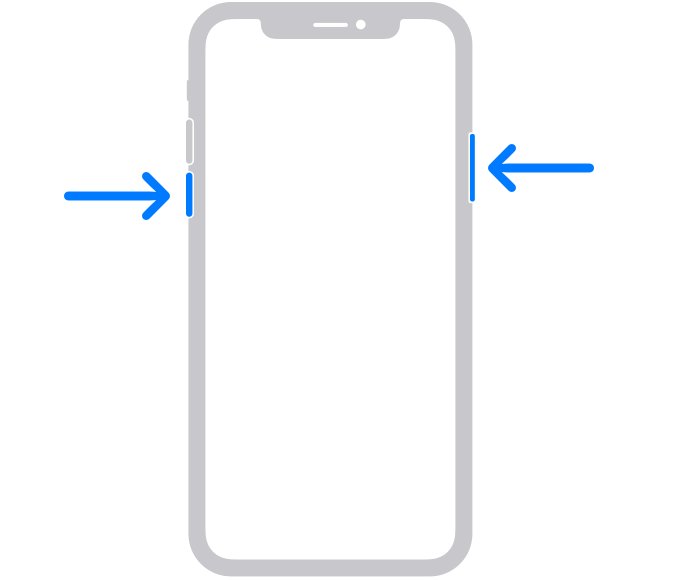
- Press and hold either volume button and the side button until the power-off slider appears.
- Drag the slider, then wait 30 seconds for the phone to turn off.
- Press and hold the side button until the Apple logo appears.
- Wait for the signal bars to return, then test your data.
Find apps using cellular data on iPhone 12 Pro
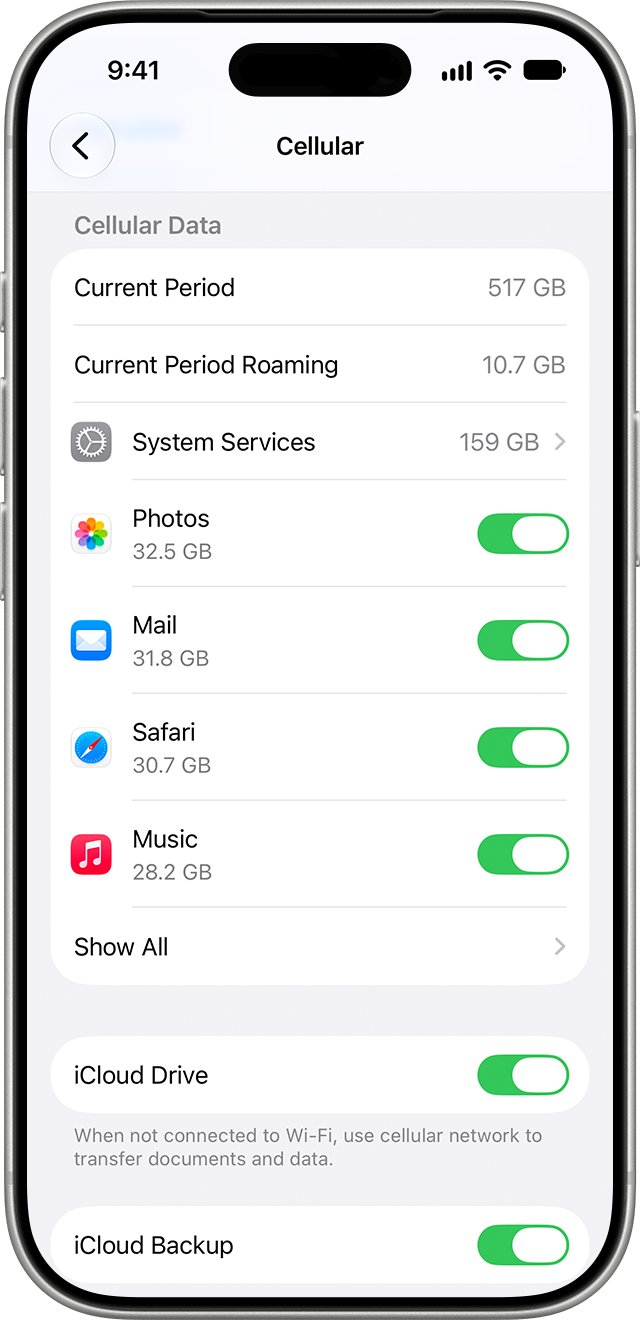
An app syncing in the background can compete with whatever you are trying to load, and it can also burn through a plan's allowance. The list under Cellular shows you which apps have used the most.
- Open Settings and tap Cellular.
- Scroll to the app list and tap Show All to see the data used below each app.
- Turn off cellular access for any app that should wait for Wi-Fi.
- Tap System Services above the app list to see system use. It cannot be switched off per service.
- Scroll to the bottom and tap Reset Statistics so that next month's numbers start clean.
An app with cellular access turned off will appear broken away from Wi-Fi. If a single app seems dead on cellular while others load, look for its switch here first.
How to test cellular data speed on iPhone 12 Pro
One speed test proves little because cell load changes through the day. A short comparison at one location tells you far more.
- Turn off Wi-Fi in Settings so the test runs over cellular.
- Stand where your data is usually slow, and run a speed test in a browser or app of your choice.
- Note the result and which icon shows in the status bar.
- Change Voice & Data to LTE and test again in the same place.
- Change it back to 5G Auto and repeat the test later in the day.
- Turn Wi-Fi back on when you finish.
If you use iCloud Private Relay, speed test numbers can read lower. It uses a single connection, while many tests open several at once, and Apple says the actual browsing experience stays fast. Any VPN you use also changes the route, so note whether it was connected during each test.
iPhone 12 Pro 5G icons in the status bar explained
The icon tells you which network your carrier reports, and it helps you describe the problem accurately when you call. Apple's specs for iPhone 12 Pro list sub-6 GHz and mmWave 5G, along with Gigabit LTE.
| Status bar shows | What it means |
|---|---|
| 5G | Your carrier's 5G network is available and the phone can use it |
| 5G+, 5G UW, 5G UC or 5GA | Your carrier's enhanced 5G is available, which can include its higher frequency version |
| LTE or 4G | The phone is on the older network, by setting, plan or coverage |
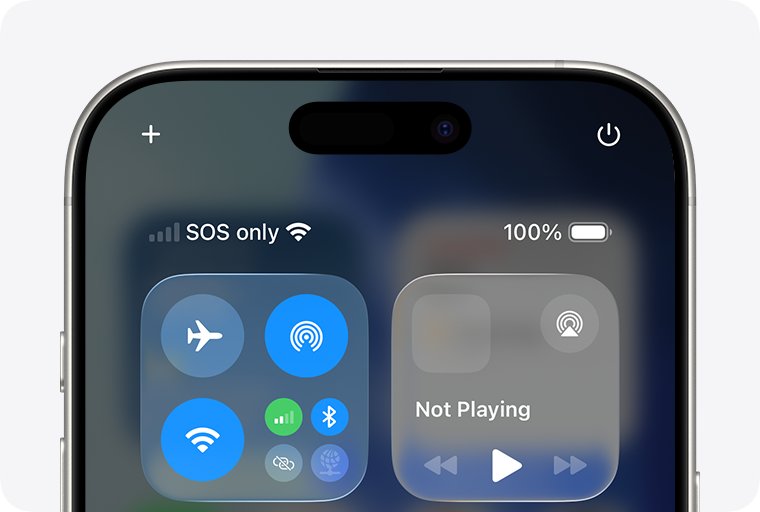
| SOS or SOS only | Not connected to your carrier, but emergency calls can go through other carrier networks |
| No Service or Searching | Not connected to any cellular network |
Higher frequency 5G works only in the United States, on an iPhone purchased in the United States. A phone bought elsewhere will not show that tier on a US carrier.
Verizon cellular data slow? What to ask your carrier
These questions apply to Verizon, AT&T, T-Mobile and any other carrier. Only your carrier can see your account and the state of its network, and Apple says as much. Apple quotes theoretical speeds for iPhone 12 Pro and states that real results vary with site conditions and carrier.
| Ask this | Why it matters |
|---|---|
| Is there an outage or known congestion in my area? | A network fault looks exactly like a phone fault |
| Is my account active and in good standing? | Account problems can affect service |
| Does my plan include 5G, and is 5G active on my line? | iPhone 12 Pro needs a 5G plan and a supporting carrier |
| Does my plan slow data after a set allowance? | A limit on your plan is invisible in iPhone settings |
| Is my SIM right for a 5G network? | A SIM from an older phone can need carrier setup first |
| Do I have the latest carrier settings? | Apple sends you to the carrier to confirm this |
iPhone 12 Pro cellular data not working after iOS 18 update
Use these when data is failing outright or behaving strangely, rather than just running slowly, including when calls work but cellular data does not.
No Service or Searching in the status bar
The phone is not connected to a cellular network at all.
- Turn Airplane Mode on for at least 15 seconds, then off.
- Restart your iPhone.
- Check for a carrier settings update under Settings > General > About.
- Ask your carrier about your account, coverage and outages.
- Download the Apple Support app, which offers extra diagnostics on iPhone models running iOS 18 or later.
No 5G icon on iPhone 12 Pro
A 5G plan, carrier support and local 5G coverage are all required.
- Confirm with your carrier that your plan supports 5G.
- Confirm that you are in an area with 5G coverage.
- Check that Voice & Data is not set to LTE.
- Turn Airplane Mode on and off.
Slow or no cellular data while traveling
Data Roaming is off, or your carrier does not support 5G roaming there.
- Open Settings > Cellular and tap Cellular Data Options.
- Turn on Data Roaming if your plan allows it, and check the charges first.
- Ask your carrier about 5G roaming, because some carriers provide 4G or LTE only abroad.
Slow data on the wrong line with Dual SIM
Data may be running over a line with a different plan.
- Open Settings > Cellular and tap Cellular Data.
- Pick the number you want to use for data.
- Tap each line and check that it is turned on, with Turn On This Line if needed.
Slow or no data with a physical SIM moved from another phone
The SIM may be damaged or need carrier setup for this network.
- Remove the SIM card and put it back in.
- Ask your carrier for a new SIM if it is damaged, does not fit or came from another device.
Still slow after every fix
Your carrier found no account or network issue, which points toward hardware.
- Run the diagnostics in the Apple Support app.
- Contact Apple to arrange service if a hardware issue is suspected.
Slow cellular data on iPhone 12 Pro FAQ
How do I fix slow data on iPhone?
Open Settings > Cellular > Cellular Data Options, set Data Mode to Standard and Voice & Data to 5G Auto. Then turn off Low Power Mode, toggle Airplane Mode, install any carrier settings update, and restart the phone before trying a network reset.
Why is my cell data so slow all of a sudden?
A sudden drop usually comes from a setting that changed, a congested or weak cell, an outage, or a plan limit. Check for the yellow Low Power Mode battery icon and Low Data Mode first, then ask your carrier about outages and your data allowance.
Mobile data is slow: how do I increase speed?
No setting raises the speed your network can deliver, but several settings hold it back. Turn off Low Data Mode and Low Power Mode, then compare 5G Auto with LTE where you are. Allow More Data on 5G enables higher-quality streaming and other high-data features.
Why is internet slow on mobile data but fine on Wi-Fi?
That pattern rules out most app and phone-wide faults and points toward the cellular side. Look at Low Data Mode, your current signal and which network icon shows, then ask your carrier about congestion in your area and any slowdown on your plan.
How do I fix my cellular data if it stops working?
Confirm Cellular Data is on under Settings > Cellular, then turn Airplane Mode on for at least 15 seconds and off again. Restart the iPhone, install any carrier settings update, and contact your carrier if the status bar still shows No Service.
Why is my phone data so slow on Verizon or US Cellular?
Carrier speed depends on local coverage, how busy the network is and your plan, and Apple states that real speeds vary by site conditions and carrier. Ask your carrier about outages and plan limits, because iPhone settings cannot show you either of those.
Does 5G Auto slow down iPhone 12 Pro data?
5G Auto switches to LTE only when 5G speeds would not provide a noticeably better experience, which saves battery. Set Voice & Data to 5G On if you want 5G whenever it is available, and compare speeds at the same location.
Will resetting network settings fix slow cellular data?
It can clear a bad network configuration, but it removes saved Wi-Fi networks and VPN settings too, and it may turn off data roaming. Try it after changing settings and installing updates. It is separate from the options that erase the phone or delete eSIMs.