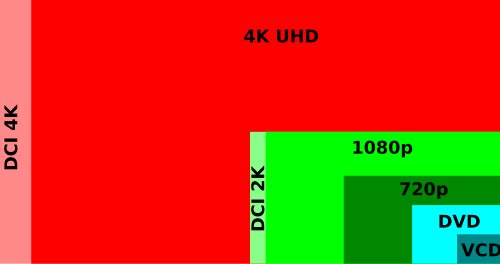
On TVs, monitors and streaming services, 4K, UHD and 2160p all describe the same 3840 x 2160 picture, and the only real difference is cinema 4K at 4096 x 2160.
Each term comes from a different place: 4K counts pixels across, UHD is a consumer display standard, and 2160p counts lines down. This guide shows what each label promises and how to confirm what your own screen is doing.
4K vs UHD vs 2160p: the difference in one table
Match the label you are looking at to its row. For a TV, monitor or laptop, the answer is almost always 3840 x 2160.
| Label | Resolution it means | Where you see it |
|---|---|---|
| 4K (on a TV or monitor) | 3840 x 2160 | Retail boxes, streaming apps and game consoles |
| UHD or Ultra HD | 3840 x 2160 as the minimum | TV and monitor specifications |
| 2160p | 2160 lines tall, normally 3840 x 2160 | Video quality menus and upload settings |
| DCI 4K or 4K DCI | 4096 x 2160 | Digital cinema and professional cameras |
What is 4K?
4K is a generic term for any picture about 4,000 pixels wide, so it describes a class of resolutions and not one exact size. The name counts the horizontal pixels, which is the opposite of how TV formats such as 1080p Full HD are named.
The strict version comes from the cinema industry. Digital Cinema Initiatives published its specification in 2005 and set a 4K container of 4096 x 2160, with crops for different film shapes.
| 4K format | Pixels | Aspect ratio | Typical use |
|---|---|---|---|
| DCI 4K full frame | 4096 x 2160 | About 1.90:1 (256:135) | Cinema container |
| DCI 4K flat crop | 3996 x 2160 | 1.85:1 | Films in the flat shape |
| DCI 4K scope crop | 4096 x 1716 | About 2.39:1 | Widescreen films |
| Consumer 4K (UHD) | 3840 x 2160 | 16:9 | TVs, monitors and streaming |
The scope crop shows why 2160p and 4K are not perfectly interchangeable: it is 4K wide but only 1716 pixels tall.
What is UHD?
UHD stands for Ultra High Definition, the consumer and broadcast format built on the 16:9 shape of HDTV. In October 2012 the Consumer Electronics Association defined Ultra HD for displays, and the ITU approved UHDTV in Recommendation BT.2020 that same year.
UHD comes in two sizes. When a product says only UHD or Ultra HD, it means the smaller 4K size.
| UHD format | Also called | Pixels | Megapixels |
|---|---|---|---|
| UHDTV-1 | 4K UHD or 2160p | 3840 x 2160 | 8.3 |
| UHDTV-2 | 8K UHD or 4320p | 7680 x 4320 | 33.18 |
The CEA definition sets a floor: at least 8 megapixels, at least 3840 pixels across, at least 2160 pixels down, and a shape of 16:9 or wider.
What is 2160p?
2160p names a picture by its height, following the same pattern as 720p and 1080p. The number is the count of horizontal lines from top to bottom, and the p stands for progressive scan.
Progressive scan draws every line of a frame in sequence. Interlaced video, marked with an i as in 480i, draws the odd lines and then the even lines in separate passes.
| Name | Pixels | How YouTube labels it |
|---|---|---|
| 1080p | 1920 x 1080 | HD |
| 1440p | 2560 x 1440 | 2K |
| 2160p | 3840 x 2160 | 4K |
Strictly, 2160p applies to any format 2160 pixels tall, so both 3840 x 2160 and 4096 x 2160 qualify. In practice, a 2160p option in a video menu means 3840 x 2160.
Wait, they’re all the same?
For anything you buy or stream at home, yes. A TV sold as 4K, a monitor sold as UHD and a video set to 2160p all use 3840 x 2160, so no picture difference comes from the name alone. The exception is DCI 4K, which is 256 pixels wider and belongs to cinema projection and professional cameras.
Marketing explains the overlap. The CEA chose Ultra HD as the display term but still allowed makers to use 4K beside it, and both names now see more marketing use than 2160p. That is why many boxes say 4K UHD.
DCI 4K vs UHD: 4096 x 2160 vs 3840 x 2160
Both formats are 2160 pixels tall. DCI 4K adds 256 pixels of width, which gives it about 6.7% more pixels and a wider shape.
| Specification | DCI 4K | UHD |
|---|---|---|
| Width x height | 4096 x 2160 | 3840 x 2160 |
| Total pixels | 8,847,360 | 8,294,400 |
| Aspect ratio | About 1.90:1 | 16:9 (about 1.78:1) |
| Defined by | Digital Cinema Initiatives, 2005 | ITU BT.2020 and the CEA, 2012 |
| Built for | Cinema projection | TVs, monitors and broadcast |
Cameras can offer both. Blackmagic Design's Pocket Cinema Camera range, for example, lists 4096 x 2160 as 4K DCI and 3840 x 2160 as Ultra HD. Pick Ultra HD when the footage is going straight to a 16:9 screen, because DCI footage needs cropping or thin black bars there.
What does 4K Ultra HD mean on a TV box?
It means a 3840 x 2160 panel. The extra words on a box name a format or a feature, so read each one separately.
| Wording on the box | What it tells you | What it does not tell you |
|---|---|---|
| 4K Ultra HD or 4K UHD | The panel is 3840 x 2160 | HDR support or refresh rate |
| Ultra HD | At least 3840 x 2160 and 16:9 or wider | Whether the set is 4K or 8K, so check the pixel count |
| 8K UHD | The panel is 7680 x 4320 | Whether 8K content is available to you |
| HDR or HDR10 | The display handles high dynamic range | The resolution, which is listed separately |
4K vs 1080p vs 1440p: pixel count by resolution
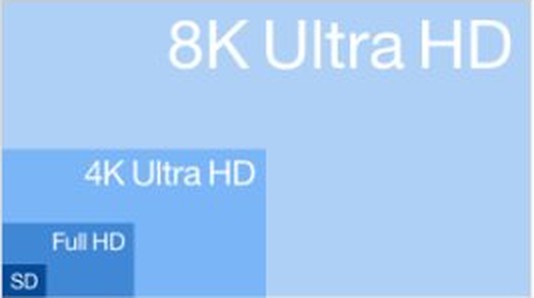
UHD doubles both the width and the height of 1080p, so it carries exactly four times the pixels. It does not double the total, which is a common misreading of the name.
| Resolution | Pixels | Total pixels | Compared with 1080p |
|---|---|---|---|
| 1080p | 1920 x 1080 | 2,073,600 | Baseline |
| 1440p | 2560 x 1440 | 3,686,400 | 2.25 times |
| 2160p (4K UHD) | 3840 x 2160 | 8,294,400 | 4 times |
| 4320p (8K UHD) | 7680 x 4320 | 33,177,600 | 16 times |
1440p is not a form of 4K. YouTube lists it as 2K, and it holds well under half the pixels of a 2160p picture.
How to check if your monitor is running at 4K UHD in Windows
Windows shows the resolution it is sending to the screen. A reading of 3840 x 2160 means your PC is outputting 4K UHD, and you can check what monitor you have to compare that reading with the model's specifications.
On Windows 11
- Select Start, then Settings.
- Go to System > Display.
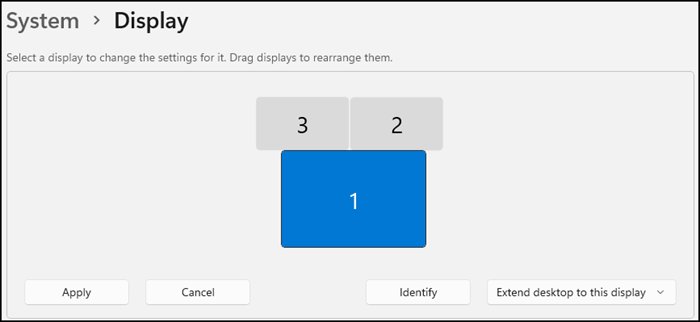
- Select your display at the top if more than one is connected.
- Read the value in the Display resolution row.
- Open the list and pick the entry marked (Recommended) if the current value differs.
On Windows 10
- Select Start, then Settings.
- Go to System > Display.
- Select your display if more than one is connected.
- Scroll to Scale and layout.
- Read the value under Display resolution, and choose the (Recommended) entry if it differs.
Resolution is only half of smooth 4K playback, so also change the monitor refresh rate if motion looks choppy at 3840 x 2160. A loose or faulty link can also limit what the PC sends, and you can fix an HDMI port that is not working before you replace anything.
4K streaming requirements for Netflix and YouTube
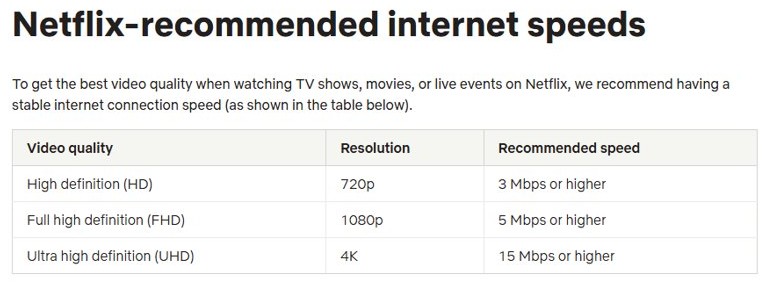
A 4K screen alone does not guarantee a 4K stream. Netflix states that every device in the chain must support the quality, and it plays at the highest level the weakest link allows.
| Requirement | Netflix | YouTube |
|---|---|---|
| Internet speed | 15 Mbps or higher for 4K Ultra HD | 20 Mbps sustained for 4K UHD |
| Account or plan | A plan that supports 4K | No plan requirement stated in its speed guidance |
| App setting | Data usage per screen set to 4K: High or Auto | In the player, Settings > Quality > 2160p (4K) |
| TV connection | An HDMI port with HDCP 2.2 or later | Not stated in its speed guidance |
| HDMI cable | Premium High Speed or Ultra High Speed | Not stated in its speed guidance |
Is 4K the same as HDR?
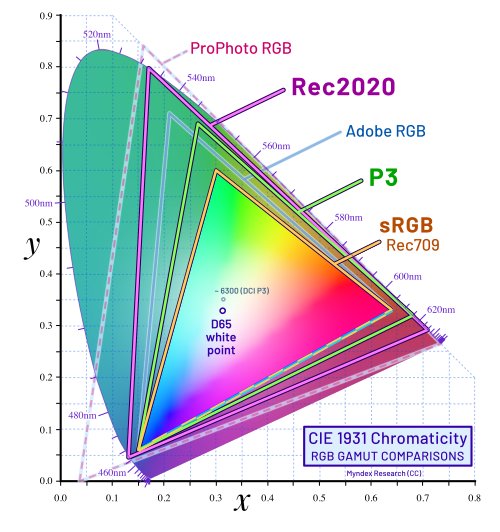
No, 4K sets the number of pixels and HDR sets how bright and vivid they can look. Microsoft describes HDR as giving a brighter, more vibrant and more detailed picture than standard dynamic range. It needs an HDR10-capable display and a PC that supports HDR and wide color gamut, so a 4K screen may or may not have it.
On Windows 11, the switch is under Settings > System > Display, where you turn on HDR for the capable display. On Windows 10 version 2004 or later, open Windows HD Color settings on the same page and turn on Use HDR.
4K, UHD and 2160p FAQ
Is UHD the same as 4K?
On consumer products, yes. A TV or monitor labelled UHD or 4K almost always has a 3840 x 2160 panel. The stricter cinema format, DCI 4K, is 4096 x 2160, so UHD is slightly narrower than true cinema 4K.
Is 2160p the same as 4K?
For home video, yes. YouTube lists 2160p as 4K at 3840 x 2160. Strictly, 2160p describes height and 4K describes width, so the two terms come from different naming systems even when they point to the same picture.
Is 4K better than UHD?
Neither is better on a TV or monitor, because both labels mean 3840 x 2160. DCI 4K has about 6.7% more pixels than UHD, but that extra width only matters in cinema projection and professional video production.
What does the p mean in 2160p?
The p stands for progressive scan, which draws all the lines of each frame in sequence. The alternative is interlaced video, marked with an i, which draws the odd lines and even lines in separate passes.
How many pixels are in 4K?
A 4K UHD picture has 8,294,400 pixels, or about 8.3 megapixels, from 3840 x 2160. A DCI 4K picture has 8,847,360 pixels from 4096 x 2160. Both figures are the width multiplied by the height.
Is 1440p considered 4K?
No. 1440p is 2560 x 1440, about 3.7 million pixels, while 2160p is about 8.3 million. YouTube labels 1440p as 2K. A monitor sold as 1440p has well under half the pixels of a 4K screen, so it is a separate class.
How much internet speed do you need for 4K?
Netflix recommends 15 Mbps or higher for 4K Ultra HD, and YouTube recommends a sustained 20 Mbps for 4K UHD. Netflix also needs a plan that supports 4K, and each service depends on a display that can show the format.