The quickest way to find your PC's serial number is to open Command Prompt and run a one-line command that reads the number the manufacturer stored in the BIOS.
This guide covers that command and four other methods, including the label and the BIOS screen for a PC that will not start, what the number looks like, and why it sometimes comes back blank.
Find your PC serial number using Command Prompt
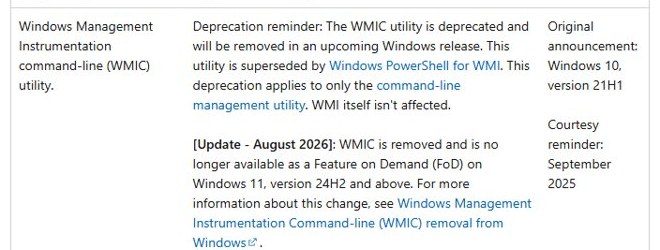
Windows reads the serial number from the BIOS through Windows Management Instrumentation (WMI). The old wmic tool is deprecated, and Windows 11 versions 24H2 and 25H2 no longer include it from August 2026, so the command below calls PowerShell from Command Prompt instead. It works on Windows 10 and every Windows 11 version.
- Select Search on the taskbar, type cmd and select Command Prompt.
- Type
powershell -NoProfile -Command "(Get-CimInstance Win32_BIOS).SerialNumber"and press Enter. - Read the line that appears below the command. That string is your PC's serial number.
- On Windows 10, or a Windows 11 PC that still has WMIC, you can type
wmic bios get serialnumberinstead and read the value under SerialNumber. - Copy the number by selecting it and pressing Ctrl + C, or write it down exactly, including letters and dashes.
If you see 'wmic' is not recognized as an internal or external command, WMIC has been removed from your Windows version. Use the PowerShell line from step 2.
5 methods to find your PC’s serial number
Each method reads the same number from a different place. Pick the one that fits the state your PC is in.
| Your situation | Use this method | Why |
|---|---|---|
| Windows works and you want it in seconds | Command Prompt | One command returns the number from the BIOS |
| WMIC is missing or you want a copyable result | Windows PowerShell | Get-CimInstance works on every current Windows version |
| Windows will not start | BIOS or UEFI settings | The firmware screen shows the number without Windows |
| PC will not power on at all | Physical label | The sticker or etching needs no power |
| You also want warranty and driver details | Manufacturer's support app | Dell SupportAssist and similar apps show it on their main screen |
Use Windows PowerShell to find the serial number
PowerShell reads the Win32_BIOS class directly. Microsoft recommends PowerShell for WMI now that WMIC is deprecated. Select Search, type powershell and open Windows PowerShell; you do not need administrator rights.
Get-CimInstance -ClassName Win32_BIOS | Select-Object SerialNumberGet-CimInstance queries the Win32_BIOS WMI class, which holds the firmware details the manufacturer set at the factory. Select-Object keeps only the SerialNumber property.
You should see: A short table with a SerialNumber heading and your serial number on the line below it, such as a seven-character Dell Service Tag.
To copy the number straight to the clipboard, run (Get-CimInstance Win32_BIOS).SerialNumber | Set-Clipboard and paste it where you need it.
Check the BIOS or UEFI settings for the serial number
The firmware screen shows the serial number even when Windows is broken, as long as the PC powers on. The menu layout depends on the PC maker, so look for a page named something like System Information or Overview.
- On Windows 11, open Settings > System > Recovery. On Windows 10, open Settings > Update & Security > Recovery.
- Next to Advanced startup, select Restart now.
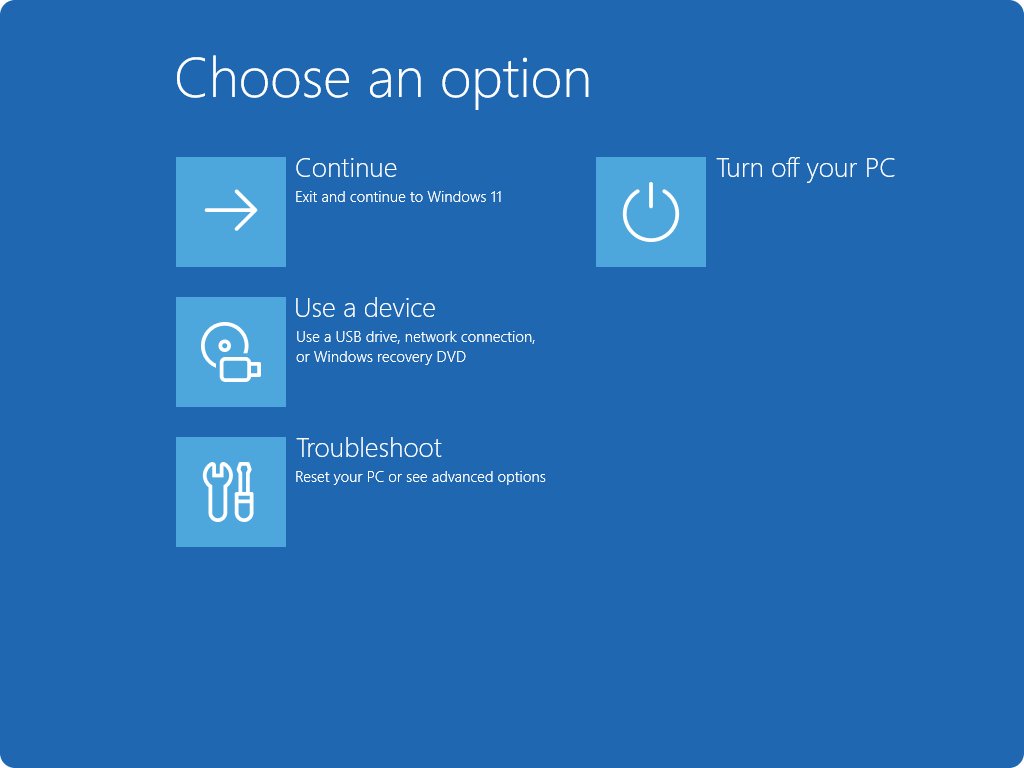
- Select Troubleshoot > Advanced options > UEFI Firmware Settings, then select Restart.
- Open the system information page of the firmware. On Dell laptops this is Overview or System Information; press F2 at power-on to get there directly.
- On a Surface, hold Volume-Up, press and release Power, and keep holding Volume-Up until the UEFI screen opens. The PC information page lists the Serial number.
- Write the number down, then exit without saving changes.
If Windows will not start at all, or UEFI Firmware Settings is missing from Advanced options, use the maker's power-on key instead of Settings, then follow steps 4 to 6.
Locate the serial number on the physical label
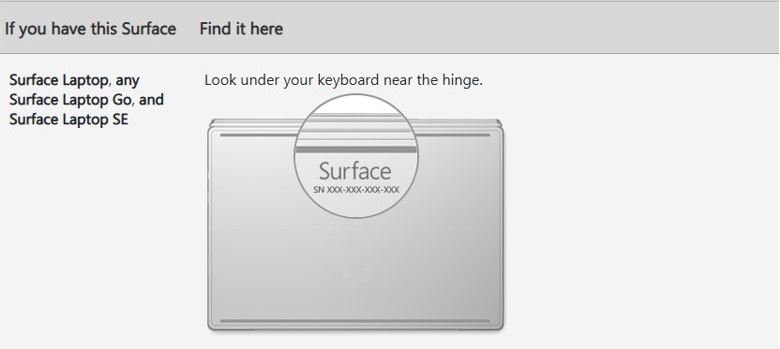
Every branded PC carries its serial number on the case, which is the only route when the PC will not power on. The label can wear off over time, so check it before you need it.
- Shut down the PC and unplug it.
- On a laptop, close the lid, turn it over and check the bottom cover for a sticker or an etched panel.
- If the laptop has a removable battery, take it out and look inside the battery compartment.
- On a desktop, check the back panel, the side panels and the top of the case.
- Look for the label marked S/N or Serial. On Dell PCs it reads Service Tag, SVC Tag or ST.
- Take a photo of the label so you have the number when the sticker fades.
The serial number is also printed on the original box and is often on the purchase receipt or the order page of the store you bought it from.
Use your manufacturer's support application
Most PC makers ship a support app that reads the serial number for you and uses it to look up warranty and drivers.
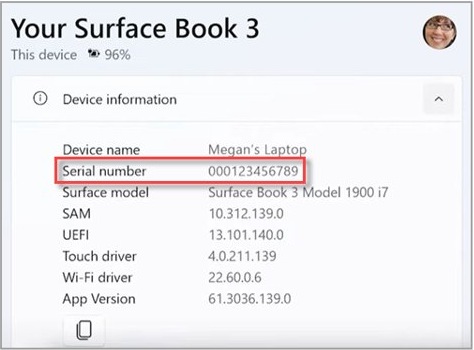
| PC maker | App or screen | Where the serial number is |
|---|---|---|
| Dell | SupportAssist, from the Start menu | Service Tag on the main screen |
| Lenovo | Lenovo Vantage, search Vantage in your installed apps | Device details in the app; the label and BIOS show it too |
| Microsoft Surface | Surface UEFI, Volume-Up plus Power at start | PC information page, Serial number line |
| Any brand | The maker's support website | Enter the serial number on the support site to check warranty and drivers |
On a Dell, the Service Tag and Express Service Code both identify the laptop, and on a Lenovo the serial lookup on the warranty page confirms the number is right.
How does a PC’s serial number look?
A serial number is a unique string the manufacturer assigns to one specific device during production. It can be letters and numbers or numbers only, and Windows stores up to 64 characters of it.
| Item | What it looks like | How it differs from the serial number |
|---|---|---|
| Serial number | A short alphanumeric string, such as a seven-character Dell Service Tag like DDC2H2J | Unique to your PC; used for warranty and support |
| Model number or name | A product name such as a laptop series and model | Shared by every PC of that model |
| Windows product key | 25 characters in five groups of five | Activates Windows; not tied to the hardware label |
| Dell Express Service Code | A longer number printed next to the Service Tag | A numeric version used by Dell's phone support |
If you need the model rather than the serial, you can find the model of your computer in Settings or System Information.
Serial number not showing in Command Prompt
'wmic' is not recognized as an internal or external command
WMIC is removed from Windows 11 versions 24H2 and 25H2 and cannot be added back.
- Run
powershell -NoProfile -Command "(Get-CimInstance Win32_BIOS).SerialNumber"in the same Command Prompt window. - Or open Windows PowerShell and run
Get-CimInstance -ClassName Win32_BIOS | Select-Object SerialNumber.
SerialNumber is blank or shows placeholder text
The value comes from the BIOS, and the motherboard maker never filled it in. This is common on custom-built desktops.
- Check the label on the case or on the motherboard itself.
- Look on the motherboard box or the PC builder's invoice for the serial number.
- Contact the shop that built the PC if neither has it.
The serial number does not match the label
The motherboard was replaced during a repair and the new board was not programmed with the original number.
- Use the number on the label for warranty claims.
- Tell the manufacturer's support that the board was replaced when you give them the number.
Windows will not start
Commands and apps need Windows; the firmware and label do not.
- Press the maker's firmware key at power-on, such as F2 on Dell, and open the system information page.
- If the PC will not power on, read the label on the bottom or back of the case.
PC serial number FAQ
What is a PC serial number?
A PC serial number is a unique code the manufacturer assigns to one specific computer during production. It separates your device from every other unit of the same model and is used for warranty claims, repairs, support and proof of ownership.
Is the serial number the same as the Windows product key?
No. The serial number identifies the hardware and is set by the PC maker. The Windows product key is a 25-character code that activates Windows, and most PCs bought with Windows activate from a digital license instead of a typed key.
Why doesn't Command Prompt show my serial number?
Either WMIC is missing, which is normal on Windows 11 24H2 and 25H2, or the manufacturer left the BIOS field empty. Run the PowerShell Get-CimInstance Win32_BIOS command instead, and check the label if the result is still blank.
Can I find the serial number if Windows won't start?
Yes. Open the BIOS or UEFI firmware screen with the maker's key at power-on and look on the system information page. If the PC will not power on, read the label on the bottom of a laptop or the back of a desktop.
Is it safe to share my serial number?
Share it with the manufacturer or a repair shop when they need it, but avoid posting it publicly. Someone with the number could try to claim warranty service or support on your device, although it cannot be used to read your personal data.
Do I need third-party software to find my serial number?
No. Command Prompt, PowerShell, the BIOS screen and the case label all show it without extra software. The only app worth using is your PC maker's own support app, such as Dell SupportAssist.
Can I change my computer's serial number?
No. The manufacturer assigns the serial number during production and it stays with that device. After a motherboard repair, the number on the case label is the one to use.