The SMART Notebook download for Windows 11, Windows 10 and Mac is free from smarttech.com, and the software runs without a subscription. It builds and presents interactive lessons on a SMART Board or any computer.
The first install also unlocks a 180-day trial of SMART Notebook Plus, the paid upgrade with game-based activities and assessments.
This guide covers the official installers, setup on Windows and Mac, the offline and MSI packages, pricing, updates and fixes for failed installs.
Which SMART Notebook download do you need?
Match your situation to a row. Every package installs the same SMART Notebook 26 software.
| Your situation | Get this | Size |
|---|---|---|
| One Windows 11 or 10 PC with internet | Web installer from the download form | 23.5 MB, fetches the rest |
| A PC with no or slow internet | Windows USB installer | 837 MB, full offline package |
| Many school PCs through deployment tools | Windows MSI installer | 1.3 GB ZIP |
| A Mac on macOS 10.15 or later | Mac web installer from the download form | 678 MB DMG |
| Many Macs managed by IT | Mac admin installer | 1.1 GB DMG |
| A Chromebook or tablet | Lumio in the browser | No install; opens Notebook files in a browser |
The Linux build stops at SMART Notebook 11 and has its own entry on the SMART downloads page.
Download SMART Notebook from the official links
SMART hosts every installer on its own servers. The teacher form asks for a few details before the download starts.
- SMART Notebook download form (Windows and Mac) — free, what most teachers need
- SMART Notebook Administrator Download — 23.5 MB to 1.3 GB · web, USB, MSI and Mac admin packages
- SMART Notebook downloads on SMART Support — admin, teacher and Linux entries
- SMART Notebook release notes — new features and known issues
The web installer also adds SMART Ink and the SMART Product Drivers, which a SMART Board needs for touch and pen input.
How to install SMART Notebook on Windows 11 and 10
Sign in to Windows with an administrator account first. The installer changes drivers and system components.
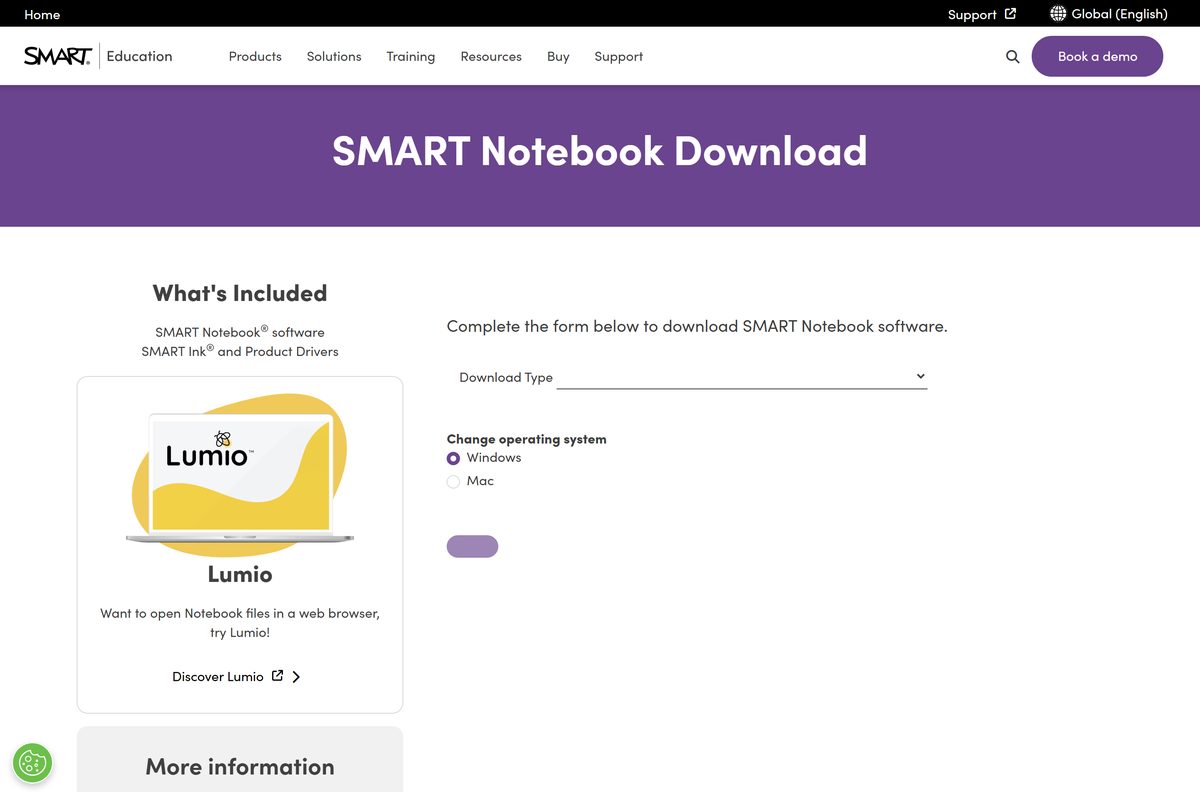
- Open the SMART Notebook download form in your browser.
- Fill in the required fields in the form.
- Select Windows as the operating system.
- Click Download and save the file to your Downloads folder.
- Double-click the downloaded installer to start the installation wizard.
- Select Yes if User Account Control asks for permission.
- Accept the license agreement and follow the on-screen instructions.
- On the last screen, select Disable trial offer and upgrade notifications if you do not want Plus prompts.
- Click Finish, then open SMART Notebook from the Start menu.
Download the SMART Notebook MSI and offline packages for deployment
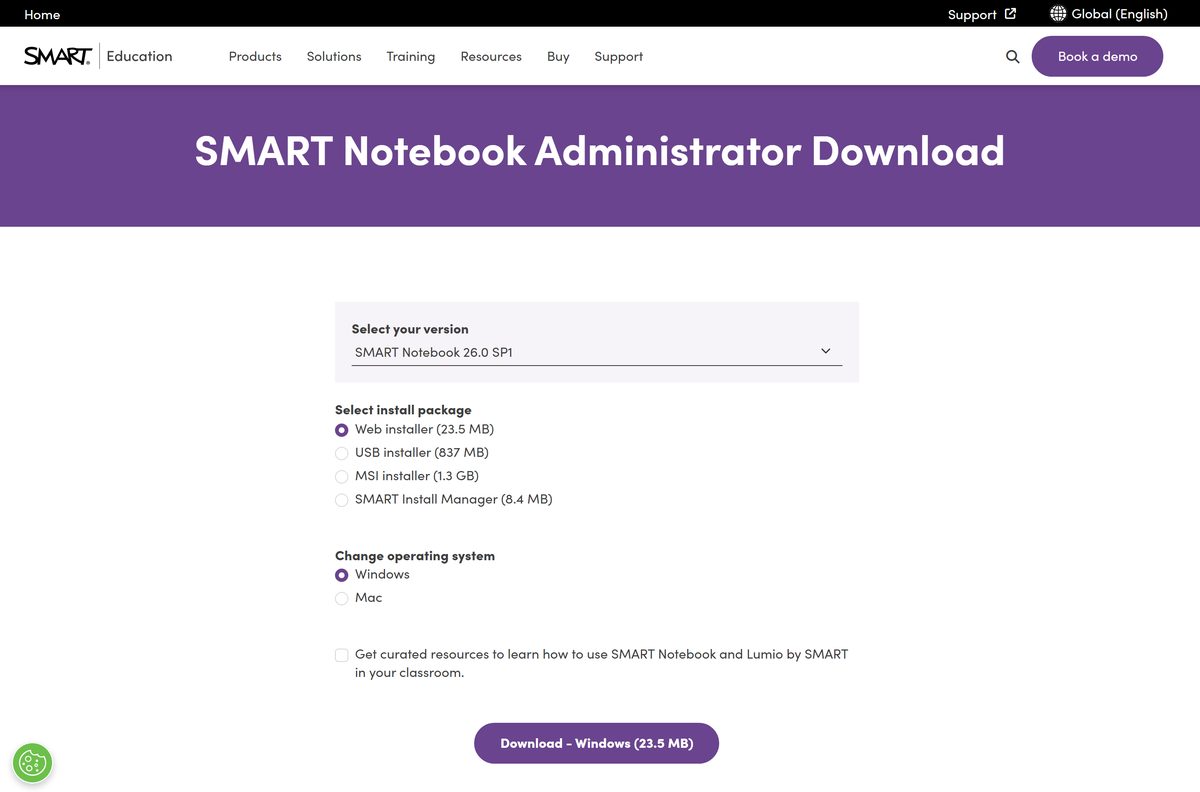
IT staff get every package from the Administrator Download page. Select SMART Notebook 26.0 SP1, then the package.
| Package | Platform | Size | Use it for |
|---|---|---|---|
| Web installer | Windows | 23.5 MB | Single PCs with internet |
| USB installer | Windows | 837 MB | Offline installs and reuse across PCs |
| MSI installer | Windows | 1.3 GB | SCCM, Intune and other deployment tools |
| SMART Install Manager | Windows | 8.4 MB | Building a customized MSI |
| Admin installer | Mac | 1.1 GB | Managed Mac deployments |
| SMART Install Manager | Mac | 27 MB | Customizing Mac packages |
Test a package on one machine before a school-wide push. Assign subscriptions and product keys in the SMART Admin Portal.
Which SMART Notebook download do you need for your Mac?
Open the Apple menu and select About This Mac to see your chip and macOS version.
| Your Mac says | Download | Note |
|---|---|---|
| Apple M1, M2, M3, M4 or later on macOS 11 or newer | Mac web installer | Install Rosetta 2 for certain features |
| Intel on macOS 10.15 Catalina or newer | Mac web installer | Runs natively |
| macOS 10.14 Mojave or older | Earlier version from the admin page | SMART Notebook 26 will not install; pick an older release under Select your version |
| A lab of managed Macs | Mac admin installer | 1.1 GB DMG |
Setup also places SMART Product Update and SMART Uninstaller under Applications/SMART Technologies.
Is SMART Notebook free?
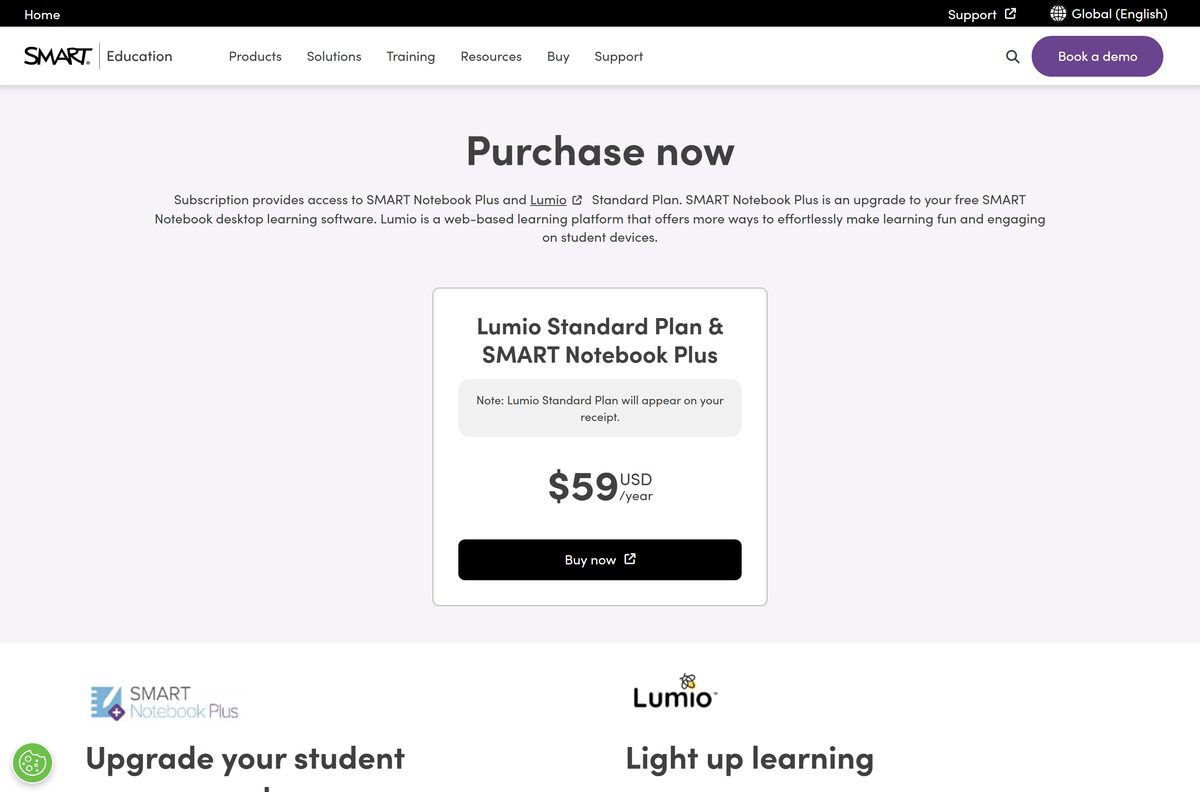
SMART Notebook itself costs nothing and needs no subscription. SMART Notebook Plus is the paid layer on top.
Install the free SMART Notebook, and pay $59 per year only if you need SMART Notebook Plus. The free version covers pen tools, SMART Ink, widgets, the Gallery, and PowerPoint and PDF import. The $59 USD yearly subscription adds SMART Notebook Plus and the Lumio Standard Plan: creating game-based activities, assessments, concept maps, lesson recordings and SMART Blocks, plus full touch on non-SMART displays. A first install gets a 180-day Plus trial, and afterwards the software keeps working for free.
How to check your SMART Notebook version and update it
SMART Product Update (SPU) installs updates for every SMART program on the computer. It needs an administrator account and an internet connection.
- Open SMART Notebook.
- Click Help > About SMART Notebook, then the Technical Support tab, and note the version.
- On Windows, open the Start menu and select SMART Technologies > SMART Product Update.
- On a Mac, open Applications/SMART Technologies/SMART Tools/SMART Product Update in Finder.
- Click Check Now.
- Click Update next to SMART Notebook and follow the on-screen instructions.
- Select Check for updates automatically and enter a number of days, up to 60, between checks.
Check whether your computer meets the SMART Notebook system requirements
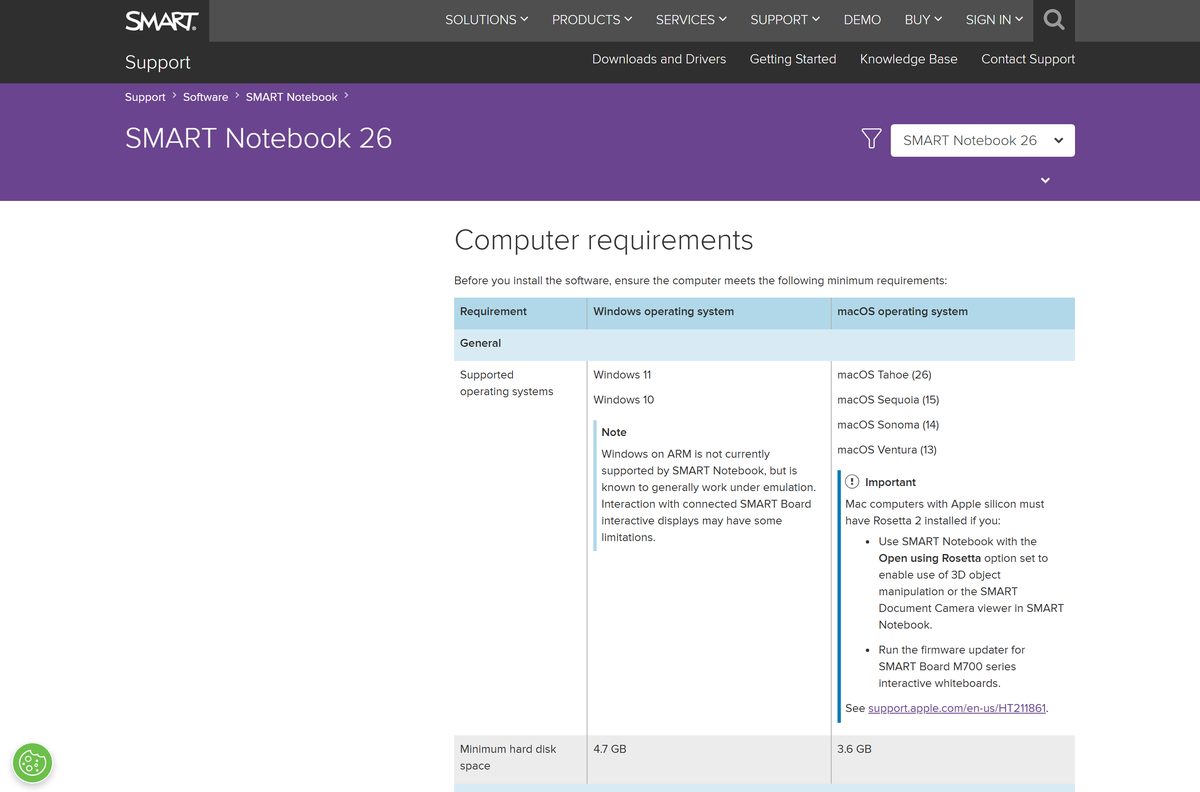
SMART Notebook 26 runs on any Windows 11 or 10 PC and on Macs from Catalina to Tahoe. A 4K display needs extra RAM and a discrete GPU.
| Field | Value |
|---|---|
| Software | SMART Notebook |
| Developer | SMART Technologies ULC |
| Latest version | 26.0 SP1 (Windows 26.0.1137.1, macOS 26.0.440.1), released August 17, 2026 |
| License | Free; SMART Notebook Plus by subscription ($59 USD per year, with Lumio Standard) |
| Download size | 23.5 MB Windows web installer; 837 MB Windows USB; 678 MB Mac |
| Windows | Windows 11 or Windows 10, .NET Framework 4.8 or later, DirectX 10 or later |
| macOS | Tahoe 26, Sequoia 15, Sonoma 14, Ventura 13, Monterey 12, Big Sur 11, Catalina 10.15 |
| Processor | Intel or AMD i386 or x86_64 on Windows; Intel or Apple silicon Mac (Rosetta 2 for certain features) |
| RAM | 4 GB minimum; 8 GB for 4K displays |
| Free disk space | 4.7 GB on Windows; 3.6 GB on Mac |
| Graphics | Integrated GPU for standard displays; discrete GPU for 4K |
| Official download source | smarttech.com |
| Offline installer | Yes, the Windows USB installer and the Mac admin installer |
| Last verified | 2026-09-24 |
Check your own PC in Settings > System > About, which lists the processor, installed RAM and Windows edition.
Fix SMART Notebook not installing on Windows 11, 10 or Mac
Each problem below has one cause and one fix.
The web installer stalls or fails partway
The 23.5 MB web installer downloads the rest of the software during setup, and a school proxy or firewall blocks it.
- Open the Administrator Download page.
- Select USB installer under Select install package.
- Run the 837 MB file, which installs without an internet connection.
Setup says you need administrator rights
The installer adds drivers and needs full administrator access.
- Right-click the installer and select Run as administrator.
- Ask school IT to install it, or to push the MSI package, when you have a standard account.
Setup stops with a .NET Framework error
SMART Notebook needs .NET Framework 4.8 or later on Windows.
- Open Settings > Windows Update and click Check for updates.
- Install all pending updates, restart, and run the installer again.
There is not enough disk space
The installed software needs 4.7 GB on Windows and 3.6 GB on a Mac.
- Open Settings > System > Storage on Windows, or System Settings > General > Storage on a Mac.
- Free at least 5 GB, then run the installer again.
Some features do not work on an Apple silicon Mac
Certain features need Rosetta 2, which Apple silicon Macs do not include by default.
- Open Terminal from Applications/Utilities.
- Run softwareupdate –install-rosetta –agree-to-license .
- Restart SMART Notebook.
Plus features are locked after installing
The 180-day trial has ended, or you have not signed in with the account that holds the subscription.
- Click Account > Sign in in SMART Notebook.
- Sign in with the SMART Account your school provisioned.
- Or click Help > Software Activation, click Add, paste the product key and click Add.
How to uninstall SMART Notebook
SMART Uninstaller removes SMART Notebook and its supporting packages in one pass.
- On Windows, click Start > All apps and select SMART Technologies > SMART Uninstaller.
- Click Next.
- Select the check boxes of the SMART software and supporting packages to remove, then click Next.
- Click Uninstall, then Finish.
- On a Mac, open Applications/SMART Technologies in Finder and double-click SMART Uninstaller.
- Select the software to remove, click Remove, then OK.
- Enter an administrator user name and password if prompted, then close SMART Uninstaller.
Choose between SMART Notebook, Notebook Plus and Lumio
SMART offers three routes to the same lessons. Pick by device and by the features you need.
| Option | Runs on | Price | Pick it when |
|---|---|---|---|
| SMART Notebook | Windows and Mac | Free | You teach from a SMART Board or a laptop and build your own lessons |
| Lumio by SMART | Any browser | Free plan with 100 MB; Standard $59 per year | Students use Chromebooks or tablets; Standard imports Notebook, PowerPoint and PDF files |
| SMART Notebook Plus | Windows and Mac | $59 USD per year | You need game-based activities and assessments on any display |
Frequently asked questions
Is SMART Notebook free to download?
Yes. SMART Notebook is subscription-free software, and the Windows and Mac installers cost nothing at smarttech.com. SMART Notebook Plus, which adds game-based activities, assessments and student devices, is part of a $59 per year subscription that also includes the Lumio Standard Plan.
What is the official SMART Notebook download page?
The official page is the SMART Notebook download form on smarttech.com. Fill in the short form, pick Windows or Mac, and the installer starts. IT staff can use the SMART Notebook Administrator Download page for the USB, MSI and admin packages.
Does SMART Notebook work on Windows 11?
Yes. SMART Notebook 26 supports Windows 11 and Windows 10. It needs 4 GB of RAM, 4.7 GB of free disk space, .NET Framework 4.8 or later and DirectX 10 graphics, with 8 GB of RAM and a discrete GPU for 4K displays.
How big is the SMART Notebook download?
The Windows web installer is 23.5 MB and fetches the rest during setup. The Windows USB installer is 837 MB, the Windows MSI package is 1.3 GB, and the Mac web installer is 678 MB. The Mac admin installer is 1.1 GB.
Is there a SMART Notebook offline installer?
Yes. The Windows USB installer is a full 837 MB offline package on the SMART Notebook Administrator Download page. It installs without internet, but activating a SMART Notebook Plus subscription still needs a connection. The Mac admin installer is a 1.1 GB DMG.
Does SMART Notebook run on a Mac?
Yes. SMART Notebook 26 runs on macOS Tahoe 26 back to macOS Catalina 10.15. Download the Mac web installer from the smarttech.com form. Macs with Apple silicon need Rosetta 2 installed for certain features.
Does SMART Notebook support ARM64 or Apple silicon?
On Windows, SMART lists any Intel or AMD i386 or x86_64 processor and names no ARM64 build. On a Mac, Apple silicon is supported, but Rosetta 2 must be installed for certain features to work.
Is SMART Notebook safe?
Yes, when the installer comes from smarttech.com or downloads.smarttech.com, which is where SMART Technologies ULC hosts its own files. Avoid download portals that repackage SMART installers or advertise cracked SMART Notebook Plus keys.
What is the latest version of SMART Notebook?
The latest release is SMART Notebook 26.0 SP1, released on August 17, 2026. The Windows build is 26.0.1137.1 and the macOS build is 26.0.440.1. It adds SMART MultiStylus support and a bulk Flipchart file converter.
Why won’t SMART Notebook install?
The usual causes are a Windows account without administrator rights, a missing .NET Framework 4.8, too little free disk space, or a web installer that cannot reach the internet. Use the offline USB installer on a restricted network, and install Rosetta 2 on Apple silicon Macs.
Can I use SMART Notebook without a SMART Board?
Yes. SMART Notebook installs on any Windows or Mac computer and opens, edits and presents lessons with a mouse or pen. Full touch on a non-SMART interactive display is a SMART Notebook Plus feature.
How long is the SMART Notebook Plus free trial?
The first time you install SMART Notebook, SMART Notebook Plus runs as a 180-day trial. When it ends, the Plus features lock but SMART Notebook keeps working for free, and lessons that use Plus features can still be delivered.