Text the word TRAVEL to 4004 from the line you are travelling with to add Verizon TravelPass, or add it on the international plans page in My Verizon.
This guide covers the daily rates, the prepaid and perk routes, how to confirm a session started abroad, and what to do when it does not.
The fastest way to add a Travel Pass to a Verizon line
Verizon charges $6 per line per day in Canada and Mexico and $12 per line per day in other TravelPass countries. Those rates were read from Verizon's TravelPass pages on 22 September 2026.
- Text the word TRAVEL to 4004 from the Verizon phone that is travelling.
- Follow the reply to put TravelPass on that line.
- Open the phone's settings and turn on data roaming so a session can start abroad.
Nothing is billed until the phone is actually used in a TravelPass country, and nothing is billed in the US.
Understanding Travel Passes and Their Benefits
The benefit is that your own number, plan and apps keep working abroad without buying a local SIM.
| What you get | Detail |
|---|---|
| Countries | 210+ countries and destinations on a postpaid line |
| Talk and text | Unlimited talk and text for the length of the session |
| Data | 5 GB of high-speed data per session, then unlimited data at 3G speeds for the rest of that session |
| Session length | 24 hours, starting automatically the first time you use the phone in a TravelPass country |
| Daily fee | $6 per line in Canada and Mexico, $12 per line elsewhere (checked 22 September 2026) |
| Billing | Only on days the phone is used in a TravelPass country; no charge in the US |
| Extra high-speed data | 2 GB more for $5 in Canada and Mexico, or $10 in other countries |
| Session warning | Verizon texts you two hours before the 24-hour session ends |
Prerequisites for Adding a Travel Pass
| Requirement | Why it matters |
|---|---|
| A Verizon mobile line | TravelPass is a feature on a line, postpaid or prepaid, not a separate product |
| A compatible phone | Most smartphones and some tablets work abroad; prepaid data-only devices are not compatible |
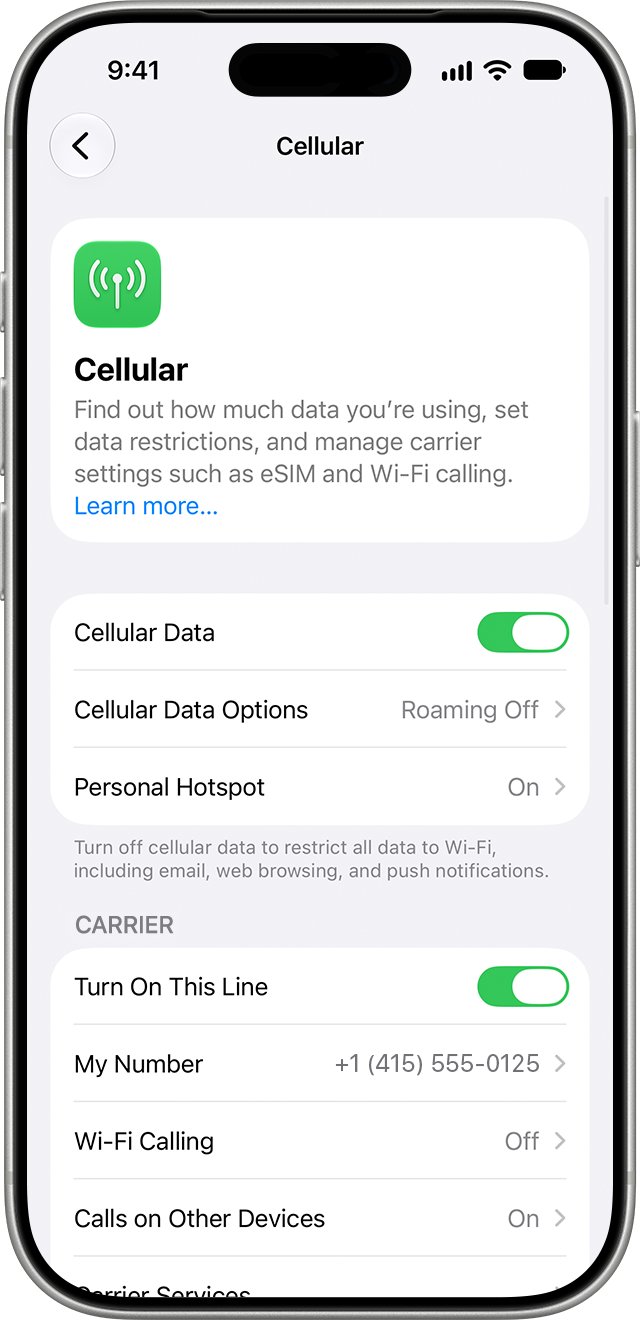
| Roaming turned on | Cellular data or data roaming must be enabled or TravelPass cannot activate |
| A My Verizon sign-in | Adding or changing an international plan happens on the line's international page |
| Account owner or manager role | Only owners and managers can add or remove the 3 TravelPass Days perk |
| Destination checked | Trip Planner confirms the phone and the plan work at that destination |
Choose Your Travel Pass
| Your trip | Pick this | Why |
|---|---|---|
| A few days in Canada or Mexico | TravelPass at $6 per line per day | Lowest daily rate Verizon lists |
| A short trip anywhere else | TravelPass at $12 per line per day | Billed only on the days you use the phone |
| Nine days or longer | International Monthly Plan at $100 per line | Verizon positions it for trips of nine days or more |
| You travel most months | 3 TravelPass Days perk at $10 a month | Banks three days a month, up to 36 stored days |
| A cruise or a flight | Cruise and In-Flight Daily Pass at $20 per line per day | A separate daily pass covers ships and aircraft |
| You are on Unlimited Ultimate | Add nothing | International data, talk and text are already in the plan |
| You are on Unlimited Plus or Unlimited Welcome | Add nothing | TravelPass is already on the line |
| You are on Verizon Prepaid | Add nothing | TravelPass is included on compatible prepaid smartphones |
Step-by-Step Guide to Adding a Travel Pass on Verizon
- Log in to your Verizon account at verizon.com, or open the My Verizon app.
- Open the international plans page for the line that is travelling.
- Select Add new plan.
- Select the TravelPass option to access the daily plan choices.
- Confirm the line and the destination, then complete the purchase.
- Repeat for every other line on the account that is travelling.
Verizon keeps international plans on the line's own international page. There is no Manage Devices section to navigate to, and no change on the device itself beyond roaming.
Add a Travel Pass on a Verizon Prepaid line
Prepaid TravelPass covers 140+ countries and destinations and costs the same $6 or $12 a day.
- Sign in to My Verizon with the prepaid mobile number.
- Open the Add-ons page for that line.
- Check that TravelPass is listed and switched on there.
- Turn on data roaming in the phone's settings before you fly.
Prepaid data-only devices cannot use TravelPass at all.
Verify Activation
- Land and leave the phone switched on for up to three minutes so it registers on a local network.
- Read the Verizon welcome text that names the rates and dialling instructions for that country.
- Turn Wi-Fi off and load a web page over cellular data.
- Open the international plans page in My Verizon and confirm TravelPass is on the line.
- Wait for the text Verizon sends two hours before the 24-hour session ends; it proves a session is running.
Using Your Travel Pass While Traveling
A session starts on its own the first time you use the phone in a TravelPass country.
- On iPhone, open Settings > Cellular > Roaming and turn on voice and data roaming before the flight.
- On Android, accept the prompt to allow global data when it appears after you land.
- Give the phone up to three minutes after landing to connect to a local network.
- Dial with +, then the country code, then the number; hold 0 on an iPhone to type +.
- Edit saved contacts so each number carries + and its country code.
- Restart the phone if service does not appear, so it re-registers on the international network.
Checking Your Travel Pass Status
- Open the My Verizon app, or sign in at verizon.com.
- Open the international plans page for the travelling line.
- Read the international plan and the international usage shown for that line.
- Check the stored day balance if the line has the 3 TravelPass Days perk.
- Compare the day count with your trip length before the next session starts.
Extending or Modifying Your Travel Pass
Managing a Travel Pass after purchase happens on the same international plans page in My Verizon.
- Keep using the phone the next day; a fresh 24-hour session starts automatically and bills as another day.
- Buy 2 GB more high-speed data for $5 in Canada or Mexico, or $10 elsewhere, once the 5 GB is gone.
- Switch to the $100 International Monthly Plan from the international plans page if the trip runs nine days or longer.
- Add the 3 TravelPass Days perk for $10 a month if you travel most months.
- Ask the account owner or a manager to make perk changes, because only those roles can add or remove it.
How to stop Travel Pass charges
- Turn off data roaming in the phone's settings before you land.
- Keep the phone in airplane mode and use Wi-Fi for data instead of the local cellular network.
- Remove TravelPass from the international plans page in My Verizon if you want it off the line entirely.
- Leave it in place otherwise, since nothing is billed on days the phone is not used abroad.
Common Troubleshooting Tips
Most troubleshooting for a Travel Pass comes down to roaming settings and network registration.
TravelPass will not activate after you land
Cellular data or data roaming is switched off, so no session can start.
- Turn on data roaming in the phone's settings.
- Switch airplane mode on, wait ten seconds, then switch it off.
- Restart the phone so it re-registers on the international network.
- Open the international plans page in My Verizon and confirm TravelPass is on the line.
No service at all at the destination
The phone has not registered on a partner network yet, or the destination is not covered.
- Leave the phone on for up to three minutes after landing.
- Restart the phone once.
- Check the destination on Verizon's international coverage map.
- Check the phone model in Trip Planner to confirm it works at that destination.
Calls will not connect from abroad
The number is stored or dialled without the plus sign and the country code.
- Hold 0 on an iPhone until + appears.
- Enter the country code, then the rest of the number.
- Edit the saved contact so it stores + and the country code.
You cannot reach your voicemail
Some networks block dialling your own number to reach voicemail.
- Open Visual Voicemail on the phone instead.
- Dial 1-845-613-8700 and follow the prompts if Visual Voicemail is unavailable.
Data slowed down partway through the day
The 5 GB of high-speed data for that session has been used.
- Carry on at 3G speeds for the rest of the session at no extra cost.
- Buy 2 GB more high-speed data for $5 in Canada or Mexico, or $10 in other countries.
- Move to Wi-Fi for large downloads.
You were charged for a day you did not plan to use
A 24-hour session starts automatically the first time the phone is used in a TravelPass country.
- Turn off data roaming on days you do not want a session.
- Keep the phone in airplane mode with Wi-Fi on.
- Contact Verizon with the mobile number and the date to query the charge.
Contacting Support
- Text the word TRAVEL to 4004 for international plan help.
- Call 1-800-VERIZON (1-800-837-4966).
- Open the Contact us link at the top of verizon.com for chat and other options.
- Have the mobile number, the destination country and the travel dates ready before you start.
What to know before the first day is billed
Keep data roaming off until you actually want a TravelPass day to begin. A 24-hour session starts automatically on the first use of the phone in a TravelPass country, so one background sync on the ground costs a full day at $6 or $12.
Frequently Asked Questions (FAQs) About Adding a Travel Pass to Your Verizon Phone
How do I add a travel pass to my Verizon phone?
Text the word TRAVEL to 4004, or sign in to My Verizon, open the international plans page for the line and select Add new plan. Verizon's Trip Planner does the same job and also checks the phone against your destination.
What is a Verizon Travel Pass?
TravelPass is a daily international plan that gives unlimited talk, text and data for a 24-hour session in 210+ countries and destinations. The session starts automatically the first time the phone is used in a covered country.
How much does a Verizon Travel Pass cost?
Verizon lists $6 per line per day in Canada and Mexico and $12 per line per day in other TravelPass countries, checked on 22 September 2026. Rates change, so confirm them on Verizon's TravelPass page before the trip.
Can I add a Travel Pass after arriving at my destination?
Yes. Texting TRAVEL to 4004 and the international plans page in My Verizon both work once you have landed. Turn data roaming on afterwards, because a session cannot start while cellular data is switched off.
Will my existing plan be affected when I add a Travel Pass?
No. TravelPass sits on top of the existing plan and lets you use your domestic talk, text and data abroad. Your number stays the same, and no TravelPass charge applies while the phone is in the US.
How long can I use a Travel Pass?
Each session runs 24 hours from first use in a covered country, and Verizon texts you two hours before it ends. There is no overall limit; another day is billed for each further day you use the phone abroad.
What should I do if I encounter issues activating my Travel Pass?
Turn data roaming on, cycle airplane mode, then restart the phone so it re-registers on the local network. Allow up to three minutes to connect. If service still fails, check the destination on the coverage map.
How do I use a global travel pass on a cruise or a flight?
TravelPass is for use on the ground in covered countries. Ships and aircraft use Verizon's separate Cruise and In-Flight Daily Pass, listed at $20 per line per day. Add it from the international plans page like any other plan.
How do I get free Travel Pass days?
The Verizon Visa Card gives two TravelPass days a year, and those days expire at the end of the year. Unlimited Plus and Unlimited Welcome already carry TravelPass, and Unlimited Ultimate includes international data, talk and text outright.
How do I apply the 3 TravelPass Days perk?
Add the perk for $10 a month in My Verizon, during plan selection or at any time after. It banks three days a month, up to 36 stored days, and days last 12 months after they are deposited.
Does Verizon Prepaid include a Travel Pass?
Yes. TravelPass is included on compatible prepaid smartphones and covers 140+ countries and destinations at the same daily rates. Prepaid data-only devices are not compatible, so check the Add-ons page in My Verizon first.