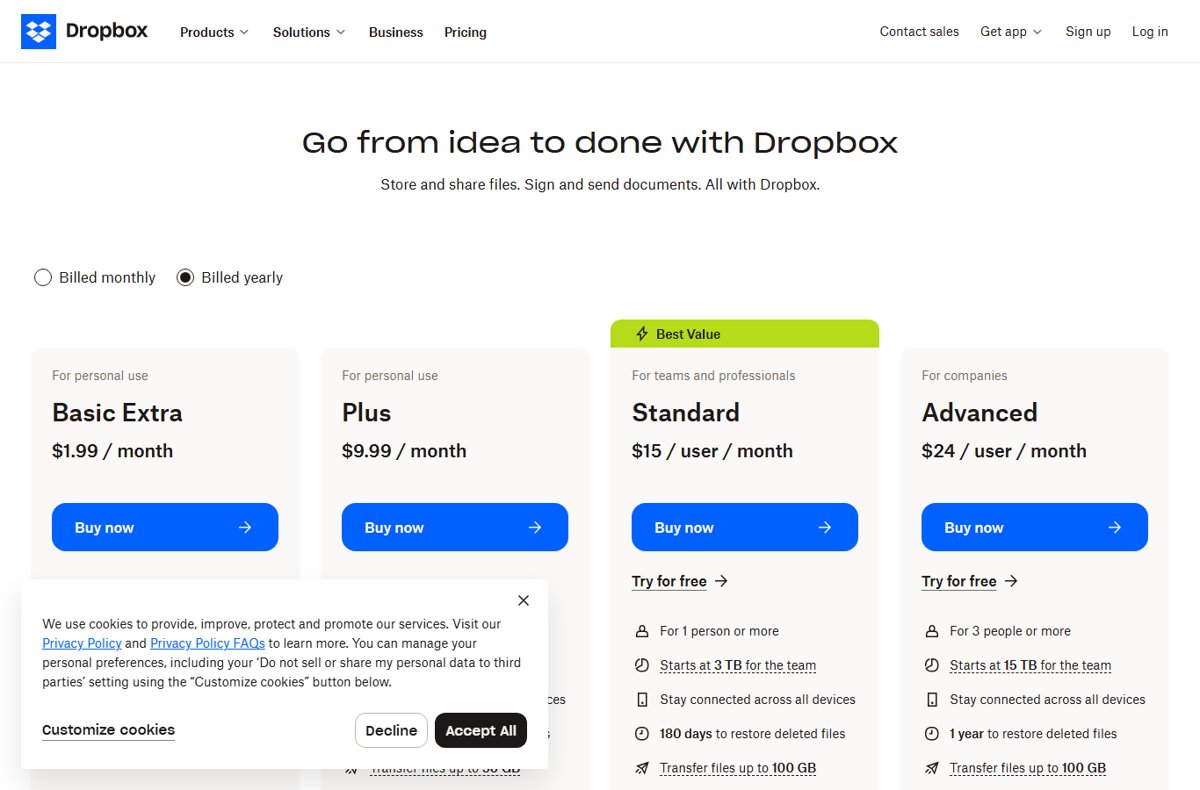
Dropbox Basic is free and gives you 2 GB of storage, while the paid plans on dropbox.com/plans are listed at $9.99 per month for Plus, $15 per user per month for Standard and $24 per user per month for Advanced.
This page breaks down every plan Dropbox sells today, the storage and limits attached to each one, the older plan names still on accounts, and how to switch or cancel.
Dropbox Pricing Overview
These are the United States list prices shown on the Dropbox plans page, read on 22 September 2026.
The plans page carries a Billed monthly and Billed yearly toggle, so the figure you are quoted at checkout depends on which cycle is selected.
| What you need | Plan | Price on the plans page |
|---|---|---|
| A free account for a few documents | Basic | Free, 2 GB |
| One person who has run out of space | Plus | $9.99 / month, 2 TB |
| A team of any size with admin controls | Standard | $15 / user / month, from 3 TB |
| A company needing audit logs and SSO | Advanced | $24 / user / month, from 15 TB |
| A large organisation with custom terms | Enterprise | Contact sales for pricing |
Prices and currency change by country. Open the Dropbox plans page to see the figures for your own billing location.
Personal Plans: Basic, Plus, and Essentials
Dropbox sells two personal plans by the month and lists them publicly. Family, Professional and Essentials are personal plans too, but Dropbox does not publish their price on the plans page.
| Plan | Storage | People | Price shown by Dropbox | Notable limits |
|---|---|---|---|---|
| Basic | 2 GB | 1 | Free | No Rewind, no remote wipe |
| Plus | 2 TB | 1 | $9.99 / month | 30-day version history, transfers up to 50 GB |
| Family | 2 TB shared | Up to 6 | Not listed on the plans page | Personal use only, no corporate email address |
| Professional | Not stated in the plan article | 1 | Not listed on the plans page | Still offered as a free trial option |
| Essentials | Not stated in the plan article | 1 | Not listed on the plans page | Adds unlimited signature requests and up to 5 eSignature templates over Professional |
Family members each keep their own Dropbox account and decide what to share, plus a shared Family Room folder everyone on the plan can reach.
Essentials is aimed at self-employed professionals running client work end to end, which is why its extras are eSignature features rather than storage.
Business Plans: Business, Business Plus, and Enterprise
Dropbox now sells its team plans as Standard, Advanced and Enterprise. Business and Business Plus are earlier names that stay on existing accounts, and Dropbox still documents them.
| Team plan | Sold today | Storage | Licence minimum | Version history |
|---|---|---|---|---|
| Standard | Yes, $15 / user / month | 3 TB for the first member, plus 1 TB per extra active licence, up to 1,000 TB | None | 180 days |
| Advanced | Yes, $24 / user / month | From 15 TB for the team, 5 TB per active licence, up to 1,000 TB | 3 licences | 1 year |
| Enterprise | Yes, contact sales | Customised to the organisation | Set with sales | 1 year |
| Business (legacy) | No, existing accounts only | From 9 TB, 3 TB per active licence, up to 1,000 TB | 3 licences | 180 days |
| Business Plus (legacy) | No, existing accounts only | From 15 TB, 5 TB per active licence, up to 1,000 TB | 3 licences | 365 days |
A licence counts as actively used when a unique person regularly logs in and uses Dropbox. Inactive licences are not removed for you, so an admin has to drop them from the admin console.
Teams that bought Standard before 30 June 2026 are usually on Dropbox Standard Classic, which gives 5 TB shared across the team and requires a minimum of three members.
Key Features Included in Each Dropbox Plan
Every plan shares the sync engine, sharing links, unlimited linked devices and 256-bit AES encryption. The differences start at security controls, admin tooling and how much each transfer can carry.
| Feature | Plus | Standard | Advanced |
|---|---|---|---|
| Restore deleted files | 30 days | 180 days | 1 year |
| Dropbox Transfer size limit | 50 GB | 100 GB | 100 GB |
| Signature requests | 3 per month | 3 per month | 3 per month |
| Password-protected links and custom expiry | No | Yes | Yes |
| Watermarking and granular permissions | No | Yes | Yes |
| HIPAA compliance can be enabled | No | Yes | Yes |
| Admin console and centralised billing | No | Yes | Yes |
| Ransomware detection and suspicious activity alerts | No | No | Yes |
| Data classification and audit logs | No | No | Yes |
| End-to-end encryption and advanced key management | No | No | Yes |
| Single sign-on integrations | No | No | Yes |
| Phone support during business hours | No | Yes | Yes |
Enterprise adds the controls the other plans do not carry at all: enterprise mobility management, network control, domain insights, account capture, 24/7 phone support and hands-on training.
Dropbox Pricing Compared by Storage, Users, and Tools
Per-user price alone hides the real gap between plans, because team storage grows with each licence while a personal plan stays fixed.
| Plan | Price | Users allowed | Storage | Transfer limit | Admin tools |
|---|---|---|---|---|---|
| Basic | Free | 1 | 2 GB | Not included | None |
| Plus | $9.99 / month | 1 | 2 TB | 50 GB | None |
| Standard | $15 / user / month | 1 or more | From 3 TB for the team | 100 GB | Admin console, groups, team folders |
| Advanced | $24 / user / month | 3 or more | From 15 TB for the team | 100 GB | Tiered admins, sign in as user, audit logs, SSO |
| Enterprise | Contact sales | Customised | Customised | 250 GB | Everything in Advanced plus device and domain controls |
Storage on Standard and Advanced is pooled, not per person. One video editor can use most of the team pool, and the 1,000 TB ceiling applies to the whole team.
How to Choose the Right Dropbox Plan for Your Needs
| Your situation | Choose | Why |
|---|---|---|
| You only sync a few documents and photos | Basic | 2 GB is free and nothing expires |
| You are one person past 2 GB and want file recovery | Plus | 2 TB with 30-day restore and Dropbox Rewind |
| Up to six people in one household | Family | 2 TB shared, separate accounts, one shared Family Room folder |
| You are self-employed and send contracts constantly | Essentials | Unlimited signature requests and reusable eSignature templates |
| Two colleagues who need shared team folders | Standard | No minimum licence count, so a team of two is allowed |
| You must show HIPAA or password-protected sharing | Standard | Cheapest plan where those controls are switched on |
| You need audit logs, SSO or ransomware alerts | Advanced | Those controls start on Advanced, not Standard |
| Fewer than three people but you want Advanced | Standard | Advanced has a three-licence minimum you would pay for anyway |
| You need custom storage, device controls or 24/7 support | Enterprise | Pricing depends on team size and location, so sales quotes it |
How to try a paid plan free before you are billed
Dropbox offers a free trial of Professional, Standard and Advanced. Billing details are collected up front, so cancel before the trial ends if you do not want the plan.
- Go to dropbox.com/plans.
- Select the plan you want and click Try for free.
- Enter your email address, or connect an existing Google or Apple account.
- Attach the trial to your current Dropbox account, or create an account at this point.
- Complete the sign-up and billing information.
- Click Done to start the trial.
A free trial is not the same thing as Dropbox Basic. Basic is a permanent free plan with 2 GB; a trial is temporary access to a paid plan's features.
How to move up or down a Dropbox plan
Changing between Plus, Professional and Essentials happens in account settings and takes effect once you confirm.
- Log in to dropbox.com.
- Click your avatar in the bottom-left corner.
- Click Manage account.
- Click Change plan at the bottom of the page.
- Select the plan you want to move to.
- Click Review changes, then click Confirm change.
How to cancel and drop back to the free plan
Cancelling a paid individual plan returns the account to Dropbox Basic at the end of the current billing cycle. It does not delete the account or the files.
- Log in to dropbox.com and click your avatar in the bottom-left corner.
- Click Manage account.
- Click Cancel plan at the bottom of the page.
- Select a reason for cancelling.
- Click Continue canceling or Confirm change and follow the prompts.
- Wait for the confirmation email titled Dropbox Plan will not renew.
Bring the account under 2 GB before the cycle ends. An account that stays over the Basic limit may be unable to sync, upload, share, move or preview files, and Dropbox may delete files you own to get back under the limit.
How to check which plan you are actually paying for
- Log in to dropbox.com.
- Click your avatar in the bottom-left corner.
- On a personal plan, click Manage account, then click Subscriptions in the left sidebar.
- On a team plan, click Settings, then open the Plan tab.
- Read the plan name shown there: Basic, Plus, Family, Essentials and Professional are personal, while Standard, Business, Business Plus, Advanced and Enterprise are team plans.
- Open the Billing tab and check Upcoming invoice for the next charge date and amount.
The plan shown belongs to the account you are signed in to. An unfamiliar plan name usually means a second Dropbox account under a different email address.
Fix the common Dropbox billing surprises
Dropbox looks more expensive than the price you remembered
The plans page shows a different figure depending on the billing cycle selected, and team plans multiply by licence count.
- Open dropbox.com/plans and switch between Billed monthly and Billed yearly.
- Confirm whether the plan you are looking at is priced per user or for one person.
- On a team account, open Settings and the Plan tab to count the licences you are paying for.
- Remove licences that nobody logs into, since inactive licences are never dropped automatically.
- Compare the storage you actually use against the next plan down before renewing.
Dropbox Basic stops syncing and asks you to upgrade
Basic includes 2 GB, and going over the quota blocks normal file operations.
- Open dropbox.com and check the storage figure on your account.
- Delete or move out files until the account is back under 2 GB.
- Empty deleted files so the space is released.
- Upgrade to Plus if 2 TB is what you need rather than repeated clear-outs.
There is no Cancel plan button in account settings
The subscription was bought through a mobile app store, which keeps the billing relationship.
- Confirm you are signed in to the Dropbox account that holds the subscription.
- Open the app store on the device where you bought Dropbox.
- Cancel the Dropbox subscription from that store's subscription list.
- Check for a cancellation email from that store rather than from Dropbox.
You cancelled but the plan still shows as active
Cancellation takes effect at the end of the current billing cycle, not immediately.
- Open the Billing tab in account settings at dropbox.com/account/billing.
- Click Change next to Billing period.
- Look for the notice titled Plan downgrade scheduled.
- Check Upcoming invoice on the right of the Billing page to see the date the plan ends.
- Remember that deleting the Dropbox app does not cancel anything, and letting a card expire does not stop the charge.
Frequently Asked Questions
How much does Dropbox cost?
Dropbox Basic costs nothing and includes 2 GB. On the Dropbox plans page, Plus is listed at $9.99 per month for 2 TB, Standard at $15 per user per month, and Advanced at $24 per user per month. Enterprise is quoted by sales.
Does Dropbox Basic cost money?
No. Dropbox Basic is a free plan with 2 GB of storage, file sharing, online-only files and Dropbox Backup. There is no trial period and no card required, but the 2 GB limit is firm and blocks syncing once you pass it.
How much does Dropbox cost per month?
For one person, Plus is listed at $9.99 per month. For teams, Standard is $15 per user per month and Advanced is $24 per user per month. Advanced bills a minimum of three licences, so its real floor is three users.
How much does Dropbox cost a year?
Dropbox does not show annual totals by default. The plans page has a Billed yearly option next to Billed monthly, and switching it updates the figure on every plan card. Check that toggle before committing to a twelve-month term.
Why is Dropbox so expensive?
Team pricing is per licence, so a five-person Standard team costs five times the headline $15. Storage is also pooled rather than metered, and Advanced pricing covers audit logs, SSO, ransomware detection and key management rather than extra space alone.
How much Dropbox storage do teams get?
Standard starts at 3 TB for the first member and adds 1 TB per extra actively-used licence. Advanced starts at 15 TB, with 5 TB per actively-used licence and a three-licence minimum. Both cap at 1,000 TB for the team.
What is the main difference between Dropbox Plus and Dropbox Standard?
Plus is a single-person plan with 2 TB and 30-day file recovery. Standard adds team folders, an admin console, centralised billing, 180-day recovery, password-protected links and phone support, and it charges per user instead of a flat fee.
Is Dropbox Business worth it for a small team?
Standard replaced Business for new purchases and has no minimum licence count, so a team of two can buy it. It is worth the step up from Plus when shared team folders, admin control over sharing and 180-day recovery matter.
When should a company choose Dropbox Enterprise instead of Advanced?
Choose Enterprise when you need customised storage and licence counts, enterprise mobility management, network control, domain insights, account capture, 250 GB transfers, 24/7 phone support or hands-on training. Pricing depends on team size and location.
Which Dropbox plan is best for one person who just needs more storage?
Plus. It gives 2 TB for one person at $9.99 per month, with 30-day file recovery, Dropbox Rewind, remote wipe and transfers up to 50 GB. Family suits the same need when up to six household members share the 2 TB.
Can you switch Dropbox plans without losing files?
Yes. Changing between individual plans in Manage account keeps every file. Downgrading to Basic also keeps the account, but the 2 GB ceiling then applies, and files can be deleted by Dropbox if the account stays over it.
Bottom Line
Buy Plus at $9.99 per month if you are one person out of space, Standard at $15 per user if two or more people share files, and Advanced at $24 per user only when audit logs, SSO or ransomware alerts are a requirement. Storage rarely decides the plan. The jump from Plus to Standard buys team folders and admin control, and the jump from Standard to Advanced buys compliance and security tooling, so match the plan to the controls you need rather than to the terabytes.