Minecraft: Java Edition signs in through a Microsoft account, so adding a Mojang account to Microsoft means migrating that profile onto one.
This page covers the official migration route, the checks that prove it worked, and fixes for linking, connectivity and Microsoft account errors.
The fastest way to add a Mojang account to Microsoft
Sign-in for Minecraft: Java Edition runs through the Microsoft account that holds the game.
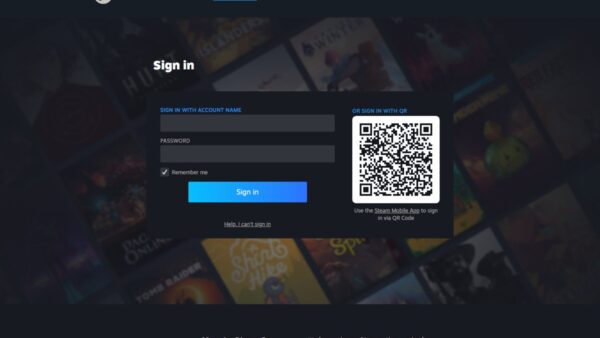
- Open account.microsoft.com, type the email address you use for Microsoft services and select Next.
- Enter the password and select Sign in.
- Open the Minecraft Launcher and sign in with that same Microsoft account.
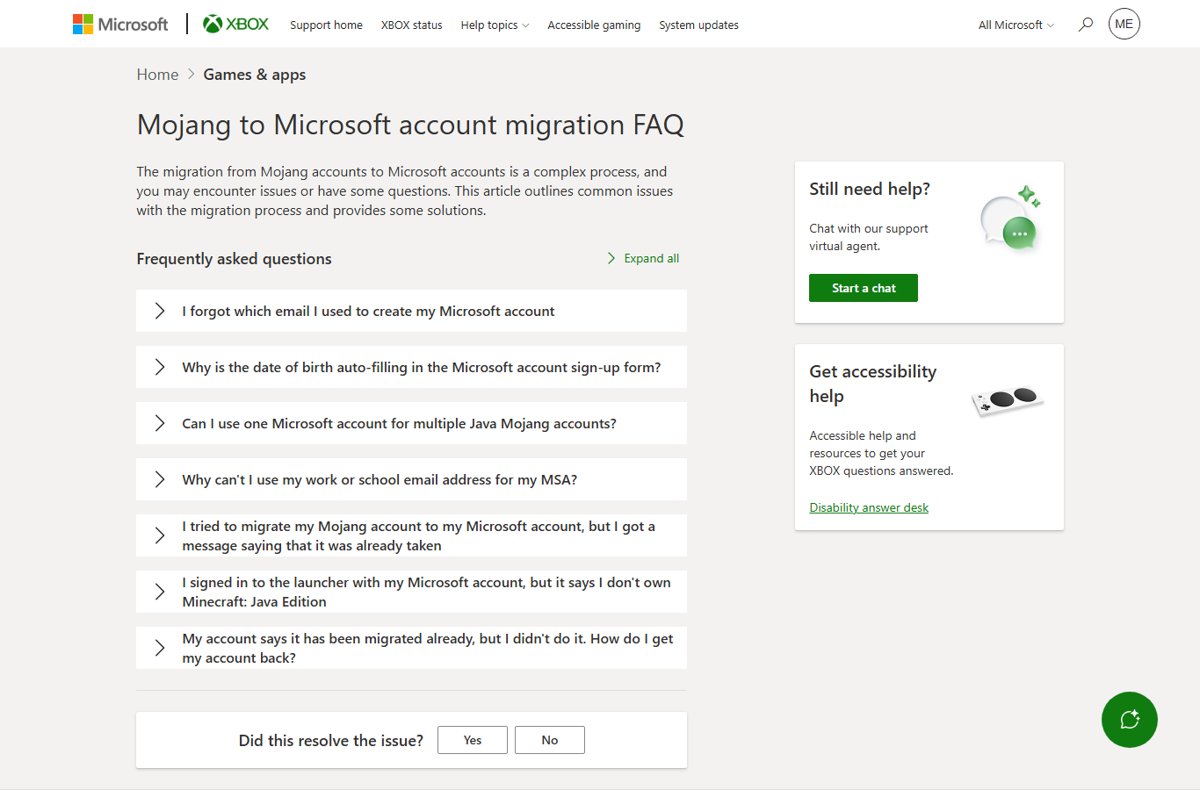
- If the launcher does not list Minecraft: Java Edition, open Microsoft's Mojang to Microsoft account migration FAQ and expand the entry that matches your case.
A reader who reaches the launcher here is finished. The rest of the page handles accounts that stall.
Understanding the Need to Link Mojang and Microsoft Accounts
Linking moves five things off the old Mojang login and onto a Microsoft account.
| What moves | What it means for you |
|---|---|
| Sign-in | The Minecraft Launcher asks for a Microsoft account email and password |
| Ownership | Minecraft: Java Edition sits in the library of the Microsoft account that bought or migrated it |
| Security | Password resets, two-step verification and recovery all run from account.microsoft.com |
| Support | Account cases go through Xbox Support's migration FAQ, which opens a support chat |
| Purchases | Minecraft: Java & Bedrock Edition for PC is sold as one bundle: the Minecraft Launcher, Minecraft for Windows and Minecraft: Java Edition |
That Microsoft account can hold more than the game. See How to Link Microsoft Account to Windows Digital License for the Windows activation side of it.
Prerequisites Before Linking Your Mojang Account to Microsoft
| You need | Why | Where to get it |
|---|---|---|
| A personal Microsoft account | Sign-in for the launcher and the store runs on it | Create free account at outlook.com |
| Its current password | The sign-in form asks for it after the email address | Reset a forgotten password |
| Working security info | Verification codes arrive at the phone or alternate email on file | account.microsoft.com/security |
| A second contact method | With two-step verification on, resetting a password needs two of them | account.microsoft.com/security |
| The Minecraft Launcher | It is where the Microsoft sign-in happens | Microsoft Store on Windows 10 and 11; Minecraft.net/download for Mac and Linux |
A work or school address is not a personal Microsoft account. Those sign in at myaccount.microsoft.com and are controlled by the organisation that issued them.
Which route applies to your account?
| Your situation | Do this | Why |
|---|---|---|
| You know the Microsoft account and the launcher shows the game | Sign in and play | Nothing is left to migrate |
| The launcher signs in but shows no Java Edition | Go to Compatibility and Software Issues below | The purchase usually sits on a different Microsoft account |
| You cannot remember which email you used | Run Microsoft's username lookup | It sends a code to your security info and shows a hint of the address |
| Sign-up says the address is already taken | Go to Account Linking Errors below | An account already exists on that address, and addresses are never reused |
| The account reads as migrated and it was not you | Recover the Microsoft account first | Recovery restores control before any game question matters |
| No Microsoft account has ever held the game | Buy Minecraft: Java & Bedrock Edition for PC | The bundle puts the launcher and both editions on one account |
Step-by-Step Guide to Add Mojang Account to Microsoft
Work through these in order and keep the browser on Microsoft's own pages the whole time.
- Step 1: Prepare your accounts. Have the Microsoft account email, its password and one working security contact in front of you.
- Step 2: Visit the official migration page. Open Microsoft's Mojang to Microsoft account migration FAQ and select Expand all.
- Step 3: Initiate the migration from that page, never from a link in an email, a chat message or a video description.
- Step 4: Sign in with your Microsoft account. Type the email address, select Next, type the password and select Sign in.
- Step 5: Grant permissions when the Microsoft sign-in form asks to let Minecraft use the account. Stop if a password box appears outside that form.
- Step 6: Confirm and complete the migration, close the browser tab, then open the Minecraft Launcher.
If a step ends in an error message rather than the next screen, the troubleshooting sections below are grouped by the exact symptom.
Step 7: Verify Migration
Four checks prove the account is where it should be.
- Open the Minecraft Launcher and check that the account menu shows your Microsoft account, not a Mojang email.
- Confirm Minecraft: Java Edition appears as playable rather than as something to buy.
- Sign out of the launcher and sign back in once; it should accept the Microsoft account without extra prompts.
- Open account.microsoft.com and confirm the email shown there is the one the launcher used.
To use the same account on the PC itself, follow How To Add User Account In Windows 11 – Full Guide. It is optional for playing.
Troubleshooting Common Issues When Adding a Mojang Account to Microsoft
These two symptoms stop most people before the migration page even opens.
You cannot log in to your Mojang account
Minecraft: Java Edition sign-in runs through a Microsoft account, so the old credentials no longer reach the launcher.
- Open the Mojang to Microsoft account migration FAQ and select Expand all.
- Read the entry that matches the message you see and follow it.
- If none matches, select Start a chat on that page to reach Xbox Support.
- Keep the old Mojang email address to hand; support asks for it.
You cannot find which account holds your Minecraft purchase
The purchase sits on one Microsoft account, and the address on file may be an alias you rarely use.
- Open Microsoft's forgotten username lookup.
- Request a security code to the phone number or email you registered, enter it and select Next.
- Read the hint Microsoft shows, in the form j*****@outlook.com.
- Sign in with that address and check the launcher again.
Account Linking Errors
"That email address is already taken"
A Microsoft account already exists on that address, and Microsoft never reuses an address, even from an account closed years ago.
- Sign in with the address instead of signing up, at account.microsoft.com.
- If the password fails, run the sign-in helper.
- If the address is genuinely not yours, use a different email address and link that one.
- Expand the matching entry on the migration FAQ before contacting support.
The account says it was migrated already and you did not do it
Someone else reached the account first, which Microsoft treats as a compromised account case.
- Run a full scan with Microsoft Defender or your antivirus program before changing anything.
- Change the password once the scan is clean, following recover a hacked or compromised Microsoft account.
- Check connected accounts, email forwarding and automatic replies, which Microsoft resets after a break-in.
- Open the migration FAQ and select Start a chat to have the game account reviewed.
Connectivity Problems
The migration or sign-in page will not load
A service outage, a blocked script, or a network that filters Microsoft sign-in pages.
- Check Xbox status before retrying anything.
- Open the same page on another device or another network, which Microsoft suggests when sign-up stalls.
- Retry in a browser with no content blocker running on microsoft.com and xbox.com.
- Wait for any listed outage to clear, then start at Step 2 again.
Compatibility and Software Issues
The launcher says you do not own Minecraft: Java Edition
The signed-in Microsoft account is not the one holding the purchase, or the launcher came from the wrong place for your operating system.
- Sign out of the launcher and sign in with the Microsoft account you believe bought the game.
- Check that account's store library for Minecraft: Java & Bedrock Edition for PC.
- On Windows 10 and Windows 11, install the Minecraft Launcher from the Microsoft Store.
- On Mac or Linux, get the launcher from Minecraft.net/download instead.
- If the purchase is on an account you cannot reach, open the migration FAQ entry about not owning Java Edition.
Microsoft Account Problems
You forgot which email you used for the Microsoft account
Any alias on the account signs in with the same password, so the address in use may not be the one you remember.
- Open the username lookup and request a code.
- Enter the code and select Next to see the masked address.
- If that fails, check the products and services where the account was used, from Microsoft's account help page.
- Sign in at account.microsoft.com with the address you recover.
The password stopped working although you know it is right
Microsoft blocks sign-in when it sees unusual activity, and support agents cannot send reset links or read account details back to you.
- Run the Microsoft account sign-in helper.
- Answer its questions about the email address or phone number on the account.
- Follow the recovery route it offers, including the account recovery form if it appears.
- Set a new password, then sign in to the launcher again.
Your work or school email address is refused
That address belongs to an organisation's directory, which is managed separately from a personal Microsoft account.
- Create or use a personal Microsoft account on an address the organisation does not own.
- Pick a fresh address if the old one was closed, because a closed account's address cannot be reused.
- Link the game to that personal account.
- Keep the work address for myaccount.microsoft.com, where organisation accounts are managed.
Security and Privacy Considerations
Treat the Microsoft account as the game account and secure it before anything else. Sign-in, ownership, purchases and recovery all sit on it, and Microsoft support agents never send password reset links or read account details back to you. Be cautious during the linking process: type account.microsoft.com yourself rather than following a link sent in chat, and stop if a password box appears outside a Microsoft sign-in page.
Adding store credit to that account is a separate job — see How to Redeem a Gift Card on a Microsoft Account.
Protect Your Account Information
- Open account.microsoft.com/security and select Manage how I sign in.
- Find Two-step verification under the additional security options.
- Select Turn on and follow the instructions on screen.
- Scan the QR code with your authenticator app when the setup asks for it.
- Add a third piece of security info, such as a second email address or phone number.
With two-step verification on, resetting a forgotten password needs two contact methods. Losing access to all of them can take 30 days to sort out, which is why Microsoft recommends keeping three on file.
Manage Privacy Settings
- Open account.microsoft.com/privacy.
- Review the search, browsing, location, voice, media, and apps and services activity stored on the account.
- Select any category you want cleared and confirm the deletion.
- Open account.microsoft.com/privacy/ad-settings to change how the account is used for advertising.
- On Windows 11, open Start > Settings > Privacy & security; on Windows 10, open Start > Settings > Privacy.
Clearing the dashboard does not clear browser cookies. Remove those in the browser's own settings.
Additional Resources and Support
| Official page | What it settles |
|---|---|
| Mojang to Microsoft account migration FAQ | Linking errors, duplicate accounts, and the support chat for game accounts |
| I can't sign in to my Microsoft account | Sign-in helper, error 400, and accounts closed after long inactivity |
| Forgotten your Microsoft account username | The lookup tool that reveals a masked account address |
| Reset a forgotten Microsoft account password | Password recovery when the address is known |
| Recover a hacked Microsoft account | What to reset after someone else reached the account |
| Two-step verification | Turning it on, app passwords, and the 30-day lockout rule |
| Xbox status | Whether sign-in or store services are down right now |
Bottom line
Sign in to the Minecraft Launcher with the Microsoft account that holds Java Edition, then turn on two-step verification for it. That one account decides whether the game launches, whether the purchase shows, and whether the address can be recovered later. Microsoft's migration FAQ and its support chat are the only official route for a linking case that will not resolve.
Frequently Asked Questions (FAQs)
How do you add a Mojang account to Microsoft?
Sign in to the Minecraft Launcher with a Microsoft account, then use Microsoft's Mojang to Microsoft account migration FAQ for anything the launcher refuses. Java Edition sign-in runs on a Microsoft account, so that account is where the profile ends up.
How do you sign in with a Mojang account now?
You sign in with the Microsoft account instead. Enter its email address in the launcher, select Next, then enter the password. If the launcher rejects it, run Microsoft's sign-in helper before trying the game again.
How do you find your Mojang account?
Use Microsoft's forgotten username lookup. Request a security code to the phone number or email on file, enter it, and Microsoft shows a hint of the address, such as j*****@outlook.com. Sign in with that address and open the launcher.
How do you create a Mojang account?
New Minecraft purchases run on a Microsoft account, so create one of those instead. Go to outlook.com, select Create free account, and finish the sign-up. A parent or guardian must sign in to complete setup for a child.
How do you use a Microsoft account for Minecraft?
Buy or migrate the game on that account, then sign in to the Minecraft Launcher with it. Minecraft: Java & Bedrock Edition for PC puts the launcher, Minecraft for Windows and Java Edition on the same account.
Can one Microsoft account hold two Minecraft Java accounts?
Microsoft answers this in the Mojang to Microsoft account migration FAQ. Open that page, select Expand all, and read the entry about using one Microsoft account for multiple Java Mojang accounts before you link anything.
Why is a work or school email address refused?
That address belongs to an organisation's directory rather than a personal Microsoft account. Use a personal address instead. Work and school accounts are managed at myaccount.microsoft.com by the organisation that issued them.
What if the launcher says you do not own Minecraft: Java Edition?
The purchase is on a different Microsoft account. Sign out, sign in with the other address, and check that account's store library for Minecraft: Java & Bedrock Edition for PC. The migration FAQ covers this case as well.
How do you access your Minecraft account on a Mac?
Get the Minecraft Launcher from Minecraft.net/download rather than the Microsoft Store, then sign in with your Microsoft account. Java Edition runs on Windows, Mac and Linux, while Minecraft for Windows does not.
How do you keep the account safe after linking?
Open account.microsoft.com/security, select Manage how I sign in, and turn on two-step verification. Keep three pieces of security info on file, because regaining access without them can take 30 days.