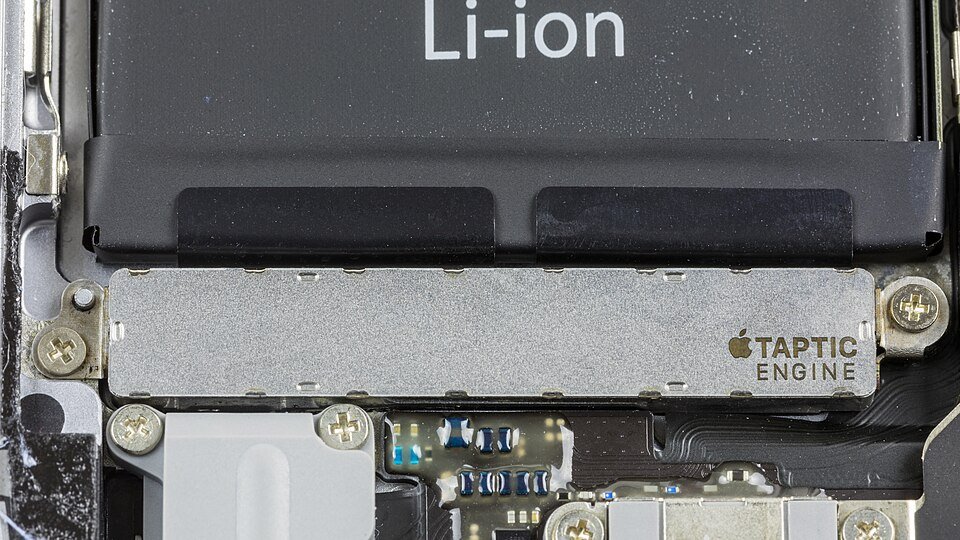
Haptics are the taps, clicks and vibrations a device plays against your skin to tell you something happened, produced by a small motor called an actuator.
This guide explains how that motor turns software events into a feeling, the main types of haptic feedback, and exactly where to turn haptics on or off on iPhone, Android, Apple Watch, Mac and Windows.
What Are Haptics?
Apple defines haptic feedback as the vibration you feel on your iPhone when you perform some actions, such as touching and holding an icon on the Home Screen.
The word comes from the Greek for touch. In technology it means any feedback you feel rather than see or hear.
Haptics are deliberate touch feedback: software tells a small actuator inside the device to move, and you feel that movement as a tap, click or buzz. A plain notification buzz, the click of a glass trackpad that never physically moves, and the scratch of a digital pen on screen are all haptics. What changes is the actuator and how precisely the software drives it.
To switch them off quickly: on iPhone, open Settings > Sounds & Haptics and turn off System Haptics. On a Pixel, open Settings > Sound & vibration > Vibration & haptics and turn off Use vibration & haptics.
How Haptics Work
Every haptic effect follows the same three-step chain, from a line of code to a sensation in your fingertip.
| Step | What happens | Example |
|---|---|---|
| 1. Software triggers the feedback | An app or the operating system requests a named effect, such as a click, a success pattern or a continuous texture. | iOS plays a selection haptic as a picker value changes; Android requests a KEYBOARD_TAP effect on each key press. |
| 2. A driver and an actuator create motion | A haptic driver chip sends a waveform to the actuator. In a linear resonant actuator (LRA), a coil pushes a magnet-and-mass assembly back and forth on springs. | Android notes LRAs are the most common vibration actuators on its devices. |
| 3. The device transfers the sensation | The moving mass shakes the phone body, trackpad glass, watch case or pen barrel, and your skin reads it as a tap or texture. | A Force Touch or haptic touchpad feels like it clicks even though the surface barely moves. |
Timing matters as much as strength. Android's documentation says driver features called overdrive and active braking start and stop an LRA faster, which makes a tap feel crisp instead of mushy.
Each LRA also has a resonant frequency. Android lists two common ranges: 200 to 300 Hz, which feels sharp, and about 150 Hz, which feels softer and fuller.
The Main Types of Haptic Feedback
Haptics are grouped two ways: by how the effect feels, and by what part of your body senses it. Android's design guide uses the first grouping; the second is standard engineering vocabulary.
| Type | What it feels like | Typical hardware | Where you meet it |
|---|---|---|---|
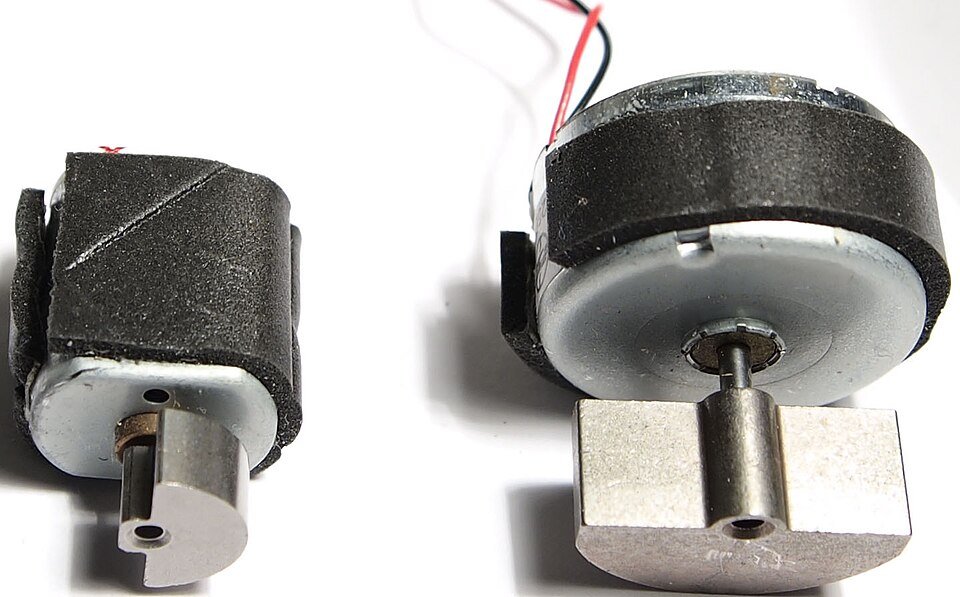
| Vibration (buzzy) feedback | A long, noisy buzz that can leave a tingle after it stops | Eccentric rotating mass (ERM) motor: an off-centre weight on a spinning shaft | Pagers, older phones, silent-mode ringing |
| Tactile (clear) feedback | A short, crisp tap that imitates a physical button | LRA with a haptic driver | Keyboard taps, toggles, trackpad clicks |
| Rich feedback | Textures, flutters, wobbles or a sense of weight | Wide-bandwidth actuators | Games, Music Haptics, pen inking textures |
| Force (kinesthetic) feedback | Resistance or push-back felt in the muscles and joints, not just the skin | Motors that resist movement | Controllers and input devices that push back against your hand |
Android's guidance is blunt about the first row: given the choice of buzzy haptics or no haptics for touch feedback, choose no haptics.
Apple's design guide splits effects into transient events, which are brief taps, and continuous events, which are sustained vibrations. Both can vary in sharpness and intensity.
Everyday Examples of Haptics
| Device | What you feel | Why it is there |
|---|---|---|
| Smartphones | Taps on key presses, toggles, touch-and-hold menus and ringtone vibration patterns | Confirms a touch on glass that has no moving parts |
| Smartwatches and fitness trackers | Wrist taps for notifications and ticks as the Digital Crown scrolls (Apple Watch Series 4 and later) | Alerts you without sound; Taptic Time can even tap out the time |
| Game controllers | Rumble and impact effects synced to gameplay | Apple's guidelines note controllers can play haptics in iPadOS, macOS, tvOS and visionOS games |
| Laptops and trackpads | A click from a solid touchpad; alignment snaps when dragging in some Mac apps | Mac Force Touch trackpads and Windows 11 haptic touchpads, such as the Surface Laptop Studio 2 touchpad |
| Digital pens | A pen-on-paper feel while inking and short clicks on buttons | Windows 11 tactile signals for haptic pens such as Surface Slim Pen 2; Apple Pencil Pro on supported iPads |
| Mice | Clicks and effects played from the mouse body | Windows 11 supports a haptic mouse device class |
Why Haptics Matter
| Benefit | What it does for you | Official example |
|---|---|---|
| They confirm actions | You know a press registered without looking for a visual change | iOS notification haptics signal success, warning or error |
| They improve accessibility | Information reaches people who cannot see or hear the screen | Music Haptics plays songs as taps and textures; Taptic Time taps out the time silently |
| They reduce screen dependence | A wrist tap or pocket buzz tells you enough to keep your eyes elsewhere | watchOS defines distinct Up, Down, Success and Failure haptics |
| They make digital experiences feel more real | Glass behaves more like a button, and a stylus more like a pen | Android says click feedback on virtual keyboards can increase typing speed and reduce errors |
Which haptics setting should you change?
Most people only want one kind of vibration gone. Match your goal to the narrowest switch so you do not lose alerts you still want.
| Your goal | Change this | What stays on |
|---|---|---|
| Stop taps on toggles and menus on iPhone | Sounds & Haptics > System Haptics off | Call and notification vibration |
| Stop keyboard taps on iPhone | Sounds & Haptics > Keyboard Feedback > Haptic off | Everything else |
| Stop every vibration on iPhone | Accessibility > Touch > Vibration off | Nothing, including emergency alert vibration |
| Stop keyboard vibration on a Pixel | Sound & vibration > Vibration & haptics > Keyboard vibration off | Ring, notification and touch vibration |
| Stop every vibration on Android | Vibration & haptics > Use vibration & haptics off | Nothing |
| Weaker wrist taps on Apple Watch | Sounds & Haptics > Haptics > Default | All alerts, at lower strength |
| No pen vibration in Windows 11 | Pen & Windows Ink > Tactile signals off | Touchpad and other input |
How to Adjust Haptics on Your Devices
These are the official paths. Labels on Android phones from other manufacturers can differ from Pixel wording.
| Device | Where haptics live | What you can change |
|---|---|---|
| iPhone | Settings > Sounds & Haptics | System Haptics, Keyboard Feedback, ringtone and alert vibration patterns |
| iPhone (all vibration) | Settings > Accessibility > Touch > Vibration | One switch for every vibration |
| Android (Pixel) | Settings > Sound & vibration > Vibration & haptics | On/off, keyboard vibration, Adaptive vibration, intensity |
| Android (accessibility path) | Settings > Accessibility > Vibration & haptics | Ring, notification, touch feedback and alarm vibration |
| Apple Watch | Settings > Sounds & Haptics on the watch, or Watch app > My Watch > Sounds & Haptics | Haptics strength, Crown Haptics, System Haptics |
| Mac | Apple menu > System Settings > Trackpad | Click firmness, Force Click and haptic feedback |
| Windows 11 pen | Settings > Bluetooth & devices > Pen & Windows Ink > Tactile signals | On/off, when signals play, intensity |
| Windows 11 touchpad | Settings > Bluetooth & devices > Touchpad | Haptic intensity and click force, on touchpads that support haptics |
How to change haptics on iPhone
- Open the Settings app.
- Tap Sounds & Haptics.
- Turn System Haptics on or off to control taps for system controls and interactions.
- Tap Keyboard Feedback and turn Haptic on or off for typing taps.
- To change a vibration pattern, tap Ringtone or an alert such as Text Tone, tap Haptics, then pick a pattern or tap Create New Vibration.
- To silence every vibration instead, go back to Settings > Accessibility > Touch and turn off Vibration.
Turning off Vibration under Accessibility also stops vibration for earthquake, tsunami and other emergency alerts. Use the narrower switches above if you still want those.
How to change haptics on Android
These steps use Pixel labels. Google notes that some steps vary by device.
- Open the Settings app.
- Tap Sound & vibration, then Vibration & haptics.
- Turn Use vibration & haptics on or off to control every vibration at once.
- Turn Keyboard vibration on or off for typing feedback.
- On Pixel 7 and later, tap Adaptive Vibration and turn on Use Adaptive Vibration to let the phone adjust strength to your surroundings.
- To set strength for calls or alerts, go to Sound & vibration > Ringtone > Vibration or Notification Vibration and move the intensity slider.
If your phone lacks those menus, try Settings > Accessibility > Vibration & haptics. It holds switches for ring, notification, touch feedback and alarm vibration.
How to change haptics on Apple Watch
- Open the Settings app on your Apple Watch.
- Tap Sounds & Haptics.
- Under Haptics, choose Default, Prominent or Off for wrist taps.
- Turn Crown Haptics on or off for the ticks you feel while scrolling with the Digital Crown.
- Turn System Haptics on or off for taps on system controls.
- To make the same changes from your phone, open the Watch app on iPhone, tap My Watch, then Sounds & Haptics.
How to turn tactile signals and touchpad haptics on or off in Windows 11
Windows calls pen haptics tactile signals in Settings; developer documentation uses the word haptic for the same feature.
- Select Start > Settings > Bluetooth & devices.
- Select Pen & Windows Ink, then Tactile signals.
- Turn tactile signals on or off, then choose when you feel them and set their intensity.
- For a haptic touchpad, go back to Bluetooth & devices and select Touchpad.
- Adjust the haptic feedback intensity and the click force. These options appear only when the touchpad supports haptics.
Microsoft's hardware guide says the lowest touchpad intensity setting plays no feedback for press and release. Click force comes in three levels: low, medium and high.
On a Mac, open Apple menu > System Settings > Trackpad. Set Click firmness, and turn Force Click and haptic feedback on or off.
How to check your haptics setting took effect
- On iPhone, flip any switch in Settings. With System Haptics on you feel a light tap as it toggles; with it off you feel nothing.
- Type a few letters on the keyboard to confirm Keyboard Feedback matches what you chose.
- On a Pixel, tap a vibration pattern under Ringtone > Vibration. The phone previews it at the slider's intensity.
- On Apple Watch, turn the Digital Crown in a list. Detent ticks confirm Crown Haptics is on.
- In Windows 11, draw with a haptic pen in an inking app. A continuous texture confirms Tactile signals is on.
What Makes Good Haptics Feel Good?
Apple and Google publish near-identical rules for designers. They also explain why some apps feel polished and others feel cheap.
| Rule | Why it works | Source |
|---|---|---|
| Short and crisp beats long and buzzy | Sharp taps read as a button; long buzzes feel noisy and numbing | Android haptics design principles |
| Subtle for frequent events | Scrolling or dragging a text handle happens constantly, so strong effects become tiring | Android haptics design principles |
| Consistent meaning | The same pattern for the same outcome lets you learn it; reused patterns confuse | Apple Human Interface Guidelines |
| Matched to sound and animation | Intensity and sharpness that match the visual make the whole interaction feel natural | Apple Human Interface Guidelines |
| Used sparingly and optional | The best haptics are ones you barely notice but miss when they are off | Apple Human Interface Guidelines |
Can Haptics Drain Battery?
Yes, a little: every tap runs a motor powered by the battery, but short taps are brief, so the long vibrations of calls and alerts are the larger share. Apple, Google and Microsoft do not publish a battery figure for haptics. They do give you the switches in this guide, so turn off keyboard haptics or System Haptics first if you want to test the difference.
Android describes older ERM buzzers as power-efficient, so heavier buzzing is not automatically a sign of higher drain. Screen, radios and apps still dominate battery use on phones.
Are Haptics the Same as Vibration?
Every haptic is a vibration of some kind, but not every vibration is designed as haptic feedback. The difference is precision and purpose.
| Basic vibration | Haptic feedback | |
|---|---|---|
| Purpose | Get your attention, usually as a ringer substitute | Confirm a specific action or convey a texture |
| Length | Long, repeated pulses | Milliseconds-long taps or shaped continuous effects |
| Typical actuator | ERM motor | LRA or other wide-bandwidth actuator with a driver |
| Feel | Buzzy, sometimes audible | Sharp, click-like, or textured |
| iPhone setting | Ringtone and alert Haptics patterns | System Haptics and Keyboard Feedback |
Common Haptics Problems and Fixes
iPhone does not vibrate at all, even though System Haptics is on
The master Vibration switch under Accessibility overrides every other haptics setting.
- Open Settings > Accessibility > Touch.
- Turn on Vibration.
Keyboard taps are missing on iPhone
Keyboard haptics are a separate switch from System Haptics.
- Open Settings > Sounds & Haptics > Keyboard Feedback.
- Turn on Haptic.
Android phone does not vibrate for anything
Use vibration & haptics is off, or the ring mode is set to mute.
- Open Settings > Sound & vibration > Vibration & haptics and turn on Use vibration & haptics.
- Press a volume button, tap Ring above the slider, then tap Vibrate instead of Mute.
Android vibration is weaker in some places than others
Adaptive Vibration on Pixel 7 and later changes strength based on your surroundings.
- Open Settings > Sound & vibration > Vibration & haptics > Adaptive Vibration.
- Turn off Use Adaptive Vibration for a fixed strength.
Apple Watch taps are too weak to notice
The Haptics strength is set to Default or Off.
- Open Settings > Sounds & Haptics on the watch.
- Set Haptics to Prominent.
Pen does not vibrate while drawing in Windows 11
Tactile signals are off, or the pen or app does not support haptics.
- Open Settings > Bluetooth & devices > Pen & Windows Ink > Tactile signals and turn it on.
- Raise the intensity setting on the same page.
- Test in an app that supports pen haptics; apps must request the feedback themselves.
The Future of Haptics
The direction is already visible in shipping software: fewer buzzes, more detailed textures, and haptics on more kinds of input devices.
| Trend | What already ships | Source |
|---|---|---|
| Rich textures on phones | Android APIs for effects such as flutter, wobble and surface texture, with envelope controls added in Android 16 | developer.android.com |
| Haptics as an accessibility channel | Music Haptics turns songs into taps and textures on supported iPhones | support.apple.com |
| Haptic pens | Windows 11 tactile signals and Apple Pencil Pro feedback on supported iPads | Microsoft Learn, Apple HIG |
| Haptic pointing devices | Windows 11 device classes for haptic touchpads and haptic mice | Microsoft Learn |
| Context-aware strength | Pixel Adaptive Vibration uses the microphone and sensors to set intensity | support.google.com |
Frequently Asked Questions
What does haptics mean?
Haptics means feedback you feel through touch. In devices, it refers to taps, clicks and vibrations produced by a small motor when you press, swipe or receive an alert. The word comes from the Greek for touch.
Are haptics vibration?
Yes, haptics are a controlled form of vibration. Plain vibration is a long buzz meant to get attention, while haptic feedback uses short, precise taps or textures to confirm an action, often from a linear resonant actuator rather than an older spinning-weight motor.
What is System Haptics on iPhone?
System Haptics is the iPhone setting that plays taps for system controls and interactions, such as flipping a switch or touching and holding an icon. Turn it on or off in Settings > Sounds & Haptics. It does not affect call or alert vibration.
What is the haptics setting?
The haptics setting controls touch feedback on your device. On iPhone it lives in Settings > Sounds & Haptics; on a Pixel, in Settings > Sound & vibration > Vibration & haptics; in Windows 11, pen haptics are under Pen & Windows Ink > Tactile signals.
How do I turn off haptics?
On iPhone, open Settings > Sounds & Haptics and turn off System Haptics, or turn off Vibration under Accessibility > Touch to stop everything. On Android, open Settings > Sound & vibration > Vibration & haptics and turn off Use vibration & haptics.
What is haptics in a computer?
In a computer, haptics is touch feedback from input devices. Examples include Mac Force Touch trackpads, Windows 11 haptic touchpads that click without a mechanical button, haptic mice, and pens such as Surface Slim Pen 2 that simulate the feel of writing.
Why are haptics important?
Haptics are important because they confirm actions without a screen check, carry information to people who cannot see or hear the device, and make glass surfaces feel like buttons. Android notes keyboard click feedback can increase typing speed and reduce errors.
What is haptics in communication?
In communication studies, haptics is the study of touch as nonverbal communication, such as a handshake or a pat on the shoulder. The technology meaning borrows the same idea: using touch to pass a message from a device to a person.
What is haptics functionality on a phone?
Haptics functionality is a phone's ability to play precise touch effects: keyboard taps, toggle clicks, custom ringtone vibration patterns and, on some iPhones, Music Haptics. Apps request the effects and the operating system plays them through the built-in actuator.

How do Apple AirTags actually work? - Techdows
[…] vibration is haptic feedback that grows stronger as the gap […]