The funniest WiFi names are short puns that land in one glance, such as Wi Believe I Can Fi, The Promised LAN and Pretty Fly for a WiFi.
Below are 265 clean names sorted by theme, followed by the exact steps to put one on a Google Nest router, a Windows hotspot or an iPhone hotspot.
Best funny WiFi names for any router
Pick one of these 30 if you want a name that works in any building. Each fits inside the 32-byte limit a WiFi network name has, so no router will cut it short.
| WiFi name | Why it works |
|---|---|
| Wi Believe I Can Fi | Song lyric, instantly recognisable |
| The Promised LAN | Biblical pun everyone gets |
| Pretty Fly for a WiFi | Classic rock title swap |
| Get Off My LAN | Grumpy neighbor energy |
| Tell My WiFi Love Her | Reads aloud perfectly |
| Silence of the LANs | Thriller title pun |
| LAN Solo | Space hero, one letter changed |
| The LAN Before Time | Childhood film pun |
| Loading… | Looks stuck forever |
| Searching… | Looks like a status message |
| No Free WiFi Here | Blunt and honest |
| Wi-Fight the Feeling | Pun with a shrug |
| Nacho WiFi | Not your WiFi, with cheese |
| Bill Paying Customers Only | Who pays, who connects |
| Mom Click Here for Internet | Helpful and funny |
| Connecting… | Fake progress forever |
| The Internet Box | How relatives describe it |
| Ask Nicely Next Time | Polite refusal |
| Keep It on the Download | Slang twist |
| Drop It Like It's Hotspot | Rap lyric swap |
| Lord of the Pings | Fantasy epic pun |
| Winternet Is Coming | Fantasy TV catchphrase |
| Yell PENGUIN for Password | Makes guests do something silly |
| 404 WiFi Unavailable | Error code joke |
| Free Public WiFi Just Kidding | Fake-out |
| WiFi Art Thou Romeo | Shakespeare pun |
| Lag Out Loud | LOL, slower |
| Router McRouterface | Internet naming meme |
| The Ping Is Mightier | Pen and sword, updated |
| Hotspot Potato | Pass it on quickly |
To put one of these on your network, jump to the router and hotspot steps further down the page.
Clever WiFi puns and wordplay
Wordplay names work best when the swapped word is LAN, Fi, ping, byte, router or lag, because those are the words people already associate with WiFi.
| WiFi name | The pun |
|---|---|
| Wi-Fi Fo Fum | Fairy tale giant |
| LANd of the Free | Anthem line |
| Wi-Five Me | High five |
| Bandwidth of Brothers | War drama title |
| Routerly Fabulous | Utterly fabulous |
| Out of Router Space | Outer space |
| Fi-Nally Connected | Finally |
| Ping Me Maybe | Pop song hook |
| Take a Byte | Take a bite |
| Megabytes and Mini Bites | Snack pun |
| Byte-Sized Signal | Bite-sized |
| Net Worth It | Net worth |
| Packet Like It's Hot | Drop it like it's hot |
| Router Limits | Out of limits |
| Under the Router | Under the radar |
| Bandwidth Wagon | Bandwagon |
| Hertz So Good | Hurts so good |
| Gigahertz of Gold | Heart of gold |
| The Ping and I | Musical title |
| Router-ific | Terrific |
| Ethernet-ity | Eternity |
| Bars of Glory | Signal bars |
| Modem Operandi | Modus operandi |
| LAN Lubbers | Landlubbers |
| WiFried Rice | Fried rice |
| Hi-Fi Wi-Fi | Rhyme |
| Wi Not | Why not |
| Ctrl Alt Defeat | Ctrl Alt Delete |
| Wireless and Flawless | Rhyme |
| Whole Lotta Lag | Rock song swap |
| The Lag Is Real | The struggle is real |
| Latency Arrival | Late arrival |
| Mesh With Me | Mesh network |
| Mesh Potatoes | Mashed potatoes |
| Pack It Loss | Packet loss |
| Netiquette | Etiquette |
| SSIDe Hustle | Side hustle |
| Router 66 | Route 66 |
| Signal and Ready to Mingle | Single and ready |
| Lag Me Not | Forget me not |
| Router Be Good | You'd better be good |
| Ping of the Hill | King of the hill |
| Up the Bandwidth | Up the creek |
| Router Pressure | Under pressure |
| A Byte to Remember | A night to remember |
Pop culture WiFi names inspired by movies, TV, and memes
Movie and TV puns work when the source is famous enough that a guest gets it without help. Meme names suit younger households and shared flats.
| WiFi name | Inspired by | Type |
|---|---|---|
| May the WiFi Be With You | Space saga blessing | Movie |
| The Fellowship of the Ping | Fantasy trilogy | Movie |
| Darth Router | Space saga villain | Movie |
| Use the Router Luke | Space saga advice | Movie |
| Honey I Shrunk the Bandwidth | Family comedy | Movie |
| Back to the Router | Time travel comedy | Movie |
| Jurassic Packet | Dinosaur park | Movie |
| One Router to Rule Them All | Fantasy ring | Movie |
| Accio WiFi | Wizard summoning spell | Movie |
| There Is No Router | Simulated reality film | Movie |
| To Infinity and Bandwidth | Animated space toy | Movie |
| Just Keep Pinging | Animated fish | Movie |
| Who You Gonna Ping | Ghost hunters | Movie |
| I'll Be Back Online | Robot from the future | Movie |
| Let It Load | Animated ice queen | Movie |
| The Need for Download Speed | Fighter pilot film | Movie |
| We Need a Bigger Router | Shark thriller | Movie |
| The LAN of Oz | Yellow brick road | Movie |
| Inconceivable Speeds | Fairy tale adventure | Movie |
| Mission Connectable | Spy franchise | Movie |
| A LAN Always Pays His Debts | Fantasy TV family motto | TV |
| Game of Phones | Fantasy TV drama | TV |
| Modem Family | Family sitcom | TV |
| Breaking Bandwidth | Crime drama | TV |
| The Big LAN Theory | Science sitcom | TV |
| Stranger Pings | Eighties sci-fi series | TV |
| Pings and Recreation | Town hall sitcom | TV |
| Bears Beets Bandwidth | Office sitcom | TV |
| The One With the WiFi | Friends sitcom episode titles | TV |
| No WiFi for You | Nineties sitcom | TV |
| Live Long and Download | Space crew series | TV |
| Bigger on the Inside Net | Time travel series | TV |
| Cool Cool Cool WiFi | Police sitcom | TV |
| Elementary My Dear WiFi | Detective series | TV |
| This Is the WiFi Way | Space western series | TV |
| One Does Not Simply Log In | Fantasy meme | Meme |
| This Is Fine No Signal | Burning room dog | Meme |
| Much WiFi Very Wow | Shiba dog meme | Meme |
| All Your Bandwidth R Belong | Old game translation | Meme |
| Never Gonna Give You WiFi | Eighties song prank | Meme |
| It's Over 9000 Mbps | Anime power level | Meme |
| Y U No Connect | Rage face meme | Meme |
| Keep Calm and Ping On | Wartime poster | Meme |
| Not Today Buffering | Not today meme | Meme |
| Shut Up and Take My Bandwidth | Cartoon money meme | Meme |
| Task Failed Successfully | Error dialog meme | Meme |
| Plz No Steal WiFi | Broken English meme | Meme |
| Big Mood No Signal | Internet slang | Meme |
| Is This the Password | Is this a pigeon meme | Meme |
| WiFi in Another Castle | Plumber game message | Meme |
Funny WiFi names to annoy or confuse your neighbors
Neighbor names should tease, not threaten. Skip anything that pretends to be the police, malware or a real business, because those names alarm people instead of amusing them.
| WiFi name | Effect on the neighbors | Style |
|---|---|---|
| Not Your WiFi | Clear and cheeky | Confusing |
| This Is Not the Network | Mind trick | Confusing |
| Connecting Will Not Help | Saves them a try | Confusing |
| Definitely Not a Router | Suspiciously specific | Confusing |
| Wrong Network Try Next Door | Sends them elsewhere | Confusing |
| Unavailable | Looks like a status | Confusing |
| Please Select Another Network | Fake system prompt | Confusing |
| WiFi Is Down Try Later | Fake outage | Confusing |
| Hidden Network | Hides in plain sight | Confusing |
| Is This Your Network | Question back at them | Confusing |
| The Network Next Door | Who owns it | Confusing |
| Just a Microwave | Kitchen disguise | Confusing |
| Smart Fridge 2.0 | Appliance disguise | Confusing |
| Toaster Network | Breakfast disguise | Confusing |
| Totally a Printer | Office disguise | Confusing |
| Thin Walls Strong Signal | Shared-wall truth | Apartment |
| Stop Stomping Upstairs | Gentle hint | Apartment |
| Turn Down the Bass Please | Polite request | Apartment |
| Your Dog Is Adorable | Friendly surprise | Apartment |
| Quiet Hours Start at 10 | Building rule reminder | Apartment |
| Hallway Whisperer | Mystery resident | Apartment |
| Elevator Music Network | Lobby vibes | Apartment |
| Upstairs Bowling League | Noise joke | Apartment |
| Hi Neighbor Wave Back | Friendly nudge | Apartment |
| Shared Wall Club | Instant community | Apartment |
| Your Cooking Smells Great | Compliment | Apartment |
| Borrow Sugar Not WiFi | Old-school neighborly | Apartment |
| Laundry Room Legends | Basement folklore | Apartment |
| Mailroom Mystery Signal | Lobby mystery | Apartment |
| Rooftop Radio | Top-floor flex | Apartment |
| Get Your Own WiFi | Direct | Harmlessly annoying |
| Pay for Your Own Internet | Even more direct | Harmlessly annoying |
| Keep Guessing the Password | Endless puzzle | Harmlessly annoying |
| The Password Is Not Password | Rules one out | Harmlessly annoying |
| Still Not Your WiFi | Persistent | Harmlessly annoying |
| Nice Try Neighbor | Caught them looking | Harmlessly annoying |
| Stop Trying to Connect | Gentle scold | Harmlessly annoying |
| Bandwidth Hog Lives Here | Self-aware | Harmlessly annoying |
| Nope Not This One | Quick no | Harmlessly annoying |
| Connection Denied Politely | Courteous refusal | Harmlessly annoying |
| Knock Knock Not You | Joke with no punchline | Harmlessly annoying |
| No Freeloaders Please | Firm but polite | Harmlessly annoying |
| WiFi for Paying Roommates | Settles disputes | Harmlessly annoying |
| Buy Me Pizza for Access | Negotiable | Harmlessly annoying |
| Ask Me Never for Password | Final answer | Harmlessly annoying |
Nerdy and tech-themed WiFi names
Tech jokes suit a home office, a developer flat or a school computer club. They read as gibberish to some guests, which is half the fun.
| WiFi name | The tech joke |
|---|---|
| No Place Like 127.0.0.1 | 127.0.0.1 is localhost, so home |
| Hello World | Every programmer's first program |
| Error 418 I'm a Teapot | Joke HTTP status code |
| It Works on My Machine | Developer excuse |
| Have You Tried Rebooting | Help desk classic |
| sudo apt get internet | Linux install command |
| Ping Me When It Compiles | Waiting on a build |
| Ctrl Alt Connect | Keyboard combo swap |
| The Cloud Is Just This Router | Cloud is someone's computer |
| Byte Club | First rule of the club |
| Bits Please | Data slang |
| Kernel Panic Room | Operating system crash |
| Segmentation Fault Line | Memory error |
| Null and Void Network | Empty value |
| 01001000 01101001 | Binary for Hi |
| Localhost | Only talks to itself |
| Infinite Loop Lane | Code that never ends |
| Bug-Free Since Never | Honest software |
| Git Off My Network | Version control pun |
| Merge Conflict Network | Shared code clash |
| Dial-Up Nostalgia | The screeching modem era |
| Turing Tested | Machine or human |
| Schrodinger's WiFi | Connected and not |
| Quantum Entangled Router | Spooky signal |
| Firewall of Fame | Hall of fame |
| It Was DNS Again | Sysadmin truth |
| Cache Me If You Can | Film title pun |
| Low Ping High Hopes | Gamer motto |
| Overclocked Router | Pushed past spec |
| Packet Lost and Found | Network lost property |
| Undefined Is Not a Network | Script error |
| Semicolon Missing; | Syntax error |
| Blue Screen of WiFi | Crash screen |
| Debug Mode On | Developer setting |
| Root Access Denied | Permission error |
Office, guest, and family-friendly WiFi names
These names are safe to show clients, visiting relatives and children. Pair a funny guest name with a guest network so visitors never see your main network password.
| WiFi name | Where it fits | Why it works |
|---|---|---|
| Meeting Could Be an Email | Office | Universal office truth |
| Reply All Responsibly | Office | Inbox etiquette |
| Coffee First WiFi Second | Office | Morning priorities |
| Per My Last Ping | Office | Polite email jab |
| Synergy Signal | Office | Buzzword bingo |
| Circle Back Network | Office | Meeting jargon |
| Out of Office Bandwidth | Office | Auto-reply joke |
| The Break Room Router | Office | Shared space |
| You're on Mute | Office | Every video call |
| Ask IT First | Office | Help desk reminder |
| Let's Take This Offline | Office | Ironic for WiFi |
| Who Ate My Lunch | Office | Fridge mystery |
| Printer Is Jammed Again | Office | Daily event |
| Quarterly Bandwidth Review | Office | Corporate parody |
| Desk Snacks Network | Office | Morale booster |
| Guest Lounge Low Lag | Guest | Promises speed |
| Welcome Wipe Your Feet | Guest | Doormat greeting |
| Guest Mode Activated | Guest | Game-style label |
| Guests Welcome Shoes Off | Guest | House rule |
| Visitor Speed Lane | Guest | Clear purpose |
| The Guest House Signal | Guest | Cozy |
| Guest Pass Granted | Guest | Access approved |
| Stay a While WiFi | Guest | Warm welcome |
| Free WiFi for Friends | Guest | Clear and kind |
| Couch Surfer Connection | Guest | Overnight visitors |
| Pizza Delivery Guest | Guest | Food first |
| Mi WiFi Es Su WiFi | Guest | My house is your house |
| Ask the Host Nicely | Guest | Password hint |
| The Spare Room Router | Guest | Where guests sleep |
| Holiday Guest WiFi | Guest | Seasonal visitors |
| Do Your Homework First | Family | Parent reminder |
| Dinner Is Ready Log Off | Family | Mealtime alert |
| Kids Go Outside | Family | Old-school advice |
| Chores Before Internet | Family | House rule |
| Family Movie Night Net | Family | Weekend plan |
| Dad Joke Network | Family | Self-explanatory |
| Mom's Network Mom's Rules | Family | Final word |
| Bedtime Means Offline | Family | Screen time rule |
| Grandma's Speedy Signal | Family | Affectionate |
| Clean Your Room First | Family | Parent classic |
| The Fam Network | Family | Casual |
| Snack Time Signal | Family | Kid favorite |
| Homework Helper WiFi | Family | School nights |
| Cartoons and Cocoa | Family | Saturday morning |
| Sibling Rivalry LAN | Family | Gaming households |
Funny hotspot WiFi names for your phone or laptop
A hotspot name shows up in every coffee shop and airport lounge you visit. A short joke here gets more readers than any home router name.
| Hotspot name | Why it works |
|---|---|
| Not a Hotspot Just Warm | Temperature pun |
| Lukewarm Spot | Low expectations |
| Sharing Is Caring Data | Kind but limited |
| Pocket WiFi Pal | Travels with you |
| Battery at 5 Percent | Connect fast |
| Data Plan Drama | Every monthly bill |
| Unlimited-ish Data | Honest marketing |
| Car Ride Connection | Back-seat streaming |
| Road Trip Router | Holiday travel |
| Borrowed Bars | Signal on loan |
| Tethered Not Tired | Upbeat pun |
| Mobile Signal Snack | Small portions |
| Airplane Mode Soon | Last call |
| Coffee Shop Escape Pod | Better than the cafe WiFi |
| Phone Home Network | Alien movie line |
Where to change your WiFi name on a router, hotspot or iPhone
Find your device in the first column, then follow the path in the second. Renaming the network does not change its password.
| Your device | Where the WiFi name lives | Name rules |
|---|---|---|
| Google Nest Wifi or Google Wifi | Google Home app > Wifi > Network settings | 1 to 31 characters, no space at the start or end |
| Guest network on Nest Wifi or Google Wifi | Google Home app > Wifi > Devices > Network settings > Guest Network | Name and password must differ from the main network |
| Windows 11 mobile hotspot | Settings > Network & internet > Mobile hotspot > Properties > Edit | Up to 32 characters, no space at the start or end |
| Windows 10 mobile hotspot | Settings > Network & Internet > Mobile hotspot > Edit | Up to 32 characters, no space at the start or end |
| iPhone or iPad Personal Hotspot | Settings > General > About > Name | The hotspot uses the device name |
| ASUS router | Web GUI at http://www.asusrouter.com or the router's LAN IP, such as http://192.168.50.1 |
Menus vary by model and firmware |
| ISP gateway (Xfinity, Spectrum, AT&T, Verizon) | The provider's own app or the gateway's admin page | Check the provider's support site for your gateway model |
Change WiFi network name in the Google Home app
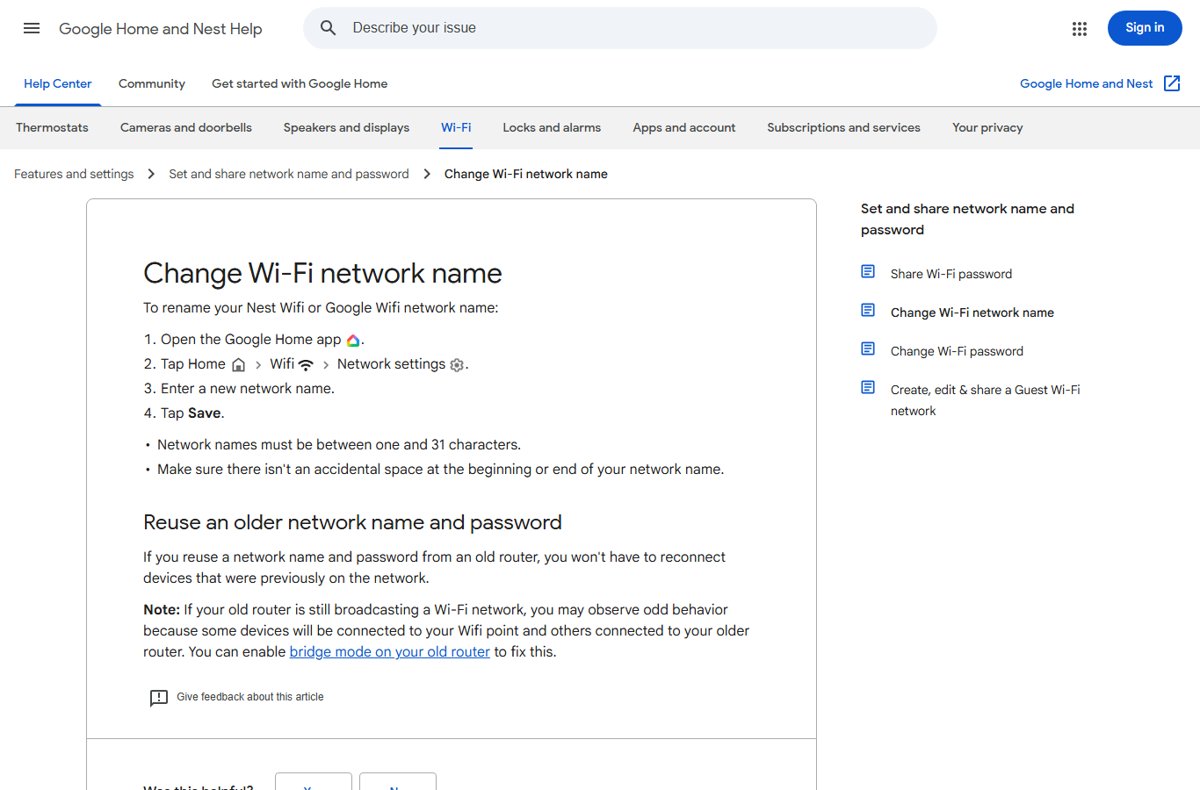
This renames a Google Nest Wifi or Google Wifi network from your phone.
- Open the Google Home app.
- On the Home tab, tap Wifi.
- Tap Network settings.
- Enter the new network name, between 1 and 31 characters, with no space at the beginning or end.
- Tap Save.
- Reconnect your phones, laptops and smart devices to the new name with the same password.
Reusing an old network name and password means devices that used that old network reconnect on their own.
Set a funny guest WiFi name in the Google Home app
- Open the Google Home app.
- Tap Wifi, then Devices.
- Tap Network settings, then Guest Network.
- Turn on Guest network.
- Enter a guest name and password that differ from your main network.
- Under Shared devices, choose any devices guests may use, such as a speaker.
- Tap Save.
Change mobile hotspot name in Windows 11
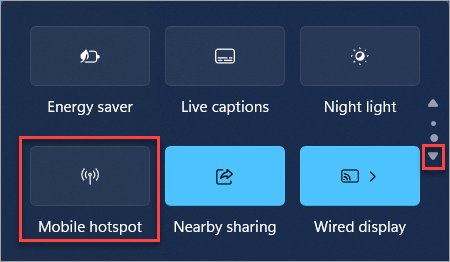
- Open Settings and select Network & internet > Mobile hotspot.
- Under Share my internet connection from, choose the connection to share.
- Under Share over, keep Wi-Fi selected.
- Expand Properties and select Edit.
- Type the funny name in the network name box and select Save.
- Turn on the Mobile hotspot toggle at the top of the page.
On Windows 10, go to Settings > Network & Internet > Mobile hotspot, select Edit, enter the name and password, select Save, then turn on Share my Internet connection with other devices.
Change iPhone Personal Hotspot name
An iPhone or iPad broadcasts its Personal Hotspot under the device name, so renaming the device renames the hotspot.
- Open the Settings app.
- Tap General, then About.
- Tap Name.
- Delete the current name and type the funny hotspot name.
- Turn Personal Hotspot on and check the new name from another device.
Check the new WiFi name is showing on your devices
- Wait for the router or app to confirm the change is saved.
- Open the WiFi list on a phone or laptop and look for the new name.
- Connect to it with your existing password.
- Open a website to confirm the internet works on the renamed network.
- Ask someone nearby to read the name aloud, which shows whether the joke lands without explanation.
Tips for choosing a funny WiFi name without going too far
Your WiFi name is public: everyone within range can read it, including landlords, children and the people you are joking about.
| Tip | Why it matters | Example |
|---|---|---|
| Keep the joke easy to understand | Most people glance at a WiFi list for a second | The Promised LAN beats a niche reference |
| Avoid jokes that sound hostile or illegal | Names that pose as the police, malware or threats can scare neighbors and prompt complaints | Swap a fake surveillance van for Definitely Not a Router |
| Choose the right tone for the place | An office or rental building is not a group chat | Reply All Responsibly for work, Nacho WiFi at home |
| Make the guest network practical | Guests need to find it quickly, and Google requires a guest name that differs from the main one | Guest Pass Granted next to your main network |
| Leave out personal details | Your surname, apartment number or address tells strangers which network is yours | Shared Wall Club instead of a unit number |
| Never put the password in the name | A hint like a birthday or pet name helps anyone guess it | Keep Guessing the Password is fine; the real password is not |
| Stay within the length limit | A WiFi name holds at most 32 bytes, and Google Nest limits it to 31 characters | Trim long jokes before saving |
WiFi name change not working: devices not connecting or old name showing
Devices will not connect after you change the WiFi name
Each device saved the old network name and keeps looking for it.
- On Windows, open Settings > Network & internet > Wi-Fi.
- Select Manage known networks.
- Choose the old network and select Forget.
- Select the new name from the WiFi list and enter your password.
The old WiFi name still shows up
An old router or access point is still broadcasting its own network.
- Find the old router that is still powered on.
- Turn its WiFi off, or put it in bridge mode if you still need it on the network.
- Forget the old network on each device so nothing reconnects to it.
The router will not save the new name
The name is too long or starts or ends with a space.
- Remove any space at the beginning or end of the name.
- Shorten the name to 31 characters for Google Nest, or 32 for most other devices.
- Remove emoji or symbols if the name field still refuses it, then select Save again.
Funny WiFi names: frequently asked questions
What is a funny WiFi name?
A funny WiFi name is a network name (SSID) chosen as a joke instead of the router's default label. It usually swaps a word for LAN, Fi, ping or router, as in The Promised LAN, and anyone nearby sees it in their WiFi list.
What are funny WiFi names for home?
Good home picks include Wi Believe I Can Fi, Pretty Fly for a WiFi, Nacho WiFi, Mom Click Here for Internet and Lord of the Pings. They are short, clean and get a laugh from visitors without explaining the joke.
Can I use spaces, emojis, or special characters in my WiFi name?
Spaces inside the name are fine, but not at the start or end. A WiFi name holds up to 32 bytes, and Google Nest allows 1 to 31 characters. Emoji support depends on the router's name field, so remove the emoji if it refuses to save.
Is it safe to use a funny WiFi name, or can it reveal too much?
A funny name is safe as long as it leaves out your surname, apartment number, address and any password hint. The name is visible to everyone in range, so a joke reveals nothing while a personal detail tells strangers which network belongs to you.
What are some funny WiFi names that are still appropriate for families or guests?
Try Dinner Is Ready Log Off, Do Your Homework First, Guest Pass Granted, Mi WiFi Es Su WiFi or Stay a While WiFi. They work for children and visiting relatives and contain nothing that needs explaining at the dinner table.
Can changing my WiFi name affect my internet connection?
Changing the name does not change your internet speed or service, but every device must reconnect to the new name. Forget the old network on each device, then join the new one with the same password. Reusing an old name and password avoids the reconnect.
Should I make my guest WiFi name funny or keep it professional?
At home, a funny guest name such as Couch Surfer Connection works well. At a business, keep the guest name clear so visitors find it quickly, and save the humor for the password card or a mild pun like Visitor Speed Lane.
Is there a funny WiFi names generator?
You do not need one. Take a famous title or phrase and swap one word for LAN, Fi, ping, byte or router, as in Silence of the LANs. Keep the result under 31 characters so it fits every router.
Can I give my phone hotspot a funny name?
Yes. On Windows 11, edit the name under Settings > Network & internet > Mobile hotspot > Properties. On an iPhone or iPad, the hotspot uses the device name, so change it under Settings > General > About > Name.
Bottom line: which funny WiFi name should you pick?
Pick a short, clean pun such as Wi Believe I Can Fi for your main network, and a clear one such as Guest Pass Granted for your guest network. Everyone in range reads your WiFi name, so a joke that lands in one glance and reveals nothing personal gets the laugh without causing complaints or helping anyone guess your password.

![Windows Update cleaning up [fully explained]](https://techdows.com/wp-content/uploads/2026/10/Disk-Cleanup-for-drive-C-with-Windows-Update-Cleanup-ticked-at-the-top-600x338.jpg)
![AWS Secrets Manager: everything you need to know [2026]](https://techdows.com/wp-content/uploads/2026/10/AWS-Secrets-Manager-product-page-with-the-Get-started-button-600x338.jpg)